
Forklift inspections
Forklift inspection software from reach trucks to telehandlers
One register for powered industrial truck examinations: the check completed at the truck, the defect attached to it, and a due list that follows how each truck is actually used.

One register for every forklift, reach truck and telehandler
This is the register for whoever is responsible for the trucks. Each truck keeps its own pre starts, faults, repairs, hour readings and services, and each operator keeps their licence and VOC on their own record.
The short answer
MapTrack keeps every forklift, reach truck, order picker and telehandler on its own record. Operators scan the truck's QR label and do the pre start on a phone; Fault Present opens a required fault note and photo, and the result stays in that truck's history. One service plan holds each truck's hour services. MapTrack keeps the records; it doesn't inspect, certify or license anyone.

Key takeaways
- One record per forklift, reach truck, order picker or telehandler: make, model, serial, fleet number, QR tag and status, with assignments, maintenance, requests, forms and files a tab away.
- Operators scan the truck's QR label and do the pre start on a phone, or a shared tablet with their own PIN. Fault Present opens a required fault note and photo, and a rule you set up can raise a linked corrective task.
- One service plan holds a truck's hour services from its maker's manual, and on an automatic schedule an hour reading someone records raises the work order for you.
- Set a failed truck's status to Damaged or Repair: the next person who scans it sees that status and the failed pre start, and a Damaged truck is blocked at check-out, with an owner's override logged.
- Each operator's licence class, number and expiry, a copy of the licence and a signed-off verification of competency (VOC) form sit on their person record, beside the forms they've completed.
What the register holds for each truck
- Every kind of truckCounterbalance, reach, order picking and rough-terrain
- Scan at the truckQR, barcode and Data Matrix labels
- The pre start on a phoneFault Present, a note and a photo
- The due listSaved checks and weekly counts
- Hour servicesOne plan per truck, from the maker's manual
- Status and check-outsDamaged, Repair and who has each truck
- Records and operatorsFiles, licences and VOCs
- TelehandlersLicences by state, services by the hour
Trusted by construction, mining and field service teams
















Customer proof
What customers say
“MapTrack's a great platform - intuitive for the guys out in the field and also has fantastic support.”
“MapTrack streamlines tracking and asset servicing across mine shutdowns - simple, reliable, and effective.”
- From the published story: The end-of-shutdown reconciliation - previously a multi-day exercise - is now completed in hours.
“Thanks to MapTrack we know exactly where our gear is, who has it and when it needs servicing.”
How it works
1. Get the trucks into the register
Add each powered industrial truck as an asset with its identifier, site and shift pattern. Bulk import if you are starting from a spreadsheet or a fleet list.
2. Label the truck
Put a QR or barcode label where the operator will actually scan it. The check happens at the machine, so the record should open there too.
3. Complete the examination at the truck
Operators run the check on a phone at shift start, photographing anything found. The result attaches to that truck, not to a pad.
4. Work the due list by shift, not by memory
Filter by next due and site to see which trucks have not been examined this shift, before they are driven.
Every forklift, reach truck, order picker and telehandler on one register
Add each truck with its make, model, serial and fleet number, bulk import the fleet from a spreadsheet or a fleet list, then bulk edit. Each kind keeps its own pre start, hour services and status, on the same register as the rest of the fleet.
Counterbalance forklifts
LPG, diesel and electric trucks in the yard, the shed and on site
- Its own pre starts, faults and repairs
- Hour services from its maker's manual
Reach trucks and order pickers
Warehouse trucks on the same register as the yard
- A QR label the operator scans before the check
- A status the next operator sees when they scan it
Rough-terrain forklifts
On building sites and in yards
- Checked out to a site with a due-back date
- Hour services by its hour meter
Telehandlers
With forks, a bucket or a jib
- Hour services from its maker's schedule
- Its jib, bucket and fork carriage as accessories, confirmed out and back with it
A QR label on every truck, indoors or out
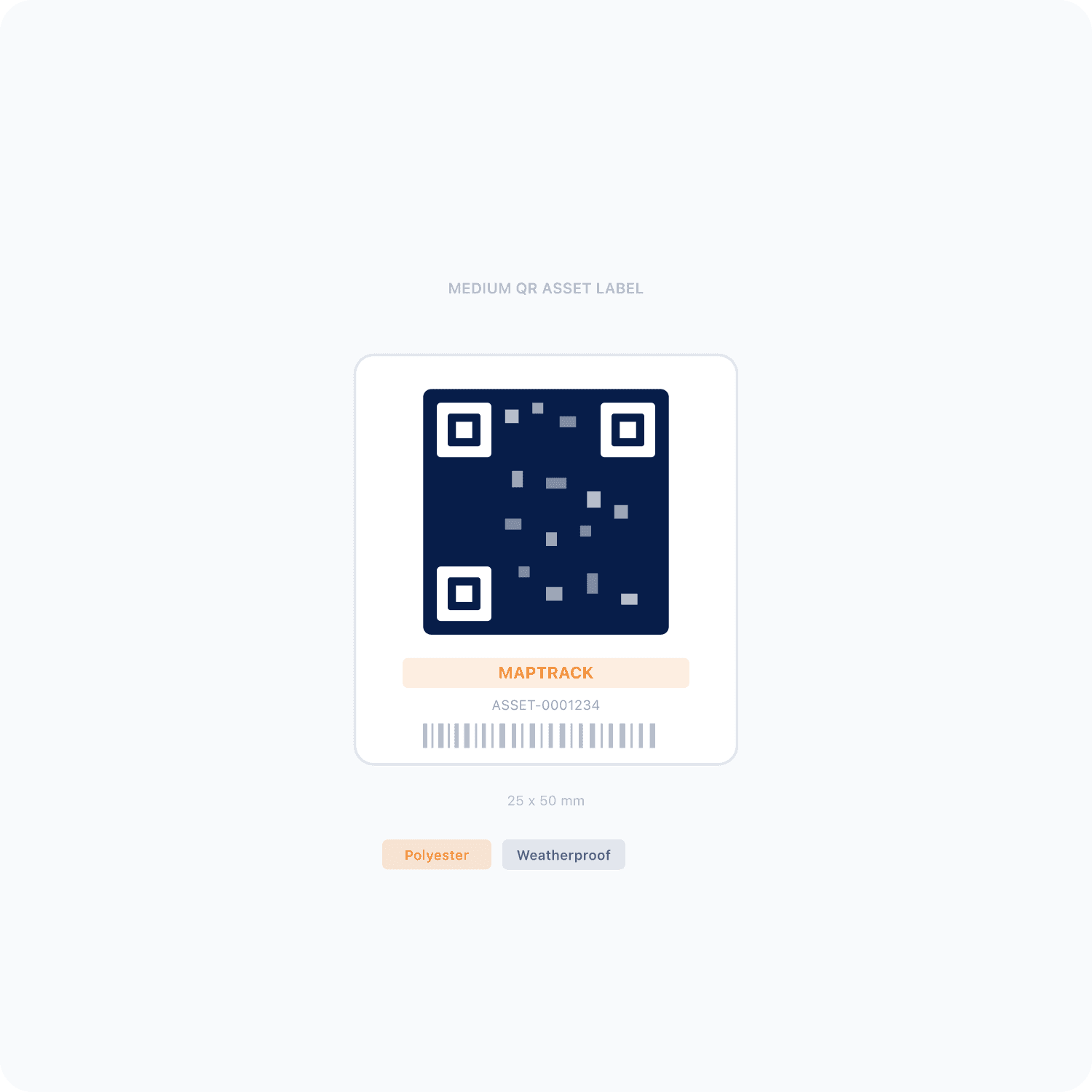
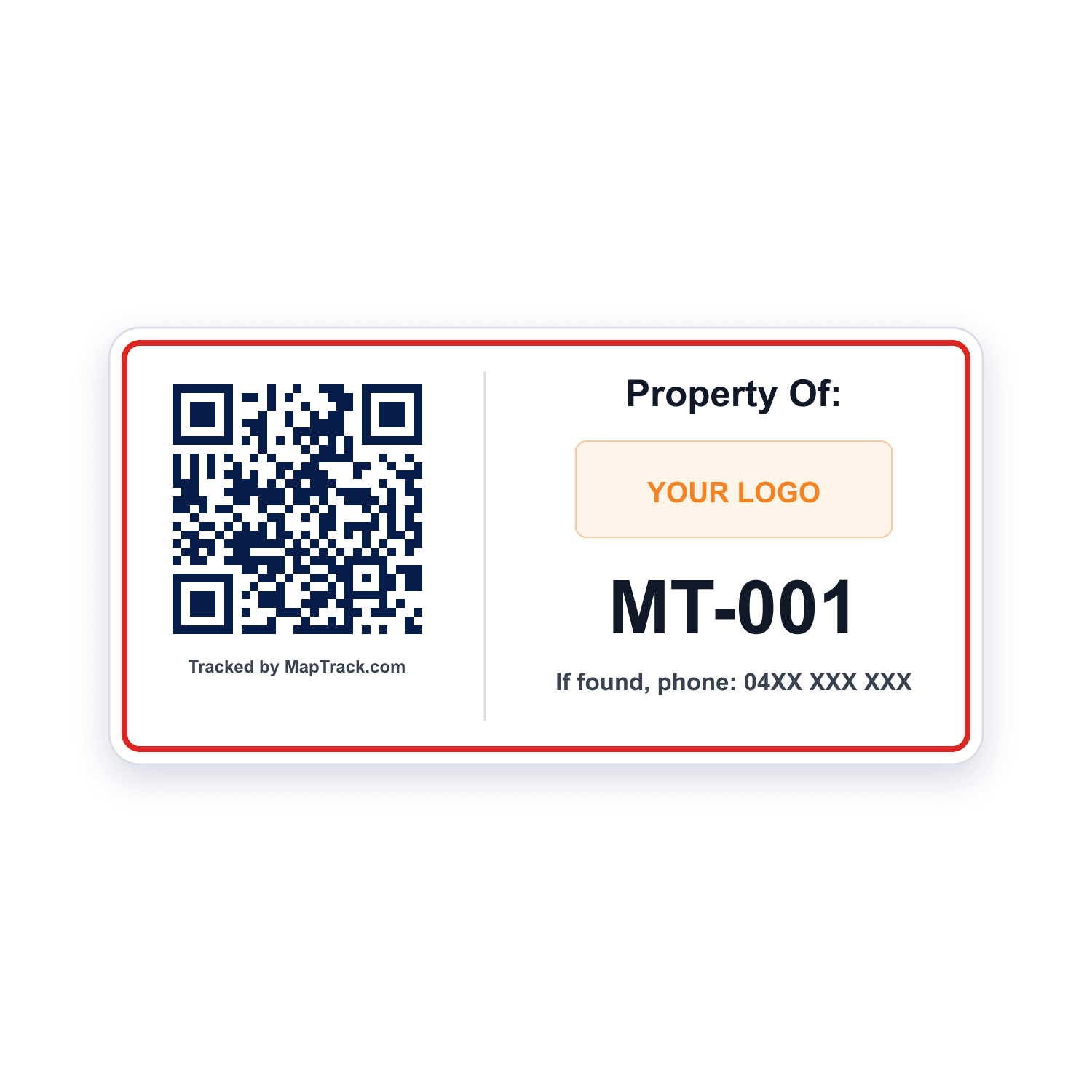
Every truck can carry a QR label, indoors or out, and the pre start starts from a scan. Scan it with the phone camera or a handheld Bluetooth or USB scanner and the truck's record opens, with its pre starts, its services and its status.
Every forklift, reach truck, order picker and telehandler
QR labels
- Scan QR, barcode and Data Matrix labels with the phone camera or a handheld Bluetooth or USB scanner to open the truck's record
- Print QR labels in MapTrack, order durable labels online, or quote metal tags from the label store
Good to know: A plain scan records no location
Trucks that already carry a barcode, or attachments that need a small code
Barcode and Data Matrix labels
- Scanned with the phone camera or a handheld Bluetooth or USB scanner
- Ordered from your asset list
Good to know: A plain scan records no location
QR, barcode and Data Matrix labels work anywhere.
What it costs
MapTrack is priced per asset, and the plans are on the pricing page. Trackers, QR labels, install and freight are quoted with your order, after a short setup call so each asset gets the right tracker.
Same register as your other checks
Pre-starts, lifting gear, fire equipment and calibration run on the same system rather than four separate ones. Forklifts and telehandlers sit in the same register as the trucks, plant, tools, lifting gear, fire equipment and calibrated instruments, and each truck carries its QR label, its make, model, serial and fleet number, its status and its site. Each of these sits on the truck, so the machine and its examination history stay together.
QR label on the truck
Scan it to open the truck's record, its pre starts and its next service
Fleet number and serial on the record
Make, model, serial and fleet number, so the register and the truck agree
Site on the record
Its site or yard, or where it was last checked out or returned
Example record
- telehandler TH-01, on the Plant Service Plan
- a fork carriage accessory and a jib attachment on its record
- its service document and manual in its Files tab

The asset register as it opens
Plant, vehicles, tools and safety gear on one register, each with its status, who has it, where it is and its QR tag.
MapTrack app · Demonstration data · Captured
About this screenshot
Demonstration workspace at a 1440 x 900 desktop viewport, the register’s default view, cropped right of the navigation sidebar to a 16:10 frame.
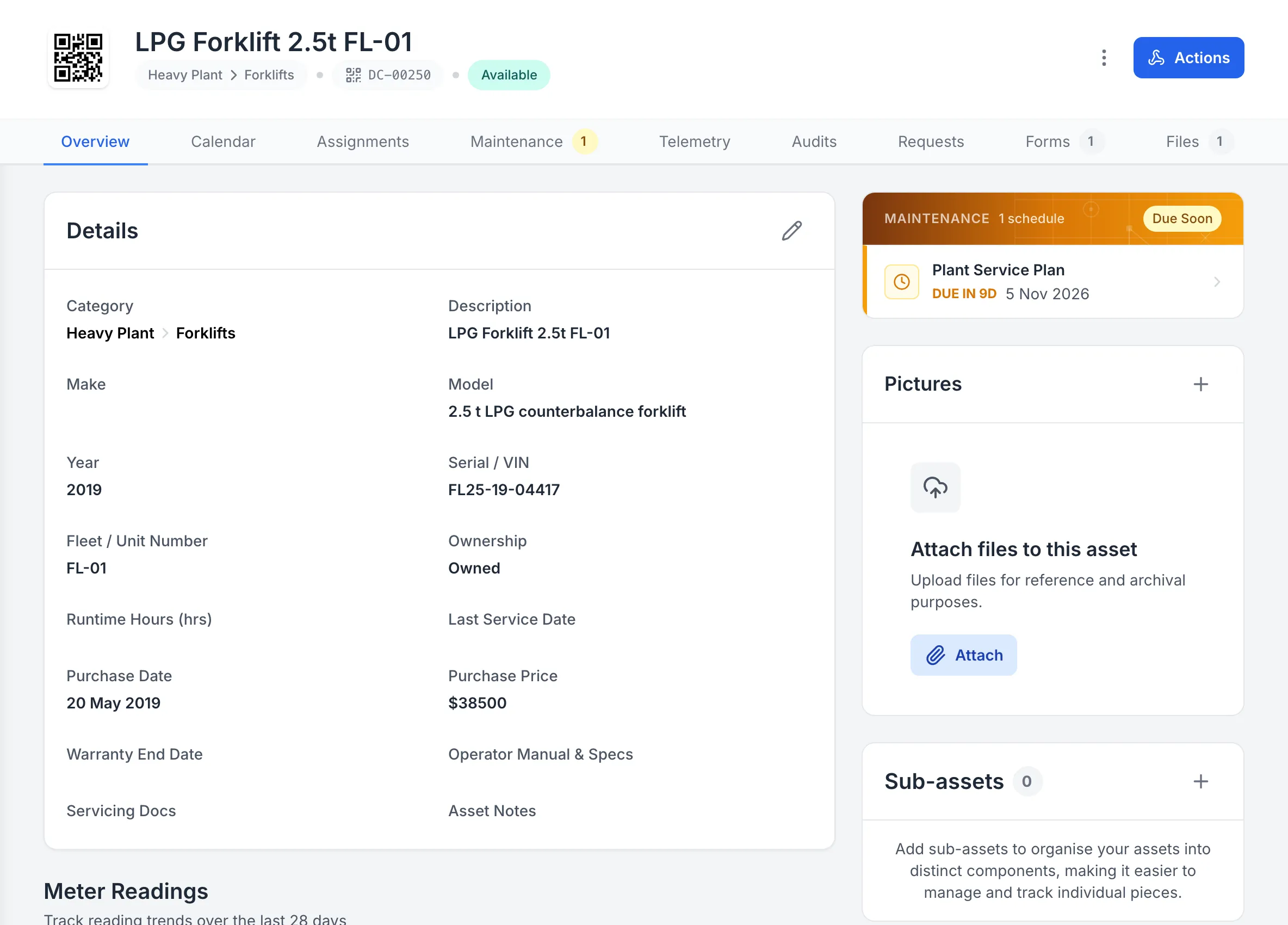
One forklift’s record
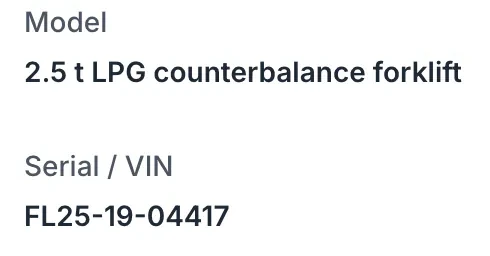
Forklift FL-01’s record: its QR tag, serial and fleet number, its status, and its Plant Service Plan due in 9 days.
MapTrack app · Demonstration data · Captured
About this screenshot
Demonstration workspace at a 1440 px desktop viewport on the forklift’s Overview tab, cropped right of the navigation sidebar. Its meter readings continue further down the page.
Why teams move the forklift check off a pad
A forklift inspection app for the check at the truck
MapTrack holds the examination on the truck itself. Each powered industrial truck carries its own check history, its defects, its photos and its next-due status, so the record is a property of the machine rather than a pad that belongs to whoever had it last. Operators scan the label on the truck and complete the check where they are standing. A fail stays visible on that truck until a later pass sits above it, so the next person who scans it sees the condition rather than an empty tag. Because the interval follows usage rather than the calendar, trucks running round-the-clock can carry a per-shift schedule alongside single-shift trucks on a daily one, in the same list.
- MapTrack's construction setup includes a Forklift / Telehandler Daily Prestart: the hour meter reading, fit for work, whether the operator holds the required licence or VOC, seat and seatbelt, horn and reverse alarm, lights, mirrors, controls, brakes, forks and carriage, mast, chains and rollers, hydraulic hoses, load backrest and guard, the capacity plate, attachments, fluids, fuel or battery charge, leaks, tyres and wheel nuts, and the fire extinguisher, signed at the end
- Scan at the truck. The check happens at the machine at shift start. Opening the record by scanning it is the difference between doing it now and doing it later.
- Results, defects and photos. Pass, fail, date and operator in sequence, with a photo of what was found. A fail stays visible until a later pass sits above it.
- A fail is visible on the machine. The condition travels with the truck, so a defect reported on Friday is still visible to the operator on Monday.
- Operators do it on a phone, or a shared tablet with their own PIN, and Fault Present opens a required fault note and photo
- A rule you set up can raise a linked corrective task, recorded apart from the original fault, and the completed pre start downloads as a PDF
Setup and limits
- Forms submit offline and sync later; opening one by scanning needs coverage or the form already loaded on the phone.
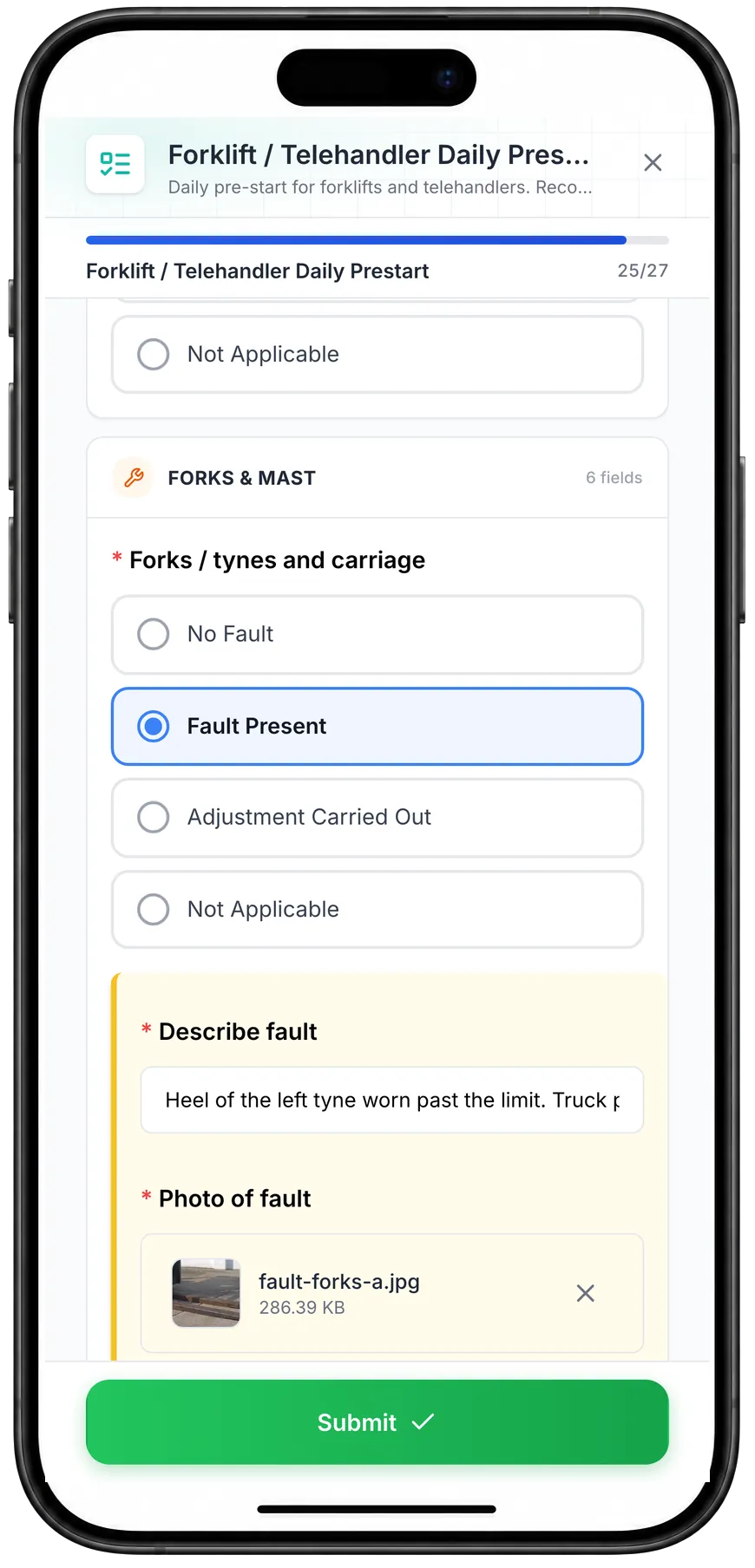
Fault Present on a forklift pre start
Choosing Fault Present on the forks and carriage check opens a fault note and a photo, both required before the pre start can be submitted.
MapTrack app · Demonstration data · Captured
About this screenshot
Captured at a 430 x 932 phone viewport in a demonstration workspace. The pre start was filled in for this screen and not submitted.
Schedule that follows usage
The interval is per shift, not per day, when the truck runs round the clock
This is the part most digital checklists get wrong, because they model the check as a daily task. 29 CFR 1910.178(q)(7) requires that industrial trucks be examined before being placed in service and that "such examination shall be made at least daily" - but the same paragraph continues: "Where industrial trucks are used on a round-the-clock basis, they shall be examined after each shift." The obligation therefore follows how the truck is used, not the date. A truck on three shifts is examined three times, by three different operators, and each of those examinations is the one that puts it into service for that shift. A system that shows a single green tick for the day is describing a different requirement to the one in the standard.
- Trucks on different shift patterns need different schedules in the same register, and the due list has to reset per shift rather than per calendar day.
- Per-shift for round-the-clock trucks, daily for single-shift ones, in one list rather than two systems.
- The due list resets per shift. A truck running round the clock is examined after each shift, so the list has to know about shifts rather than dates.
- In MapTrack every pre start is saved with its date, time and operator, so the checks on a truck sit in order on its record
- A daily schedule shows when a single-shift truck's check is due, and the Service Board shows what's overdue and due soon
- Forms Reporting counts a week of submissions by asset, location or person
Setup and limits
- MapTrack holds the schedule you set and the result your operator records. It does not determine your shift pattern or certify that an examination met the standard.
- Forms Reporting counts submissions; it doesn't prove every check was done.

Choose the week and the type of form
Choose a week and use All, Asset, Location or Person to focus the view. The summary counts submissions and participating users; it does not establish that every required inspection was completed.
MapTrack app · Demonstration data · Captured
About this screenshot
Demonstration weekly summary. The individual user rows are outside this crop.
Forklift maintenance software that services by the hour
Record the hour meter on the truck's record; manual readings need no tracker. One service plan holds a truck's hour services, and when two coincide the bigger covers the smaller in one work order. Set them by hours, months or whichever comes first, from the maker's manual: MapTrack estimates the next due date from recent readings, flags stale ones, and the Service Board shows what's overdue and due soon.
- On an automatic schedule, an hour reading someone records raises the work order for you, one per truck or one batch for everything due together
- A person raises per-asset or batch work orders from the schedule in a couple of clicks, and one work order can cover several trucks, each with its own pass or fail
- A calendar schedule, such as the yearly service, puts the job due soon and overdue, and the person assigned gets an email 7 days out
- Scan a batch of trucks and log the service for all of them at once; each keeps its own hour reading and history entry
- A 0 to 100 maintenance health score per truck and schedule, with 12 months of memory
- If a truck carries a GPS tracker registered in MapTrack, see its battery, signal and last report, and its estimated run hours keep the hour meter current
Setup and limits
- Tracker hours are estimated, so record the hour meter at each service.
- A date never raises the work order on its own: a person raises it from the schedule.
- Logging a service round by scan needs a connection.
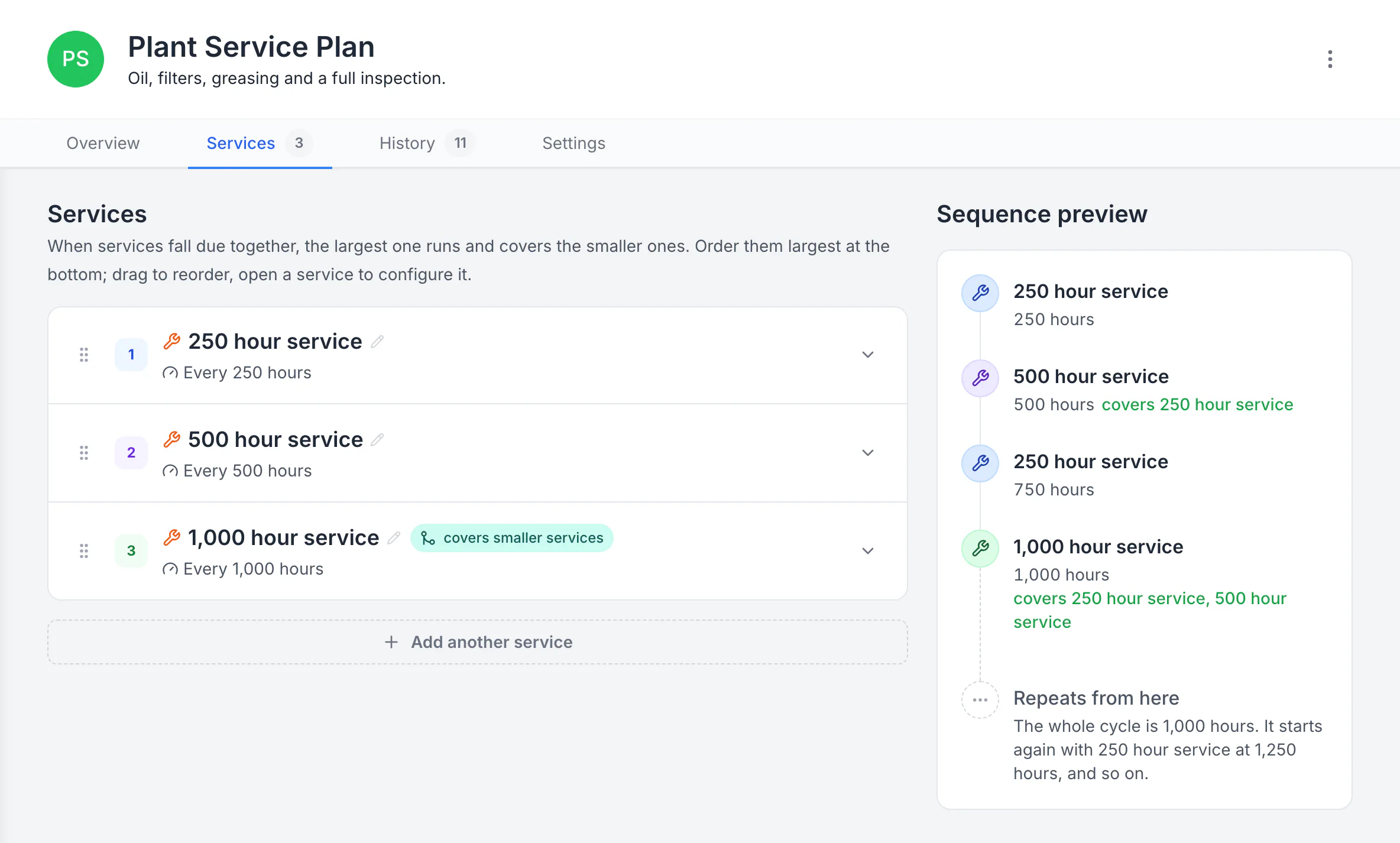
Build a plan with separate service levels
The plan runs a 250-hour service, a 500-hour service that covers it, and a 1,000-hour service that covers both. The sequence preview shows the whole 1,000-hour cycle and where it starts again.
MapTrack app · Demonstration data · Captured
About this screenshot
Demonstration plan. Each level carries its own triggers, procedure, parts and work-order defaults. Follow your equipment manufacturer’s service intervals.
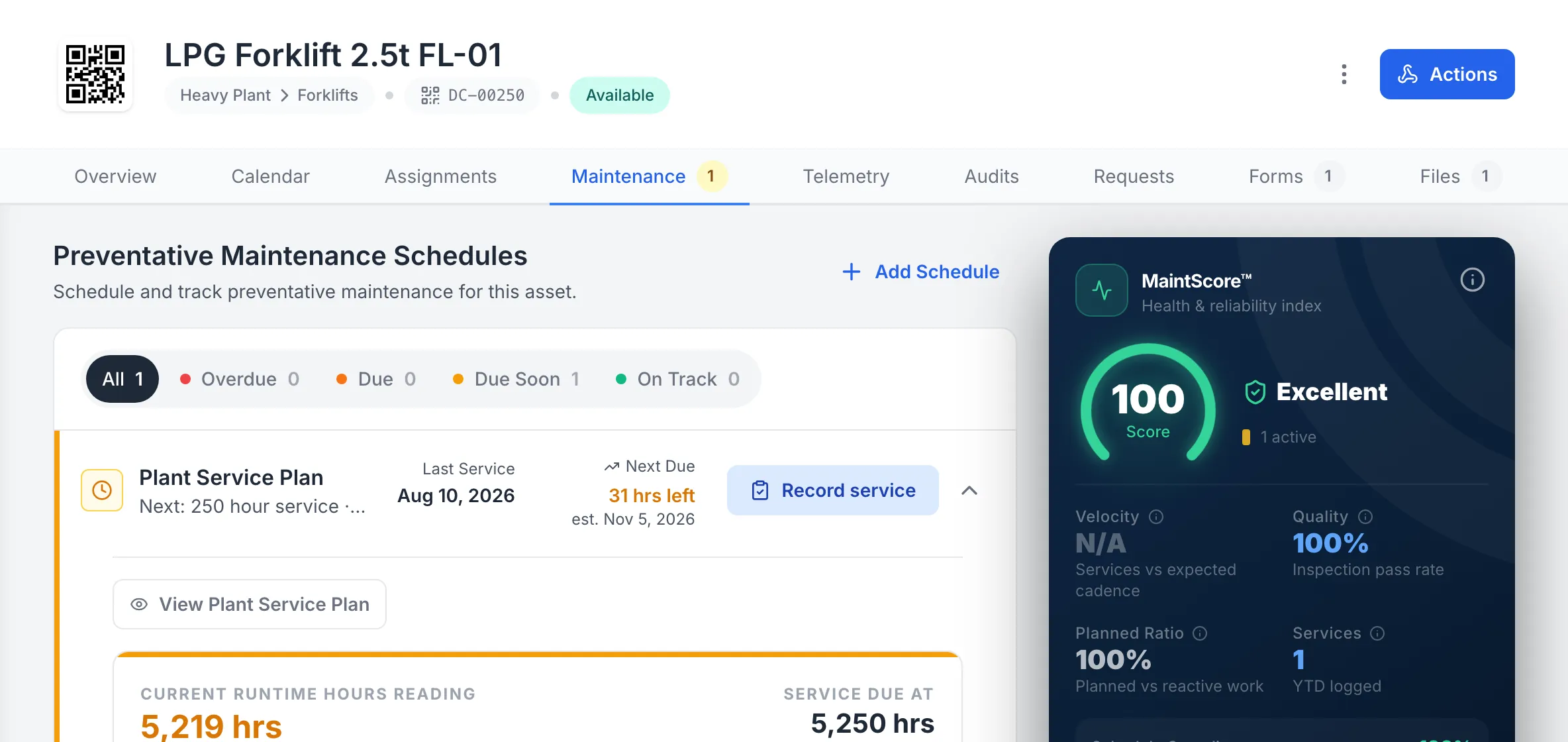
A forklift’s hour service, counted down
Forklift FL-01’s Plant Service Plan runs on its hour meter: 31 hours to the 250 hour service at 5,250 hours, with the date estimated from its use.
MapTrack app · Demonstration data · Captured
About this screenshot
Demonstration workspace at a 1440 px desktop viewport on the forklift’s Maintenance tab, cropped right of the navigation sidebar. The 250 hour interval is the demonstration workspace’s own plan, not a maker’s.

The service a meter reading raised
Work order WO-00037, the 250 hour service for reach truck RT-01, raised by its Plant Service Plan after an hour reading was recorded.
MapTrack app · Demonstration data · Captured
About this screenshot
Demonstration workspace at a 1440 px desktop viewport, cropped to one row of the work order list. The reading of 2,573 hours was recorded on RT-01 that day.
| Hours | Typical work | Source |
|---|---|---|
| 250 hours | Toyota's guide: basic lubrication, fluid level checks, air filter cleanings and thorough visual inspections, every 250 hours or every 6 weeks | SourceToyota Material Handling, Forklift Maintenance Plans Guide (US, July 2026) |
| 500 hours | Toyota's guide: changing oil and filters, inspecting hydraulic tension, mast chain lubrication and brake pad inspections, every 500 hours or every 3 months | SourceToyota Material Handling, Forklift Maintenance Plans Guide (US, July 2026) |
| 2,000 hours | Toyota's guide: deep system flushes, hydraulic filter replacements and major component testing, every 2,000 hours or every 12 months | SourceToyota Material Handling, Forklift Maintenance Plans Guide (US, July 2026) |
These intervals come from each maker's own documents and change with the model, the fuel or power and how hard the truck works; Toyota's guide is a US framework, not one model's schedule. Many makers set a calendar limit as well as an hour limit. In Australia, Safe Work Australia's general guide for industrial lift trucks says to service them regularly or at least once every 12 months, and in New Zealand, WorkSafe New Zealand's 1995 Approved Code of Practice for training forklift operators asks for a scheduled planned maintenance, lubrication and inspection system (WorkSafe notes it predates the Health and Safety at Work Act 2015). Always follow the operator's manual for your truck's model and serial number.
Out-of-service status on the machine
Forklift management software for status, check-outs and bookings
Set a truck's status to Repair or Damaged on its record; the next person who scans it sees that status and the failed pre start in its Forms tab. A Damaged or written-off truck is blocked at check-out, and an owner's override is logged. A status is a record, so tag the truck out physically too.
- The next person who scans the truck sees its condition, instead of finding an empty tag and guessing.
- Check a forklift or telehandler out to a person, a site or both, with a due-back date; its attachments and charger are confirmed out and back, with a reason for anything missing
- An overdue service is flagged when someone checks the truck out or books it, and going ahead is logged
- Book a truck for a job or a site with Requests, approve it, and turn it into a check-out by scan
- Overdue check-outs get a reminder email
Setup and limits
- Check-outs, returns and bookings need a connection.
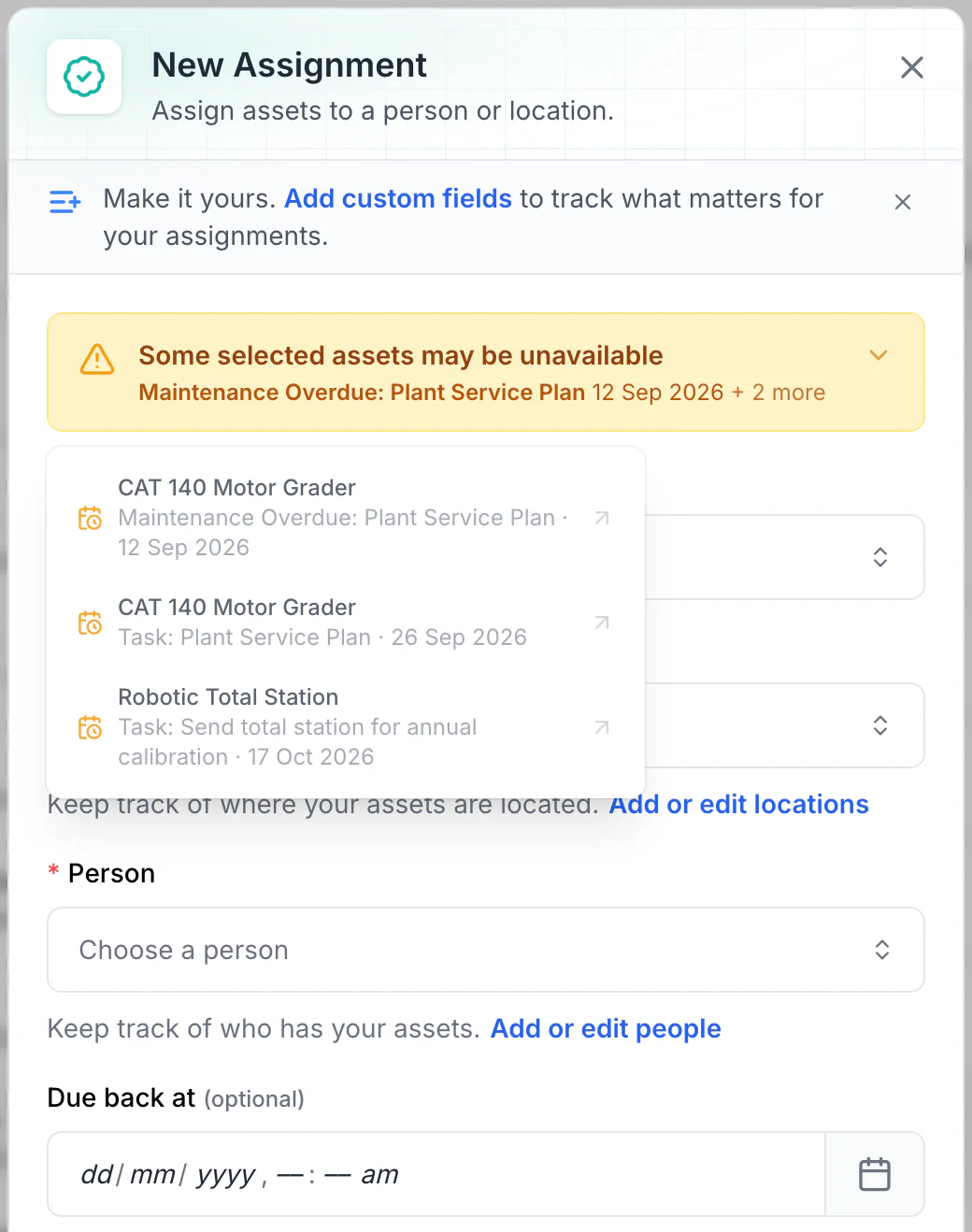
Read the warnings before issuing equipment
Overdue maintenance and scheduled tasks show as amber warnings. No due-back date is set here, so every upcoming conflict is listed. With a due-back date, only tasks before it are listed: a 15 October due-back leaves out the total station’s 17 October calibration.
MapTrack app · Demonstration data · Captured
About this screenshot
Demonstration workspace. Two assets selected and Assign opened; the form was not saved.
OSHA requires the examination, not the paperwork - keep it anyway
It is worth being precise about this, because a great deal of published guidance asserts a recordkeeping requirement that 1910.178 does not contain. The standard requires that the examination be made, and that a truck showing any condition adversely affecting its safety is not placed in service. It does not require you to create or retain a written record of each daily examination. The reason to keep one is evidentiary rather than regulatory: an examination you cannot evidence is hard to distinguish, after the fact, from one that did not happen. That distinction matters most in exactly the situation where you least want an argument about it - after an incident, or when a defect that was reported turns out not to have been corrected. Holding the record on the truck makes the sequence provable: what was found, when, by whom, and what happened next.
- Each truck's pre starts, the faults found and the repairs that follow, its hour readings, service plan and history, and its files, ready when someone asks to see them
- The operator manual, a data plate photo, attachment rating details and service and inspection reports on the truck's record, and in Great Britain the thorough examination report on the truck it covers
- Operator evaluation dates. The three-yearly operator evaluation under 1910.178(l)(4)(iii) held next to the trucks each operator is qualified on.
- Each operator's licence class (for example LF or LO in Australia), number and expiry, and a copy of the licence, on their person record, with a VOC form signed off there
- In the US, the three-yearly evaluation date and who trained or evaluated the operator sit on their person record, beside the forms they've completed; the certification stays the employer's
Setup and limits
- MapTrack doesn't check an operator against a truck.
Telehandler inspections and hour services on the same register
Telehandlers keep their own record on the same register as the forklifts, with the pre start, hour services from the maker's schedule and attachments, and each operator's licence sits on their person record. JLG lists telehandler checks every 10, 50, 250, 500 and 1,000 hours, with the boom wear pads among its 250-hour items, and Genie runs one-time services at 50 and 150 hours, quarterly and annual checks and hour-based tasks. One service plan in MapTrack holds those hour services, the bigger covering the smaller when they coincide. Telehandler licences differ by state: in NSW a telehandler with forks or a bucket needs no high risk work licence, while in Victoria a non-slewing telehandler over 3 tonnes needs the TV licence or a mobile crane licence.
- The telehandler's pre start, fault photos and service history on its own record
- The operator's licence and a signed-off VOC form on their person record
- Its jib, bucket and fork carriage as accessories, confirmed out and back with a reason for anything missing
- With a hardwired GPS tracker, its latest position in MapTrack and estimated run hours on its hour meter; live GPS, trips, history and boundary alerts run in MapTrack Telematics, an optional add-on
Setup and limits
- MapTrack keeps whichever licence applies on the operator's record; it doesn't check an operator against a telehandler.
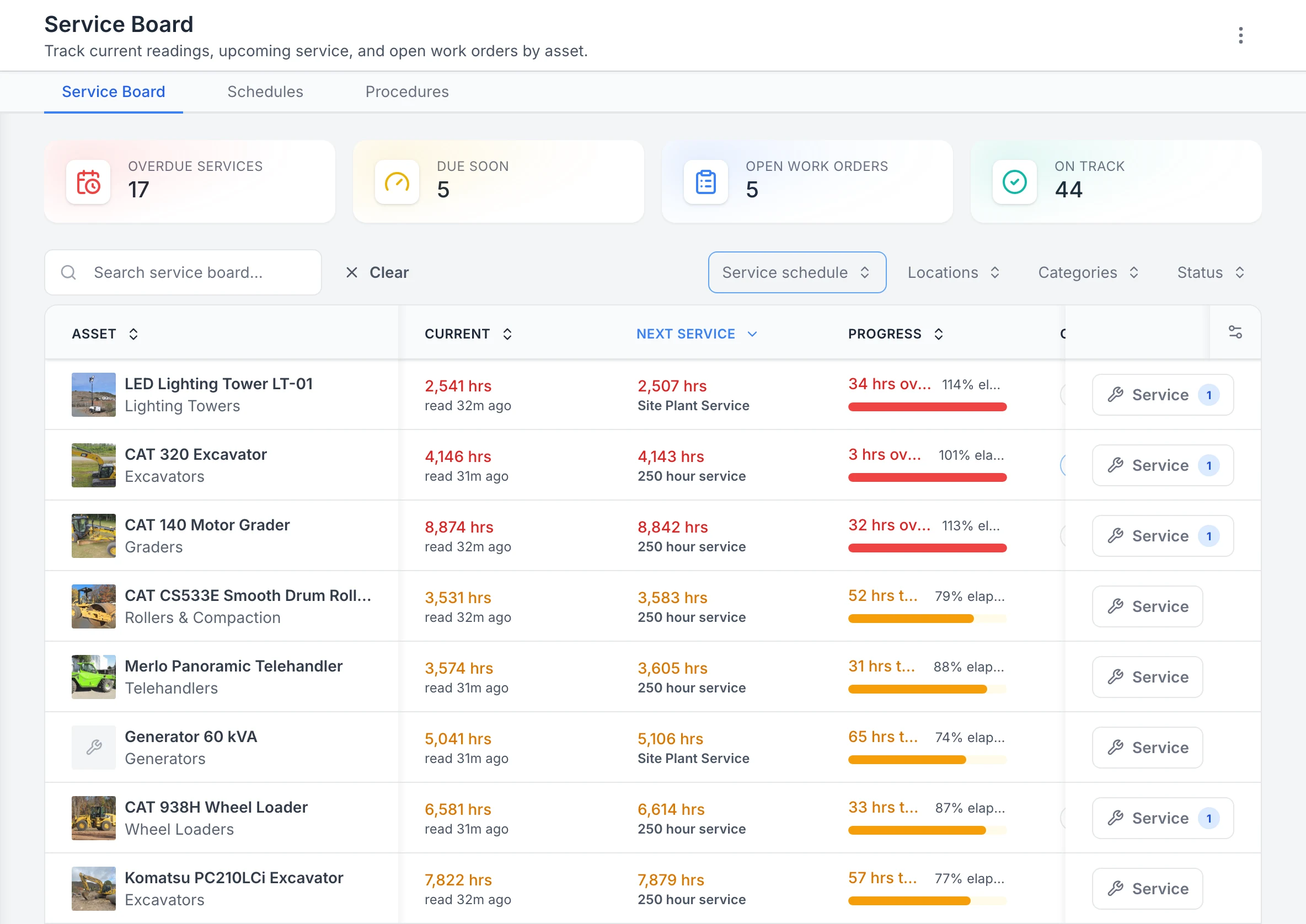
Plant and site gear by next service
Filtered to the plant and site-plant service plans and sorted by next service, the machines past their hour services come first: a lighting tower, the CAT 320 and a grader. Each row shows the current hour reading, the reading its next service falls due at and how far through the interval it is. The counts at the top cover the whole workspace, not only the filtered rows.
MapTrack app · Demonstration data · Captured
About this screenshot
Demonstration workspace at a 1440 px desktop viewport. The readings were entered by hand in the app that day. Filtered to two service plans with the board’s service schedule filter. Requires enrolled assets, configured schedules and an internet connection.
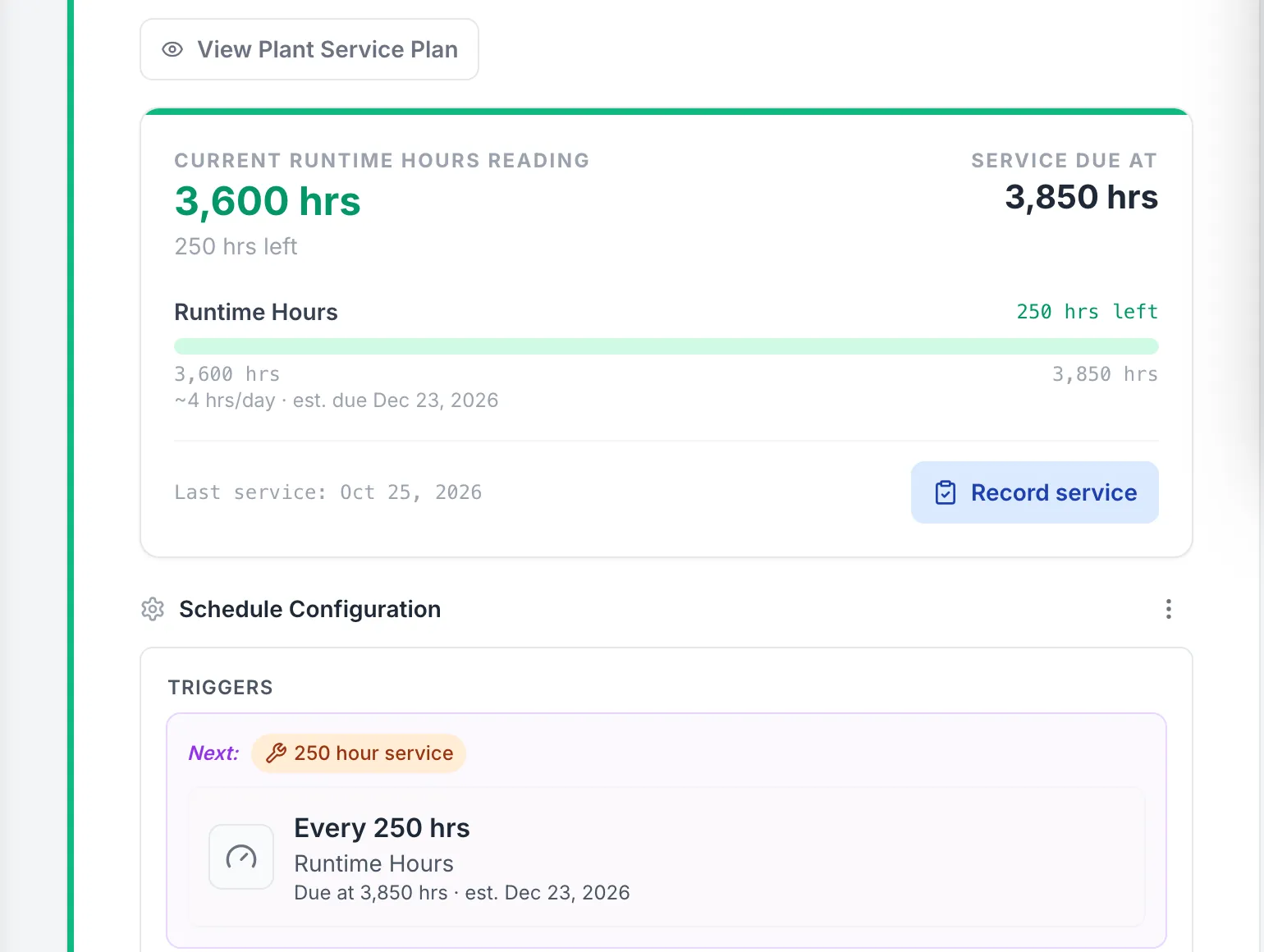
A telehandler’s next hour service, after the last one
With its 250 hour service recorded at 3,600 hours, the telehandler’s plan counts down to the next at 3,850 hours, the date estimated from about 4 hours a day.
MapTrack app · Demonstration data · Captured
About this screenshot
Demonstration workspace at a 1440 px desktop viewport on a Merlo telehandler’s Maintenance tab, cropped to its Plant Service Plan. The 250 hour interval is the demonstration workspace’s own plan, not a maker’s.
Yards, sheds and sites
Audit a yard or a shed by scanning each truck's label; at the end you choose Mark Missing or Skip All. Draw each site's or yard's boundary on its map in MapTrack and see the gear there.
- The app shows a truck's latest position when its tracker has a fix; without one, the pin shows where it was last checked out or returned
- Live GPS, trips, history and boundary alerts run in MapTrack Telematics, an optional add-on
Setup and limits
- Audits need a connection.
Service agents, parts and costs
Keep the forklift service agent as a vendor and set it as the schedule's preferred vendor. Labour, parts and external costs go on the work order and stay in each truck's service history.
- Forks, chains, tyres and filters as parts with stock per bin, planned against used on the work order
- Rate cards, an add-on on Pro and Enterprise plans: daily, weekly and monthly hire rates (dry, wet or standby), with the hire cost recorded when a truck comes back
- Finance and costings, an add-on on Pro and Enterprise plans: a cost ledger for every truck, with budget against actual, depreciation, repair-or-replace guidance and fuel costs
Setup and limits
- A work order's planned parts aren't deducted from stock by it.
Free forklift and telehandler pre starts and hour services
Daily checks and pre starts for forklifts, rough-terrain forklifts and telehandlers, the OSHA and HSE inspection checklists, the LOLER thorough examination checklist for Great Britain, monthly inspections, the 250 to 2,000 hour services, pallet jack services, the log book and a safety programme. Print any of them; the daily checks and pre starts, the thorough examination checklist and the 250 and 500 hour services also run on the phone in MapTrack.
- Forklift pre-start checklist
- Forklift daily fleet inspection
- Rough terrain forklift pre-start checklist
- Telehandler pre-start checklist
- OSHA forklift inspection checklist
- HSE forklift inspection checklist
- Forklift monthly inspection checklist
- Telehandler monthly inspection checklist
- LOLER forklift thorough examination checklist
- Forklift 250-hour service procedure
- Forklift 500-hour service procedure
- Forklift 1000-hour service procedure
- Forklift 2000-hour service checklist
- Rough terrain forklift 250-hour service
- Rough terrain forklift 500-hour service
- Rough terrain forklift 1000-hour service checklist
- Telehandler 250-hour service procedure
- Telehandler 500-hour service procedure
- Telehandler 1000-hour service checklist
- Pallet jack quarterly service procedure
- Pallet jack annual service procedure
- Forklift log book
- Forklift safety program template
How to do a forklift pre-start
Start a free trial and keep your forklift register in MapTrack
The instruments this recordkeeping sits under
The examination frequency, the out-of-service rule and the operator evaluation interval are set by the instruments below, not by MapTrack. We support the recordkeeping; the examination and the compliance judgement remain yours.
Check the current source
- Model WHS Regulations (Safe Work Australia)
- OSHA 29 CFR Part 1910, Occupational Safety and Health Standards
- Lifting Operations and Lifting Equipment Regulations 1998 (LOLER)
- Provision and Use of Work Equipment Regulations 1998 (PUWER)
- AS 2359 series, Powered industrial trucks (Standards Australia listing)
MapTrack keeps the records these standards ask you to keep. It does not certify your work or make you compliant, and the current text of each instrument is the authority.
Every truck examined before it is placed in service
Full access to every feature. No credit card required. Per-asset pricing so you scale as your fleet grows.
- No credit card required
Common questions
What is forklift inspection software?
How often does OSHA require a forklift to be inspected?
Does OSHA require us to keep a written record of the daily check?
Who is allowed to do the daily examination?
What happens when a truck fails the check?
How often do forklift operators need to be re-evaluated?
Can operators complete the check on a phone?
Can we see which trucks are due or overdue across sites?
How often should a forklift be checked in Australia?
What licence do forklift operators need in Australia?
Do telehandler operators need a licence?
How often should a forklift be serviced?
Can MapTrack keep a forklift's hours?
What records should we keep for each forklift?
What is a thorough examination of a forklift?
Does AS 2359 say how often to inspect a forklift?
Can operators do the forklift pre start offline?
How is forklift management software different from a spreadsheet?
Does MapTrack work as forklift fleet management software for a mixed fleet?
Why is the daily forklift check so hard to prove?
Does MapTrack inspect or certify forklifts?


“MapTrack's a great platform - intuitive for the guys out in the field and also has fantastic support.”
Matthew Anderson
Maintenance Planning Supervisor at Supagas
Go digital with forklift inspections
Join construction, mining and field service teams across Australia.
4.9 on G2 · 5.0 on Capterra, GetApp & Software Advice
- No credit card required