
















HVAC contractors

HVAC asset management software for contractors

Track tools, refrigerant handling equipment and vehicles across installation and service jobs. Compliance, calibration and maintenance in one platform, so you know who has what, what’s due and what’s job-ready.

From $1 a tool and $12 a machine a month, AUD ex GST. Unlimited users.

600,000+ assets tracked since 2012 · Unlimited users, per-asset pricing · Offline-ready, works in plant rooms

A technician drilling into a rooftop condensing unit, with the cordless drill ringed, a Bluetooth tag marked on it and its MapTrack assignment, out with Jack Roberts, laid beside it.
Who's got it
MapTrack assignments: Cordless Drill DR-01, in Drills, out with Jack Roberts.
Bluetooth tagExample: seen by a nearby gateway
Who's got it
MapTrack assignments: Cordless Drill DR-01, in Drills, out with Jack Roberts.
Bluetooth tagExample: seen by a nearby gateway
Who's got it
MapTrack assignments: Cordless Drill DR-01, in Drills, out with Jack Roberts.
Bluetooth tagExample: seen by a nearby gateway

HVAC asset management software helps refrigeration and air conditioning contractors keep a record of every unit they service and the gear they service it with. In MapTrack each customer site holds its split systems, chillers, fan coils and cooling towers, each with a QR label and its own service history, and services fall due on dates or run hours. The same register tracks manifold gauges, recovery units, vacuum pumps and hand tools across vans. MapTrack combines QR scanning with pre-starts and inspections that save with no reception on rooftops, in plant rooms and in basements, ARC licence and AS/NZS 5149 records, equipment energy ratings and runtime-based preventive maintenance. HVAC teams use it to stop gear going missing from vans, keep recovery units and vacuum pumps in calibration between services, and run van stock audits in minutes instead of an hour with a clipboard. Gear that is stolen rarely comes back: Queensland Police returned only about 5% of the more than 25,000 tools stolen across the state in 2024-25.

Key takeaways

  • Give every split system, chiller, fan coil and cooling tower you service its own record and QR label, so the next tech scans it and sees its service history.
  • Victoria’s Crime Statistics Agency recorded A$40.8 million of hand and power tools stolen from vehicles and properties in the year to June 2025, 36,708 tools and up 7.5% on the year before.
  • ARC refrigerant handling licences and AS/NZS 5149 refrigeration safety records belong on each recovery unit and gauge set, with expiry reminders on every certificate.
  • AS/NZS 3823 governs energy ratings of air conditioning equipment; capture model, serial and energy class on the asset for warranty and customer reporting.
  • Queensland Police recorded more than 25,000 tools stolen in 2024-25 and only 1,283 were returned to their owners, about 5%, so a stolen manifold gauge, recovery kit or hand tool is usually gone for good.
  • Preventive maintenance triggered by runtime hours, not arbitrary calendars, keeps vacuum pumps and recovery units in calibration between service intervals.
  • Pre-starts and inspections save with no reception in plant rooms, on rooftops and in basements, then sync. Van stock audits that took an hour with a clipboard now take minutes on a phone.

Pricing

One price per machine, with the hardware included: software and a QR tag from $12 a machine a month, GPS tracking from $27 and AI cameras from $72. Tools and equipment start at $1/asset/month. Every plan includes unlimited users. Prices are AUD ex GST, and machine prices are for annual billing.

View pricingGet a tailored quote

Jarrod Milford

Jarrod Milford

Co-Founder & Commercial Director

Published 15 February 2026Updated 26 October 2026

HVAC asset management software for the units you service

HVAC asset management covers two lots of gear: your own tools and the units you service for customers. In MapTrack each customer site is a location, and every split system, chiller, fan coil and cooling tower on it gets a QR label and its own record with its make, model, serial number and refrigerant details. Scan the label and the unit's service history opens on the phone. Services fall due on dates or run hours, each one closes out on a work order with the parts and costs, and the record stays with the unit for the next tech.

HVAC

MapTrack at a glance

Built for
HVAC contractors who look after their own tools and the units they service at customer sites.
Tracks
Vacuum pumps, gauge sets and recovery units, press tools and drills, oxy sets, commissioning and calibration instruments, scissor lifts and hoists, site boxes and trailers, service vans, and the split systems, chillers, fan coils and cooling towers you service.
Tracked with
QR labels, Bluetooth tags, battery GPS trackers, hardwired GPS trackers or AI dashcams with built-in GPS.
Works offline
Pre starts, inspections and other forms save with no reception and sync when the phone is back in range. A work order already loaded on the phone can be worked through with no reception too.
Phones and computers
In the browser on a computer, and Android, iPhone and iPad access through the mobile browser or the installable web app.
Connects to
Telematics and accounting integrations, a public API, and an MCP server for AI tools such as Claude.
Sign-in
Sign in with Microsoft, or SAML 2.0 single sign-on set up by our team (Enterprise, or a Pro add-on).
Set-up and support
24/7 support. Our team sets up single sign-on and OEM telematics feeds, and helps connect trackers you already run.
Track record
600,000+ assets tracked since 2012.

How to choose HVAC asset management software

Look for:

  1. Each customer unit on its own record, with make, model, serial and refrigerant details
  2. The unit's service history open on the phone from a scan of its label
  3. Services due on dates or run hours, closed out with the parts and costs
  4. Know which tech's got each kit, without ringing round
  5. Commissioning and test gear kept in cal

Where MapTrack fits

Next to job management software

Job management software runs the quotes, bookings and invoices. MapTrack keeps the record of each unit you service and of your own tools: its history, what's due, and who's got the gear.

Next to telematics

A telematics platform tracks where vehicles go. MapTrack puts each vehicle and machine on the same register as the tools, with its pre starts and services. A GPS tracker or AI dashcam puts its latest position on the record, with estimated km and hours feeding its services, and MapTrack Telematics adds GPS tracking with trips, history and geofences.

See what MapTrack costs for your HVAC assets

Per-asset pricing tailored to your HVAC asset mix and a rollout plan, within one business day.

Trusted by maintenance and field service teams, including 365 Alongside and Axis Services Group

365 AlongsideAxis Services GroupSaunders InternationalMineral ResourcesSupagasHacer Group
G2 rating 4.9 out of 5
Capterra rating 5.0 out of 5GetApp rating 5.0 out of 5Software Advice rating 5.0 out of 5
15 reviews on G2 · the same 17 reviews on Capterra, GetApp and Software AdviceCapterra Best Value 2026 badgeCapterra Best Ease of Use 2026 badgeAll MapTrack reviews

What we track

The units you service, and the gear you service them with

MapTrack is built for the full mix of assets that move across your technician vans, depots, job sites and warehouses - from hand tools to specialist refrigerant handling equipment and fleet vehicles - plus the units you service at each customer site.

  • Split systems, chillers, fan coils & cooling towers you service
  • Refrigerant recovery & charging equipment
  • Vacuum pumps & manifold gauges
  • Power tools (drills, saws, hole cutters)
  • Ladders & access equipment
  • Vans & light fleet
  • Leak detectors & gas analysers
  • Duct tools & sheet metal equipment
  • Test and balance instruments
  • Thermal imaging cameras
  • Hand tools & tool kits
  • Generators & site power
  • Refrigerants & consumables
  • Bulk brackets & fasteners

What you run, and how MapTrack tracks it

Vacuum pumps, gauge sets and recovery units
QR label and Bluetooth tag
Press tools, drills and grinders, with batteries and chargers
QR label
Oxy sets
QR label
Commissioning and calibration instruments
QR label and Bluetooth tag
Laser levels
QR label and Bluetooth tag
Scissor lifts, duct lifters, hoists and mini cranes
QR label and battery GPS tracker
Site boxes and trailers
QR label and battery GPS tracker
Service vans
Hardwired GPS tracker or AI dashcam
Extinguishers, first aid kits, harnesses and ladders
QR label
Split systems, chillers, fan coils and cooling towers you service
QR label

Running a mix like this? See how MapTrack handles it in a demo built around HVAC teams.

Book a demo

30 minutes on Microsoft Teams

The challenge

The costs of poorly tracked customer units, HVAC tools and equipment

HVAC tools and equipment don’t sit in one place. They move between technician vans, job sites and the depot every day. Specialist gear needs calibration, compliance must be documented, and missing tools cost money and delay jobs. The units you service need their history kept too.

No service history on hand for the units you service

The tech on the roof can’t see what was done to a unit last visit, which parts went in or when it’s next due. The history sits in old job sheets and emails, so missed services and repeat faults are found late.

Specialist refrigerant equipment moves between jobs untracked

Recovery units, vacuum pumps and manifold gauges get loaded into whichever van is heading to the next job. Without a clear chain of custody you lose track of high-value specialist gear, and re-purchase when it can’t be found.

Compliance and refrigerant handling certifications aren’t attached to assets

Calibration certificates, refrigerant handling licences and inspection records live in filing cabinets or scattered folders. When a client or auditor asks for evidence, you’re scrambling to locate it instead of producing it instantly.

Tools go missing between vans and depots

Drills, saws, hole cutters and hand tools move between technician vans, job sites and the depot. Nobody signs them in or out. By the time you notice something's missing, there’s no trail to follow and the replacement bill stacks up.

No visibility on what’s with each technician or van

The office doesn’t know what tools and equipment each technician has on their van. When a specific piece of kit is needed for a job, you ring around or drive to the depot to check - wasting time every day.

Service due dates missed on recovery units and pumps

Vacuum pumps, recovery units and leak detectors need regular servicing and calibration. Calendar reminders get missed, and equipment that’s overdue for service goes out on jobs - risking inaccurate readings, failed work and non-compliance.

From MapTrack's own data

What we see across MapTrack customer accounts

These figures come from MapTrack's own product data, de-identified and aggregated. Accounts aren't grouped by industry, so each figure covers every qualifying customer account, not one industry alone. Every figure counts at least 20 accounts, and each one says how it was measured.

15%

Scheduled services past their due date

Across 32 MapTrack customer accounts with service schedules, 15% of scheduled services were past their due date on 26 October 2026. More than three quarters of those (78%) were over 30 days past due.

Method: MapTrack's own product data: 32 customer accounts with service schedules, 5,855 scheduled services (884 past due), snapshot at 26 October 2026. Demo, test and trial-build accounts are left out. Includes schedules MapTrack set up during onboarding; the servicing itself is the customer's. One account holds 53% of the past-due services; without it the share is 16%. Some past-due items may be assets no longer in use that were never archived.
More than 80 days

How late a missed service runs

Across 32 MapTrack customer accounts, a service that was past due on 26 October 2026 was typically more than 80 days overdue.

Method: MapTrack's own product data: 32 customer accounts, 884 past-due services, snapshot at 26 October 2026. Demo, test and trial-build accounts are left out. Includes schedules MapTrack set up during onboarding; the servicing itself is the customer's. Typical means the median: 105 days across all past-due services and 82 days with the largest account left out, so the lower figure is used.

37%

Check-outs that come back late

Across 37 MapTrack customer accounts over the 12 months to October 2026, 37% of check-outs with a due-back date came back late or were still out past it. One in five (21%) was more than a day late.

Method: MapTrack's own product data: 37 customer accounts, 6,794 check-outs with a due-back date (2,507 late), 12 months to 26 October 2026. Demo, test and trial-build accounts and anything MapTrack staff created are left out. Late means back more than an hour after the due-back time, or still out past it. Return times for a straight return are approximate. One account holds 54% of these check-outs; without it the late share is higher (45%).

77%

Usual calendar service intervals

Across 37 MapTrack customer accounts with calendar-based service schedules, 6 months and 12 months are the usual intervals: together they cover 77% of calendar triggers.

Method: MapTrack's own product data: 37 customer accounts with calendar-based service schedules, 141 calendar triggers, schedules live on 26 October 2026. Demo, test and trial-build accounts and anything MapTrack staff created are left out. Counts: 6 months 55, 12 months 53, 3 months 18, monthly 7, other 8. This describes how customers set their own schedules, not what a regulation or standard requires.

Want to know what these costs look like on your own sites? Talk it through with us.

Book a demo

30 minutes on Microsoft Teams

Use cases

How HVAC contractors use MapTrack

Tool audits without ringing round every tech

Set up an audit for each tech or site, and they scan what they've got. You see what's been scanned and what turned up extra, then choose whether anything left is marked missing.

Audits
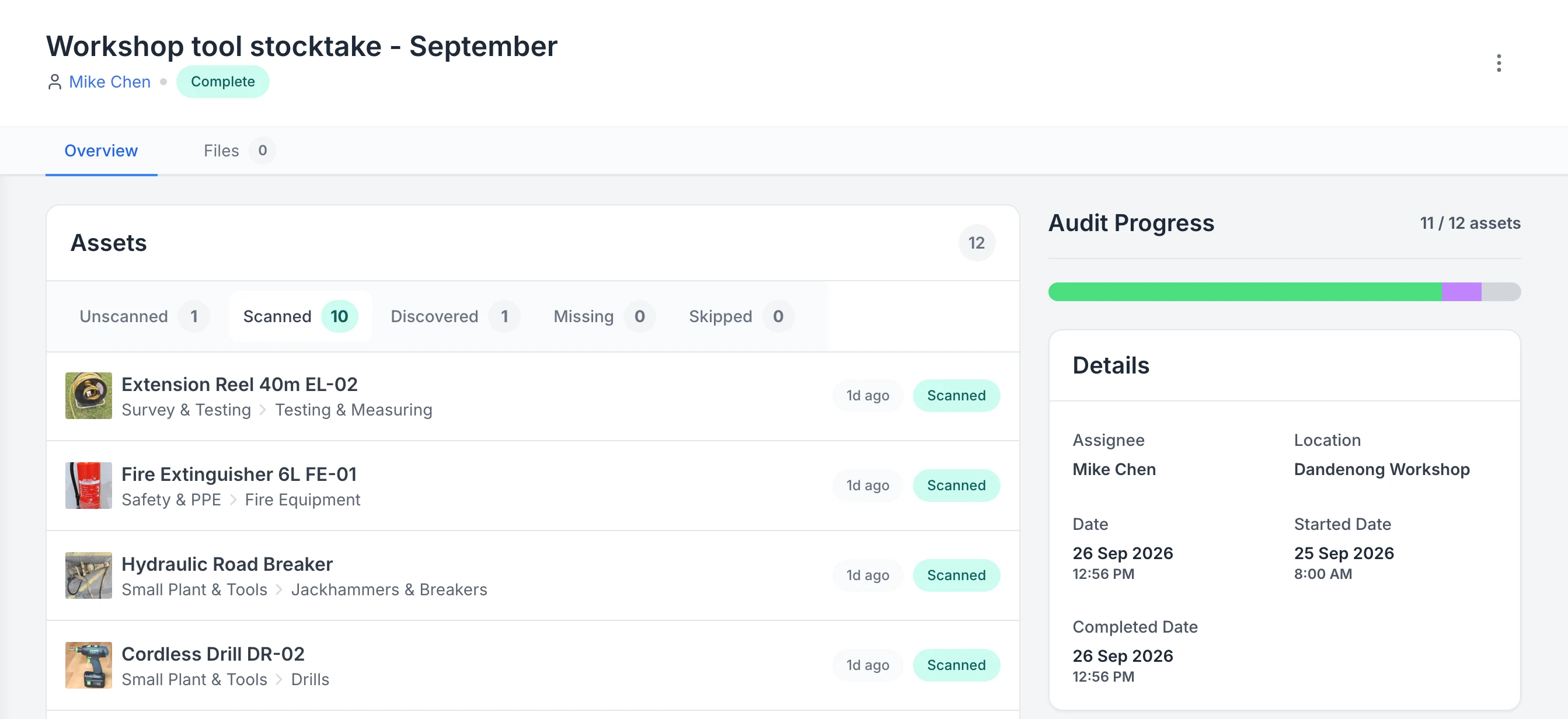
MapTrack audit Workshop tool stocktake - September, assigned to Mike Chen and marked Complete. Tabs show 1 unscanned, 10 scanned, 1 discovered, 0 missing and 0 skipped; the scanned list starts with an extension reel, a fire extinguisher, a hydraulic road breaker and a cordless drill; the progress bar reads 11 of 12 assets.

See what a stocktake scanned, discovered and missed

A completed workshop stocktake. Ten listed assets were scanned and one asset that was not on the list was discovered, so progress reads 11 of 12. One asset is still unscanned and none are marked missing.

MapTrack app · Demonstration data · Captured

About this screenshot

Captured in a demonstration workspace on the audit’s Overview tab with the Scanned tab open; its activity log continues below the crop.

Know which tech's got each kit

Scan each vacuum pump, gauge set and press tool out to the tech taking it, with a due-back date. You see who's got what, anything overdue is flagged, and you're not buying it twice.

Tool tracking
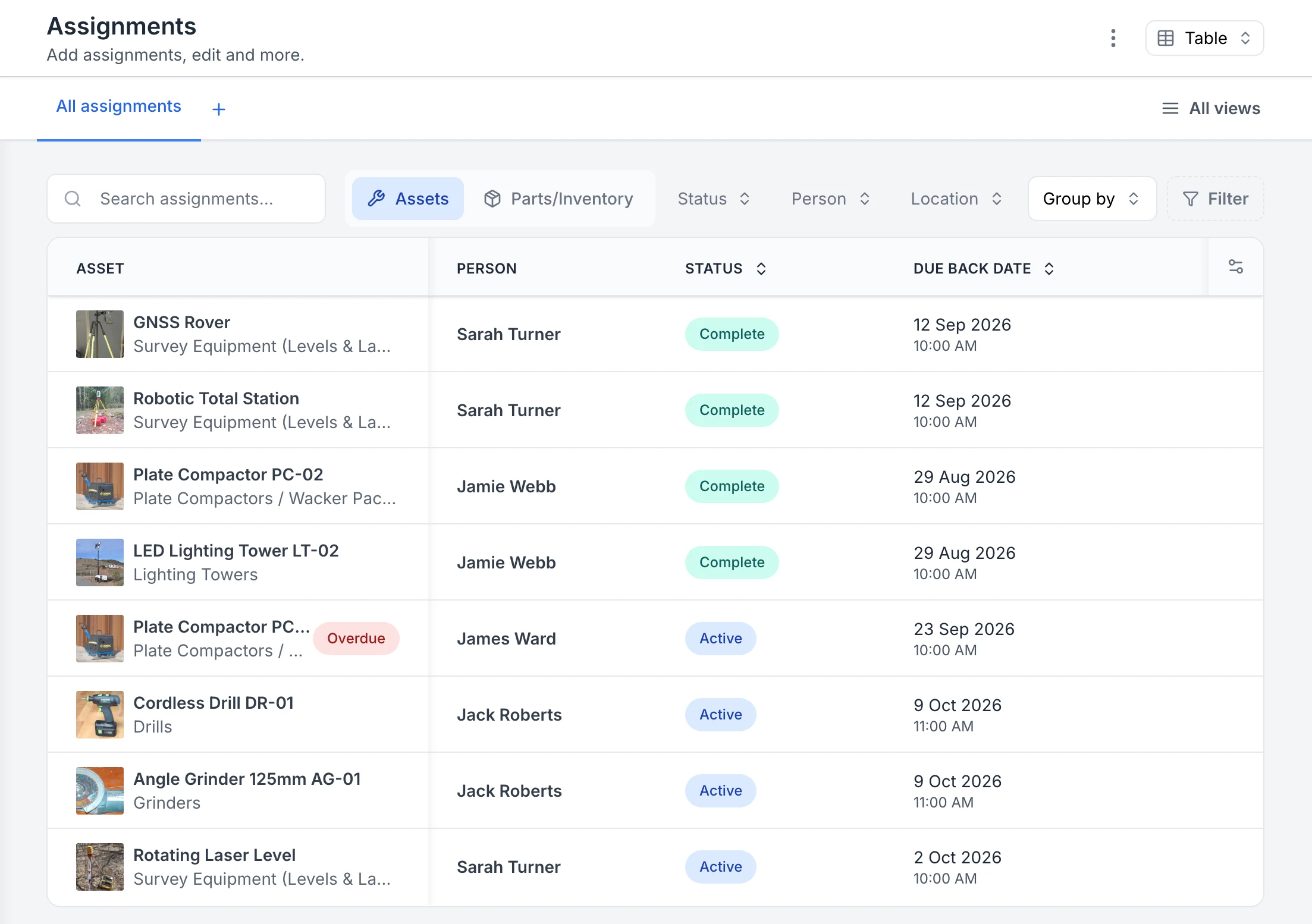
MapTrack Assignments table listing eight tool and equipment assignments, a GNSS rover, robotic total station, two plate compactors, a lighting tower, a cordless drill, an angle grinder and a rotating laser level, each with its photo, the person it went to, a Complete or Active status and a due-back date. One plate compactor is flagged Overdue.

See who has each tool and when it is due back

Every sign-out in one list. Four assignments are back and marked Complete; four are still out as Active, each with the person and the due-back date. The plate compactor with James Ward was due back on 23 September, so it is flagged Overdue.

MapTrack app · Demonstration data · Captured

About this screenshot

Captured in a demonstration workspace on the All assignments view with the Person, Status and Due Back Date columns. The app shortens long asset and category names.

Extinguishers, harnesses and ladders checked on time

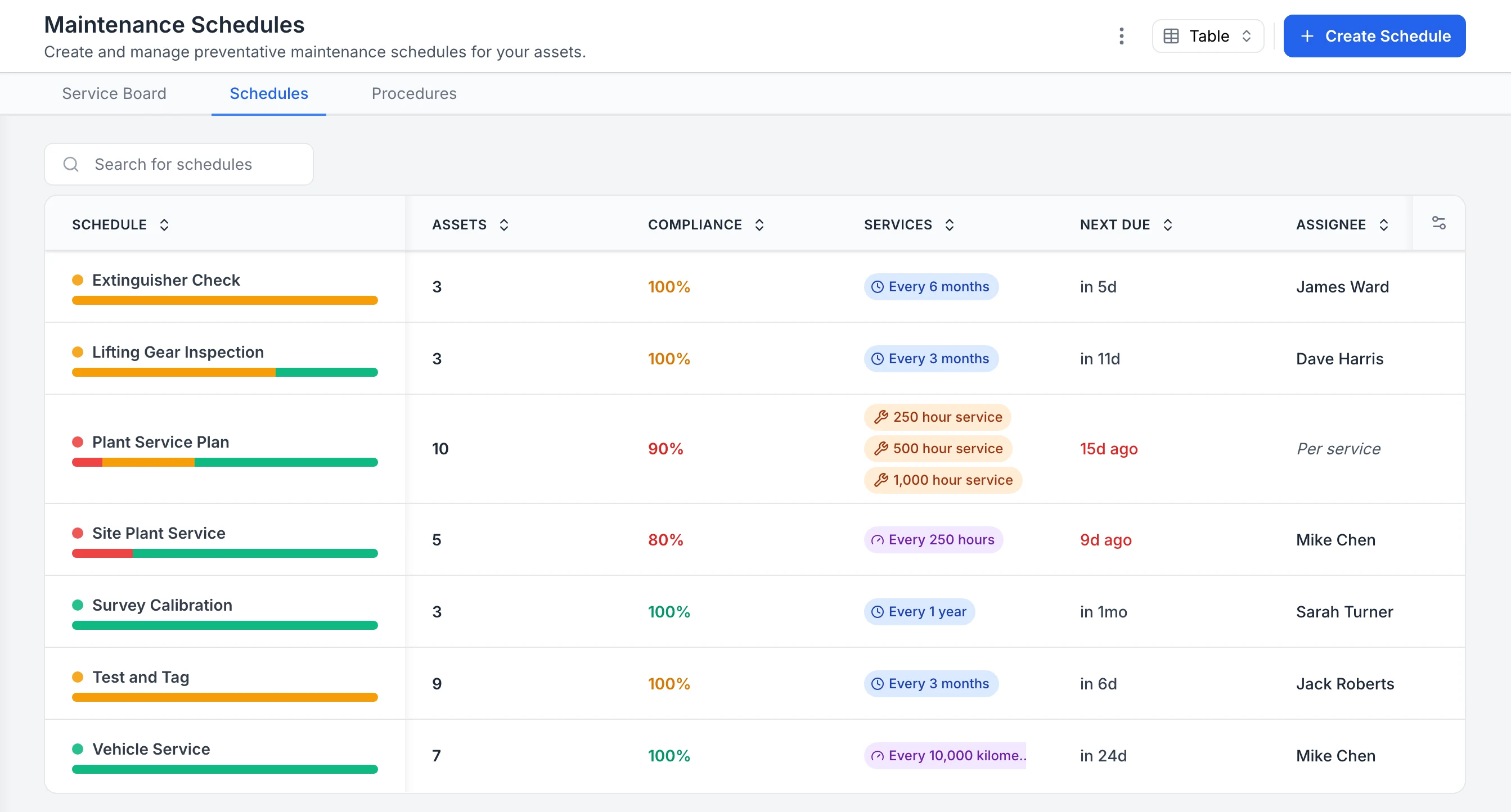
Extinguisher, first aid kit, harness and ladder checks each run on a schedule with its own compliance rate. The assigned person gets an email a week before each check falls due, and overdue schedules show in red.

Compliance
MapTrack Maintenance Schedules table listing Extinguisher Check, Lifting Gear Inspection, Plant Service Plan, Site Plant Service, Survey Calibration, Test and Tag and Vehicle Service, each with its asset count, a compliance percentage, its interval, when it is next due and who it is assigned to. The two plant schedules are overdue and show in red.

See compliance for every inspection and service schedule

Every maintenance schedule in one table. Extinguisher checks, lifting gear inspections, test and tag and survey calibration sit beside plant and vehicle servicing, each with a compliance percentage, interval, next due date and assignee. The plant service plan and site plant service are overdue, so they show in red; schedules with assets due soon show in orange.

MapTrack app · Demonstration data · Captured

About this screenshot

Captured in a demonstration workspace on the Maintenance Schedules tab. The app shortens long interval labels, as in the vehicle service row.

Commissioning and test gear kept in cal

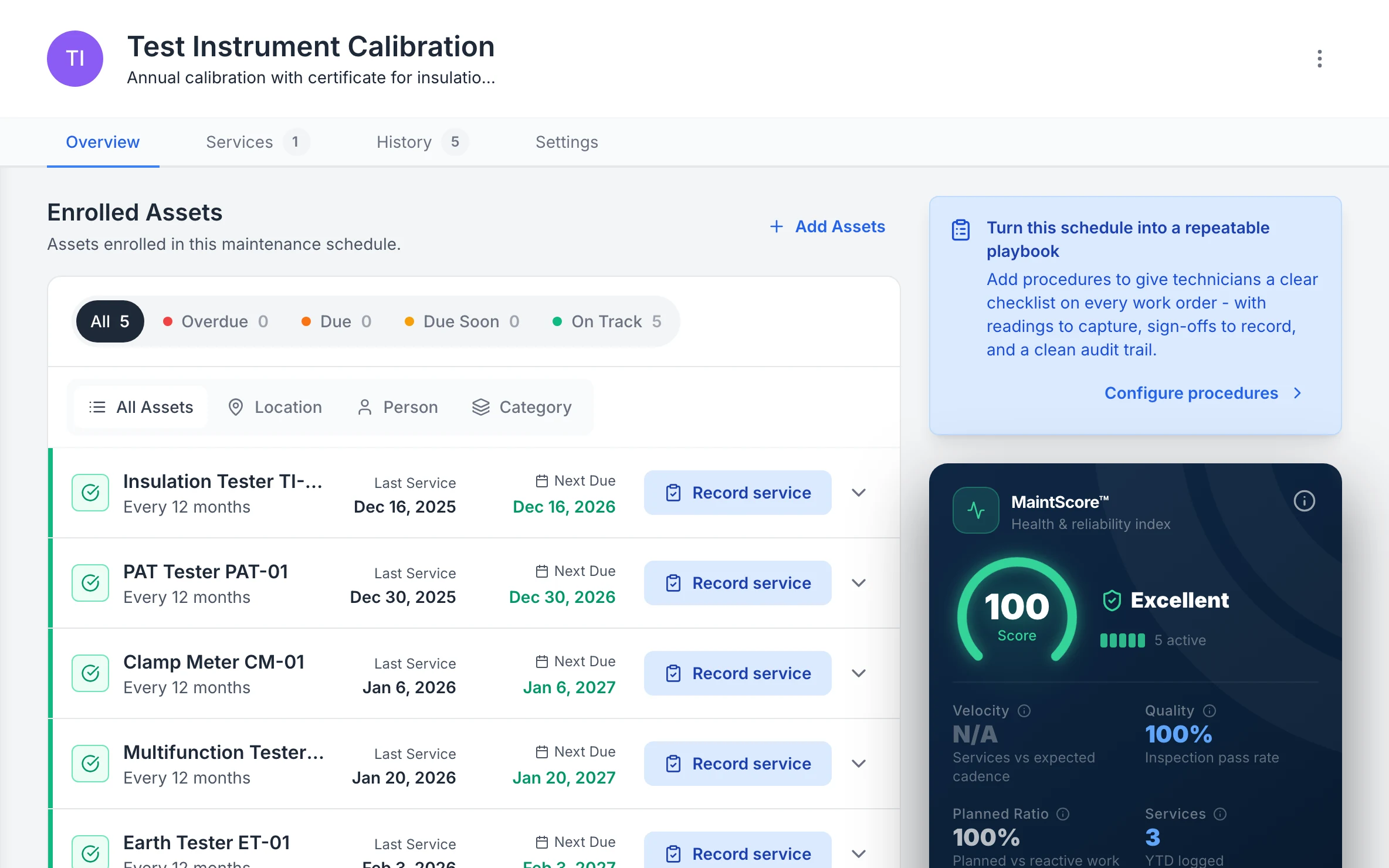
Each commissioning and test instrument carries its last and next calibration, with the cal cert on its record. If one's out of cal, it's flagged when a tech goes to book it out.

Compliance
MapTrack Test Instrument Calibration schedule, annual calibration with a certificate: five enrolled testers, all on track, among them PAT tester PAT-01, clamp meter CM-01 and earth tester ET-01, each with its last calibration and next due date, beside a MaintScore of 100, Excellent.

Every tester’s next calibration

Each test instrument with its last calibration and when the next is due, on a yearly calibration schedule.

MapTrack app · Demonstration data · Captured

About this screenshot

Demonstration workspace at a 1440 x 900 desktop viewport, cropped right of the navigation sidebar to a 16:10 frame.

Not sure which of these to start with? We'll walk you through it in a demo.

Book a demo

30 minutes on Microsoft Teams

Every unit's service history on its own record

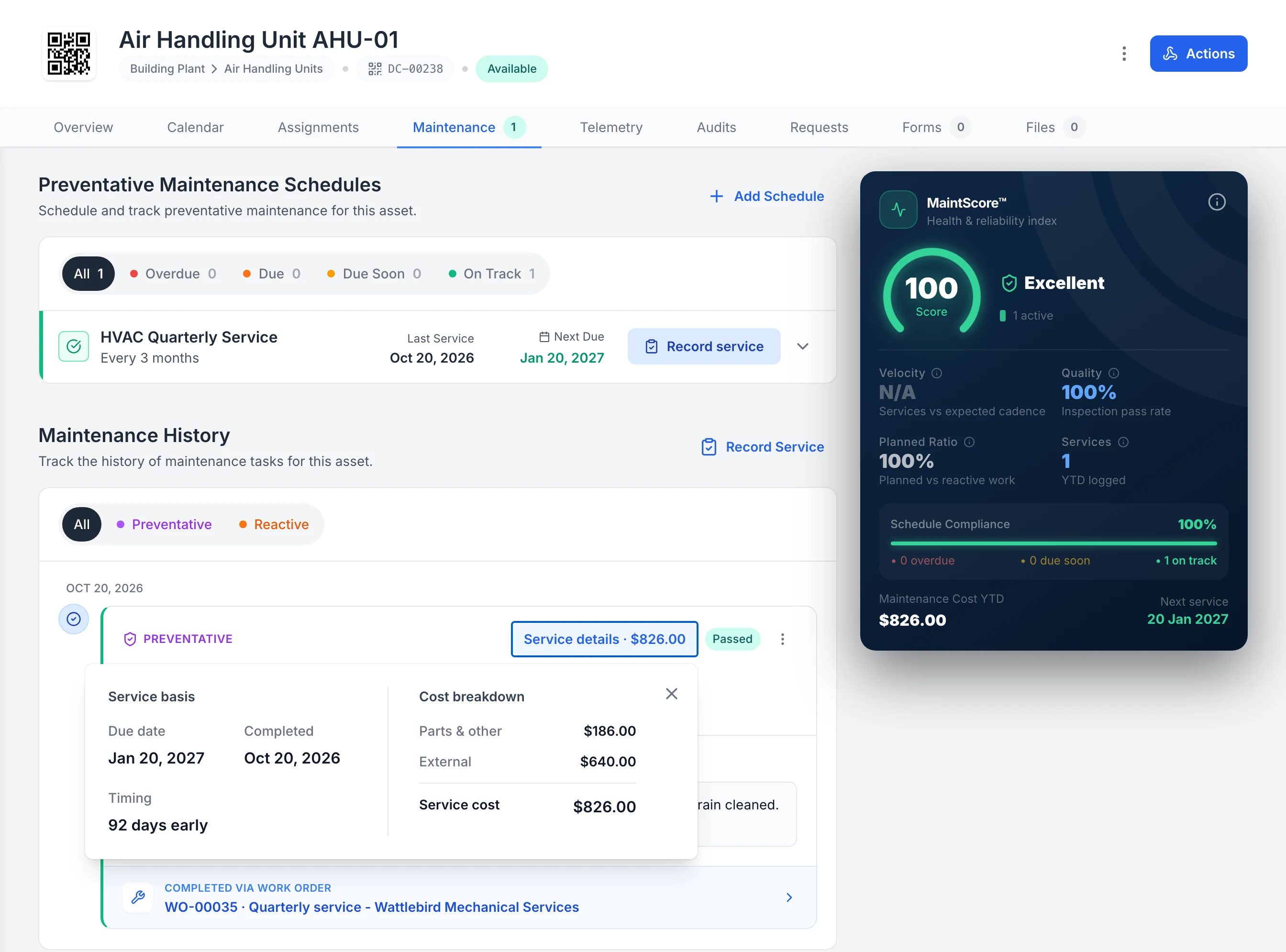
Each customer site is a location, and every unit you service there has its own record. Each service, yours or a supplier's, closes out on it with the result and the cost.

Service history
MapTrack Maintenance tab for Air Handling Unit AHU-01: the HVAC Quarterly Service schedule, last serviced Oct 20, 2026 and next due Jan 20, 2027, and in the maintenance history a passed preventative service with its Service details open: parts and other $186.00, external $640.00, service cost $826.00, completed through work order WO-00035, Quarterly service - Wattlebird Mechanical Services.

A supplier’s service visit on the unit’s own record

A supplier’s quarterly service, logged on the air handling unit’s own record: passed, with the supplier’s $640 charge shown separately from $186 of parts.

MapTrack app · Demonstration data · Captured

About this screenshot

Demonstration workspace at a 1600 x 1400 desktop viewport, with the Service details panel open on the service record, cropped right of the navigation sidebar.

Kits back complete, or a reason why not

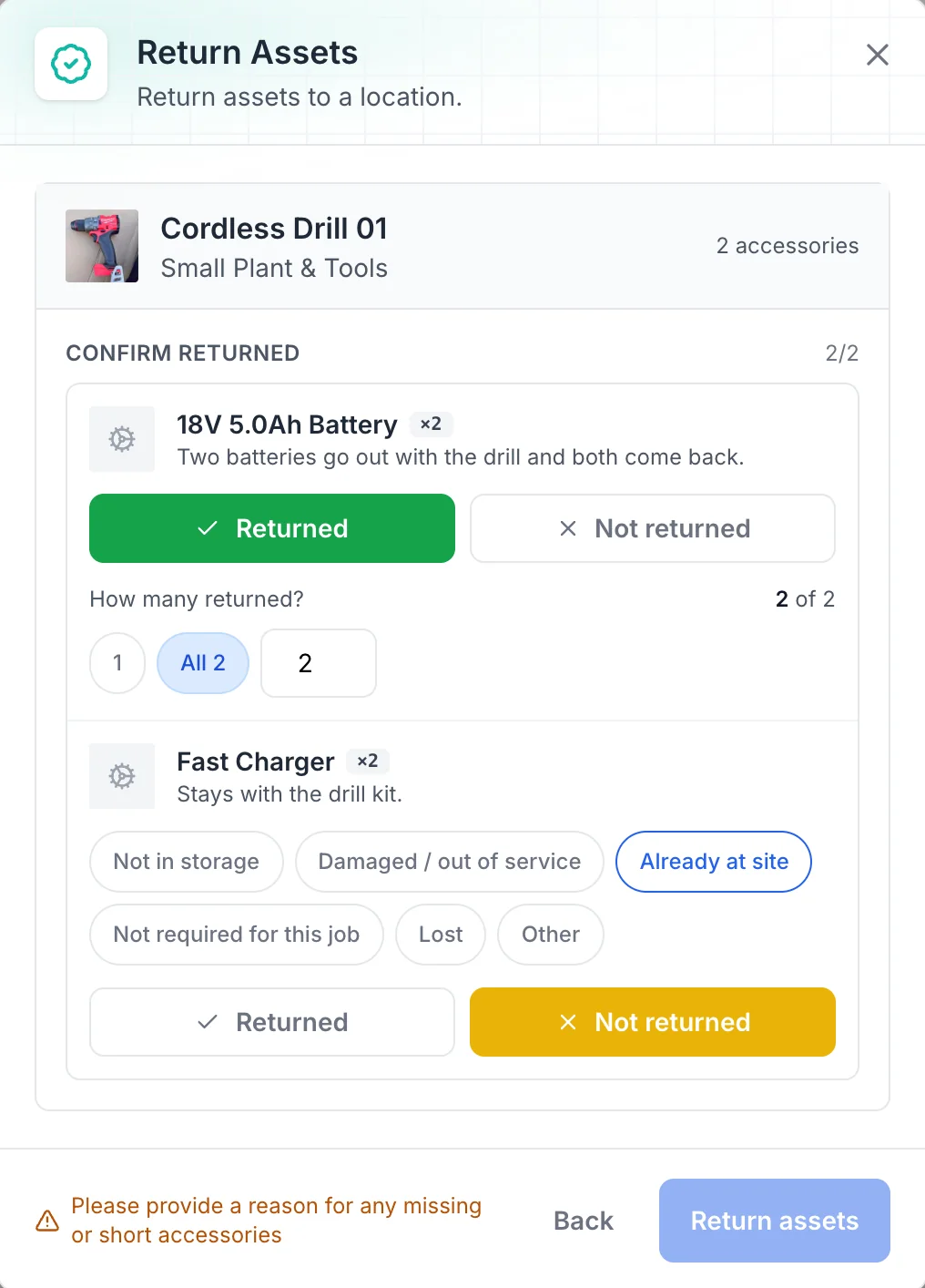
When a tech brings a kit back, each accessory is confirmed returned, and anything short needs a reason before the return is saved.

Tool tracking
MapTrack Return Assets dialog for Cordless Drill 01 with 2 accessories: two 18V 5.0Ah batteries marked Returned, 2 of 2, and two fast chargers marked Not returned, with the reasons Not in storage, Damaged / out of service, Already at site (selected), Not required for this job, Lost and Other, and a prompt to give a reason for any missing or short accessories.

Accessories back, or a reason why not

Returning a drill kit: both batteries are confirmed back, the chargers are marked not returned with a reason, and anything short asks for one.

MapTrack app · Demonstration data · Captured

About this screenshot

Demonstration workspace at a desktop viewport, in the Return Assets dialog, cropped to the dialog.

Seen one that fits how your team works? We'll show it to you in a demo.

Book a demo

30 minutes on Microsoft Teams

Customer proof

What customers say

We haven't published a HVAC customer story. These are customers doing the same work in other industries, each labelled with their own industry.

Building maintenance contractor

“MapTrack has completely changed how we track tools and manage compliance across our sites - the admin time we've saved alone has been a game-changer.”

365 Alongside Team, Management, 365 Alongside
  • From the published story: Weekly hours spent on manual data entry, form transcription and compliance reporting dropped from roughly 8–10 hours to under 4 hours after moving to digital forms and automated workflows.
Read the 365 Alongside story

“Very easy to learn and use across the team. Scanning and assigning assets takes seconds, and the custom forms help us make it fit our process.”

Shannon, General Manager, Machinery, 51-200 employeesVerified review on Capterra, August 2025

“For tooling, it's made a big difference in reducing loss and improving accountability, and it was straightforward to implement without needing much setup. ... Helps us stay in control of our tools and supports the compliance side by sending reminders and email alerts, making it easy to stay on top of inspections and servicing.”

Tony, Maintenance Planner, Mining & Metals, Mid-Market (51-1000 emp.)Verified review on G2, July 2025

Want to hear how other HVAC teams set MapTrack up? Ask us in a demo.

Book a demo

30 minutes on Microsoft Teams

By the numbers

The real cost of untracked HVAC equipment

HVAC contractors face significant losses from untracked tools, compliance lapses, and time spent searching for equipment. The numbers make a clear case for digital tracking.

A$40.8M

of hand and power tools stolen from Victorian vehicles and properties in 2024-25, across 36,708 tools, up 7.5% on the year before

Crime Statistics Agency Victoria, year to 30 June 2025

~5%

of the more than 25,000 tools reported stolen in Queensland in 2024-25 were returned to their owners

Queensland Police Service, 2024-25

35%

typical wrench time: the share of a maintenance technician’s day on hands-on work, with the rest lost to travel, parts, paperwork and searching

Doc Palmer, Plant Services, 4 March 2019

One platform

Customer units, tools, compliance and maintenance in one system

Stop juggling spreadsheets, paper compliance folders and disconnected tools. MapTrack connects asset tracking, compliance and calibration records, and maintenance scheduling into a single platform built for HVAC teams in the field, with the units you service on the same register as your own gear.

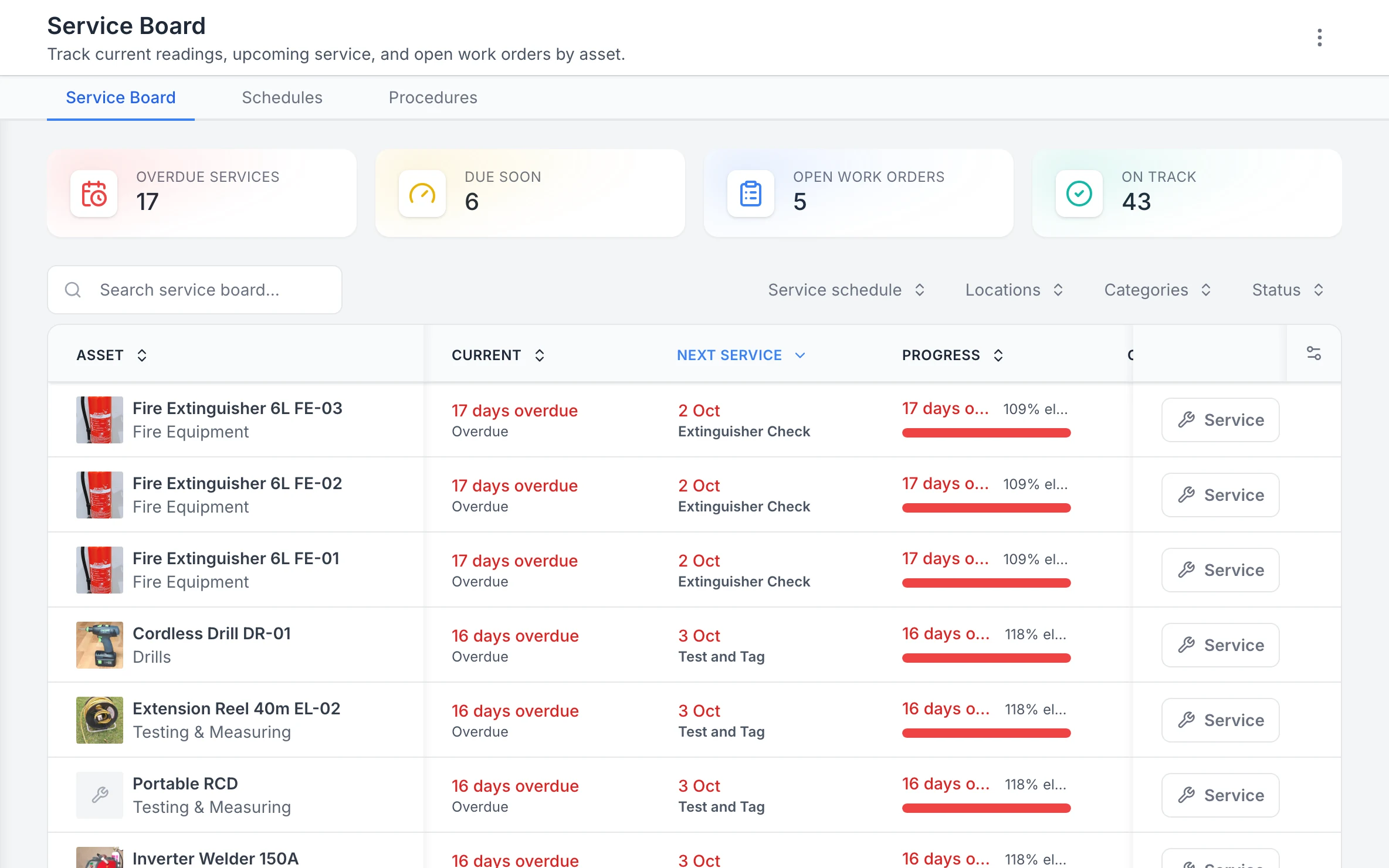
MapTrack Service Board with 17 overdue services, 6 due soon, 5 open work orders and 43 on track; three 6L fire extinguishers 17 days overdue for their Extinguisher Check, and a cordless drill, a 40m extension reel and a portable RCD 16 days overdue for Test and Tag, each row with a Service button.

The Service Board, overdue first

Every asset’s next service in one list, the overdue ones first, with a Service button on each row.

MapTrack app · Demonstration data · Captured

About this screenshot

Demonstration workspace at a 1440 x 900 desktop viewport, cropped right of the navigation sidebar to a 16:10 frame.

Want to see how these fit together on your own sites? We'll show you in a demo.

Book a demo

30 minutes on Microsoft Teams

Compliance

Refrigerant compliance and calibration records, attached to every asset

Attach calibration certificates, refrigerant handling licences and inspection records directly to each piece of equipment. Set expiry reminders so nothing lapses. Pre-start forms completed on mobile in plant rooms and on rooftops - with photos - attach to the asset record with a timestamp.

  • Calibration due dates with automated reminders
  • Certificates and licences attached to each asset
  • Pre-starts completed on mobile - works offline
  • Failed items automatically trigger work orders
  • Full compliance history searchable and exportable
Compliance & certificates
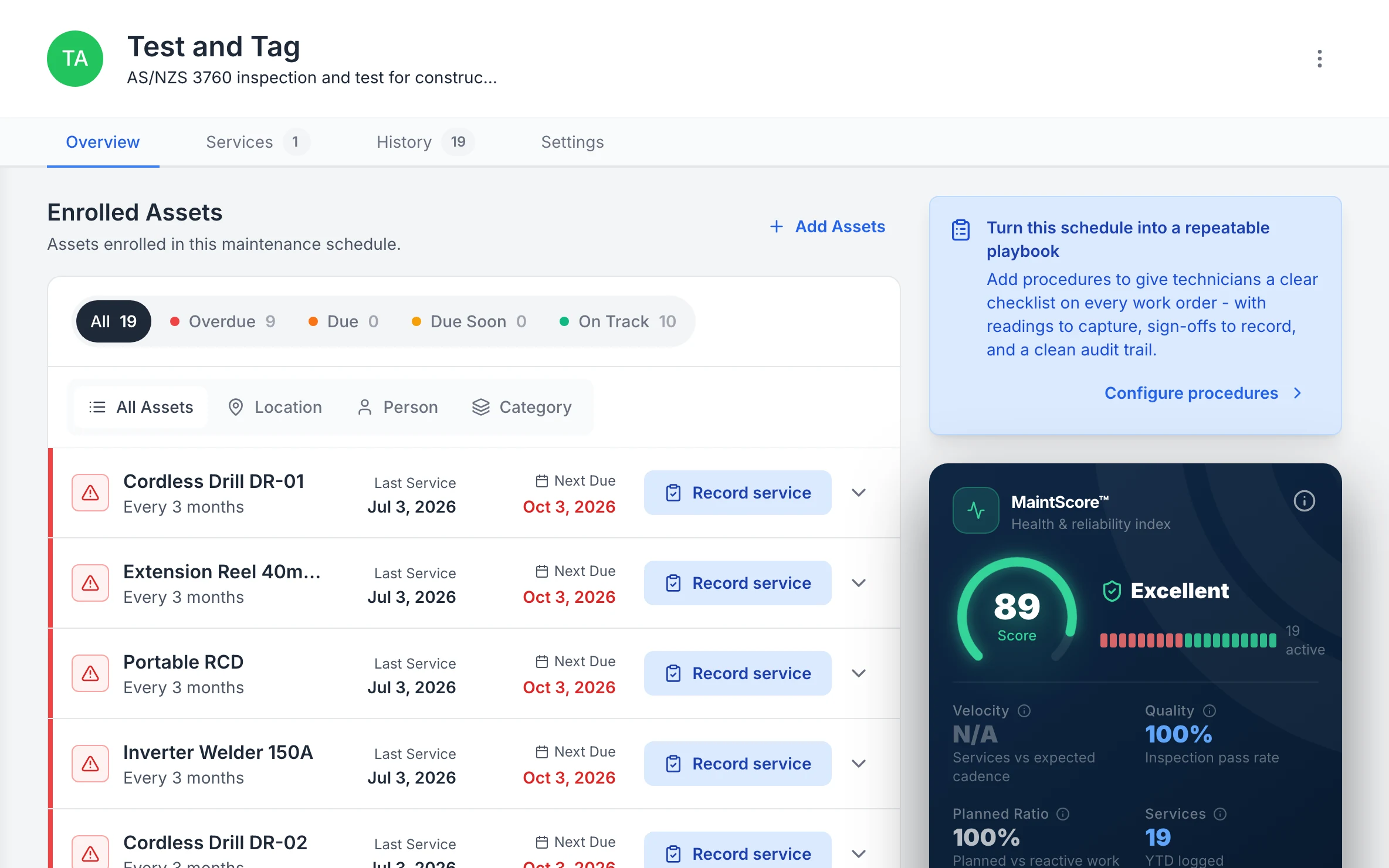
MapTrack Test and Tag schedule for AS/NZS 3760 inspection and test: 19 enrolled assets, 9 overdue and 10 on track; cordless drills, a 40m extension reel, a portable RCD and an inverter welder, each tested every 3 months with its last service and next due date, beside a MaintScore of 89, Excellent.

Test and tag, lead by lead

Every enrolled lead and tool with when it was last tested and when it’s next due, the overdue ones first.

MapTrack app · Demonstration data · Captured

About this screenshot

Demonstration workspace at a 1440 x 900 desktop viewport, cropped right of the navigation sidebar to a 16:10 frame.

Accountability

Know what’s in every van and on every job

QR code every tool and piece of specialist equipment. Assign assets to technicians, vans or jobs (as job sites). Technicians scan to check gear in and out from the field. The office sees who has what in real time. No more ringing around to find a recovery unit or thermal camera.

  • Check-in and check-out on mobile from the van or depot
  • Bulk scanning for van audits and depot stocktakes
  • Assign to technicians, vans or specific jobs (as job sites)
  • GPS location for fleet vehicles where fitted
  • Geofence alerts when vans leave a site boundary
Asset tracking
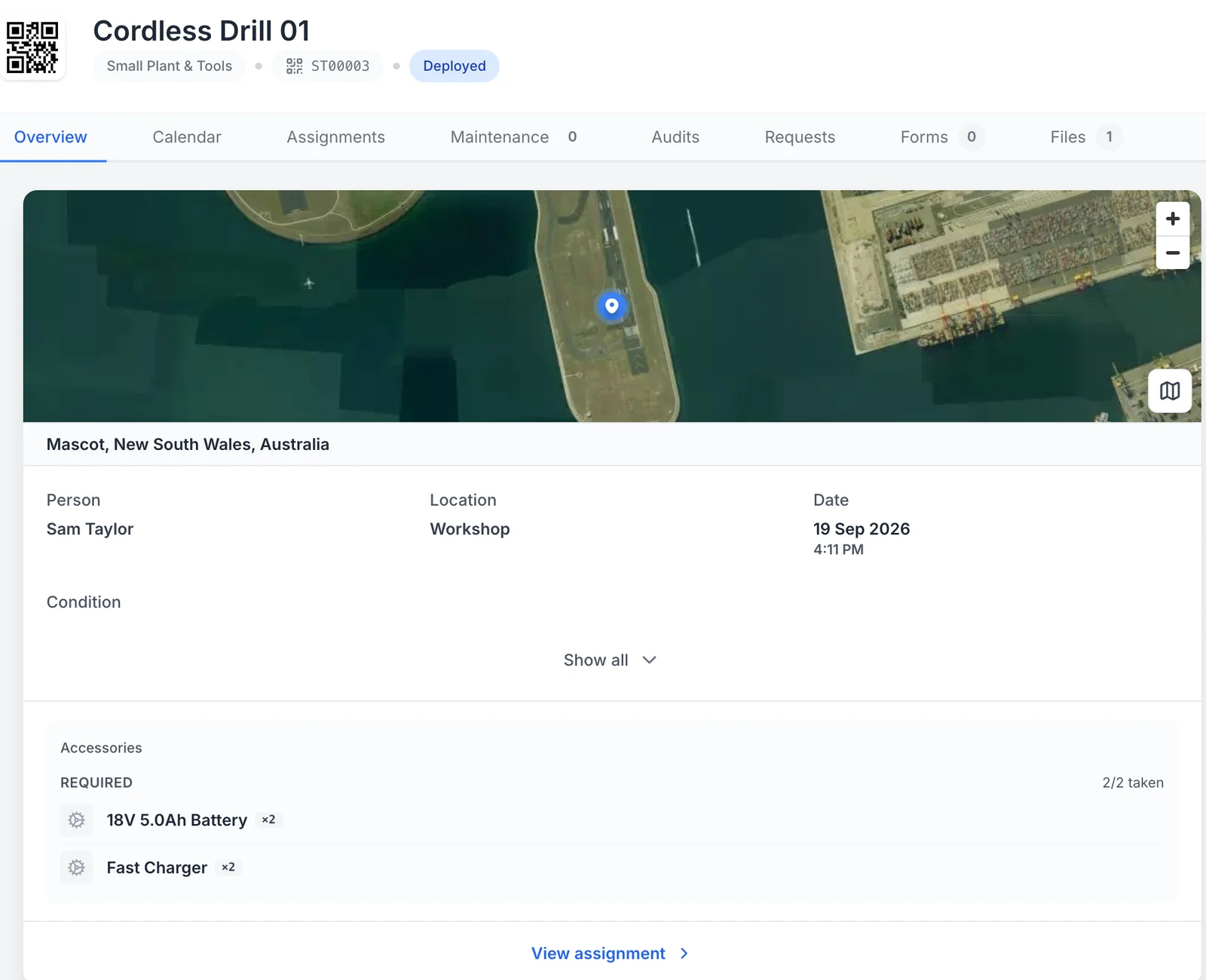
MapTrack record for Cordless Drill 01, tag ST00003, Deployed: a satellite map pinned at Mascot, New South Wales, the person Sam Taylor, the location Workshop, the date 19 Sep 2026 at 4:11 PM, and its required accessories, two 18V 5.0Ah batteries and two fast chargers, 2 of 2 taken.

Who has it, and where it was checked out

While the drill is out, its record shows who has it, where it was checked out on the map and the accessories that went with it.

MapTrack app · Demonstration data · Captured

About this screenshot

Demonstration workspace at a desktop viewport, on the asset’s Overview tab, cropped to its header, map, assignment and accessories.

See these on a phone and a desktop in a live demo.

Book a demo

30 minutes on Microsoft Teams

Maintenance

Keep customer units, recovery units, pumps and vans serviced on time

Schedule preventive maintenance on the units you service, specialist equipment, power tools and fleet vehicles. Trigger work orders from calendar intervals, usage or failed inspections. Every service record lives alongside the asset's tracking and compliance history - so nothing falls through the cracks.

  • Each customer unit's service history on its own record
  • Calendar and usage-based service triggers
  • Odometer-based servicing for vans and fleet
  • Work orders assigned to technicians on mobile
  • Parts history and cost tracking per asset
  • Overdue alerts so servicing stays current
Maintenance & work orders
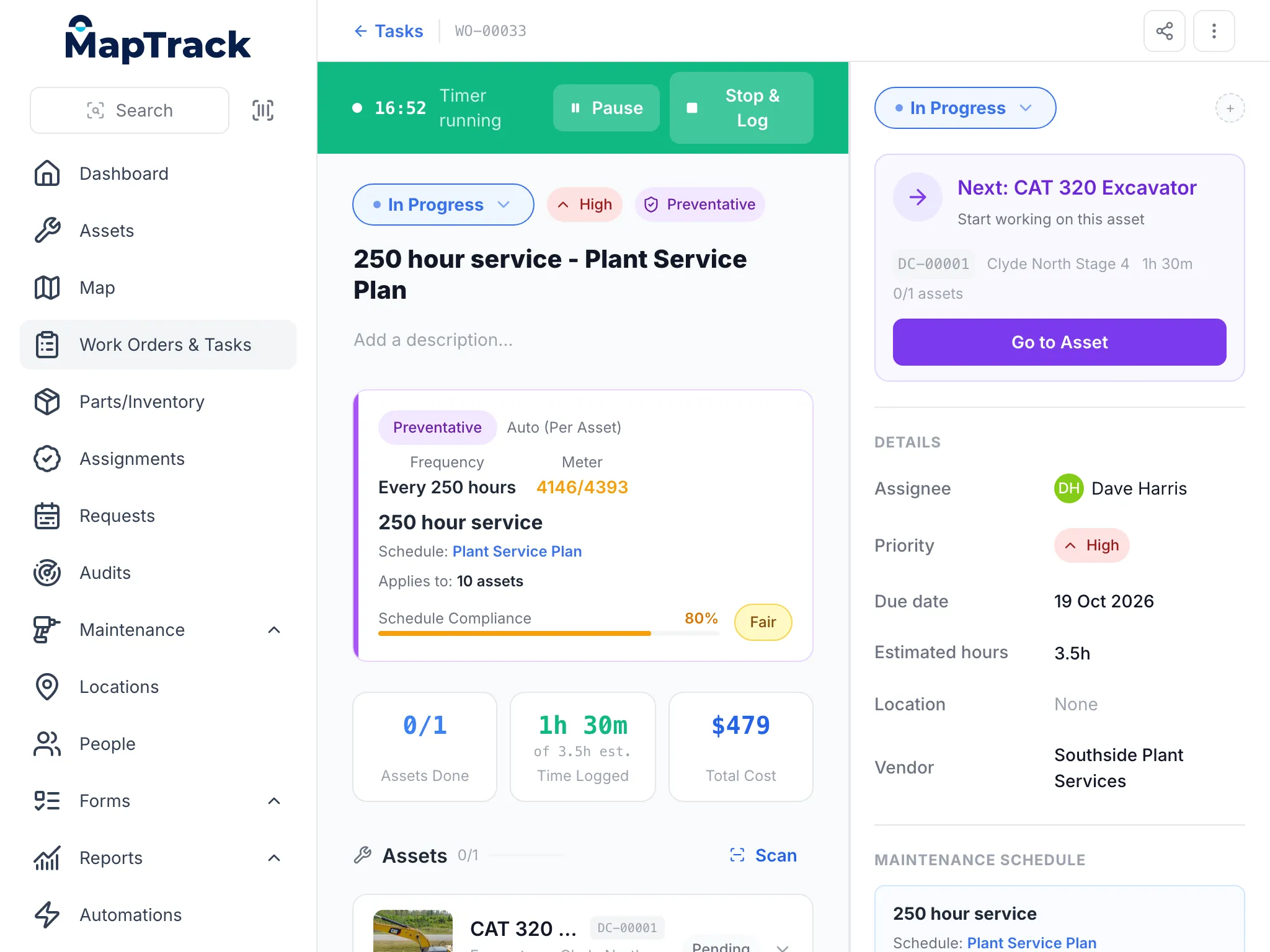
MapTrack on a tablet: a 250 hour service work order for a CAT 320 excavator, in progress with its timer running at 16:52, high priority and preventative, every 250 hours on a meter reading 4146 of 4393, with 1 hour 30 minutes logged, a total cost of $479, Dave Harris assigned and Southside Plant Services as the vendor.

A service job on a tablet

The same work order a mechanic runs on a phone or a desk, here on a tablet: the timer, the schedule that raised it, the time logged and the costs.

MapTrack app · Demonstration data · Captured

About this screenshot

Captured at a 1024 x 768 tablet viewport (the app at a 1024 px wide window) in a demonstration workspace; nothing pressed.

Integrations

Fleet GPS data feeds straight into MapTrack

If your vans already have GPS tracking through Teletrac Navman or Geotab, MapTrack pulls in odometer readings and location data automatically, driving van service triggers and giving you fleet visibility without manual data entry.

Teletrac Navman
Geotab
  • Odometer tracking for timely van and vehicle servicing
  • Live GPS location and geofence alerts for your fleet
  • Time-on-site data for job costing and utilisation
  • Integrates alongside QR-tracked tools and equipment in one platform

See all integrations

Field-ready

Built for technicians, vans and customer sites

HVAC work happens at customer sites, not the office. MapTrack runs on any phone or tablet. No specialist hardware required. Scan equipment, complete maintenance forms, update service records and log refrigerant usage directly from the roof or plant room.

Offline mode means technicians can keep working in plant rooms, rooftops or basements with no signal. Data syncs automatically when back online. Unlimited users means every technician, apprentice and office staff member has access.

Offline sync

Works in plant rooms

QR scan

Any standard phone camera

Unlimited users

No per-seat charges

Track the units you service, your tools, vehicles and refrigerant gear

Compliance, calibration and fleet management for HVAC contractors. Keep every technician accountable without the paperwork.

  • Used across Australia & New Zealand
  • Per-asset pricing
  • Unlimited users

Get started

How HVAC contractors get started

Most HVAC teams are tracking tools and equipment within days. Start with your existing tool register, label everything, and build accountability from the first job.

MapTrack Assets table filtered to Small Plant & Tools, showing 9 tools, angle grinders, a hydraulic road breaker, cordless drills, a concrete cut-off saw, an inverter welder and plate compactors, each with its category, a Deployed or Available status, the person or site it is with, its QR tag ID and its make.

Keep small tools in the same register as plant

The same register filtered to small plant and tools. Each tool carries its own QR tag and shows whether it is out with someone or sitting at the workshop or on site.

MapTrack app · Demonstration data · Captured

About this screenshot

Captured in a demonstration workspace. The All assets view is filtered to the Small Plant & Tools category and shows the Status, Person, Location, Tag and Make columns.

Step 1

Register the units you service, your tools and refrigerant equipment

Import your existing tool register or build from scratch. Add manifold gauges, recovery units, nitrogen kits, leak detectors, and service vehicles. Set up each customer site as a location and add the units you service there.

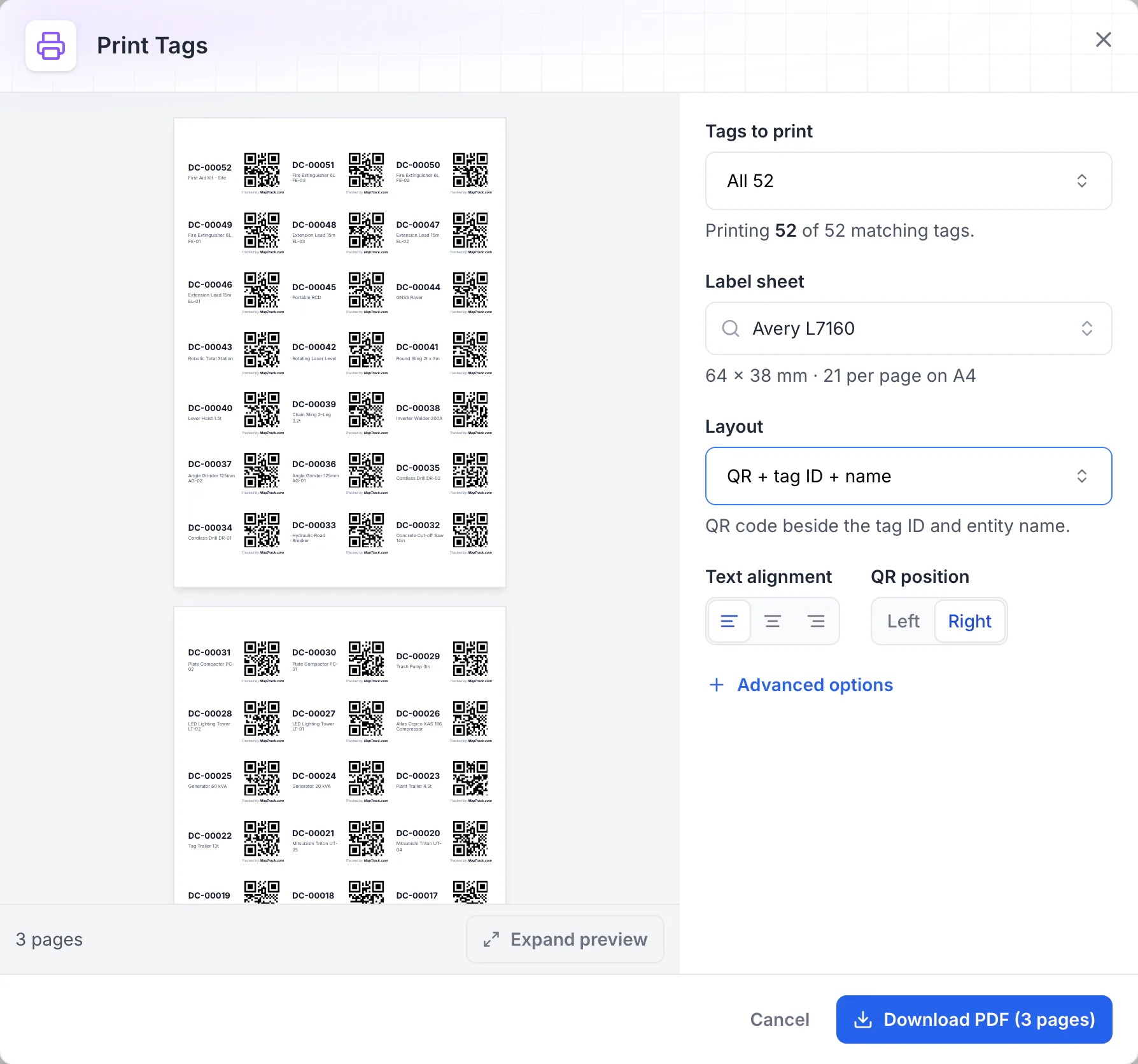
MapTrack Print Tags dialog: all 52 QR tags laid out on Avery L7160 A4 label sheets of 64 x 38 mm, 21 per page, each label showing the QR code, tag ID and asset name, with a Download PDF button for 3 pages.

Print QR labels for every asset

Print Tags lays QR labels out on standard label stock. Here all 52 tags fill three A4 sheets of 64 x 38 mm labels, each with the QR code beside the tag ID and asset name, ready to download as a PDF and print.

MapTrack app · Demonstration data · Captured

About this screenshot

Captured in a demonstration workspace with the Avery L7160 sheet and the QR + tag ID + name layout chosen. Each QR code holds the tag ID printed beside it.

Step 2

Label equipment and assign to technicians or vans

Print durable QR labels and link assets to individual technicians or service vehicles. Every item has a clear owner.

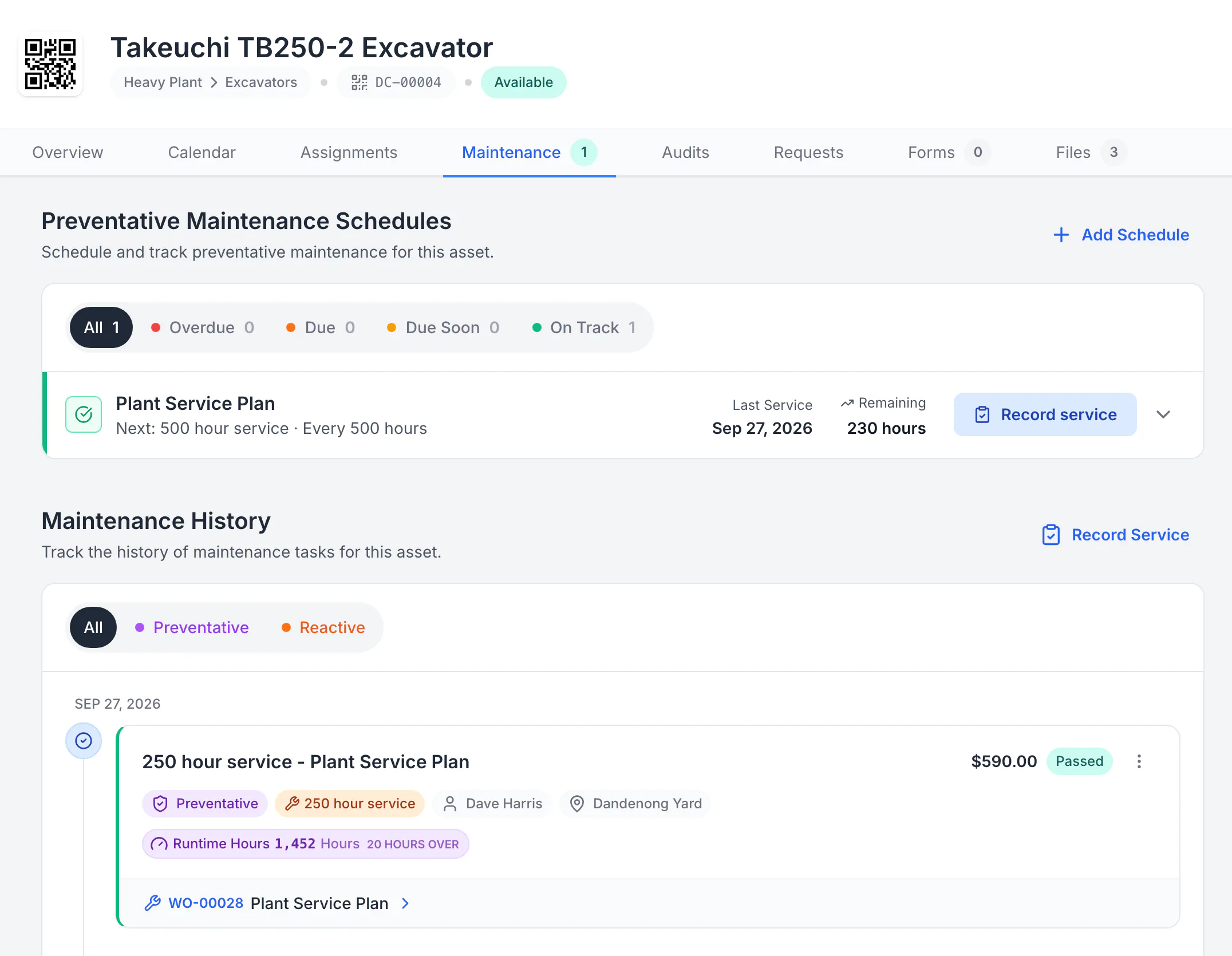
A saved MapTrack service record for a Takeuchi TB250-2 excavator: 250-hour service passed on 27 September at 1,452 hours, $590, linked to work order WO-00028, with the plan showing the 500-hour service next.

Open the saved service record on the asset

The 250-hour service was completed on work order WO-00028 at 1,452 hours, 20 hours past its service point, with $590 in logged costs. After completion the plan moved on: the 500-hour service is next, 230 hours away.

MapTrack app · Demonstration data · Captured

About this screenshot

The work order was started, time and costs were logged and it was completed in a demonstration workspace, then the record was reopened from the asset’s Maintenance tab.

Step 3

Schedule calibration, track service history, stay compliant

Set reminders for gauge calibration and equipment service. Log refrigerant handling records and produce inspection reports on demand.

Key features for HVAC contractors

MapTrack gives your team the visibility, accountability and compliance tracking to cut both without adding admin overhead or replacing your existing fleet GPS.

The refrigerant and equipment records HVAC rules ask for

HVAC contractors in Australia, the United States and the United Kingdom answer to different rules, but the records they ask for look alike: what was checked, when, by whom, and what's due next. Open a market to see its rules, the words buyers there search for, and how pricing is quoted.

Australia

AS/NZS 3760

Prices on our pricing page are in Australian dollars, ex GST.

  • Australia and New Zealand

    AS/NZS 3760:2022, in-service safety inspection and testing of electrical equipment

    What it asks for

    Sets how often electrical equipment is inspected and tested, by the kind of environment it's used in, and what each test record holds.

    How MapTrack keeps the record

    Each power tool, lead and vacuum pump on the vans carries its tag date and next due date, and a test and tag round runs as one job across a van, with a pass or fail on each item.

    Source: AS/NZS 3760:2022, In-service safety inspection and testing of electrical equipment (Standards Australia, checked 29 Aug 2026)

United States

EPA 40 CFR 84.106

Pricing is quoted in your currency, US dollars.

  • United States, appliances holding 15 pounds or more of a regulated refrigerant, from 1 January 2026

    EPA 40 CFR 84.106, refrigerant leak repair

    What it asks for

    Owners or operators work out each appliance's full charge and record its owner, address, full charge and installation date. Each installation, service, repair or disposal is recorded with the appliance, the date, the parts worked on, what was done, who did it, the refrigerant added or removed and the leak rate. Records are kept at least three years. Residential and light commercial air conditioning is excluded.

    How MapTrack keeps the record

    Each unit at a client's site is a record, with custom fields for its refrigerant and full charge. Every service is a form or work order on that unit with the date, the technician and the refrigerant added, kept as a PDF.

    Source: 40 CFR 84.106, Leak repair (eCFR) (US Environmental Protection Agency, via the Electronic Code of Federal Regulations, checked 26 Oct 2026)

Leak rate
How fast refrigerant is escaping from an appliance, worked out each time refrigerant is added. Above the rate 40 CFR 84.106 sets (20 percent for commercial refrigeration, 30 for industrial process refrigeration, 10 for comfort cooling and most others), the leak is repaired within 30 days, or the appliance is retrofitted or retired.

United Kingdom

F-gas article 4, F-gas article 6

Pricing is quoted in your currency, pounds sterling.

  • United Kingdom, stationary refrigeration, air conditioning, heat pumps and other F-gas equipment

    F-gas Regulation (Regulation (EU) No 517/2014 as it applies in the UK), article 4, leak checks

    What it asks for

    Equipment holding 5 tonnes of CO2 equivalent or more of fluorinated gases is leak checked at least every 12 months, every 6 months from 50 tonnes and every 3 months from 500 tonnes, with each interval doubled where a leak detection system is fitted. Hermetically sealed equipment under 10 tonnes that's labelled as such is exempt.

    How MapTrack keeps the record

    Each unit is a record with custom fields for its gas and its charge in tonnes of CO2 equivalent, and the leak check is a service schedule at the interval that charge sets, showing as due soon or overdue.

    Source: Regulation (EU) No 517/2014 (F-gas), article 4 (legislation.gov.uk (The National Archives), checked 26 Oct 2026)

  • United Kingdom, operators of equipment that needs leak checks

    F-gas Regulation (Regulation (EU) No 517/2014 as it applies in the UK), article 6, record keeping

    What it asks for

    For each piece of equipment that needs leak checks, the operator keeps a record of the type and quantity of gas installed and added, the quantity recovered, who installed, serviced, repaired or decommissioned it and their certificate number, and the dates and results of each leak check, for at least five years.

    How MapTrack keeps the record

    Every leak check, top-up and repair is a form or work order on the unit's record with the date, the engineer and the quantity added, and form responses export to CSV.

    Source: Regulation (EU) No 517/2014 (F-gas), article 6 (legislation.gov.uk (The National Archives), checked 26 Oct 2026)

F-gas leak check
The periodic check for refrigerant leaks the F-gas Regulation sets by the equipment's charge in tonnes of CO2 equivalent, from every 12 months down to every 3.

MapTrack keeps the records these rules ask you to keep. It does not do the inspection or testing, certify your work or make you compliant, and the current text of each instrument is the authority.

Want to see how these records would look for your own gear? We'll show you in a demo.

Book a demo

30 minutes on Microsoft Teams

Stop the loss

Tool loss and missed compliance are the two biggest controllable costs for HVAC contractors

MapTrack gives your team the visibility, accountability and compliance tracking to cut both without adding admin overhead or replacing your existing fleet GPS.

Frequently asked questions

HVAC asset tracking software is a platform that helps HVAC contractors, refrigeration mechanics and air conditioning service businesses track, manage and maintain their tools, specialist equipment and vehicles across installation and service jobs. It replaces spreadsheets, paper compliance folders and disconnected tools with a single source of truth for where assets are, who has them, what certifications are attached and when they’re due for service or calibration. MapTrack combines asset tracking (QR codes, barcodes and GPS for fleet), pre-start and inspection forms, maintenance scheduling and work orders, and calibration tracking, all on mobile in the field.

Yes. MapTrack lets you attach compliance certificates, refrigerant handling licences and calibration records directly to each asset. Pre-start forms and inspections completed in the field attach to the asset record with timestamps and photos. You can set expiry reminders on certificates so nothing lapses without notice. All evidence is searchable and exportable for audits, whether that’s an internal review, a client audit or a regulatory check on your refrigerant handling procedures.

Assign QR labels to each recovery unit, vacuum pump, manifold gauge set and leak detector. Technicians scan to check equipment in and out from the depot or van. MapTrack records the full chain of custody - who has it, where it went and when it was returned. Pair this with calibration tracking and maintenance schedules so your specialist gear is always in-date, serviced and ready for the next job.

Yes. Assign assets to specific vans, technicians or jobs (as job sites). Filter and report by van to see exactly what tools and equipment each technician is carrying. Run bulk QR scans to verify van loadouts at the depot. When a technician transfers a tool to another van or returns it, the system records the movement with a timestamp, so you always know where everything is.

MapTrack is built for field use with offline support. In roof spaces, plant rooms, basements and remote sites, technicians can scan assets, complete pre-starts, inspections and other forms, and work through a work order already loaded on the phone, all with no reception. Data syncs automatically when the device comes back online. No work is lost.

Set calibration due dates on manifold gauges, leak detectors, gas analysers, thermal imaging cameras and test instruments. MapTrack sends reminders before calibration expires. Attach calibration certificates from your provider directly to the asset record. Reports show which instruments are in-date, which are due and which have lapsed, so you never send a technician to a job with out-of-calibration equipment.

Use bulk scanning (QR or barcode) to verify what’s in a van or at the depot. MapTrack records each asset scanned, when it was scanned and who scanned it. Compare scanned results to expected asset lists and immediately see what’s missing, unscanned or overdue for service. Audits that used to take hours with clipboards now take minutes on mobile.

MapTrack uses per-asset pricing with unlimited users included. Not per-seat licensing. You can give access to every technician, apprentice, service coordinator and admin without your costs growing as the team does. This matters for HVAC businesses where technicians need mobile access for scanning and forms, and office staff need visibility and reporting. Pricing scales with the number of assets you track, not the size of your team.

Yes. Vans and light fleet sit alongside tools and equipment in MapTrack. Schedule servicing based on odometer or calendar intervals. Run pre-start vehicle inspections on mobile. Track registration, insurance and roadworthy expiry dates with reminders. Where you have GPS or telematics (Teletrac Navman, Geotab), odometer data feeds in automatically to drive service triggers.

Most HVAC teams are running on MapTrack within one to two weeks. The typical approach is to start with one depot or your high-value specialist equipment: import or scan in assets, set up your first workflows (usually van audits or compliance tracking), and roll out to technicians. MapTrack’s onboarding team supports you through setup and training at no additional cost. For larger operations with multiple branches, a phased rollout works well.

Set each customer's site up as a location and register the units there, each with its make, model, serial number and a QR label. Every service, repair and supplier visit closes out on that unit's record with the date, the result, the parts and the cost, so the next tech sees the history before they start. Export the register for the customer whenever they ask for it.

Yes. Nest the plant rooms, roofs and floors under each site as zones, register every unit, and put them on service plans. One work order can cover many units, each with its own pass or fail, so a quarterly round across a building is one job. The service board shows what's over first, and the assigned tech gets an email a week before a service falls due.

It depends on the job you need done. Quoting, dispatch and invoicing belong to job management software, and most HVAC businesses already run one. For a record of every unit you service and every piece of gear you own, look for a QR label and service history on each unit, customer sites as locations, services due on dates or run hours, pre-starts and inspections that complete without signal, and per-asset pricing so every tech can use it. MapTrack, built in Brisbane, does each of these with unlimited users on every plan, and sits beside your job management software.

Got a question we haven't answered here? Ask it in a demo.

Book a demo

30 minutes on Microsoft Teams

Get MapTrack pricing for HVAC teams

Tell us about your operations. Our team will share per-asset pricing tailored to your hvac asset mix and a rollout plan - within one business day.

Per-asset pricing. Unlimited users. Primary database hosted in Sydney.

Ready for your HVAC field team

Join the maintenance and field service teams already using MapTrack, including 365 Alongside and Axis Services Group. Track the units you service, your tools and your compliance, all in one platform.

Pre-start inspections · Maintenance · Asset tracking · Electrical · Compare

Tools from $1 · Machines from $12View pricing