 vs

MapTrack vs Sitemate: Unified Asset Ops vs Forms Stack
Sitemate is an Australian-built company whose products are Dashpivot (HSEQ forms and field records), Flowsite (no-code integrations) and Gearbelt (asset and fleet management, the rebrand of Nomad Fleet), each subscribed separately. MapTrack is a single unified asset operations platform: one register that tracks tools, plant and fleet by QR, GPS and BLE, with inspections, maintenance and reservations on each asset, per-asset pricing and AUD billing. Both are Australian and both offer offline. Choose Sitemate for forms depth and a best-of-breed suite; choose MapTrack for one unified asset-first platform. MapTrack is one platform for every asset a field business runs: AI-built pre-starts and inspections sit on each asset’s record with its location, bookings and maintenance, and a failed check can raise a work order automatically, through a rule you set.

Based on Sitemate’s public documentation and named third-party reviews as of Oct 2026. How we compare · Report a correction
Trusted by construction, mining and field service teams





What are the key differences between MapTrack and Sitemate?
- •Sitemate is an Australian-built company (Sydney, founded 2015 as Dashpivot, rebranded 2018). Its products are Dashpivot (HSEQ forms and field records), Flowsite (no-code integrations) and Gearbelt (asset and fleet management, the rebrand of Nomad Fleet which Sitemate acquired in August 2024). Each is a separate, separately-subscribed product.
- •MapTrack is a single unified asset operations platform: one register that tracks tools, plant and fleet by QR, barcode, GPS and BLE, with 150+ telematics, fleet and fuel-card data sources, plus inspections, maintenance, reservations and cost tracking on each asset record - one subscription, per-asset pricing.
- •Both companies are Australian and both offer offline mobile, so neither is a point of difference. The real contrast is the model: Dashpivot is forms-first with assets in a separate product (Gearbelt) and per-user pricing, whereas MapTrack is asset-first and unified with per-asset pricing.
What MapTrack covers in one platform
- Every asset, one record
- Tools on QR or barcode labels and Bluetooth tags, plant on GPS trackers, vehicles with GPS and AI dash cams, sites with boundaries: custody, inspections, maintenance and costs on the same record.
- Maintenance that runs on real usage
- Run hours and kilometres from trackers, dash cams or manual readings feed tiered service plans and next-service forecasts, every asset gets a 0 to 100 maintenance health score, and one work order can cover many assets, each with its own pass or fail.
- Easy for crews
- Pre-starts and inspections work without signal, on any phone, with shared-device PINs, single sign-on and AI help to build forms and add assets from a photo. Capterra Best Ease of Use 2026.
- Hardware and software from one vendor
- GPS trackers, AI dash cams with built-in GPS, Bluetooth tags and labels at published prices, managed in the same app, plus LightMetrics dash cam accounts and 150+ telematics, fleet and fuel-card data sources.
- Simple to buy and run
- Per-asset pricing with unlimited users, 24/7 support and month-to-month plans. Capterra Best Value 2026.
The full capability list (35)
- One register for tools, plant, equipment and vehicles
- Custody: who has what, and where
- Site boundaries on the map
- Live tracking and alerts in MapTrack Telematics
- Rate cards (Pro and Enterprise add-on)
- Finance dashboards (Pro and Enterprise add-on)
- Divisions (Pro and Enterprise add-on)
- Run hours and km from trackers, cameras, feeds or readings
- Work orders raised from meters, run hours and data feeds
- Tiered service plans
- Next-service forecasts from usage
- Stale-reading flags
- Maintenance health score
- Service board and due-soon emails
- One work order across many assets
- Batch work orders and bulk scan logging
- Labour, parts and external costs on every service
- Failed checks raise work orders by rule
- Parts and inventory by location and bin
- Offline pre-starts and inspections
- Mobile web app (Android, iPhone, iPad)
- Shared-device PINs
- SAML 2.0 single sign-on (SSO)
- AI form builder
- AI asset creation from a photo
- Equipment bookings (Requests)
- GPS trackers managed in the app
- AI dash cam video in the app
- AI dash cams with built-in GPS
- LightMetrics dash cam connection
- Bluetooth tags
- QR, barcode and Data Matrix scanning
- OEM feeds under Connections
- 150+ data sources
- Engine hours from 68 integrations
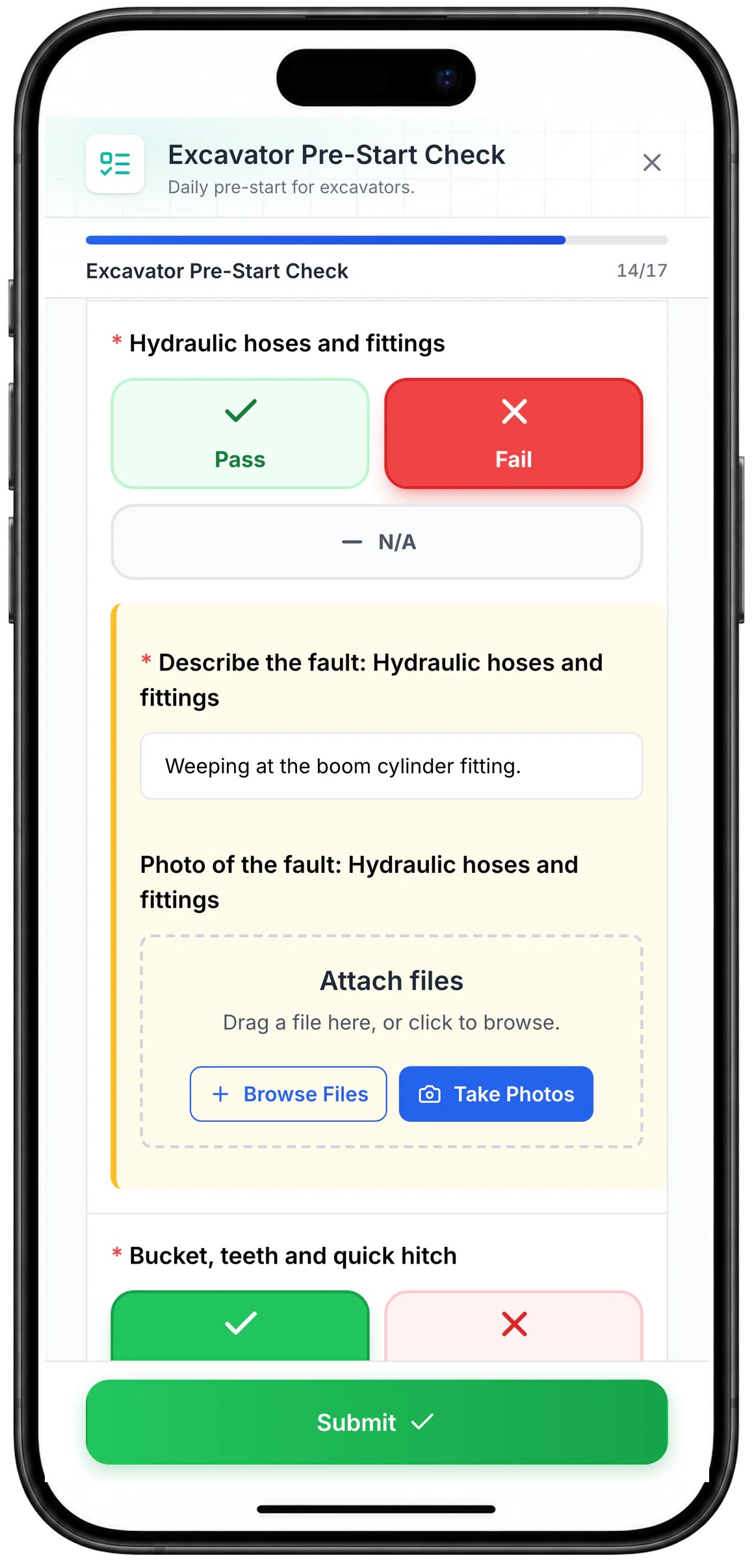
Tap Pass, Fail or N/A on a phone
A Pass, Fail or N/A question shows as large coloured buttons. Choosing Fail on the hydraulic hoses opens the fault description and photo fields.
MapTrack app · Demonstration data · Captured
About this screenshot
Captured at a 430 x 932 phone viewport in a demonstration workspace and shown in a phone frame. Questions render as buttons when their choices are a Pass/Fail-style set.
What's the quick summary of MapTrack vs Sitemate?
Both are Australian-built, but they are different shapes. Sitemate is a forms-first company with three separate products. MapTrack is one unified asset operations platform with per-asset pricing. Here is a clear, side-by-side comparison.
TL;DR - MapTrack vs Sitemate: Sitemate is an Australian-built company (Sydney, founded 2015) whose products are Dashpivot (HSEQ forms and field records, its flagship and strongest surface), Flowsite (no-code integrations) and Gearbelt (asset and fleet management, the rebrand of Nomad Fleet acquired August 2024), each subscribed separately. Dashpivot is priced per user across four paid plans, with a 30-day trial whose work carries over when you subscribe; reported per-user prices vary across third-party sources, so confirm on the Dashpivot pricing page. MapTrack is a single unified asset operations platform: one register that tracks tools, plant and fleet by QR, barcode, GPS, BLE and 150+ telematics, fleet and fuel-card data sources, with inspections, AS/NZS-aware templates you adapt, reservations, work orders and per-asset cost tracking - all in one subscription with per-asset pricing and AUD billing. Both companies are Australian and both offer offline mobile, so we do not claim MapTrack is more Australian or wins on offline. Choose Sitemate for forms depth and a best-of-breed suite (Dashpivot + Flowsite + Gearbelt); choose MapTrack for one unified asset-first platform where tracking, inspections and maintenance already connect. MapTrack covers tools, plant, trailers and vehicles on one record, from any phone, and holds Capterra’s Best Ease of Use award for 2026.
Which platform fits your team?
Pick the persona that sounds most like you. The recommendation reflects publicly documented capabilities as at Oct 2026.
The construction HSEQ or document lead
Is your core job digitising HSEQ paperwork, project delivery records and site documents with a powerful form builder and template library?
Sitemate (Dashpivot) is a strong fit. It is an Australian-built, mature forms and field-records platform for the built world, with a large free template library and registers. MapTrack runs forms and inspections too, tied to assets and also for sites and people, but as part of an asset platform rather than a dedicated forms platform.
The asset-ops or plant manager
Do you need an asset register, field tracking and maintenance in one platform rather than separate products?
Choose MapTrack. It unifies the register, QR/GPS/BLE tracking, inspections, maintenance and reservations in one subscription. Sitemate covers assets via Gearbelt, a separate product from Dashpivot and Flowsite.
Learn more →The buyer weighing one platform vs three
Would you rather buy one unified platform than assemble Dashpivot plus Flowsite plus Gearbelt?
Choose MapTrack for a single platform with per-asset pricing. Choose Sitemate if you prefer best-of-breed products you combine - forms, integrations and assets - from one Australian vendor.
Learn more →The fleet-tracking-first team
Is live GPS tracking across a mixed fleet, with OEM telematics, your primary need?
Choose MapTrack. It integrates GPS and BLE with 150+ telematics, fleet and fuel-card data sources in the core platform. Verify Gearbelt’s live GPS/BLE depth if you evaluate Sitemate, as it is QR-led and native live GPS is not publicly confirmed.
Learn more →How do MapTrack and Sitemate compare on every feature?
Side-by-side criteria, grouped by category. Updated Oct 2026 from public Sitemate documentation.
| Criteria |  MapTrack |  Sitemate |
|---|---|---|
| Platform & products | ||
| Best for | Unified asset operations - register, tracking, inspections and maintenance for mobile tools, plant and fleet | Built-world forms and field records (Dashpivot), with asset/fleet in a separate product (Gearbelt)(per Sitemate, Jun 2026) |
| Product structure | YesOne unified platform (tracking + inspections + maintenance) | Separate products: Dashpivot (forms), Flowsite (integrations), Gearbelt (assets)(per Sitemate, Jun 2026) |
| Home base | YesAustralian-founded (2012); primary database and application hosting in Sydney | YesAustralian-founded (Sydney, 2015); AU-built(per Sitemate, Jun 2026) |
| Asset operations | ||
| Asset register | YesFull register for tools, plant, fleet and equipment | ?Via Gearbelt (separate product); registers in Dashpivot(per Sitemate acquires Nomad (Gearbelt), Jun 2026) |
| Asset tracking (QR / GPS / BLE) | YesQR, barcode, GPS, BLE; live location and geofences | ?Gearbelt: QR codes; native live GPS/BLE not confirmed(per Sitemate acquires Nomad (Gearbelt), Jun 2026) |
| OEM / telematics data | Yes150+ telematics, fleet and fuel-card data sources | Not publicly confirmedFlowsite no-code integrations; OEM telematics depth not confirmed(per Sitemate, Jun 2026) |
| Maintenance / work orders | YesWork orders; meter, inspection and schedule triggers; due-soon reminders | ?Gearbelt: preventative maintenance and digital work orders(per Sitemate acquires Nomad (Gearbelt), Jun 2026) |
| Reservations / planning | YesBuilt-in reservations and planning view | Not publicly confirmedNot documented across the suite(per Sitemate, Jun 2026) |
| Forms & inspections | ||
| Digital forms / field records | YesCustom forms, pre-starts and inspections on the asset record; 25 field types, conditional logic, photos, signatures and an AI form builder, for assets, sites and people | YesCore strength: Dashpivot form builder, registers, sign-offs(per Sitemate, Jun 2026) |
| Inspections / pre-starts | YesPre-starts and inspections tied to the asset; AS/NZS-aware templates you adapt | YesInspection forms (Dashpivot); Gearbelt asset inspections(per Sitemate, Jun 2026) |
| Free template library | YesAU-focused templates (WHS, plant, AS/NZS-aware) you adapt | YesLarge free template library (safety, quality, forms)(per Sitemate, Jun 2026) |
| Pricing & platform | ||
| Pricing model | YesPer asset; unlimited users; one subscription; AUD | Per user (Dashpivot); Flowsite and Gearbelt priced separately (Jun 2026)(per Dashpivot pricing, Jun 2026) |
| Free option | ?Free trial, no credit card, full access | ?30-day trial in a Lite Workspace; trial data carries over when you subscribe(per Dashpivot pricing, Jun 2026) |
| Mobile & offline | YesOffline-first on all plans; iOS, Android, tablet, desktop | YesOffline mobile in Dashpivot and Gearbelt(per Sitemate, Jun 2026) |
| SSO / enterprise controls | YesRBAC and API on all plans; SSO on Enterprise (Pro add-on) | Not publicly confirmedSSO (OIDC and SAML 2.0) on the Pro, Premium and Platinum plans only(per Sitemate help: single sign-on, Oct 2026) |
Tracking, inspections and maintenance in one platform
Full access to the asset register, QR/GPS/BLE tracking, 150+ telematics, fleet and fuel-card data sources, inspections and maintenance. Per-asset pricing with unlimited users.
- No credit card required
- Unlimited users
How MapTrack and Sitemate compare on features
One platform or three products?
MapTrack is one unified platform for tracking, inspections and maintenance. Sitemate splits these across Dashpivot (forms), Flowsite (integrations) and Gearbelt (assets), each subscribed separately.
Sitemate is a multi-product company. Dashpivot is the flagship forms and field-records product, Flowsite is a no-code integration layer, and Gearbelt is the asset and fleet management product (the rebrand of Nomad Fleet, acquired August 2024). For an asset operation you would typically run Dashpivot plus Gearbelt, and possibly Flowsite, each priced and managed separately (per Sitemate, June 2026). MapTrack puts the asset register, QR/GPS/BLE tracking, inspections, maintenance, reservations and cost tracking in one platform with one subscription. If you prefer best-of-breed products you assemble, Sitemate offers that; if you want one system where tracking, inspections and maintenance already connect, MapTrack is unified by design.
Which is stronger on asset operations?
MapTrack is asset-tracking-first in one platform. Sitemate covers assets via Gearbelt, a separate product, while its core strength and traffic centre on forms and HSEQ.
MapTrack is built around the asset: a register for tools, plant, fleet and equipment, QR and barcode identification, GPS and BLE for live location and geofences, and 150+ telematics, fleet and fuel-card data sources for meter readings, all in one place. Sitemate addresses assets through Gearbelt, which is a credible construction asset and fleet product (QR codes, offline inspections, preventative maintenance, digital work orders), but it is a separate product from Dashpivot, and Sitemate’s organic footprint and content centre on safety and forms rather than asset operations (per Sitemate, June 2026). For an asset-first operation, MapTrack keeps the register, inspections and maintenance together; with Sitemate the asset layer is a distinct product.
Which is stronger on forms and field records?
Sitemate wins here. Dashpivot is a mature forms and field-records platform with a large template library. MapTrack runs forms and inspections too, tied to the asset, with conditional logic, signatures and an AI form builder, and can file them on a site or person too.
We are clear about this: Dashpivot is genuinely strong on forms. Its form builder, registers, sign-offs, photo capture and large free template library are built for digitising HSEQ paperwork and project delivery records for the built world, and that is where Sitemate’s product and content depth sit. MapTrack runs custom forms, pre-starts and inspections too, with conditional logic, signatures, an AI form builder and PDFs with your logo, but they live on the asset record rather than as a standalone forms platform. If your core need is digitising site documents and HSEQ workflows, Dashpivot is purpose-built for it; if your forms need to attach to assets you also track and maintain, MapTrack ties them together.
Which tracks assets in the field?
MapTrack adds QR, barcode, GPS, BLE and 150+ telematics, fleet and fuel-card data sources in one platform. Gearbelt offers QR codes; native live GPS/BLE across the suite is not publicly confirmed.
MapTrack tracks assets by QR and barcode for identification, GPS and BLE hardware for live location and geofences, and ingests engine hours, odometer and fault codes from 150+ telematics, fleet and fuel-card data sources. Sitemate’s Gearbelt uses QR codes for asset and fleet management with offline inspections and maintenance; native live GPS location and BLE proximity across the suite are not publicly confirmed (per Sitemate, June 2026). If real-time field location across a mixed fleet is the job, verify Gearbelt’s tracking depth and weigh MapTrack’s integrated GPS/BLE and telematics.
How do maintenance and work orders compare?
Both can run maintenance. MapTrack has work orders with meter and inspection triggers in the core platform; Sitemate offers preventative maintenance and work orders via Gearbelt.
MapTrack runs work orders triggered by meters, failed inspections or schedules, with parts, costs and service history on the asset, in the same platform as tracking and inspections. Sitemate offers preventative maintenance and digital work orders through Gearbelt, its asset and fleet product, with Dashpivot handling the forms side. Both cover maintenance; the difference is integration. In MapTrack the inspection, the work order and the asset location are one record; in the Sitemate suite, maintenance lives in Gearbelt and forms live in Dashpivot, connected via the platform and Flowsite. Compare how tightly the inspection-to-work-order loop runs for your workflow in a pilot.
Which pricing model fits better?
MapTrack is per asset with unlimited users in one subscription. Dashpivot is per user, with Flowsite and Gearbelt priced separately.
MapTrack charges per asset with unlimited users included and one subscription covering tracking, inspections and maintenance, billed in AUD. Dashpivot is priced per user across four paid plans (Standard, Pro, Premium and Platinum), with a 30-day trial whose work carries over when you subscribe, and reported per-user prices vary across third-party sources, so confirm the current figures on the Dashpivot pricing page; Flowsite and Gearbelt are priced and subscribed separately (per Sitemate, June 2026). For an asset operation that needs tracking and maintenance across many users, a single per-asset subscription is usually simpler than assembling per-user products. Model both against your real headcount, asset count and which Sitemate products you would need.
Which is better: MapTrack or Sitemate?
MapTrack wins for teams that want one unified platform for asset tracking, inspections and maintenance with per-asset pricing, rather than assembling separate products. Sitemate wins for forms-first, construction HSEQ teams that want Dashpivot’s mature form builder and template library, no-code integrations via Flowsite, and a dedicated construction fleet product (Gearbelt) from one Australian vendor. Both are Australian and both offer offline.
| Category | Winner |
|---|---|
| One unified platform (tracking + inspections + maintenance)(per Sitemate, Jun 2026) | MapTrack |
| Asset tracking depth: QR, GPS, BLE and 150+ telematics, fleet and fuel-card sources(per Sitemate, Jun 2026) | MapTrack |
| Per-asset pricing with unlimited users, one subscription(per Dashpivot pricing, Jun 2026) | MapTrack |
| Asset-first model (vs Dashpivot + Flowsite + Gearbelt)(per Sitemate acquires Nomad (Gearbelt), Jun 2026) | MapTrack |
| Forms and field-records depth (Dashpivot) | Sitemate |
| No-code integration platform (Flowsite) | Sitemate |
| Construction HSEQ template breadth | Sitemate |
| Domain authority and organic reach | Sitemate |
| Australian heritage | Draw |
| Offline mobile | Draw |
How Sitemate compares: independent ratings and verified pricing
All figures below are sourced from public review platforms, vendor pricing pages and customer reviews. We recheck every field on a quarterly cadence.
Pricing
Dashpivot is priced per user, not per asset: Standard from about US$32/user/month and Pro from about US$54/user/month (Pro adds more integrations; API access varies by Flowsite plan across Sitemate’s help articles), with a free trial before a paid plan, and user types split into paid Contributors and Visitors, with unlimited Visitors included from Pro. Sitemate sells Gearbelt for assets separately. Figures are from third-party listings as sitemate.com blocks automated access.
Source: Analyst estimate · View source
Feature parity: MapTrack vs Sitemate
| Capability | MapTrack | Sitemate |
|---|---|---|
| Barcode and QR label scanning from a phoneSitemate Gearbelt documents QR-code scanning for asset identification; its asset tags are grouping labels, not barcode or RFID tags, and barcode scanning is not documented. Dashpivot captures forms via QR submission links. MapTrack scans QR, barcode and Data Matrix labels with the phone camera or a handheld Bluetooth or USB scanner. | ||
| Asset register and check-in / check-outSitemate Gearbelt documents a fixed-asset register and location logs; a check-in / check-out workflow is not publicly documented. Note this sits in Gearbelt, a separate product from the forms-first Dashpivot. | ||
| Native GPS, BLE and 150+ telematics, fleet and fuel-card data sourcesSitemate markets GPS-tracker sync for Gearbelt, but its help centre documents location only as logs added by hand or picked on a form; native BLE and broad telematics integration are not publicly documented, so marked partial. | ||
| Offline-first mobile captureThe Dashpivot mobile app is documented to work offline and sync when reconnected (offline access rated 5.0 on GetApp). | ||
| Maintenance scheduling and work ordersSitemate Gearbelt documents maintenance scheduling and history plus digital work orders. Delivered via Gearbelt, not Dashpivot. | ||
| Digital pre-starts, inspections and compliance formsDashpivot is forms-first: drag-and-drop digital forms, inspections, audits, workflows, photos and e-signatures, online and offline. | ||
| Public API included (not gated to a higher tier)Sitemate offers an Open API that its help centre describes as generally available on all Flowsite plans, although an older Flowsite plan article still ties Open API access to the paid plans, so check the plan; API access is included with MapTrack. | ||
| Per-asset pricing with unlimited usersDashpivot is priced per user (paid Contributors; unlimited Visitors included from Pro), so cost scales with team size rather than asset count. The separate Gearbelt asset product is priced per asset with users free and unlimited (per its pricing page, Jul 2026), subscribed separately. |
Last verified 2026-06-28. Sitemate is not affiliated with MapTrack; trade marks belong to their respective owners.
MapTrack vs Sitemate: the differences that matter
Sitemate is a capable, Australian-built suite; the competitor column states documented capability as at Oct 2026. MapTrack figures are customer-reported outcomes or platform capability.
| Metric | MapTrack | Sitemate |
|---|---|---|
| Product structure | One unified platform | Dashpivot + Flowsite + Gearbelt (separate products) |
| Asset tracking | QR, barcode, GPS, BLE and 150+ telematics, fleet and fuel-card data sources | Gearbelt QR codes; native live GPS/BLE not confirmed |
| Core strength | Asset tracking + maintenance + compliance | Forms and field records (Dashpivot) |
| Pricing model | Per asset, unlimited users, one subscription (AUD) | Per user (Dashpivot); Flowsite/Gearbelt priced separately |
| Home base | Australian-founded (2012) | Australian-founded (Sydney, 2015) |
| Reduction in asset loss after switching | Up to 70% (customer-reported) | Not a stated outcome |
How does MapTrack pricing compare to Sitemate?
MapTrack
Priced per asset with unlimited users, files, scans, documents, forms, alerts and automations included, in one subscription. No per-seat fees and no lock-in. Free trial with no credit card and guided onboarding; AUD pricing; monthly or annual billing.
Get pricing for your asset count →Sitemate
- Dashpivot: four per-user paid plans: Standard, Pro, Premium and Platinum (figures vary by source)
- Trial: 30-day trial in a Lite Workspace; data carries over when you subscribe
- Flowsite & Gearbelt: priced and subscribed separately
Per user (as of June 2026); confirm exact tiers on the Dashpivot pricing page.
Dashpivot is per user; Flowsite and Gearbelt are priced separately. MapTrack is per asset with unlimited users in one subscription. Model both against your headcount, asset count and which Sitemate products you would need. Reported Dashpivot prices vary across sources; confirm on the live pricing page.
Should you choose MapTrack or Sitemate?
Choose MapTrack if you…
- Want one unified platform for tracking, inspections and maintenance
- Want an asset register and field tracking (QR, barcode, GPS, BLE) in the core platform
- Want 150+ telematics, fleet and fuel-card data sources, not just QR
- Prefer per-asset pricing with unlimited users in one subscription
- Want inspections, work orders and asset location on the same record
- Want AS/NZS-aware compliance templates you adapt and AUD pricing
- Would rather not assemble Dashpivot plus Flowsite plus Gearbelt
- Want a failed check to raise a work order automatically, through a rule you set
- Want tiered service plans on run hours, with work orders raised from meter readings
- Run test and tag or calibration rounds as one work order across many assets, each with its own pass or fail
- Want GPS trackers managed in the same app, with battery, signal and estimated run hours feeding service plans
- Use barcode or Data Matrix labels as well as QR, scanned with the phone camera or a handheld scanner
- Want AI dash cams with live video and event clips in the same app as your assets
- Hire out equipment and need rate cards with daily, weekly and monthly rates (a Pro and Enterprise add-on)
- Want a cost ledger, budget vs actual and repair-or-replace for every asset (a Pro and Enterprise add-on)
- Run several divisions that each need their own assets and team access (a Pro and Enterprise add-on)
Consider Sitemate if you…
- Forms and field records are your core need (Dashpivot form builder)
- You want a large construction HSEQ template library
- You want no-code integrations via Flowsite from the same vendor
- You want a dedicated construction fleet product (Gearbelt)
- You prefer best-of-breed products you combine over one platform
- You are comfortable subscribing to separate products for forms and assets
Best Sitemate alternatives, ranked
These are the tools teams compare against Sitemate when they want a unified asset platform, or stronger asset tracking alongside forms.
- 1
MapTrack
Best for unified asset tracking, inspections and maintenance in one platform, with per-asset pricing and a Sydney-hosted primary database.
- 2
Gearbelt
Sitemate’s own asset and fleet product (ex-Nomad Fleet): QR codes, offline inspections and preventative maintenance. A separate subscription from Dashpivot.
- 3
SafetyCulture
Broad inspections and forms platform with a large template library and training. Per-seat pricing; free tier capped at 10 users.
- 4
MaintainX
Maintenance-first CMMS with strong work orders and inspections tied to maintenance. Per-user pricing.
- 5
Fiix
Rockwell-owned plant CMMS with deep preventive maintenance and reliability. Per-user pricing.
What our customers say
“MapTrack streamlines tracking and asset servicing across mine shutdowns. Simple, reliable and effective.”

Gordon Stennings
Maintenance Storeman, Mineral Resources
“Thanks to MapTrack we know exactly where our gear is. Hire costs reduced 25-35%.”

Denis Slaviero
Operations Manager, Hacer Group
“We used to spend 1 to 2 days a week tracking our generators alone. MapTrack gave us full visibility across every site.”
Steve McAllister
Asset Coordinator, Saunders International
How do you switch from Sitemate to MapTrack?
MapTrack supports CSV and spreadsheet imports with AI-assisted field mapping, so you can bring across your asset list and rebuild forms and inspections on the asset record. The MapTrack onboarding team provides guided setup and crew training. Most teams are operational within a week.
Export your data
Export your asset list, registers and form templates from Dashpivot or Gearbelt.
Import & rebuild
Upload assets into MapTrack and rebuild forms and inspections on the asset record; our team maps sites and forms.
Go live
Roll out to your crew with training. Operational within a week.
What should you verify in a pilot?
Before committing, run a short pilot or proof with your own asset mix and workflows.
- ✓MapTrack: Confirm the asset register and QR/GPS/BLE tracking fit your asset mix; verify your telematics or fuel-card provider is among the 150+ telematics, fleet and fuel-card data sources in MapTrack's integration directory; test inspection-to-work-order on a real asset; review reservations and cost tracking; confirm AS/NZS template coverage and the Sydney primary-database and application-hosting setup.
- ✓Sitemate: Confirm which products you need (Dashpivot, Flowsite, Gearbelt) and their combined cost; test Dashpivot form building and template fit; verify Gearbelt’s asset tracking and live GPS depth; check how tightly forms, assets and integrations connect across the suite.
Methodology and sources
Updated Oct 2026. This comparison uses the public Sitemate, Dashpivot and Gearbelt product and pricing pages, the Nomad Fleet acquisition announcement (August 2024), and MapTrack product data. Both companies are Australian-founded. We focus on the practical difference: one unified asset platform versus a forms-first suite with asset management in a separate product.
- Sitemate (Dashpivot, Flowsite, Gearbelt; AU-built)
- Sitemate acquires Nomad Fleet (rebranded Gearbelt, Aug 2024)
- Dashpivot pricing (per-user plans; 30-day trial, data carries over when you subscribe)
- Dashpivot product (HSEQ forms and field reporting)
Sitemate is a genuine Australian company and Dashpivot is a strong forms platform; we do not claim MapTrack is "more Australian", and both platforms offer offline. Reported Dashpivot per-user prices vary across third-party sources, so confirm current figures on the Dashpivot pricing page; Flowsite and Gearbelt are priced separately and their exact per-user pricing is not publicly confirmed. Where a capability is not documented (for example native live GPS across the suite), it is marked "not publicly confirmed" rather than asserted as absent. Verify with Sitemate directly and in a pilot.
Spotted something out of date or incorrect? Email corrections@maptrack.com and we will review and update this page.
Frequently asked questions: MapTrack vs Sitemate
By industry
More comparisons
- MapTrack vs Asset Panda
- MapTrack vs SafetyCulture
- MapTrack vs Hilti ON!Track
- MapTrack vs Milwaukee ONE-KEY
- MapTrack vs MaintainX
- MapTrack vs Fleetio
- MapTrack vs ToolSense
- MapTrack vs Tenna
- MapTrack vs Samsara
- MapTrack vs Geotab
- MapTrack vs Verizon Connect
- MapTrack vs Trackunit
- MapTrack vs ToolWatch
- MapTrack vs spreadsheets
- MapTrack vs Sortly
- MapTrack vs EZOfficeInventory
- MapTrack vs Limble
- MapTrack vs GoCodes
- MapTrack vs AssetTiger
- MapTrack vs Cheqroom
- MapTrack vs ShareMyToolbox
- MapTrack vs Gearbelt
- MapTrack vs Fiix
- MapTrack vs GoAudits
- MapTrack vs GoFMX
- MapTrack vs IBM Maximo
- MapTrack vs Kynection
About the author

Co-Founder & GM of Operations
Lachlan leads operations at MapTrack, bringing 10+ years of enterprise technology experience across mining, construction and heavy industry. Before MapTrack, he held senior roles at Workato (integration and automation) and AppDynamics/Cisco (application performance), working directly with ASX-listed organisations to modernise their technology stacks. His deep understanding of field operations and blue-collar workflows shapes how MapTrack solves real problems for asset-intensive teams.
View LinkedIn profile →Free templates for this workflow
Whichever platform you choose, these are free to download and use. No account needed.
One unified asset platform, built in Australia
Book a tailored demo and get pricing for your asset count. No lock-in; unlimited users included; a Sydney-hosted primary database.
4.9 on G2 · 5.0 on Capterra, GetApp & Software Advice
- No credit card required
- Unlimited users
Dashpivot alternative · MapTrack vs Gearbelt · Asset tracking