
Plant and equipment management software
Run excavators, attachments, generators and the whole mixed fleet from one register. Pre-starts, meter-based servicing and recorded work-order costs, built for Australian sites.
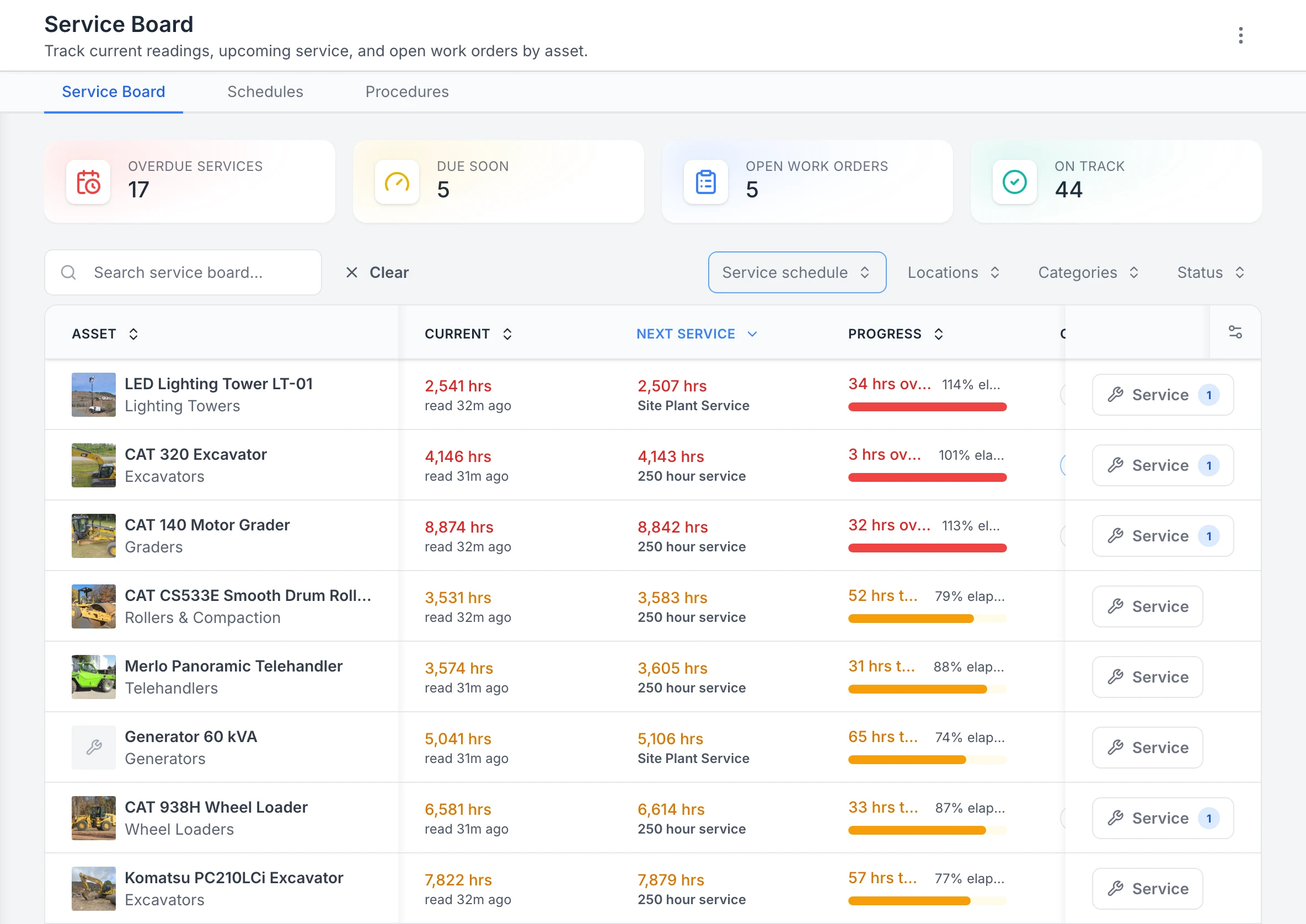
Plant and site gear by next service
Filtered to the plant and site-plant service plans and sorted by next service, the machines past their hour services come first: a lighting tower, the CAT 320 and a grader. Each row shows the current hour reading, the reading its next service falls due at and how far through the interval it is. The counts at the top cover the whole workspace, not only the filtered rows.
MapTrack app · Demonstration data · Captured
About this screenshot
Demonstration workspace at a 1440 px desktop viewport. The readings were entered by hand in the app that day. Filtered to two service plans with the board’s service schedule filter. Requires enrolled assets, configured schedules and an internet connection.

Co-Founder & GM of Operations
Trusted by construction, mining and field service teams















The challenge
Plant lists drift the moment machines start moving
Plant moves between sites, crews and projects every week. Spreadsheets, whiteboards and workshop diaries cannot keep up, and the gaps show up as lost gear, missed services and failed audits.
Nobody knows where the plant actually is
The register says the roller is at the depot; the depot says it went to the northern job. MapTrack can show the latest linked GPS position for confirmed devices. A QR scan identifies an unpowered asset but does not establish its location or transfer it. A scan identifies the asset. Assignment, return, transfer and audit actions are deliberate connected steps. Confirm the device, provider, delivered location or telemetry fields and rollout scope.
Services run on the calendar, not the hour meter
Calendar-only servicing can over-service idle machines and under-service busy ones. Confirm the device, provider, delivered location or telemetry fields and rollout scope. Choose and test the schedule trigger and manual, per-asset automatic or batch generation mode.
Pre-starts and certificates live on paper
Daily pre-starts in triplicate books and certificates in a filing cabinet mean compliance evidence is slow to produce and easy to lose. Digital pre-starts attach the evidence to the asset record automatically.
No one can say what a machine really costs
Servicing, repairs, hire charges and downtime are scattered across systems. Without per-asset cost visibility, repair-or-replace decisions and project costings run on gut feel.
One platform
Register, pre-starts, servicing and costs in one system
MapTrack replaces the plant spreadsheet, paper pre-start book and workshop diary with one platform the crew can use on phones and tablets. Loaded forms can be submitted offline and loaded work orders record per-asset results offline. Adding costs, closing work orders, creation, setup, imports, exports and server-side automations need a connection.
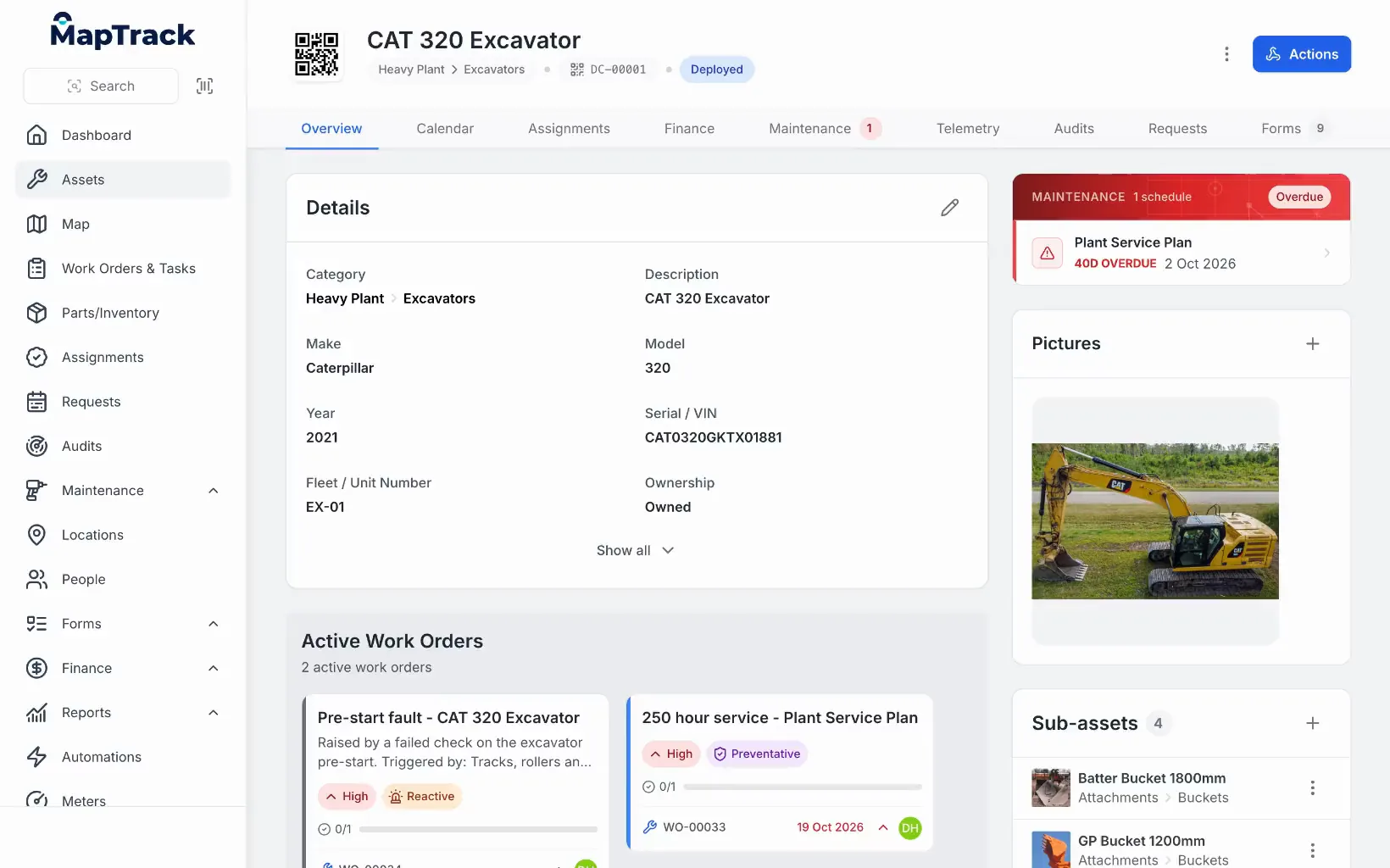
Everything about one machine
An excavator's record: its tag, details, next service and open work orders.
MapTrack app · Demonstration data · Recorded
Mixed-fleet asset register
Excavators, attachments, generators, vehicles and tools can share one register with QR identification and confirmed location sources matched to the asset class. A scan identifies the asset. Assignment, return, transfer and audit actions are deliberate connected steps. Confirm the device, provider, delivered location or telemetry fields and rollout scope.
Explore mixed-fleet asset registerPlant pre-start inspections
Run daily pre-starts on mobile with photos and signatures. A failed submission doesn’t create follow-up work by default. Configure and test any task or work-order automation before rollout.
Explore plant pre-start inspectionsMeter-based maintenance
Choose and test the schedule trigger and manual, per-asset automatic or batch generation mode.
Explore meter-based maintenanceRecorded service and costs
Completed work stays in the asset service history, and work orders can record task time plus manual part, external and other cost lines. Confirm any utilisation or project-cost report before relying on it.
Explore recorded service and costsKeep the service level attached to the machine
A tiered plan can give each machine a named minor, intermediate or major service when its configured triggers become due.
1. Define the complete service levels
Set each level’s triggers, procedure and parts list. Higher-level content needs to include the full work required at that service.
2. Review the next and last service
Use the Service Board and retained service record before allocating workshop time or sending the machine to another site.
Track everything
From 30-tonne excavators to the breaker on the back of the ute
Use QR identification for attachments and tools, and confirm GPS, BLE or telematics delivery for assets that need location data. A scan identifies the asset. Assignment, return, transfer and audit actions are deliberate connected steps. Confirm the device, provider, delivered location or telemetry fields and rollout scope.
- Latest linked GPS positions for confirmed devices
- QR labels for scan-based identification
- Attachments tracked separately from parent machines
- Bulk scanning for mobilisation and demobilisation audits
- Loaded forms can be submitted offline and loaded work orders record per-asset results offline. Adding costs, closing work orders, creation, setup, imports, exports and server-side automations need a connection.
Inspection evidence
Pre-starts that close the loop on plant faults
Operators complete plant pre-starts on a phone before the machine starts work, with submitted results, photos and signatures stored against the asset. A failed submission doesn’t create follow-up work by default. Configure and test any task or work-order automation before rollout. Your team defines and tests the operational isolation and return-to-service process.
- Daily plant pre-starts with photo evidence and signatures
- Selected results can feed configured corrective work
- Configured certificate fields and uploaded documents stay with the asset record
- Submitted inspection results stay with the asset record
- Notification emails require a configured action and valid Person email
Service on the meter
Work orders raised by engine hours, not guesswork
Choose and test the schedule trigger and manual, per-asset automatic or batch generation mode.
- Hour-based, odometer-based and calendar-based triggers
- Provider and field delivery confirmed before rollout
- Manual readings captured at pre-start for untracked plant
- Service history and costs stored per asset
- Configured notification emails to selected Person records
Customer proof
What customers say
“Finally we've got everything in one place - I would recommend this platform to anyone.”
- From the published story: Safety audit documentation that previously took 2–3 days to compile can now be retrieved instantly from the platform on any device.
“Thanks to MapTrack we know exactly where our gear is, who has it and when it needs servicing.”
- From the published story: Better visibility of owned assets across all projects reduced unnecessary equipment hire by an estimated 25–35%, as the team could identify and redeploy idle assets instead of hiring externally.
Scale across projects
Plant management that scales from one depot to every state
Whether you run 50 machines from one yard or thousands of assets across multiple states, MapTrack keeps the same simple field experience while giving plant managers fleet-wide visibility.
Confirm current pricing, plan inclusions, user entitlements, trial and subscription terms directly with MapTrack before relying on them. Use the documented workspace roles and test the required site, division or contractor access before rollout.
Provider fit
confirm telematics delivery
Offline work
Record results after first load
Unlimited users
on every plan
Hosting
Confirm before procurement
One register for every machine, attachment and tool
Tracking, pre-starts, meter-based servicing and recorded work-order costs in one platform. Built for Australian contractors running mixed plant fleets across sites.
- Free trial
- No credit card required
- Confirm current plan scope
Get started
How plant teams roll out MapTrack
Setup depends on data quality, labels, workflows and team size. Start with one asset class or site, test one field workflow, then expand.
Build the register
Import a pilot plant list from a supported spreadsheet and validate the mapped columns. Apply QR labels to attachments and tools, then confirm any GPS hardware, provider, fields and delivery before rollout. Confirm the device, provider, delivered location or telemetry fields and rollout scope.
Connect telematics and meters
Choose and test the schedule trigger and manual, per-asset automatic or batch generation mode.
Digitise pre-starts
A failed submission doesn’t create follow-up work by default. Configure and test any task or work-order automation before rollout.
Review and expand
Review submitted inspection results, completed service history and recorded work-order costs from the pilot. Confirm any utilisation, time-on-site or project-cost report before relying on it, then expand to the next asset class or site.
Key features for plant and equipment management
Everything you need to track, inspect, service and cost a mixed plant fleet.
Stop the plant-list drift
Your plant register should update itself from the field
Submitted pre-starts and recorded meter readings stay with the asset record. Assignment, return and transfer actions are deliberate connected steps. A scan identifies the asset. Assignment, return, transfer and audit actions are deliberate connected steps.
Frequently asked questions
Common questions about managing plant, equipment and attachments with MapTrack.
Resources for plant and equipment teams
Guides, comparisons and templates for managing plant across job sites.
Commercial GPS tracking
Confirm the provider, hardware, delivered fields and reporting scope for plant location data before rollout. Confirm the device, provider, delivered location or telemetry fields and rollout scope.
Explore commercial GPS trackingBest plant management software
An honest comparison of the leading plant management platforms, including where each one fits.
Explore best plant management softwarePlant compliance use case
How contractors keep submitted inspection evidence with each selected plant record and test their own operational process.
Explore plant compliance use caseConstruction templates library
Free pre-start, inspection and maintenance templates for construction plant.
Explore construction templates libraryPlant and equipment software in Australia
How the main platforms compare on offline pre-starts, servicing on run hours, custody and pricing.
Explore plant and equipment software in AustraliaExplore
- Pricing
- Book a demo
- MapTrack vs Asset Panda
- Alternative to Asset Panda
- Alternative to spreadsheets
- Commercial GPS tracking
- Construction equipment GPS tracking
- Construction
- Vehicle pre-start checklist
- Hardware store
Other industries we serve
- Construction
- Civil contractors
- Plumbing contractors
- Electrical contractors
- HVAC contractors
- Landscaping
- Building services
- Mining and resources
- Oil and gas
- Industrial maintenance
- Facilities services
- Fleet and transport
- Government and councils
- Manufacturing
- Energy and utilities
- Infrastructure
- Education
- IT assets
- Aviation
- Fire safety and protection
- Agriculture
- Transport and logistics
- Water utilities
Run your plant fleet from one platform
Use MapTrack to keep plant records, submitted pre-starts, configured meter-based maintenance and recorded work-order costs together. Confirm current pricing, plan inclusions, user entitlements, trial and subscription terms directly with MapTrack before relying on them.
Commercial GPS tracking · Asset tracking · Maintenance · Pre-start inspections · Cost tracking · Construction templates