
Crane inspections
Crane inspection and maintenance software for mobile, pick-and-carry and overhead cranes
Pre starts on the phone, hour services, annual and major inspections and the logbook on each crane, and every operator's VOC on their own record.

One register for every mobile, pick-and-carry and overhead crane
This is the register for whoever answers for the cranes. Each crane carries its pre starts, faults and repairs, its hour services, its annual and major inspections and its logbook, while each operator's licence and VOC sit on their own record.
The short answer
MapTrack keeps every mobile crane, pick-and-carry, crane truck and overhead crane on its own record. Operators scan the QR label and do the pre start on a phone, hour readings drive each service plan, and the annual and major inspection dates, logbook and reports sit on the crane. Each operator's licence and VOC sit on their record.

Co-Founder & GM of Operations
Key takeaways
- One record per crane, whether it's a slewing mobile crane, a pick-and-carry, a crane truck or an overhead crane: make, model, serial, fleet number, QR tag and status.
- Operators scan the crane's QR label and do the pre start on a phone. Fault Present opens a fault note and a photo.
- Each crane's hour services sit on one plan set from its maker's manual; on an automatic schedule, an hour reading someone records raises the work order for you.
- The annual inspection, the registration renewal and the major inspection go on calendar schedules, and the person assigned gets an email 7 days out.
- Each operator's high risk work licence classes, expiry and a signed-off VOC form sit on their person record.
What MapTrack keeps for each crane
- Every kind of craneMobile, pick-and-carry, crane trucks and overhead
- Pre starts on a phoneFault Present, a note and a photo
- Hour servicesOne plan per crane, from the maker's manual
- Annual and major inspectionsCalendar schedules and a 7-day email
- Logbook and operatorsReports, certificates, licences and VOCs
- Status and check-outsDamaged, Repair and who has each crane
- The gear below the hookBeams, slings and shackles on the same register
- Scan itQR, barcode and Data Matrix labels
Trusted by construction, mining and field service teams
















Customer proof
What servicing and safety teams say
We haven't published a crane customer story. These are customers doing the same work in other industries, each labelled with their own industry.
Construction
“Thanks to MapTrack we know exactly where our gear is, who has it and when it needs servicing.”
Construction
“Finally we've got everything in one place - I would recommend this platform to anyone.”
- From the published story: Safety audit documentation that previously took 2–3 days to compile can now be retrieved instantly from the platform on any device.
Mining
“MapTrack streamlines tracking and asset servicing across mine shutdowns - simple, reliable, and effective.”
- From the published story: The end-of-shutdown reconciliation - previously a multi-day exercise - is now completed in hours.
Every mobile, pick-and-carry and overhead crane on one register
Add each crane with its make, model, serial and fleet number, or bulk import the crane fleet from a spreadsheet and bulk edit it. Each kind gets the pre start, inspections and services that suit it, on the same register as the rest of your plant.
Mobile and all-terrain cranes
Slewing cranes on a truck or an all-terrain carrier
- Its item registration number and expiry as fields where Australia's model WHS Regulations register it (rated over 10 tonnes)
- Its operators' C2, C6, C1 or C0 class on their person records
- Its annual and major inspections on calendar schedules
Pick-and-carry cranes
Non-slewing articulated cranes such as Frannas
- Its operators' CN class on their person records
- Hour services on one plan, from the maker's manual
- Its major inspection date as a field, with the report in its Files tab
Crane trucks
Trucks with a Hiab or another vehicle-loading crane
- Rego, rego expiry and odometer on the same record
- The Truck & Crane Truck Daily Prestart and its Crane & Load section
- Its operators' CV class on their person records, for a crane of 10 metre tonnes or more
Overhead and gantry cranes
Bridge and gantry cranes in a workshop or yard
- A QR label for the pre start, indoors as well as out
- Its frequent and periodic inspections on calendar schedules
- In Australia, its design registration number as a field when it's on the design registration list
- Running a tower crane? Start with the free tower crane inspection checklist
Before the first lift
Pre starts at the crane, faults on its record
The operator scans the crane's QR label and does the pre start on a phone, or on a shared tablet with their own PIN. MapTrack's construction setup includes a Truck & Crane Truck Daily Prestart with a Crane & Load section: crane pins, hooks and safety latches, outriggers and pads, crane hydraulics and controls, chains, slings and lifting gear tagged, load restraint, and the tray and gates. It also asks whether the operator holds the required licence or VOC, takes the odometer reading and ends with a signature. For mobile, pick-and-carry and overhead cranes, the crane pre-start and crane inspection checklists run as forms in MapTrack: set one up for each kind of crane.
- Fault Present opens a fault note and a photo
- A rule you set up can raise a linked corrective task, recorded apart from the original fault, and a repeat report of the same fault can join the job that's still open
- The completed pre start downloads as a PDF with the signature, the fault photo and where it was submitted
- Whoever scans the crane next sees the failed pre start in its Forms tab
Setup and limits
- A pre start submits offline and syncs when the phone has reception again; opening one by scanning needs coverage, unless the form is already open on the phone.
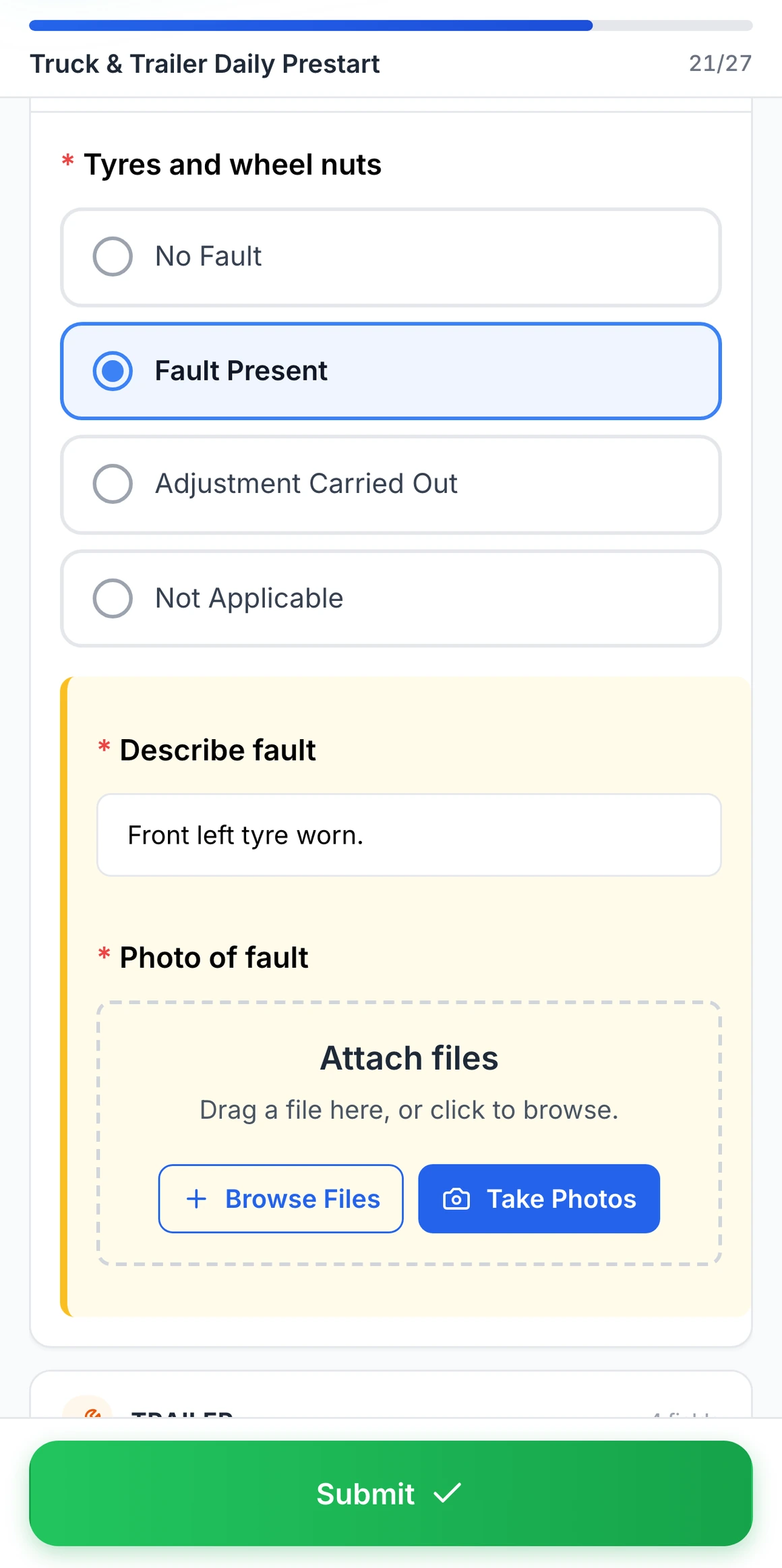
Fault Present on a truck pre start
Choosing Fault Present on tyres and wheel nuts opens a fault note and a photo, both required before the pre start can be submitted.
MapTrack app · Demonstration data · Captured
About this screenshot
Captured at a 430 x 932 phone viewport in a demonstration workspace. The pre start was filled in for this screen and not submitted.
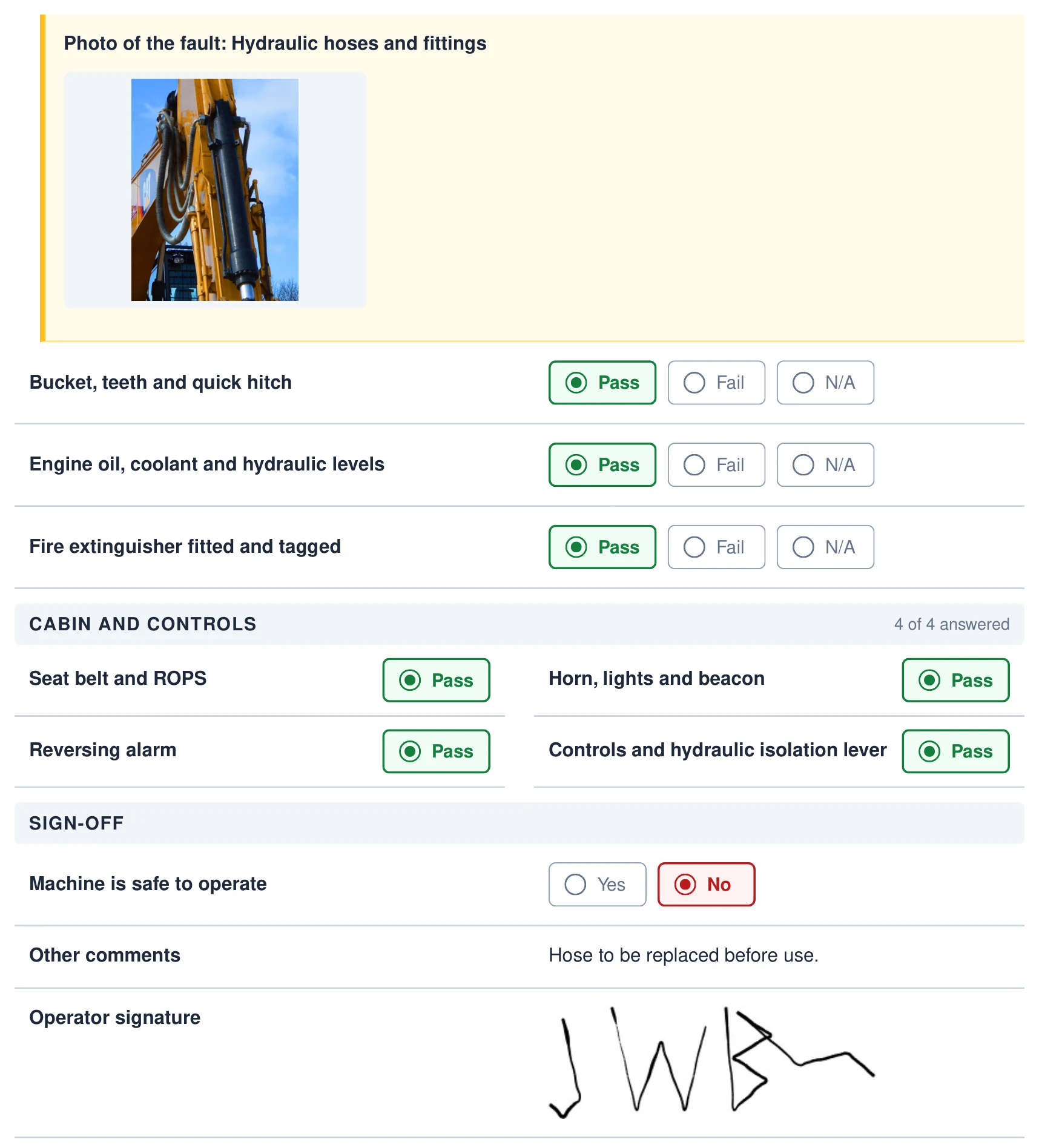
Photo, sign-off and signature in the PDF
The PDF keeps the fault photo, every answer, the sign-off and the operator’s signature.
MapTrack PDF export · Demonstration data · Captured
About this screenshot
An excerpt from page two of the three-page PDF downloaded from this saved demonstration submission.
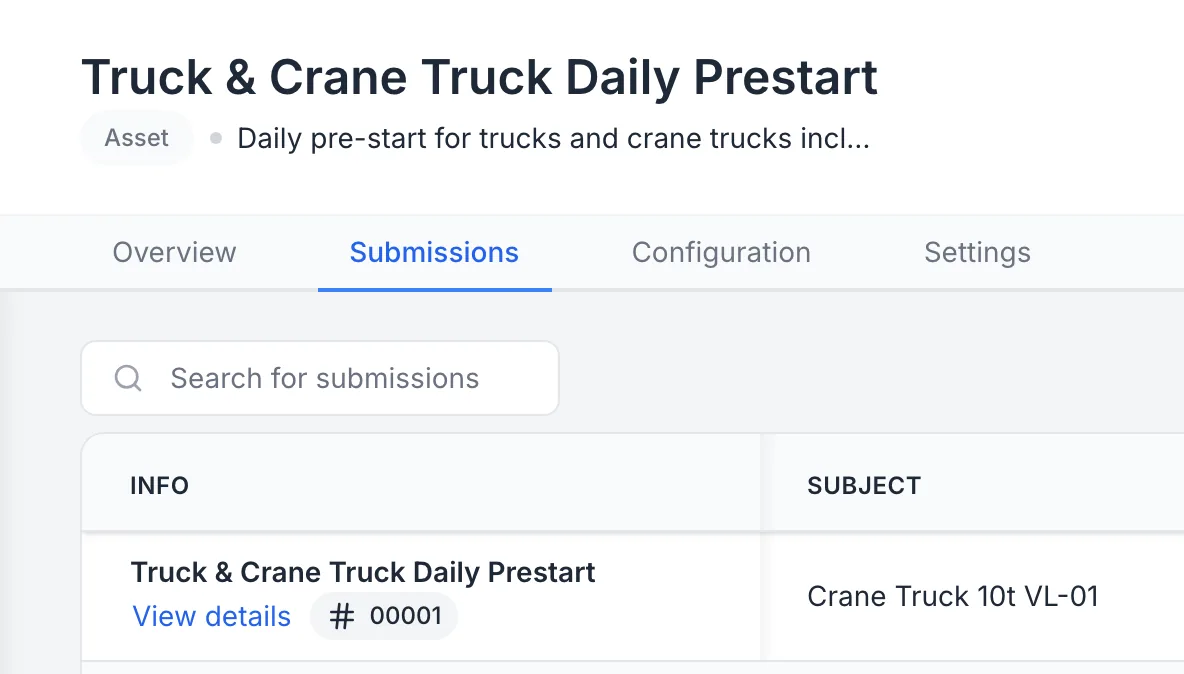
A crane truck’s pre start, submitted
The Truck & Crane Truck Daily Prestart’s submissions, the first one on crane truck VL-01.
MapTrack app · Demonstration data · Captured
About this screenshot
Demonstration workspace at a desktop viewport on the form’s Submissions tab, cropped to the first row.
Hours
Hour services on one plan per crane
Record the hour meter by hand on the crane's record, or on a pre start that asks for it, and the reading goes onto the crane's meter; manual readings need no tracker. One plan holds a crane's hour services, and when two coincide the bigger covers the smaller in one work order. Set each plan by hours, months or whichever comes first, from the crane maker's manual. MapTrack estimates the next due date from recent readings and flags a reading that has gone stale, and the Service Board shows which cranes are overdue and which are due soon.
- On an automatic schedule, an hour reading someone records raises the work order for you, one per crane or one batch for everything due together
- From the schedule, a person can raise per-asset or batch work orders in a couple of clicks
- After a service round, scan a batch of cranes and log the service for all of them at once; each crane keeps its own reading and history entry
- A maintenance health score from 0 to 100 for each crane and schedule, with 12 months of memory
- If a crane carries a GPS tracker registered in MapTrack, see the tracker's battery, signal and last report, and its estimated run hours keep the hours meter current
Setup and limits
- Tracker hours are estimates, and a crane's superstructure hours and its carrier's engine hours can differ: record the hour meter at each service.
- Scanning a batch of cranes to log a service round needs a connection.
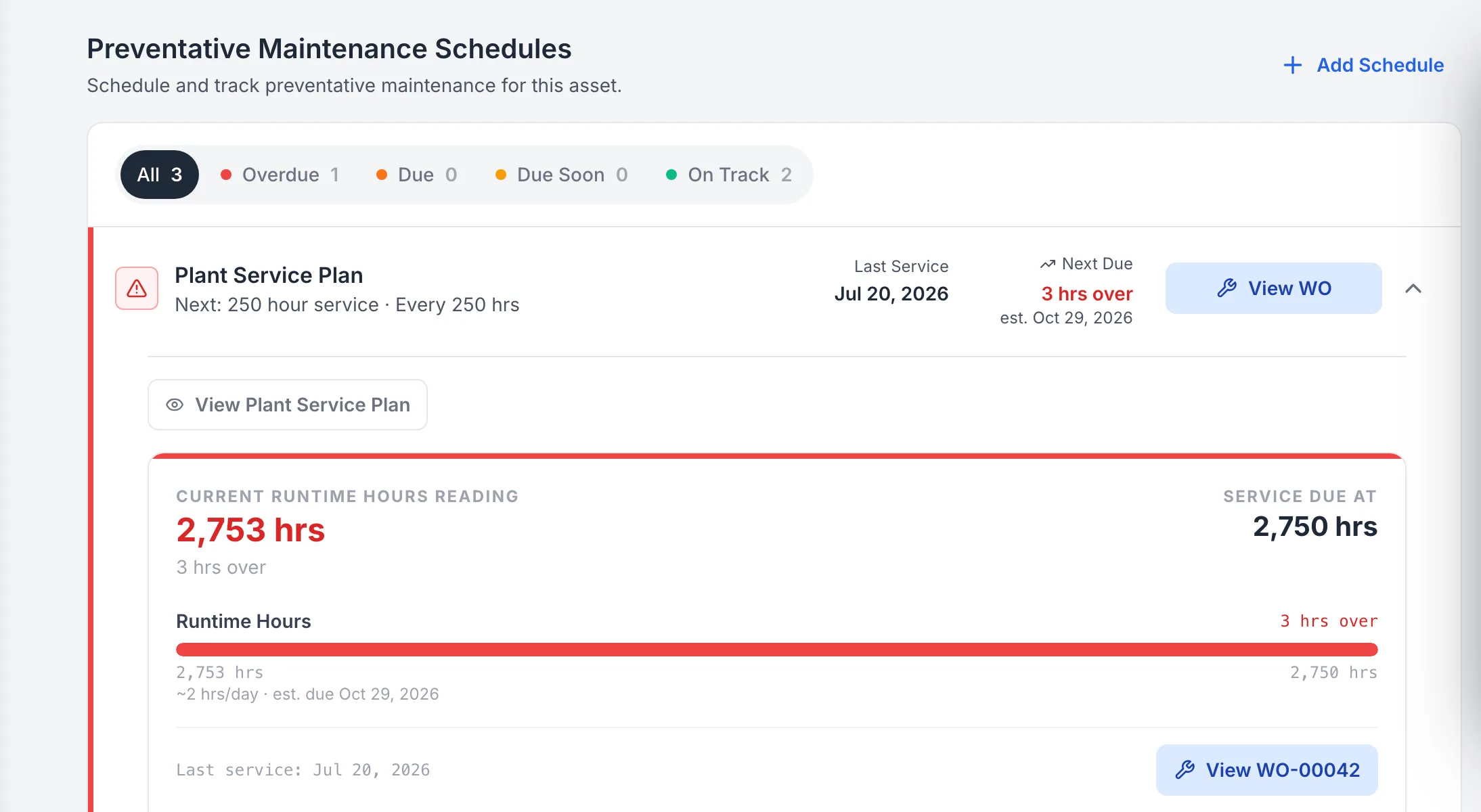
A crane’s hour service plan against its meter
The crane’s hour service plan: its hour meter at 2,753 against a service due at 2,750, so the 250 hour service shows 3 hours over.
MapTrack app · Demonstration data · Captured
About this screenshot
Demonstration workspace at a desktop viewport on the crane’s Maintenance tab, with the plan expanded.
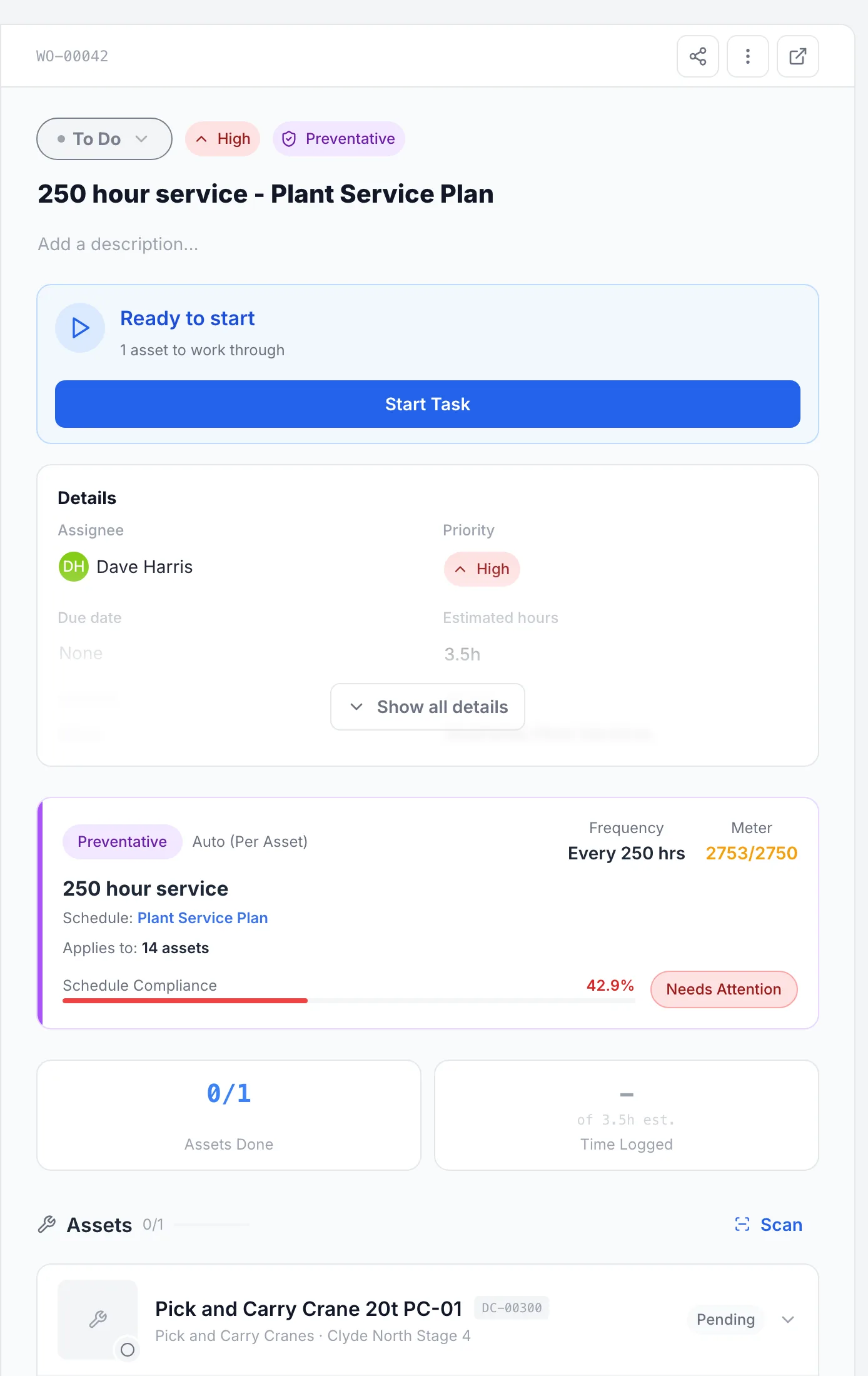
The crane’s 250 hour service as a work order
The 250 hour service on the crane’s plan as a work order, ready to start, with the hour reading that brought it due.
MapTrack app · Demonstration data · Captured
About this screenshot
Demonstration workspace at a desktop viewport on the work order’s panel.
Service intervals come from your crane maker's manual for the model and serial number, and change with the duty, the hours and the lifting cycles. Many makers set a yearly service beside the hour services, and a design life that sets the major inspection. MapTrack holds the plan you set from the manual; it doesn't supply the intervals.
Annual, major and registration
Annual and major inspections, each on its own schedule
In Australia, the model WHS Regulations have a competent person inspect plant as its manufacturer recommends, else as a competent person recommends, and otherwise at least once a year. In Australia, a registered mobile or tower crane also has a major inspection at the end of the design life its maker recommends, or as a competent person recommends, or every 10 years from first commissioning or registration if neither is practicable, done by or under the supervision of a registered professional engineer. In WA, the competent person for a major inspection is someone eligible for professional engineer membership of Engineers Australia, and WorkSafe WA says to get a competent person's recommendations in writing. In NSW, a registered crane's item registration is renewed each year, and at renewal SafeWork NSW asks you to confirm it's been maintained, inspected and tested by a competent person.
- Put the annual inspection, the registration renewal and the major inspection on calendar schedules; MapTrack shows each one due soon and then overdue, and the person assigned gets an email 7 days before it's due
- In Great Britain the thorough examination, and in the US the monthly and annual inspections, go on calendar schedules the same way
- One work order can take several cranes through their annual inspection, each with its own pass or fail
- Each inspection report, and the major inspection report with its engineer's sign-off, goes in the crane's Files tab
Setup and limits
- A date puts the inspection due; someone raises its work order from the schedule.
- The pre start is the operator's daily check; the annual and major inspections are a competent person's, each on its own schedule.
- MapTrack doesn't inspect, test, register or certify cranes, and it isn't an inspection company. Your competent person does the inspection; MapTrack keeps the result and the report on the crane. Recording a result doesn't make a crane or a lift compliant.
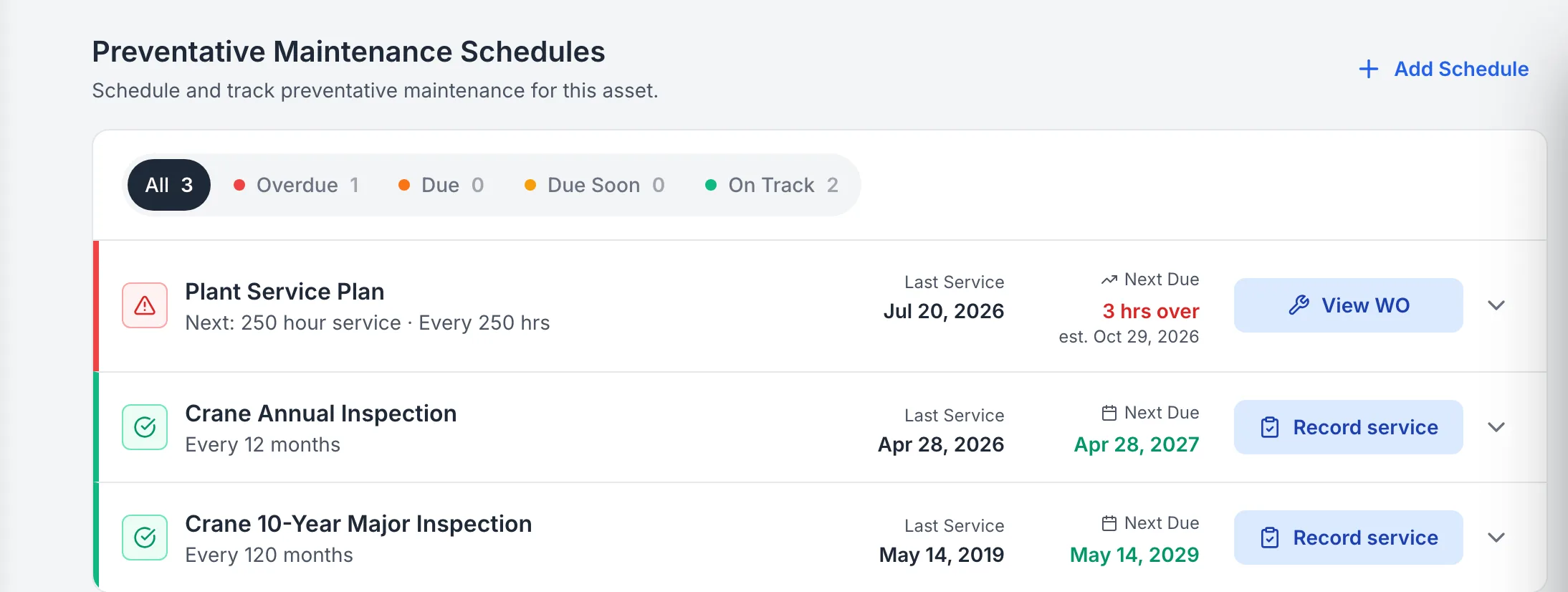
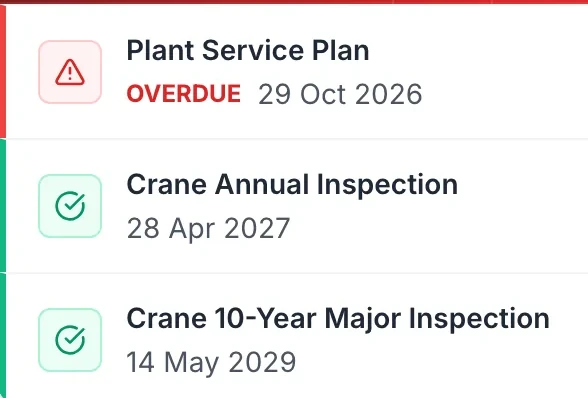
Annual and 10-year major inspections, each on its own schedule
One crane’s three schedules: the hour services, the annual inspection every 12 months and the major inspection every 120 months, each with its own next date.
MapTrack app · Demonstration data · Captured
About this screenshot
Demonstration workspace at a desktop viewport on the crane’s Maintenance tab. The intervals are the demonstration workspace’s own schedules.
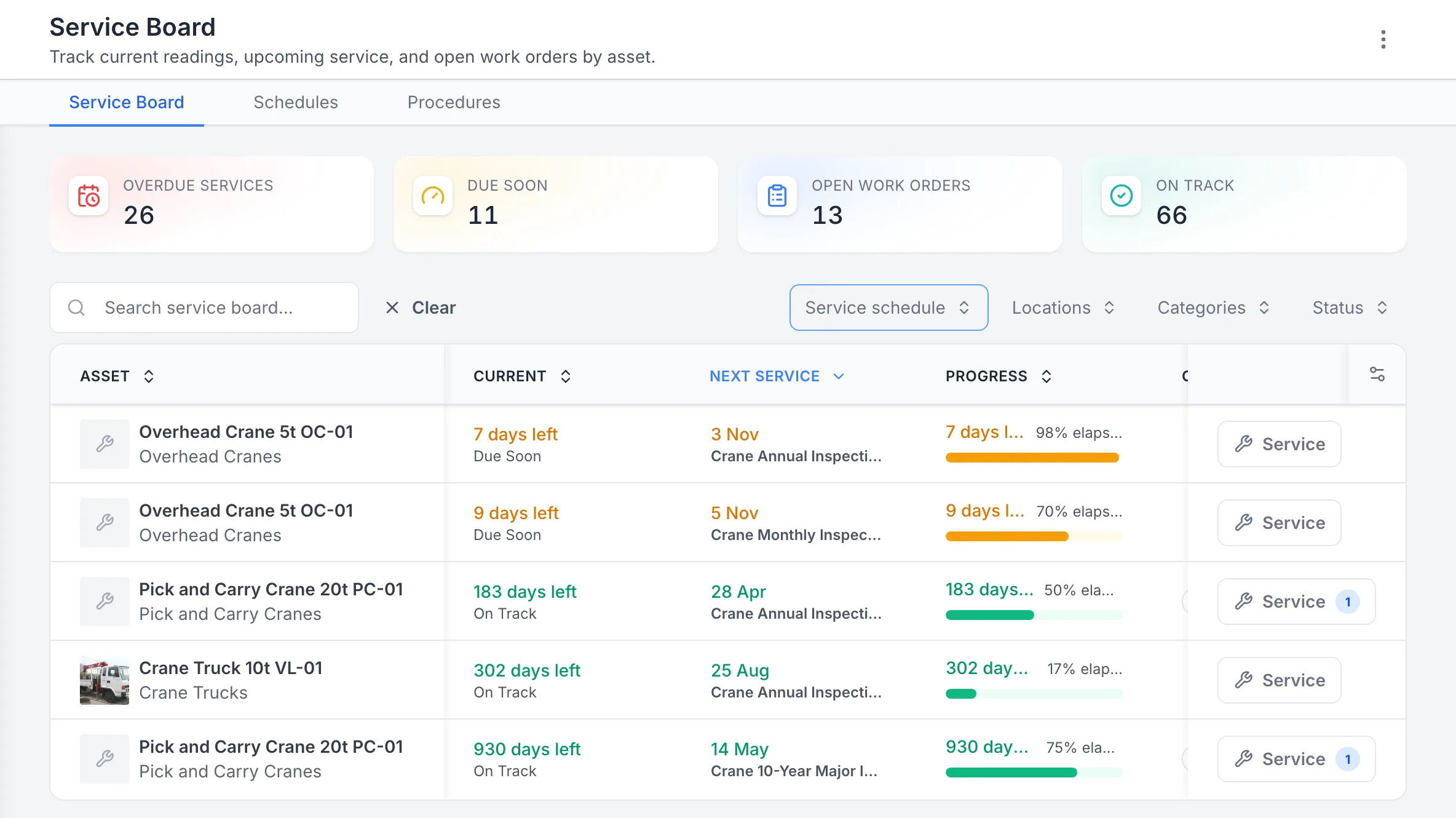
Crane inspections on the Service Board
The Service Board with the cranes’ inspections, the overhead crane’s two due soon first and the rest on track.
MapTrack app · Demonstration data · Captured
About this screenshot
Demonstration workspace at a 1440 px desktop viewport on the Service Board. The counts at the top cover the whole demonstration workspace.
The logbook
The logbook on the crane, the VOC on the operator
In Australia, the model WHS Regulations have whoever is in control of registered plant keep a record of all its tests, inspections, maintenance, commissioning, decommissioning, dismantling and alterations while it's used, and make it available to whoever takes control of it next. In MapTrack each crane's pre starts, the faults found and the jobs that fixed them, its hour readings, its service plan and history with costs, its annual and major inspection reports, its registration certificate and its logbook sit on its own record, ready when someone asks to see them.
- The logbook pages, the annual inspection report, the major inspection report and its engineer's sign-off, the registration certificate, the load chart, the operator's manual and NDT reports, on the crane's record
- Each operator's high risk work licence classes (CN, CV, C2, C6, C1, C0, CB and dogging), number, expiry and a copy of the licence on their person record, with a VOC form signed off there
- In the US, each operator's certification or licence and the employer's evaluation document on their person record: the certification is the testing organisation's or the government's, the evaluation is the employer's
Setup and limits
- MapTrack doesn't check an operator against a crane.
- MapTrack's record isn't a logbook system a regulator has approved.
A logbook page in the crane’s files
An example logbook page kept in crane PC-01’s Files tab.
MapTrack app · Demonstration data · Captured
About this screenshot
Demonstration workspace at a desktop viewport on the crane’s Files tab, cropped to one file. The logbook page is an example document.
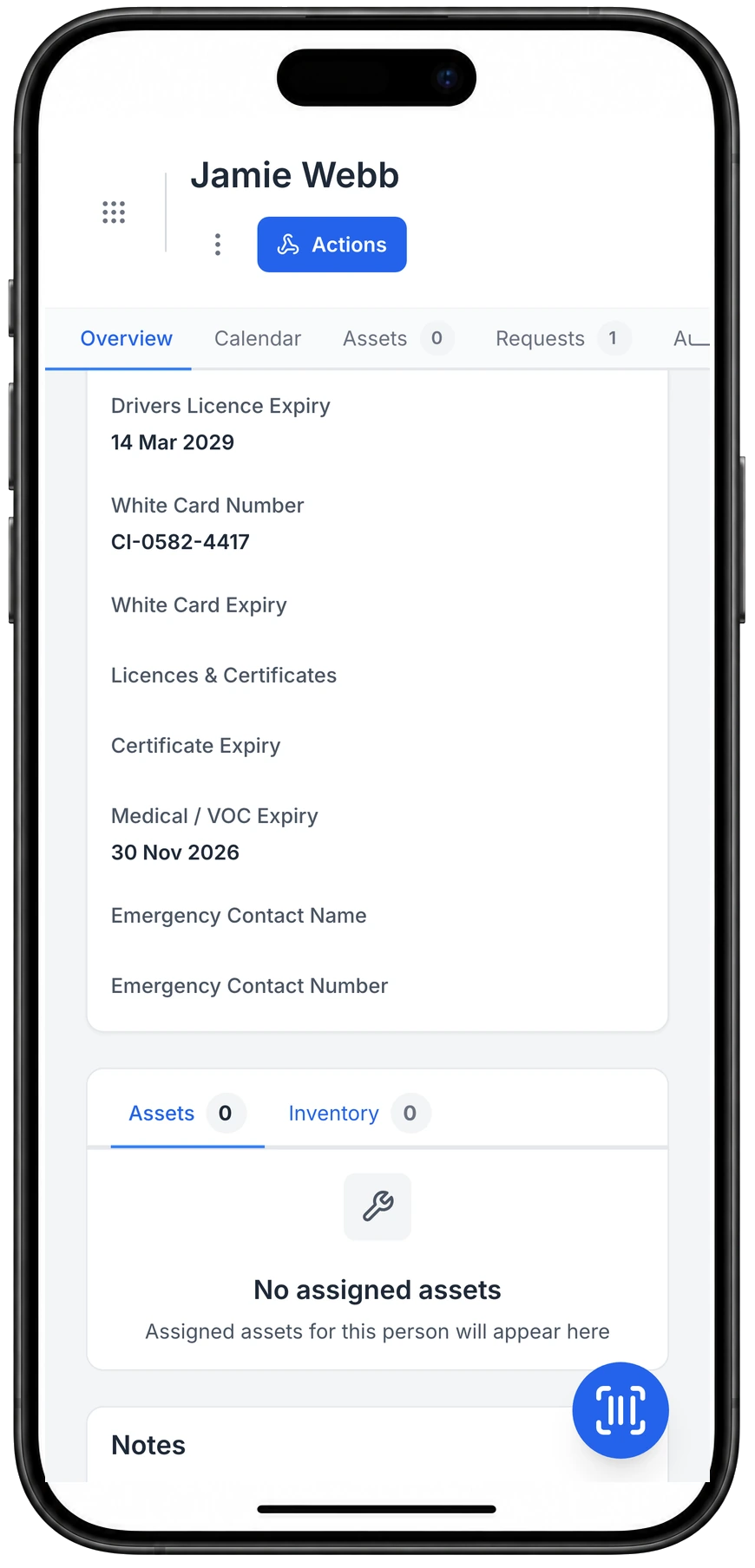
Licence, white card and VOC dates on the person’s record
Licence, white card and medical or VOC dates live on the person's record, next to the gear they hold.
MapTrack app · Demonstration data · Captured
About this screenshot
Demonstration person with three values entered on 23 Oct 2026; the fields are custom person fields set up in this workspace.
Out of service, on the record
Status, check-outs and bookings, crane by crane
Set a crane's status to Repair or Damaged on its record, and whoever scans it next sees that status and the failed pre start in its Forms tab. A Damaged or written-off crane is blocked at check-out, and an owner's override is logged.
- Check a crane out to a person, a site or both, with a due-back date; its outrigger pads, fly jib or hook block are confirmed out and back, with a reason for anything missing
- An overdue service or inspection is flagged when someone checks the crane out or books it, and going ahead is logged
- Book a crane for a job with Requests, approve it, and turn it into a check-out by scan
Setup and limits
- A status is a record: tag the crane out physically as well.
- Checking a crane out or back in, and booking one, needs a connection.
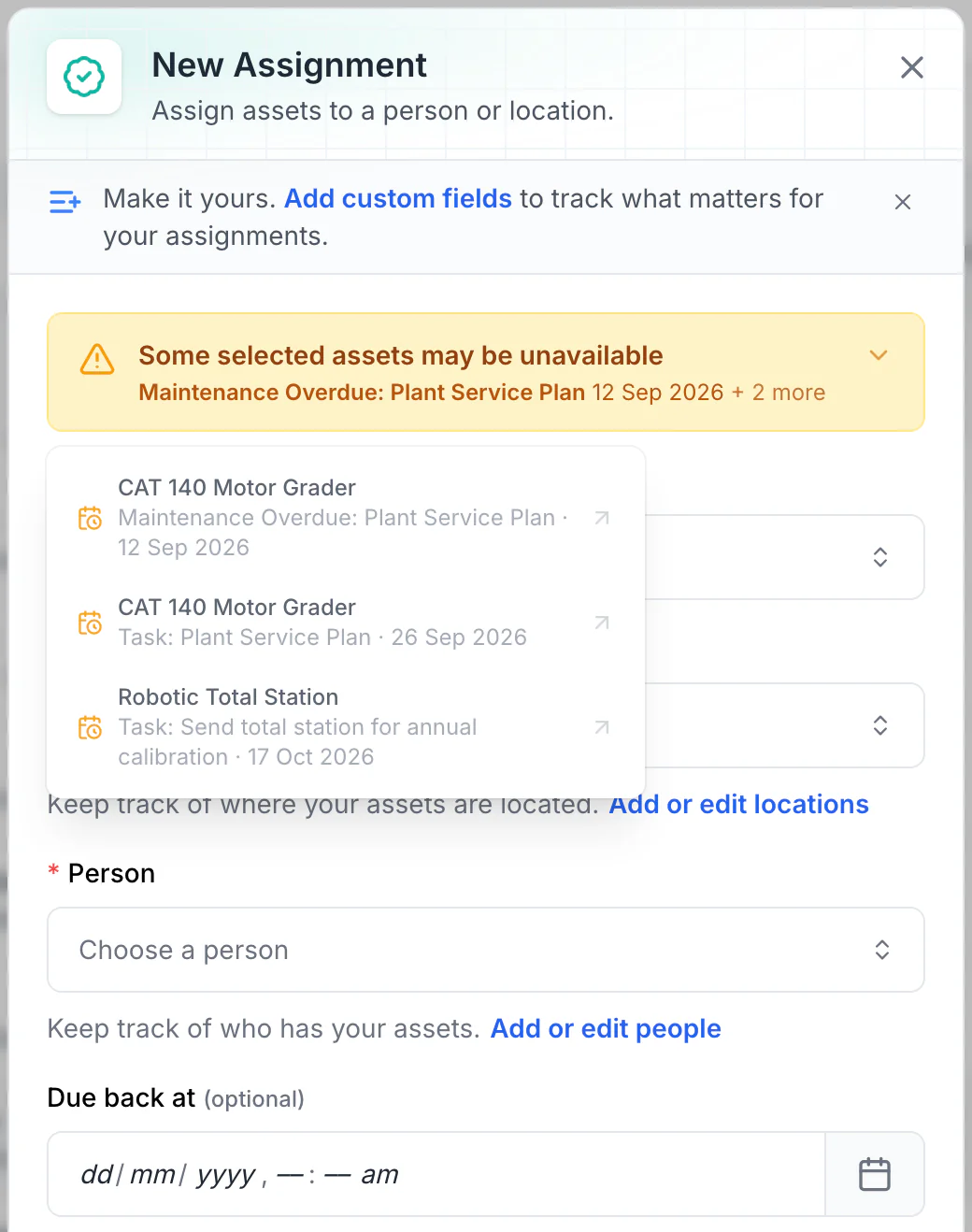
Read the warnings before issuing equipment
Overdue maintenance and scheduled tasks show as amber warnings. No due-back date is set here, so every upcoming conflict is listed. With a due-back date, only tasks before it are listed: a 15 October due-back leaves out the total station’s 17 October calibration.
MapTrack app · Demonstration data · Captured
About this screenshot
Demonstration workspace. Two assets selected and Assign opened; the form was not saved.
A QR label on every crane, in the yard or the workshop
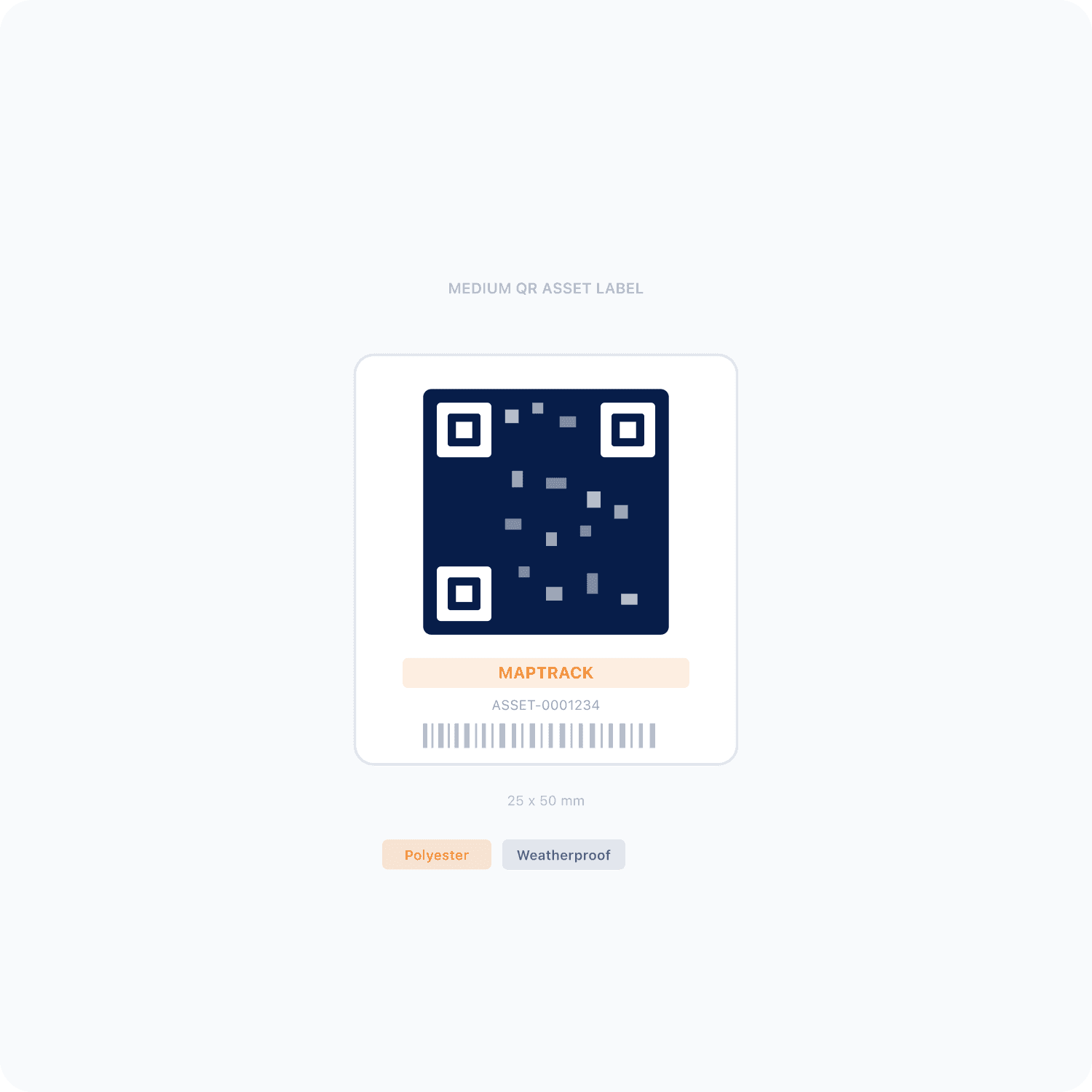
Every crane can carry a QR label, the overhead crane in the workshop as much as the pick-and-carry in the yard, and its pre start starts from a scan. The phone camera or a handheld Bluetooth or USB scanner reads the label and opens that crane's record: its pre starts, its next service, its inspections and its status.
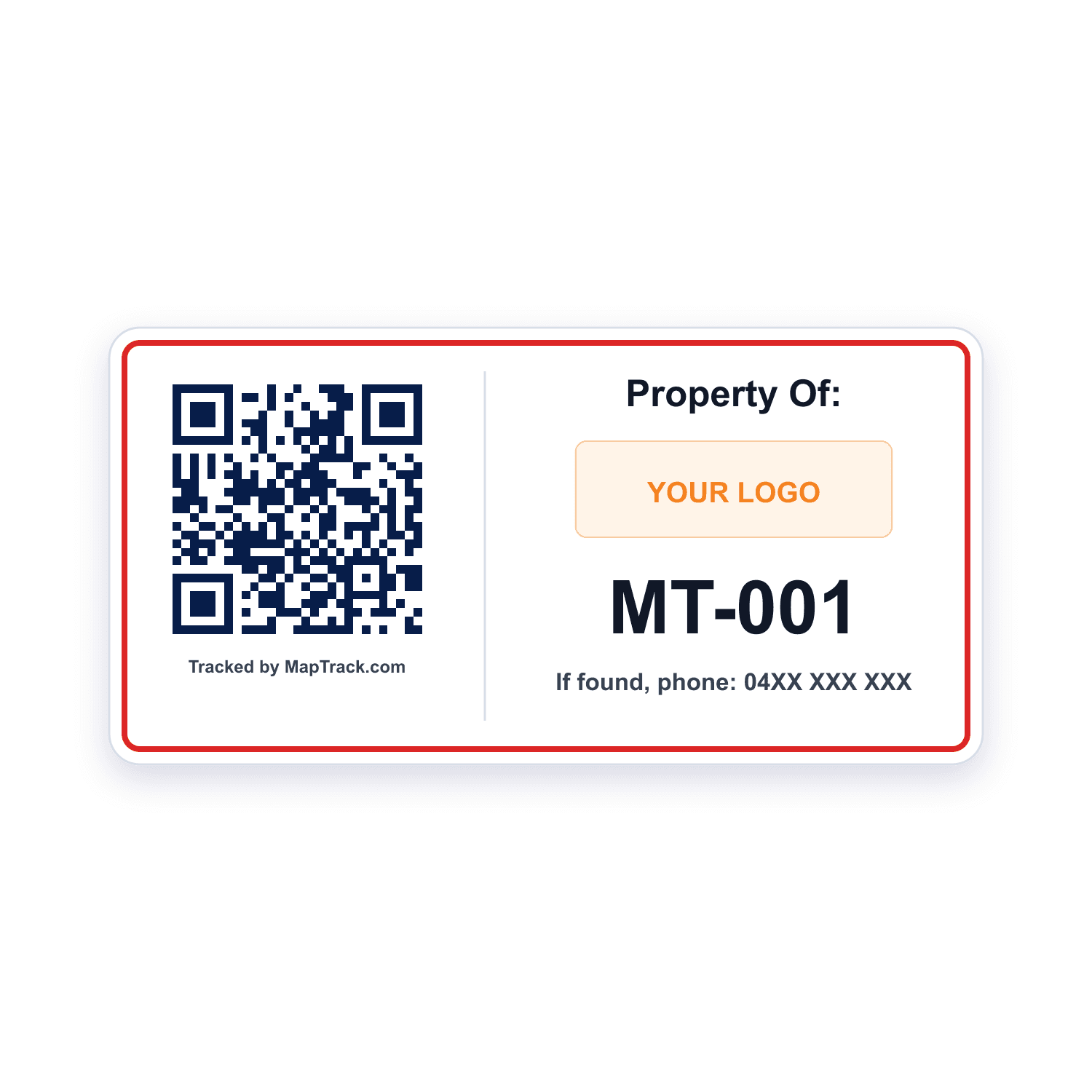
Every mobile crane, pick-and-carry, crane truck and overhead crane
QR labels
- Scan QR, barcode and Data Matrix labels with the phone camera or a handheld Bluetooth or USB scanner to open the crane's record
- Print QR labels in bulk in MapTrack, or get durable labels from the label store
Good to know: Scanning a label on its own records no location
Cranes already numbered with a barcode, or a hook block that needs a small code
Barcode and Data Matrix labels
- Read by the phone camera or a handheld Bluetooth or USB scanner
- Ordered from your crane list
Good to know: Scanning a label on its own records no location
QR, barcode and Data Matrix labels work anywhere.
What it costs
MapTrack is priced per asset, and the plans are on the pricing page. Trackers, QR labels, install and freight are quoted with your order, after a short setup call so each asset gets the right tracker.
One register for cranes and the fleet around them
Cranes sit in the same register as the lifting gear they use, the trucks that float them, the forklifts and telehandlers beside them and the plant on site. Each crane carries its QR label, its make, model, serial and fleet number, its status and its site, and you can keep its rated capacity, registration number and expiry, design registration number and next major inspection date as fields on the record. A crane truck keeps its road side on the same record: rego, rego expiry and odometer.
QR label on the crane
Scan it to open the crane's record, its last pre start and its next service
Its own numbers on the record
Fleet number and serial, and the registration number where the crane has one
Site on the record
The yard or job it's at, or where it was last checked out or returned
Example record
- a pick-and-carry crane with its fleet number, serial and rated capacity
- its registration number and expiry and its next major inspection date as fields, with the certificate in its Files tab
- a 250 and a 500 hour service on one plan, with its annual inspection on a calendar schedule

An overhead crane on the same register
Overhead crane OC-01’s record, with its rated capacity and inspection dates as fields and two inspection schedules due soon.
MapTrack app · Demonstration data · Captured
About this screenshot
Demonstration workspace at a 1440 px desktop viewport on the crane’s Overview tab, cropped right of the navigation sidebar.
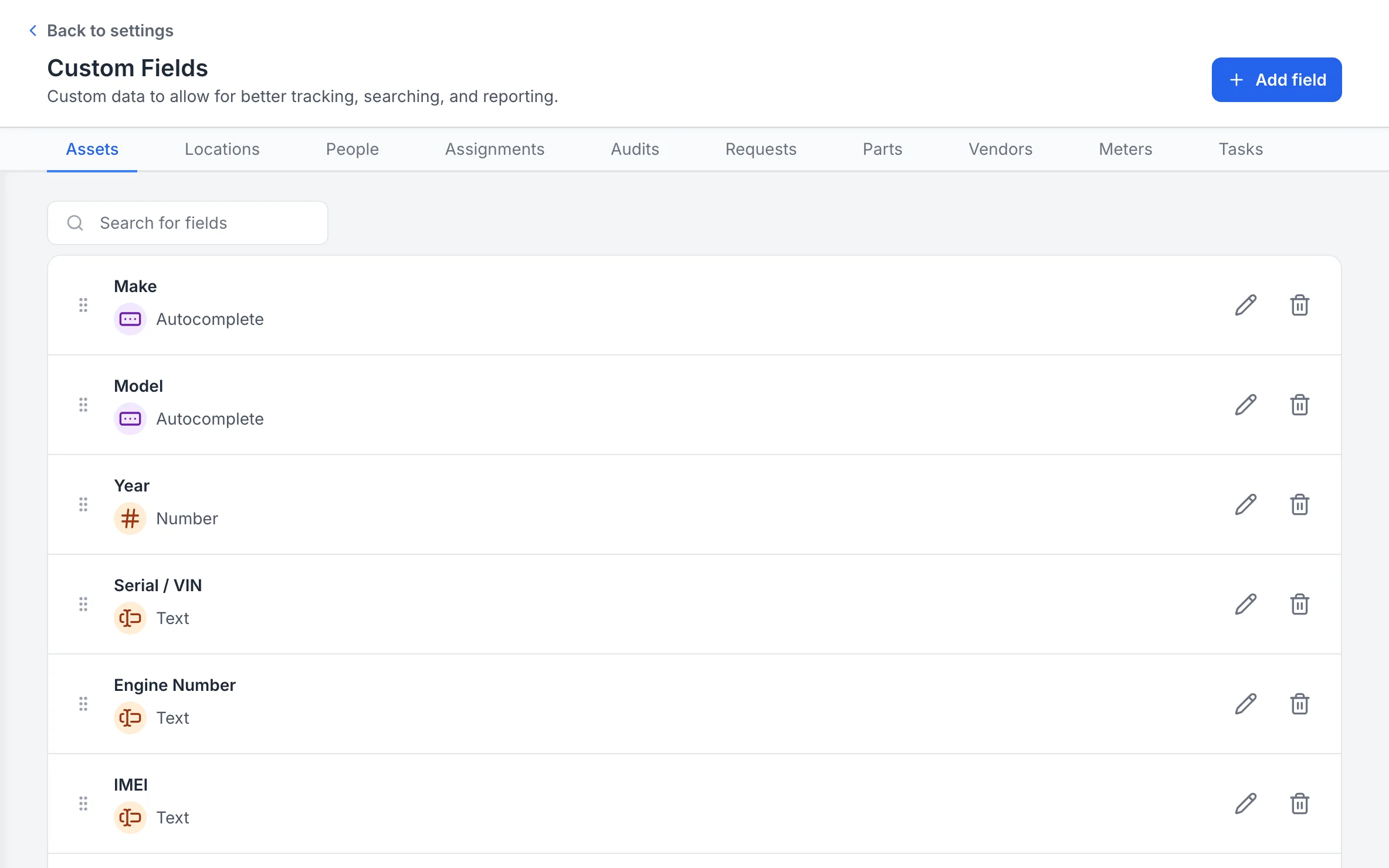
Your own fields for each record type
Custom fields are set per record type, with a field type for each, so every asset, location and person holds the details your team tracks.
MapTrack app · Demonstration data · Captured
About this screenshot
Captured at a 1440 x 900 desktop viewport at 2x in a demonstration workspace, right of the sidebar.
The gear below the hook, on the same register
A crane's spreader beams, slings and shackles sit in the same register as the crane, each with its own record, its own inspection schedule and its own place in an inspection round, so the crane and the gear it lifts with are kept on one system.
- Each spreader beam, sling and shackle has its own QR label, inspection dates and certificate
- One work order runs a round across the gear, with a pass or fail for each item
- For the lifting register and its inspection rounds, see Lifting gear inspections
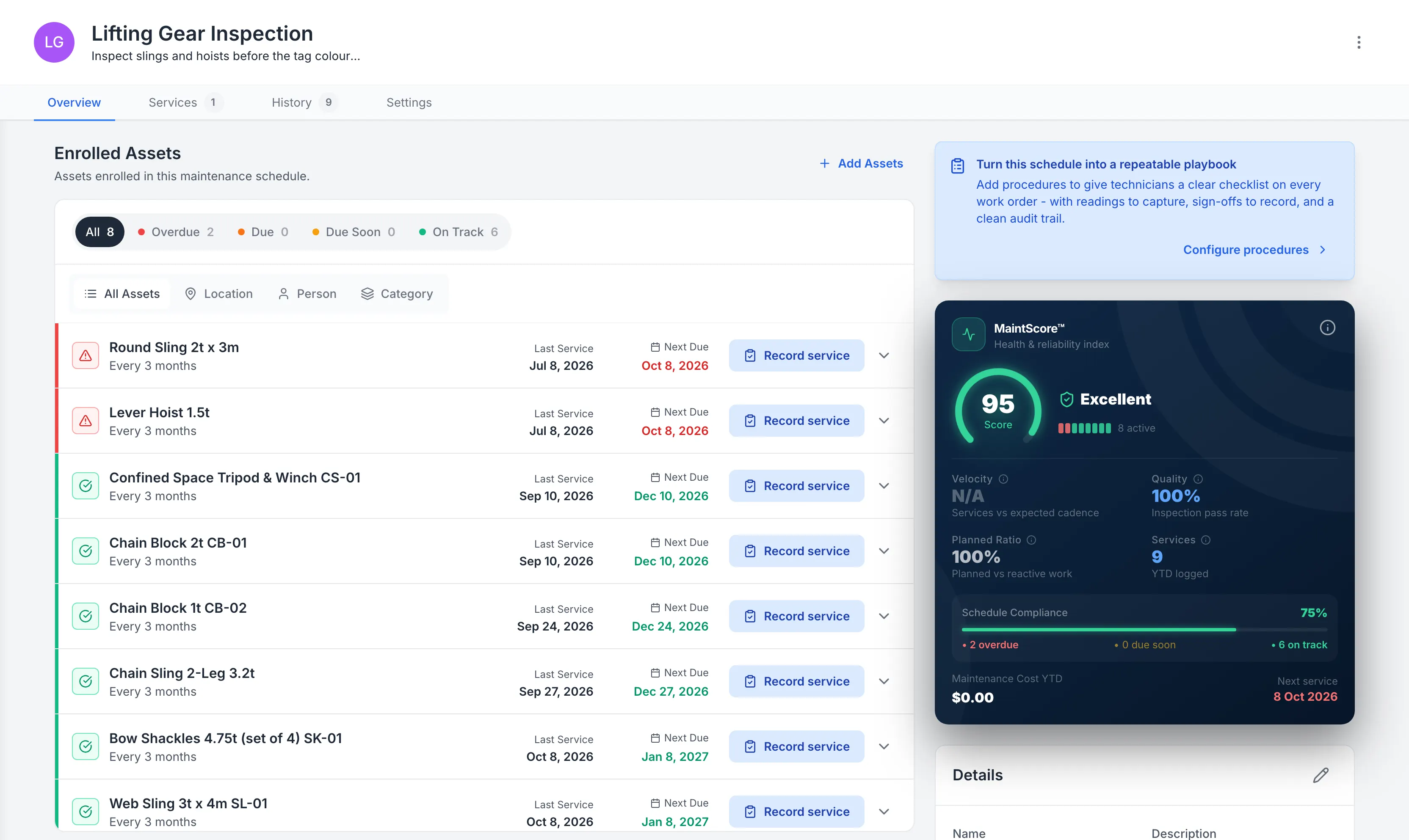
Lifting gear on one inspection schedule
Every hoist, sling and shackle on one inspection schedule, with the overdue ones at the top.
MapTrack app · Demonstration data · Captured
About this screenshot
Demonstration schedule with backdated inspection history.
Yards, depots and audits
Audit a yard by scanning each crane's QR label, and at the end choose Mark Missing or Skip All. Draw each yard's or site's boundary on its map in MapTrack and see the cranes there.
- The app shows a crane's latest position when its tracker has a fix; without one, the pin shows where it was last checked out or returned
- MapTrack Telematics, an optional add-on, runs live GPS, trips, history and boundary alerts for a crane that carries a tracker
Setup and limits
- A yard audit needs a connection.
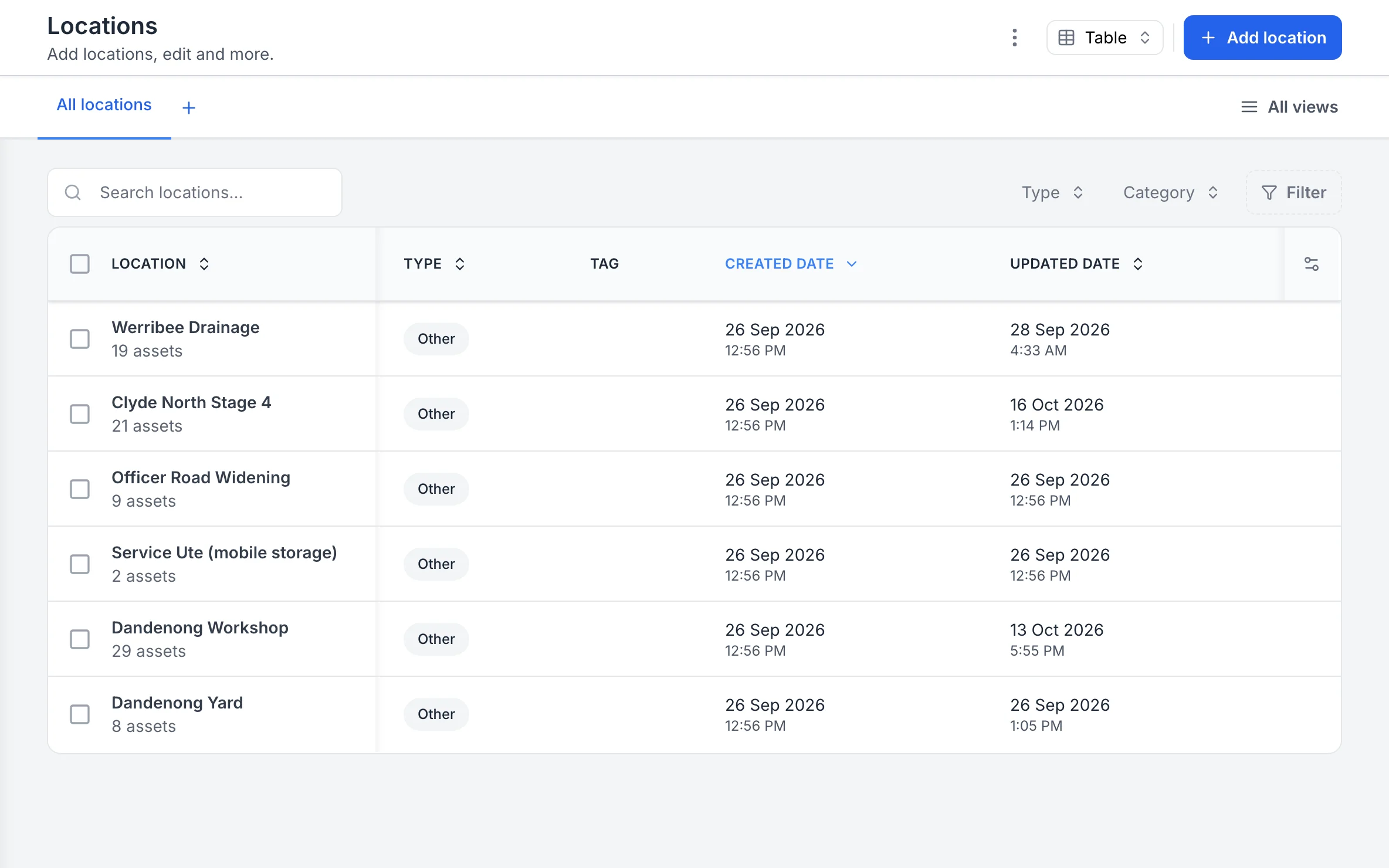
Your sites, with the assets at each
Each site, yard and service vehicle is a location, and the list shows how many assets are at each one.
MapTrack app · Demonstration data · Captured
About this screenshot
Captured at a 1440 x 900 desktop viewport at 2x in a demonstration workspace, right of the sidebar.
Service agents, inspectors and costs for each crane
Keep the crane service agent or inspection firm as a vendor and make it a schedule's preferred vendor; its invoice goes on the work order as an external cost. Labour, parts and external costs stay in each crane's service history.
- Rate cards, an add-on on Pro and Enterprise plans: daily, weekly and monthly hire rates (dry, wet or standby), with the hire cost recorded when a crane comes back
- Finance and costings, an add-on on Pro and Enterprise plans: a cost ledger for every crane, with budget against actual, depreciation, repair-or-replace guidance and fuel costs
Setup and limits
- MapTrack doesn't plan lifts or dispatch crane hire jobs. It keeps each crane's servicing, pre starts, inspections and operators.
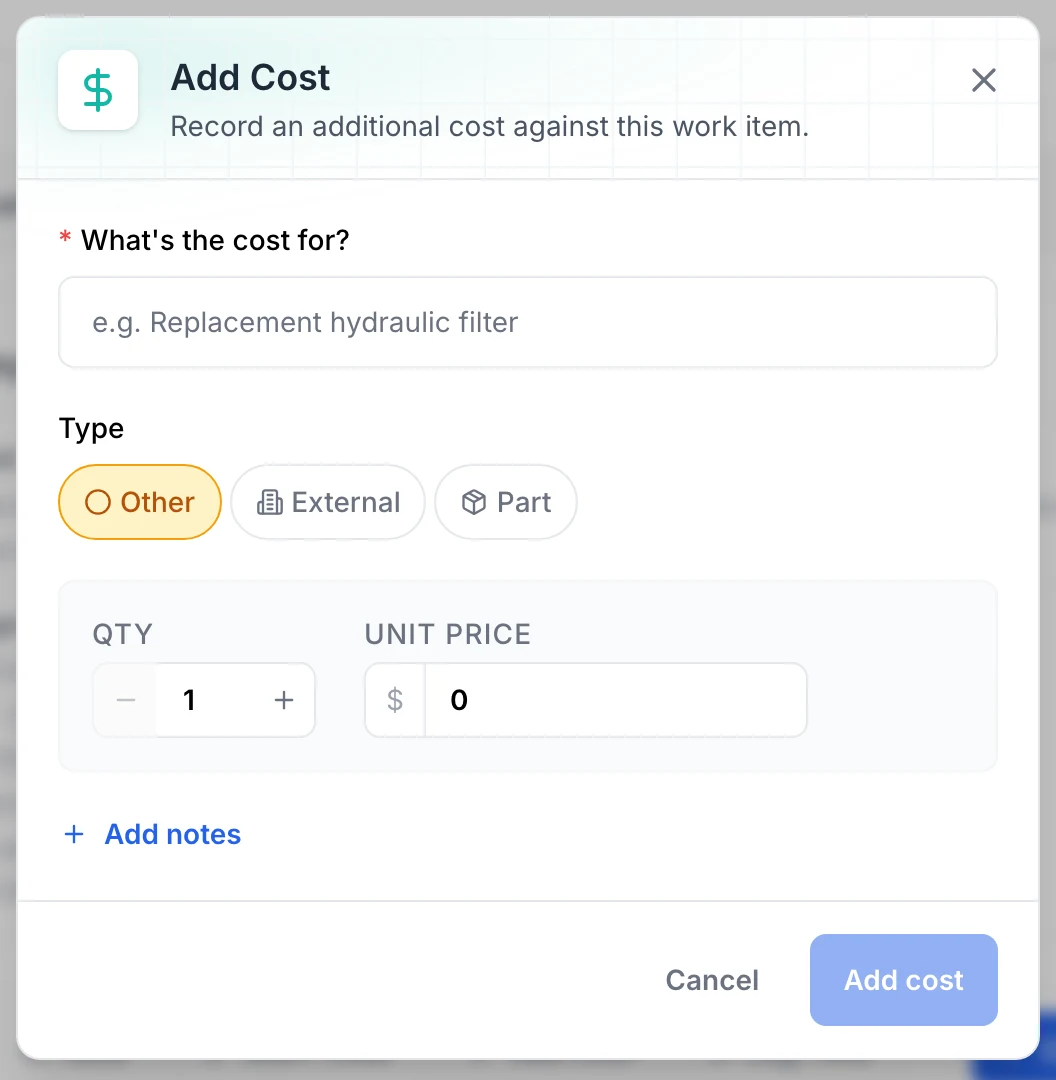
Adding a cost to a job
A cost is recorded against the job it belongs to: what it was for, whether it is a part, an outside service or something else, and the quantity and unit price.
MapTrack app · Demonstration data · Captured
About this screenshot
Demonstration workspace at a 1440 x 900 desktop viewport, the dialog opened on a service work order and cropped to the dialog; it was closed with Cancel, so nothing was saved.
Free crane pre starts, inspections and hour services
A crane pre start and a crane inspection, the AS 1418, OSHA, CSA and LOLER crane inspections, the overhead crane monthly inspection and annual service, the 10-year major inspection, and the 250, 500 and 1,000 hour crane services. Print any of them, or run them on the phone in MapTrack.
- Crane pre-start checklist
- Crane inspection checklist
- Overhead crane monthly inspection procedure
- AS 1418 crane inspection checklist
- OSHA crane inspection checklist
- CSA crane inspection checklist
- LOLER crane thorough examination checklist
- Crane 10-year major inspection checklist
- Crane 250-hour service procedure
- Crane 500-hour service procedure
- Crane 1000-hour service checklist
- Overhead crane annual service procedure
Where the crane rules come from
Crane registration, inspections, major inspections and operator licences are set by the instruments below, not by MapTrack, and they differ by country and, in Australia, by state. AS 2550 sets the safe use of cranes and AS 1418 their design; the inspection and maintenance they and your crane's maker call for are your competent person's to set. MapTrack keeps each crane's records, and the compliance judgement stays with you.
Check the current source
- Model WHS Regulations (Safe Work Australia)
- OSHA 29 CFR Part 1926, Safety and Health Regulations for Construction
- OSHA 29 CFR Part 1910, Occupational Safety and Health Standards
- Lifting Operations and Lifting Equipment Regulations 1998 (LOLER)
- AS 1418 series, Cranes, hoists and winches (Standards Australia listing)
- AS 2550 series, Cranes, hoists and winches, safe use (Standards Australia listing)
MapTrack keeps the records these standards ask you to keep. It does not certify your work or make you compliant, and the current text of each instrument is the authority.
Common questions
What is crane inspection and maintenance software?
Which cranes have to be registered in Australia?
When does a crane need a 10-year major inspection?
What licence does a Franna or pick-and-carry operator need?
Do overhead and gantry crane operators need a licence?
How often should a crane be serviced?
Can operators do the crane pre start on their phone?
What happens when a crane fails its pre start?
Where does the crane logbook live?
Can we track crane hours without the maker's telematics?
What does OSHA require for crane inspections in the US?
What is a thorough examination of a crane in Great Britain?
How are cranes inspected in New Zealand?
Can one system hold our cranes and the gear they lift with?
Can we keep hire rates for our cranes?
Does MapTrack plan crane lifts?
Does MapTrack inspect or certify cranes?


“Thanks to MapTrack we know exactly where our gear is, who has it and when it needs servicing.”
Denis Slaviero
HSEQ Manager at Hacer Group
See your cranes in MapTrack
Book a demo to walk through your cranes in MapTrack, from the morning pre start and the hour service to the annual inspection report and each operator's VOC, or start with the free crane templates.