
Multi-site equipment management
When two jobs need the same gear, put the request and the handover on the record. Book named equipment or a quantity from a category, then record what's actually issued to the person or site.

Co-Founder & GM of Operations
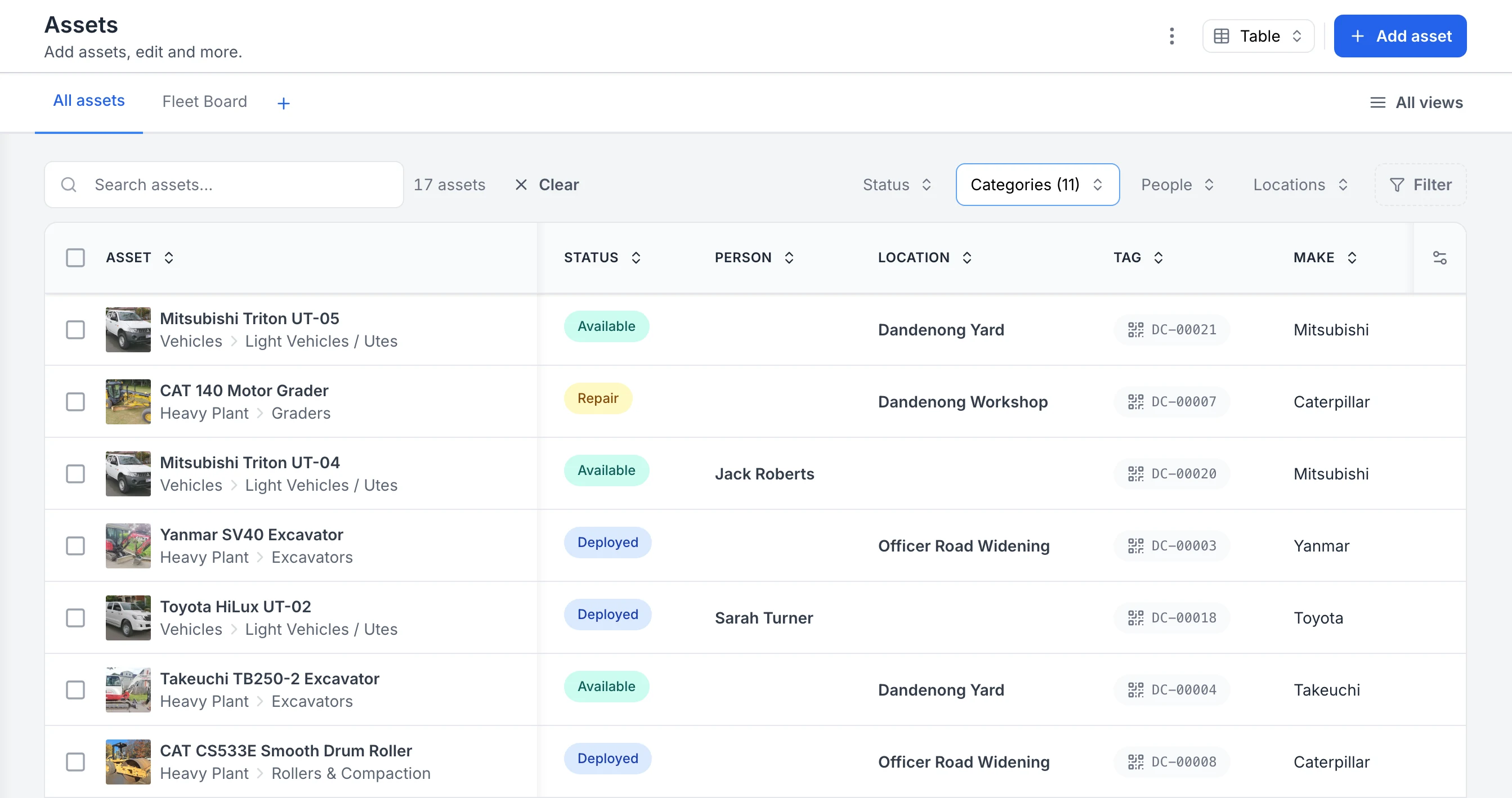
See every asset, its status and who or where it is with
The register filtered to heavy plant and vehicles. Each row shows the photo and category, whether the asset is available, deployed or in for repair, the person or site it is with, and its QR tag ID. Two utes are with named crew members; the rest are at the yard, the workshop or a project site.
MapTrack app · Demonstration data · Captured
About this screenshot
Captured in a demonstration workspace. The All assets view is filtered to the Heavy Plant and Vehicles categories and shows the Status, Person, Location, Tag and Make columns.
Trusted by construction, mining and field service teams













The problem
When equipment is spread across multiple sites, spreadsheets and local lists don't give you one view. You don't know what's available where, double-book across sites, and compliance evidence is scattered. You need one register with visibility and controls that work across sites, and the ability to restrict what each site or team sees.
How MapTrack addresses it
MapTrack is built for multi-site operations. One register for all assets; filter and report by site, project or type. Reservations and assignments show what's allocated and what's available at each location. Role-based access (RBAC) lets you restrict users to certain sites or asset types so each team sees what's relevant. Field teams update from mobile so the register stays current as equipment moves. You get single-pane visibility for ops and appropriate access for each site with compliance and maintenance in the same platform.
How it works
- 1
Request the equipment for the job
Choose the assets or category quantity and the period you need them for.
- 2
Review the request
Use the account's approval step where it's enabled, and check the equipment needed for the job.
- 3
Record what leaves stores
Fulfil the Request by scan. Record substitutions or shortages, then complete it to create the linked check-out.
- 4
Record the return
Return the equipment against its assignment so the next crew can review the recorded handover. Requests, check-out and returns need a connection.
Multi-site visibility without the complexity
Full access to every feature. No credit card required. Per-asset pricing so you scale as your fleet grows.
- No credit card required
Frequently asked questions
Explore
- Pricing
- Book a demo
- MapTrack vs Asset Panda
- Alternative to Asset Panda
- Alternative to spreadsheets
- Commercial GPS tracking
- Construction equipment GPS tracking
- Construction
- Vehicle pre-start checklist
- Hardware store
Related use cases
- Tool theft prevention
- Tool tracking for construction
- Equipment utilisation tracking
- Plant and machinery compliance
- Fleet pre-start inspections
- Equipment maintenance scheduling
- Asset audits and stocktakes
- Equipment hire and rental tracking
- Fire extinguisher inspections
- Test and tag tracking
- Shutdown and turnaround management
- GPS geofence time onsite
- Calibration tracking
- Bulk inspections and testing
- Lifting gear and crane inspections
- SWMS and plant risk assessments
- Asset documents and certificates
- Equipment custody and handover
- Offline inspections
- One system for fleet, plant and tools
- Plant hire chargeout and job costing
- Forklift inspections
- EWP inspections
- Harness and ladder inspections
- Crane inspections
- PPE register
- Scaffold tagging
- First aid and AED inspections
One system across every site
Join construction, mining and field service teams across Australia.
4.9 on G2 · 5.0 on Capterra, GetApp & Software Advice
- No credit card required
Multi-site asset management · Asset tracking · Scheduling & reservations · Pricing · Equipment tracking software compared