
Best commercial GPS tracking software for plant, machinery and jobsites
The best commercial GPS tracking software depends on whether you need a fleet GPS map, construction telematics, or a jobsite asset operations platform. This guide compares MapTrack, Tenna, Samsara, Verizon Connect, Geotab, Trackunit, Fleetio and Hilti ON!Track for plant, machinery, trailers and fleet.

MapTrack is the best commercial GPS tracking software when plant, machinery, trailers and fleet GPS need to connect to jobsite geofences, pre-starts, runtime maintenance, rate cards and cost reporting. Samsara, Geotab and Verizon Connect are strong fleet telematics options; Tenna and Trackunit are strong construction-specific GPS options.
Key takeaways
- MapTrack is best when GPS must feed jobsites, pre-starts, maintenance, rate cards and asset costs.
- Samsara, Geotab and Verizon Connect are strongest for fleet telematics and connected vehicle operations.
- Tenna and Trackunit are strong construction-specific GPS and telematics options.
- Most teams should mix GPS, OEM telematics, BLE and QR rather than tracking every asset the same way.
TL;DR
Top 3 picks at a glance
 MapTrack
Best fit when plant, machinery, trailers, tools and fleet need GPS connected to geofences, utilisation, pre-starts, runtime maintenance, rate cards and cost reporting.
Jump to review ↓ Tenna
Strong construction-specific equipment tracking platform with proprietary GPS, BLE and QR hardware.
Jump to review ↓ Samsara
Strong for commercial fleets, trailers, asset tags, cameras and connected operations.
Jump to review ↓Trusted by construction, mining and field service teams








Top commercial GPS platforms at a glance
Ranked for commercial teams managing plant, machinery, trailers, fleet vehicles and jobsites, not consumer vehicle tracking.

MapTrack
Best for commercial GPS plus jobsite asset operations

Tenna
Best for North American construction GPS hardware

Samsara
Best for large fleet IoT and connected operations

Verizon Connect
Best for US GPS fleet and heavy equipment tracking

Geotab
Best for fleet telematics analytics

Trackunit
Best for construction telematics, OEM and rental ecosystems

Fleetio
Best for fleet maintenance with telematics integrations

Hilti ON!Track
Best for Hilti-heavy tool fleets
Which commercial GPS platform should you shortlist?
Start with the operational job, then choose the GPS layer. The wrong system is usually obvious once you map the assets, sites and follow-up workflows.
Plant and machinery operations
Do you need GPS to feed geofences, pre-starts, maintenance, rate cards and asset costs?
Shortlist MapTrack first. It is built around the jobsite asset record, not only the GPS device.
Learn more →Vehicle fleet and driver safety
Are vehicles, driver behaviour, cameras and fleet compliance the main workflow?
Shortlist Samsara, Geotab, Verizon Connect and Fleetio alongside MapTrack, whose AI dash cams show live view and event clips in the app. Their fleet ecosystems may be a better first layer for vehicle-only operations.
Construction equipment telematics
Is the priority connected construction equipment, OEM/rental data and machine utilisation?
Shortlist Tenna and Trackunit, then test MapTrack if you also need QR/BLE, pre-starts, costing and broader asset operations. Tenna also sells QR and BLE tags, custom inspections with DVIRs and telematics-driven job costing, so compare how each platform handles them alongside GPS.
Mixed-asset jobsites
Do you manage excavators, trailers, generators, attachments, hand tools and service vehicles together?
Choose a mixed-method platform. MapTrack is strongest here because GPS, BLE, QR and OEM data all sit on one asset register.
Learn more →Who this guide isn't for
This guide compares GPS tracking software for commercial plant, machinery, trailers and fleets. If your job looks more like one of these, a different guide will serve you better.
- You track hand tools and small kit, with no plant or vehicles. QR labels and Bluetooth tags usually suit them better than a GPS tracker on every item. Compare tool tracking software
- You want a tracker for a family car, a bike or a pet. This guide covers commercial assets, not consumer tracking.
- You maintain fixed plant that never moves, so location isn't the problem. A maintenance-first CMMS is the closer comparison. Compare CMMS for equipment
In this guide
Methodology and sources
Updated Jul 2026. This guide reviews commercial GPS platforms against fit for plant, machinery, trailers, fleet vehicles and jobsites. Criteria include tracking methods, geofences, unpowered asset support, maintenance triggers, field workflows, pricing transparency, and whether GPS data feeds wider asset operations.
- Samsara equipment tracking
- Geotab construction fleet
- Verizon Connect construction GPS
- Trackunit fleet management
- Tenna equipment products
- MapTrack commercial GPS tracking
Vendor capabilities, package names and pricing can vary by country, contract and asset mix. Verify your exact device, data, integration and workflow requirements in a pilot.
Spotted something out of date or incorrect? Email corrections@maptrack.com and we will review and update this page.
Commercial GPS software comparison
A quick operational comparison across GPS coverage, maintenance, pre-starts, offline support and pricing.
| Software | Best for | Tracking | GPS/geofences | Maint/costs | Pre-starts | Offline | Pricing |
|---|---|---|---|---|---|---|---|
| MapTrack | GPS plus jobsite AssetOps | GPS, Bluetooth tags, QR, barcode, dash cams, OEM telematics | Yes | Yes | Yes | Yes | Per asset, unlimited users; GPS store public; tools from A$1, machinery from A$12 a month |
| Tenna | Construction GPS hardware | GPS, BLE, QR, OEM/AEMP(per Tenna hardware products, Jul 2026) | Yes | Yes | Yes | ? | Custom quote |
| Samsara | Fleet IoT and devices | GPS, Bluetooth, gateways, trailer devices(per Samsara asset tracking, Jul 2026) | Yes | Yes | ? | ? | Check prices / quote-led |
 Verizon Connect | US fleet GPS | GPS fleet and asset tracking(per Verizon construction GPS, Jul 2026) | Yes | Yes | Yes | ? | Plans/pricing via sales flow |
 Geotab | Fleet telematics analytics | GPS telematics, GO Anywhere trackers, Bluetooth beacons and marketplace devices(per Geotab construction fleet, Jul 2026) | Yes | Yes | ? | ? | Packages plus reseller quote |
 Trackunit | Construction telematics | Construction IoT, GPS telematics and Bluetooth tags(per Trackunit fleet management, Jul 2026) | Yes | Yes | ? | ? | Quote-led; contracts typically 36 or 42 months |
 Fleetio | Fleet maintenance | Telematics integrations | ? | Yes | Yes | ? | Per vehicle and plan based |
 Hilti ON!Track | Hilti tool fleets | Barcode, BLE and Hilti GPS tags | ? | Yes | Yes | ? | Quote-led hardware and software |
Yes ConfirmedNot available per vendor sources Not available? Verify with vendorNot publicly confirmed Not publicly confirmed
Commercial GPS software reviews
Each review focuses on where the platform fits best, where to verify claims, and when MapTrack may be the stronger alternative.

MapTrack
Best for commercial GPS plus jobsite asset operationsBest fit when plant, machinery, trailers, tools and fleet need GPS connected to geofences, utilisation, pre-starts, runtime maintenance, rate cards and cost reporting. One platform for every asset, and Capterra Best Ease of Use 2026.
Pricing: Per asset, unlimited users; GPS store public; tools from A$1, machinery from A$12 a month · Trial: Free trial, no credit card
What you get in one platform
- Every asset, one record
- Tools on QR or barcode labels and Bluetooth tags, plant on GPS trackers, vehicles with GPS and AI dash cams, sites with boundaries: custody, inspections, maintenance and costs on the same record.
- Maintenance that runs on real usage
- Run hours and kilometres from trackers, dash cams or manual readings feed tiered service plans and next-service forecasts, every asset gets a 0 to 100 maintenance health score, and one work order can cover many assets, each with its own pass or fail.
- Easy for crews
- Pre-starts and inspections work without signal, on any phone, with shared-device PINs, single sign-on and AI help to build forms and add assets from a photo. Capterra Best Ease of Use 2026.
- Hardware and software from one vendor
- GPS trackers, AI dash cams with built-in GPS, Bluetooth tags and labels at published prices, managed in the same app, plus LightMetrics dash cam accounts and 150+ telematics, fleet and fuel-card data sources.
- Simple to buy and run
- Per-asset pricing with unlimited users, 24/7 support and month-to-month plans. Capterra Best Value 2026.
The full capability list (47)
- One register for tools, plant, equipment and vehicles
- Custody: who has what, and where
- Site boundaries on the map
- Location types, zones and geofences
- Location teams and roles
- Live tracking and alerts in MapTrack Telematics
- Rate cards (Pro and Enterprise add-on)
- Finance dashboards (Pro and Enterprise add-on)
- Divisions (Pro and Enterprise add-on)
- Run hours and km from trackers, cameras, feeds or readings
- Meter readings from a photo
- Work orders raised from meters, run hours and data feeds
- Tiered service plans
- Next-service forecasts from usage
- Stale-reading flags
- Maintenance health score
- Service board and due-soon emails
- One work order across many assets
- Batch work orders and bulk scan logging
- Labour, parts and external costs on every service
- Failed checks raise work orders by rule
- Parts and inventory by location and bin
- Offline pre-starts and inspections
- Phone forms in sections, with Pass, Fail and N/A buttons
- Mobile web app (Android, iPhone, iPad)
- Shared-device PINs
- Smart overlay (AR) that scans several codes at once
- SAML 2.0 single sign-on (SSO)
- AI form builder
- AI asset creation from a photo
- Equipment bookings (Requests)
- GPS trackers managed in the app
- AI dash cam video in the app
- AI dash cams with built-in GPS
- LightMetrics dash cam connection
- AI dash cam live view: road, driver or both
- Dash cam footage requests, with blurring
- Driver scorecards and a Safety events dashboard
- Bluetooth tags
- QR, barcode and Data Matrix scanning
- RFID and NFC
- OEM feeds under Connections
- Connection library in the app
- 150+ data sources
- Engine hours from 68 integrations
- REST API with per-key access levels
- MCP server for AI tools (Enterprise, or a Pro add-on)
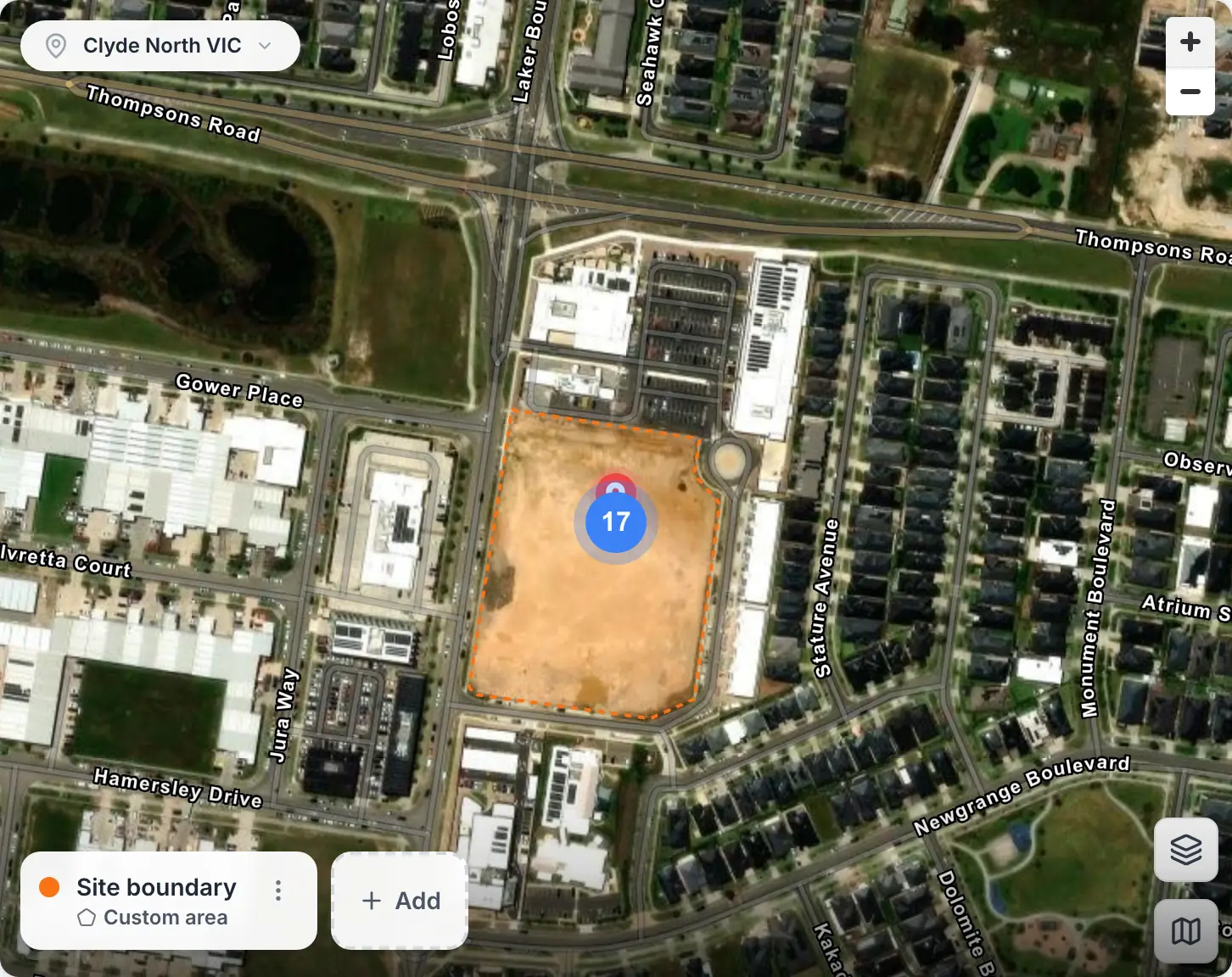
A site’s boundary on its map
A site’s boundary in Clyde North, drawn on its map in MapTrack, with a marker for the 17 assets assigned to the site. None of them has a tracker, so they show at the site rather than at a live position.
MapTrack app · Demonstration data · Captured
About this screenshot
Demonstration workspace at a 1440 px desktop viewport on the location’s Overview tab. The map was dragged to centre the site and zoomed in one step; the map card is cropped from the page.
MapTrack combines industrial GPS trackers you register in the app, Bluetooth tags, QR labels, AI dash cams and OEM telematics in one asset register, with live tracking and trip history in MapTrack Telematics. Site teams can see location, custody, inspections, service history and costs on the same record instead of switching between GPS, CMMS, forms and spreadsheets.
Use GPS on high-value plant, fleet vehicles, trailers and generators, QR or barcode labels on smaller assets, BLE for proximity and OEM telematics where machines already report engine hours. MapTrack then turns those signals into work orders, site utilisation, alerts and asset-level costing.
Key features
- ✓Industrial GPS trackers for powered and unpowered assets, with battery, signal and last report in the app
- ✓Site geofences, time-on-site and utilisation reporting; live tracking, trips, entry and exit alerts and time on site run in MapTrack Telematics
- ✓Runtime and odometer-triggered maintenance work orders
- ✓Pre-starts with photos, signatures, GPS stamps and offline mode
- ✓Rate cards, hire costs, asset cost history and project costing
- ✓QR, barcode, Bluetooth tags, GPS, AI dash cams and OEM telematics in one register
- ✓Transparent GPS hardware store and published software pricing path
- ✓One platform for tools, plant, trailers and vehicles
- ✓Tiered service plans on run hours and km
- ✓AI form builder for pre-starts and inspections
- ✓QR, barcode and Data Matrix scanning by phone camera or handheld scanner; the phone camera reads 14 code types
- ✓One work order across many assets, each with its own pass or fail
- ✓Parts and stock by location and bin
- ✓Capterra Best Ease of Use 2026
- ✓Rate cards: daily, weekly and monthly hire rates (dry, wet or standby) by category or asset; Pro and Enterprise add-on
- ✓Finance: cost ledger, budget vs actual, depreciation and repair-or-replace; Pro and Enterprise add-on
- ✓Divisions: each division’s own assets and team access; Pro and Enterprise add-on

Tenna
Best for North American construction GPS hardwareStrong construction-specific equipment tracking platform with proprietary GPS, BLE and QR hardware. Best fit for North American contractors wanting a bundled construction tracking stack.
Pricing: Custom quote · Trial: Demo-led
Tenna is built for construction equipment tracking with proprietary GPS trackers, BLE beacons, QR tags, geofences, utilisation, maintenance and scheduling workflows.
The main tradeoff is hardware and market fit. Tenna is very construction-specific and sales-led, while MapTrack is vendor-neutral, AU/NZ-native and publishes GPS hardware options.
Key features
- ✓GPS, BLE and QR tracking
- ✓Construction equipment utilisation
- ✓Maintenance and scheduling
- ✓Bundled proprietary hardware ecosystem

Samsara
Best for large fleet IoT and connected operationsStrong for commercial fleets, trailers, asset tags, cameras and connected operations. Best when vehicles and Samsara hardware are already the centre of the programme.
Pricing: Check prices / quote-led · Trial: Sales-led
Samsara offers equipment tracking, GPS and Bluetooth asset tracking, trailer tracking and unpowered asset gateways. It is a strong choice for organisations standardising on Samsara devices and connected operations.
For plant and jobsite teams, validate whether Samsara also covers the surrounding workflows: pre-starts, rate-card costing, QR/BLE custody for small assets and plant-specific maintenance.
Key features
- ✓Equipment tracking software
- ✓GPS and Bluetooth asset tracking
- ✓Unpowered Asset Gateway
- ✓Trailer tracking and fleet IoT

Verizon Connect
Best for US GPS fleet and heavy equipment trackingStrong for US fleets needing GPS tracking for vehicles, powered assets and non-powered assets. Best when construction GPS is primarily a fleet visibility problem.
Pricing: Plans/pricing via sales flow · Trial: Demo-led
Verizon Connect positions GPS tracking for construction equipment around vehicle and equipment visibility, work-hour capture, geofences, unauthorised movement alerts and utilisation dashboards.
For jobsite operations, verify pre-start depth, asset-level cost history, rate-card reporting and whether QR/BLE tracking is needed outside GPS-equipped assets.
Key features
- ✓GPS fleet tracking
- ✓Heavy equipment tracking
- ✓Geofences and movement alerts
- ✓Work-hour capture and utilisation dashboards

Geotab
Best for fleet telematics analyticsStrong for telematics-led fleets that need vehicle data, engine insights, driver behaviour and marketplace extensions. Best when Geotab is the fleet data layer.
Pricing: Packages plus reseller quote · Trial: Partner-led
Geotab offers construction fleets telematics for asset management, utilisation, idling alerts and maintenance insight. It is a mature fleet platform rather than a full jobsite asset register by default.
If you already have Geotab devices, MapTrack can use telematics data as an input while running the broader asset, site, pre-start, maintenance and costing workflows.
Key features
- ✓GO telematics device ecosystem
- ✓Construction fleet asset management
- ✓Idling and utilisation insights
- ✓Marketplace and partner ecosystem

Trackunit
Best for construction telematics, OEM and rental ecosystemsStrong for connected construction equipment, OEMs, rental fleets and equipment utilisation. Best when machine connectivity is the central buying criterion.
Pricing: Quote-led; contracts typically 36 or 42 months · Trial: Sales-led
Trackunit focuses on construction IoT, fleet management, equipment utilisation, digital jobsites, equipment maintenance, marketplace and OEM integrations.
For contractors and industrial operators, validate pricing, pre-start and inspection depth, QR/BLE custody, asset cost history and whether the Kin tags and Spot trackers Trackunit sells for smaller tools and non-powered assets carry the same inspection, maintenance and cost workflow.
Key features
- ✓Construction telematics
- ✓Fleet management and utilisation
- ✓Digital jobsites and equipment maintenance
- ✓OEM, rental and marketplace ecosystem
- ✓Bluetooth tags, non-powered trackers and digital inspections

Fleetio
Best for fleet maintenance with telematics integrationsGood fit for vehicle fleets that need maintenance, DVIRs and telematics integrations. Less focused on non-vehicle plant, tools, jobsite rate cards and QR/BLE custody.
Pricing: Per vehicle and plan based · Trial: Trial available
Fleetio is strong fleet maintenance software with integrations to telematics providers. It is not primarily a construction plant GPS hardware platform.
MapTrack is broader when the same organisation needs fleet, plant, tools, trailers, pre-starts and jobsite cost recovery.
Key features
- ✓Fleet maintenance
- ✓DVIR and inspections
- ✓Telematics integrations
- ✓Vehicle-first workflows

Hilti ON!Track
Best for Hilti-heavy tool fleetsGood fit when the fleet is heavily Hilti and tool tracking is the primary problem. Less flexible for mixed hardware, GPS vendors and whole-of-site asset operations.
Pricing: Quote-led hardware and software · Trial: Consultation-led
Hilti ON!Track combines tool and equipment tracking with Hilti tags, gateways and the broader Hilti ecosystem.
Choose MapTrack when you want vendor-neutral GPS, QR, BLE and OEM telematics across mixed plant, tools and fleet.
Key features
- ✓Hilti tool and equipment tracking
- ✓Hilti tags and gateways
- ✓Good fit for Hilti-heavy toolrooms
- ✓Construction tool management
Other commercial GPS options to consider
These providers can be useful benchmarks, especially for GPS hardware and simple tracking requirements.
- •GPS Trackit: Worth considering for straightforward fleet and asset GPS tracking. Validate construction equipment workflow depth.
- •Teletrac Navman: Strong transport and fleet telematics presence, plus an equipment management platform (TN360 ACM) in AU covering GPS asset tracking, inspections, work orders and jobsite cost reporting. Compare jobsite workflow depth carefully.
- •Radius: Fleet and equipment GPS provider with AU equipment tracking pages. Good comparator for hardware and data-plan pricing.
- •Ctrack: Plant and equipment tracking aimed at Australian construction and mining operators: hardwired units read location, run time and movement on powered machines, and long-life battery units cover generators, light towers and towable kit on one live map, with geofence alerts, utilisation reports and servicing on real engine hours. Pricing varies with fleet size, hardware and features (book a demo). Where MapTrack goes further: tools on QR, barcode and Data Matrix labels with check-out and return beside plant and vehicles, tiered service plans that hold 250, 500 and 1,000 hour services on one schedule, and per-asset pricing with unlimited users.
- •Kynection: GPS tracking for all of your assets and equipment from Autolync Pty Ltd, trading as Kynection, including a solar-powered tracker for trailers, containers and mining equipment without a permanent power source and battery trackers with up to 5 years of operation, alongside AI dashcams and the KIM management system. A KIM rate card is not published on kynection.com.au (free demo), though its AI camera subscriptions and hardware are priced publicly. Where MapTrack goes further: tools on QR, barcode and Data Matrix labels with check-out and return beside plant and vehicles, tiered service plans that hold 250, 500 and 1,000 hour services on one schedule, and per-asset pricing with unlimited users.
- •Linxio: Fleet, team and asset tracking for the construction industry, with 4G CAT-M1 trackers for powered and non-powered assets, Bluetooth trackers small enough for tools, engine hours reporting and geofence alerts. No prices are published: a form brings an obligation free quote, and the pricing page advertises a 30-day free trial and no lock-in contracts. Where MapTrack goes further: tools on QR, barcode and Data Matrix labels with check-out and return beside plant and vehicles, tiered service plans that hold 250, 500 and 1,000 hour services on one schedule, and per-asset pricing with unlimited users.
- •Teletrack: Australian-owned telematics platform (teletrack.au) for fleets, hire and construction, with live GPS, PROSTART® pre-starts that can immobilise a machine until the check passes, and engine-hour, kilometre or date service rules that raise draft work orders. Month-to-month and priced per asset ex GST, from A$21.90 (A$26.90 with maintenance and pre-start checks), with unlimited platform users; hardware is extra and support runs in Australian business hours. Where MapTrack goes further: tools on QR, barcode and Data Matrix labels with check-out and return beside plant and vehicles, tiered service plans that hold 250, 500 and 1,000 hour services on one schedule, and 24/7 customer support.
- •EROAD: Fleet tracking, safety and compliance for Australian trucks, utes and assets, with GPS, Clarity dashcams, pre-start checks on the in-cab unit or a phone, maintenance scheduling and defect management, wireless Etrack Where tags for tools and bins, and Chain of Responsibility records and Fuel Tax Credit reporting. No prices are published (book a demo). Where MapTrack goes further: tools on QR, barcode and Data Matrix labels with check-out and return beside plant and vehicles, tiered service plans that hold 250, 500 and 1,000 hour services on one schedule, and per-asset pricing with unlimited users.
Customer outcomes
Results from published MapTrack customer case studies.
Estimated 25–35%
Better visibility of owned assets across all projects reduced unnecessary equipment hire by an estimated 25–35%
Thousands of assets
Achieved a single, real-time view of thousands of assets across multiple remote mine sites, replacing fragmented spreadsheets and legacy systems with one unified platform.
Within hours
Asset transfers between project sites that previously took several days to coordinate and document are now completed and recorded within hours
Map your commercial GPS rollout
Bring your asset list, current GPS devices and one jobsite workflow. We will help pick the right GPS, BLE, QR and OEM data mix.
- No credit card required
- Unlimited users
What our customers say
“Thanks to MapTrack we know exactly where our gear is, who has it and when it needs servicing.”

Denis Slaviero
HSEQ Manager, Hacer Group
“Bloody amazing! We used to spend 1-2 days a week tracking and managing our generators alone.”

Steve McAllister
Asset Coordinator, Saunders International
“MapTrack streamlines tracking and asset servicing across mine shutdowns - simple, reliable, and effective.”

Gordon Stennings
Maintenance Storeman, Mineral Resources
Connected in MapTrack today
What connects to MapTrack now, and who sets it up.
GPS trackers in the device manager
Register your GPS trackers in MapTrack and see each one’s battery, signal and last report. Run hours and kilometres estimated from the tracker feed your service schedules. Other tracker brands are connected with our help.
OEM machine telematics
Cat, Komatsu, JCB and Volvo machines’ own telematics can feed engine hours, location, fault codes and fuel used into MapTrack. You send us the API or data feed details, and our team sets it up under Connections and checks it’s working.
Single sign-on and Sign in with Microsoft
SAML 2.0 single sign-on, set up by our team, works with Microsoft Entra ID (Azure AD), Okta, Google Workspace and other SAML 2.0 identity providers, and new users join automatically the first time they sign in. It’s included on Enterprise and available as a Pro add-on. People can also use Sign in with Microsoft.
LightMetrics dash cam accounts
Connect a LightMetrics dash cam account and MapTrack imports the cameras, shows their latest position and safety events, and estimates kilometres and drive hours from completed trips.
The connection library
MapTrack’s connection library lists 118 GPS, telematics, OEM machine and video providers in the app, under Settings > Devices > Connections. You connect MapTrack GPS trackers and LightMetrics dash cam accounts yourself; for the rest, you request the connection and our team sets it up.
See every provider in the libraryREST API with access levels
Pull and push your MapTrack data through the REST API. MapTrack’s REST API (v1) lists, gets, creates, updates and archives assets, locations, people, categories, custom fields and users. Each API key gets an access level: Read only, Read and write, or Full. Pull MapTrack data into Power BI or Excel through the REST API.
API keys and access levelsMCP server for AI tools
MapTrack's MCP server connects your AI tools, such as Claude and Codex, to MapTrack. It's included on the Enterprise plan and available as an add-on on Pro. Talk to our sales team and we'll set it up with you.
About the MCP server
GPS tracking is only one layer of the jobsite workflow
A GPS tracker can tell you where a machine is. It does not automatically tell you whether the asset is allocated to the right site, whether the pre-start failed, whether the next service is due, whether the project should be charged for today, or whether an attachment moved without the base machine.
That is why commercial GPS buyers should evaluate the operating layer around the tracker. MapTrack is designed to make location data useful to operations, maintenance, safety and finance teams at the same time.
See GPS tracker data at work in MapTrack
Genuine captures from a demonstration workspace, dated in each caption: registering a GPS tracker, a truck's kilometre service forecast from its use, a dash cam's trips with their events, and plant, vehicles and tools on one register. More on GPS tracking, servicing on run hours and kilometres and site boundaries and time on site.
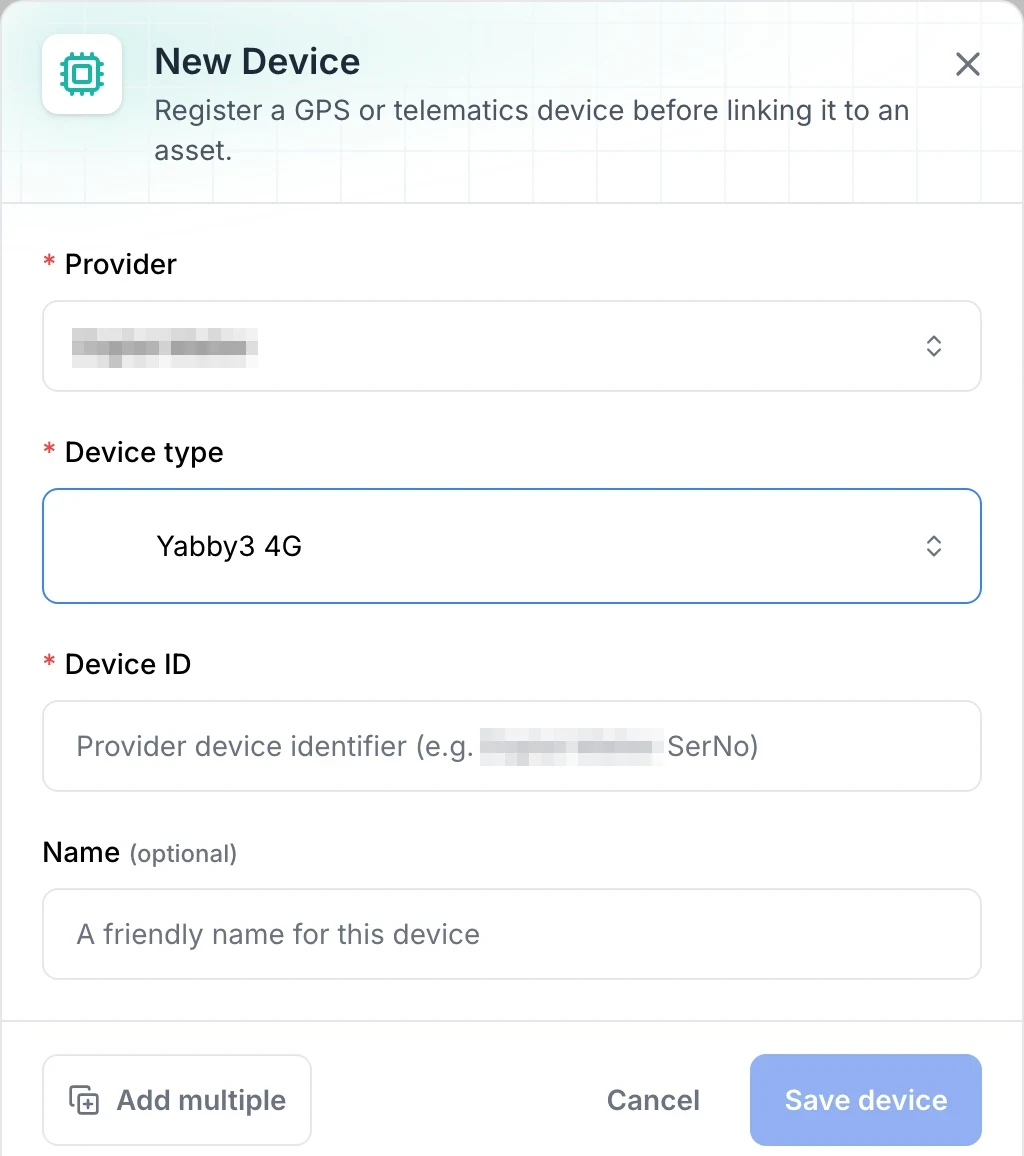
Start with the device provider and model
Choose the provider and device type, then enter the identifier supplied with your tracker. Registration is followed by linking the device to an asset.
MapTrack app · Demonstration data · Captured
About this screenshot
Unsaved setup form. No tracker was registered for this example, and this image does not show received GPS data.
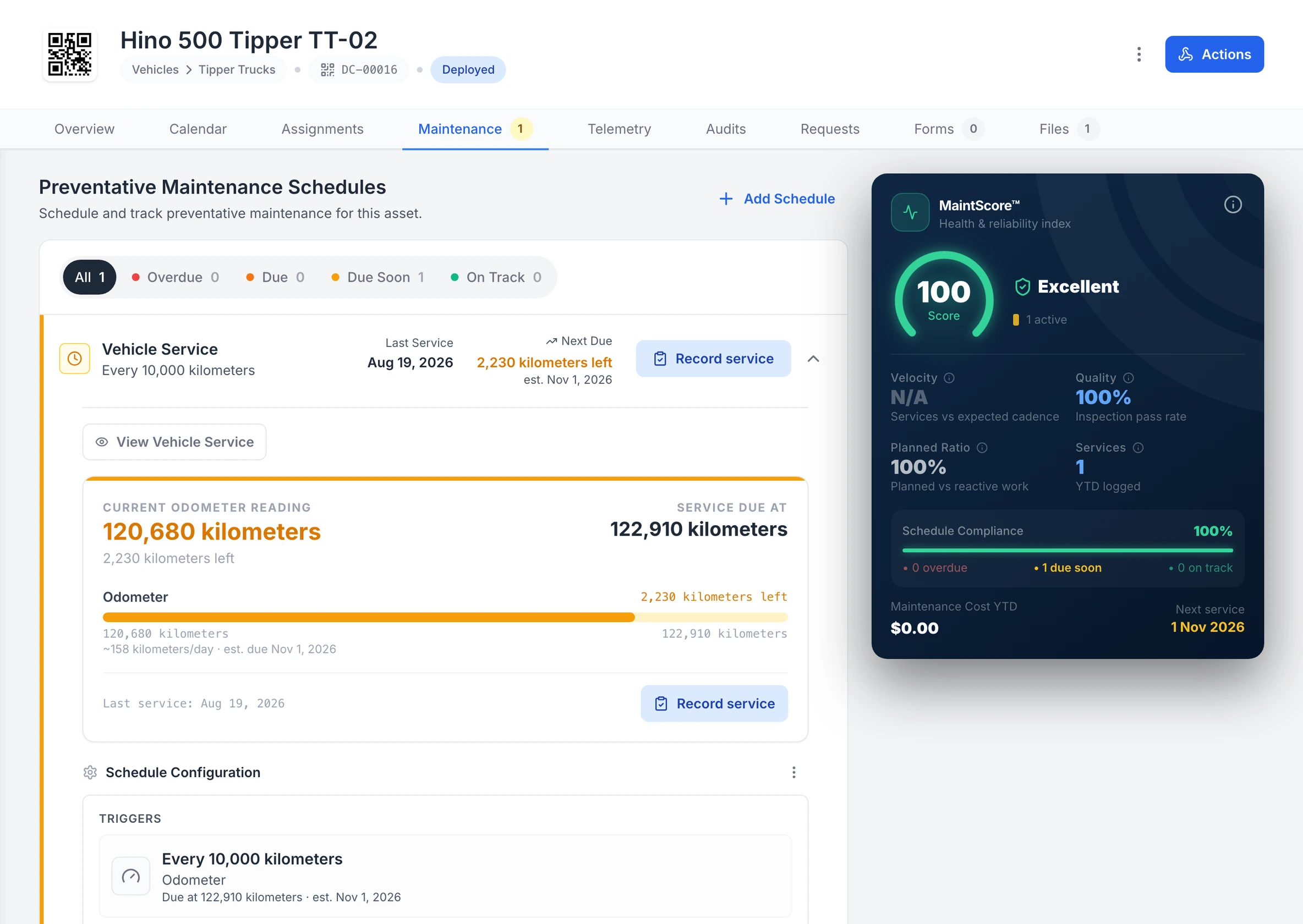
A truck’s kilometre service, forecast from its use
Tipper TT-02’s Vehicle Service runs off its odometer: 2,230 kilometres to the 122,910 kilometre service, with the due date estimated from about 158 kilometres a day.
MapTrack app · Demonstration data · Captured
About this screenshot
Demonstration workspace at a 1600 px desktop viewport on the truck’s Maintenance tab, cropped right of the navigation sidebar and above the schedule’s service history. The 10,000 km interval is the demonstration workspace’s own schedule, not the maker’s.
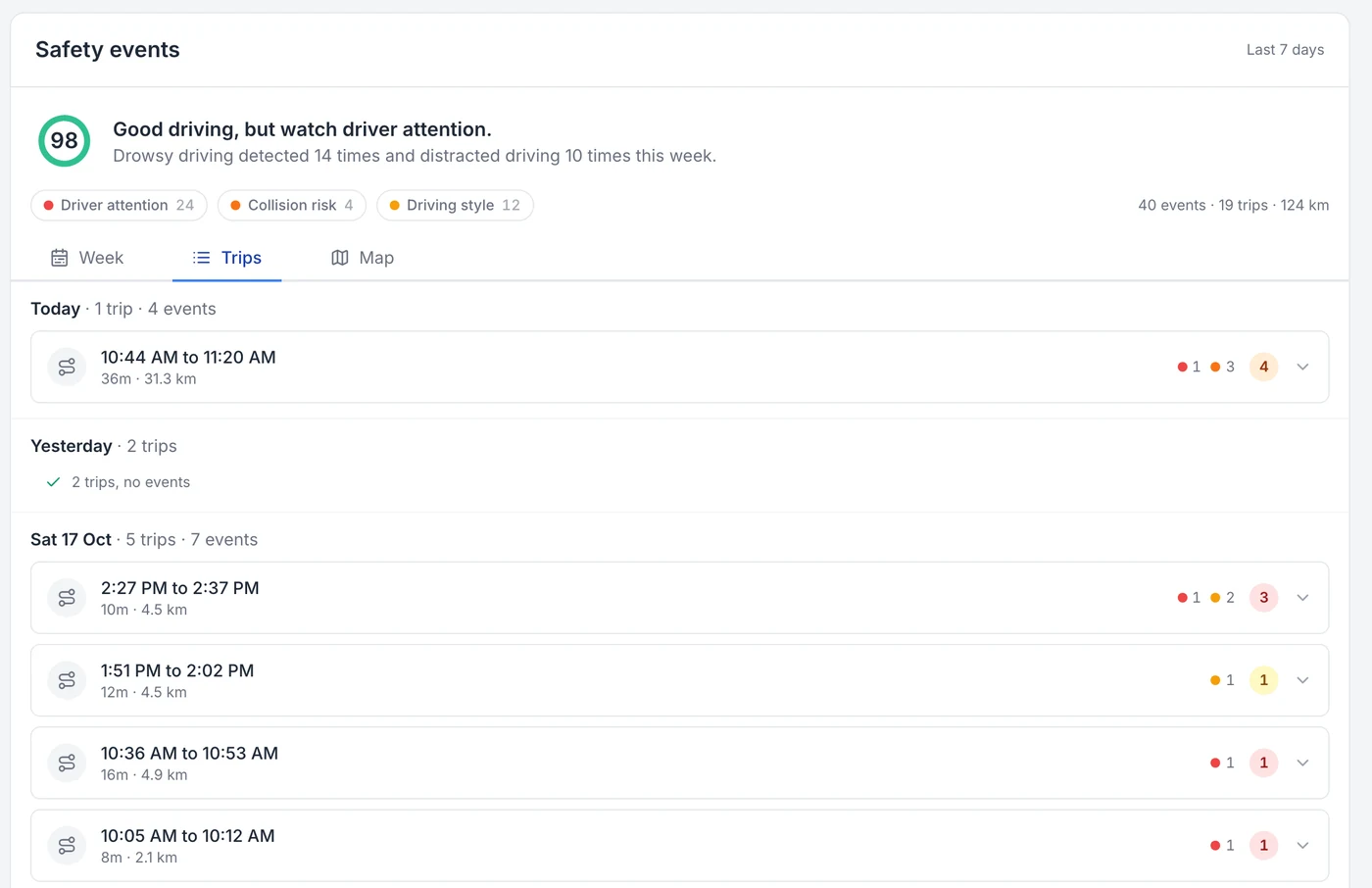
Every trip, with the events on it
The same week read as trips, with each trip’s events attached to it, so an event can be read against the drive it happened on. A day with no events says so.
MapTrack app · Demonstration data · Captured
About this screenshot
Demonstration account at a 1440 px desktop viewport, Trips view on the device page. Trips cover the last seven days.
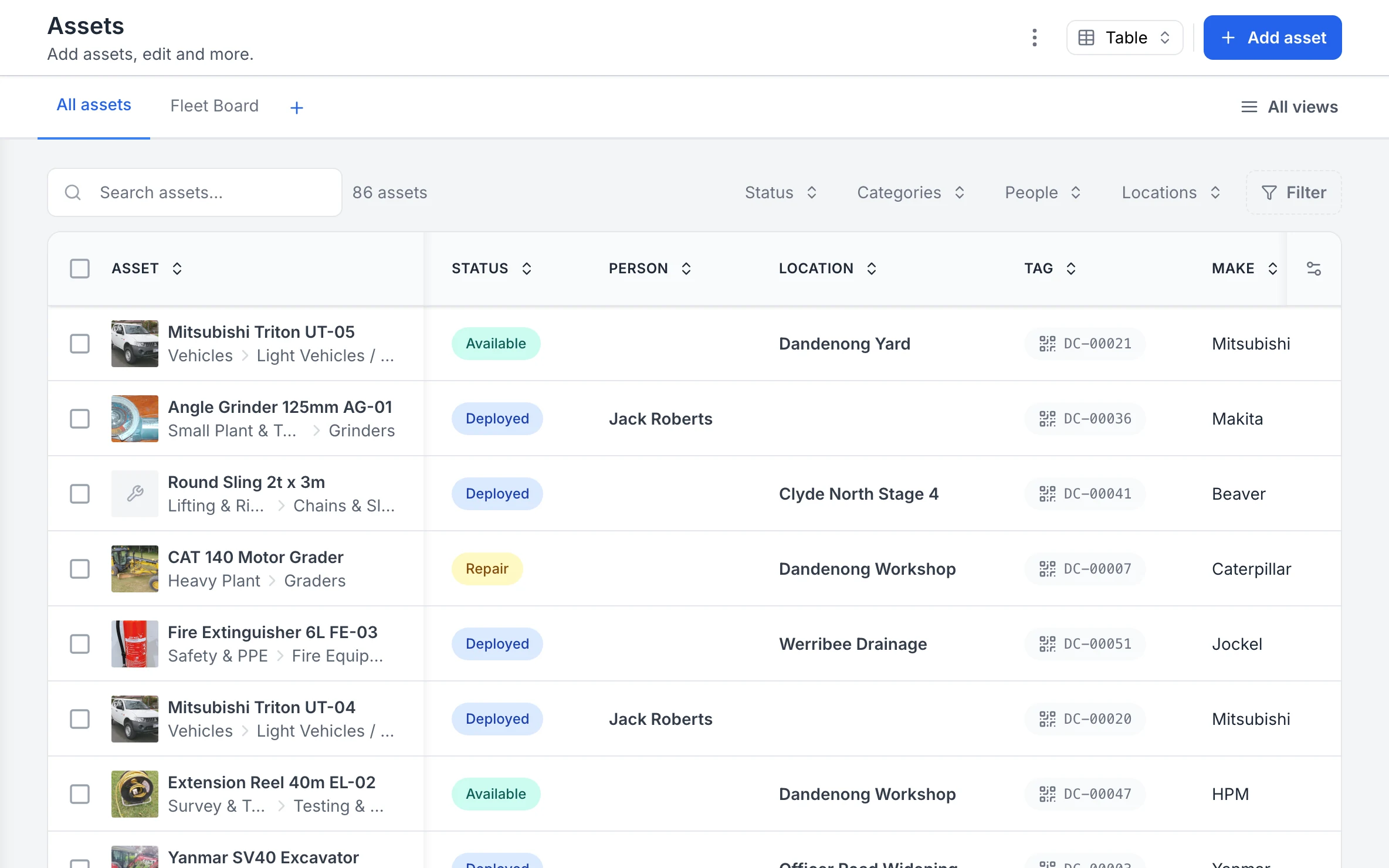
The asset register as it opens
Plant, vehicles, tools and safety gear on one register, each with its status, who has it, where it is and its QR tag.
MapTrack app · Demonstration data · Captured
About this screenshot
Demonstration workspace at a 1440 x 900 desktop viewport, the register’s default view, cropped right of the navigation sidebar to a 16:10 frame.
Who should choose MapTrack as their GPS tracking platform
Choose MapTrack if:
- GPS trackers sit on plant, trailers and generators, and the same team runs their pre-starts, servicing and costs.
- You want tracker battery, signal and last report in the same app as maintenance, with estimated run hours and kilometres feeding service schedules.
- Some machines already report through their maker's telematics. Cat, Komatsu, JCB and Volvo feeds are set up by our team under Connections.
- Tools and smaller kit need tracking too, on QR, barcode and Data Matrix labels or Bluetooth tags, on the same register.
- You want per-asset pricing with unlimited users.
Shortlist another platform first if:
- Vehicles, drivers and cameras are the whole programme. Samsara, Geotab and Verizon Connect are strong fleet telematics options.
- Machine connectivity across OEM and rental fleets is the main buy. Tenna and Trackunit are construction-specific.
Use the right tracking method for each asset class
High-value powered plant usually deserves hardwired GPS or OEM telematics. Trailers, generators, pumps and containers often suit battery GPS. Toolrooms, attachments and consumables usually need QR, barcode or BLE rather than a cellular tracker on every item.
The best commercial GPS platform lets you combine all of those methods in one register. That is the difference between a GPS map and a usable asset system.
Commercial GPS buyer checklist
- Can the system track powered and unpowered assets?
- Can GPS data trigger maintenance from runtime or odometer readings?
- Can field teams complete pre-starts offline and attach evidence?
- Can you report utilisation by site, project or cost centre?
- Can the platform handle QR/BLE assets that do not need GPS?
- Can you see hardware, data and software costs before committing?
- Can the platform integrate OEM telematics you already pay for?
Commercial GPS total cost checklist
Compare every vendor on the same cost categories. A cheap monthly tracker can become expensive if it leaves forms, maintenance and costing in other systems.
GPS hardware and connectivity
- Hardwired GPS tracker cost
- Battery GPS tracker cost and expected battery life
- SIM, cellular or satellite data fees
- Installation, replacement and decommissioning labour
Software and users
- Per-asset, per-vehicle or per-user licence model
- Minimum asset count or contract term
- Included users, roles and field access
- Modules needed for forms, work orders, reports and APIs
Workflow consolidation
- Pre-starts and defect escalation
- Runtime or odometer-triggered maintenance
- Rate cards, hire cost and jobsite costing
- QR/BLE coverage for assets that do not justify GPS
Bottom line
If you only need a vehicle GPS map, a fleet telematics provider may be enough. If you need GPS to help run commercial jobsites, track plant and machinery, trigger maintenance, record inspections and recover costs, MapTrack should be on the shortlist.
Start with a small pilot: one machine, one trailer, one generator, one service vehicle and one QR/BLE-tracked asset. The right platform will prove itself in the workflow, not just on the map.
Commercial GPS tracking software FAQs
What is commercial GPS tracking software?
What is the best commercial GPS tracking software for plant and machinery?
Is GPS tracking worth it for construction equipment?
How should I choose between Samsara, Geotab, Verizon Connect, Trackunit, Tenna and MapTrack?
Do I need GPS on every asset?
What should a commercial GPS pilot include?
How much does commercial GPS tracking software cost?
Can GPS data trigger maintenance work orders?
Is MapTrack one platform for tools, plant and vehicles?
Does MapTrack do rate cards, finance and divisions?
Does a GPS platform for plant and vehicles handle dash cams too?
Can machines’ own OEM telematics feed a GPS and maintenance platform?
Can I see GPS tracker battery and signal in the same app as maintenance?
Do MapTrack’s AI dash cams need a separate GPS tracker?
How does MapTrack work out when the next service is due?
Does MapTrack support single sign-on (SSO)?
Can a crew share one phone or tablet and still sign their own work?
What is GPS tracker software?
What should a GPS tracking platform do beyond the map?
Is GPS tracker software tied to one hardware brand?
Does MapTrack have geofencing?
Related software guides
- Best asset tracking software 2026
- Best asset tag suppliers Australia
- Best tool tracking software 2026
- Best CMMS for equipment 2026
- Best equipment management software 2026
- Best plant management software
- Best pre-start inspection software
- Best fleet management software 2026
- Best fleet maintenance software 2026
- Best fleet management software Australia
- Best asset management software 2026
- Best maintenance planning software 2026
- Best asset inspection software 2026
- Best construction equipment tracking software
- Best construction equipment maintenance software
- Best construction fleet management software
- Best fuel management software 2026
- Best safety management software 2026
Compare MapTrack head-to-head
About the author

Co-Founder & GM of Operations
Lachlan leads operations at MapTrack, bringing 10+ years of enterprise technology experience across mining, construction and heavy industry. Before MapTrack, he held senior roles at Workato (integration and automation) and AppDynamics/Cisco (application performance), working directly with ASX-listed organisations to modernise their technology stacks. His deep understanding of field operations and blue-collar workflows shapes how MapTrack solves real problems for asset-intensive teams.
View LinkedIn profile →Build a GPS layer your sites actually use
MapTrack connects location, utilisation, pre-starts, work orders, rate cards and costs on one asset record.
4.9 on G2 · 5.0 on Capterra, GetApp & Software Advice· Source: G2.com, Inc.
- No credit card required
- Unlimited users