
Tool tracking for construction
One system for construction tool and equipment tracking: assign to crews (through a crew member or crew vehicle) and projects (as project sites), run audits, attach pre-starts and compliance so nothing goes missing and nothing slips through.

Co-Founder & GM of Operations
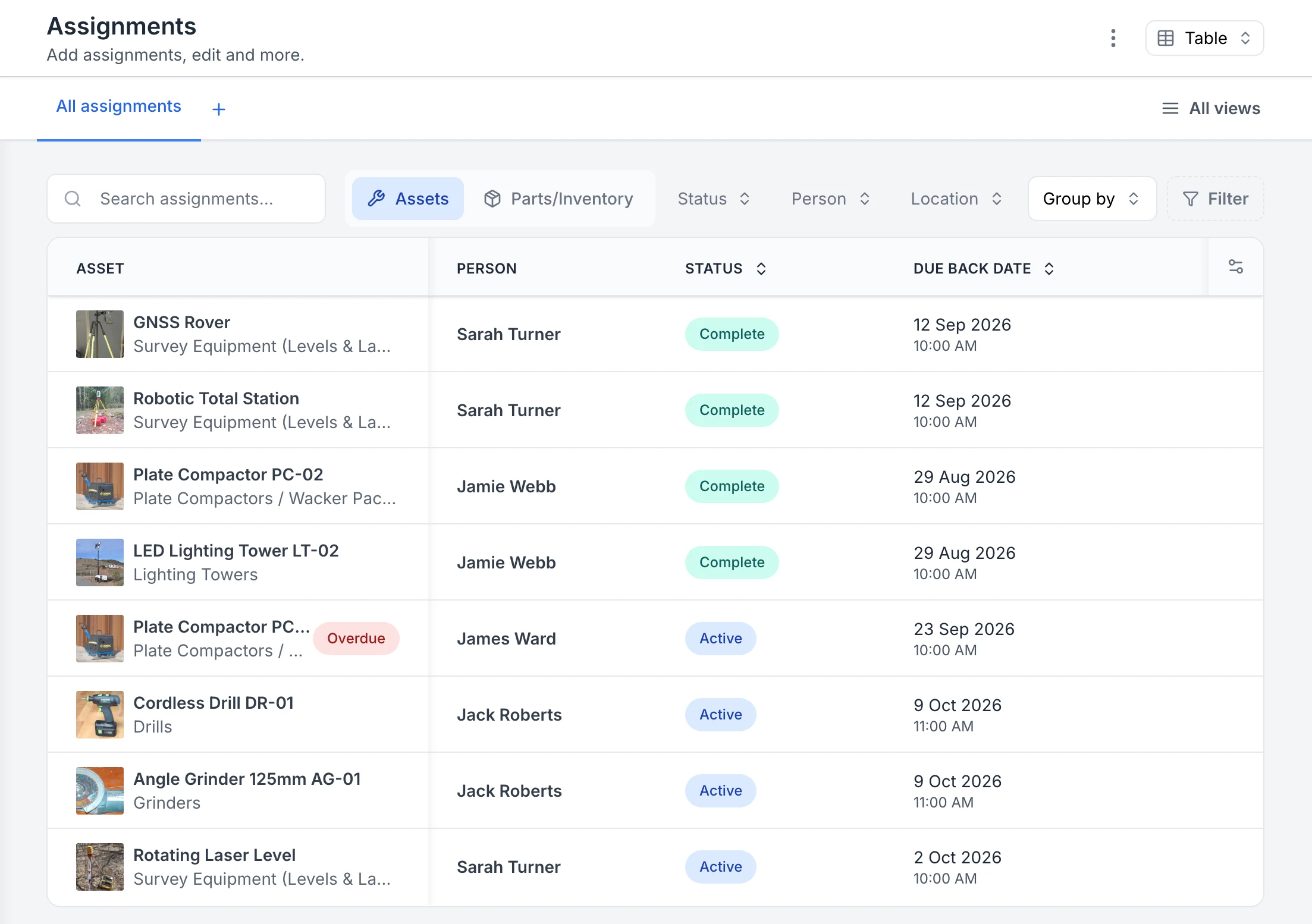
See who has each tool and when it is due back
Every sign-out in one list. Four assignments are back and marked Complete; four are still out as Active, each with the person and the due-back date. The plate compactor with James Ward was due back on 23 September, so it is flagged Overdue.
MapTrack app · Demonstration data · Captured
About this screenshot
Captured in a demonstration workspace on the All assignments view with the Person, Status and Due Back Date columns. The app shortens long asset and category names.
Trusted by construction, mining and field service teams













Follow the site request through to the physical return
A crew may ask for a category quantity before stores selects the exact tools. Keep the request, actual issue and return connected.
1. Retain the actual items supplied
Use Requests to record the requirement and any replacement reason. Review the linked checkout after fulfilment.
2. Reconcile tools and accessories
Confirm the returned quantities and explain anything missing. A Bluetooth detection near the depot does not establish that the return was completed.
How tools move between the store, crews and sites
Every check-out, return and audit is a scan against the tool's own record, so stores, supervisors and the office all see the same answer to who has it, where it went and what came back.
- Scan with what the crew already carries: Scan QR, barcode and Data Matrix labels with the phone camera or a handheld Bluetooth or USB scanner. A check-out can save where the tool was handed over, from the person's phone, when the account setting and the phone's location permission are on. Check-outs, returns, audits and Requests need a connection.
- Check out to a person, a site or a vehicle: A check-out goes to a person, a location, or both. A location can be a site, a store, a vehicle or anything you name, such as a job site, van, trailer or container.
- Accessories and consumables come back accounted for: Accessories are confirmed out and back with a reason for anything missing, and consumables can be issued and returned on the same check-out.
- Find tools that don't have GPS: A tool with a GPS device shows its latest fix on the map. Any other tool shows where it was last checked out or returned. Audits and forms record where each scan or check was done on their own records, so a site audit also shows where each tool was scanned.
- Reminders before tools go missing: MapTrack sends reminder emails for overdue check-outs, audits and Requests, and emails the assigned person when a service falls due within 7 days, as long as the schedule has an assignee.
The problem
Construction teams move tools and equipment between sites, projects and crews. Spreadsheets and paper can't keep up. You lose track of who has what, audits are slow, and compliance evidence is scattered. You need a single place to assign assets, verify quickly and keep pre-starts and certificates attached to each asset.
How MapTrack addresses it
MapTrack gives construction teams one register for tools, plant and equipment. Assign to people, crews (through a crew member or crew vehicle) or projects (as project sites); check in/out from the field; reserve gear for jobs so there's no double-booking. Run bulk scans for fast audits. Keep pre-starts, inspections and certificates on each tool's record. Overdue maintenance raises a warning at check-out; a decision to proceed is recorded. Damaged and written-off tools are blocked from issue. A failed inspection needs a practical follow-up decision and record. Maintenance can be triggered by meters or a rule you set. Per-asset pricing with unlimited users scales as you roll out to more crews.
How it works
- 1
One register for tools and plant
Tools, equipment and plant in one system. Custom types and fields match how you work. AI-assisted setup speeds migration from spreadsheets.
- 2
Assign and reserve by job
Assign assets to crews (through a crew member or crew vehicle) or projects (as project sites). Use reservations to plan which tools and plant go to which job - avoid double-booking and no-shows.
- 3
Bulk scans and audits
Verify a site or storeroom with bulk QR/barcode scanning. See what's present and what's missing; keep evidence for audits.
- 4
Pre-starts and compliance on the asset
Keep pre-starts, inspections and certificates on the asset record. A rule you set can raise a work order after a failed result. Review the finding and record the follow-up decision before the tool is used again.
Construction tool tracking done right
Full access to every feature. No credit card required. Per-asset pricing so you scale as your fleet grows.
- No credit card required
Frequently asked questions
Explore
- Pricing
- Book a demo
- MapTrack vs Asset Panda
- Alternative to Asset Panda
- Alternative to spreadsheets
- Commercial GPS tracking
- Construction equipment GPS tracking
- Construction
- Vehicle pre-start checklist
- Hardware store
Related use cases
- Tool theft prevention
- Equipment utilisation tracking
- Plant and machinery compliance
- Fleet pre-start inspections
- Equipment maintenance scheduling
- Asset audits and stocktakes
- Equipment hire and rental tracking
- Fire extinguisher inspections
- Test and tag tracking
- Shutdown and turnaround management
- Multi-site equipment management
- GPS geofence time onsite
- Calibration tracking
- Bulk inspections and testing
- Lifting gear and crane inspections
- SWMS and plant risk assessments
- Asset documents and certificates
- Equipment custody and handover
- Offline inspections
- One system for fleet, plant and tools
- Plant hire chargeout and job costing
- Forklift inspections
- EWP inspections
- Harness and ladder inspections
- Crane inspections
- PPE register
- Scaffold tagging
- First aid and AED inspections
Track every tool on every site
Join construction, mining and field service teams across Australia.
4.9 on G2 · 5.0 on Capterra, GetApp & Software Advice
- No credit card required
Construction · Asset tracking · Compliance · Contractor tool tracking · Pricing · Tool tracking software compared