














Oil & gas

Oil and gas asset management software

Track tools, equipment and plant across oil & gas sites, shutdowns and turnarounds. Pre-starts, compliance registers and maintenance in one platform, so you know who has what, what’s due and what’s shutdown-ready.

From $1 a tool and $12 a machine a month, AUD ex GST. Unlimited users.

G2 rating 4.9 out of 5
Capterra rating 5.0 out of 5GetApp rating 5.0 out of 5Software Advice rating 5.0 out of 5
15 reviews on G2 · the same 17 reviews on Capterra, GetApp and Software AdviceAll MapTrack reviews
Unlimited usersper-asset pricing
Offline-readyworks on remote sites
Oil and gas processing facility. MapTrack tracks tools, equipment and plant across Australian oil & gas operations

Published customer results

Days to hours

End-of-shutdown reconciliation reduced from days to hours

Mineral Resources, Mining
Read the Mineral Resources story

Estimated 70–80%

Automated scheduling and alerts for safety inspections, certifications and regulatory requirements reduced overdue compliance items by an estimated 70–80% within the first year.

Mineral Resources, Mining & Resources
Read the Mineral Resources story

Two-way API integration

Two-way API integration with existing enterprise systems eliminated manual data re-entry and ensured asset records remain consistent across all platforms.

Mineral Resources, Mining & Resources
Read the Mineral Resources story

Asset tracking software for oil and gas helps onshore and offshore operators manage pressure equipment, compressors, pumps, generators and lifting gear from one register. MapTrack combines QR scanning and OEM telematics with offline mobile access for processing plants, platforms and pipeline corridors, API inspection cycles on the asset record, meter-based work orders and bulk turnaround audits. Oil and gas teams use it to hold NOPSEMA, WHS and AS 2550 evidence per asset, prevent the runtime breakdowns that halt production, and replace clipboard mobilisation stocktakes with QR scans.

Key takeaways

  • ABB’s 2023 Value of Reliability survey puts unplanned downtime at close to A$349,000 an hour for the typical Australian industrial business, against A$194,000 globally. Its sample includes oil and gas operators.
  • Australian offshore facilities operate under NOPSEMA; onshore plant compliance sits under WHS Regulations and AS 2550 lifting standards.
  • Pressure equipment inspection cycles (API 510 vessels, API 570 piping, API 580 risk-based) belong on the asset record, not in filing cabinets.
  • Compressors, pumps and generators wear by runtime hours; meter-based work orders prevent the breakdowns that halt production.
  • Offline mobile access is essential for processing plants, offshore platforms and pipeline corridors where cellular coverage is patchy or absent.
  • Turnaround mobilisation and demobilisation audits via bulk QR scan replace clipboard stocktakes that used to take a full shift.

Pricing

One price per machine, with the hardware included: software and a QR tag from $12 a machine a month, GPS tracking from $27 and AI cameras from $72. Tools and equipment start at $1/asset/month. Every plan includes unlimited users. Prices are AUD ex GST, and machine prices are for annual billing.

View pricingGet a tailored quote

Jarrod Milford

Jarrod Milford

Co-Founder & Commercial Director

Published 15 February 2026Updated 26 October 2026

Oil and gas asset tracking for tools, gas detectors and field equipment

Oil and gas asset tracking starts with who has each item and when it's next due. In MapTrack every tool, gas detector, piece of lifting gear and shutdown kit gets a QR label and its own record: who's got it, where it was last checked out or returned, and its certificates and service dates. Gear that moves between sites can carry a Bluetooth tag that a nearby gateway tracker picks up, or a battery GPS tracker. We supply both in Australia and New Zealand, and connect trackers you already run with our help. Live tracking, trips and history run in MapTrack Telematics.

Oil & Gas

MapTrack at a glance

Built for
Oil and gas operators and contractors moving tools, gas detectors and field equipment between sites, shutdowns and contractors.
Tracks
Gas detectors, lifting gear and rigging, pressure vessels, relief valves and gauges, Ex-rated equipment, scaffolding, hand and power tools, pumps, compressors and generators, lighting towers, mobile plant and cranes, service trucks, tubulars and serialised stock.
Tracked with
QR labels or telematics integrations.
Works offline
Pre starts, inspections and other forms save with no reception and sync when the phone is back in range. A work order already loaded on the phone can be worked through with no reception too.
Phones and computers
In the browser on a computer, and Android, iPhone and iPad access through the mobile browser or the installable web app.
Connects to
Telematics and accounting integrations, a public API, and an MCP server for AI tools such as Claude. Cat, Komatsu, JCB and Volvo machines' own telematics can feed engine hours, location, fault codes and fuel used into MapTrack, set up by our team under Connections.
Sign-in
Sign in with Microsoft, or SAML 2.0 single sign-on set up by our team (Enterprise, or a Pro add-on).
Set-up and support
24/7 support. Our team sets up single sign-on and OEM telematics feeds, and helps connect trackers you already run.
Track record
600,000+ assets tracked since 2012.

How to choose oil and gas asset tracking software

Look for:

  1. A custodian for every item, with where it was last checked out or returned
  2. Inspection registers with the report attached to each item
  3. Forms that work with zero reception and sync later
  4. Gas detectors in cal, with the next due date on the record
  5. Kit checked back in by scan after a shutdown

Where MapTrack fits

Next to your EAM or ERP

If you run an EAM or ERP for fixed plant, work planning and finance, MapTrack can sit beside it for the gear that moves between sites, shutdowns and contractors. MapTrack has a public API for passing records between the two.

Next to telematics

A telematics platform tracks where vehicles go. MapTrack puts each vehicle and machine on the same register as the tools, with its pre starts and services. A GPS tracker or AI dashcam puts its latest position on the record, with estimated km and hours feeding its services, and MapTrack Telematics adds GPS tracking with trips, history and geofences.

See what MapTrack costs for your oil & gas assets

Per-asset pricing tailored to your oil & gas asset mix and a rollout plan, within one business day.

Trusted by field and shutdown crews, including Supagas and Mineral Resources

SupagasMineral ResourcesSaunders InternationalHacer GroupMetro TunnelUltrabuilt
G2 rating 4.9 out of 5
Capterra rating 5.0 out of 5GetApp rating 5.0 out of 5Software Advice rating 5.0 out of 5
15 reviews on G2 · the same 17 reviews on Capterra, GetApp and Software AdviceCapterra Best Value 2026 badgeCapterra Best Ease of Use 2026 badgeAll MapTrack reviews

What we track

Every asset type across your oil & gas operations

MapTrack is built for the full mix of assets that move across your processing facilities, well sites, pipeline corridors, shutdown locations and workshops, from hand tools to heavy plant.

  • Pressure vessels, separators & heat exchangers
  • Pumps, compressors & turbines
  • Pipework, valves & instrumentation
  • Lifting equipment & rigging gear (AS 2550)
  • Fixed and portable gas detectors (AS/NZS 60079)
  • Calibration equipment & flow meters
  • Generators, light towers & site power
  • Specialist hand tools & power tools
  • Hazardous-area-rated electrical equipment
  • Personal protective and safety equipment
  • Mobile plant (excavators, cranes, EWPs)
  • Vehicles (utes, service trucks, trailers)
  • Tubulars & serialised stock
  • Contractor plant on lease pads & well sites

What you run, and how MapTrack tracks it

Gas detectors
QR label
Lifting gear and rigging
QR label
Pressure vessels, relief valves and gauges
QR label
Ex-rated electrical equipment
QR label
Scaffolding and insulation gear
QR label
Hand and power tools
QR label
Pumps, compressors and generators
QR label and telematics integration
Lighting towers
QR label
Mobile plant and cranes
Telematics integration
Service trucks and pickups
Telematics integration
Tubulars and other serialised stock
QR label

Running a mix like this? See how MapTrack handles it in a demo built around oil & gas teams.

Book a demo

30 minutes on Microsoft Teams

The challenge

The costs of poorly managed oil & gas assets

Oil & gas assets don’t sit still. They move between processing facilities, well sites, pipeline corridors and shutdown locations, wear out based on runtime hours not dates, require documented compliance registers, and their downtime can halt entire production schedules.

Tooling disappears between shutdowns and turnarounds

Specialty tools, valve actuators and test equipment get issued for a turnaround, borrowed between crews or left behind at a previous facility. Without a clear chain of custody you write off the loss and re-purchase. Every shutdown cycle.

Compliance registers for pressure equipment and lifting gear

Pressure vessels, relief valves, cranes and lifting equipment require current inspection certificates and design registrations. Producing compliance evidence on demand for site audits or regulatory inspections is painful when records live in filing cabinets, email threads and scattered spreadsheets.

Plant servicing runs on hours. Not the calendar

Compressors, pumps, generators and mobile plant need servicing based on runtime hours and operational cycles. Not arbitrary monthly reminders. Missing service intervals causes unplanned breakdowns that halt production and trigger costly emergency repairs.

Multi-site visibility fragmented across regions

Assets spread across processing facilities, well sites, pipeline corridors, shutdown locations and workshops with no single view. Each site or contractor runs its own spreadsheet. Leadership can’t see the full picture without manual consolidation across regions.

Equipment downtime halts production and triggers penalties

When critical equipment goes down without warning on a production facility, it doesn’t just cost repair time. It stops throughput, cascades across the production schedule and can trigger contractual penalties or deferred production. You need proactive visibility before failures occur.

From MapTrack's own data

What we see across MapTrack customer accounts

These figures come from MapTrack's own product data, de-identified and aggregated. Accounts aren't grouped by industry, so each figure covers every qualifying customer account, not one industry alone. Every figure counts at least 20 accounts, and each one says how it was measured.

15%

Scheduled services past their due date

Across 32 MapTrack customer accounts with service schedules, 15% of scheduled services were past their due date on 26 October 2026. More than three quarters of those (78%) were over 30 days past due.

Method: MapTrack's own product data: 32 customer accounts with service schedules, 5,855 scheduled services (884 past due), snapshot at 26 October 2026. Demo, test and trial-build accounts are left out. Includes schedules MapTrack set up during onboarding; the servicing itself is the customer's. One account holds 53% of the past-due services; without it the share is 16%. Some past-due items may be assets no longer in use that were never archived.
More than 80 days

How late a missed service runs

Across 32 MapTrack customer accounts, a service that was past due on 26 October 2026 was typically more than 80 days overdue.

Method: MapTrack's own product data: 32 customer accounts, 884 past-due services, snapshot at 26 October 2026. Demo, test and trial-build accounts are left out. Includes schedules MapTrack set up during onboarding; the servicing itself is the customer's. Typical means the median: 105 days across all past-due services and 82 days with the largest account left out, so the lower figure is used.

51%

Services driven by hours and kilometres

Across 39 MapTrack customer accounts with service schedules, half of all service triggers (51%) run off engine hours or kilometres rather than the calendar.

Method: MapTrack's own product data: 39 customer accounts with service schedules, 289 service triggers (148 meter based: 118 hours, 30 km), schedules live on 26 October 2026. Demo, test and trial-build accounts and anything MapTrack staff created are left out. Counts trigger rules on live schedules, not services carried out, so the record count is small.

99%

Meter readings typed in by hand

Across 25 MapTrack customer accounts that log hour or kilometre readings, 99% of meter readings in MapTrack were entered by hand, and nearly half of meters (47%) had gone more than 30 days without a new reading on 26 October 2026.

Method: MapTrack's own product data: 25 customer accounts, 43 meters, 24,491 readings, all readings to 26 October 2026. Demo, test and trial-build accounts and anything MapTrack staff created are left out. Counts the readings stored in the MapTrack app only; trips and run hours shown through MapTrack Telematics may not appear here. Only 43 meters, so the 47% is thin, and a quiet meter can be a parked machine.

Want to know what these costs look like on your own sites? Talk it through with us.

Book a demo

30 minutes on Microsoft Teams

Use cases

How oil and gas operators use MapTrack

See which plant goes out, and which sits idle

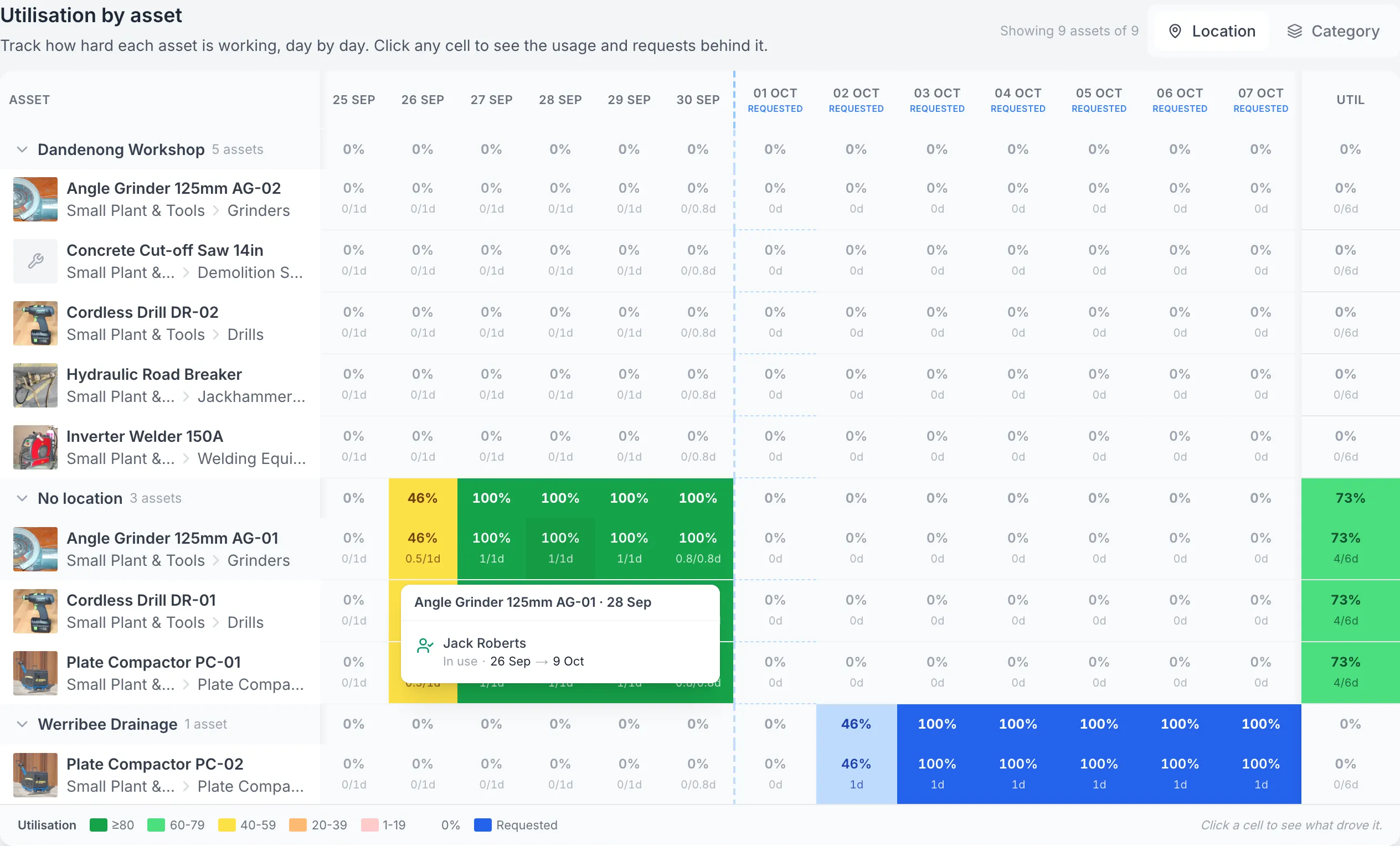
Every sign-out and return adds to a day-by-day utilisation view, so gear sitting idle on a remote site stands out before you hire more.

Reporting
Asset utilisation heatmap for nine assets, with green allocation cells, blue future-request cells and the Angle Grinder AG-01 detail for 28 September showing Jack Roberts and In use from 26 September to 9 October.

Open the allocation behind a coloured cell

Opening the grinder’s 28 September cell reveals the recorded allocation and its dates. Green allocation time and blue requested time answer different questions; neither proves that the equipment was running.

MapTrack app · Demonstration data · Captured

About this screenshot

Demonstration Small Plant & Tools filter, 25 September to 7 October 2026. Location groups use each asset’s current saved location. The No location group does not mean the equipment has no physical whereabouts.

A custodian for every item

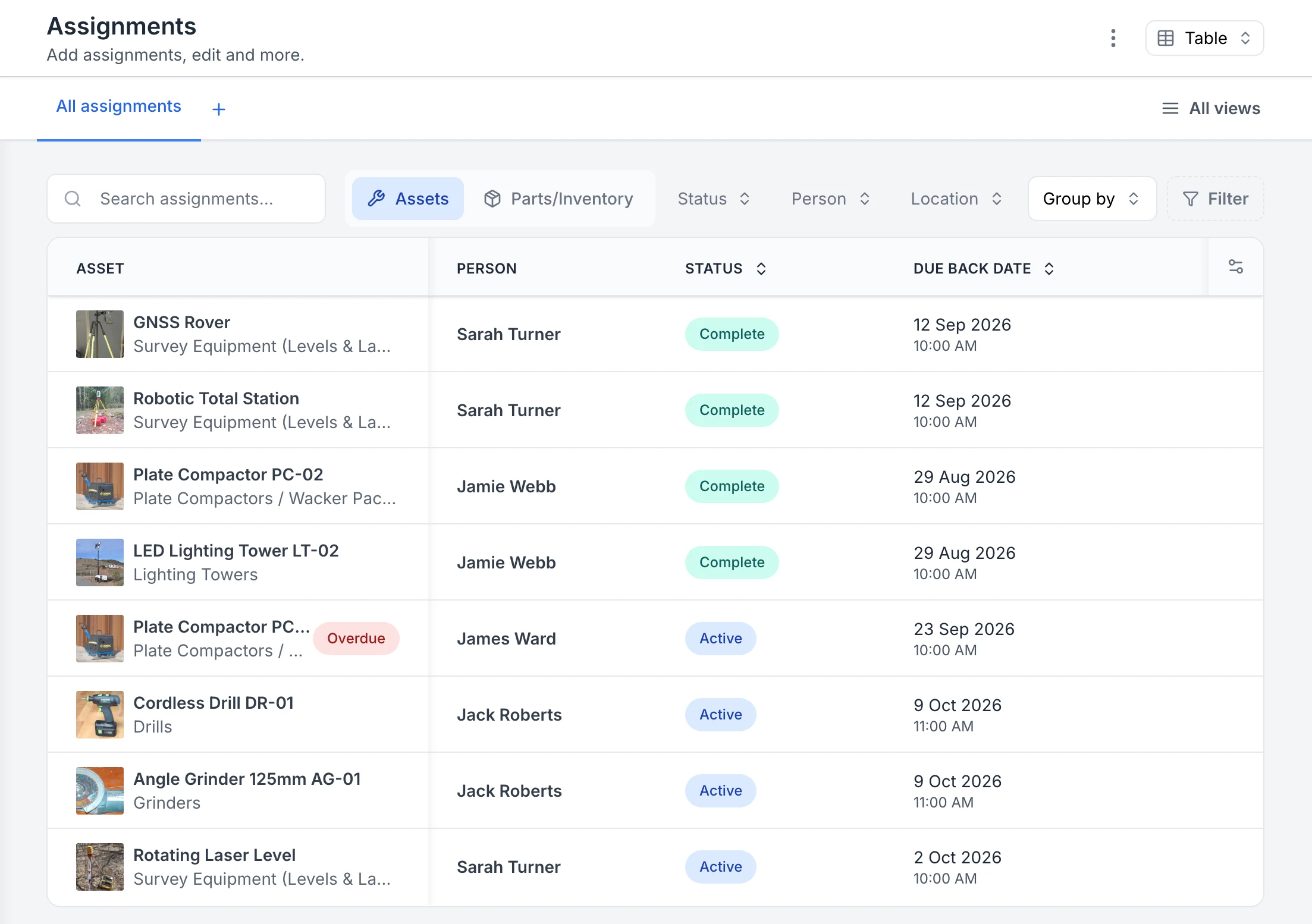
Sign each item out to the person responsible, with a due-back date. Overdue returns are flagged, and the history shows who had it last.

Tool tracking
MapTrack Assignments table listing eight tool and equipment assignments, a GNSS rover, robotic total station, two plate compactors, a lighting tower, a cordless drill, an angle grinder and a rotating laser level, each with its photo, the person it went to, a Complete or Active status and a due-back date. One plate compactor is flagged Overdue.

See who has each tool and when it is due back

Every sign-out in one list. Four assignments are back and marked Complete; four are still out as Active, each with the person and the due-back date. The plate compactor with James Ward was due back on 23 September, so it is flagged Overdue.

MapTrack app · Demonstration data · Captured

About this screenshot

Captured in a demonstration workspace on the All assignments view with the Person, Status and Due Back Date columns. The app shortens long asset and category names.

Inspection registers with the report attached

Lifting gear, pressure items and Ex equipment each sit on an inspection schedule, with the last report on the service record. The register shows compliance, what's due and what's overdue.

Compliance
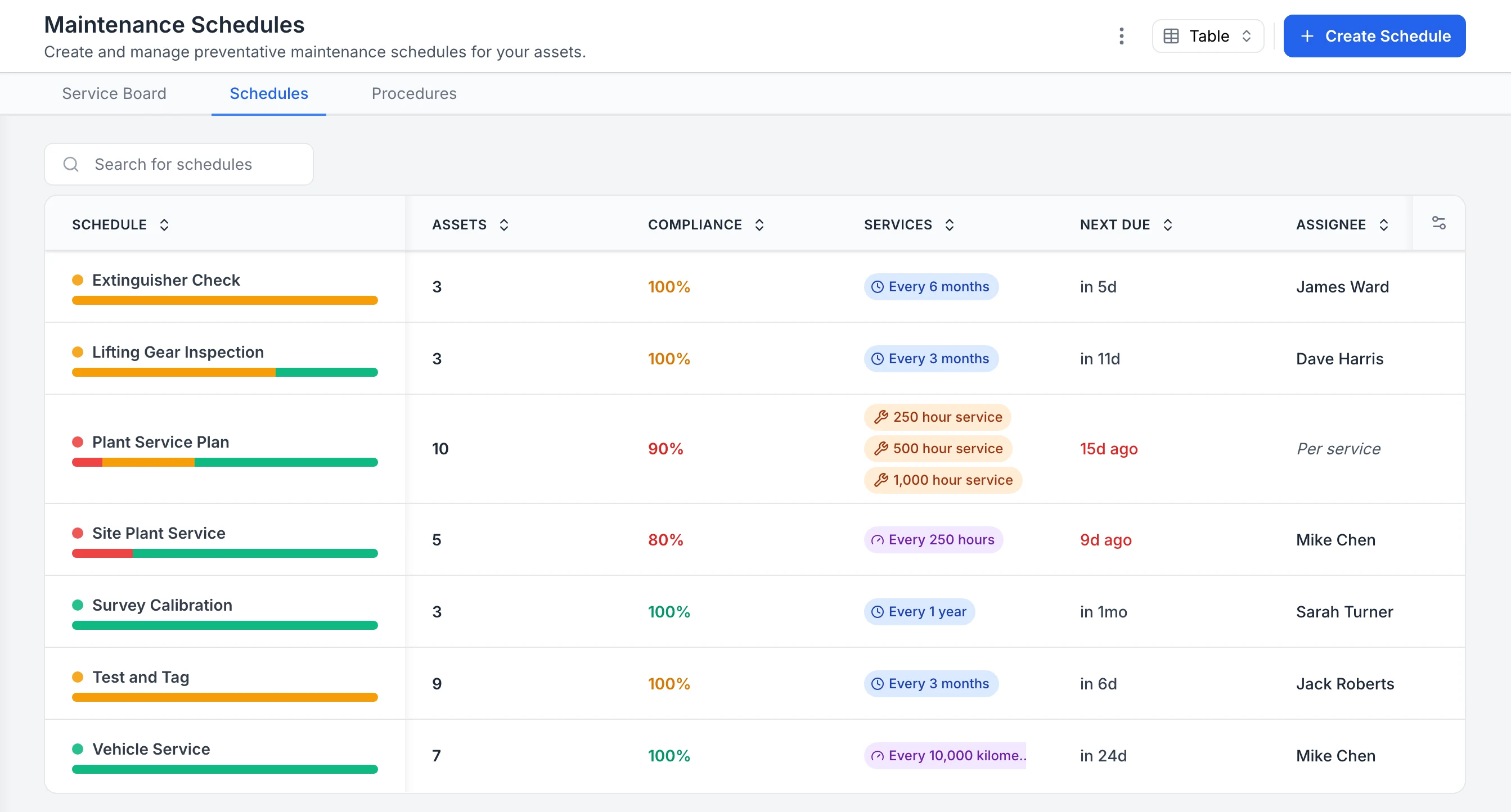
MapTrack Maintenance Schedules table listing Extinguisher Check, Lifting Gear Inspection, Plant Service Plan, Site Plant Service, Survey Calibration, Test and Tag and Vehicle Service, each with its asset count, a compliance percentage, its interval, when it is next due and who it is assigned to. The two plant schedules are overdue and show in red.

See compliance for every inspection and service schedule

Every maintenance schedule in one table. Extinguisher checks, lifting gear inspections, test and tag and survey calibration sit beside plant and vehicle servicing, each with a compliance percentage, interval, next due date and assignee. The plant service plan and site plant service are overdue, so they show in red; schedules with assets due soon show in orange.

MapTrack app · Demonstration data · Captured

About this screenshot

Captured in a demonstration workspace on the Maintenance Schedules tab. The app shortens long interval labels, as in the vehicle service row.

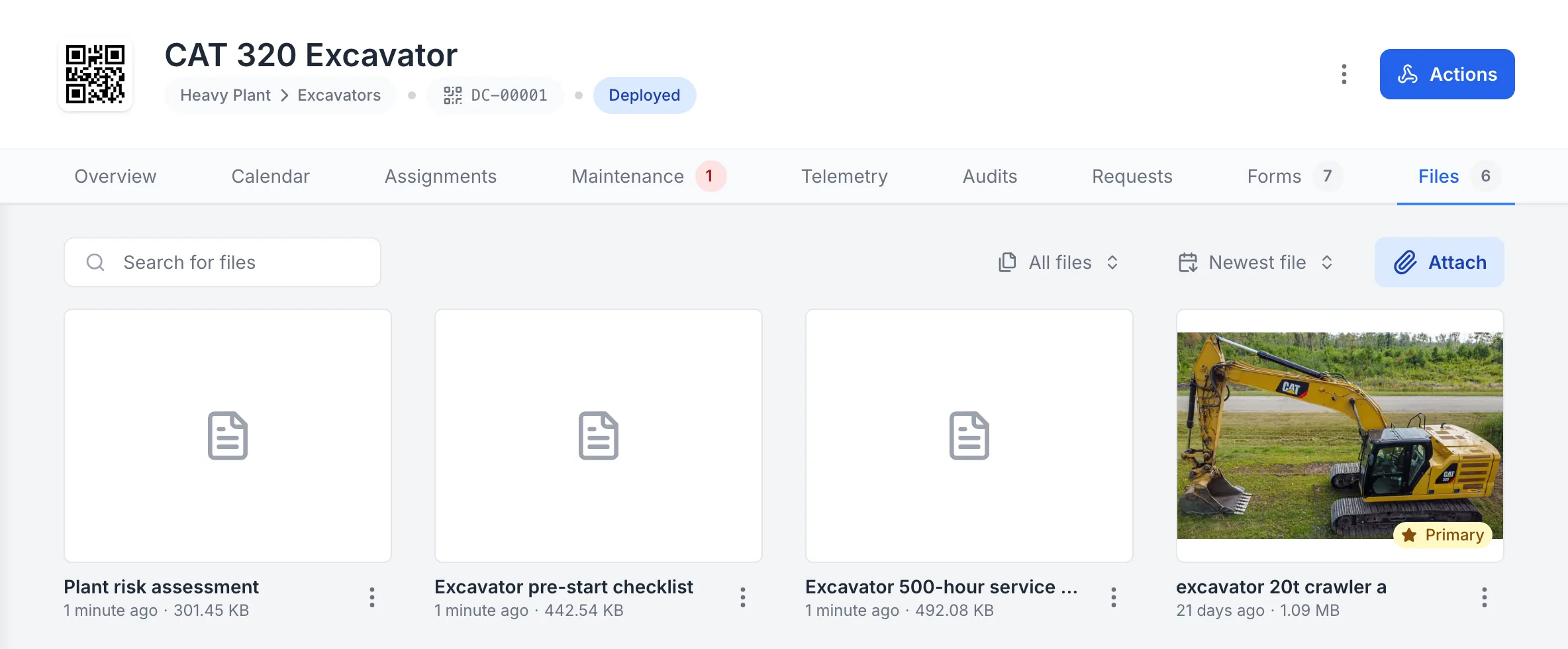
Files tab of a CAT 320 Excavator in MapTrack, showing 6 files: PDFs named Plant risk assessment (301.45 KB), Excavator pre-start checklist (442.54 KB) and Excavator 500-hour service procedure (492.08 KB), added a minute before the capture, and the excavator’s photo marked Primary, with Search for files, All files, Newest file and Attach controls.

The excavator’s paperwork on its record

A plant risk assessment, a pre-start checklist and a 500 hour service procedure kept on the CAT 320’s own record, next to its photo. These three are MapTrack’s free templates, saved as PDFs and attached in the app.

MapTrack app · Demonstration data · Captured

About this screenshot

Demonstration workspace at a 1440 px desktop viewport on the asset’s Files tab, cropped to the first row of its six files. The three PDFs were attached with Attach that day.

Forms that work with zero reception

Daily checks and inspections submit with no signal and sync once you're back in range. On a job loaded before you leave coverage, crews record each item's pass or fail offline.

Mobile app
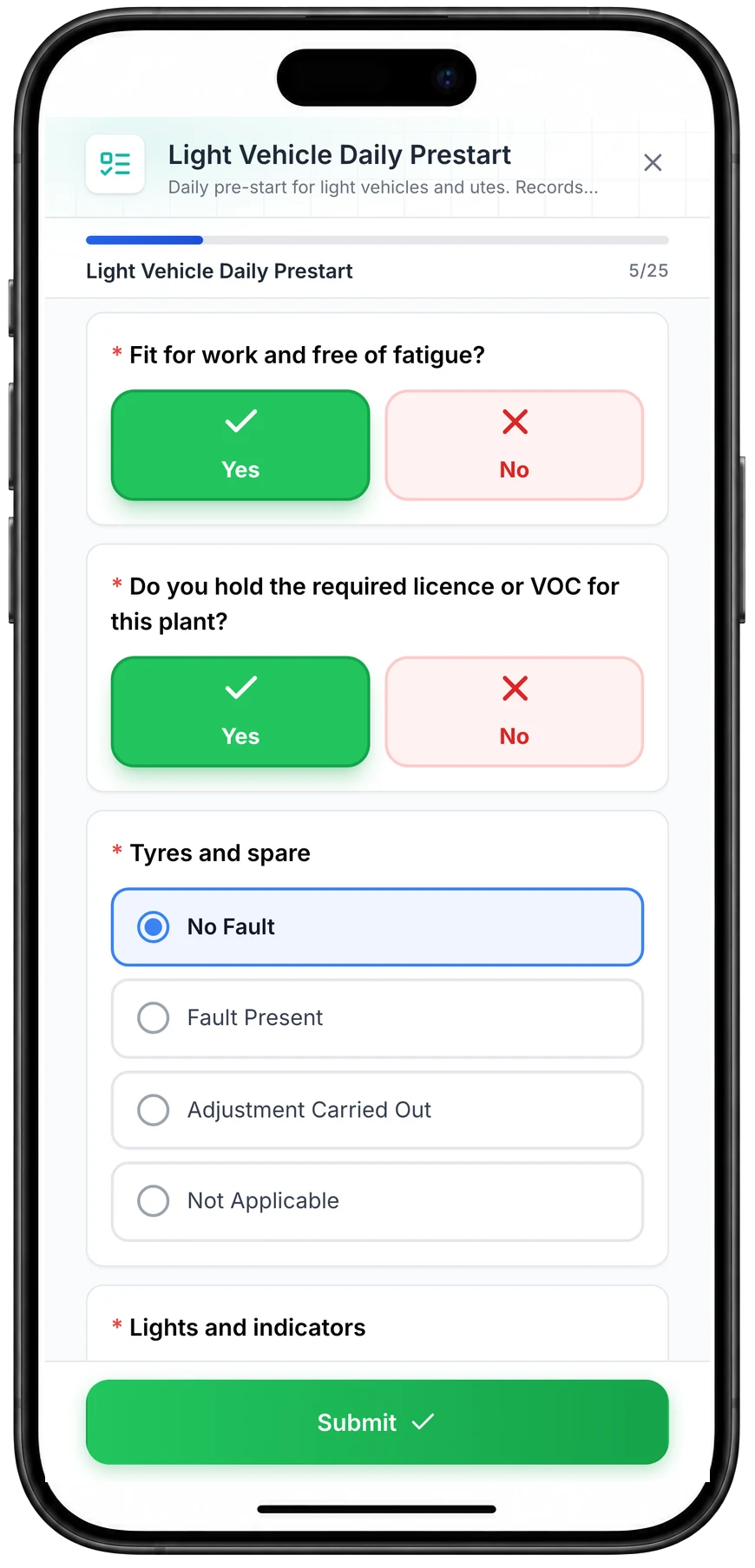
MapTrack Light Vehicle Daily Prestart on a phone, 5 of 25 answered: Yes selected for fit for work and free of fatigue and for holding the required licence, No Fault selected for tyres and spare from No Fault, Fault Present, Adjustment Carried Out and Not Applicable, the lights and indicators check next, and a Submit button.

Run a vehicle pre-start on a phone

A daily pre-start for a ute, part-way through. Driver checks such as fitness for work and licence take one tap, and each vehicle check records No Fault, Fault Present, Adjustment Carried Out or Not Applicable.

MapTrack app · Demonstration data · Captured

About this screenshot

Captured at a 430 x 932 phone viewport in a demonstration workspace and shown in a phone frame; the form was closed without submitting.

Not sure which of these to start with? We'll walk you through it in a demo.

Book a demo

30 minutes on Microsoft Teams

Check the kit back after a shutdown

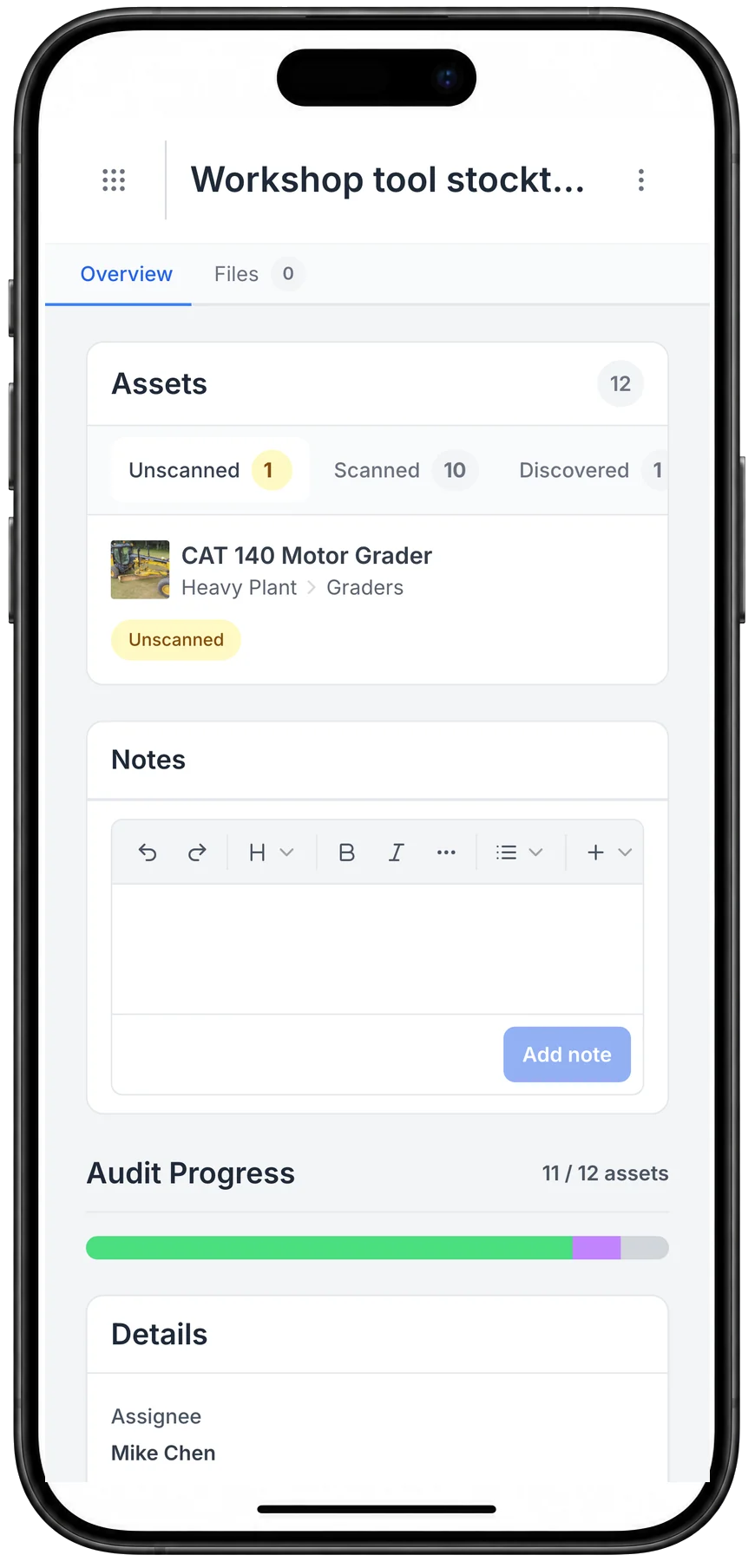
Scan the returned kit against what's recorded at the shutdown. You see what's back and what turned up extra, then choose whether the rest is marked missing.

Audits
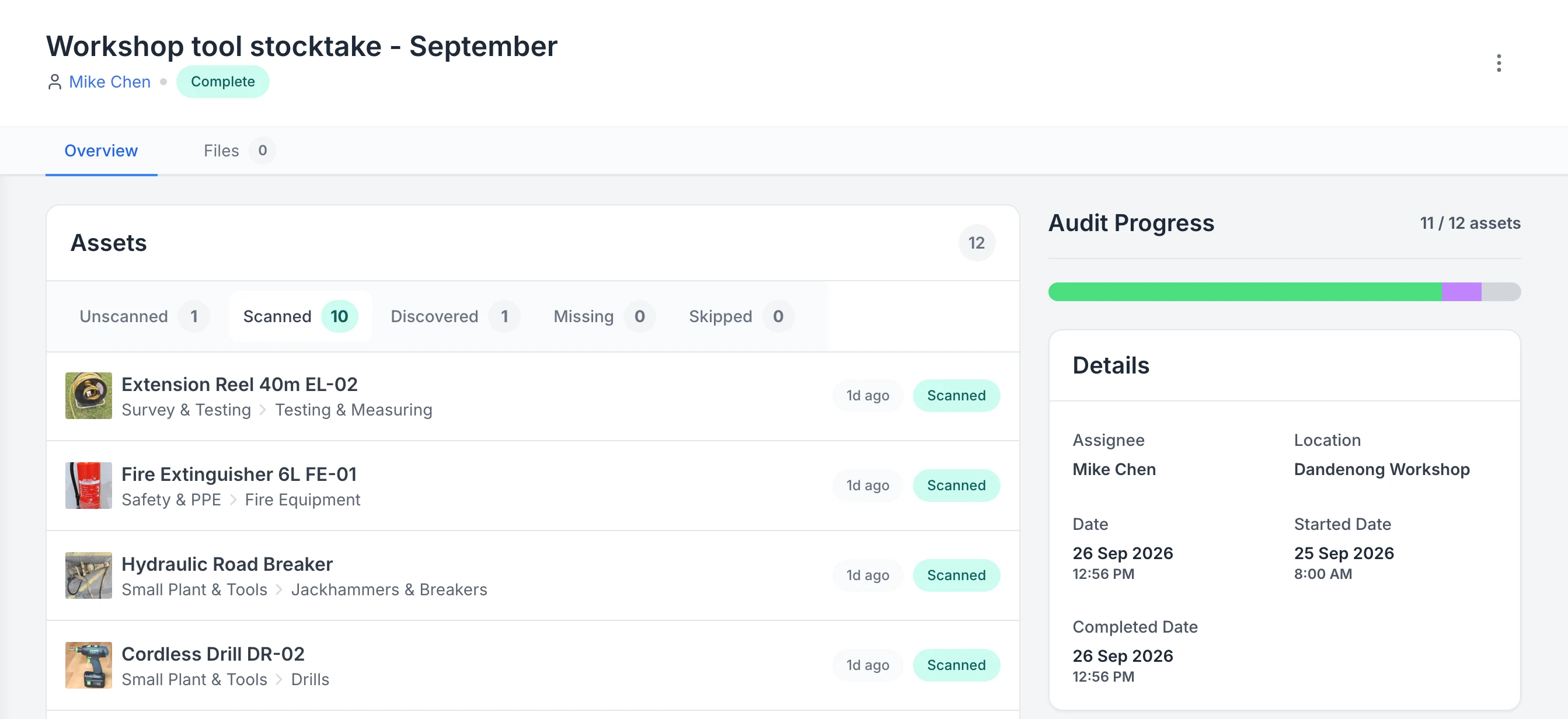
MapTrack audit Workshop tool stocktake - September, assigned to Mike Chen and marked Complete. Tabs show 1 unscanned, 10 scanned, 1 discovered, 0 missing and 0 skipped; the scanned list starts with an extension reel, a fire extinguisher, a hydraulic road breaker and a cordless drill; the progress bar reads 11 of 12 assets.

See what a stocktake scanned, discovered and missed

A completed workshop stocktake. Ten listed assets were scanned and one asset that was not on the list was discovered, so progress reads 11 of 12. One asset is still unscanned and none are marked missing.

MapTrack app · Demonstration data · Captured

About this screenshot

Captured in a demonstration workspace on the audit’s Overview tab with the Scanned tab open; its activity log continues below the crop.

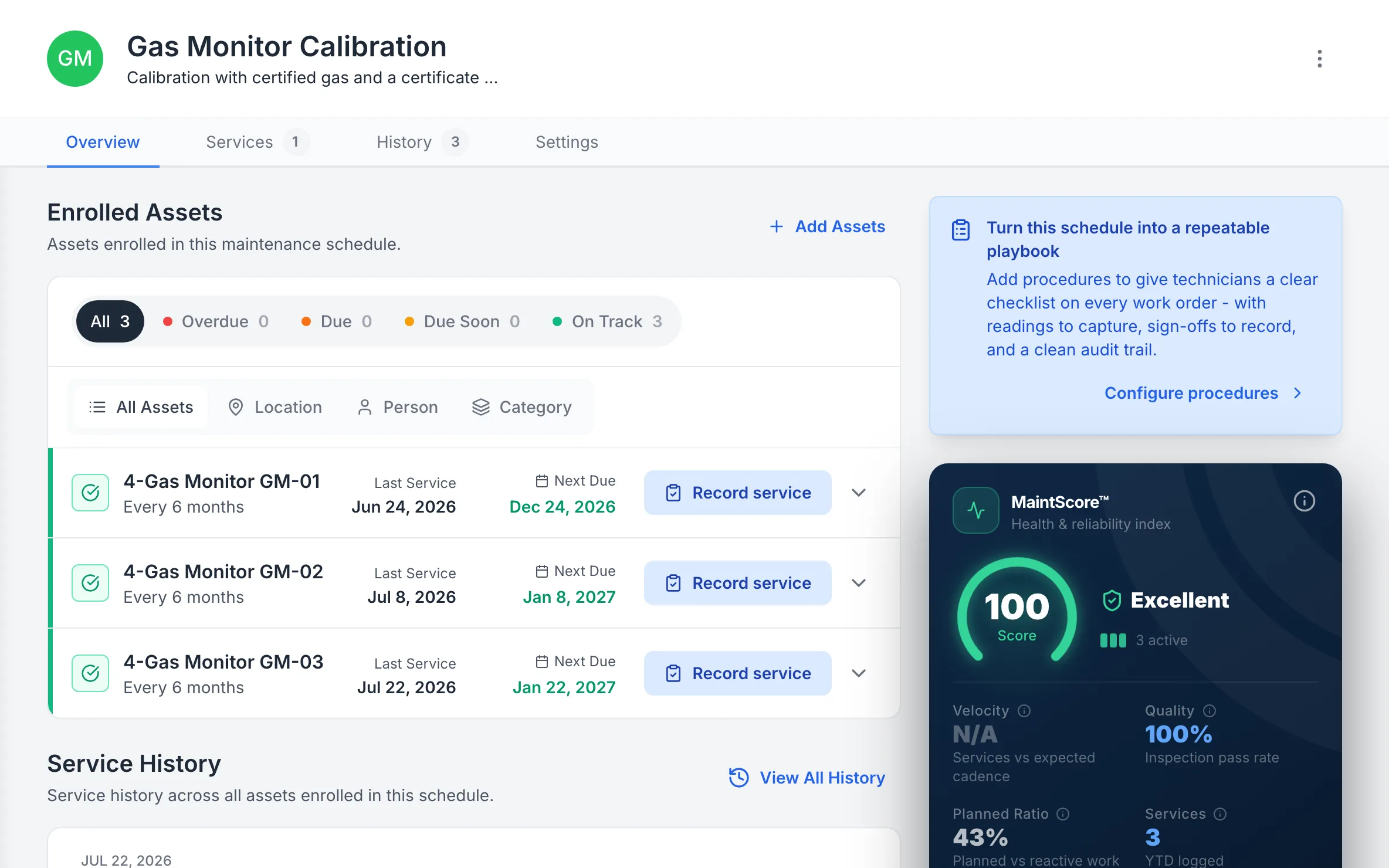
Gas detectors in cal

Each gas detector sits on a calibration schedule with when it was last done and when it's next due, and anything overdue is flagged when someone goes to sign it out.

Compliance
MapTrack Gas Monitor Calibration schedule with 3 enrolled 4-gas monitors, GM-01, GM-02 and GM-03, all On Track, each calibrated every 6 months, last calibrated 24 June, 8 July and 22 July 2026 and next due 24 December 2026, 8 January and 22 January 2027.

Gas monitors on a calibration schedule

Each gas monitor on a six-monthly calibration schedule, with when it was last calibrated and when the next is due.

MapTrack app · Demonstration data · Captured

About this screenshot

Demonstration workspace at a 1440 x 900 desktop viewport, on the schedule’s Overview tab, cropped right of the navigation sidebar to a 16:10 frame.

Seen one that fits how your team works? We'll show it to you in a demo.

Book a demo

30 minutes on Microsoft Teams

Customer proof

What customers say

We haven't published an oil and gas customer story. The cards are customers doing the same work in other industries, and the first review below is from Oil & Energy. Each is labelled with its own industry.

Mine shutdown crew

“MapTrack streamlines tracking and asset servicing across mine shutdowns - simple, reliable, and effective.”

Gordon Stennings, Maintenance Storeman, Mineral Resources
  • From the published story: The end-of-shutdown reconciliation - previously a multi-day exercise - is now completed in hours.
Read the Mineral Resources story

Gas distributor

“MapTrack's a great platform - intuitive for the guys out in the field and also has fantastic support.”

Matthew Anderson, Maintenance Planning Supervisor, SupagasReview on Capterra
Read the reviews on Capterra

“Overall very happy. It is intuitive to use, and the team are very responsive to any suggestions.”

Mathew, Senior Planner, Oil & Energy, 11-50 employeesVerified review on Capterra, January 2025. Invited by MapTrack, incentive offered

“We used to spend hours trying to track down tools and equipment, and things would regularly go missing. That cost us both time and money. MapTrack has solved that by giving us clear visibility of where everything is and who has it. It's reduced asset losses, improved accountability across the team, and saved us a lot of admin time.”

Verified User, Manufacturing, Mid-Market (51-1000 emp.)Verified review on G2, August 2025

Want to hear how other oil & gas teams set MapTrack up? Ask us in a demo.

Book a demo

30 minutes on Microsoft Teams

By the numbers

The real cost of poor asset management in oil and gas

In oil and gas, equipment failures and compliance gaps carry some of the highest financial and safety consequences of any industry. The numbers make a clear case for digital asset management.

A$349K

an hour: what unplanned downtime costs the typical Australian industrial business, against A$194,000 globally

ABB, Value of Reliability survey (2023)

69%

of industrial businesses surveyed experience an unplanned outage at least once a month

ABB, Value of Reliability survey (2023)

30–40%

savings opportunity that a functioning predictive maintenance programme opens up against a reactive-heavy operation

US Department of Energy, O&M Best Practices Guide, Release 3.0 (2010), p. 5.4

One platform

Tracking, compliance and maintenance in one system

Stop juggling spreadsheets, paper compliance registers and point solutions. MapTrack connects asset tracking, pre-starts and inspections, and usage-based maintenance into a single platform built for field use across oil & gas facilities.

MapTrack Assets register showing 86 assets in a table with status, person, location, QR tag and make: Mitsubishi Triton utes, a 125mm angle grinder deployed with Jack Roberts, a round sling at Clyde North Stage 4, a CAT 140 motor grader in Repair at Dandenong Workshop, a 6L fire extinguisher, a 40m extension reel and a Yanmar SV40 excavator.

The asset register as it opens

Plant, vehicles, tools and safety gear on one register, each with its status, who has it, where it is and its QR tag.

MapTrack app · Demonstration data · Captured

About this screenshot

Demonstration workspace at a 1440 x 900 desktop viewport, the register’s default view, cropped right of the navigation sidebar to a 16:10 frame.

Want to see how these fit together on your own sites? We'll show you in a demo.

Book a demo

30 minutes on Microsoft Teams

Hazardous areas

Ex-rated asset registers built for AS/NZS 60079 zones

Track every Ex-rated motor, junction box, intrinsically safe radio and hazardous-area gas detector against its Zone 0, 1 or 2 classification. Certificates of conformity, IECEx tags and Ex inspection records attach to the asset, so dossier evidence is one scan away when the auditor turns up.

  • Zone classification on every Ex-rated asset
  • IECEx and ATEX certificates attached per item
  • Ex inspection cycles scheduled by grade
  • Gas detector bump and calibration history
  • Field-ready evidence for AS/NZS 60079 audits
Pre-start inspections

Shutdowns

Mobilise and demobilise a turnaround without the clipboard stocktake

Bulk QR scan 200-plus rotating crew, tooling crates and mobilisation packs in and out of the turnaround gate. Every item is assigned to a contractor, scope or work pack (through the contractor or the laydown area for that scope), so demob audits close out in hours rather than days, while production is still down.

  • Bulk scan mobilisation packs at the gate
  • Assign tooling to contractor or work pack (as a laydown area)
  • Demob audit closes out by exception
  • Scoped access for rotating shutdown crew
  • Chain of custody across the full turnaround
Asset tracking
A MapTrack workshop tool stocktake on a phone: 12 assets, with 10 scanned, 1 discovered and 1 still unscanned, a CAT 140 motor grader, and audit progress at 11 of 12 assets, assigned to Mike Chen.

A stocktake on the phone

A stocktake on the phone: what has been scanned, what turned up that was not on the list, and what is still to find.

MapTrack app · Demonstration data · Captured

About this screenshot

Captured at a 430 x 932 phone viewport in a demonstration workspace and shown in a phone frame.

See these on a phone and a desktop in a live demo.

Book a demo

30 minutes on Microsoft Teams

Calibration

Pressure equipment and calibration cycles, by code not calendar

Schedule statutory inspections against API 510 for vessels, API 570 for piping and API 580 for risk-based intervals. Every pressure gauge, flow meter and relief valve carries its current calibration certificate, so NOPSEMA, WHS Regulations and insurer evidence is on the asset, not in a shared drive.

  • API 510, 570 and 580 cycles on each asset
  • Calibration certificates per gauge and meter
  • Relief valve test history attached
  • NOPSEMA and WHS evidence on demand
  • Overdue alerts before the inspection window
Maintenance & work orders

Integrations

Plant data straight from the machine

MapTrack integrates with OEM telematics platforms across major equipment brands used in oil & gas, so runtime hours, odometer and GPS location drive maintenance and utilisation automatically, without manual data entry.

Caterpillar
Komatsu
Hitachi
John Deere
Teletrac Navman
Geotab
HCSS
  • Runtime hour and ODO tracking for timely preventive maintenance
  • Live GPS location and geofence alerts for plant across your facilities
  • Fault and diagnostic data where supported by your integration
  • Geofence-based utilisation and time-on-site for project and shutdown job costing

See all integrations

Field-ready

Built for facilities, shutdowns and remote sites

Oil and gas operations happen in the field, not the office. MapTrack runs on any phone or tablet. No specialist hardware required. Scan equipment, complete pre-starts, update compliance registers and log maintenance issues directly from the facility, well site or shutdown.

Offline mode means crews can keep working in remote locations, offshore platforms or facilities with no signal. Data syncs automatically when back online. Unlimited users means every operator, supervisor, contractor and safety officer has access.

Offline sync

Works on remote sites

QR scan

Any standard phone camera

Unlimited users

No per-seat charges

Total asset control across sites and shutdowns

Track tools, plant and mobile assets across oilfield operations. Compliance, pre-starts and maintenance scheduling built for demanding environments.

  • Used across Australia & New Zealand
  • Per-asset pricing
  • Unlimited users

Get started

How oil and gas teams get started

Most oil and gas teams have their safety-critical asset register imported and tagged within days. Start with your highest-risk equipment categories and expand across facilities.

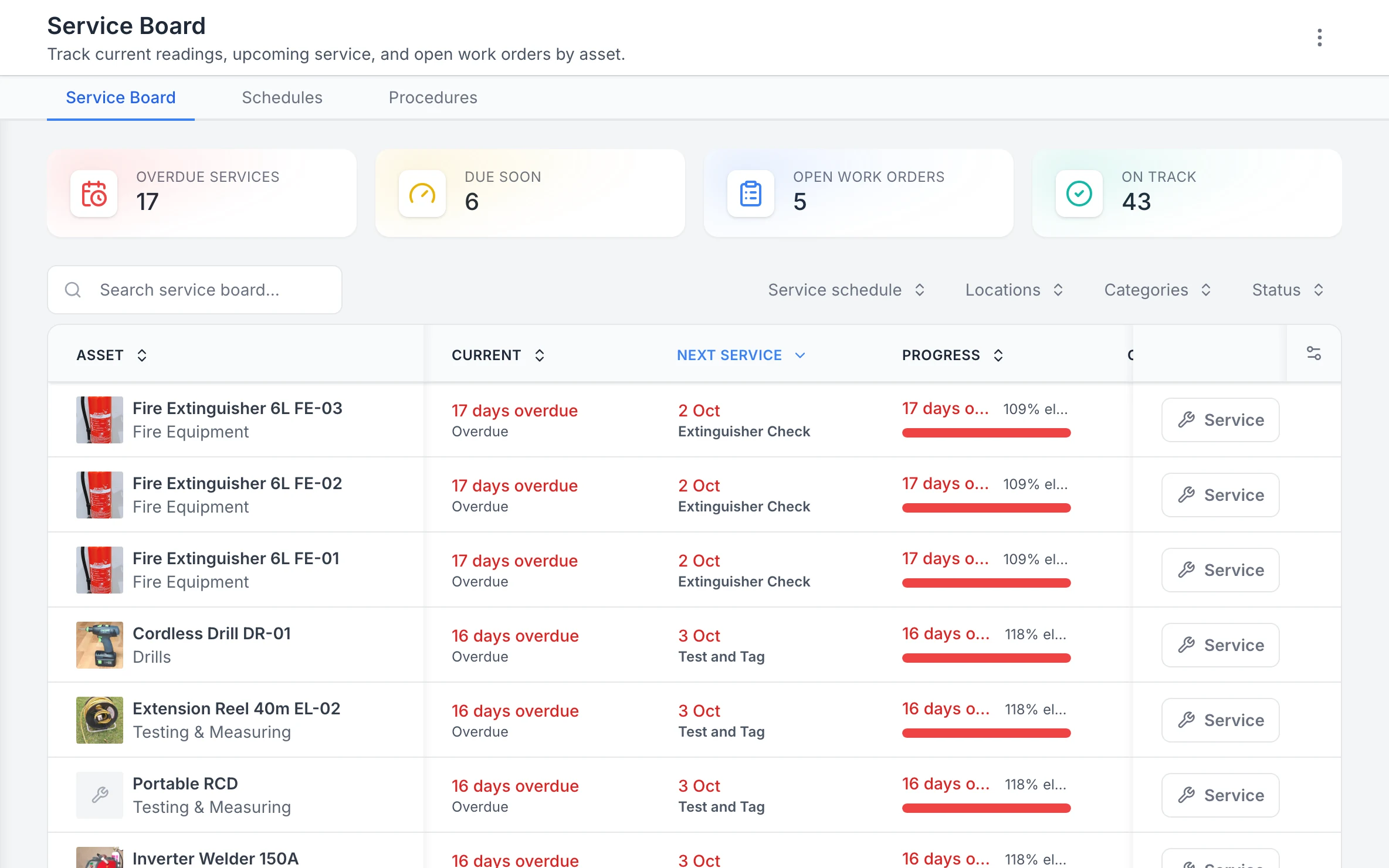
MapTrack Service Board with 17 overdue services, 6 due soon, 5 open work orders and 43 on track; three 6L fire extinguishers 17 days overdue for their Extinguisher Check, and a cordless drill, a 40m extension reel and a portable RCD 16 days overdue for Test and Tag, each row with a Service button.

The Service Board, overdue first

Every asset’s next service in one list, the overdue ones first, with a Service button on each row.

MapTrack app · Demonstration data · Captured

About this screenshot

Demonstration workspace at a 1440 x 900 desktop viewport, cropped right of the navigation sidebar to a 16:10 frame.

Step 1

Import your safety-critical asset register

Upload your existing equipment list or start with a high-risk category like lifting gear, pressure vessels, rotating plant or tooling for shutdowns.

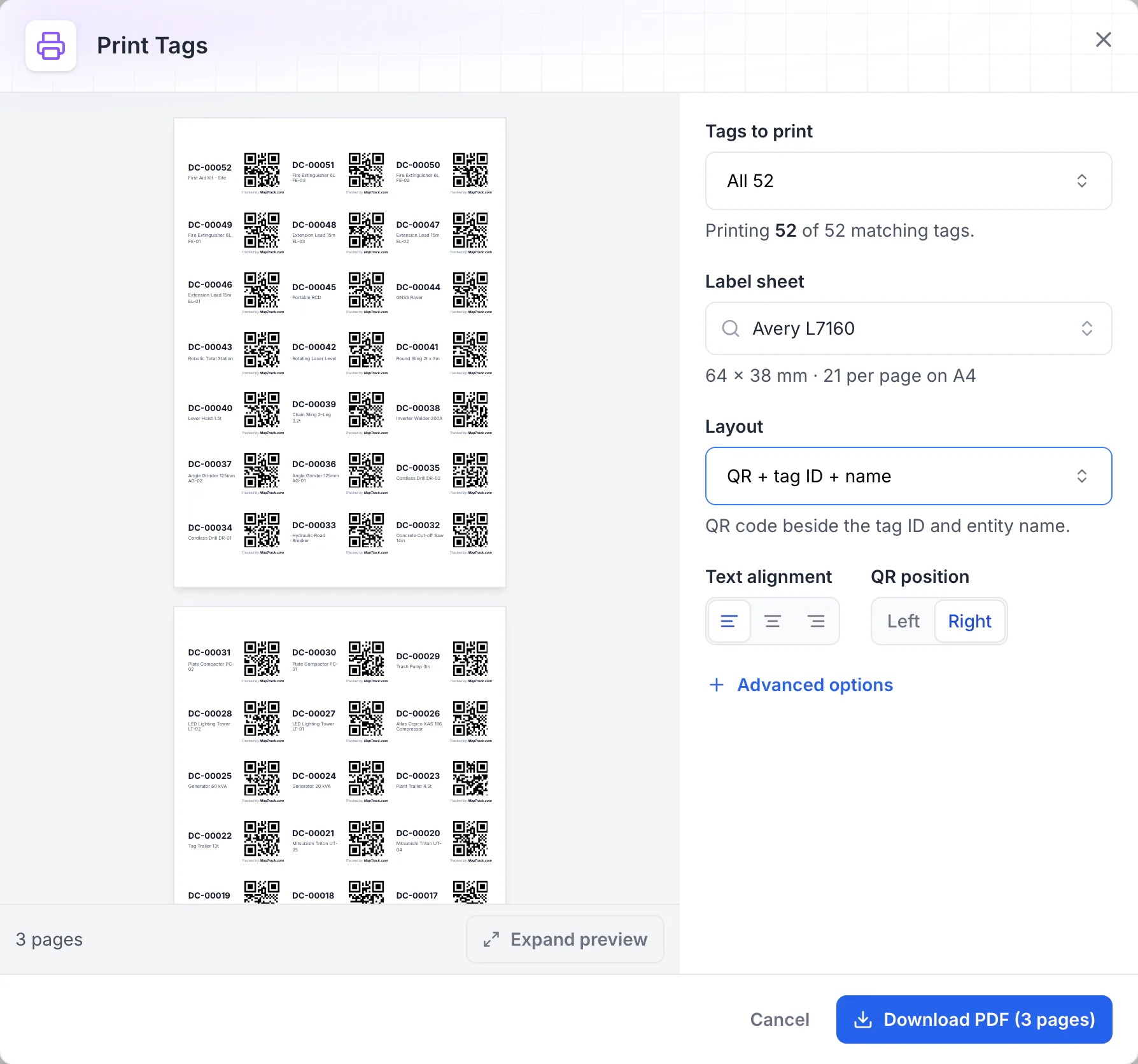
MapTrack Print Tags dialog: all 52 QR tags laid out on Avery L7160 A4 label sheets of 64 x 38 mm, 21 per page, each label showing the QR code, tag ID and asset name, with a Download PDF button for 3 pages.

Print QR labels for every asset

Print Tags lays QR labels out on standard label stock. Here all 52 tags fill three A4 sheets of 64 x 38 mm labels, each with the QR code beside the tag ID and asset name, ready to download as a PDF and print.

MapTrack app · Demonstration data · Captured

About this screenshot

Captured in a demonstration workspace with the Avery L7160 sheet and the QR + tag ID + name layout chosen. Each QR code holds the tag ID printed beside it.

Step 2

Tag and assign across facilities, vessels and shutdowns

Print durable QR labels for tools, plant and PPE. Assign assets to crews (through a crew member), facilities, shutdown projects (as shutdown sites) or vessels so every item has a custodian and a clear chain of custody.

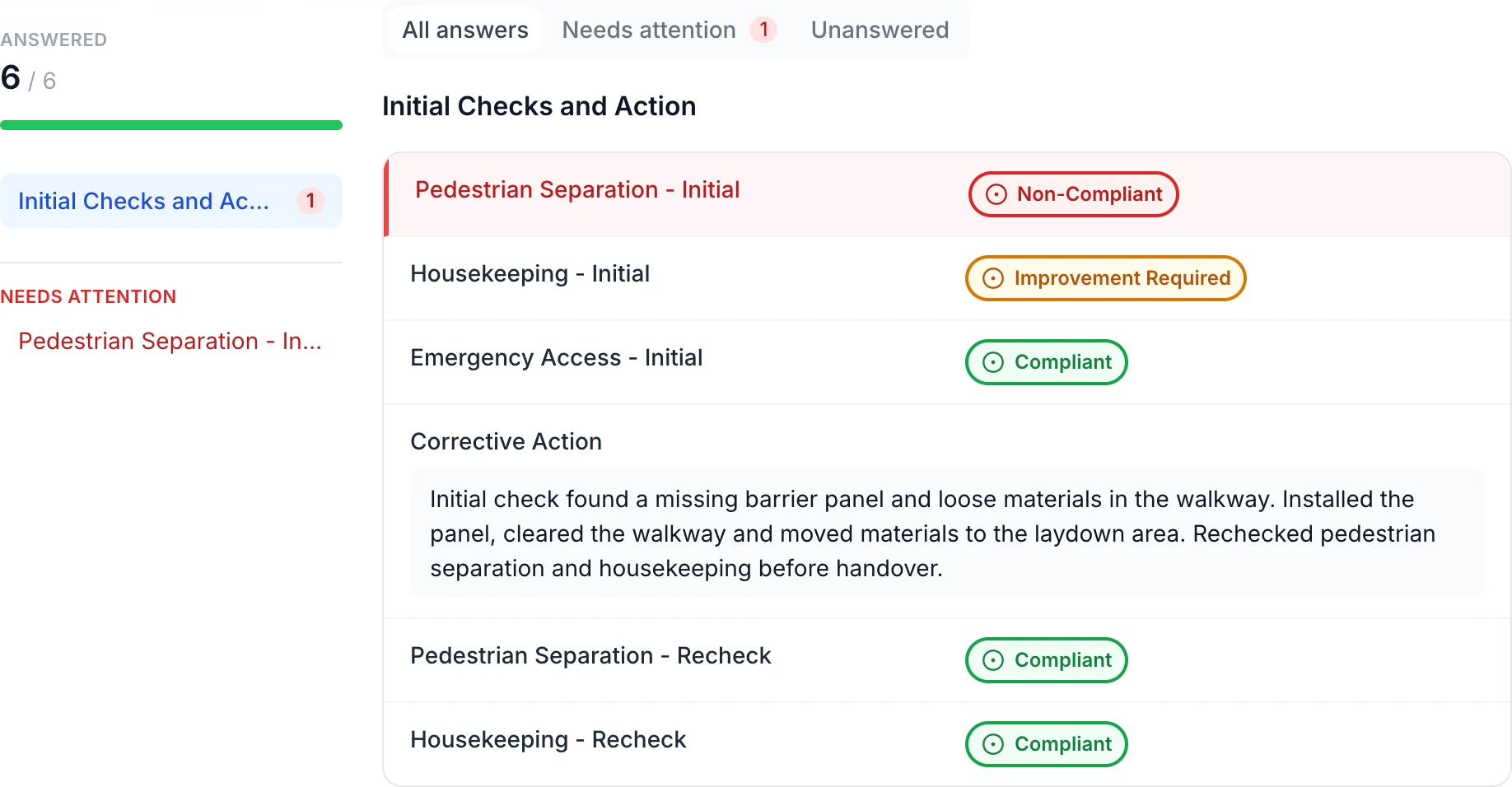
Completed site inspection with six of six answers: red Non-Compliant pedestrian separation, amber Improvement Required housekeeping, green Compliant emergency access, a corrective action note and two green Compliant rechecks.

Keep the site finding and corrective action together

The initial red and amber findings remain beside the recorded action: install the missing barrier panel, clear the walkway and recheck both items. In this example, only the red Non-Compliant answer appears under Needs attention.

MapTrack app · Demonstration data · Captured

About this screenshot

Saved demonstration Location form linked to a site. All six answers appear here.

Step 3

Run inspections, schedule maintenance, stay compliant

Complete pre-starts and inspections in the field on mobile. Set meter or calendar maintenance triggers. Compliance evidence captured and attached to each asset automatically.

Key features for oil & gas

MapTrack gives your team the visibility, accountability and maintenance triggers to cut both without adding headcount or replacing your existing telematics.

The inspection records oil and gas rules ask for

Australian sites work to the WHS Regulations, AS 2550 and AS/NZS 60079, covered earlier on this page; the record rule for registered plant is set out below in Queensland's text. In the United States, two OSHA rules spell out what an inspection record for process equipment and lifting gear has to hold. In the United Kingdom, the Pressure Systems Safety Regulations and LOLER set the examination records.

Australia

WHS Regulation s 237

Prices on our pricing page are in Australian dollars, ex GST.

  • Australia, in Queensland's text of the model WHS Regulations (each state and territory enacts its own version)

    Work Health and Safety Regulation 2011, section 237, records of registered plant

    What it asks for

    For plant that has to be registered, which includes boilers and pressure vessels of hazard level A, B or C, tower cranes and mobile cranes rated over 10 tonnes, the person with management or control keeps a record of all tests, inspections, maintenance, commissioning, decommissioning, dismantling and alterations. The record is kept for as long as the plant is used or until they give up control of it, kept available for inspection, and handed to whoever takes the plant over.

    How MapTrack keeps the record

    Each registered item's tests, inspections, services and repairs sit on its own record as work orders and signed forms with their PDFs, so the history is in one place when an inspector asks or the plant changes hands.

    Source: Work Health and Safety Regulation 2011 (Queensland) (Queensland Government (Queensland Legislation), checked 26 Oct 2026)

United States

OSHA 1910.119(j), OSHA 1910.184

Pricing is quoted in your currency, US dollars.

  • United States, processes handling highly hazardous chemicals

    OSHA 29 CFR 1910.119(j), process safety management: mechanical integrity

    What it asks for

    Covers pressure vessels and storage tanks, piping and valves, relief and vent systems, emergency shutdown systems, controls and pumps. Inspections and tests follow recognised and generally accepted good engineering practice, at a frequency consistent with the manufacturer's recommendations and good engineering practice (more often where operating experience shows it's needed), and each one is documented with its date, who did it, the equipment's serial number or other identifier, what was done and the result.

    How MapTrack keeps the record

    Each vessel, valve or pump is its own record with its serial number. An inspection form saves the date, the person who did it and the result, with photos, a signature and the PDF kept on that record, and the next inspection shows as due soon or overdue.

    Source: 29 CFR 1910.119, Process safety management of highly hazardous chemicals (US Occupational Safety and Health Administration, checked 26 Oct 2026)

  • United States, general industry

    OSHA 29 CFR 1910.184, slings

    What it asks for

    A competent person inspects each sling, with its fastenings and attachments, every day before it's used, and a damaged sling comes out of service straight away. Alloy steel chain slings also get a thorough periodic inspection at least every 12 months, and the employer keeps a record of the most recent month each one was thoroughly inspected.

    How MapTrack keeps the record

    Each sling carries its own QR label and record. The daily check is a pre-use form on the phone, the 12-monthly inspection is a service with its date on the record, and a failed check can raise a follow-up job through a rule you set.

    Source: 29 CFR 1910.184, Slings (US Occupational Safety and Health Administration, checked 26 Oct 2026)

United Kingdom

PSSR regulation 9, LOLER regulation 9

Pricing is quoted in your currency, pounds sterling.

  • Great Britain, installed and mobile pressure systems

    Pressure Systems Safety Regulations 2000, regulation 9, examination under the written scheme

    What it asks for

    The parts in the written scheme are examined by a competent person within its intervals. The examiner's signed, dated report says what was examined, its condition, any repairs needed and by when, and the date after which the system may not be operated without another examination, and the system isn't run past that date until it has been examined again.

    How MapTrack keeps the record

    Each vessel, relief valve and pipeline in the scheme is its own record. The examination is a service on that record with the report's PDF attached, and the next examination date shows as due soon or overdue.

    Source: Pressure Systems Safety Regulations 2000 (PSSR), regulation 9 (legislation.gov.uk (The National Archives), checked 26 Oct 2026)

  • United Kingdom, lifting equipment and lifting accessories

    LOLER 1998, regulation 9, thorough examination and inspection

    What it asks for

    Lifting equipment exposed to conditions that cause deterioration is thoroughly examined at least every 6 months if it lifts people or is a lifting accessory, and at least every 12 months otherwise, or to an examination scheme, plus after anything exceptional. A competent person inspects it between examinations where that suits, and equipment going to another business carries evidence of its last thorough examination.

    How MapTrack keeps the record

    Each crane, hoist, sling and shackle carries a QR label and its own record. Thorough examinations are services with their report attached, on a 6 or 12 month schedule, and a failed pre-use check can raise a follow-up job through a rule you set.

    Source: Lifting Operations and Lifting Equipment Regulations 1998 (LOLER), regulation 9 (legislation.gov.uk (The National Archives), checked 26 Oct 2026)

Written scheme of examination
The document PSSR asks for before a pressure system runs, drawn up or certified by a competent person, naming the parts to examine and how often.
LOLER thorough examination
A detailed examination of lifting equipment by a competent person: at least every 6 months for gear that lifts people and for lifting accessories, at least every 12 months for other lifting equipment, or to an examination scheme.

MapTrack keeps the records these rules ask you to keep. It does not do the inspection or testing, certify your work or make you compliant, and the current text of each instrument is the authority.

Want to see how these records would look for your own gear? We'll show you in a demo.

Book a demo

30 minutes on Microsoft Teams

Oil and gas asset terms, defined

Mechanical integrity
The part of a process safety program that keeps process equipment fit for service: written procedures, trained maintenance people, scheduled inspection and testing, and fixing deficiencies. OSHA's process safety management rule sets it out in paragraph (j).
Asset integrity
Keeping plant and equipment able to do its job safely over its whole life, through design, inspection, maintenance and records. It's the wider idea that mechanical integrity sits inside.
Risk-based inspection (RBI)
Setting how often and how deeply each item is inspected by its likelihood and consequence of failure, rather than one fixed interval for everything. API 580 is the recommended practice the industry works to.
Turnaround or shutdown
A planned stop of a plant or unit for inspection, maintenance and repairs, when contractors, tools and hired gear arrive in bulk and all of it has to be accounted for when the work ends.
Hazardous area (Ex) equipment
Electrical equipment built and certified for use where a flammable gas, vapour or dust atmosphere may be present. In Australia it's inspected and maintained to the AS/NZS 60079 series.
Bump test and calibration
A bump test briefly exposes a gas detector to a known gas to check its sensors and alarms respond. A calibration adjusts its readings against a certified test gas. Many sites bump test before use and calibrate on the maker's schedule.

Stop the loss

Equipment loss and unplanned downtime are the two biggest controllable costs in oil & gas asset management

MapTrack gives your team the visibility, accountability and maintenance triggers to cut both without adding headcount or replacing your existing telematics.

Frequently asked questions

Oil & gas asset management software is a platform that helps operators, shutdown contractors and maintenance teams track, manage and maintain their tools, equipment, plant and fleet across sites, shutdowns and turnarounds. It replaces spreadsheets, paper compliance registers and disconnected systems with a single source of truth for where assets are, who has them, what their compliance status is and when they’re due for service. MapTrack combines asset tracking (QR codes, barcodes, GPS and OEM telematics), pre-start and inspection forms, maintenance scheduling and work orders, and reporting, all on mobile in the field.

Yes. Shutdowns and turnarounds are where asset management breaks down for most oil & gas teams - hundreds of tools and equipment items are mobilised to site, issued to crews and returned at completion. MapTrack supports full shutdown workflows: allocate assets to a specific turnaround (as the turnaround site), check in and out by crew, run bulk audits to verify what’s on site, and track handover and acceptance. Assignments and transfers are tracked with timestamps so accountability is always clear - even when thousands of assets move between workshops and shutdown sites over a compressed timeframe.

Pressure vessels, relief valves and lifting equipment all have mandatory inspection and certification requirements. MapTrack stores inspection certificates, design registrations and test records against each asset with expiry dates that trigger alerts before gear goes out of compliance. Compliance registers are searchable and exportable so you can produce evidence on demand for site audits, regulatory inspections and client compliance reviews. No more filing cabinets or scattered spreadsheets.

Yes. MapTrack supports mixed asset types in a single platform. Use QR or barcode labels for hand tools, power tools, specialty tooling, valves, fittings and smaller equipment. Use GPS tracking or OEM telematics data for mobile plant, heavy equipment and fleet where devices or integrations are in place. All asset types - regardless of how they’re tracked. Live in the same system alongside their compliance registers, maintenance history and assignments.

Yes. MapTrack is built for field use with offline support. Field crews can scan assets, complete pre-start forms, update work orders and record meter readings in areas with no connectivity. Data syncs automatically when the device comes back online. This is critical for remote oil & gas facilities, offshore support bases, pipeline corridors and processing plants where cellular coverage is limited or absent.

Yes. Meter-based maintenance triggers (runtime hours, engine hours, odometer) drive work orders in MapTrack. Where you have OEM or telematics integrations (Caterpillar, Komatsu, Hitachi, John Deere, Teletrac Navman, Geotab and others), meter data feeds in automatically so you’re servicing based on real usage. Not just the calendar. Manual meter readings are also supported where telematics is not fitted. This is critical for compressors, pumps, generators and mobile plant that wear based on operational hours.

MapTrack helps oil & gas teams meet WHS, PSSR and site-specific compliance obligations by keeping pre-start records, inspection certificates and maintenance evidence attached to each asset. This includes daily plant pre-starts required under WHS Regulations, design registration and inspection requirements for registered plant, pressure vessel and relief valve inspection certifications, lifting equipment and crane certifications, calibration records for test and measurement equipment, and site-specific compliance registers required by the operator or principal contractor. All evidence is searchable and exportable for audits. Failed pre-start items can automatically trigger work orders so defects are tracked from identification through to rectification.

Use bulk scanning (QR or barcode) to verify what’s on site or allocated to a shutdown (through its laydown area). MapTrack records each asset scanned, when it was scanned and who scanned it. You can compare scanned results to expected asset lists and immediately see what’s missing, unscanned or unaccounted for. Reports by site, shutdown or asset class give you audit-ready evidence. This is particularly valuable during turnaround mobilisation and demobilisation when hundreds of assets are moving in and out of a facility in a short window.

MapTrack's primary database and application hosting are in Sydney. Some supporting services may process data outside Australia, so operators should review the current subprocessor list and hosting documentation against their contractual and regulatory requirements. RBAC and SSO support enterprise rollouts where IT security and access control are mandatory.

MapTrack uses per-asset pricing with unlimited users included. Not per-seat licensing. You can give access to every field worker, supervisor, plant operator, workshop tech, shutdown coordinator and admin without your costs growing as the team does. This is a significant advantage in oil & gas where crew sizes spike during shutdowns and turnarounds, contractors rotate through projects, and you may need hundreds of people to be able to complete forms or scans. Pricing scales with the number of assets you track, not the size of your team.

The best asset tracking solution for oil and gas combines QR code and GPS tracking with compliance management, pre-start inspections and maintenance scheduling in a single mobile-first platform. It needs to work offline for remote sites, handle both hand tools and heavy plant in the same system, support runtime-based maintenance triggers for compressors and generators, and produce audit-ready compliance reports for site audits and shutdowns. MapTrack is set up for these requirements, with per-asset pricing (not per-user), unlimited logins and field teams completing forms on mobile even without connectivity.

MapTrack creates a complete digital audit trail for every asset in your operation. Every inspection, pre-start check, service event, location transfer and compliance document is timestamped, geotagged and linked to the specific asset. During shutdowns, turnarounds and site audits, managers generate reports covering any date range or asset group with full evidence attached. This replaces the paper-based systems and spreadsheets that typically leave gaps in compliance records, miss overdue inspections and fail to link evidence to specific assets. For oil and gas operators subject to PSSR, WHS and site-specific compliance requirements, this level of traceability is essential.

Start with the gear that goes missing or falls out of date, then grow. MapTrack charges per asset with unlimited users, so every operator, contractor and storeman can scan without a seat licence. QR labels scan with the phone camera, so there's no special hardware to start, and in Australia and New Zealand, Bluetooth tags or battery GPS trackers go only on the items that move between sites. Inspections, servicing on run hours and audits sit in the same app, so compliance records don't need a second system. See pricing for your mix of tools and machinery.

Match the tracking to the item. Every item gets a QR label, so its record shows where it was last checked out or returned. In Australia and New Zealand, gear that moves without a person, like generators, light towers and trailers, can carry a battery GPS tracker, and smaller items a Bluetooth tag that a nearby gateway tracker picks up. Machines with their maker's telematics (Cat, Komatsu, JCB or Volvo) can feed engine hours, location, fault codes and fuel used into MapTrack, set up by our team. The app shows each asset's latest position; live tracking, trips and history run in MapTrack Telematics.

Log every service against the machine. MapTrack records a service cost, or breaks it into labour, parts and external costs, and the time and costs on a work order roll up into that asset's service record. Services fall due on run hours, kilometres or dates, and a meter reading taken on a pre start updates the machine's meter. For budget against actual and depreciation across the fleet, the Finance add-on is available on Pro and Enterprise plans.

Enough to answer an auditor without opening a second system: the item's identifier or serial number, its custodian or location, its inspection or calibration date with the certificate attached, the next due date, its service history and photos of any defect. Add your own fields for what your sites need, such as a hazardous-area rating or a pressure equipment registration number. In MapTrack all of that sits on the item's record, and an existing spreadsheet register imports straight in.

Watch for three things: one tracking method forced onto every asset, labels stuck on without a custodian named for each item, and inspection due dates left behind in the old spreadsheet. Start with the register: import it, give every item a custodian or a location, and bring its last inspection and next due date across. Then label the gear that moves most, show the people who sign it out how it works, and save trackers for the assets whose value or movement justifies one. Check that any tag or tracker is rated for the hazardous area before it goes into a zone.

Yes, as the record of each inspection and test. Each item of process equipment is its own record with its serial number, and an inspection form saves the date, who did it, what was checked and the result, with photos, a signature and the PDF kept on the item. MapTrack doesn't write your mechanical integrity procedures or set inspection frequencies: your program and the current text of OSHA 29 CFR 1910.119(j) do.

Weigh it against what the gaps cost now: gear bought twice because nobody could find it, hire kept on after a turnaround because nobody knew it was sitting idle, and the hours spent chasing inspection records before an audit. Put your own numbers into the ROI calculator, or book a demo and we'll work it through for your sites.

Got a question we haven't answered here? Ask it in a demo.

Book a demo

30 minutes on Microsoft Teams

Get MapTrack pricing for Oil & Gas teams

Tell us about your operations. Our team will share per-asset pricing tailored to your oil & gas asset mix and a rollout plan - within one business day.

Per-asset pricing. Unlimited users. Primary database hosted in Sydney.

Offshore and onshore asset visibility

Join oil & gas teams across Australia using MapTrack to track assets, run digital pre-starts and keep plant maintained, all in one platform.

Pre-start inspections · Maintenance · Asset tracking · Mining · Compare

Tools from $1 · Machines from $12View pricing