 vs

The Milwaukee ONE-KEY Alternative for Mixed-Brand Fleets and Real GPS
MapTrack is the best Milwaukee ONE-KEY alternative for mixed-brand fleets that need native GPS, a Sydney-hosted primary database and real CMMS workflows. No brand lock-in and no crowdsourced mesh dependency.
Teams switch from ONE-KEY when they want more than a tag or barcode for non-Milwaukee tools, want real GPS instead of crowdsourced Bluetooth, require a Sydney-hosted primary database or need CMMS workflows beyond service reminders. Per AirPinpoint: there is no GPS chip in any Milwaukee tool or tag - it is Bluetooth-only.

Who should choose MapTrack or Milwaukee ONE-KEY?
Choose MapTrack if your tools come from more than one brand and share the job with plant, trailers and light vehicles, in construction, civil, mining, utilities or trades. MapTrack is tool and equipment tracking software that keeps tools, equipment, trailers and trucks of any brand in one inventory, with check-out, bookings, test and tag, inspections and servicing on each asset’s record, using QR, barcode and Data Matrix labels, Bluetooth tags and GPS trackers. It’s priced per asset with unlimited users. Specialised Plumbing and Drainage cut unnecessary tool purchases by an estimated 40-50% in its first year (case study).
Choose Milwaukee ONE-KEY if your crews mostly run Milwaukee M18 and M12 tools and you want a free app for tool inventory, Bluetooth last-seen tracking, geofence alerts and smart-tool settings such as speed and torque.
Milwaukee ONE-KEY facts last checked: Oct 2026. Each sourced row in the comparison table shows its own source and date.
Milwaukee ONE-KEY has no GPS chip in any tool or tag (per AirPinpoint) - it is Bluetooth-only - and its smart tracking only works on Milwaukee tools (brand-locked). It does not state an Australian hosting region; Milwaukee Tool Australia's privacy policy indicates personal and tool-location data may be disclosed overseas, including to the US and Hong Kong. The platform is service reminders, not a CMMS. MapTrack is the brand-agnostic alternative with native GPS, 150+ telematics, fleet and fuel-card data sources, a primary database in AWS Sydney and real CMMS workflows. MapTrack is one platform for every asset a field business runs: any brand of tool on QR, barcode or Data Matrix labels and Bluetooth tags, plus plant and vehicles on GPS trackers and AI dash cams, with check-out, bookings, test and tag rounds and maintenance on one record.
MapTrack publishes this page and is one of the alternatives discussed. Based on Milwaukee ONE-KEY’s public documentation, pricing pages and named third-party reviews as of Oct 2026; confirm current features and pricing with each vendor and in a pilot. Where a capability is not confirmed in public sources we mark it as not publicly confirmed, not absent. Spotted something out of date? Email corrections@maptrack.com.
Trusted by construction, mining and field service teams










TL;DR - Milwaukee ONE-KEY vs MapTrack
- •Milwaukee ONE-KEY is a FREE software loyalty platform from Milwaukee Tool (TTI subsidiary; parent sales about US$15.3 billion in 2025) tied to Milwaukee M18/M12/MX FUEL ecosystems. Tool customisation (RPM, torque) on 120+ smart Milwaukee tools; Bluetooth community-network tracking. No GPS chip in any tool or tag (per AirPinpoint) - Bluetooth-only. Service reminders only - not a CMMS. Around A$46/tag at AU retail + Milwaukee hardware premium (our research). No Australian hosting region stated; AU privacy policy indicates overseas disclosure, incl. the US, Hong Kong and the Philippines.
- •MapTrack is Australian-built and brand-agnostic - any tool brand + plant + fleet + machinery on one register. Native GPS trackers (including ultra long-life battery), 150+ telematics, fleet and fuel-card data sources, Bluetooth tags, native CMMS workflows (work orders, inspections, custom forms, meter PM), AWS Sydney AU data residency, AS/NZS-aware templates, transparent per-asset pricing with unlimited users.
- •Choose MapTrack if you run mixed-brand fleets, need native GPS, require a Sydney-hosted primary database, need real CMMS workflows or want enterprise SSO + public API. Choose ONE-KEY if you are a Milwaukee-loyal trades shop needing free basic inventory + smart-tool customisation only.
What MapTrack covers in one platform
- Every asset, one record
- Tools on QR or barcode labels and Bluetooth tags, plant on GPS trackers, vehicles with GPS and AI dash cams, sites with boundaries: custody, inspections, maintenance and costs on the same record.
- Maintenance that runs on real usage
- Run hours and kilometres from trackers, dash cams or manual readings feed tiered service plans and next-service forecasts, every asset gets a 0 to 100 maintenance health score, and one work order can cover many assets, each with its own pass or fail.
- Easy for crews
- Pre-starts and inspections work without signal, on any phone, with shared-device PINs, single sign-on and AI help to build forms and add assets from a photo. Capterra Best Ease of Use 2026.
- Hardware and software from one vendor
- GPS trackers, AI dash cams with built-in GPS, Bluetooth tags and labels at published prices, managed in the same app, plus LightMetrics dash cam accounts and 150+ telematics, fleet and fuel-card data sources.
- Simple to buy and run
- Per-asset pricing with unlimited users, 24/7 support and month-to-month plans. Capterra Best Value 2026.
The full capability list (46)
- One register for tools, plant, equipment and vehicles
- Custody: who has what, and where
- Site boundaries on the map
- Location types, zones and geofences
- Location teams and roles
- Live tracking and alerts in MapTrack Telematics
- Rate cards (Pro and Enterprise add-on)
- Finance dashboards (Pro and Enterprise add-on)
- Divisions (Pro and Enterprise add-on)
- Run hours and km from trackers, cameras, feeds or readings
- Meter readings from a photo
- Work orders raised from meters, run hours and data feeds
- Tiered service plans
- Next-service forecasts from usage
- Stale-reading flags
- Maintenance health score
- Service board and due-soon emails
- One work order across many assets
- Batch work orders and bulk scan logging
- Labour, parts and external costs on every service
- Failed checks raise work orders by rule
- Parts and inventory by location and bin
- Offline pre-starts and inspections
- Phone forms in sections, with Pass, Fail and N/A buttons
- Mobile web app (Android, iPhone, iPad)
- Shared-device PINs
- Smart overlay (AR) that scans several codes at once
- SAML 2.0 single sign-on (SSO)
- AI form builder
- AI asset creation from a photo
- Equipment bookings (Requests)
- GPS trackers managed in the app
- AI dash cam video in the app
- AI dash cams with built-in GPS
- LightMetrics dash cam connection
- AI dash cam live view: road, driver or both
- Dash cam footage requests, with blurring
- Driver scorecards and a Safety events dashboard
- Bluetooth tags
- QR, barcode and Data Matrix scanning
- OEM feeds under Connections
- Connection library in the app
- 150+ data sources
- Engine hours from 68 integrations
- REST API with per-key access levels
- MCP server for AI tools (Enterprise plan or add-on)
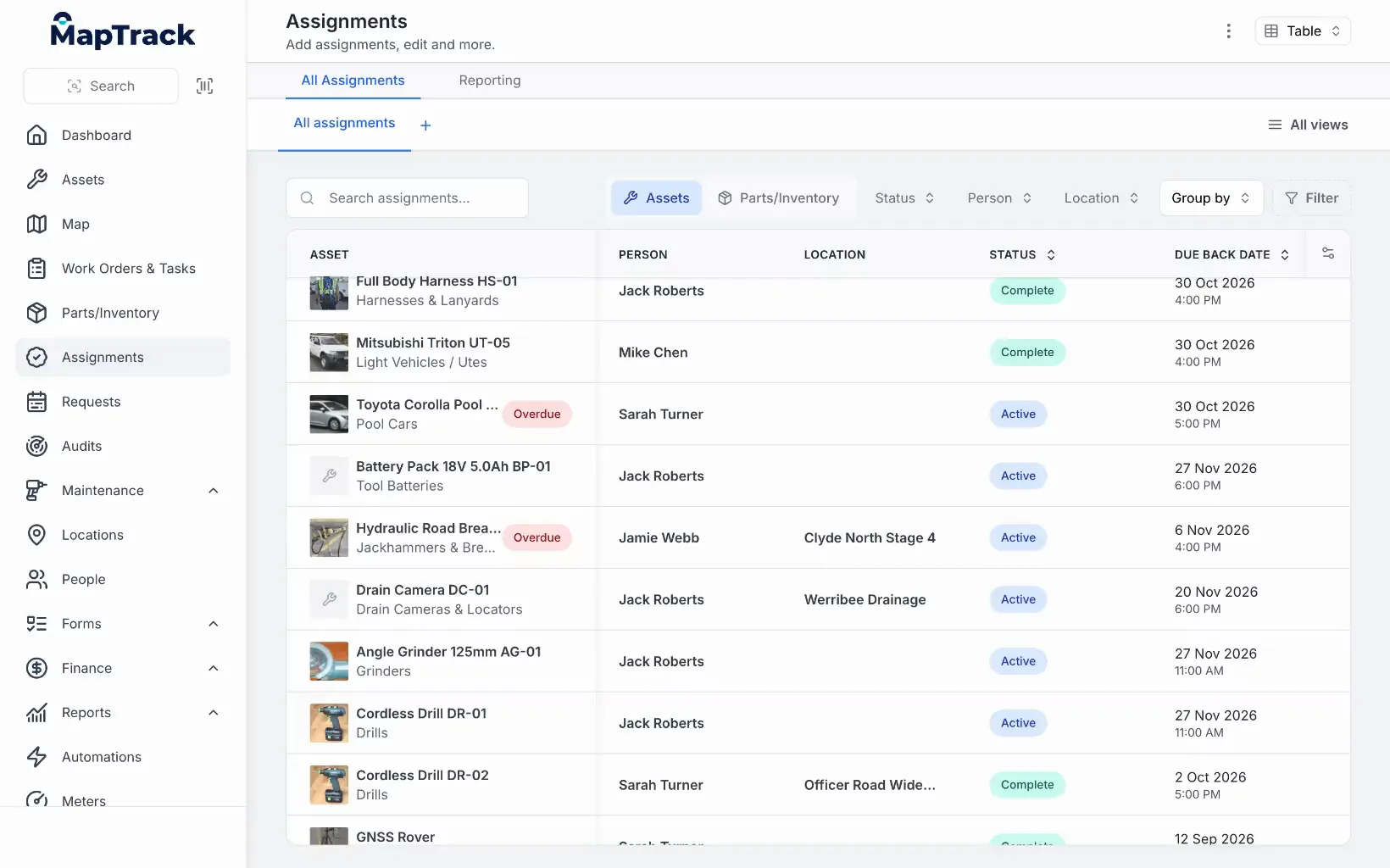
Every sign-out in one list
The assignments list: each sign-out with its person, location, status and due-back date.
MapTrack app · Demonstration data · Recorded
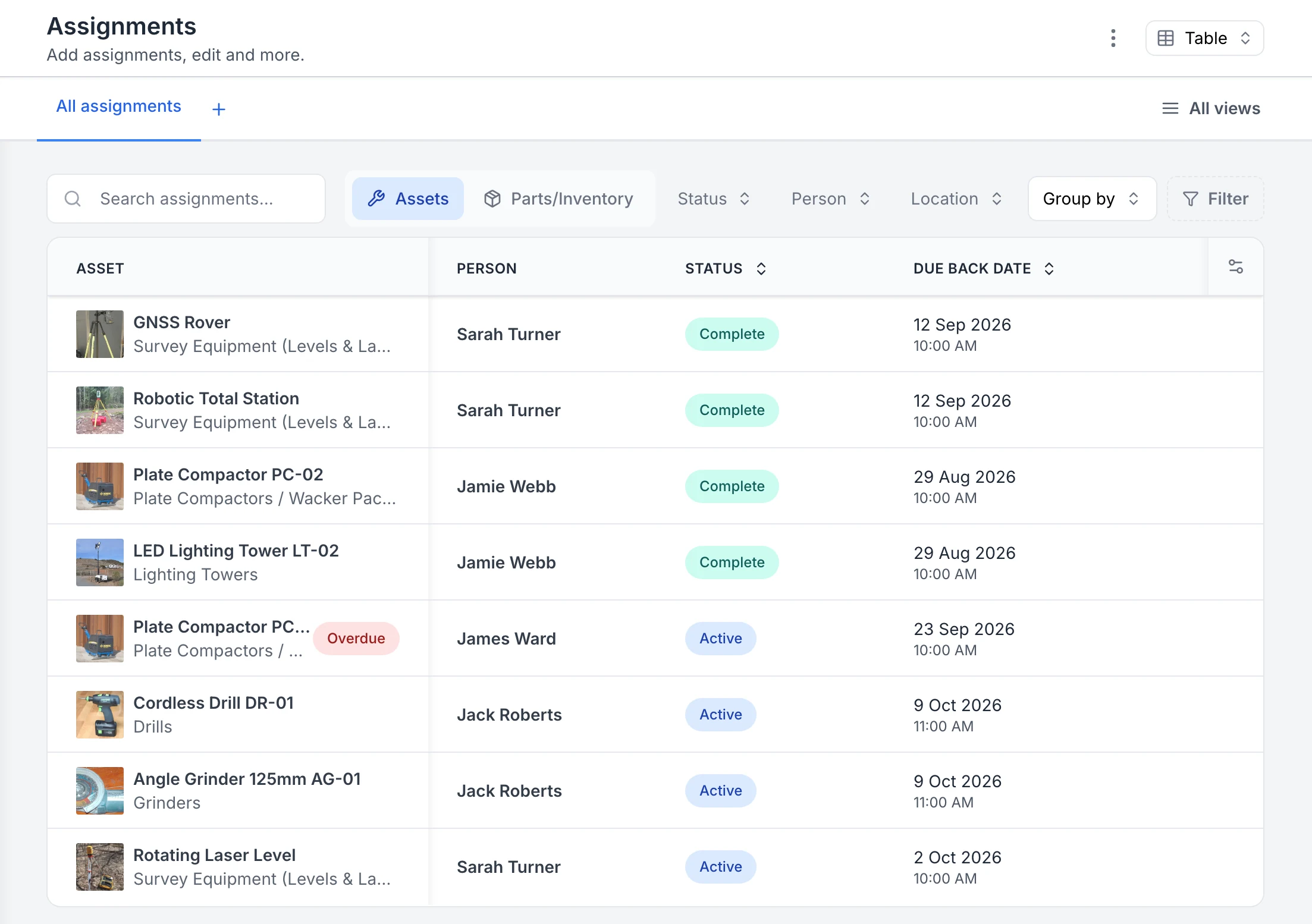
See who has each tool and when it is due back
Every sign-out in one list. Four assignments are back and marked Complete; four are still out as Active, each with the person and the due-back date. The plate compactor with James Ward was due back on 23 September, so it is flagged Overdue.
MapTrack app · Demonstration data · Captured
About this screenshot
Captured in a demonstration workspace on the All assignments view with the Person, Status and Due Back Date columns. The app shortens long asset and category names.
What is Milwaukee ONE-KEY?
Milwaukee ONE-KEY is a free Bluetooth tool tracking and customisation platform from Milwaukee Tool, a subsidiary of Techtronic Industries (TTI), the Hong Kong-listed parent (TTI reported record sales of about US$15.3 billion in 2025). Launched September 2015 as the "first digital platform for tools and equipment", ONE-KEY manages Milwaukee tool inventory, customises tool performance (speed, torque, trigger ramp profiles) on 120+ smart Milwaukee tools, and tracks Bluetooth-equipped tools via a crowdsourced community network of ONE-KEY app users.
The software is free; revenue comes from Milwaukee hardware premium (M18, M12, MX FUEL) and Bluetooth Tracking Tags (TICK) sold at around A$46 each in Australia via a Total Tools 10-pack. There is no GPS chip in any Milwaukee tool or tag (per AirPinpoint) - it is Bluetooth-only, so location depends on whoever's ONE-KEY app last passed within roughly 300ft (90m) of the tag. Tool Lockout remotely disables stolen Milwaukee tools. Crew management, service reminders (monthly/quarterly/semi-annual/annual), and named partner integrations (Procore, Autodesk BIM 360, EquipmentShare T3, with Oracle Primavera piloting) round out the feature set. No public developer API documented; SSO not publicly confirmed; no SOC 2 attestation surfaced. Milwaukee Tool Australia's privacy policy indicates overseas disclosure, including to the US and Hong Kong.
Why teams look for a Milwaukee ONE-KEY alternative
ONE-KEY is a strong fit for Milwaukee-loyal trades shops with basic inventory needs. Teams typically look for alternatives when they have mixed-brand fleets, need real GPS, require a Sydney-hosted primary database or need CMMS workflows beyond service reminders:
Multi-brand vs Milwaukee-first
ONE-KEY's deep features only activate on Milwaukee tools. Mixed-brand fleets can add DeWalt, Makita, Hilti and Bosch tools with ONE-KEY tags or barcodes, without those features. MapTrack tracks any brand of tool plus plant + fleet + machinery on one register.
Real GPS hardware, not crowdsourced Bluetooth theatre
AirPinpoint reports there is no GPS chip in any Milwaukee tool or tag - it is Bluetooth-only. Location depends on whoever's phone last passed within about 300ft. MapTrack ships native GPS trackers (including ultra long-life battery) for real-time location.
Sydney-hosted primary database vs overseas disclosure
Milwaukee Tool Australia's privacy policy indicates personal and tool-location data may be disclosed overseas, including to related entities in the US and Hong Kong. Milwaukee does not state an Australian hosting region; MapTrack hosts its primary database in AWS Sydney.
Real CMMS workflows vs service reminders
ONE-KEY has date-based service reminders (monthly/quarterly/semi-annual/annual) and repair alerts from smart tools. MapTrack has native work orders, structured inspections with custom forms, meter-driven PM, and failed-inspection-to-WO escalation.
Reservations + planning view
MapTrack has built-in reservations and planning view standard on all plans. ONE-KEY does not publicly document either - reservations and double-booking prevention are not in its support topics.
API + RBAC on all plans, SSO on Enterprise
MapTrack includes RBAC and API on all plans, with SSO/Active Directory (SAML 2.0 with Microsoft Entra ID, set up by our team) on Enterprise (Pro add-on). ONE-KEY has no public developer portal (integrations via named partners only) and SSO is not publicly confirmed. Enterprise procurement teams need API + SSO.
Which platform fits your team?
Pick the persona that sounds most like you. The recommendation reflects Nov 2026 capabilities, including Milwaukee Tool Australia's privacy policy and AirPinpoint's findings on GPS hardware.
The Milwaukee-loyal trades shop
Are you a small trades shop where 80%+ of your tools are Milwaukee M18 / M12 / MX FUEL and you only need basic inventory + tool customisation?
Stay on ONE-KEY. The free tier + Milwaukee tool customisation (RPM, torque, profiles) on smart tools + crowdsourced Bluetooth mesh are genuine for Milwaukee-heavy shops. Tool Lockout is useful as a deterrent.
The mixed-brand fleet manager
Do you run DeWalt + Makita + Hilti + Bosch + Milwaukee tools that all need tracking on one platform?
Choose MapTrack. ONE-KEY's deep features (tool customisation, OTA updates, tool lockout) only activate on Milwaukee tools. MapTrack tracks any brand of tool + plant + fleet on one register with native GPS and 150+ telematics, fleet and fuel-card data sources.
Learn more →The AU operator concerned about data residency
Do you need an Australian-hosted primary database for compliance or governance reasons?
Choose MapTrack. Milwaukee Tool Australia's privacy policy indicates personal and tool-location data may be disclosed overseas, including to related entities in the United States and Hong Kong, and Milwaukee does not state an Australian hosting region. MapTrack hosts its primary database in AWS Sydney.
The maintenance coordinator who needs CMMS workflows
Do you need work orders, inspections, custom forms or meter-driven PM beyond basic service reminders?
Choose MapTrack. ONE-KEY has date-based service reminders (monthly/quarterly/semi-annual/annual) and repair alerts from smart tools. MapTrack has native work orders, inspections, custom forms, meter-driven PM and failed-inspection-to-WO triggers.
Learn more →Best Milwaukee ONE-KEY alternatives, ranked
These are the tools teams compare against Milwaukee ONE-KEY when they need mixed-brand support, native GPS, real CMMS workflows or a Sydney-hosted primary database.
- 1
MapTrack
Best for mixed-brand fleets needing native GPS, a Sydney-hosted primary database and real CMMS workflows. Brand-agnostic, 150+ telematics, fleet and fuel-card data sources, AS/NZS-aware templates.
- 2
Hilti ON!Track
Best for Hilti-loyal contractors. Hilti BLE hardware + service workflows + Trimble Viewpoint integration. Hardware lock-in to Hilti.
- 3
Asset Panda
Best for IT and office inventory with configurable workflows and Gantt reservations.
- 4
MaintainX
#1 CMMS on G2 for maintenance-first teams. Per-user pricing from $20/user/mo.
- 5
Fleetio
Best for fleet-only operations where vehicles dominate the asset mix. Per-vehicle pricing.
MapTrack vs Milwaukee ONE-KEY: detailed comparison
Side-by-side across 12 criteria. Updated Oct 2026. Verify current features and pricing with each vendor.
| Criteria |  MapTrack |  Milwaukee ONE-KEY |
|---|---|---|
| Best for | Multi-brand mixed-fleet ops: tools + plant + fleet + machinery, any brand | Milwaukee-loyal trades shops; smart-tool customisation on M18/M12/MX FUEL(per Milwaukee ONE-KEY connected tools (smart-tool settings; a commitment to the trades), Nov 2026) |
| Pricing model | YesPer asset; unlimited users included; tools from A$1, machinery from A$12 a month | ?FREE software (no fees or subscriptions) + ~A$46/tag at AU retail (Milwaukee lists no tag price) + Milwaukee tool premium (~10-20%, our research)(per Milwaukee ONE-KEY tracking tag press release (no fees or subscriptions; tags in 1, 2 and 10 packs), Nov 2026) |
| Brand coverage | YesAny brand: tools + plant + fleet + machinery | ?Any brand via tags, but smart features only on Milwaukee tools(per ONE-KEY support: Add tools from other manufacturers (any brand via barcode, asset ID tag or TICK tracker), Nov 2026) |
| GPS hardware | YesNative GPS trackers + 150+ telematics/fleet/fuel-card data sources + Bluetooth tags | Not available per vendor sourcesNo GPS chip in any tool or tag; Bluetooth-only (per AirPinpoint)(per AirPinpoint ONE-KEY tracking analysis (no GPS chip in any Milwaukee tool or tag), Nov 2026) |
| Hosting region | YesPrimary database in AWS Sydney; AS/NZS-aware templates | Not publicly confirmedHosting region not stated; AU privacy policy indicates overseas disclosure; incl. US, Hong Kong and the Philippines(per Milwaukee Tool AU privacy policy (overseas disclosure to the US, Hong Kong and the Philippines), Nov 2026) |
| CMMS depth | YesNative work orders + inspections + custom forms + meter PM + WO from failed inspection | ?Digitally stores records and manages service, with reminder intervals; native work orders or inspection forms not publicly confirmed(per ONE-KEY support: Service reminders (date-based, monthly to annual), Nov 2026) |
| Reservations / planning | YesBuilt-in reservations and planning view (all plans) | Not publicly confirmedReservations or planning not publicly confirmed(per ONE-KEY support: Inventory management topics (transfers, audits, reports; no reservations), Nov 2026) |
| Tool customisation (RPM/torque) | ?Not applicable - asset management focused | YesRPM, torque and trigger ramp customisation on many of its 120+ connected Milwaukee smart tools and devices (signature feature)(per Milwaukee ONE-KEY connected tools (customise tool controls on many compatible tools), Nov 2026) |
| Public / documented API | YesRBAC and API on all plans; each API key gets an access level: Read only, Read and write, or Full | ?Public developer portal not documented; integrations via named partners (Procore, Autodesk BIM 360, EquipmentShare; Oracle Primavera piloting)(per Milwaukee ONE-KEY integration partners (Autodesk BIM 360, Procore, EquipmentShare), Nov 2026) |
| SSO + RBAC | YesRBAC and API on all plans; SSO/Active Directory (SAML 2.0 with Microsoft Entra ID, set up by our team) on Enterprise (Pro add-on); each API key gets an access level: Read only, Read and write, or Full | Not publicly confirmedCustom roles built from four editable default roles; SSO not publicly confirmed(per ONE-KEY support: Customizing multi-user roles (four editable default roles), Nov 2026) |
| Industries covered | YesConstruction + mining + civil + councils + facilities + transport + energy + water | ?Built for the trades (electrical, HVAC, plumbing, construction); other industries not a stated focus(per Milwaukee AU ONE-KEY tool tracking (built for the trades), Nov 2026) |
Brand-agnostic, real GPS, AU data, real CMMS
MapTrack tracks any tool brand plus plant + fleet + machinery with native GPS, 150+ telematics, fleet and fuel-card data sources, a primary database in AWS Sydney, real work orders + inspections + meter PM, and transparent per-asset pricing with unlimited users.
- No credit card required
- Unlimited users
How MapTrack compares to Milwaukee ONE-KEY
Which is brand-agnostic for mixed fleets?
MapTrack tracks any tool brand + non-tools. ONE-KEY deep features only work on Milwaukee.
ONE-KEY is built around Milwaukee's M18, M12 and MX FUEL ecosystems. Deep features (tool customisation - RPM, torque, profiles; OTA firmware updates; built-in Bluetooth tracking; Tool Lockout) only activate on Milwaukee ONE-KEY tools. As AirPinpoint notes, the smart tracking works best on Milwaukee tools, and most job sites run three to four different manufacturers, which leaves the system incomplete for mixed fleets. MapTrack is brand-agnostic - any tool brand (Milwaukee, DeWalt, Hilti, Makita, Bosch and more) plus plant, fleet, machinery, generators, light towers and hire equipment on one register. For mixed-brand fleet managers, MapTrack consolidates tools, plant and vehicles on GPS trackers, OEM telematics, QR labels and Bluetooth tags in one register, beyond the tags and barcodes ONE-KEY uses for other brands.
Which has real GPS hardware?
MapTrack ships native GPS trackers. ONE-KEY has no GPS chip in any tool or tag.
AirPinpoint reports: 'There is no GPS chip in any Milwaukee tool or tracking tag.' The platform is Bluetooth-only, so location updates depend entirely on another ONE-KEY app user's phone passing within about 300ft (90m) of the tag. Milwaukee markets the industry's largest Bluetooth tracking community (5M+ tool location updates per day), but one user quoted by AirPinpoint reports: 'I installed a TICK on my equipment and it's only ever been located by my phone. Not once has it ever been seen by another ONE-KEY app user in 2 months.' Other reviewers note that if nobody with ONE-KEY walks past a TICK for a week, you get no updates. MapTrack ships native GPS trackers (including ultra long-life battery units) for real-time asset location, trip history and geofence-based alerts. For reliable theft recovery and asset tracking outside dense Milwaukee jobsites, MapTrack's native GPS is the only practical option.
Which publishes clearer hosting information for AU buyers?
MapTrack has a primary database in AWS Sydney. ONE-KEY does not state an Australian hosting region (its AU policy indicates overseas disclosure; verify).
Milwaukee Tool Australia's privacy policy indicates personal and tool-location data may be disclosed overseas, including to related entities in the United States and Hong Kong, and Milwaukee does not state an Australian hosting region. For AU organisations with data-governance requirements, that uncertainty should be checked directly with Milwaukee. MapTrack is Australian-founded, with its primary database and application hosting in Sydney; supporting services may process data overseas. For privacy-conscious AU buyers, this is a material governance difference to assess against both vendors' full subprocessor lists.
Which is a real CMMS?
MapTrack has native work orders + inspections + meter PM. ONE-KEY documents date-based service reminders.
ONE-KEY's maintenance capability is service reminders only: monthly, quarterly, semi-annual and annual recurring schedules. Work orders, structured inspections, custom forms, meter-driven preventive maintenance and failed-inspection-to-work-order triggers are not publicly documented. ToolGuyd's Stuart writes: 'Tool tracking networks are not - from what I have seen and heard - large enough to be very practical outside of inventory management and tracking.' MapTrack has native work orders tied to assets, structured inspections with custom form builder, meter-driven PM from 150+ telematics, fleet and fuel-card data sources, and failed-check-to-WO escalation. For maintenance coordinators and operations teams, MapTrack is a real CMMS; ONE-KEY is an inventory app.
Which has reservations and planning?
MapTrack has built-in reservations on all plans. ONE-KEY does not publicly document either.
MapTrack includes built-in reservations and a planning view standard on all plans - reserve specific assets by job, see availability across the fleet, avoid double-booking. ONE-KEY does not publicly document a reservation or planning view - it is not a CMMS. For teams that need to coordinate asset availability across multiple crews and jobs, MapTrack covers the gap.
Which is actually cheaper at scale?
MapTrack publishes transparent per-asset pricing. ONE-KEY is free but offset by Milwaukee hardware premium.
ONE-KEY software is free. Hardware costs add up: around A$46 per Bluetooth Tracking Tag (TICK) via a Total Tools 10-pack at roughly A$460 ex GST. Beyond that, Milwaukee ONE-KEY smart tools cost ~10-20% more than non-ONE-KEY equivalents. The 'free' platform is offset by Milwaukee hardware lock-in. For mixed-brand fleets, you pay the Milwaukee premium without getting deep ONE-KEY features on non-Milwaukee tools. MapTrack publishes transparent per-asset pricing with unlimited users on any brand - you choose the hardware that suits your fleet, not the platform.
Which is enterprise-procurement-ready?
MapTrack has API + RBAC on all plans and SSO on Enterprise. ONE-KEY has neither documented publicly.
Enterprise procurement teams require API access for integration into ERP, financial systems and identity providers. MapTrack includes RBAC and API on all plans, with SSO (Azure AD, SAML) and Active Directory sign-in through Microsoft Entra ID, set up by our team, on Enterprise (Pro add-on). ONE-KEY documents no public developer portal - integrations are partner-built (Procore, Autodesk BIM 360, EquipmentShare T3, with Oracle Primavera piloting). SSO is not publicly confirmed for ONE-KEY. For larger organisations with identity management requirements and ERP integration needs, MapTrack ships what ONE-KEY does not. MapTrack’s REST API (v1) lists, gets, creates, updates and archives assets, locations, people, categories, custom fields and users. Each API key gets an access level: Read only, Read and write, or Full. A key is shown once and stored hashed, and asset records include their tag value.
Where Milwaukee ONE-KEY wins
Milwaukee ONE-KEY is a genuinely valuable platform for Milwaukee-loyal trades shops with basic inventory needs. A balanced comparison should acknowledge where the competitor excels:
FREE software with no subscription
Milwaukee ONE-KEY software is free. No monthly fee, no per-user pricing, no enterprise tier upcharge. For Milwaukee-loyal trades shops with basic inventory needs, this is genuinely valuable. Revenue comes from Milwaukee hardware margin and TICK tags.
Tool customisation on smart Milwaukee tools
RPM, torque, trigger ramp and self-tapping screw mode profiles - customised via Bluetooth from the ONE-KEY app on many of its 120+ connected Milwaukee smart tools and devices. Machine-learning calibration on TORQUE-SENSE controlled-torque impact wrenches and OTA firmware updates. Nobody without Milwaukee hardware can match this; nobody on Milwaukee should ignore it.
Industry-largest Bluetooth tracking community
Milwaukee markets the industry's largest Bluetooth tracking community, with 5M+ tool location updates per day. In dense Milwaukee jobsites, the crowdsourced network genuinely improves recovery odds. Pro Tool Innovation Award 2022 + Chicago Innovation Award.
Tool Lockout (theft deterrent)
Remote disable of a stolen Milwaukee tool, rendering it useless. A real anti-theft deterrent for high-value Milwaukee fleets, despite some reports of random lockouts. Useful for crew supervisors managing after-hours security.
Massive parent scale - TTI at about US$15.3 billion (2025)
Techtronic Industries (Milwaukee's parent) reported record sales of about US$15.3 billion in 2025 (TTI annual results). Pro tool brand affinity in trades is enormous - Milwaukee leads the AU cordless market alongside DeWalt and Bosch.
Strong AU retail presence (not data residency)
Milwaukee Tool Australia HQ Rowville VIC; ~237-369 employees; full distribution via Total Tools, Toolmart, Prime Supplies, Tool Kit Depot, Sydney Tools. AU brand presence is genuine - just not the data residency.
What our customers say
“MapTrack has completely transformed how we manage our tools, equipment and fleet.”

Scott Bradley
Managing Director, SPDR
“Our investment in MapTrack paid off in a big way when a couple of pieces of test equipment, valued at over $142,000 AUD, was stolen during a break-in at an employee's home. Thanks to MapTrack, we were able to give police the exact location of the asset, even guiding them over the phone as they executed the search warrant. This led them directly to the equipment, which was recovered within 48 hours.”

Dane Rolinson
Operations Manager, Mega Electrics
“MapTrack has completely changed how we track tools and manage compliance across our sites - the admin time we've saved alone has been a game-changer.”

365 Alongside Team
Management, 365 Alongside
Customer outcomes
Results from published MapTrack customer case studies.
Estimated 40-50%
Unnecessary tool purchases dropped by an estimated 40-50% in the first year as crews gained visibility over what was already available and where it was located.
Dramatically reduced
QR code check-in/out and clear accountability per worker dramatically reduced lost, misplaced and unaccounted-for tools across all sites.
Approximately 12+ separate spreadsheets
Consolidated approximately 12+ separate spreadsheets and paper-based systems into one centralised platform, eliminating duplicate records and version-control issues.
How Milwaukee ONE-KEY compares: independent ratings and verified pricing
All figures below are sourced from public review platforms, vendor pricing pages and customer reviews. We recheck every field on a quarterly cadence.
Pricing
The ONE-KEY app is free on web, iOS and Android, with no per-asset or per-user subscription. Costs sit in optional hardware (ONE-KEY Bluetooth Tracking Tags and TICK trackers) and the price premium on ONE-KEY-enabled Milwaukee tools. Tracking is Bluetooth community-network based (no GPS or cellular) and is centred on the Milwaukee tool ecosystem.
Source: Vendor pricing page · View source
Feature parity: MapTrack vs Milwaukee ONE-KEY
| Capability | MapTrack | Milwaukee ONE-KEY |
|---|---|---|
| Free to use (no subscription)The ONE-KEY app is free (Milwaukee markets it as "Free to use"); MapTrack is a paid per-asset platform. A genuine ONE-KEY strength for Milwaukee-tool users. | ||
| Brand-agnostic tracking (any brand of tool, plant or vehicle)ONE-KEY tags can be attached to anything, but the platform is built around 120+ ONE-KEY-enabled Milwaukee tools; MapTrack is a general per-asset register for any brand of tool, plant or vehicle. | ||
| Native GPS or cellular location trackingONE-KEY uses a Bluetooth community network only - location updates when a phone running the app passes within about 100 ft - and has no GPS or cellular tracking, as documented by Milwaukee and independent reviewers. MapTrack includes GPS, Bluetooth tags and OEM telematics, and supplies the GPS trackers and Bluetooth tags, with each asset's latest position in MapTrack and live tracking in MapTrack Telematics. | ||
| Barcode and QR label scanning from a phoneONE-KEY has a built-in phone-camera barcode scanner that assigns existing barcodes, or its own Asset ID tags, to inventory items and supports barcode search; its new Bluetooth tag carries a QR code. MapTrack scans QR, barcode and Data Matrix labels with the phone camera or a handheld Bluetooth or USB scanner. | ||
| Maintenance scheduling and remindersONE-KEY supports recurring service reminders and a "needs service" view; it is reminder-based rather than full work-order management. | ||
| Digital pre-starts, inspections and compliance formsNo Milwaukee page documents a configurable pre-start, inspection or compliance-form builder; verify in a pilot. | ||
| Public API for custom integrationsONE-KEY has named partner integrations (Procore, Autodesk, Oracle) but no publicly documented self-serve developer API was found; verify in a pilot. API access is included with MapTrack. | ||
| AUD pricing and a Sydney-hosted primary databaseONE-KEY is sold in Australia via milwaukeetool.com.au, but a Sydney-hosted primary database for tool and location data is not publicly confirmed. |
Last verified 2026-06-28. Milwaukee ONE-KEY is not affiliated with MapTrack; trade marks belong to their respective owners.
Measured impact: what teams report after switching
Verified outcomes from MapTrack customers across construction, mining and field services. ONE-KEY outcomes are from Milwaukee Tool case studies and third-party reviews.
| Metric | MapTrack | Milwaukee ONE-KEY |
|---|---|---|
| Brand coverage | Any brand: Milwaukee + DeWalt + Hilti + Makita + Bosch + non-tools (plant, fleet, machinery) | Tracks any brand of item with a ONE-KEY Bluetooth tag, but the deep tool-settings features only activate on ONE-KEY-enabled Milwaukee tools |
| GPS hardware | Native GPS trackers + 150+ telematics, fleet and fuel-card data sources + Bluetooth tags | No GPS chip in any tool or tag (per AirPinpoint); Bluetooth-only, location depends on a passing ONE-KEY phone |
| CMMS depth | Native work orders + inspections + custom forms + meter-driven PM | Date-based service reminders (monthly/quarterly/semi-annual/annual), plus repair alerts from smart tools |
| Hosting region | Primary database and application hosting in Sydney | Hosting region not stated; AU privacy policy indicates overseas disclosure; incl. US, Hong Kong and the Philippines |
| Tool replacement costs | 40-50% reduction (SPDR) | Theft recovery via crowdsourced mesh (low probability) |
| Equipment recovery | $142K recovered in 48 hours via real GPS (Mega Electrics) | Theft recovery requires another ONE-KEY user to pass within 300ft of the tag |
Should you choose MapTrack or Milwaukee ONE-KEY?
Choose MapTrack if you…
- Run mixed-brand fleets (Milwaukee + DeWalt + Hilti + Makita + Bosch)
- Need to track non-tool assets (plant, fleet, machinery, generators)
- Need real GPS tracking, not crowdsourced Bluetooth mesh
- Require a Sydney-hosted primary database (Milwaukee does not state an Australian hosting region; its AU privacy policy indicates overseas disclosure)
- Need native CMMS workflows: work orders, inspections, custom forms, meter PM
- Want reservations and planning view to coordinate assets across crews
- Need public API + SSO + RBAC for enterprise integration
- Operate in mining, civil, councils or facilities beyond trades
- Use barcode or Data Matrix labels as well as QR, scanned with the phone camera or a handheld scanner
- Run test and tag or calibration rounds as one work order across many assets, each with its own pass or fail
- Want tiered service plans on run hours, with work orders raised from meter readings
- Want AI dash cams with live video and event clips in the same app as your assets
- Hire out equipment and need rate cards with daily, weekly and monthly rates (a Pro and Enterprise add-on)
- Want a cost ledger, budget vs actual and repair-or-replace for every asset (a Pro and Enterprise add-on)
- Run several divisions that each need their own assets and team access (a Pro and Enterprise add-on)
Consider Milwaukee ONE-KEY if you…
- •Run a Milwaukee-loyal trades shop where 80%+ of tools are Milwaukee
- •Want tool customisation (RPM, torque, profiles) on smart Milwaukee tools
- •Only need basic inventory and service reminders (no CMMS workflows)
- •Value the free software model and accept Milwaukee hardware premium
- •Already use Tool Lockout as anti-theft deterrent on Milwaukee fleet
- •Operate in dense Milwaukee jobsites where the Bluetooth mesh works
Pricing: MapTrack vs Milwaukee ONE-KEY
MapTrack
Priced per asset with unlimited users, files, scans, documents, forms, alerts and automations included. Brand-agnostic - track any tool, plant, fleet or machinery. No per-seat fees. No lock-in contracts. Free trial with no credit card and guided onboarding.
Get pricing for your asset count →Milwaukee ONE-KEY
- Software: FREE (no subscription)
- TICK Bluetooth Tracking Tag (AU): ~A$460 ex GST / 10-pack (about A$46/tag) via Total Tools
- Asset ID tags: Sold separately for non-Bluetooth assets
- Milwaukee tool premium: ~10-20% more for ONE-KEY smart tools vs non-ONE-KEY equivalents
- No published enterprise tier, public API or SOC 2 attestation: Free product; no SLA published
Check Milwaukee ONE-KEY for current hardware availability.
ONE-KEY software is free but offset by Milwaukee hardware premium and TICK tag costs. For mixed-brand fleets, you pay the Milwaukee premium without getting deep ONE-KEY features on non-Milwaukee tools. MapTrack publishes transparent per-asset pricing on any brand.
How to switch from Milwaukee ONE-KEY to MapTrack
MapTrack supports CSV and spreadsheet imports with AI-assisted field mapping. Most teams are operational within a week. Many teams run both: ONE-KEY for Milwaukee tool customisation, MapTrack for the asset register, GPS, CMMS and compliance.
Export your data
Export your asset inventory from the ONE-KEY app or via Milwaukee Tool support. Capture any Milwaukee-specific tool customisation profiles separately (these stay on the tool).
Import & map fields
Upload into MapTrack. AI-assisted import auto-matches columns. Our team maps your sites, categories and custom fields. Apply QR labels for non-Milwaukee tools.
Go live
Roll out to your crew with guided training. Add GPS trackers for high-value equipment. Most teams are operational within a week. Many teams run both: ONE-KEY for Milwaukee tool customisation, MapTrack for the asset register and CMMS.
What to verify in a demo
Before committing, run a short pilot with your own asset mix and workflows:
- ✓MapTrack: Confirm reservations and planning work for your job types; verify your telematics vendor is among the 150+ data sources in MapTrack's integration directory; test offline on your field sites; confirm AS/NZS-aware pre-start workflows; check a primary database in AWS Sydney for your governance needs.
- ✓Milwaukee ONE-KEY: Verify the Bluetooth mesh detection rate in your specific AU jobsites (where Milwaukee adoption is high but mesh density varies by region); confirm whether your non-Milwaukee tools can be tracked meaningfully (without deep ONE-KEY features); calculate Milwaukee hardware premium vs alternatives at your asset count.
Other Milwaukee ONE-KEY alternatives to consider
Depending on your use case, these platforms may also fit:
Hilti ON!Track
Tool tracking with Hilti BLE hardware + service workflows. Best for Hilti-loyal contractors. Hardware lock-in to Hilti ecosystem (vs Milwaukee).
Asset Panda
Configurable cloud-based asset tracking with Gantt reservations. Best for IT, office and general inventory. Quote-based pricing (not publicly listed; verify).
MaintainX
#1 CMMS on G2 with strong work orders and parts inventory. Best for maintenance-first teams. Per-user pricing from $20/user/mo.
Fleetio
Fleet management for vehicles and equipment. Best for fleet-only operations. Per-vehicle pricing from ~$4/mo.
See our full best tool tracking software 2026 guide for a detailed comparison across all platforms.
Methodology and sources
Updated Oct 2026. This comparison is based on publicly available Milwaukee ONE-KEY documentation, TTI 2025 annual results (parent company; record sales of about US$15.3 billion), AirPinpoint editorial coverage on GPS hardware, ContractorTalk and Tools in Action forum sentiment, App Store + Google Play ratings, and Milwaukee Tool Australia's privacy policy (paraphrased).
- Milwaukee ONE-KEY product overview
- Milwaukee Tool Australia privacy policy
- AirPinpoint: Milwaukee Tool Tracker analysis
- TTI annual results (parent company financials, verify)
Milwaukee ONE-KEY launched September 2015 as a free software loyalty platform tied to Milwaukee Tool's M18, M12 and MX FUEL ecosystems. Software is free; revenue model is Milwaukee hardware premium plus Bluetooth Tracking Tags (around A$46/tag in AU via a Total Tools 10-pack). AirPinpoint reports there is no GPS chip in any Milwaukee tool or tracking tag - it is Bluetooth-only. Verify your specific use case in a pilot.
Spotted something out of date or incorrect? Email corrections@maptrack.com and we will review and update this page.
Frequently asked questions: Milwaukee ONE-KEY vs MapTrack
What is Milwaukee ONE-KEY?
Does Milwaukee ONE-KEY have GPS?
Does ONE-KEY work with non-Milwaukee tools?
Is Milwaukee ONE-KEY a CMMS?
Does ONE-KEY have a Sydney-hosted primary database?
Why do reviewers say ONE-KEY's theft tracking is unreliable?
How much does Milwaukee ONE-KEY actually cost in Australia?
How do I move our asset data from ONE-KEY to MapTrack?
Can MapTrack still work with Milwaukee tools?
What about Tool Lockout - is that worth keeping ONE-KEY for?
Where is MapTrack's data hosted, and are its templates AS/NZS-aware?
Does MapTrack support barcodes and Data Matrix labels?
Can one MapTrack work order cover many assets?
Does MapTrack handle preventive maintenance?
Does MapTrack do rate cards, finance and divisions?
Which ONE-KEY alternative shows which tools and plant are behind on servicing?
Can a ONE-KEY alternative bring in plant hours from Cat, Komatsu, JCB or Volvo telematics?
Can a tool tracking platform forecast plant servicing too?
Can a site tablet or shared phone sign tools out to different people?
Can we add assets to MapTrack from a photo?
Who should choose MapTrack instead of Milwaukee ONE-KEY?
Which Milwaukee ONE-KEY alternative tracks vehicles, plant and tools in one system?
Does MapTrack have geofencing?
Can MapTrack scan several codes at once?
More alternatives
- Alternative to Asset Panda
- Alternative to Hilti ON!Track
- Alternative to MaintainX
- Alternative to SafetyCulture
- Alternative to Fleetio
- Alternative to Limble
- Alternative to Cheqroom
- Alternative to IBM Maximo
- Alternative to UpKeep
- Alternative to SAP EAM
- Alternative to Sortly
- Alternative to EZOfficeInventory
- Alternative to GoCodes
- Alternative to AssetTiger
- Alternative to spreadsheets
- Alternative to Toolwatch
- Alternative to ShareMyToolbox
- Alternative to Gearbelt
- Alternative to Tenna
- Alternative to Samsara
- Alternative to ToolSense
- Alternative to Fiix
- Alternative to GoAudits
- Alternative to Dashpivot
- Alternative to GoFMX
- Alternative to Kynection
Direct comparison and category guides
About the author

Co-Founder & GM of Operations
Lachlan leads operations at MapTrack, bringing 10+ years of enterprise technology experience across mining, construction and heavy industry. Before MapTrack, he held senior roles at Workato (integration and automation) and AppDynamics/Cisco (application performance), working directly with ASX-listed organisations to modernise their technology stacks. His deep understanding of field operations and blue-collar workflows shapes how MapTrack solves real problems for asset-intensive teams.
View LinkedIn profile →Brand-agnostic. Real GPS. AU data. Real CMMS.
Book a tailored demo and get pricing for your asset count. Track any tool brand plus plant + fleet + machinery with native GPS and a primary database in AWS Sydney.
4.9 on G2 · 5.0 on Capterra, GetApp & Software Advice· Source: G2.com, Inc.
- No credit card required
- Unlimited users
MapTrack vs Milwaukee ONE-KEY · Hilti ON!Track alternative · Best asset tracking software