6 best asset management software in Australia for 2026
Comparing asset management software for an Australian operation in 2026? We compared 6 platforms across tracking, maintenance, compliance and lifecycle, with per-asset vs per-user pricing, so you can shortlist and verify with vendors. The right choice depends on whether your biggest gap is tracking, maintenance or enterprise reliability, and whether you need AS/NZS-aware compliance out of the box.

MapTrack ranks best for tracking physical assets at scale across multiple sites with per-asset pricing and unlimited users; Asset Panda is the most configurable; MaintainX and Limble lead the CMMS-led category; IBM Maximo is the reference enterprise EAM.
Key takeaways
- MapTrack ranks best for tracking physical assets at scale across multiple sites with per-asset pricing and unlimited users (tools from A$1 per asset, machinery from A$12 per machine per month on Machine Plans).
- Asset Panda is the most configurable platform; MaintainX and Limble lead the CMMS-led category; IBM Maximo is the reference enterprise EAM.
- Per-asset pricing scales best when you have many field workers; per-user pricing scales best when user count is small relative to asset count.
- Most teams need asset tracking + light CMMS, not full EAM. Shortlist two platforms and run a real-world trial before buying on the demo.
TL;DR
Top 3 picks at a glance
Trusted by construction, mining and field service teams


Quick verdict: best asset management software by category
Our top picks by use case. Click any card to jump to the full review.

MapTrack
Best for tracking physical assets at scale across multiple sites

Asset Panda
Best for configurable asset workflows in mixed environments

MaintainX
Best for maintenance-led asset management
IBM Maximo Application Suite
Best enterprise EAM for asset-intensive industries
Eptura Asset
Best for facilities and workplace asset management
Limble CMMS
Best mid-market CMMS-led asset management
Which asset management approach fits your team?
Different operations leaders have different priorities. Use these profiles to narrow your shortlist.
The operations manager tracking physical assets across sites
We have tools, equipment, plant and fleet spread across multiple sites. We need to know where everything is, who has it and when it is due for service. What fits?
Start with a register-led platform like MapTrack or Asset Panda. Both handle multi-site tracking, QR/barcode scanning, assignment and audit. MapTrack adds service schedules, AS/NZS-aware compliance and per-asset pricing; Asset Panda offers heavier custom configuration. Pick the one that fits your workflows with the least setup time.
Learn more →The maintenance manager with preventive schedules
Unplanned downtime is killing us. We have hundreds of assets on PM schedules and need work orders, parts inventory and technician sign-off. Which CMMS?
MaintainX and Limble are the leading mid-market CMMS choices. Both have strong mobile UX, PM scheduling and procedures. Compare on per-user pricing math - if you have many field technicians, model annual cost at 2x growth. If you also need integrated asset tracking with reservations and AS/NZS forms, MapTrack pairs well alongside or replaces both, with its own preventive schedules, work orders and parts inventory.
Learn more →The facilities lead managing buildings plus equipment
We run a multi-building campus with HVAC, electrical, fire safety and IT assets, plus room bookings and visitor management. Should I buy a workplace suite?
If your scope is buildings plus the assets inside them, Eptura's integrated workplace platform is built for this. If your scope is equipment-led and you only need light space planning, a CMMS-led tool plus a separate booking system is usually cheaper. Decide on workflow integration value: how much time would your team save if assets, work orders and space were in one tool?
Learn more →The enterprise operations lead with reliability targets
We operate large industrial assets with reliability and uptime targets. We need RCM, condition monitoring and predictive maintenance integrated with our ERP. What scale?
IBM Maximo, SAP EAM or Oracle EAM. Pick based on existing ERP footprint (Maximo for IBM watsonx AI, SAP EAM for SAP shops, Oracle EAM for Oracle ERP). Budget for 6-18 month implementations with a systems integrator. Mid-market CMMS platforms cannot match this depth and you will regret picking one if reliability targets are part of executive reporting.
Learn more →In this guide
How we evaluated these platforms
We assessed each platform across seven criteria: identification methods, assignment and check-out workflows, maintenance depth, compliance and inspections, mobile and offline support, pricing model and deployment options. Where we could not confirm a capability from public sources or vendor documentation, we note "verify with vendor" rather than guess.
- G2 asset management software reviews
- Capterra asset management software reviews
- Vendor websites and public documentation
- MapTrack customer interviews and case studies
This guide is published by MapTrack (rated 4.9/5 on G2 and 5.0/5 on Capterra, GetApp and Software Advice). MapTrack is included as one option among others. We are transparent that MapTrack is not the right fit for every use case - it is not an enterprise EAM and is not designed for software licence compliance. Shortlist two or three options and run a trial with real data before deciding.
Spotted something out of date or incorrect? Email corrections@maptrack.com and we will review and update this page.
Asset management software comparison table
Side-by-side overview of 6 platforms. Verify current features and pricing with each vendor.
| Software | Best for | Tracking | Check-out | Maintenance | Compliance | Offline | Pricing |
|---|---|---|---|---|---|---|---|
 MapTrack | Physical assets at scale | QR, barcode, GPS, Bluetooth tags, dash cams | Yes | Yes | Yes | Yes | Per asset; unlimited users; tools from A$1, machinery from A$12 a month |
 Asset Panda | Configurable workflows | Barcode, QR | Yes | Yes | Yes | Yes | Quote-based; verify in a pilot |
 MaintainX | Maintenance-led | Barcode, QR | Not available per vendor sources | Yes | Yes | Yes | Per user; from ~US$21/mo |
| IBM Maximo Application Suite | Enterprise EAM | Barcode, RFID, IoT sensors | Yes | Yes | Yes | Yes | AppPoints; Essentials from under US$40K/yr, Standard estimator, Premium by quote |
| Eptura Asset | Facilities + workplace | Barcode, QR | Yes | Yes | ? | ? | Mid-market; contact vendor |
| Limble CMMS | Mid-market CMMS | Barcode, QR | Not available per vendor sources | Yes | Yes | Yes | Per user; from ~US$28/mo |
Yes ConfirmedNot available per vendor sources Not available? Verify with vendorNot publicly confirmed Not publicly confirmed
Asset management software reviews
Detailed review of each platform including features, pricing and best fit.

MapTrack
Best for tracking physical assets at scale across multiple sitesStrong for teams managing tools, equipment, plant, fleet and IT hardware in one register. Per-asset pricing with unlimited users scales well for field-heavy organisations. Not a heavy industrial EAM. One platform for every asset, and Capterra Best Ease of Use 2026.
Pricing: Per asset; unlimited users; tools from A$1, machinery from A$12 a month · Trial: Free trial, no credit card
What you get in one platform
- Every asset, one record
- Tools on QR or barcode labels and Bluetooth tags, plant on GPS trackers, vehicles with GPS and AI dash cams, sites with boundaries: custody, inspections, maintenance and costs on the same record.
- Maintenance that runs on real usage
- Run hours and kilometres from trackers, dash cams or manual readings feed tiered service plans and next-service forecasts, every asset gets a 0 to 100 maintenance health score, and one work order can cover many assets, each with its own pass or fail.
- Easy for crews
- Pre-starts and inspections work without signal, on any phone, with shared-device PINs, single sign-on and AI help to build forms and add assets from a photo. Capterra Best Ease of Use 2026.
- Hardware and software from one vendor
- GPS trackers, AI dash cams with built-in GPS, Bluetooth tags and labels at published prices, managed in the same app, plus LightMetrics dash cam accounts and 150+ telematics, fleet and fuel-card data sources.
- Simple to buy and run
- Per-asset pricing with unlimited users, 24/7 support and month-to-month plans. Capterra Best Value 2026.
The full capability list (35)
- One register for tools, plant, equipment and vehicles
- Custody: who has what, and where
- Site boundaries on the map
- Live tracking and alerts in MapTrack Telematics
- Rate cards (Pro and Enterprise add-on)
- Finance dashboards (Pro and Enterprise add-on)
- Divisions (Pro and Enterprise add-on)
- Run hours and km from trackers, cameras, feeds or readings
- Work orders raised from meters, run hours and data feeds
- Tiered service plans
- Next-service forecasts from usage
- Stale-reading flags
- Maintenance health score
- Service board and due-soon emails
- One work order across many assets
- Batch work orders and bulk scan logging
- Labour, parts and external costs on every service
- Failed checks raise work orders by rule
- Parts and inventory by location and bin
- Offline pre-starts and inspections
- Mobile web app (Android, iPhone, iPad)
- Shared-device PINs
- SAML 2.0 single sign-on (SSO)
- AI form builder
- AI asset creation from a photo
- Equipment bookings (Requests)
- GPS trackers managed in the app
- AI dash cam video in the app
- AI dash cams with built-in GPS
- LightMetrics dash cam connection
- Bluetooth tags
- QR, barcode and Data Matrix scanning
- OEM feeds under Connections
- 150+ data sources
- Engine hours from 68 integrations
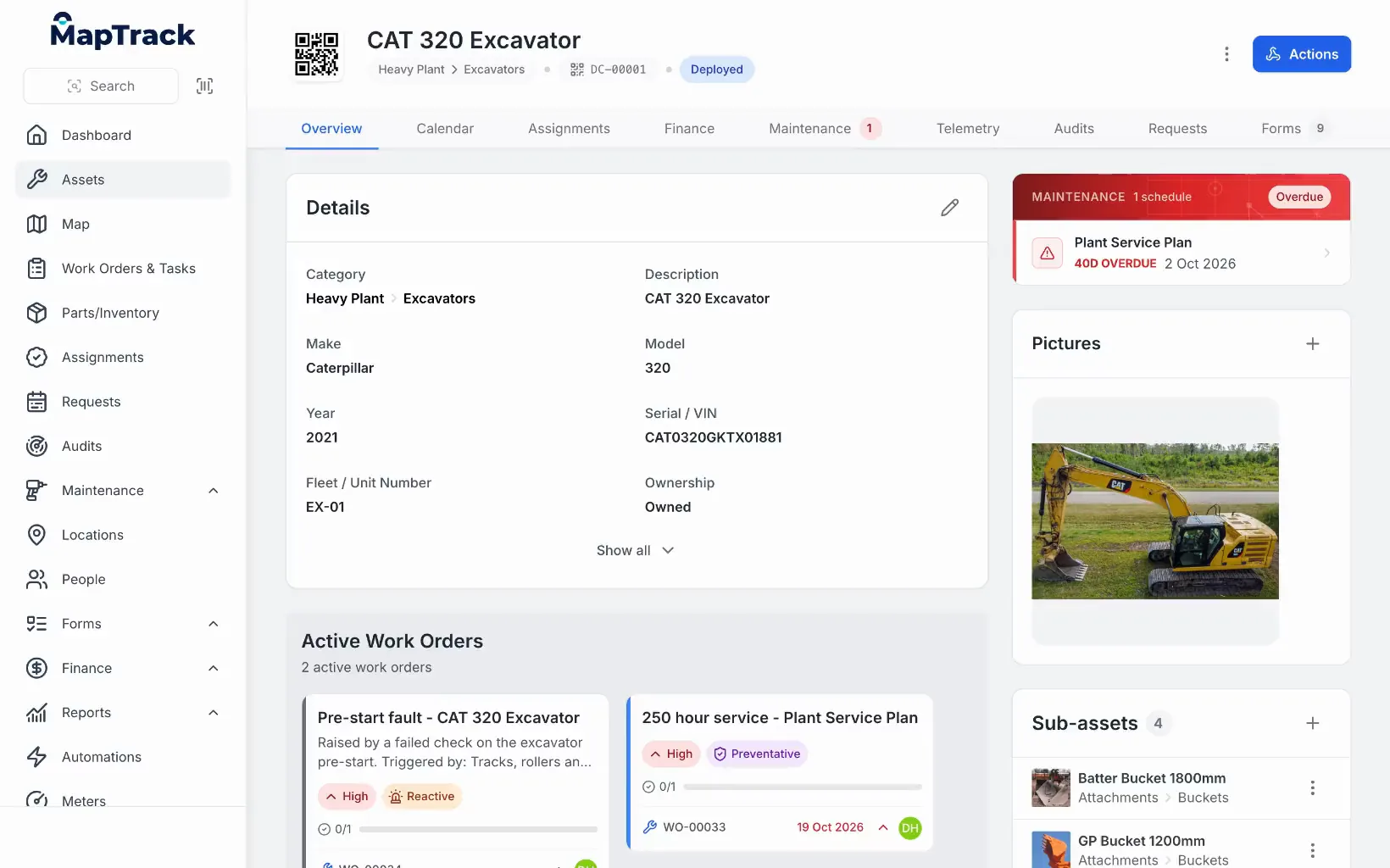
Everything about one machine
An excavator's record: its tag, details, next service and open work orders.
MapTrack app · Demonstration data · Recorded
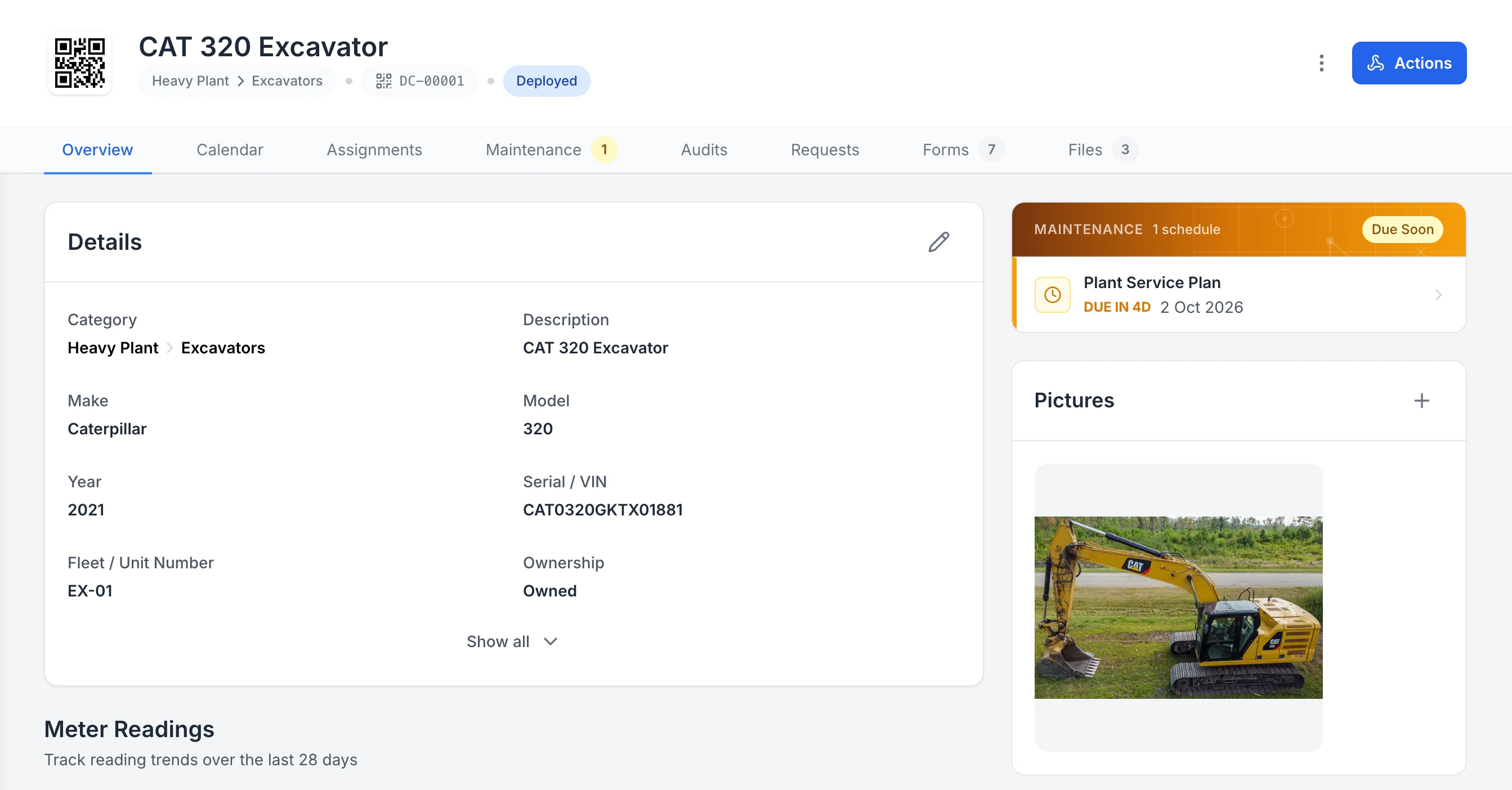
Keep the details, next service and photo on the asset
One excavator’s record. Its QR tag, status and details sit at the top, the next service is flagged Due Soon, and its assignments, maintenance, audits, requests, forms and files are each one tab away.
MapTrack app · Demonstration data · Captured
About this screenshot
Captured in a demonstration workspace on the asset’s Overview tab. Meter readings, sub-assets, parts and activity continue further down the page.
MapTrack is a unified asset management platform built for operations teams that track physical assets across sites. QR codes, barcodes, GPS trackers, Bluetooth tags and AI dash cams identify and locate assets. Assignment workflows, mobile inspections and maintenance triggers run on a single register. Per-asset pricing with unlimited users keeps field rollouts simple.
For asset-intensive teams in construction, civil, mining, electrical, plumbing, HVAC, manufacturing, fleet and facilities, MapTrack handles tracking, maintenance, compliance forms and lifecycle in one tool. Public per-asset pricing is separated by asset class: tools/equipment from A$1 per asset per month and Fleet, Plant & Heavy Machinery from A$12 per machine on Machine Plans, billed annually, with a GPS tracker included from A$27. Australian-built, with its primary database and application hosting in Sydney; AS/NZS-aware templates you adapt to your standard, plus pre-start workflows. Not designed for IBM Maximo-class industrial maintenance planning or full software licence management.
Key features
- ✓Single register for tools, equipment, plant, fleet and IT hardware
- ✓QR, barcode, GPS and BLE tracking
- ✓Assignment workflows with full audit trail
- ✓Maintenance work orders with meter and schedule triggers
- ✓Pre-starts, inspections and custom forms (AS/NZS-aware, you adapt)
- ✓Mobile and offline; iOS, Android, desktop
- ✓AI-assisted asset creation and data import
- ✓Per-asset pricing; unlimited users
- ✓RBAC and API on all plans; SSO on Enterprise; primary database and application hosting in Sydney
- ✓Cost tracking and asset depreciation
- ✓One platform for tools, plant, trailers and vehicles
- ✓GPS trackers managed in the app: battery, signal and estimated run hours
- ✓Site geofences on every map; entry and exit alerts in MapTrack Telematics
- ✓QR, barcode and Data Matrix scanning by phone camera or handheld scanner
- ✓Tiered service plans on run hours and km
- ✓Parts and stock by location and bin
- ✓AI form builder for pre-starts and inspections
- ✓Rate cards: daily, weekly and monthly hire rates (dry, wet or standby) by category or asset; Pro and Enterprise add-on
- ✓Finance: cost ledger, budget vs actual, depreciation and repair-or-replace; Pro and Enterprise add-on
- ✓Divisions: each division’s own assets and team access; Pro and Enterprise add-on

Asset Panda
Best for configurable asset workflows in mixed environmentsHighly configurable platform with custom fields and approval workflows. Quote-based pricing with minimum user counts. Setup effort is real; Asset Panda Pro added offline in Sept 2025 (verify depth).
Pricing: Quote-based; verify in a pilot · Trial: Free 7-day trial
Asset Panda is a flexible asset management platform serving 10,000+ organisations since 2012 across 60+ countries, spanning education, healthcare, government and corporate IT. Barcode and QR scanning, custom workflows, lifecycle tracking and check-out/check-in let teams model the way they already work rather than fit a fixed schema.
The configuration depth is also the trade-off: expect days to weeks to set up workflows, custom fields and approvals before rollout. Asset Panda Pro (Sept 2025) added full mobile offline for all customers; verify offline depth before relying on it for poor-coverage field teams. Pricing is quote-based (not publicly listed; verify in a pilot) with minimum user counts. Best fit for organisations that want a flexible canvas and have time to configure it.
Key features
- ✓Configurable workflows and custom fields
- ✓Barcode/QR scanning with audit trails
- ✓Asset lifecycle and depreciation tracking
- ✓Check-out/check-in with approval routing
- ✓Custom forms and document storage
- ✓Integrations: Zendesk, JIRA, Slack and more

MaintainX
Best for maintenance-led asset managementStrong CMMS with mobile-first work orders and procedures. Asset tracking is functional rather than central. Per-user pricing scales fastest with team size.
Pricing: Per user; from ~US$21/mo · Trial: Free tier; 30-day on paid
MaintainX is a mobile-first CMMS used by manufacturing, facilities and food and beverage operators. Work orders, preventive maintenance schedules, parts inventory and standard operating procedures sit alongside an asset register. The asset side handles location, condition and history, but the centre of gravity is maintenance.
Strong choice for operations leaders whose biggest pain is unscheduled downtime or compliance maintenance. The procedure builder lets technicians follow guided checklists from mobile. Pricing starts at approximately US$21 per user per month on the Essential plan; Premium and Enterprise tiers add advanced reporting, SSO and integrations. Compare total cost carefully if you have many field users - per-user economics differ sharply from per-asset.
Key features
- ✓Mobile-first work orders and procedures
- ✓Preventive maintenance scheduling
- ✓Parts inventory and reordering
- ✓Asset register with condition tracking
- ✓In-app messaging on work orders
- ✓Integrations: SAP, Oracle, Microsoft Teams, Slack
IBM Maximo Application Suite
Best enterprise EAM for asset-intensive industriesThe reference enterprise asset management platform. Deep maintenance planning, reliability engineering and AI-driven predictive maintenance. Long implementations and enterprise pricing.
Pricing: AppPoints; Essentials from under US$40K/yr, Standard estimator, Premium by quote · Trial: Guided trial (Manage, Health)
IBM Maximo Application Suite is the long-standing enterprise asset management leader, deployed across utilities, oil and gas, transportation, mining and manufacturing. Asset lifecycle, work and resource management, reliability strategies and predictive maintenance run on a unified platform. Now offered on Red Hat OpenShift for cloud or on-premises deployment.
Maximo's depth is unmatched for organisations running thousands of complex assets where downtime is measured in millions per hour. Reliability-centred maintenance, condition monitoring (Maximo Health) and predictive maintenance (Maximo Predict) extend the platform into IIoT and AI use cases. Implementations are measured in months to years, with significant systems-integrator effort. Pricing is in AppPoints: IBM lists SaaS Essentials from under US$40K a year, prices Standard through an online estimator and quotes Premium and client-managed software. Overkill for mid-market or pure tracking use cases.
Key features
- ✓Asset lifecycle and work management
- ✓Reliability-centred maintenance (RCM)
- ✓Predictive maintenance with AI (IBM watsonx)
- ✓Condition monitoring (Maximo Health)
- ✓Inventory, purchasing and contracts
- ✓Cloud (Red Hat OpenShift) or on-premises
Eptura Asset
Best for facilities and workplace asset managementCombined CMMS and workplace platform formed by the iOFFICE/Hippo CMMS/SpaceIQ merger. Strong for facilities teams managing buildings plus equipment. Verify which legacy product covers your need.
Pricing: Mid-market; contact vendor · Trial: Contact vendor
Eptura is the facilities-focused asset and workplace management vendor created by the 2022 merger of iOFFICE, Hippo CMMS and SpaceIQ. Eptura Asset (formerly Hippo CMMS) provides preventive maintenance, work orders and asset tracking; the wider platform extends into space planning, room booking and visitor management.
Best fit for facilities teams that also manage workplace experience, room bookings or hot-desking alongside equipment. Eptura Asset on its own competes with mid-market CMMS tools; the value lies in the broader workplace stack if you already run iOFFICE or Archibus for space planning. Implementation effort and pricing depend heavily on which modules you turn on. Verify which legacy platform you are buying - the product mix is still consolidating.
Key features
- ✓Preventive maintenance and work orders
- ✓Asset register with condition tracking
- ✓Space planning and room booking (broader suite)
- ✓Visitor management (broader suite)
- ✓Reporting and analytics dashboards
- ✓Integrations: SAP, Oracle, Microsoft 365
Limble CMMS
Best mid-market CMMS-led asset managementMobile-first CMMS with clean UX and fast onboarding. Strong asset register and PM scheduling. Per-user pricing; less suited to per-asset rollouts at scale.
Pricing: Per user; from ~US$28/mo · Trial: 30-day free trial
Limble is a mid-market CMMS used by manufacturing, facilities and field service teams. Asset tracking, preventive maintenance, parts inventory and customisable PM templates run on a mobile-first interface. Known for fast time-to-value and a high G2 satisfaction score.
Strong UX makes Limble a credible alternative to MaintainX for teams whose primary need is maintenance with asset tracking attached. Per-user pricing starts around US$28 per user per month on the Standard tier. Asset Map and QR-code generation help non-technical teams roll out quickly. Less suited if you want public per-asset pricing or need AS/NZS-aware compliance forms out of the box.
Key features
- ✓Mobile-first CMMS and PM scheduling
- ✓Asset register with QR generation
- ✓Parts inventory and reordering
- ✓Custom PM templates and procedures
- ✓Reporting dashboards
- ✓Integrations: SAP, Microsoft Teams, Power BI
Also worth considering
These platforms did not make our top 6 but may suit specific use cases:
- •Fiix Software (Rockwell Automation): Cloud CMMS with strong integration into the Rockwell automation stack. Good fit for discrete and process manufacturing already running Rockwell PLCs. Per-user pricing; AI-led work order suggestions.
- •UpKeep: Mobile-first CMMS popular with facilities and small manufacturing teams. Per-user pricing: Essential from approximately US$24 and Premium from approximately US$55 per user per month (Professional and Enterprise custom; trial only, no free plan). Strong technician UX; lighter on asset lifecycle than Maximo or Eptura.
- •Snipe-IT: Free open-source IT asset management. Good for technical IT teams wanting full control. Self-hosted or paid cloud option. Best paired with a physical-asset platform if you also track tools, plant or fleet. See our /best/it-asset-management-software guide.
What teams report after switching to MapTrack
Outcomes from businesses managing physical assets with MapTrack across industries.
70%
Reduction in asset loss and shrinkage
Customer-reported outcomes
1-2 days/week
Time saved on weekly equipment tracking
Saunders International
$142,000+
Stolen equipment recovered
Mega Electrics, under 48 hours
Days to weeks
Time to full platform rollout
AI-assisted setup
Customer outcomes
Results from published MapTrack customer case studies.
Approximately 12+ separate spreadsheets
Consolidated approximately 12+ separate spreadsheets and paper-based systems into one centralised platform, eliminating duplicate records and version-control issues.
Thousands of assets
Achieved a single, real-time view of thousands of assets across multiple remote mine sites, replacing fragmented spreadsheets and legacy systems with one unified platform.
Estimated 25–35%
Better visibility of owned assets across all projects reduced unnecessary equipment hire by an estimated 25–35%
Track tools, equipment and plant in one register. Try MapTrack free
Per-asset pricing with unlimited users. AU-built; AS/NZS-aware. Free trial, no credit card.
- No credit card required
- Unlimited users
What our customers say
“Bloody amazing! We used to spend 1-2 days a week tracking and managing our generators alone.”

Steve McAllister
Asset Coordinator, Saunders International
“MapTrack's a great platform - intuitive for the guys out in the field and also has fantastic support.”

Matthew Anderson
Maintenance Planning Supervisor, Supagas
Connected in MapTrack today
What connects to MapTrack now, and who sets it up.
GPS trackers in the device manager
Register your GPS trackers in MapTrack and see each one’s battery, signal and last report. Run hours and kilometres estimated from the tracker feed your service schedules. Other tracker brands are connected with our help.
OEM machine telematics
Cat, Komatsu, JCB and Volvo machines’ own telematics can feed engine hours, location, fault codes and fuel used into MapTrack. You send us the API or data feed details, and our team sets it up under Connections and checks it’s working.
Single sign-on and Sign in with Microsoft
SAML 2.0 single sign-on, set up by our team, works with Microsoft Entra ID (Azure AD), Okta, Google Workspace and other SAML 2.0 identity providers, and new users join automatically the first time they sign in. It’s included on Enterprise and available as a Pro add-on. People can also use Sign in with Microsoft.
LightMetrics dash cam accounts
Connect a LightMetrics dash cam account and MapTrack imports the cameras, shows their latest position and safety events, and estimates kilometres and drive hours from completed trips.
What is asset management software?
Asset management software is a system for tracking the location, condition, maintenance and lifecycle of an organisation's assets. The category covers physical assets (tools, equipment, plant, vehicles, IT hardware, fixed assets) and, for some platforms, intangibles like software licences or service contracts.
The shared promise is a single source of truth. Instead of spreadsheets that go stale and paper checklists that never make it back to the office, an asset management platform holds the register, mobile capture, maintenance schedules, compliance forms and audit trail in one place. For operations leaders that means knowing what you own, where it is, who has it, when it needs servicing and what it costs across its useful life.
The market has fragmented into three overlapping product categories - asset tracking, CMMS and EAM - plus specialised IT asset management. Most teams need the first two; only asset-intensive industries (utilities, mining, heavy manufacturing) need true EAM depth.
If you mainly need to find and audit assets, compare asset tracking software in Australia.
Asset management vs CMMS vs EAM: which fits your team?
The terms overlap and most modern platforms span more than one category. Use these distinctions to narrow your shortlist:
Asset tracking / asset management
Centred on the register: identification (QR, barcode, GPS, BLE), assignment, location, condition, audit. Pairs with maintenance and compliance workflows, up to preventive schedules, work orders and parts in MapTrack.
Examples: MapTrack, Asset Panda
CMMS
Centred on work orders, preventive maintenance schedules and parts inventory. The asset register supports maintenance rather than the other way around.
Examples: MaintainX, Limble, Fiix, UpKeep
EAM
Enterprise asset management: deep maintenance planning, reliability engineering, condition monitoring and predictive maintenance. Built for industries where downtime costs millions per hour.
Examples: IBM Maximo, SAP EAM, Oracle EAM
When asset tracking is enough: Your primary need is knowing what you own, where it is and who has it. Maintenance is meter- or schedule-based but does not involve reliability-centred planning. Most construction, civil, electrical, plumbing, facilities and fleet teams fit here.
When you need a CMMS-led platform: Maintenance is the biggest pain. You have planned preventive schedules, parts inventory to manage and technicians whose day runs on work orders.
When you need true EAM: You operate large-scale industrial assets where reliability-centred maintenance, IIoT sensor integration and predictive maintenance pay for the platform on a single avoided outage.
Key features to evaluate in asset management software
- •Asset identification: QR codes and barcodes for the bulk of assets, GPS for high-value or theft-prone items, Bluetooth beacons for proximity-based tracking. Mix tracking methods by asset value.
- •Assignment and check-out: Who has what, who returned it, when and to which site. Audit trails for insurance claims and lost-equipment investigations.
- •Maintenance scheduling: Meter-based (run hours, kilometres) and time-based preventive schedules. Work order workflow with technician sign-off, parts and labour capture.
- •Compliance and inspections: Pre-start checks, periodic inspections (test and tag, lift gear, pressure vessels). AS/NZS, OSHA, HSE alignment depending on geography. Mobile capture with photo evidence.
- •Lifecycle and depreciation: Acquisition cost, warranty, service history, depreciation curves, disposal. Feeds financial reporting and replacement planning.
- •Mobile and offline: Field teams scan, update and complete forms without connectivity, then sync when they get signal. Test this in a real-world trial; vendor claims vary.
- •Integrations: Accounting (Xero, MYOB, QuickBooks), HR (SSO via Azure AD, Okta, Google Workspace), telematics (Geotab, Samsara), and OEM data feeds (Caterpillar VisionLink, Komatsu KOMTRAX, John Deere JDLink).
Pricing models compared: per-asset vs per-user vs enterprise
The three dominant models price very differently as you scale. The right choice depends on your asset-to-user ratio:
1. Per-asset (e.g. MapTrack). You pay for what you track; users are unlimited. A 50-asset team with 25 field workers pays the same as a 50-asset team with 5 office staff. Strong fit for field-heavy operations where you want every worker to scan, inspect and update on mobile without per-seat anxiety. Predictable as you grow users; scales with asset count.
2. Per-user (e.g. MaintainX, Limble, UpKeep). You pay for each technician or admin who logs in. Cheaper for small teams; expensive for organisations with many field workers. A 10-user team with 5,000 assets often pays less than a 100-user team with 100 assets. Watch the math if you have a large field workforce - per-user quickly becomes the most expensive option.
3. Enterprise EAM (e.g. IBM Maximo, SAP). Custom-quote pricing tied to deployment scope, modules, asset count and implementation effort. Annual commitments typically six to seven figures, though IBM Maximo lists SaaS Essentials from under US$40K a year. Justified when you operate large-scale industrial assets where a single avoided outage pays for the platform.
Recommendation: Calculate annual cost at your current size and at 2x growth. Many teams discover their cheapest plan today becomes the most expensive in two years. MapTrack publishes per-asset pricing publicly; most competitors require a sales call to get a quote.
Conclusion: shortlist on fit, decide on trial
The right asset management software depends on which problem you are solving. If tracking is the biggest pain, a register-led platform like MapTrack or Asset Panda solves 80% of the issue in weeks. If maintenance is the centre of gravity, a CMMS-led tool like MaintainX or Limble is the specialist choice, though MapTrack now runs preventive schedules, work orders and parts on the same register. If you operate large-scale industrial assets, IBM Maximo or SAP EAM is the reference.
Whatever you choose, shortlist two or three platforms, run a real-world trial with your team and validate offline mode, pricing at scale and integrations with your existing stack. Do not buy on the demo; buy on the trial.
Frequently asked questions
What is asset management software?
How is asset management software different from CMMS or EAM?
How is asset management software priced?
Do I need GPS hardware for asset management?
Should I choose cloud or on-premises asset management software?
Why does MapTrack publish this comparison guide?
Can asset management software replace spreadsheets and paper checklists?
Is MapTrack one platform for tools, plant and vehicles?
Does MapTrack do rate cards, finance and divisions?
Can we add assets to MapTrack from a photo?
Can a site tablet or shared phone sign equipment out to different people?
How does MapTrack work out when the next service is due?
Related software guides
- Best asset tracking software 2026
- Best asset tag suppliers Australia
- Best tool tracking software 2026
- Best CMMS for equipment 2026
- Best equipment management software 2026
- Best plant management software
- Best pre-start inspection software
- Best fleet management software Australia
- Best maintenance planning software 2026
- Best asset inspection software 2026
- Best construction equipment tracking software
- Best construction equipment maintenance software
- Best construction fleet management software
- Best commercial GPS tracking software
- Best fuel management software 2026
- Best safety management software 2026
Compare MapTrack head-to-head
About the author

Co-Founder & GM of Operations
Lachlan leads operations at MapTrack, bringing 10+ years of enterprise technology experience across mining, construction and heavy industry. Before MapTrack, he held senior roles at Workato (integration and automation) and AppDynamics/Cisco (application performance), working directly with ASX-listed organisations to modernise their technology stacks. His deep understanding of field operations and blue-collar workflows shapes how MapTrack solves real problems for asset-intensive teams.
View LinkedIn profile →Start tracking your assets in days, not months
Replace spreadsheets and paper checklists with a single live register, mobile capture and automated maintenance alerts. Free trial; no credit card.
4.9 on G2 · 5.0 on Capterra, GetApp & Software Advice
- No credit card required
- Unlimited users