
Construction equipment GPS tracking for mixed fleets
Excavators, loaders, rollers, trailers, generators and service vehicles on one register, with GPS trackers adding each machine’s latest position and estimated run hours.

Every kind of asset in one register
Utes, plant, tools, lifting gear and safety equipment sit in one register. Each row shows the asset’s status, who or where it is with, and its QR tag.
MapTrack app · Demonstration data · Captured
About this screenshot
Captured at a 1440 x 900 desktop viewport at 2x in a demonstration workspace, right of the sidebar, in the default view and sort.
Key takeaways
- MapTrack can keep excavators, loaders, rollers, graders, generators, trailers, containers and service vehicles in one mixed-asset register.
- The current app can show the latest GPS fix when a device feed is configured; MapTrack Telematics is separate.
- Choose and test the schedule trigger and manual, per-asset automatic or batch generation mode.
- A failed submission doesn’t create follow-up work by default. Configure and test any task or work-order automation before rollout.
- A scan identifies the asset. Assignment, return, transfer and audit actions are deliberate connected steps.

Co-Founder & GM of Operations
Trusted by construction, mining and field service teams















What we track
Assets covered by construction equipment GPS tracking
MapTrack lets construction teams keep mixed assets in one register and use QR labels for identification. Confirm the device, provider, delivered location or telemetry fields and rollout scope.
- Excavators, loaders, graders and rollers
- Cranes, forklifts and telehandlers
- Generators, compressors, pumps and light towers
- Tool trailers, containers and site storage
- Utes, trucks, vans and service vehicles
- Attachments, buckets and high-value tools
The problem
Most GPS trackers do not solve the full construction equipment workflow
Location is useful, but construction teams also need asset, inspection and service records. Confirm the intended location source and any reporting or integration scope before rollout.
Location lives outside the asset record
Teams may see where construction equipment are in one system while inspection, service, document and cost records live elsewhere. MapTrack keeps those operational records together and can show the latest GPS fix when a device feed is configured.
Site utilisation is hard to prove
Without confirmed movement evidence, construction teams may rely on calls, dockets and spreadsheets. A separately scoped MapTrack Telematics deployment can provide geofences and trip history.
Maintenance does not follow actual usage
Enter hour or odometer readings manually for meter-based service planning. A failed pre-start does not create follow-up work unless a workspace owner configures and tests the form-submission automation.
Costing needs location evidence
Assignment, service and entered cost records can support a project review. Confirm any required geofence, time-on-site, utilisation or cost-allocation report before rollout.
MapTrack approach
Plan construction equipment GPS tracking around the asset workflow
Keep asset, inspection and service records in MapTrack, then confirm the provider, fields and delivery needed for the location layer.
Industrial GPS hardware
Confirm the intended GPS, OEM, BLE or satellite provider, hardware, fields and delivery before choosing coverage for powered plant, vehicles, trailers or unpowered equipment.
Explore industrial GPS hardwareGeofences and utilisation
MapTrack Telematics can provide geofences and trip history when separately scoped. Confirm any time-on-site or utilisation report before relying on it.
Explore geofences and utilisationRuntime maintenance
Enter hour or odometer readings manually for meter-based service planning. A failed pre-start does not create follow-up work unless a workspace owner configures and tests the form-submission automation.
Explore runtime maintenanceMixed asset coverage
Keep machines, attachments and tools in one register and use QR labels for identification. Confirm the device, provider, delivered location or telemetry fields and rollout scope.
Explore mixed asset coverageCheck movement and service readiness together
A site planner may need the last received position, the route history and the next service. These are distinct records.
1. Use the right location view
The app shows the latest asset position. MapTrack Telematics provides live GPS, geofences, trips and history.
2. Check the planned service
Review the Service Board and relevant meter before assigning the machine to the next job.
What contractors ask before putting GPS on their equipment
Most contractors look at GPS after a machine goes missing, a hire bill turns up for gear they already own, or a service gets missed because nobody knew the hours. Here's how MapTrack handles each of those, and where the limits are.
The short answer
MapTrack is construction equipment GPS tracking for contractors running mixed fleets: GPS trackers on plant and vehicles, Bluetooth tags and QR labels on tools, and each machine's latest position, estimated run hours, pre starts and services on one record. Live GPS, trips and boundary alerts run in MapTrack Telematics, from the same vendor and account.
Which tracker suits which gear
| Your equipment | How MapTrack tracks it |
|---|---|
| Excavators, loaders, rollers, graders and trucks with a usable power supply | A hardwired tracker (G70 or Dart3), which also feeds estimated run hours into the machine's hour meter. |
| Trailers, generators, light towers, compactors and site containers without power | A battery GPS tracker, with its battery level shown in MapTrack. |
| Attachments, buckets, hand tools and power tools | A Bluetooth tag picked up by a gateway tracker (Oyster, Remora3, G70 or Dart3), or a QR label scanned with a phone. |
| Utes, vans and trucks | A GPS tracker, or a MapTrack AI dash cam whose own GPS puts the vehicle's location and trips on its record. |
| Machines with their own OEM telematics, such as Cat, Komatsu, JCB and Volvo CE | The machine's own feed, set up by our team under Connections, can bring in the hours the machine itself records, its location, fault codes and fuel used. Confirm the feed and fields for your machines on the setup call. |
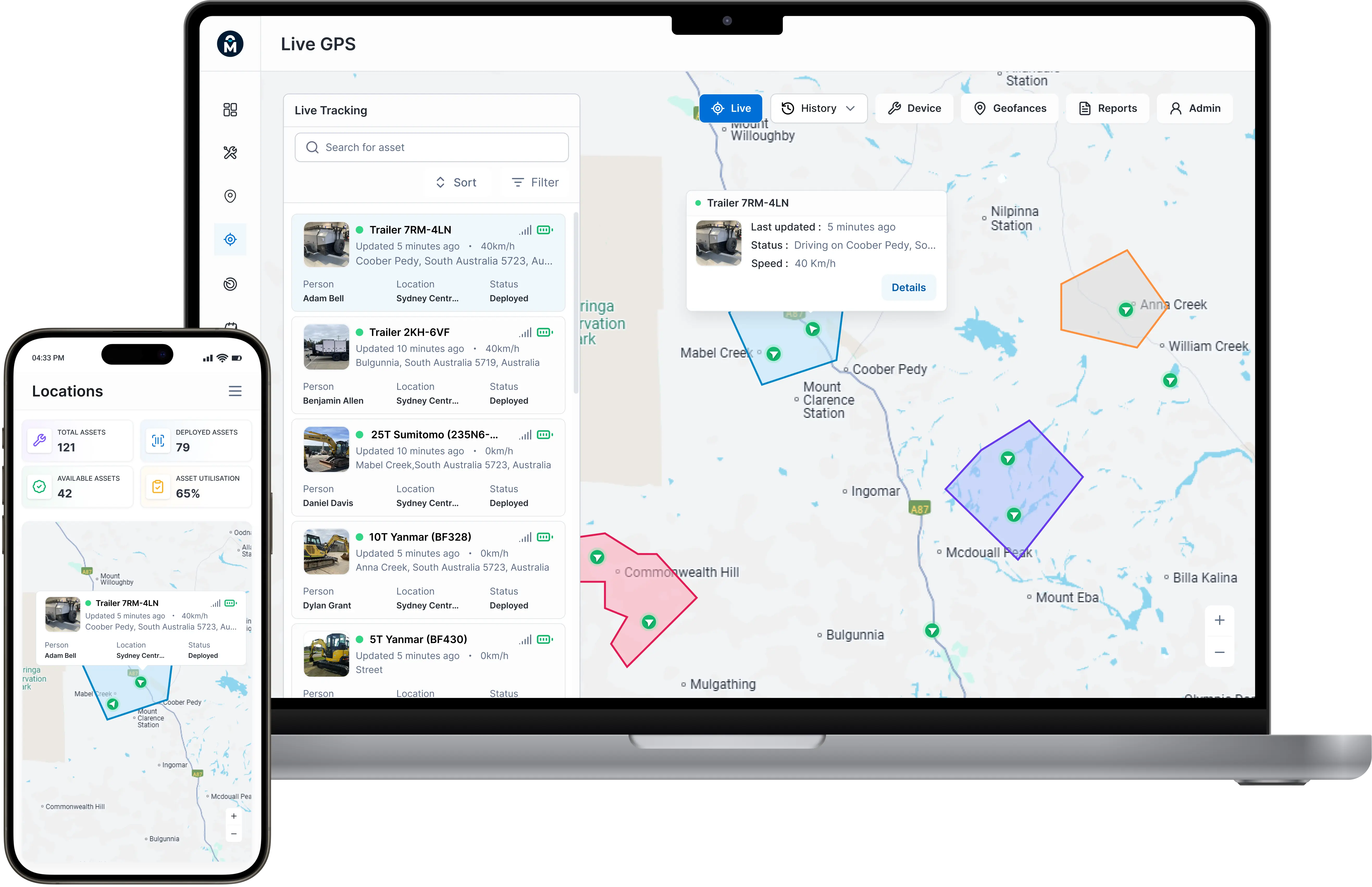
The app shows each tracked asset's latest position; live GPS, trips, history and boundary alerts run in MapTrack Telematics, which MapTrack sells and supports.
Hardware goes through a setup call that matches a tracker to each machine before anything ships, and other tracker brands go through an assisted setup request.
1. Put every machine on the register
Add plant, vehicles, attachments and tools as assets, each with a QR label, so the gear without a tracker sits on the same list as the gear with one.
2. Match a tracker to each machine
Register each tracker against its asset in Settings > Devices, where you see its battery, signal and last report.
3. Let the hours drive servicing
Estimated run hours from the tracker keep each machine's hour meter current, and operators can enter the hour meter on the pre start too. The service plan falls due on those hours, and the work order comes from a meter reading, or through a rule you set.
4. Check each site
Each site's map draws its boundary and groups the gear assigned there, so a site manager sees what's on their job and what should come back.
What lost and idle equipment costs
Stolen machines alone cost US contractors an estimated US$300 million to US$1 billion a year, and 21% of stolen equipment was recovered in the most recent national report (NER and NICB, 2016). Those figures leave out stolen tools, the hire that covers the gap and the crew time spent looking.
Idle gear costs money too: when nobody can see what's sitting on a finished job, the next job hires it in. Hacer Group, a construction contractor using MapTrack, reduced unnecessary equipment hire because the team could identify and redeploy idle assets instead of hiring externally; its published result is in the customer stories on this page.
Theft: what GPS does and doesn't do
No tracker stops a machine being taken. GPS gives you the machine's last known position on its record and, through MapTrack Telematics, which is separately scoped, a geofence alert when it leaves a site, so you can act early and give police a location.
Mega Electrics, a MapTrack customer: "$142,000 AUD of test equipment recovered in full within 48 hours."
Servicing on run hours
Plant is serviced on hours. MapTrack holds tiered service plans, such as 250, 500 and 1,000 hour services on one schedule, and the bigger service covers the smaller ones that fall due with it in one work order.
MapTrack works out each asset's usage rate from its recent readings and estimates when the next meter service will fall due. The assigned person gets an email when a service falls due within 7 days.
Utilisation: what's working and what's sitting
Compare each machine's hour meter week to week to see which plant is working and which has sat still, and check each site's gear before hiring in. Trips and time on site come from MapTrack Telematics, which is separately scoped.
Vehicles, plant and tools in one place
Most contractors run a mix: utes and trucks, heavy plant and machinery, and hundreds of tools. MapTrack keeps all three on one register, on the phone, so a site manager checks a ute's pre start, a loader's next service and who has the laser level in the same place.
- Light vehicles: a MapTrack AI dash cam or a GPS tracker.
- Plant and machinery: a hardwired or battery tracker, or the machine’s own OEM feed.
- Tools and equipment: QR labels for check-out and return to a person or a site, and Bluetooth tags where you want a location.
What it costs
MapTrack is priced per asset, not per user, so every operator and site manager can use it. Trackers, tags and labels are quoted on a setup call, and live GPS in MapTrack Telematics is scoped separately.
Setup and limits
- The app shows the latest position. Live GPS, trips, history and boundary alerts are in MapTrack Telematics.
- Run hours from a GPS tracker are estimated from the tracker, not read from the engine.
- A date on its own does not raise a work order: dates put a service due soon and overdue and email the assigned person, and the work order comes from a meter reading or a rule you set.
- A Bluetooth detection does not check a tool in or out; check-out and return are QR steps.
Location evidence
Review confirmed positions for construction equipment
Use MapTrack to see the latest linked GPS position, then open the asset record for inspections, maintenance and documents. Confirm the device, provider, delivered location or telemetry fields and rollout scope.
- Latest linked GPS position for construction equipment
- Separately scoped MapTrack Telematics for geofences and trip history
- QR identification for assets without a linked GPS device
- Provider and delivered fields confirmed before rollout
- Asset, inspection, service and document records kept together
Service control
Configure meter-based maintenance safely
Choose and test the schedule trigger and manual, per-asset automatic or batch generation mode. Confirm the device, provider, delivered location or telemetry fields and rollout scope.
- Configured hour, odometer or calendar service triggers
- Selected inspection results can feed a tested automation
- Service history and costs stored against each asset
- Configured maintenance email to selected Person records
- Manual meter readings available without a sensor feed
Customer proof
What customers say
“Thanks to MapTrack we know exactly where our gear is, who has it and when it needs servicing.”
- From the published story: Better visibility of owned assets across all projects reduced unnecessary equipment hire by an estimated 25–35%, as the team could identify and redeploy idle assets instead of hiring externally.
“MapTrack easily shows us where our equipment is, what project it's on & who it is assigned to. Support is super helpful.”
“Our investment in MapTrack paid off in a big way when a couple of pieces of test equipment, valued at over $142,000 AUD, was stolen during a break-in at an employee's home. Thanks to MapTrack, we were able to give police the exact location of the asset, even guiding them over the phone as they executed the search warrant. This led them directly to the equipment, which was recovered within 48 hours.”
Built for field operations
Construction Equipment GPS Tracking without another disconnected portal
MapTrack keeps asset, inspection and service records together. Use QR for identification and confirm any GPS, OEM or BLE deployment separately.
Operations and maintenance teams can work from the same asset record. Confirm any geofence, utilisation, finance or integration workflow before rollout.
GPS
Latest linked position
QR
Scan-based identification
Provider fit
Confirm delivered fields
CMMS
Work orders and service history
Plan construction equipment GPS tracking around the operational record
Keep confirmed location, pre-start and maintenance records together, with provider and reporting scope verified before rollout.
- Free trial
- No credit card required
- Confirm current plan scope
Rollout
How to roll out construction equipment GPS tracking
Start with the assets where confirmed location or maintenance evidence matters most, test one provider and field workflow, then expand.
Segment the asset fleet
List the construction equipment that need confirmed GPS positions and the attachments or tools that suit QR identification. Treat OEM and BLE delivery as separate scope.
Choose tracker classes
Confirm the intended GPS, OEM, BLE or satellite provider, hardware, fields and delivery before choosing coverage for powered plant, vehicles, trailers or unpowered equipment.
Verify location delivery
Test the device, provider, position fields and update behaviour. Confirm the device, provider, delivered location or telemetry fields and rollout scope.
Configure maintenance and review needs
Choose and test the schedule trigger and manual, per-asset automatic or batch generation mode. Confirm any cost allocation or utilisation report before relying on it.
Features for construction equipment GPS tracking
Asset, maintenance and review workflows to test alongside the intended location delivery.
GPS plus workflows
Review location with the construction equipment operating record
MapTrack keeps asset, inspection and service records together. Confirm the device, provider, delivered location or telemetry fields and rollout scope.
Frequently asked questions
Common questions about construction equipment GPS tracking.
Resources for construction equipment GPS tracking
Related pages for GPS hardware, commercial GPS workflows and equipment tracking comparisons.
Commercial GPS tracking
The main MapTrack hub for plant, machinery, fleet and jobsite GPS workflows.
Explore commercial GPS trackingGPS tracker store
Review available hardware, then confirm the provider, device fit, data fields and delivery status before rollout.
Explore GPS tracker storeConstruction equipment tracking software
Compare platforms and adjacent options for equipment tracking, plant management and fleet visibility.
Explore construction equipment tracking softwareExplore
- Pricing
- Book a demo
- MapTrack vs Asset Panda
- Alternative to Asset Panda
- Alternative to spreadsheets
- Commercial GPS tracking
- GPS tracking feature
- GPS tracker hardware
- Meter-based maintenance
- Construction
- Vehicle pre-start checklist
- Hardware store
Other industries we serve
- Construction
- Civil contractors
- Plumbing contractors
- Electrical contractors
- HVAC contractors
- Landscaping
- Building services
- Mining and resources
- Oil and gas
- Industrial maintenance
- Facilities services
- Fleet and transport
- Government and councils
- Manufacturing
- Energy and utilities
- Infrastructure
- Education
- IT assets
- Aviation
- Fire safety and protection
- Agriculture
- Transport and logistics
- Water utilities
Build construction equipment GPS tracking into your operating system
Use MapTrack to keep confirmed location, pre-start and maintenance records together, then verify the provider and reporting scope before rollout.
Commercial GPS · GPS tracking · GPS trackers · Geofence time onsite · Runtime maintenance