 vs

MapTrack vs Trackunit for construction equipment GPS
Choose MapTrack when you want commercial GPS plus asset registers, pre-starts, maintenance, rate cards and cost reporting in one platform. Choose Trackunit when your focus is construction telematics, OEM/rental ecosystems and equipment connectivity at scale.

Based on Trackunit's public documentation, MapTrack product pages and pricing/store pages as of Oct 2026. Capabilities can vary by region and package; verify in a pilot.
Who should choose MapTrack or Trackunit?
Choose MapTrack if your machines share the job with tools, trailers and light vehicles, and crews need bookings, pre starts, inspections and servicing on each asset’s record as well as machine data, in construction, civil, mining, utilities or trades. MapTrack is equipment tracking software that connects OEM telematics feeds such as Cat, Komatsu and John Deere alongside its own GPS trackers, Bluetooth tags and QR, barcode and Data Matrix labels, with service plans on run hours. It’s priced per asset with unlimited users. Saunders International cut the time spent locating generators and plant from about 1-2 days a week to under 2 hours (case study).
Choose Trackunit if you’re an equipment manufacturer, rental company or large contractor that wants construction telematics across a mixed-brand machine fleet, with its own Raw, Spot, Kin and Beam hardware, OEM data feeds and a Marketplace of partner apps.
Trackunit facts last checked: Oct 2026. Each sourced row in the comparison table shows its own source and date.
Trusted by construction, mining and field service teams














Trackunit vs MapTrack at a glance
- •MapTrack is built for contractors and industrial operators managing plant, tools, trailers and fleet across jobsites.
- •Trackunit is built deeply around construction equipment connectivity, OEMs and rental fleets.
- •MapTrack exposes GPS tracker options and pricing paths publicly, while Trackunit requires direct sales validation for package pricing.
- •MapTrack goes further on pre-starts, rate cards, asset cost history and QR/BLE workflows for every asset class.
What MapTrack covers in one platform
- Every asset, one record
- Tools on QR or barcode labels and Bluetooth tags, plant on GPS trackers, vehicles with GPS and AI dash cams, sites with boundaries: custody, inspections, maintenance and costs on the same record.
- Maintenance that runs on real usage
- Run hours and kilometres from trackers, dash cams or manual readings feed tiered service plans and next-service forecasts, every asset gets a 0 to 100 maintenance health score, and one work order can cover many assets, each with its own pass or fail.
- Easy for crews
- Pre-starts and inspections work without signal, on any phone, with shared-device PINs, single sign-on and AI help to build forms and add assets from a photo. Capterra Best Ease of Use 2026.
- Hardware and software from one vendor
- GPS trackers, AI dash cams with built-in GPS, Bluetooth tags and labels at published prices, managed in the same app, plus LightMetrics dash cam accounts and 150+ telematics, fleet and fuel-card data sources.
- Simple to buy and run
- Per-asset pricing with unlimited users, 24/7 support and month-to-month plans. Capterra Best Value 2026.
The full capability list (47)
- One register for tools, plant, equipment and vehicles
- Custody: who has what, and where
- Site boundaries on the map
- Location types, zones and geofences
- Location teams and roles
- Live tracking and alerts in MapTrack Telematics
- Rate cards (Pro and Enterprise add-on)
- Finance dashboards (Pro and Enterprise add-on)
- Divisions (Pro and Enterprise add-on)
- Run hours and km from trackers, cameras, feeds or readings
- Meter readings from a photo
- Work orders raised from meters, run hours and data feeds
- Tiered service plans
- Next-service forecasts from usage
- Stale-reading flags
- Maintenance health score
- Service board and due-soon emails
- One work order across many assets
- Batch work orders and bulk scan logging
- Labour, parts and external costs on every service
- Failed checks raise work orders by rule
- Parts and inventory by location and bin
- Offline pre-starts and inspections
- Phone forms in sections, with Pass, Fail and N/A buttons
- Mobile web app (Android, iPhone, iPad)
- Shared-device PINs
- Smart overlay (AR) that scans several codes at once
- SAML 2.0 single sign-on (SSO)
- AI form builder
- AI asset creation from a photo
- Equipment bookings (Requests)
- GPS trackers managed in the app
- AI dash cam video in the app
- AI dash cams with built-in GPS
- LightMetrics dash cam connection
- AI dash cam live view: road, driver or both
- Dash cam footage requests, with blurring
- Driver scorecards and a Safety events dashboard
- Bluetooth tags
- QR, barcode and Data Matrix scanning
- RFID and NFC
- OEM feeds under Connections
- Connection library in the app
- 150+ data sources
- Engine hours from 68 integrations
- REST API with per-key access levels
- MCP server for AI tools (Enterprise plan or add-on)
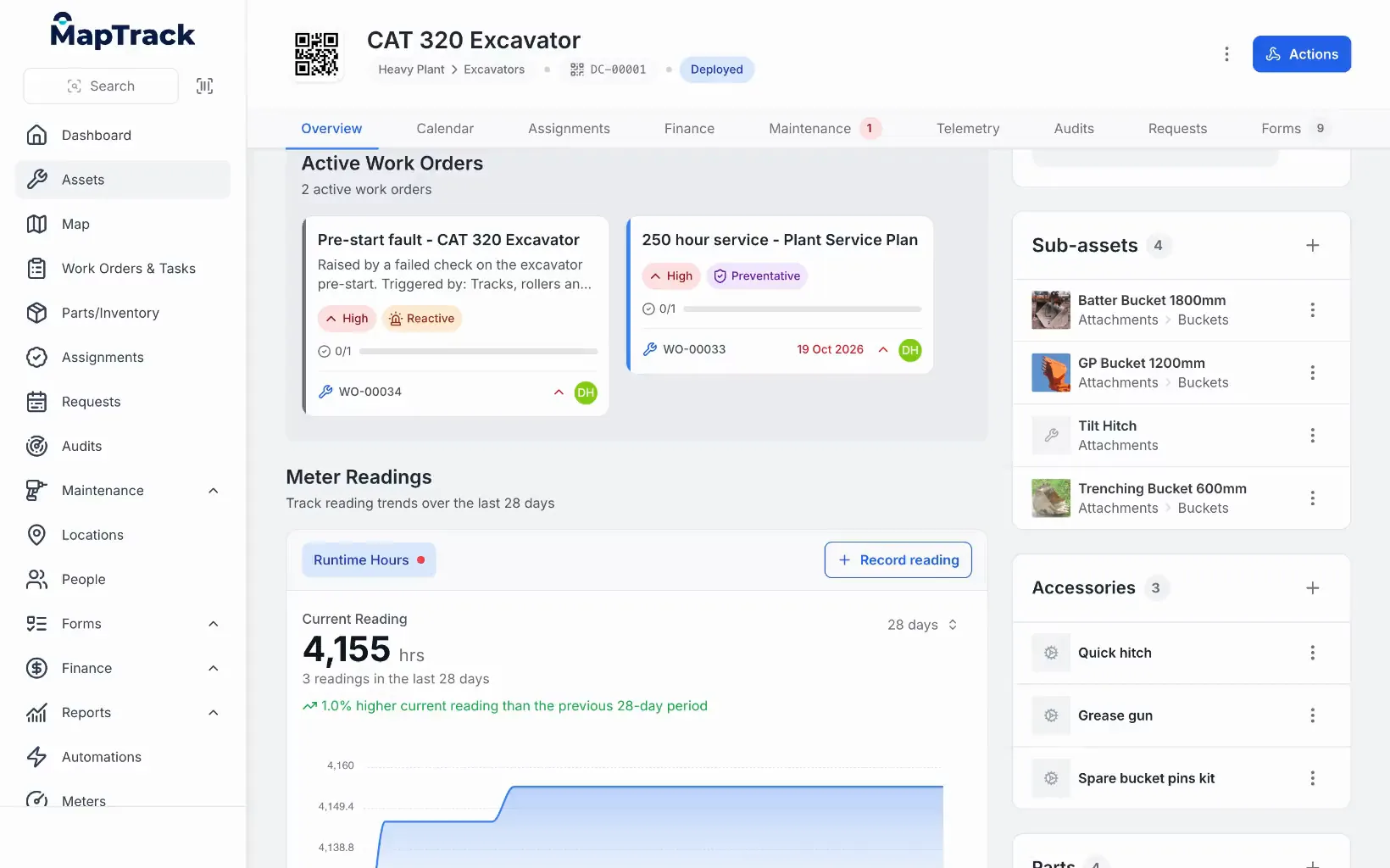
Hours in, the 250 hour job raised
An excavator's runtime hours and the 250 hour service work order they raised.
MapTrack app · Demonstration data · Recorded
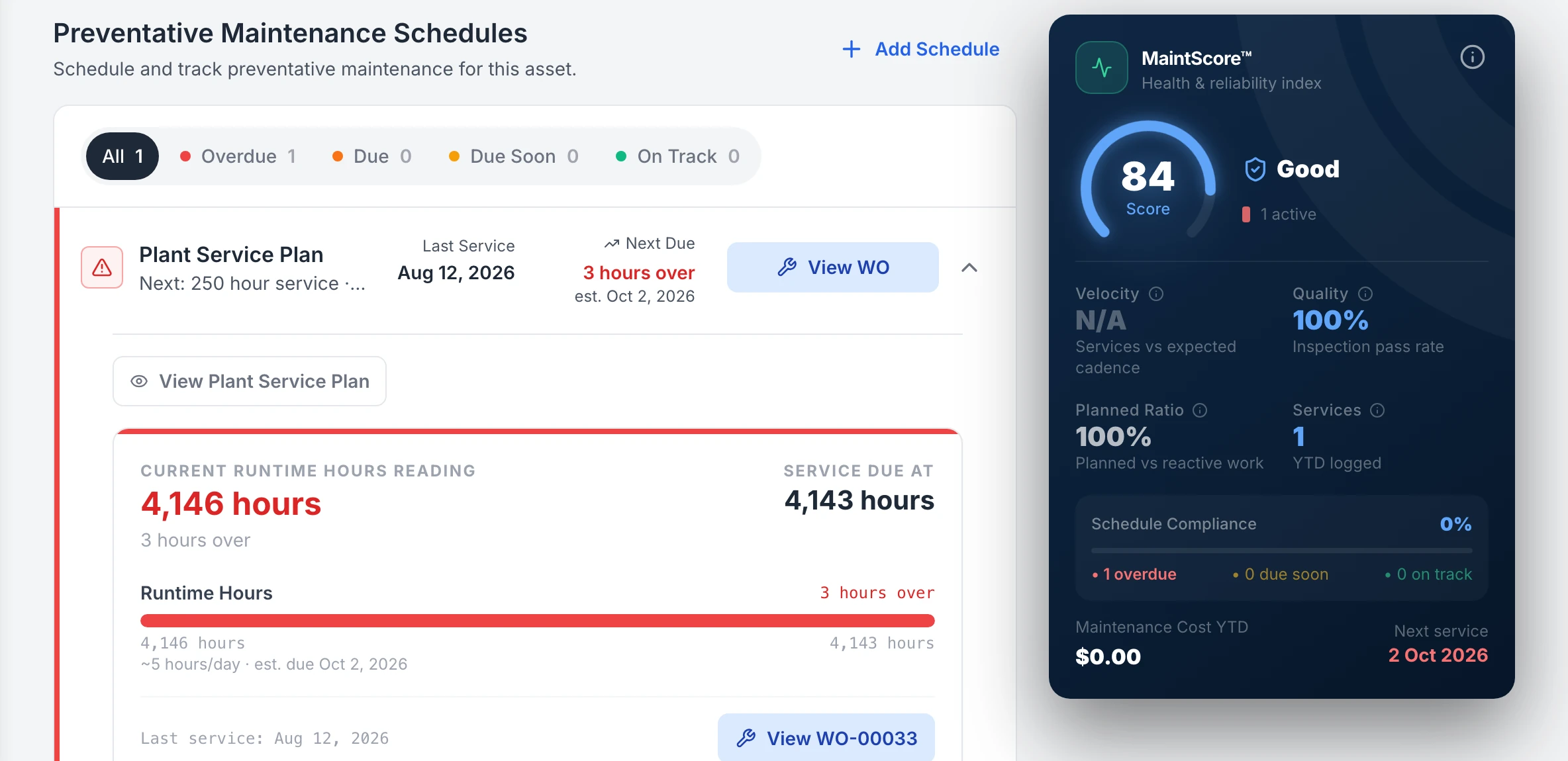
Hours against the next service
An excavator’s runtime hours, typed in on the asset, set against its next 250 hour service: 4,146 hours, 3 hours past the 4,143 hour service, with a button to open work order WO-00033. The reading shown was entered by hand, not reported by a device.
MapTrack app · Demonstration data · Captured
About this screenshot
Demonstration workspace at a 1440 px desktop viewport, scrolled to the asset’s service plan. The reading was entered in the app that day.
Short answer
Trackunit is purpose-built for construction equipment connectivity, fleet management, utilisation, digital jobsites and equipment maintenance. MapTrack is the modern asset-operations layer for organisations that need GPS data to power practical site workflows, not only connected-equipment telemetry.
Trackunit is strong for connected construction equipment, OEMs, rental fleets and telematics. MapTrack is stronger for contractors and industrial organisations that need GPS plus QR/BLE tracking, site geofences, pre-starts, work orders, transparent hardware, published software pricing and asset-level cost recovery. MapTrack covers tools, plant, trailers and vehicles on one record, from any phone, and holds Capterra’s Best Ease of Use award for 2026.
Which platform fits your GPS programme?
Use these buyer patterns to shortlist the right pilot. The answer changes depending on whether GPS is a standalone fleet layer or part of a wider jobsite operating system.
The jobsite operations team
Do you need GPS to feed run hours, pre-starts, maintenance, rate cards and asset costs?
Choose MapTrack. This is the strongest fit for plant, machinery, trailers, tools and fleet moving between sites and projects.
Learn more →The Trackunit-standardised fleet
Are you already standardised on Trackunit hardware, telematics or fleet workflows?
Stay close to Trackunit if its existing ecosystem already solves your fleet problem. Then test whether it covers the plant, QR/BLE, pre-start, costing and maintenance workflows you need.
The mixed-asset contractor
Do you track excavators, trailers, generators, attachments, small tools and service vehicles together?
Choose MapTrack. Mixed tracking methods matter because not every asset justifies the same GPS hardware.
Learn more →The procurement team
Do you need transparent GPS hardware options and a simple software pricing model before a pilot?
Choose MapTrack first, then benchmark the quote against the incumbent. Compare device cost, data plans, implementation, user access and contract lock-in.
Learn more →MapTrack vs Trackunit: commercial GPS comparison
Use this table to compare the location layer, jobsite workflows, maintenance triggers and commercial model.
| Criteria |  MapTrack |  Trackunit |
|---|---|---|
| Commercial GPS coverage | ||
| Best for | Plant, machinery, tools, trailers and fleet across jobsites, with GPS tied to operations | Construction equipment connectivity, OEMs, rental fleets, digital jobsites and utilisation(per Trackunit, Oct 2026) |
| GPS hardware | YesTransparent industrial GPS tracker store plus compatible third-party/OEM feeds | YesTrackunit IoT and telematics hardware for connected construction equipment(per Trackunit, Oct 2026) |
| Unpowered assets | YesBattery GPS trackers for trailers, containers, generators, pumps and mobile plant | YesSpot S300 self-powered trackers for non-powered equipment such as trailers, containers and welders (seven years at four reports per day), and Kin Bluetooth tags for tools and attachments (battery up to five years)(per Trackunit Spot, Oct 2026) |
| Geofencing | YesSite geofences drawn on every map in MapTrack, with entry and exit alerts in MapTrack Telematics. Each location takes one or more geofences, a circle from 50 m to 1,000 km or an area you trace, with zones inside it; check-outs and forms offer one-tap You are here and Nearby choices | YesFleet page lists geo-fencing and site-level intelligence beside real-time GPS, status and movement on one map(per Trackunit fleet management, Oct 2026) |
| Tracking methods | YesGPS, BLE, QR, barcode and OEM telematics in one asset register; the phone camera reads 14 code types, Data Matrix included, and its smart overlay (AR) scans several codes at once | YesTelematics devices (Raw), non-powered trackers (Spot), Bluetooth tags (Kin), site gateways (Beam) and OEM data feeds, with fleet management and utilisation products(per Trackunit, Oct 2026) |
| Jobsite operations | ||
| Maintenance triggers | YesRuntime, odometer, fault-code, failed pre-start and schedule triggers create work orders | YesAutomatic service triggers from engine hours and operating conditions, fault-code diagnostics, service schedules, and technician access to diagnostics, histories and work orders in Trackunit Go(per Trackunit equipment maintenance, Oct 2026) |
| Pre-starts and inspections | YesAsset-linked forms with photos, signatures, GPS stamps, offline mode and defect escalation; on a phone, forms come in sections with a progress bar and colour-coded Pass, Fail and N/A buttons, and drafts save on the device as you go | ?Trackunit Inspections (launched May 2026) replaces paper checks with guided digital workflows: timestamped, photo-backed and tied to an operator, with flagged defects triggering an action. Signatures, form building and offline use are not publicly documented, verify in a pilot(per Trackunit Inspections launch, Oct 2026) |
| Rate cards and job costing | YesTrack hire rates, internal charge-out, service cost and asset cost history by site/project | Not publicly confirmedNot publicly positioned as a rate-card and project-costing platform(per Trackunit fleet management, Oct 2026) |
| Operator and driver identity | YesDriver/operator assignment, custody, audit trail and BLE-card-friendly field workflows; workstation mode, a shared-device kiosk, gives each person on a shared phone or tablet their own four-digit PIN and role | ?Access Management: operator keys by phone, PIN or card, with operator credentials, training and usage logs in one dashboard. Tool check-out and custody records are not publicly documented, verify BLE card and site workforce fit(per Trackunit access management, Oct 2026) |
| Commercial model and rollout | ||
| Pricing transparency | YesPublished software pricing path plus transparent GPS hardware store | ?A public pricing page explains how a plan is built (software plan, per-asset configuration, service package, add-ons) and prices are quoted on request; verify quote and hardware model(per Trackunit pricing, Oct 2026) |
| Commercial model | YesPer-asset software pricing with unlimited users; GPS hardware chosen by asset class; tools from A$1, machinery from A$12 a month | Per connected asset on an OEM, rental or contractor software plan with a service package and add-ons; quoted on request, generally on 36 or 42 month contracts with a monthly billing option(per Trackunit pricing, Oct 2026) |
| Region fit | YesAustralian-owned and operated, with customers across Australia, New Zealand, North America, the UK and Europe. Primary database in AWS Sydney. | YesInternational construction equipment ecosystem(per Trackunit, Oct 2026) |
| Integrations | Yes150+ telematics, OEM, fleet and fuel-card data sources plus API/webhooks; REST API keys can be read-only, read-and-write or full access. The MapTrack connection library lists 118 GPS, telematics, OEM machine and video providers in the app, and our team sets up the ones you request | YesMarketplace, OEM integrations and construction telematics ecosystem(per Trackunit Marketplace (Trackunit and third-party apps from telematics and ConTech providers), Nov 2026) |
See commercial GPS in the MapTrack workflow
Bring a real asset list, current GPS vendors and one jobsite workflow. We will map the right GPS, BLE, QR and OEM data mix.
- No credit card required
- Unlimited users
How to decide between them
Which is better for GPS across jobsites?
MapTrack is stronger when GPS needs to become day-to-day jobsite action: allocations, inspections, work orders and costs.
A jobsite GPS platform has to do more than show dots on a map. It needs to understand which site, crew, project and cost centre an asset belongs to, whether that asset is inspected, and what should happen when the machine runs enough hours to need service.
How do hardware choices compare?
Trackunit is deep in construction IoT. MapTrack gives contractors a more flexible mix of industrial GPS, BLE, QR and OEM feeds.
High-value machines, trailers and service vehicles often need different tracking methods. MapTrack lets teams combine hardwired GPS, battery GPS, BLE, QR labels, barcodes and OEM telematics instead of forcing every asset into one device model.
What happens after GPS data arrives?
Both can support maintenance outcomes. MapTrack centres the work order, pre-start defect and cost record on the asset.
Location and meter data only become useful when they trigger action. MapTrack connects GPS, engine hours, odometer and fault-code feeds to pre-starts, defects, service intervals and work orders, with the evidence retained on the asset record.
Which model is easier to cost before a pilot?
MapTrack gives clearer public software and GPS hardware paths. Trackunit buyers should validate final package pricing directly.
For commercial GPS, compare total cost: device purchase or rental, SIM/data plan, installation, software modules, user access, implementation, support and contract term. MapTrack separates hardware selection from the operating platform so buyers can model the rollout asset by asset.
What should a pilot prove?
Pilot an owned machine, a rented machine, a trailer and a smaller QR/BLE asset to see whether one workflow covers all asset classes.
A good pilot should include powered and unpowered assets, at least two jobsite geofences, a pre-start form, one runtime or odometer maintenance trigger, one asset cost report and one field user who has to complete the workflow offline.
Verdict: MapTrack wins when GPS has to run the jobsite
Trackunit can be a strong GPS or telematics choice. MapTrack is the better fit when plant, machinery, trailers, tools and fleet need to share one operating record across sites, inspections, maintenance and costs.
| Category | Winner |
|---|---|
| Commercial GPS hardware | Draw |
| Mixed plant, tools and fleet register | MapTrack |
| Pre-starts tied to GPS and assets, completed without signal | MapTrack |
| Runtime/odometer maintenance with tiered service plans | MapTrack |
| Rate cards and job costing | MapTrack |
| Trackunit ecosystem depth(per Trackunit Marketplace (Trackunit and third-party apps from telematics and ConTech providers), Nov 2026) | Trackunit |
| Public GPS hardware and software pricing path | MapTrack |
Pricing and total cost
MapTrack
MapTrack uses asset-based pricing with unlimited users, so operators, supervisors, mechanics and project managers can all use the system without per-seat friction.
GPS hardware is available through the public GPS tracker store, and software pricing is published on the pricing page.
Trackunit
Trackunit’s pricing page explains how a plan is built (a software plan for OEMs, rental companies or contractors, a per-asset configuration, a service package and add-ons, generally on 36 or 42 month contracts with a monthly billing option) and prices are quoted on request. Validate hardware, platform modules, connectivity, OEM integrations, rental or contractor package fit and implementation cost in a direct quote.
Always compare hardware, SIM/data, installation, implementation, software modules, users and contract term before deciding.
Commercial GPS TCO checklist
Use the same cost categories for every vendor quote so the comparison is not just monthly software price.
Hardware and connectivity
- GPS device cost by asset class
- SIM, satellite or data-plan costs
- Installation and replacement labour
- Battery life and service interval assumptions
Software and users
- Software licence model
- Unlimited users versus per-seat pricing
- Modules required for maintenance, forms and reporting
- Contract length, minimums and cancellation terms
Workflow consolidation
- Separate tools still needed beside Trackunit
- Pre-start and defect workflow coverage
- Rate-card and cost-reporting coverage
- Manual export/import work required for finance or maintenance
When to choose each platform
Choose MapTrack if you…
- You manage plant, machinery, trailers, tools and vehicles across jobsites.
- You need GPS to connect to pre-starts, work orders, run hours, rate cards and asset costs.
- You want transparent GPS hardware options and per-asset software pricing with unlimited users.
- You need QR, BLE, GPS and OEM telematics in one asset register.
- You need equipment bookings (Requests) with approvals, conflict checks and scan-to-check-out.
- You want tiered service plans on run hours, with work orders raised from meter readings.
- You want an AI form builder for pre-starts and inspections, with loaded forms that submit offline and sync after reconnection.
- You use barcode or Data Matrix labels as well as QR, scanned with the phone camera or a handheld scanner.
- You want AI dash cams with live video and event clips in the same app as your assets.
- You hire out equipment and need rate cards with daily, weekly and monthly rates (a Pro and Enterprise add-on).
- You want a cost ledger, budget vs actual and repair-or-replace for every asset (a Pro and Enterprise add-on).
- You run several divisions that each need their own assets and team access (a Pro and Enterprise add-on).
Consider Trackunit if you…
- You are an OEM, rental company or large construction equipment organisation already aligned to Trackunit.
- Your primary objective is construction telematics, machine connectivity and utilisation data.
- You need Trackunit network, marketplace or OEM ecosystem capabilities more than QR/BLE/pre-start/cost workflows on one record across tools, plant and vehicles.
Best Trackunit alternatives for commercial GPS
Shortlist by workflow fit rather than brand size. The best choice depends on whether you need fleet telematics, construction IoT or a full jobsite asset operations layer.
- 1
MapTrack
Best when GPS needs to feed plant, machinery, pre-starts, maintenance, rate cards and costing.
- 2
Tenna
Strong construction-specific GPS and equipment tracking platform with proprietary hardware.
- 3
Trackunit
Trackunit is strong for construction telematics, fleet management, utilisation, digital jobsites, OEM and rental ecosystems.
What our customers say
“Thanks to MapTrack we know exactly where our gear is, who has it and when it needs servicing.”

Denis Slaviero
HSEQ Manager, Hacer Group
“Bloody amazing! We used to spend 1-2 days a week tracking and managing our generators alone.”

Steve McAllister
Asset Coordinator, Saunders International
“MapTrack streamlines tracking and asset servicing across mine shutdowns - simple, reliable, and effective.”

Gordon Stennings
Maintenance Storeman, Mineral Resources
Customer outcomes
Results from published MapTrack customer case studies.
Estimated 25–35%
Better visibility of owned assets across all projects reduced unnecessary equipment hire by an estimated 25–35%
Instantly
Safety audit documentation that previously took 2–3 days to compile can now be retrieved instantly from the platform on any device.
Estimated 40-50%
Unnecessary tool purchases dropped by an estimated 40-50% in the first year as crews gained visibility over what was already available and where it was located.
How to move from Trackunit or a standalone GPS tool
You do not need to retag every asset at once. Start with the assets where location, downtime and cost leakage hurt most.
Map assets and tracking methods
Classify plant, trailers, generators, service vehicles, attachments and tools by value, movement pattern and whether they need GPS, BLE, QR or OEM telematics.
Pilot the real workflow
Run a small GPS pilot with live geofences, one pre-start, one runtime maintenance trigger, one operator assignment and one cost report.
Compare Trackunit data coverage
Check which data should stay in the incumbent telemetry platform, which should flow into MapTrack and which separate spreadsheets or forms can be retired.
Roll out by asset class
Deploy the right hardware and forms by asset type, then train site teams on scan, inspect, allocate, maintain and cost workflows.
What to verify in a GPS pilot
A commercial GPS pilot should prove the operational workflow, not just whether a tracker reports a dot on a map.
- ✓MapTrack: Verify geofences, pre-starts, runtime/odometer work orders, rate cards, cost reporting, QR/BLE fallback and offline field workflows.
- ✓Trackunit: Verify Trackunit hardware fit, contract terms, region support, API/integration scope, pre-start depth, maintenance workflow depth and whether job costing needs another system.
Methodology and sources
Updated Oct 2026 from Trackunit public homepage, fleet management page, solution navigation and MapTrack product, pricing and GPS tracker pages.
Trackunit packaging may vary by contractor, OEM and rental use case. Verify pricing, hardware and workflow depth in a scoped pilot.
Spotted something out of date or incorrect? Email corrections@maptrack.com and we will review and update this page.
MapTrack vs Trackunit FAQs
Is MapTrack better than Trackunit for commercial GPS tracking?
Can MapTrack replace Trackunit?
Does MapTrack support GPS trackers for plant and machinery?
How should I compare GPS tracker pricing between vendors?
What is the biggest difference between MapTrack and fleet GPS systems?
Can I trial MapTrack with only a few GPS assets?
Can crews book equipment in MapTrack?
Does MapTrack handle preventive maintenance?
Can MapTrack build inspection forms with AI?
Does MapTrack do rate cards, finance and divisions?
How does MapTrack work out when the next service is due?
Can MapTrack record labour, parts and external costs on each service?
Does MapTrack support single sign-on (SSO)?
Who should choose MapTrack instead of Trackunit?
Which Trackunit alternative tracks vehicles, plant and tools in one system?
Can crews share one tablet for pre-starts and still sign their own checks?
By industry
More comparisons
- MapTrack vs Asset Panda
- MapTrack vs SafetyCulture
- MapTrack vs Hilti ON!Track
- MapTrack vs Milwaukee ONE-KEY
- MapTrack vs MaintainX
- MapTrack vs Fleetio
- MapTrack vs ToolSense
- MapTrack vs Tenna
- MapTrack vs Samsara
- MapTrack vs Geotab
- MapTrack vs Verizon Connect
- MapTrack vs ToolWatch
- MapTrack vs spreadsheets
- MapTrack vs Sortly
- MapTrack vs EZOfficeInventory
- MapTrack vs Limble
- MapTrack vs GoCodes
- MapTrack vs AssetTiger
- MapTrack vs Cheqroom
- MapTrack vs ShareMyToolbox
- MapTrack vs Gearbelt
- MapTrack vs Fiix
- MapTrack vs GoAudits
- MapTrack vs Sitemate
- MapTrack vs GoFMX
- MapTrack vs IBM Maximo
- MapTrack vs Kynection
About the author

Co-Founder & GM of Operations
Lachlan leads operations at MapTrack, bringing 10+ years of enterprise technology experience across mining, construction and heavy industry. Before MapTrack, he held senior roles at Workato (integration and automation) and AppDynamics/Cisco (application performance), working directly with ASX-listed organisations to modernise their technology stacks. His deep understanding of field operations and blue-collar workflows shapes how MapTrack solves real problems for asset-intensive teams.
View LinkedIn profile →Free templates for this workflow
Whichever platform you choose, these are free to download and use. No account needed.
Build a commercial GPS layer that runs the jobsite
MapTrack connects GPS, BLE, QR and OEM telematics to pre-starts, maintenance, run hours, rate cards and asset costs.
4.9 on G2 · 5.0 on Capterra, GetApp & Software Advice· Source: G2.com, Inc.
- No credit card required
- Unlimited users