
Fleet Video Telematics
Fleet and Commercial AI Dash Cams
Road and driver cameras with GPS built in. Every event, trip and safety score lands in MapTrack, beside your plant, trailers and tools.
Cameras from $795 ex GST ($874.50 inc GST), plans from $34 ex GST ($37.40 inc GST) a month, plus the vehicle's MapTrack plan, $9 to $12 a month ex GST. Or lease a MapTrack DualSight AI dash cam for $80 a month ex GST.
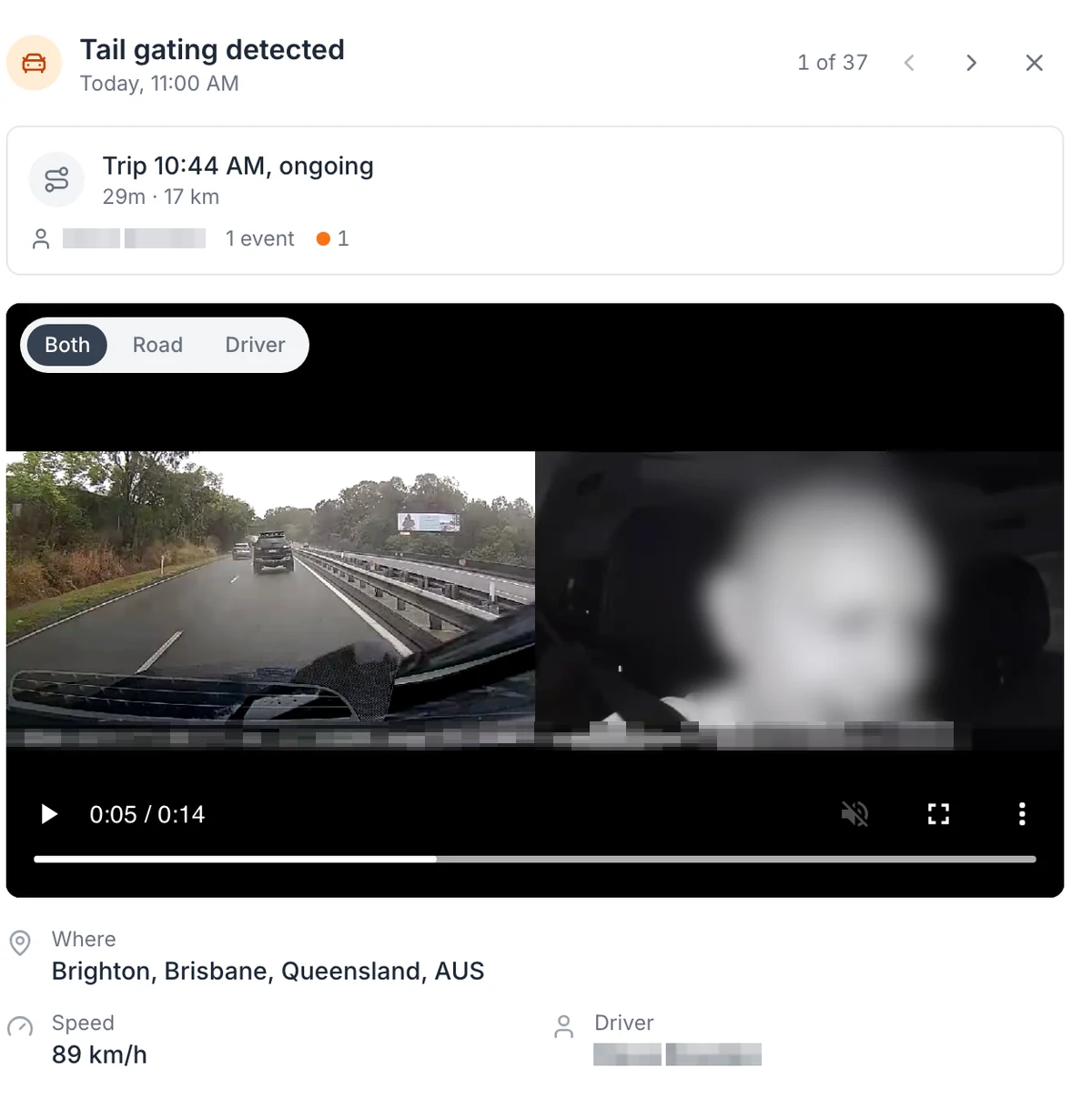
A tailgating alert, with the road and the cab side by side
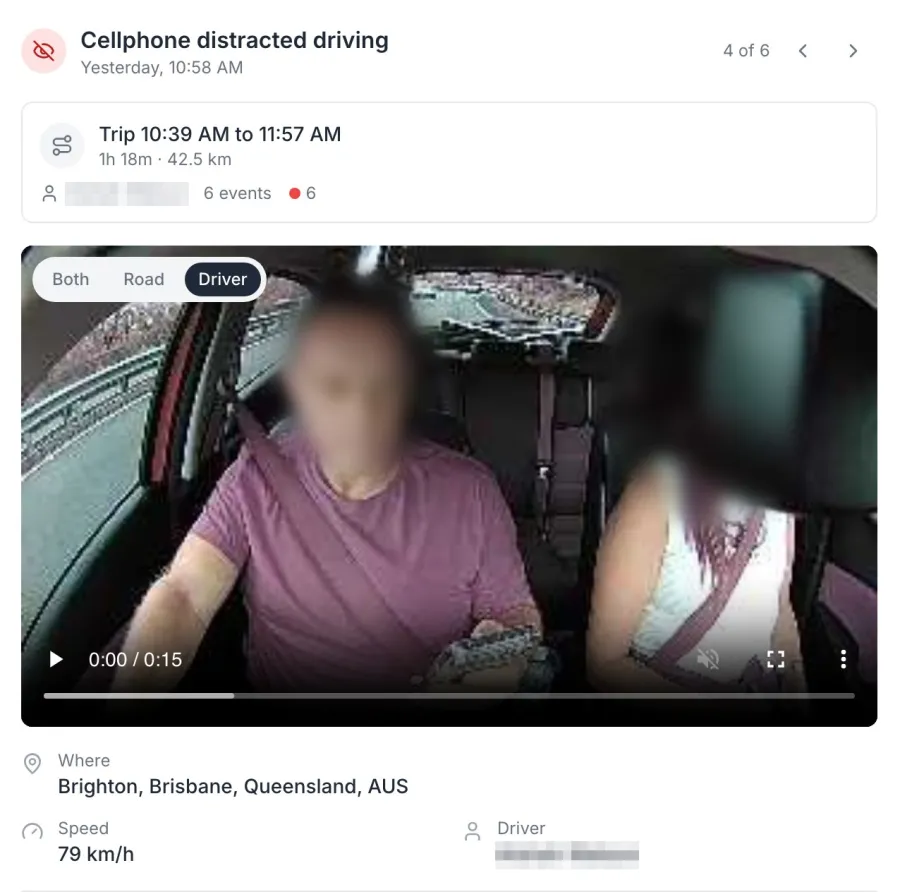
An AI dash cam event as it opens in MapTrack: the clip from the road and cab cameras together, the trip it happened on, the speed at the time and the suburb. Road and Driver views are one tap away. The face is blurred in this screenshot, and the driver name is masked.
MapTrack app · Demonstration data · Captured
About this screenshot
Demonstration account at a 1440 px desktop viewport. The event drawer is cropped from the device page. The driver’s face is pixelated and blurred, and the driver name and the clip’s burnt-in position overlay are masked.
Trusted by construction, mining and field service teams
















“MapTrack has completely transformed how we manage our tools, equipment and fleet.”
600K+ assets tracked since 2012
One record for the vehicle
The camera is part of MapTrack, not a second system. Its GPS puts the vehicle's location and trips on its own record, and completed trips add estimated run hours to its meter, so services set on hours fall due on real use. The same record holds the vehicle's pre-starts, services and costs, beside your plant, trailers and tools.
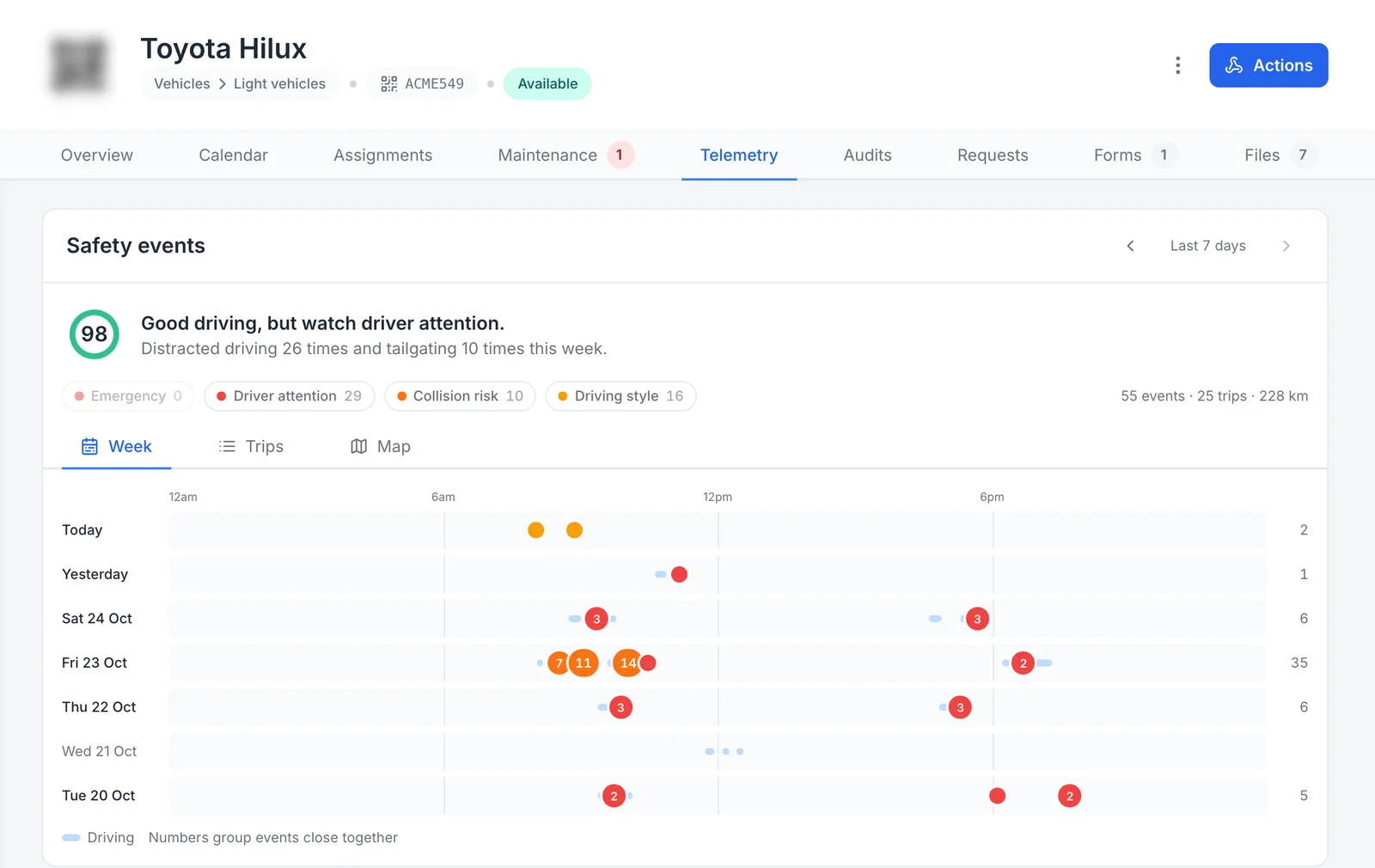
The camera’s week on the vehicle’s own record
The camera’s safety events sit on the vehicle’s own record, on the Telemetry tab beside its maintenance, inspections and files.
MapTrack app · Demonstration data · Captured
Open full size screenshot: The camera’s week on the vehicle’s own record (new tab)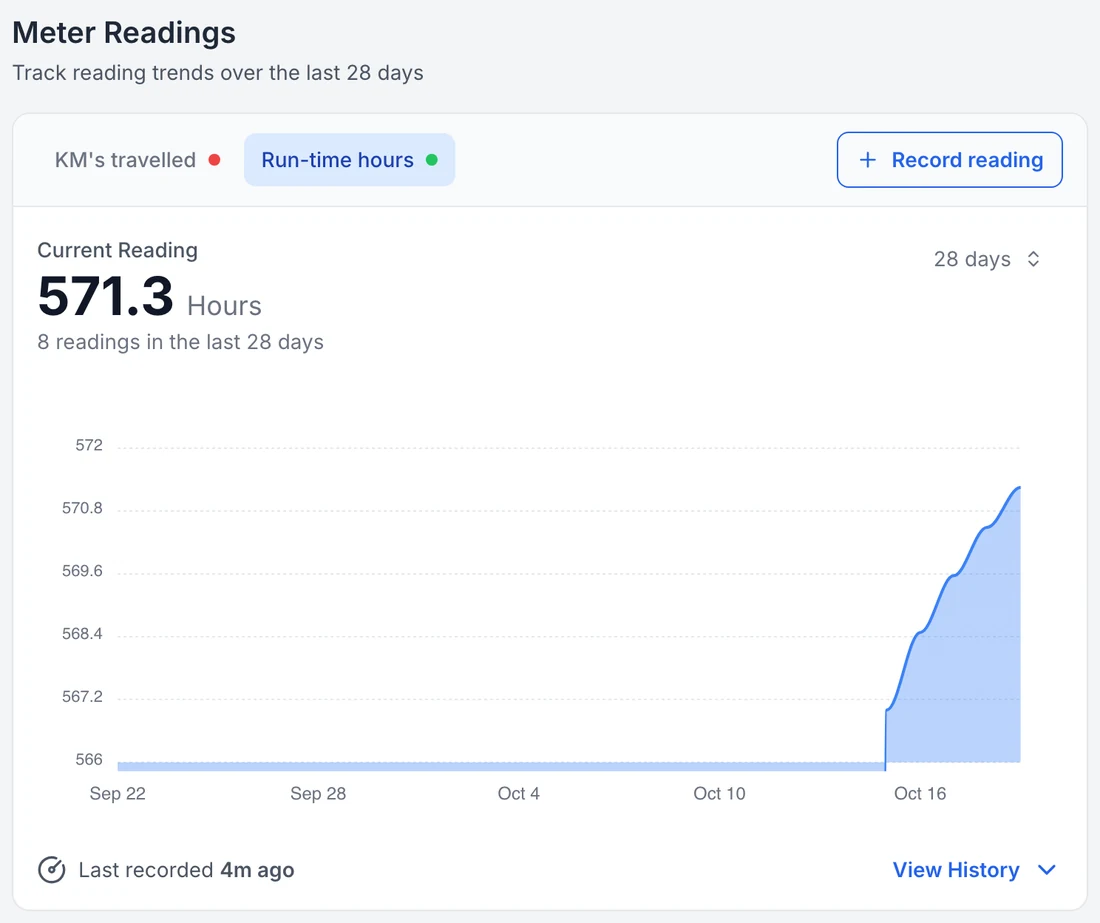
Run hours on the vehicle record
Completed trips add estimated run hours to the vehicle’s meter, so services set on hours fall due on real use.
MapTrack app · Demonstration data · Captured
Open full size screenshot: Run hours on the vehicle record (new tab)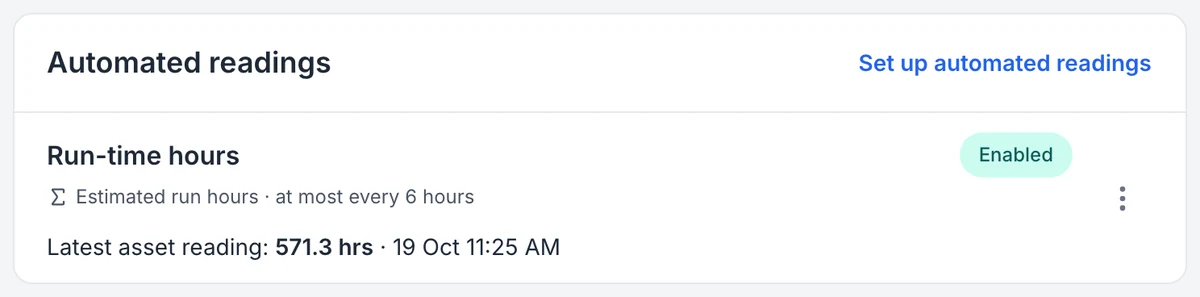
The reading the camera sends, and how often
MapTrack labels the reading an estimate and shows how often it updates. Time spent idling isn’t counted.
MapTrack app · Demonstration data · Captured
Open full size screenshot: The reading the camera sends, and how often (new tab)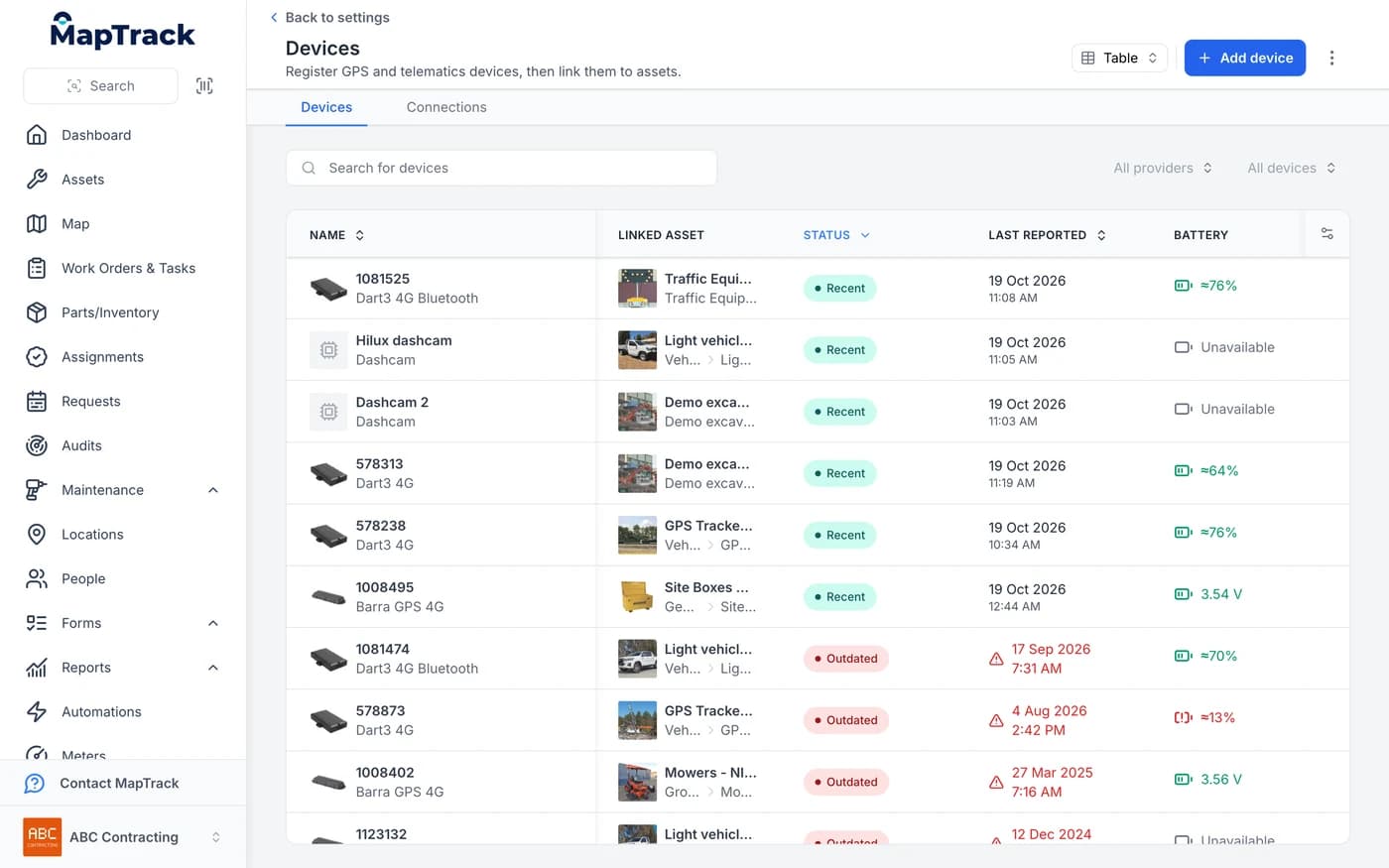
Cameras and trackers in one device list
The camera sits in the same device list as your GPS trackers, linked to the asset it’s fitted to.
MapTrack app · Demonstration data · Captured
Open full size screenshot: Cameras and trackers in one device list (new tab)
When a service falls due, you raise the work order from the schedule in a couple of clicks. Camera footage, live view and safety events are visible to account owners only.
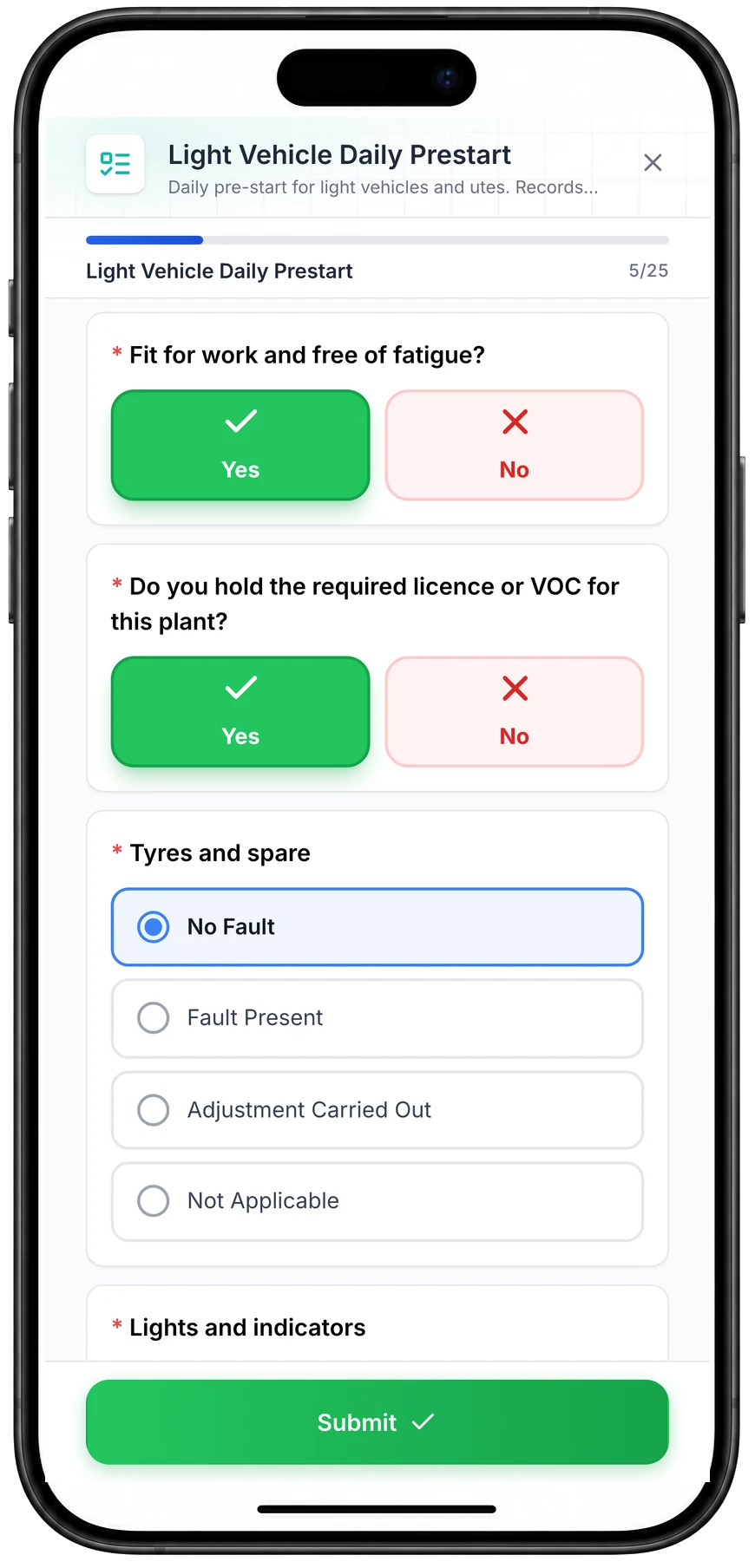
The pre-start sits on the same record
Drivers scan the QR label in the cab and run the daily pre-start on their phone. It lands on the same vehicle record as the camera's trips and events.
“Through the forms feature, we've been using daily safety truck checks. So our mechanic here completes that every day, as well as the truck drivers.”
Camera, trackers and tools in one register
The camera is one more source on the asset record, not a separate system. Here is what reaches MapTrack, and where it shows.
What's connected
- RoadSight and DualSight dash cams
- GPS trackers on utes, trucks and plant
- Battery GPS trackers on trailers and generators
- Bluetooth tags and QR labels on tools and equipment
One asset register in MapTrack
- Ute
- Truck
- Excavator
- Generator
- Trailer
- Gang box
What you see on each record
From the camera
- Live view and saved event clips
- Location, speed and trips
- Estimated run hours and kilometres
Also on the record
- Tracker battery level
- Vehicle battery voltage
- Pre-starts, services and costs
Already on LightMetrics? Connect your account and MapTrack imports the cameras, their latest position and safety events, and estimates kilometres and drive hours.
Lease or buy
Lease a DualSight for $80 a month ex GST ($88 inc GST)
One monthly price per camera. It includes:
- The DualSight road and driver camera, with a free upgrade to a new camera after 36 months
- GPS tracking built in, with the vehicle’s location and trips in MapTrack, so it doesn’t need a separate tracker
- Live view and saved event clips in MapTrack
- Driver AI alerts for fatigue, distraction and phone use
- The SIM card
36-month minimum termInstallation quoted with your orderFreight quoted with your orderData sized with your quote
Rather buy outright? The DualSight is $995 ex GST ($1,094.50 inc GST), plus a camera plan from $34 a month ex GST. See the plans
New in MapTrack
Every camera on one safety dashboard
The Safety events dashboard in MapTrack brings every connected camera into one view, so you can see how the whole fleet is driving, not one vehicle at a time. It sits under Devices, and camera footage and safety events are visible to account owners only, because they're personal to the driver.
- Trips, drive time, distance and events per 100 km for the whole fleet, each against the previous period.
- A week view that shows when events happen, and a heat map that shows where. When one kind of event keeps happening at the same spot, MapTrack flags it.
- Needs attention lists the events to look at first, such as panic button presses.
- Click an event type to see how many, where, which vehicles or drivers, and the time of day it happens.
- A table ranks every vehicle, or every driver, by safety score and top issue, with To watch and Safest filters.
- Date ranges from today back to the last quarter, and every vehicle’s own record keeps its camera’s week.
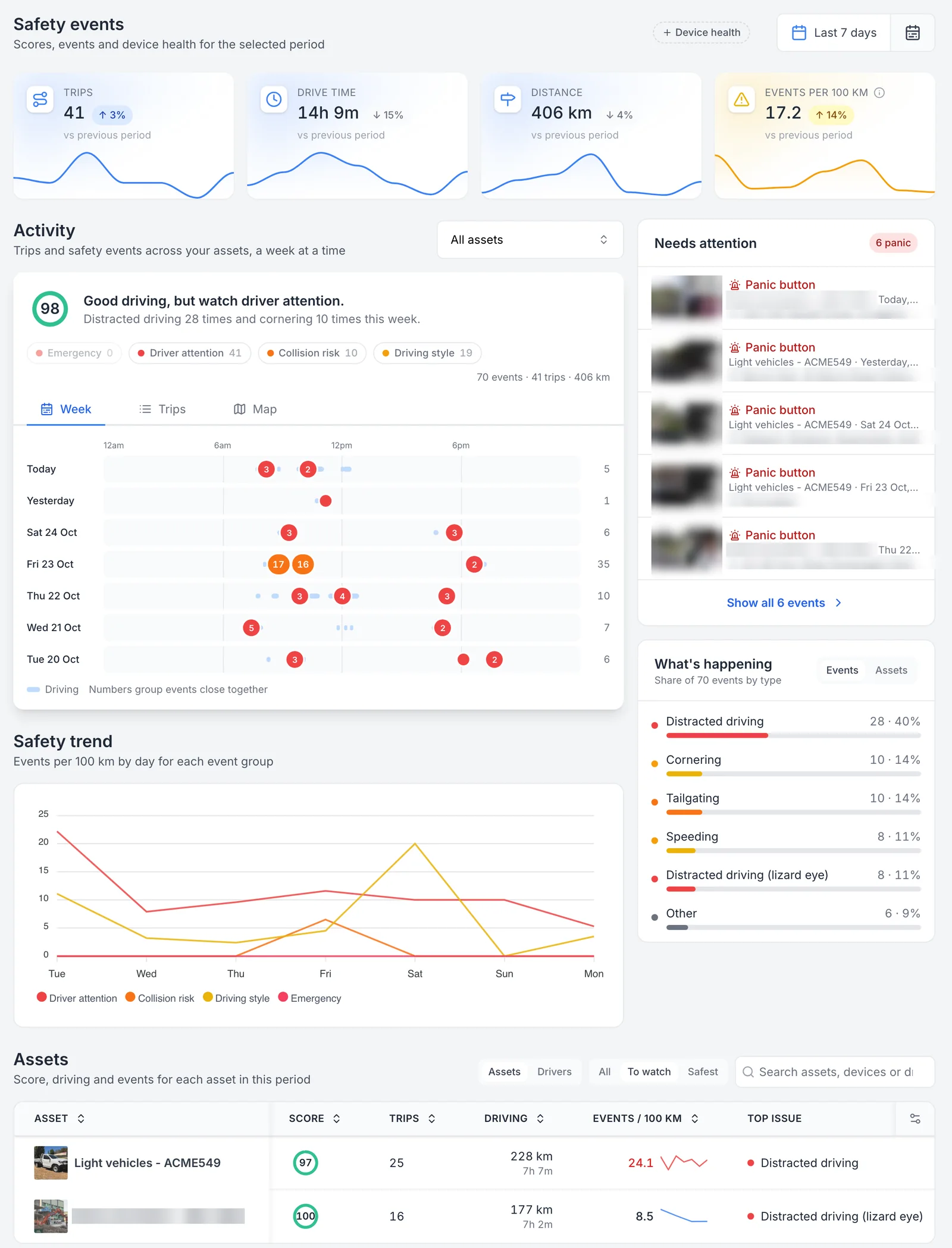
Every camera’s safety events on one page
Released on 25 October 2026: one page for every camera in the fleet. Trips, drive time, distance and events per 100 km sit against the previous period, the week shows when events happen, Needs attention lists panic button presses first, and the Assets table ranks each vehicle by its score and top issue. Thumbnails, street addresses and one demonstration asset name are masked.
MapTrack app · Demonstration data · Captured
About this screenshot
Demonstration account at a 1440 px desktop viewport, signed in as an account owner (camera data is owner-only). Settings, Devices, Safety events over the last 7 days, Assets table filtered to To watch. Event thumbnails, street addresses and one demonstration asset name are pixelated.
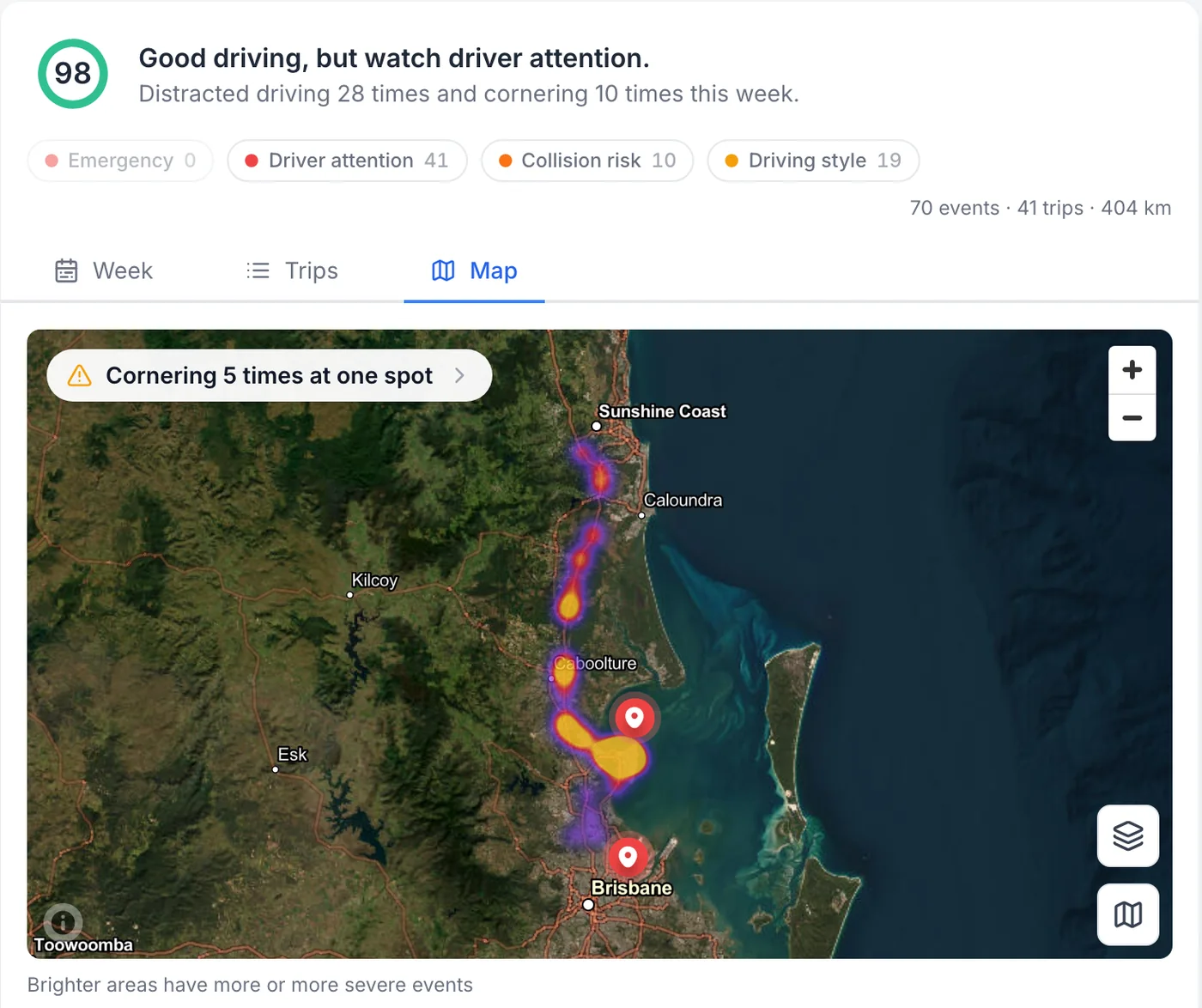
Where the fleet’s events happen, as a heat map
The same week on the map for the whole fleet. Brighter areas have more or more severe events, and when one kind of event keeps happening in the same place, MapTrack flags the spot, here cornering five times at one spot.
MapTrack app · Demonstration data · Captured
About this screenshot
Demonstration account at a 1440 px desktop viewport, signed in as an account owner. Safety events dashboard, Activity on the Map view at its opening zoom over the last 7 days.
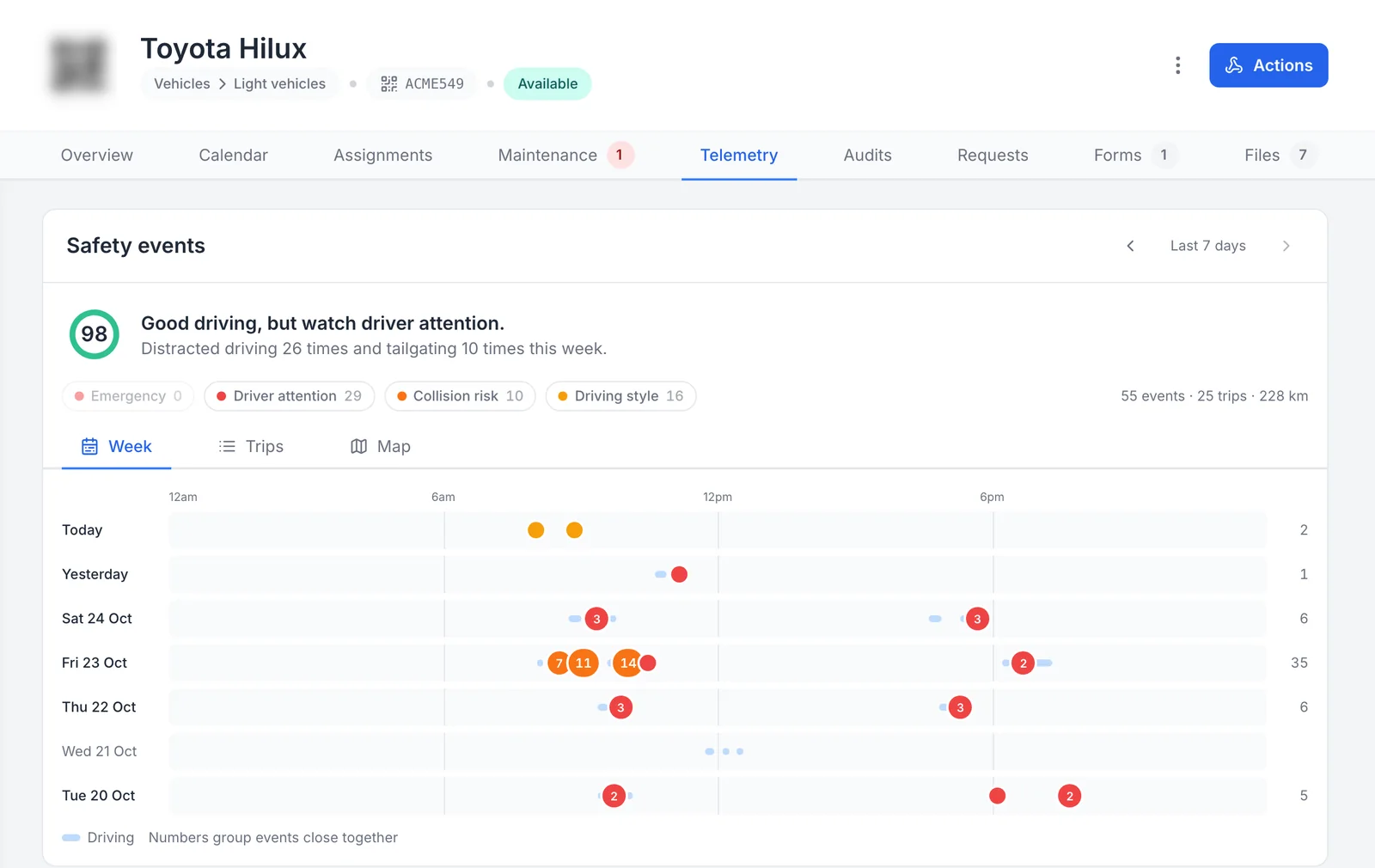
The camera’s week on the vehicle’s own record
The vehicle’s own record carries its camera’s safety events, on the Telemetry tab next to its maintenance, inspections and files. The arrows step back a week at a time.
MapTrack app · Demonstration data · Captured
About this screenshot
Demonstration account at a 1440 px desktop viewport, signed in as an account owner. Asset record, Telemetry tab, cropped to the header and the Safety events card. The asset QR code is pixelated.
See it on your own fleet
We'll show you the dashboard on a 30-minute call, work out which camera and plan each vehicle needs, then send the quote.
What the AI catches
Short clips of real events, saved by the camera with the speed and place. Which alerts are live depends on the camera and your plan.
On the road
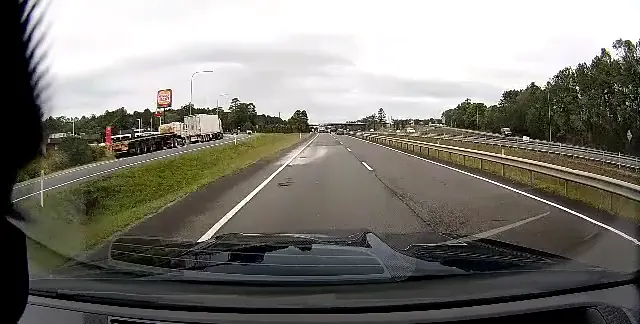
Speeding alert at 111 km/h.
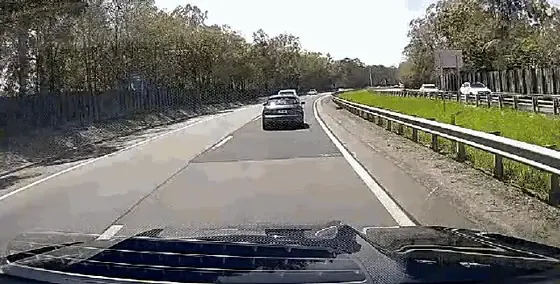
Tailgating alert at 94 km/h, road camera.
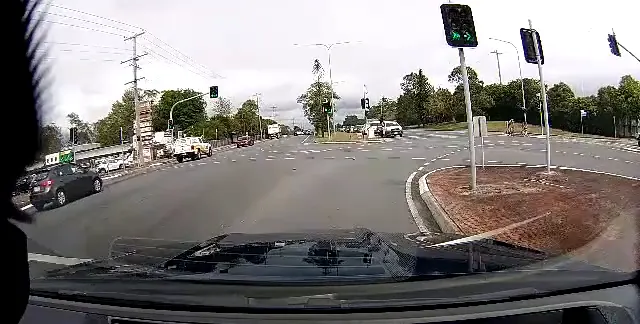
Harsh braking alert at the lights.
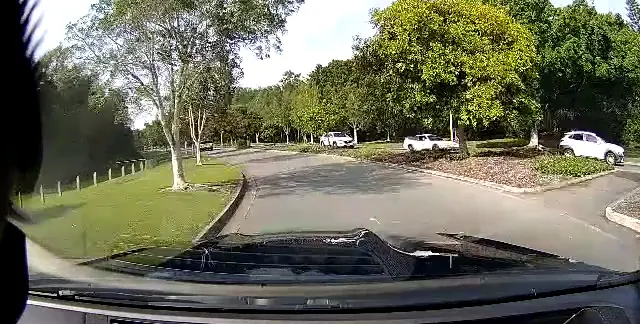
Harsh cornering alert at a roundabout.
In the cab
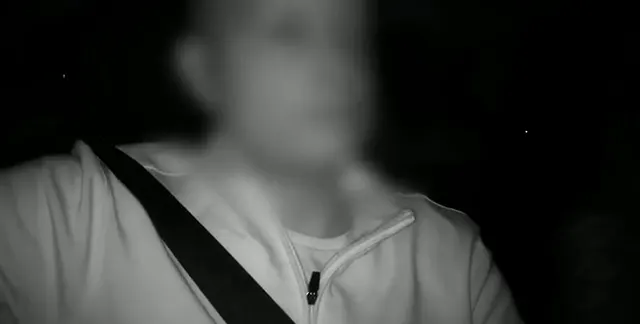
Drowsiness alert on the driver camera at night (infrared). Face blurred for privacy.
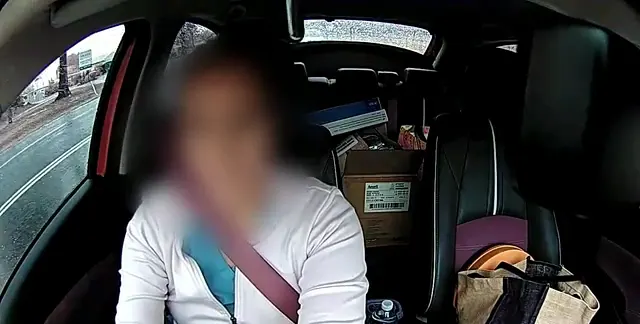
Eyes-down distraction alert at 66 km/h in the rain. Face blurred for privacy.
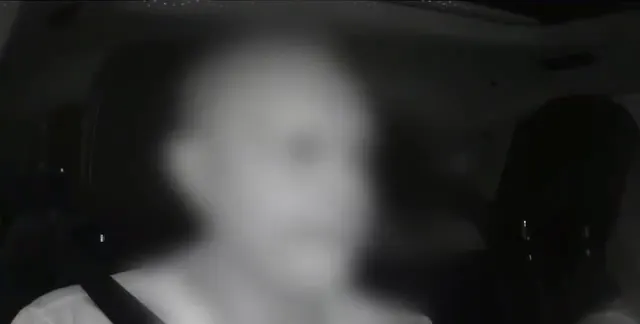
Distraction alert: head turned away from the road. Face blurred for privacy.
A privacy lens cap is available for the driver-facing lens. Workplace surveillance rules differ by state, so check your obligations and tell your drivers before you fit driver-facing cameras.
What you see in MapTrack
These are from one of the cameras in our demonstration account, captured in the MapTrack app.
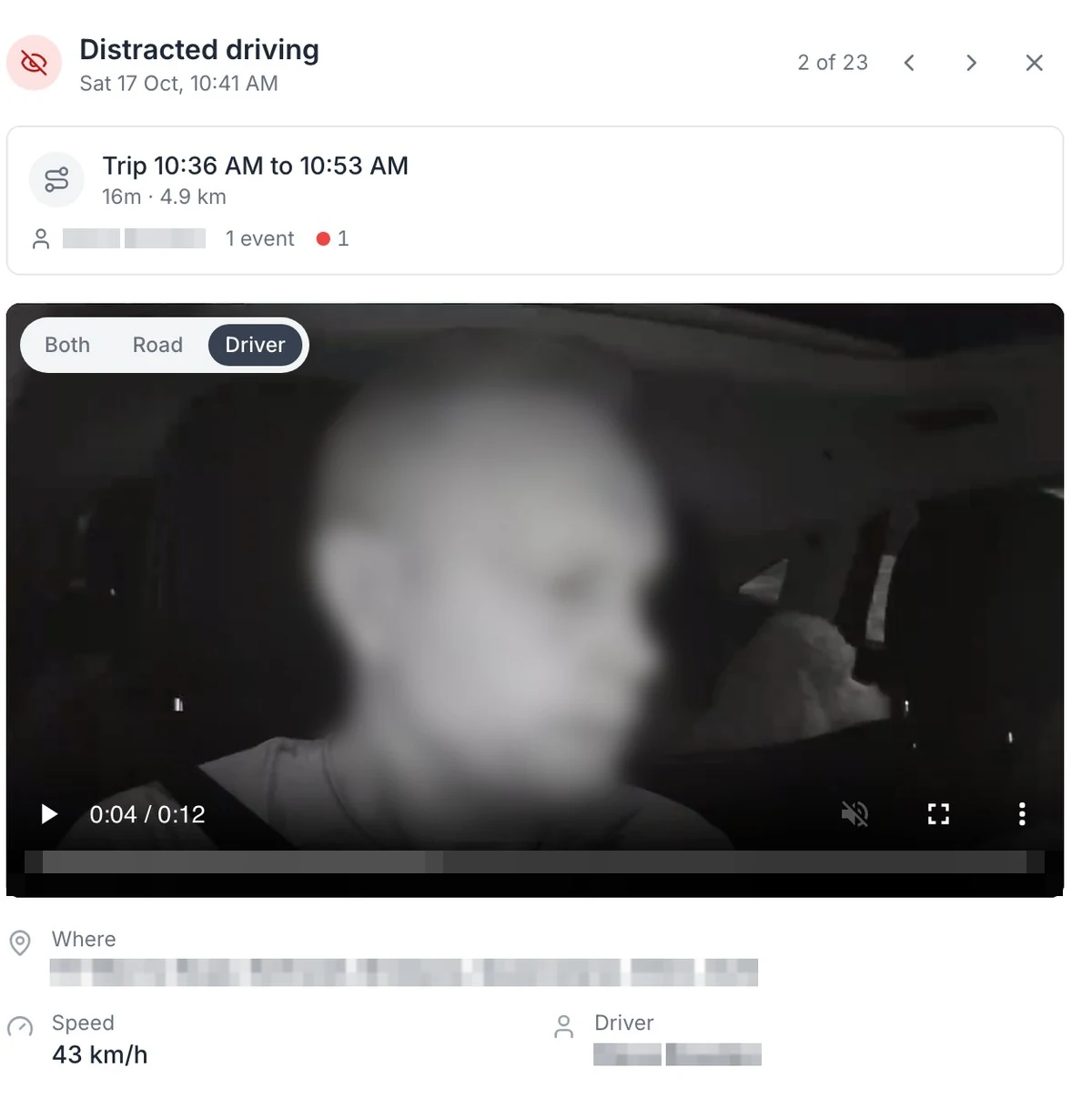
Distracted driving, on the camera facing the driver
On the DualSight, the camera facing the driver picks up distraction, fatigue and phone use on the Advanced plan. The face is blurred here.
MapTrack app · Demonstration data · Captured
Open full size screenshot: Distracted driving, on the camera facing the driver (new tab)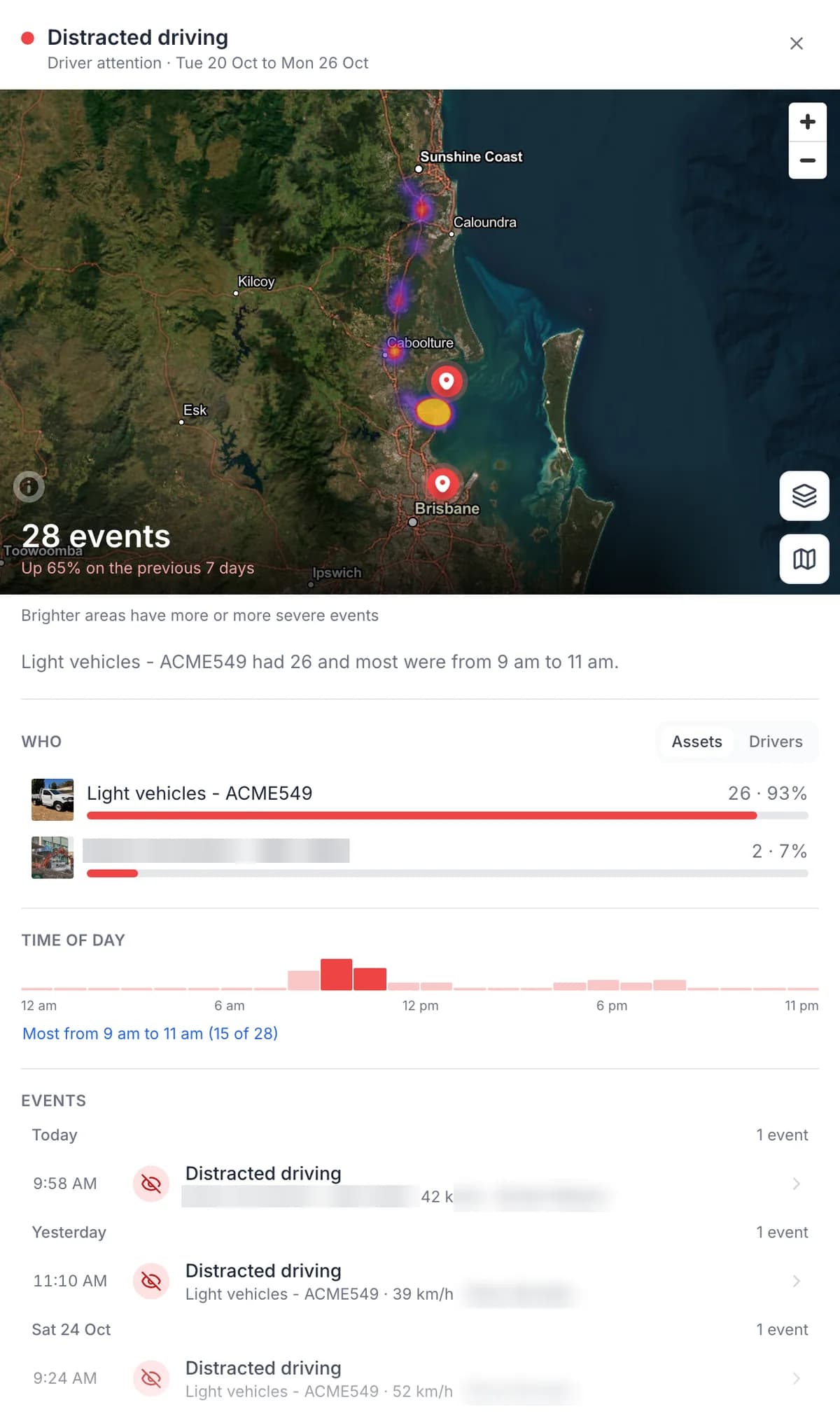
One event type: where, who and what time of day
Pick an event type to see how many, where, which vehicles and what time of day. Driver names are masked here.
MapTrack app · Demonstration data · Captured
Open full size screenshot: One event type: where, who and what time of day (new tab)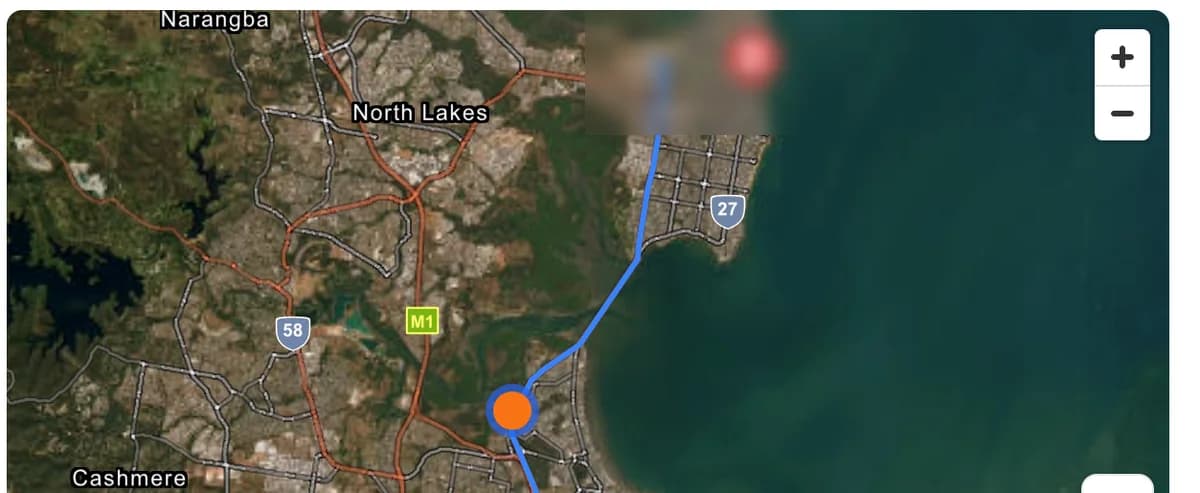
The trip’s route and where the alert happened
Each event opens with the trip it happened on: the route, and a marker where the alert fired.
MapTrack app · Demonstration data · Captured
Open full size screenshot: The trip’s route and where the alert happened (new tab)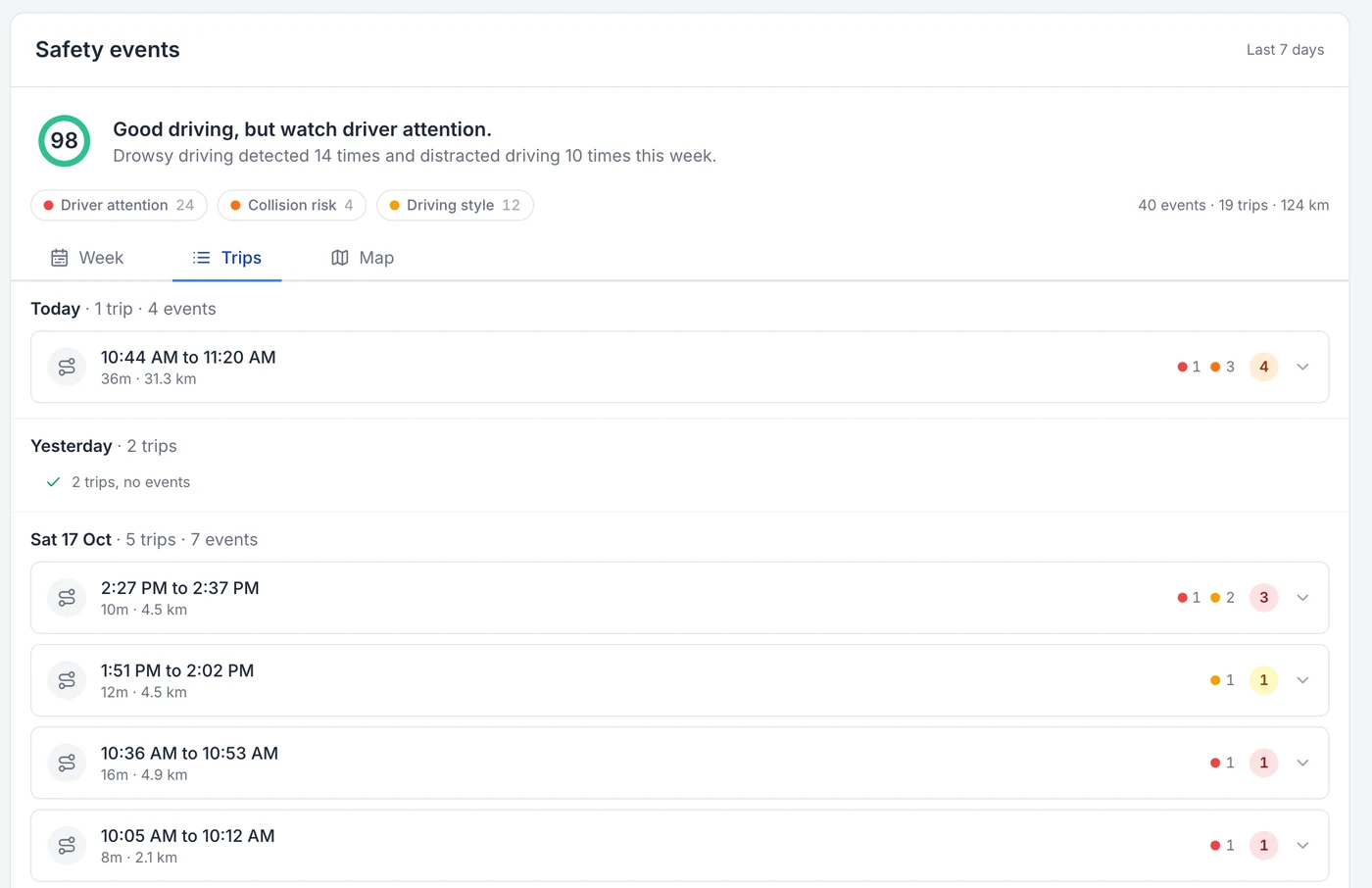
Every trip, with the events on it
Every trip is logged with its times and kilometres, and the events that happened on it.
MapTrack app · Demonstration data · Captured
Open full size screenshot: Every trip, with the events on it (new tab)
Dash cams by vehicle and need
- Truck dash cams
Which camera suits rigid trucks and prime movers, 12 V and 24 V power, and why a camera truck needs no separate GPS tracker.
- Driver fatigue and distraction cameras
What the DualSight's driver camera picks up on the Advanced plan, what NHVR's guidance says, and driver privacy.
- Ute and van dash cams
Which camera suits a work ute or van, why it needs no separate GPS tracker, and how to handle the tools in the back.
- Construction fleet dash cams
Cameras on the utes, vans and trucks, GPS trackers on the plant, and tags and labels on the tools, all in one register.
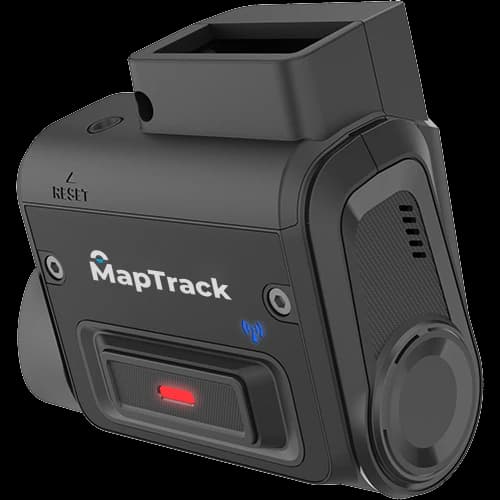
Road-facing AI dash cam for commercial vehicles. Full HD forward recording, 4G LTE, GPS and video in MapTrack. No driver-facing camera.
- Road-facing 1080p Full HD camera, 142° diagonal field of view
- Live ADAS alerts on the Pro plan: tailgating, lane departure, harsh braking
$795 ex GST($874.50 inc GST)
+ camera plan from $34 ex GST($37.40 inc GST) a month, plus the vehicle's MapTrack plan
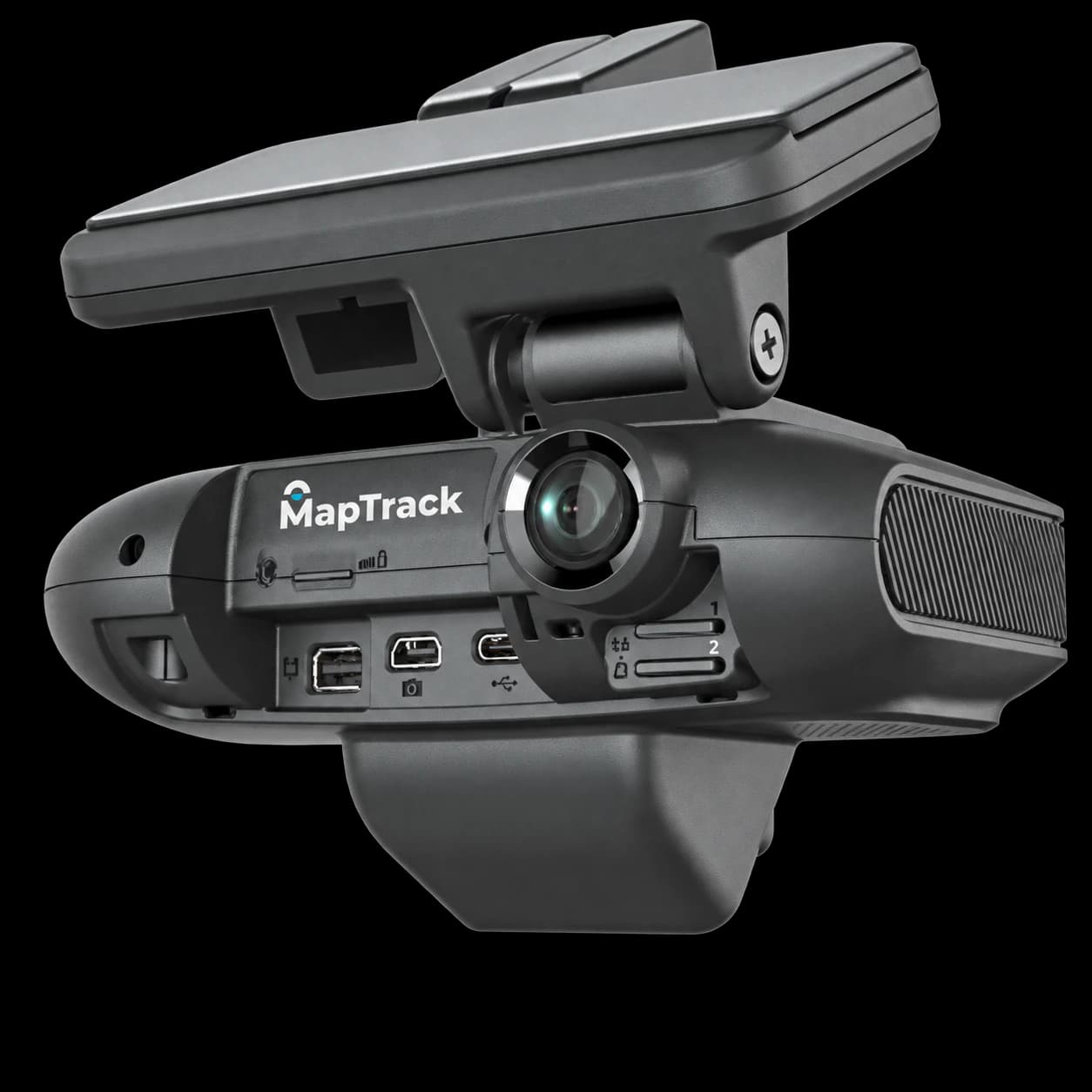
Road-facing and driver-facing AI dash cam with connections for extra cameras, for vehicles that need more viewpoints. 2 x 512GB storage included.
- Road-facing 1080p Full HD camera, 142° diagonal field of view
- Driver-facing camera
$1,519 ex GST($1,670.90 inc GST)
Plan confirmed with your quote
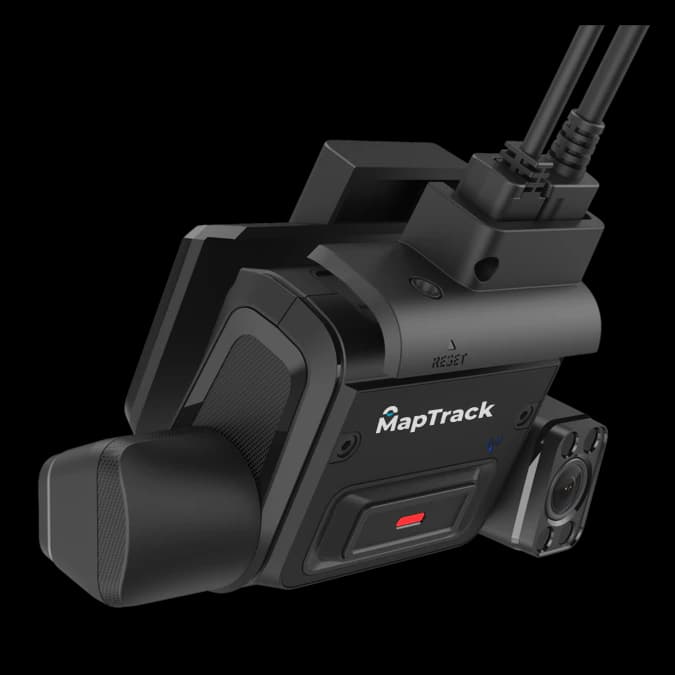
Commercial AI dash cam with road-facing and infrared driver-facing 1080p cameras, GPS, and video in MapTrack. Driver monitoring on the Advanced plan. 128GB industrial card included.
- Dual-facing 1080p HD cameras (road + driver)
- Driver monitoring on the Advanced plan: fatigue, distraction, phone use
$995 ex GST($1,094.50 inc GST)
+ camera plan from $34 ex GST($37.40 inc GST) a month, plus the vehicle's MapTrack plan
What a fleet dash cam costs to run
MapTrack dash cams cost $795 ex GST ($874.50 inc GST) for the road-facing RoadSight, $995 ex GST ($1,094.50 inc GST) for the DualSight and $1,519 ex GST ($1,670.90 inc GST) for the multi-camera Panorama, per camera for 1 to 9 units, with lower prices from 10 and from 100 cameras. The RoadSight's memory card, power cable and mounting are confirmed with your quote. The RoadSight and DualSight then run on a month-to-month camera plan: Standard $34 ex GST ($37.40 inc GST), Pro $38 ex GST ($41.80 inc GST) or, on the DualSight only, Advanced $48 ex GST ($52.80 inc GST) a month. The Panorama's plan is confirmed with your quote. A MapTrack SIM is $12 ex GST ($13.20 inc GST) a month if you want one, or use your own. Each vehicle also needs a MapTrack plan, priced per asset: $9 to $12 a month ex GST ($9.90 to $13.20 inc GST) on the Operate machine plan, billed annually, depending on fleet size. Installation and freight are quoted with your order.
Per camera, per month, month to month. The same rate at every quantity.
Each vehicle also needs a MapTrack plan, priced per asset: $9 to $12 a month ex GST ($9.90 to $13.20 inc GST) on the Operate machine plan, billed annually, depending on fleet size. See MapTrack pricing
| Plan | What it includes | Per camera, per month |
|---|---|---|
| Standard$34 ex GST($37.40 inc GST)Live view, saved event clips, and location, trips, estimated run hours and kilometres in MapTrack | Live view, saved event clips, and location, trips, estimated run hours and kilometres in MapTrack | $34 ex GST($37.40 inc GST) |
| Pro$38 ex GST($41.80 inc GST)Everything in Standard, plus live ADAS alerts: tailgating, lane departure and harsh braking | Everything in Standard, plus live ADAS alerts: tailgating, lane departure and harsh braking | $38 ex GST($41.80 inc GST) |
| Advanced$48 ex GST($52.80 inc GST)Everything in Pro, plus driver monitoring: fatigue, distraction, phone use, seatbelt and smoking, on the DualSight's driver-facing camera | Everything in Pro, plus driver monitoring: fatigue, distraction, phone use, seatbelt and smoking, on the DualSight's driver-facing camera | $48 ex GST($52.80 inc GST) |
| Option | What it includes | Per camera, per month |
|---|---|---|
| MapTrack SIM, 1GB a month$12 ex GST($13.20 inc GST)Optional. A MapTrack SIM with 1GB of data a month, or use your own compatible SIM | Optional. A MapTrack SIM with 1GB of data a month, or use your own compatible SIM | $12 ex GST($13.20 inc GST) |
| MapTrack Telematics: link to an existing tracked asset$4 ex GST($4.40 inc GST)Optional. Links the camera to a vehicle already tracked in MapTrack Telematics | Optional. Links the camera to a vehicle already tracked in MapTrack Telematics | $4 ex GST($4.40 inc GST) |
| MapTrack Telematics: camera as its own tracked asset$10 ex GST($11 inc GST)Optional. Sets the camera up as its own tracked asset in MapTrack Telematics | Optional. Sets the camera up as its own tracked asset in MapTrack Telematics | $10 ex GST($11 inc GST) |
- Data allowance and overage are confirmed with your quote.
- Choose one telematics option at most: link or standalone, never both.
- For the Panorama, the camera layout, recording setup, plan features and MapTrack integration are confirmed with your quote.
Want the numbers for your fleet?
Tell us your vehicles on a 30-minute call and we'll send a quote with the cameras, plans, installation and freight, or the lease.
Build your camera kit
Pick a camera, how many vehicles and what it runs on. You'll see what you pay upfront and each month, then send the kit for a quote.
One camera per vehicle.
Compare the range
| Feature | RoadSight | DualSight | Panorama |
|---|---|---|---|
| Road-facing camera | 1080p, 142° | 1080p, 142° | 1080p, 142° |
| Driver-facing camera | No | Yes, infrared | Yes |
| AI driver alerts | No (no driver camera) | Phone use, fatigue, distraction, seatbelt, smoking (Advanced plan) | Confirmed with your quote |
| Extra cameras | None offered | 1 USB camera | Up to 4 TVI + 1 USB |
| Storage included | Confirmed with your quote | 128GB | 2 x 512GB |
| Monthly plans | Standard, Pro | Standard, Pro, Advanced | Confirmed with your quote |
| 1 to 9 cameras | $795 ex($874.50 inc) | $995 ex($1,094.50 inc) | $1,519 ex($1,670.90 inc) |
| 10 to 99 cameras | $649 ex($713.90 inc) | $799 ex($878.90 inc) | $1,219 ex($1,340.90 inc) |
| 100+ cameras | $584.10 ex($642.51 inc) | $719.10 ex($791.01 inc) | $1,097.10 ex($1,206.81 inc) |
How MapTrack compares with other AI dash cam vendors
Lytx, Netradyne, Motive, Samsara, Teletrac Navman and EROAD all offer AI video for vehicles. Here's how they line up with MapTrack on what a mixed fleet asks about. Where a vendor leads, as several do on driver coaching and EROAD and Teletrac Navman do on road-transport compliance, the table says so.
Each vendor's name links to our full comparison with it: where it wins, when to choose it, pricing and what to check in a pilot.
| Feature | MapTrack | Lytx | Netradyne | Motive | Samsara | Teletrac Navman | EROAD |
|---|---|---|---|---|---|---|---|
| Built for | Mixed fleets: plant, machinery, trailers, tools and vehicles on one asset record | Vehicle fleets where driver video, risk detection and coaching are the programme | Vehicle fleets buying continuous driver analysis and a positive-recognition coaching programme | Vehicle fleets buying AI driver video with a managed human review and coaching layer | Large connected operations, fleet IoT, trailer tracking, cameras and Samsara hardware standardisation | Road fleets and equipment-heavy operations wanting telematics, AI video, equipment management and heavy-vehicle compliance reporting in one place | Road fleets where telematics, safety and road-transport compliance are the programme |
| AI dash cams | RoadSight, DualSight and Panorama AI dash cams with GPS built in, events on the same asset record as pre-starts, maintenance and cost, and a fleet safety events dashboard. Driver monitoring (fatigue, distraction, phone use, seatbelt and smoking) needs the DualSight's driver-facing camera and the Advanced plan. | DriveCam SF-Series and Surfsight AI-Series cameras, plus a 360-degree visibility product | Driver-i camera range including Hub-X and a 360-degree AI camera system | Road-facing and dual-facing AI dashcams, now including the AI Dashcam Plus, plus AI Omnicam for 360-degree visibility | AI cameras within Cameras and Video | AI video review across driving time, alongside fleet telematics hardware | Clarity Edge, road or dual-facing, with road, driver and fatigue AI and in-cab voice alerts; it needs an Ehubo2 or CoreHub. The Clarity range runs from one to six camera angles |
| Plant, excavators, trailers and tools on the same asset register as the camera | MapTrack keeps the ute, the excavator, the generator, the trailer and the gang box in the same register: GPS trackers, Bluetooth tags and QR, barcode and Data Matrix labels, each on its own asset record with pre-starts, bookings and maintenance | Battery-powered and wired asset trackers for trailers, containers and equipment in LytxOne. Specific plant types and battery life are not publicly documented, so verify in a pilot | Trailer DVIR inspections are documented, but tracking excavators, generators, containers, tools or unpowered trailers is not publicly documented. Verify in a pilot | Equipment Monitoring and Asset Tracking exist as separate products; Asset Gateway Mini (battery mode) and Beacon (Bluetooth, replaceable 4-year battery) cover unpowered assets such as dumpsters, containers and generators | Unpowered Asset Gateway for containers, construction equipment, dumpsters and water tanks | GPS Asset Tracking covers trailers, small powered tools and non-powered assets with battery-powered GPS trackers, plus geofencing, movement and dwell reporting and a recovery mode; confirm the trackers for your asset types | Etrack Where Bluetooth tags, Oyster3 battery GPS trackers for trailers and bins, and wired G70 units for plant and generators |
| Pre-starts and inspections | QR pre-starts and inspections attached to the asset, with failures raising work orders | Digital DVIR with checklist pre- and post-trip inspections, visual evidence and defect alerts; asset-linked plant pre-starts are not publicly documented | Pre- and post-trip inspections (DVIRs) for vehicles and trailers, completed on a smartphone or tablet. Pre-starts for plant and tools, photos, signatures and offline use are not publicly documented, verify in a pilot | Customisable inspection forms in the Driver App for vehicles and off-road assets, with defects creating work orders; verify plant pre-start depth in a pilot | Driver and equipment workflows available, but asset-linked pre-start depth should be verified in a pilot | Digital pre-use inspections for equipment with instant failure notifications, alongside automated work order creation and assignment; photos, signatures, GPS stamps and offline use should be verified | EROAD Inspect on the Ehubo2 or a phone, for any vehicle or asset, with defects on a defect board |
| Servicing from run hours or odometer | On the RoadSight and DualSight, completed trips add estimated run hours to the vehicle's meter, so services set on hours fall due on real use, and you raise the work order from the schedule in a couple of clicks. | Odometer-based service reminders with a service history for vehicles; engine-hour schedules and work orders are not publicly documented | Preventative maintenance on odometer or engine-hour intervals, plus fault-code (DTC) reports, for vehicles. Work orders, parts and plant or tool maintenance are not publicly documented, verify in a pilot | Maintenance product: schedules on mileage, time and engine hours, plus work orders created from inspection defects and fault codes, for vehicles and heavy equipment | Connected Maintenance CMMS: work orders, preventive schedules on odometer and engine hours, fault-code alerts and DVIR defects, for vehicles and heavy equipment | Fleet Maintenance is a published product, and equipment tracking covers location, costs and maintenance schedules | Services due by date, kilometres or engine hours, with a service history; work orders are not publicly documented |
| Driver coaching and event review | Fleet managers review saved clips in MapTrack and use them in coaching conversations. The Safety events dashboard has a table that ranks each vehicle or driver by safety score | Structured coaching workflows and in-cab alerts built to change habits over time, including Self-Coaching and Coach Assist | GreenZone scoring and DriverStars reward good driving rather than only flagging exceptions; both self-managed and managed coaching are offered | Motive’s Safety Team reviews low-confidence events before they reach managers, and customers can opt for AI-only validation | AI cameras and driver safety workflows sit at the centre of its fleet product | See comparison | Clarity Edge fatigue AI, with a voice alert to the driver and a notification to a manager at the same time |
| Road-transport compliance (road user charges, fuel tax, work diaries) | Pre-start, inspection and service records on each asset. MapTrack is not a road-user charging, fuel tax or work diary product | See comparison | Also sells fleet-management modules for tracking, maintenance and compliance | See comparison | See comparison | On its Australian site, Electronic Work Diary, Fuel Tax Credits, Mass Manager and Chain of Responsibility support are published alongside telematics (ELD, DVIR and IFTA on its US site) | Electronic RUC in New Zealand; a Fuel Tax Credit report the ATO accepts as an official record, an FBT logbook and Chain of Responsibility records in Australia |
Last checked Oct 2026, from each vendor's public pages; see each comparison for sources.
Accessories and camera kits
Fixed prices, the same at any quantity. We confirm the part revision, cable runs and kit contents with your quote. Choose a camera system kit or its separate parts, not both.
Extra cameras
External TVI camera
Panorama. IP69K, 5V, 720p HD.
Fits Panorama
$177 ex GST($194.70 inc GST)
Additional USB camera
DualSight / Panorama.
Fits DualSightFits Panorama
$126 ex GST($138.60 inc GST)
In-cabin USB camera
DualSight / Panorama. Extended cable kit included. How it records on your vehicles is confirmed with your quote.
Fits DualSightFits Panorama
$114 ex GST($125.40 inc GST)
Panorama camera system kits
2-camera system kit, 2 x 5m
Panorama. Camera system with 2 x 5m cables.
Fits Panorama
$468 ex GST($514.80 inc GST)
3-camera system kit, 2 x 5m + 1 x 10m
Panorama. Confirm camera positions before ordering.
Fits Panorama
$686 ex GST($754.60 inc GST)
4-camera system kit, 2 x 5m + 2 x 10m
Panorama. Confirm camera positions before ordering.
Fits Panorama
$950 ex GST($1,045 inc GST)
1-camera system kit, 3 x 5m
Panorama. Cable quantities follow the listed kit configuration.
Fits Panorama
$323 ex GST($355.30 inc GST)
2-camera system kit, 4 x 5m
Panorama. Cable quantities follow the listed kit configuration.
Fits Panorama
$533 ex GST($586.30 inc GST)
3-camera system kit, 5 x 5m
Panorama. Cable quantities follow the listed kit configuration.
Fits Panorama
$744 ex GST($818.40 inc GST)
4-camera system kit, 6 x 5m
Panorama. Cable quantities follow the listed kit configuration.
Fits Panorama
$994 ex GST($1,093.40 inc GST)
Power and cabling
1-to-4 channel video adaptor
Panorama. 550mm; with external power adaptor.
Fits Panorama
$45 ex GST($49.50 inc GST)
12V DC power cable
Panorama.
Fits Panorama
$57 ex GST($62.70 inc GST)
4-channel power box
Panorama. 12/24V.
Fits Panorama
$40 ex GST($44 inc GST)
OBD power cable with button support
Panorama. Supports emergency button.
Fits Panorama
$30 ex GST($33 inc GST)
TVI extension cable, 10m
Panorama.
Fits Panorama
$46 ex GST($50.60 inc GST)
TVI extension cable, 5m
Panorama.
Fits Panorama
$36 ex GST($39.60 inc GST)
OBD power cable with button support
DualSight. Supports panic button.
Fits DualSight
$29 ex GST($31.90 inc GST)
Open-wire power cable
DualSight.
Fits DualSight
$29 ex GST($31.90 inc GST)
Premium cable set
DualSight. OBDII + open-wire.
Fits DualSight
$92 ex GST($101.20 inc GST)
OBDII power cable
DualSight.
Fits DualSight
$29 ex GST($31.90 inc GST)
Mounting, protection and controls
3M mounting kit
Panorama.
Fits Panorama
$12 ex GST($13.20 inc GST)
CDR cable cap
Panorama.
Fits Panorama
$12 ex GST($13.20 inc GST)
Emergency / panic button
DualSight.
Fits DualSight
$92 ex GST($101.20 inc GST)
Tie wrap
DualSight.
Fits DualSight
$29 ex GST($31.90 inc GST)
Cable cap
DualSight. Confirm part version when ordering.
Fits DualSight
$12 ex GST($13.20 inc GST)
3M mounting kit
DualSight. Confirm part version when ordering.
Fits DualSight
$13 ex GST($14.30 inc GST)
Privacy lens cap
DualSight.
Fits DualSight
$7 ex GST($7.70 inc GST)
I/O cover
DualSight.
Fits DualSight
$7 ex GST($7.70 inc GST)
Not sure which camera each vehicle needs?
We'll go through your vehicles, the plan each one needs and installation on a 30-minute call, then send the quote.
Deploying dashcams across your fleet? Get volume pricing.
Our team provides custom quotes within 24 hours, including volume discounts, professional installation coordination, and dedicated onboarding for your drivers and fleet managers.
Why AI dashcams are essential for fleet safety
Fleet dash cams do more than record. Modern AI-powered dash cameras pair high-definition video with on-device analysis of the road and, where there is a driver-facing camera, the driver. You get a record of what happened and, on the right plan, alerts as it happens.
On the RoadSight and DualSight, the road-facing camera records continuous 1080p footage of the road ahead, giving you evidence for incident investigation and insurance claims. Where a camera has a driver-facing lens, as the DualSight does, driver monitoring on the Advanced plan detects fatigue, distraction and phone use as they happen.
On the RoadSight and DualSight, every clip is tagged with GPS coordinates, speed, date and time, so each event is tied to a place and a route. Fleet managers review saved clips in MapTrack and use them in coaching conversations.
The RoadSight and DualSight connect to the same platform as your GPS trackers and Bluetooth beacons. Live view and saved event clips open in MapTrack, on the vehicle's asset record. The camera also puts location, speed, trips, estimated run hours and kilometres on that record, next to its pre-starts, services and costs.
Insurance and fatigue records
Video from road and driver cameras gives you a record to check claims against. Some fleet insurers take cameras and driver monitoring into account, so ask yours. On the DualSight with the Advanced plan, fatigue and distraction events give you a dated record to support fatigue management under your chain of responsibility duties.
Complete your tracking system
Choosing fleet cameras
Guides and tools
Common questions