
PPE register
PPE register software from hard hats to respirators
Every hard hat, respirator and gas monitor with the person who holds it and its next date, and the gloves and hi-vis in each store, so the guys get the right gear and it's in date.

One register for the PPE your crews wear
This is the register for whoever answers for the PPE. Each hard hat, respirator and gas monitor carries its dates, its checks and the person who holds it, and the gloves, glasses and hi-vis sit as stock in each store, issued to the people who use them.
The short answer
MapTrack keeps a PPE register two ways. Hard hats, respirators and gas monitors each get a record with their dates and the person who holds them, and everyday PPE like gloves, glasses and hi-vis sits as stock per store, issued to a person, used up or tracked for return. Checks run on a phone, with photos.

Co-Founder & GM of Operations
Key takeaways
- Two ways in one register: a hard hat, respirator or gas monitor gets a record of its own, and gloves, earplugs, glasses and hi-vis are stock with minimums.
- Check a dated item out to the person who wears it, with a due-back date if you want one; Assignments grouped by person show what each worker holds.
- Manufacture, first issue and replace-by dates sit on the item as fields, and on an inspection schedule the person assigned gets an email 7 days out.
- Issue stock from a store to a person, used up now or tracked for return, and receive new stock into the store when it arrives.
- Inspect gear with MapTrack's PPE Inspection Checklist on a phone, and audit what one worker holds by scanning each item.
What MapTrack keeps for every piece of PPE
- Every kind of PPEHard hats, respirators, glasses, hi-vis and gloves
- Dated itemsA record each, with its own dates
- Who holds whatCheck-outs, issues and returns
- Stock per storeMinimums, restock and counts
- PPE checks on a phoneA Fail with a note and a photo
- Inspection schedulesDue soon, overdue and a 7-day email
- Fit tests and trainingOn each worker's own record
- Personal gas monitorsIssued to the person who carries one
Trusted by construction, mining and field service teams


















Customer proof
What customers say
“MapTrack has completely changed how we track tools and manage compliance across our sites - the admin time we've saved alone has been a game-changer.”
- From the published story: Weekly hours spent on manual data entry, form transcription and compliance reporting dropped from roughly 8–10 hours to under 4 hours after moving to digital forms and automated workflows.
Digital forms with automatic timestamps and asset linking replaced paper records, making compliance documentation instantly retrievable for client or auditor requests.
Every kind of PPE, from hard hats to hi-vis and gloves
Dated items go in as records, one by one or imported from a spreadsheet and bulk edited after; everyday PPE goes in as stock lines in the app. PPE sits in the same register as the vehicles, plant, tools, harnesses and test gear the same crews use, so whoever answers for the safety gear keeps one system.
Hard hats
Helmets with dates of their own
- Date of manufacture, first issue and replace-by as fields on the record
- Checked out to the worker who wears it
Respirators and filters
Half-face and full-face respirators, with filters as stock
- The facepiece's make, model and size on the wearer's person record, beside their fit-test date
- Filters issued from the store, used up or tracked for return
Eye and hearing protection
Safety glasses, earplugs and earmuffs
- Stock per store with minimum and maximum levels
- Earmuffs on a record of their own when you inspect them one by one
Hi-vis and gloves
Vests, shirts and work gloves
- Issued to a person, used up or tracked for return
- A count of the store, bin by bin
Boots and work wear
Safety boots and uniforms in each size you keep
- A stock line for each size you keep
- What each worker was issued, in Assignments grouped by person
Each hard hat and respirator on its own record
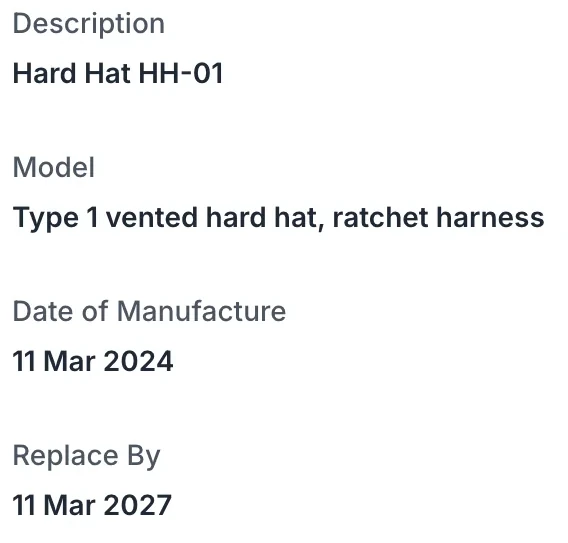
A hard hat, a half-face respirator or a personal gas monitor has dates of its own, so it gets a record of its own: make, model, serial, size, label and status, with its forms, files and history a tab away. Add your own date fields for the date of manufacture, the first issue and a replace-by or expiry date, so the dates sit on the record when someone checks.
Its QR label
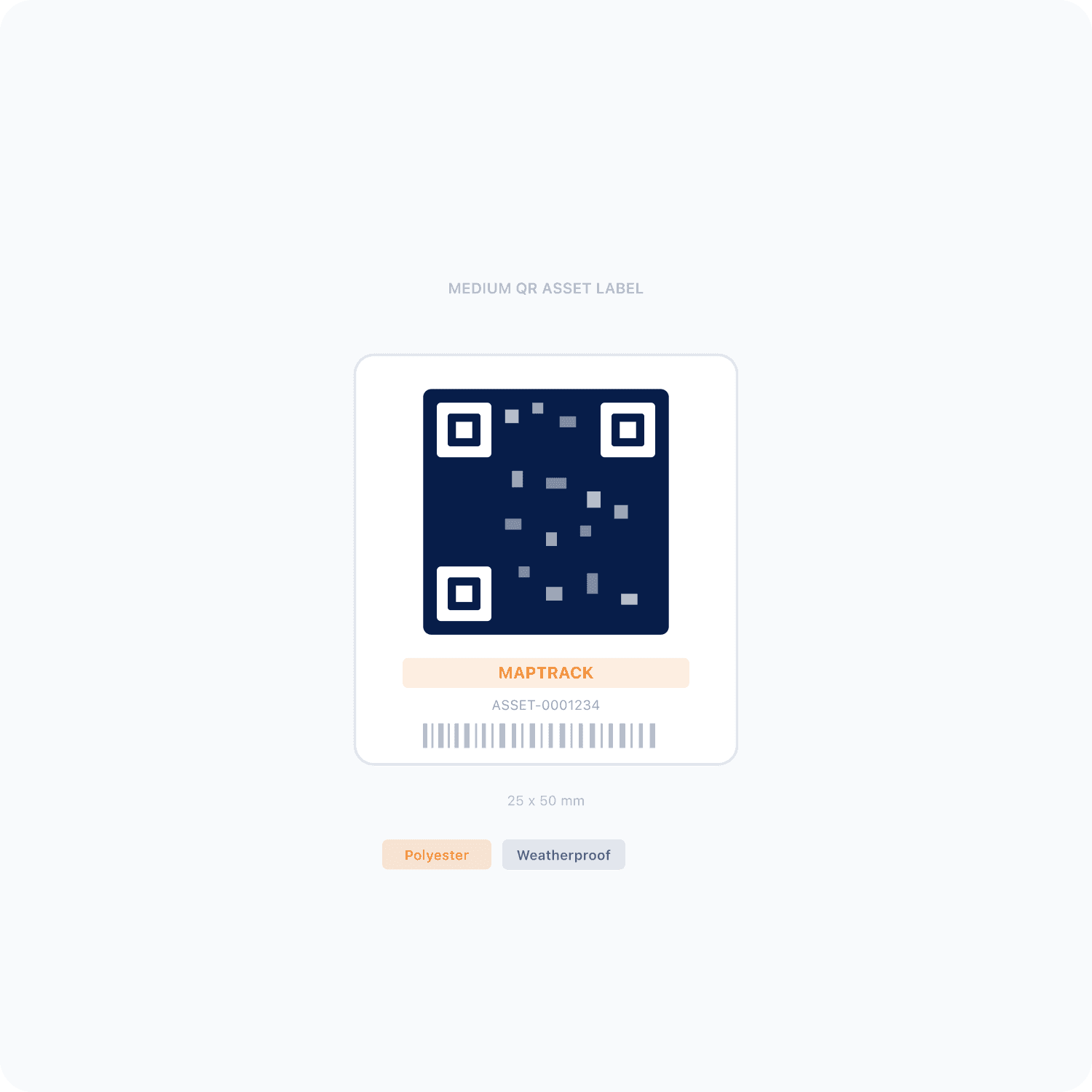
Scan it to open the item's record, its checks and its next inspection
The person who holds it
Checked out to the worker who wears it, with a due-back date if you want one
Where it went
The store, ute or site it's checked out to, beside or instead of a person
Example record
- a hard hat with its make, model, size and serial
- its date of manufacture, first issue date and replace-by date as fields
- checked out to the worker who wears it, with its PPE checks in its Forms tab
- a respirator on its own record, its filters held as stock in the store
Who holds what
Check-outs, issues and returns for every worker
Check a hard hat, respirator or gas monitor out to a person, a location or both, with a due-back date if you want one. Everyday PPE is issued from a store to a person or a location, either used up now or tracked for return. Tracked PPE comes back as returned or used up, each with an optional note, and the issue closes once everything is reconciled.
- A PPE line's Deployed view shows who holds how many
- Assignments grouped by person show each worker's items and the stock issued to them
- An item whose status is Damaged or Written off is blocked at check-out, and an owner's override is logged
- Overdue check-outs get a reminder email
- A storeman with the Scanner role can issue PPE but not receive, transfer, adjust or dispose of stock
- An automation you set up can email someone when PPE stock is issued or fully returned
- A store tablet shared by the crew, each with their own 4-digit PIN
Setup and limits
- Issuing, returning, receiving and counting stock need a connection, and so do check-outs.
- A status is a record: tag failed gear out of use as well.
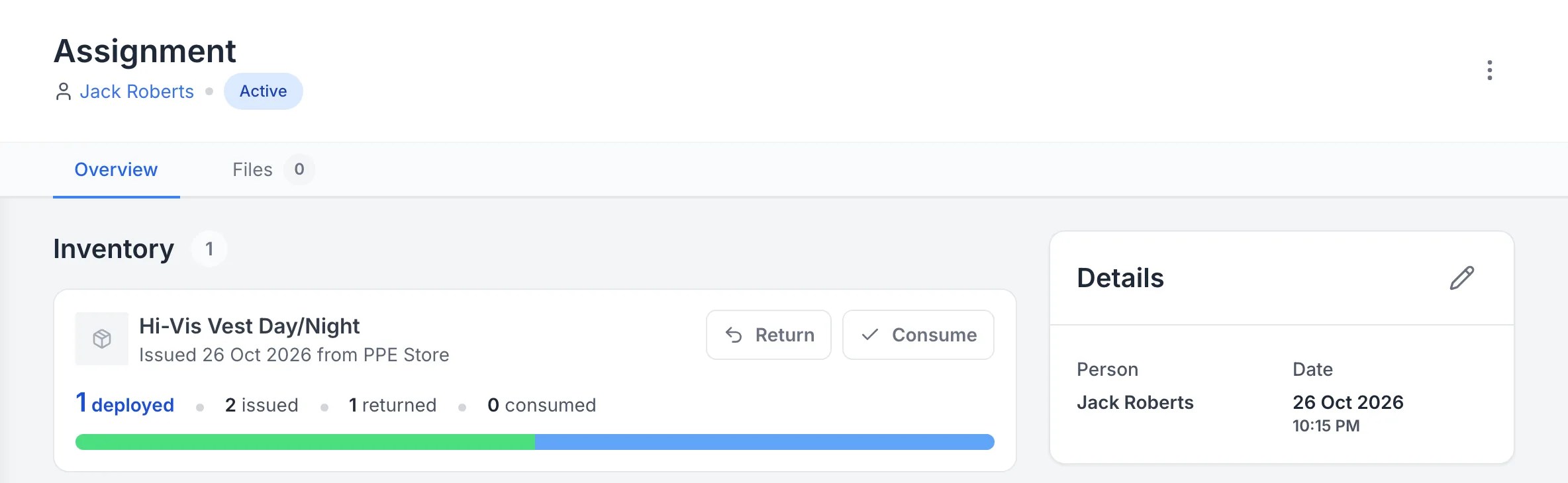
Hi-vis vests out to a worker, one already back
Two hi-vis vests tracked for return: one has come back, one is still out, and either can be returned or marked as used up.
MapTrack app · Demonstration data · Captured
About this screenshot
Demonstration workspace at a 1440 px desktop viewport on the assignment’s Overview tab.
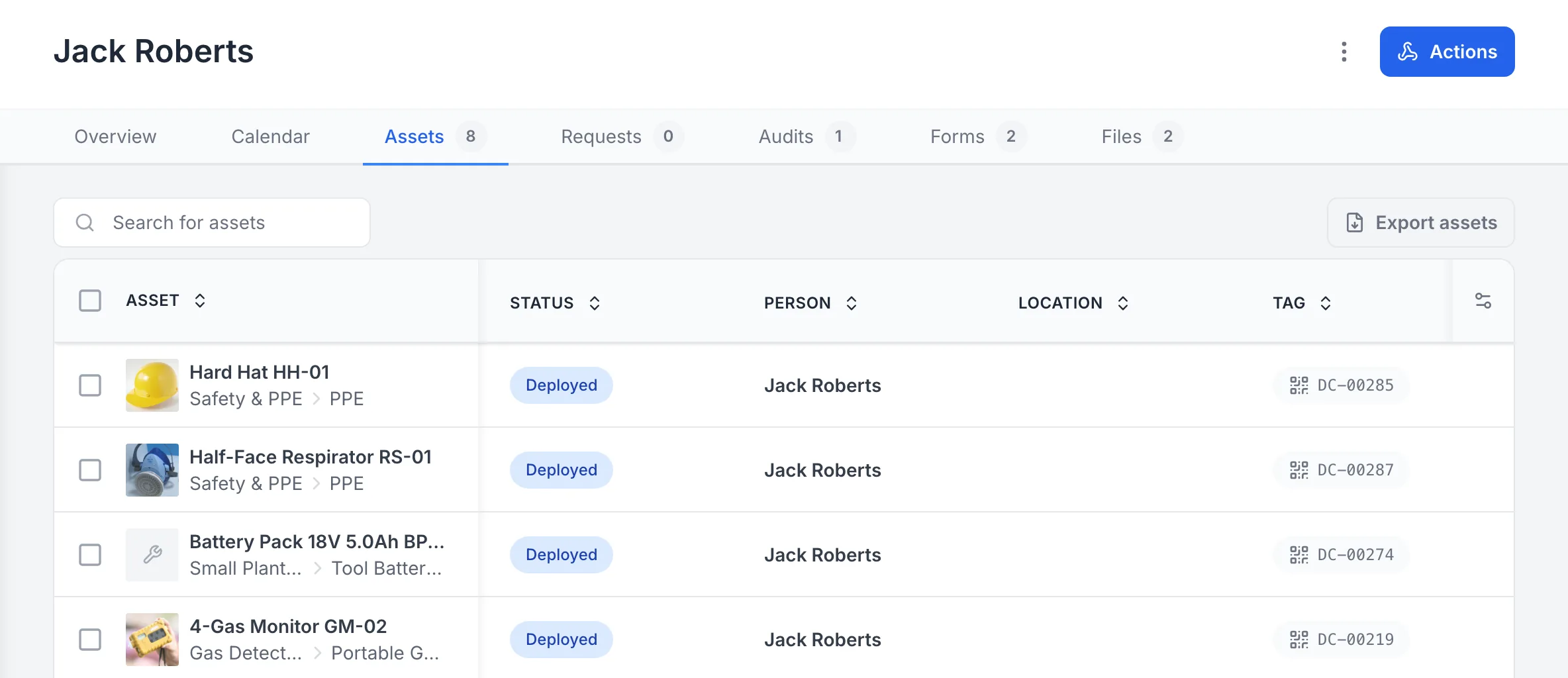
Everything one worker holds
One worker’s Assets tab: the hard hat, the respirator and the gas monitor they hold, each with its tag.
MapTrack app · Demonstration data · Captured
About this screenshot
Demonstration workspace at a 1440 px desktop viewport on a person’s Assets tab, showing the first four of eight rows.
Stock and restock
PPE stock per store, ute and site box
Keep gloves, earplugs, safety glasses, hi-vis and respirator filters as stock in each store, ute or site box, each a location in MapTrack, with minimum and maximum levels per bin. The list flags a line that runs low. Receive new stock into a store when it arrives, and every receive, issue, return and count stays in an append-only history with a value per bin.
- Count a store bin by bin, and MapTrack records the difference
- A ute set up as its own location shows its stock on that location's own list
- Earmuffs or a respirator you inspect one by one can have a record of their own instead
Setup and limits
- PPE stock lines are added in the app; spreadsheet import covers items, locations and people, not stock.
- For parts and consumables beyond PPE, see inventory and parts management
- Inventory in MapTrack
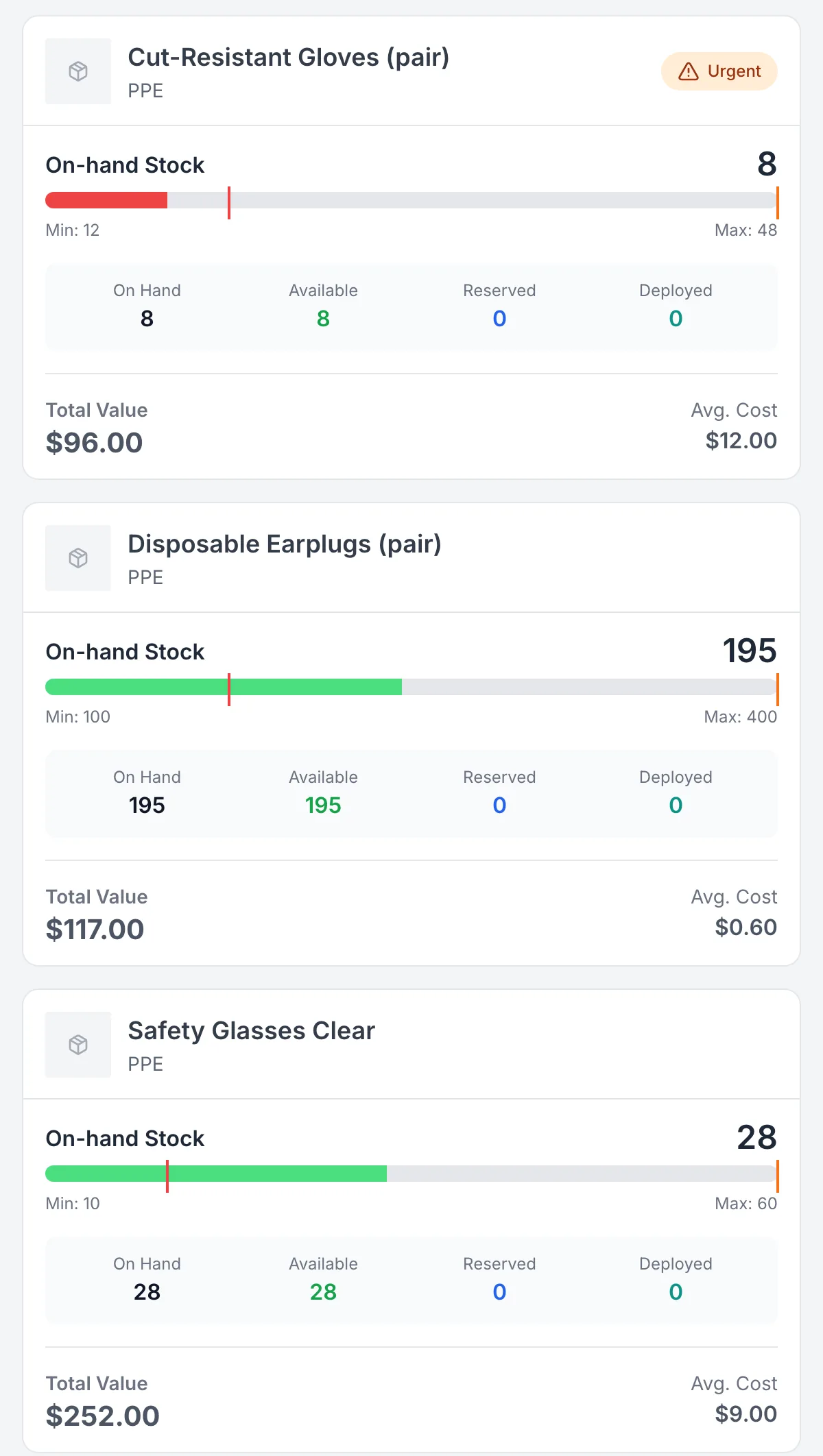
PPE stock in the store, flagged when it runs low
Gloves, earplugs and safety glasses held as stock with a minimum and maximum, and the gloves flagged Urgent below their minimum.
MapTrack app · Demonstration data · Captured
About this screenshot
Demonstration workspace on the PPE Store’s Parts/Inventory tab, cropped to the first three stock cards.
Before each use
PPE checks on a phone, with a photo of what failed
Scan the hard hat or respirator's label and inspect it with MapTrack's PPE Inspection Checklist on a phone, a ready-made form in the app. A Fail opens a note and a photo of what was found, and a rule you set up can raise a linked corrective task. A check on the worker, such as whether they have the PPE the job needs, runs as a Person form on their own record.
- The original Fail stays on the record beside the task its rule raised
- A saved Person form keeps its red Non-Compliant answer beside the follow-up note
- The completed check downloads as a PDF
- Checks submit offline and sync once the phone has reception
Setup and limits
- Scanning to open a check needs coverage, unless the form is already on the phone.
- MapTrack records the check; the wearer or your competent person decides whether the gear is fit to use.
- For what to look for on each piece of PPE, see How to inspect PPE
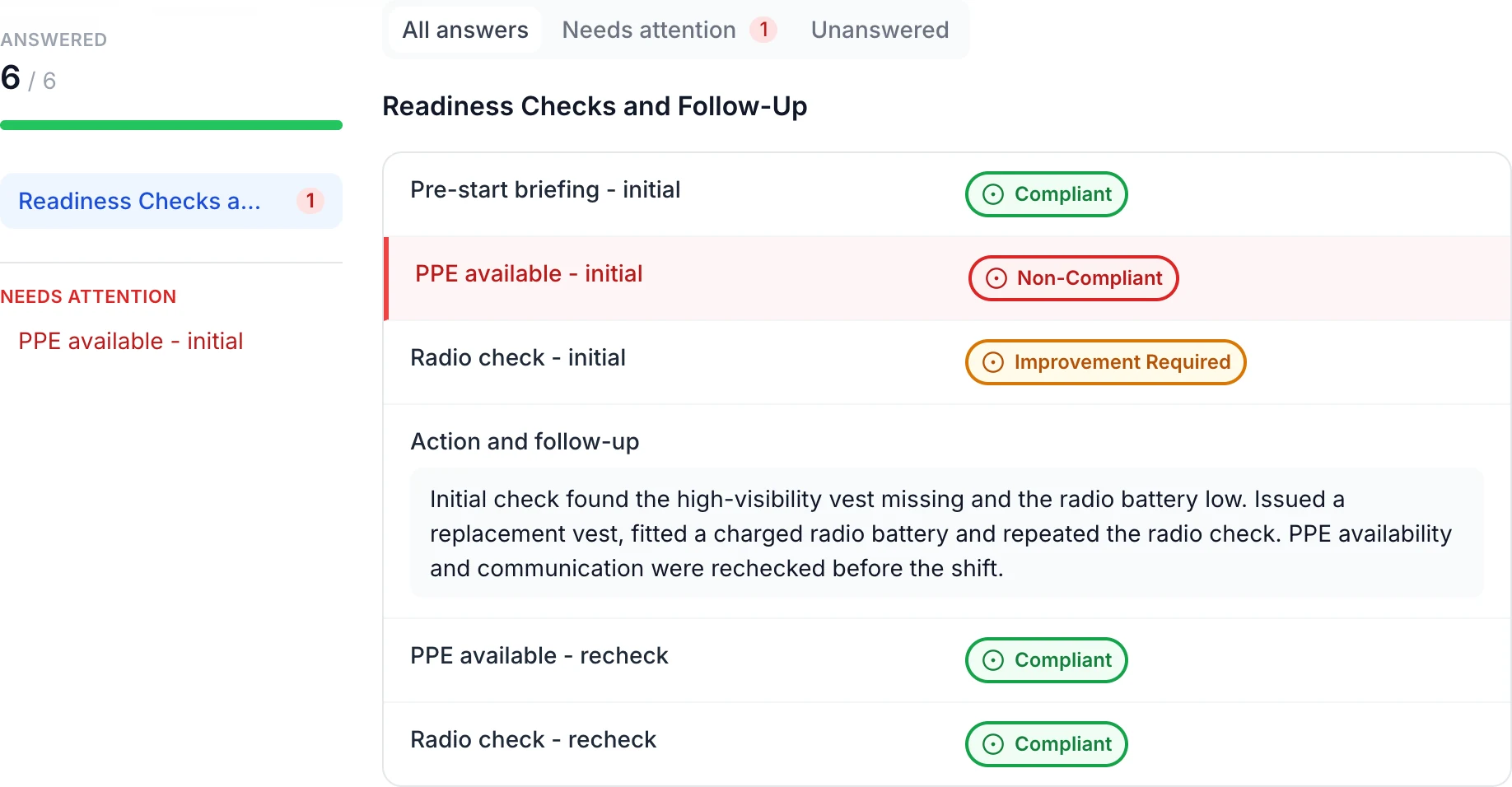
Keep worker checks and follow-up with the person
The saved check retains the missing PPE and low radio battery findings. The follow-up records a replacement vest, charged battery and repeated checks, with both rechecks marked Compliant.
MapTrack app · Demonstration data · Captured
About this screenshot
Saved demonstration Person form linked to a worker record. All six answers appear here.
Due dates
Inspection schedules for hard hats and respirators
Put each dated item on an inspection schedule at the interval the maker's instructions or your competent person set. The Service Board shows what's overdue and due soon across every store and site, and the person assigned to the schedule gets an email when an inspection falls due within 7 days.
- An item with an overdue inspection is flagged when someone checks it out, and going ahead is logged
- A replace-by or expiry date sits on the record as a field, beside its schedule
Setup and limits
- Put each inspection on a schedule: the due list, the 7-day email and the check-out flag read schedules, not date fields.
- The maker's instructions set how long a hard hat or respirator lasts; its replace-by date in MapTrack is a record of that.
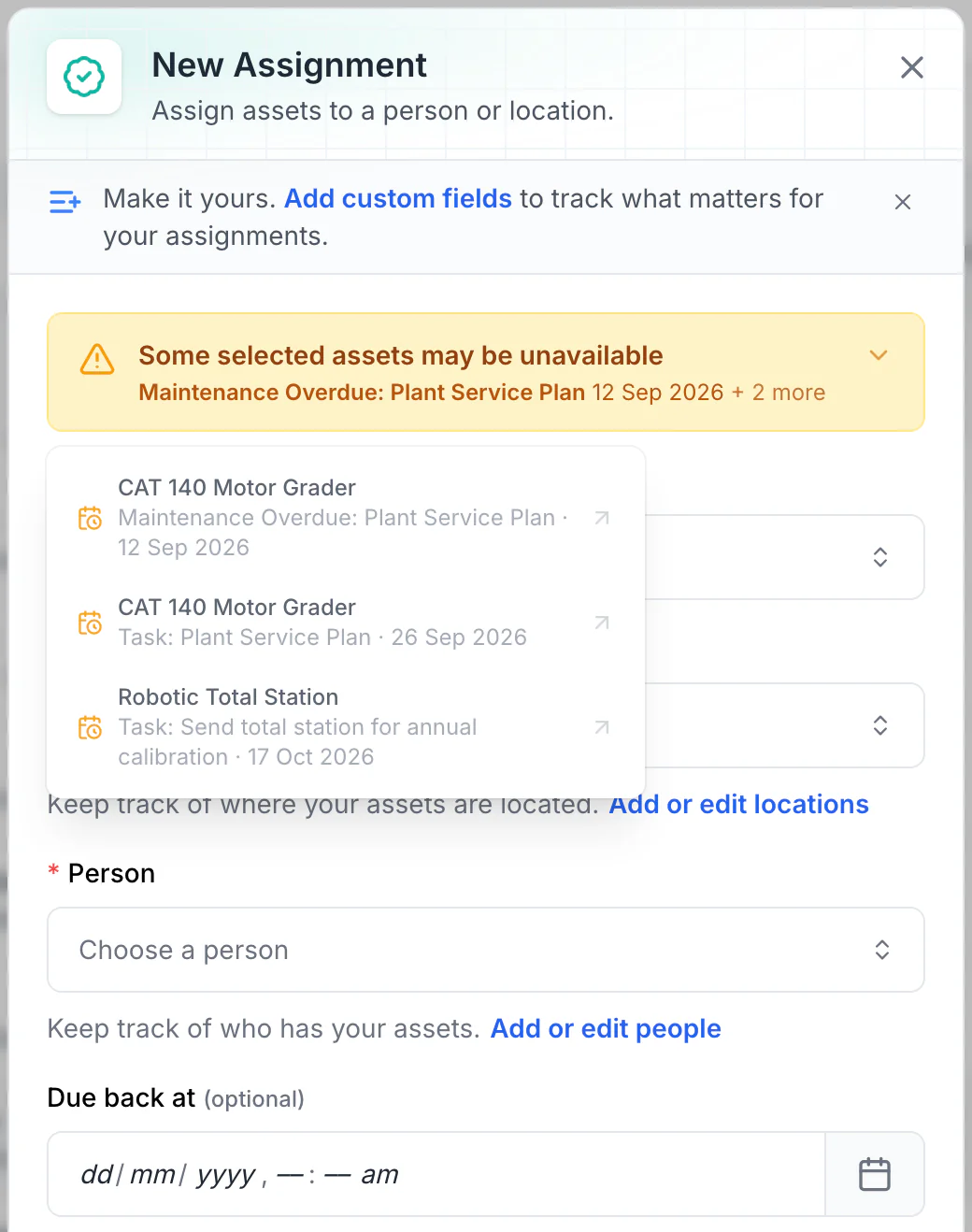
Read the warnings before issuing equipment
Overdue maintenance and scheduled tasks show as amber warnings. No due-back date is set here, so every upcoming conflict is listed. With a due-back date, only tasks before it are listed: a 15 October due-back leaves out the total station’s 17 October calibration.
MapTrack app · Demonstration data · Captured
About this screenshot
Demonstration workspace. Two assets selected and Assign opened; the form was not saved.
Intervals come from the maker's instructions or your competent person; MapTrack doesn't set them.
Makers' instructions, worker records and signatures
Keep each item's maker's instructions, and a gas monitor's certificates, in its Files tab. Each worker's training and fit-test dates sit as fields on their person record, with the make, model and size of facepiece they passed with, a VOC form signed off there, and their certificates and fit-test reports in Files. In the US, the written certification of the hazard assessment that 29 CFR 1910.132 asks for can sit in a site's Files.
- The worker signs a Person form on the phone, such as an issue acknowledgement or a fit-test record, and the signature is saved with the submission and printed on its PDF
- A VOC form signed off on the worker's person record
- Fit-test reports and certificates in Files, on the person or the item they belong to
Setup and limits
- MapTrack keeps the fit-test record; a competent person does the fit test.
- MapTrack doesn't check a worker's training or fit test against the gear they're issued.
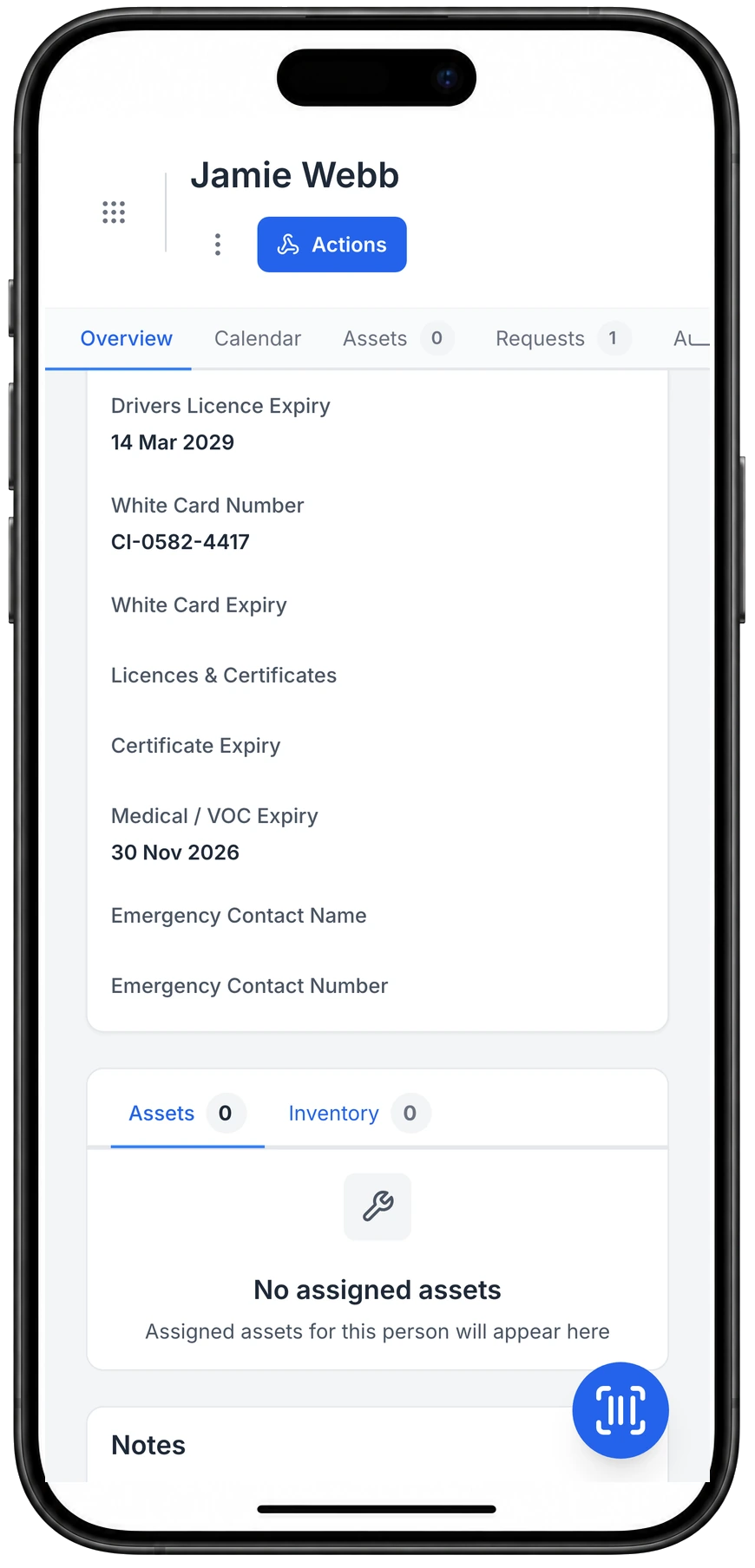
Licence, white card and VOC dates on the person’s record
Licence, white card and medical or VOC dates live on the person's record, next to the gear they hold.
MapTrack app · Demonstration data · Captured
About this screenshot
Demonstration person with three values entered on 23 Oct 2026; the fields are custom person fields set up in this workspace.
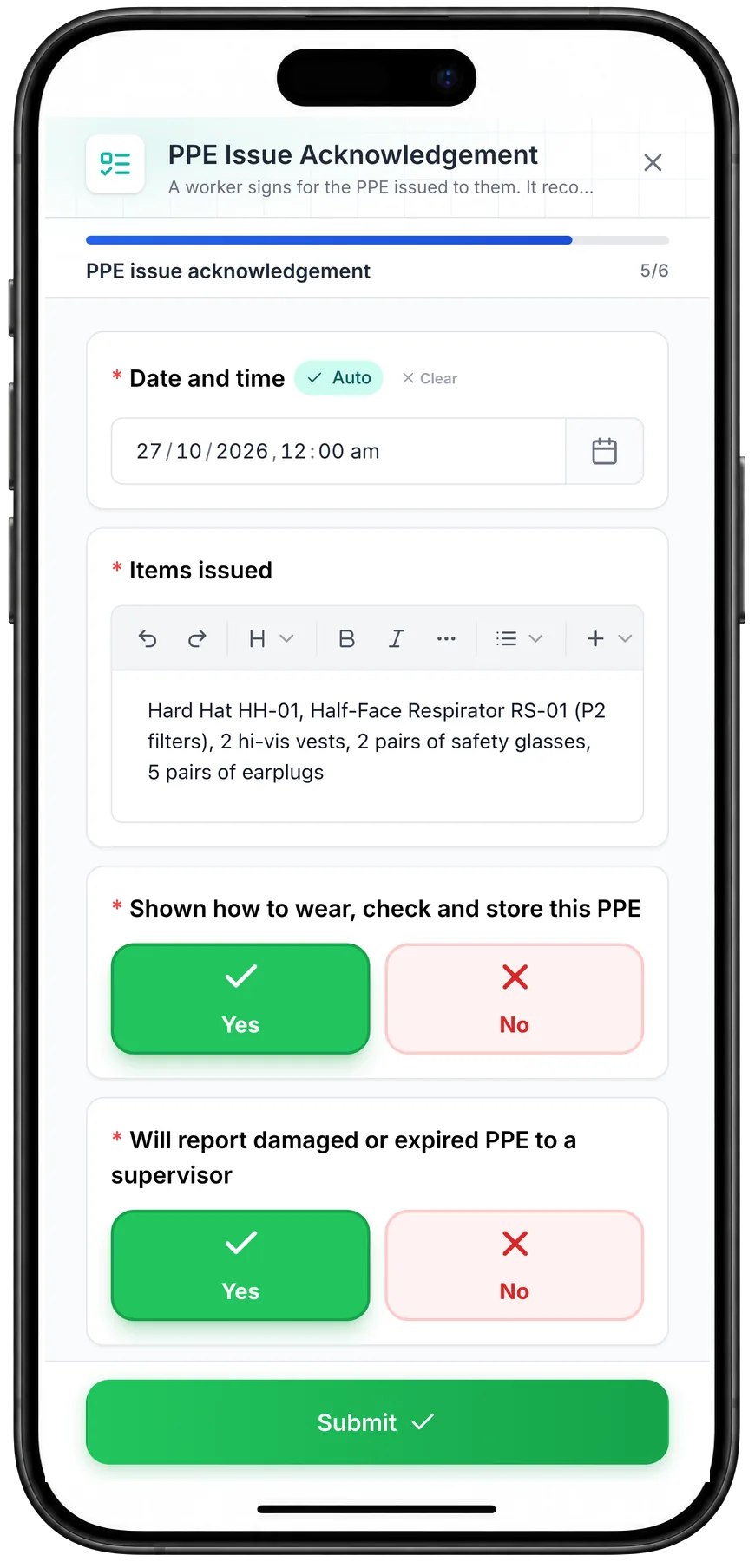
A worker’s PPE acknowledgement on a phone
A worker’s PPE acknowledgement on a phone: the gear they took, and their Yes to being shown how to wear, check and store it.
MapTrack app · Demonstration data · Captured
About this screenshot
Captured at a 430 x 932 phone viewport in a demonstration workspace, on a Person form.
The rules
What the PPE rules ask for in Australia, Great Britain and the US
In Australia, regulation 44 of the model WHS Regulations, which Safe Work Australia says every jurisdiction except Victoria has implemented (some with variations), says the business must provide PPE that's suitable and fits, keep it maintained, repaired or replaced so it stays clean, hygienic and in good working order, make sure it's used or worn so far as reasonably practicable, and train workers in its use, storage and maintenance. In Great Britain, the PPE at Work Regulations 1992 require suitable PPE that fits, an assessment before it's chosen, maintenance including replacement or cleaning, somewhere to keep it, and information, instruction and training. In the US, 29 CFR 1910.132 requires a hazard assessment with a written certification, PPE that fits each employee, training that covers its care, maintenance, useful life and disposal, and that defective or damaged PPE isn't used.
- Each item, who holds it and when it was issued, with its dates on its record
- Every check and what happened next, on the item it was done on
- The stock in each store and what went out, in its history
- Each worker's fit-test and training records on their person record, ready when someone asks to see them
Setup and limits
- In Australia and Great Britain the regulations don't name a register; a register is how most businesses show the duties are met.
- Victoria runs its own Occupational Health and Safety Act 2004 and Regulations 2017, so check WorkSafe Victoria for what applies there.
- MapTrack keeps the records; it doesn't decide what the law needs from you.
QR labels on the gear and on every stock bin
No GPS tracker goes on PPE. A QR label goes on each hard hat, respirator or gas monitor that has a record of its own, where its maker allows a label, or on its case or storage hook, and on each bin of stock in the store. A scan with the phone camera or a handheld Bluetooth or USB scanner opens that item's record.
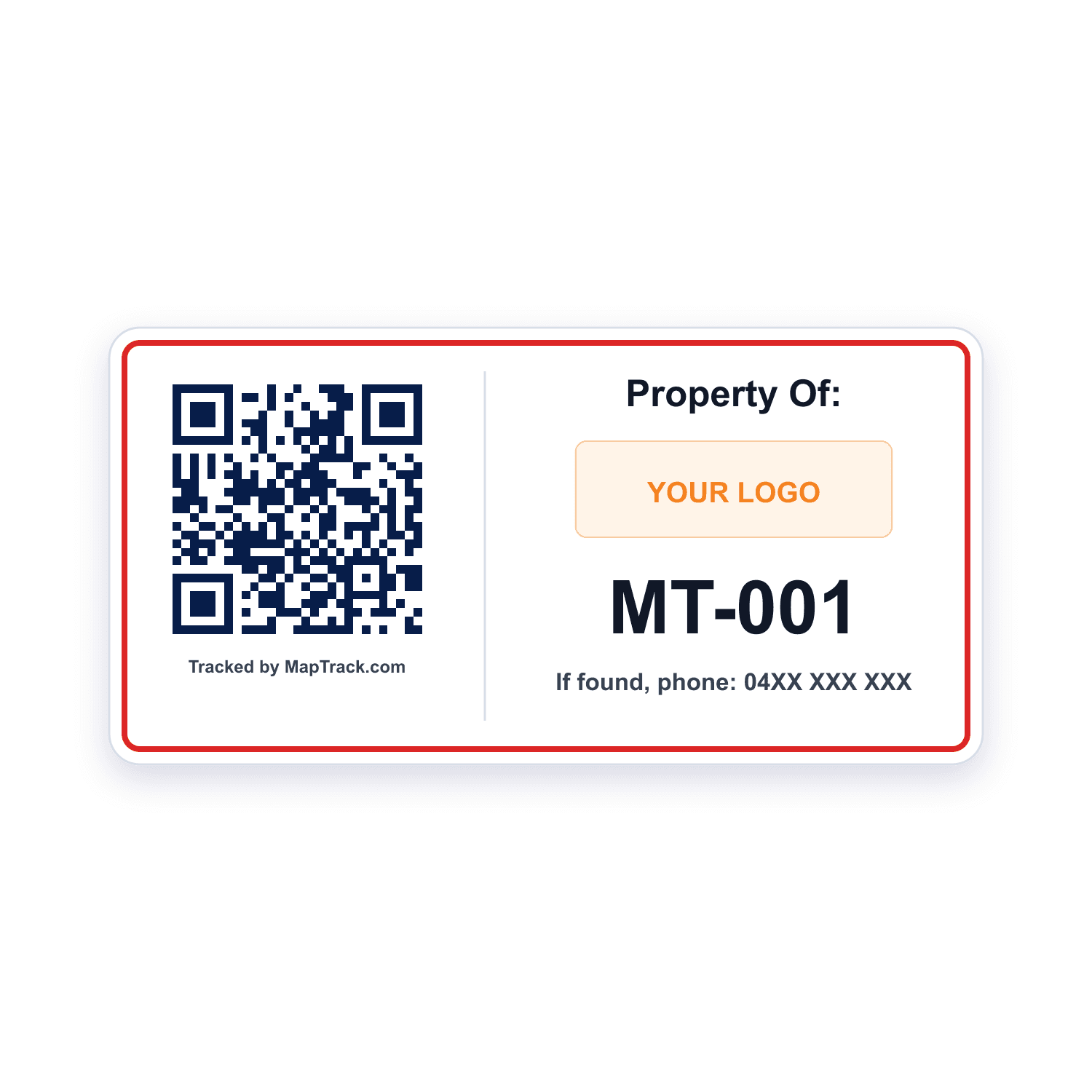
Hard hats, respirators and gas monitors with a record of their own
QR labels
- A scan with the phone camera or a handheld Bluetooth or USB scanner opens the item's record, its checks and its next inspection
- Print QR labels in bulk in MapTrack, or order durable labels from the label store
Good to know: A plain scan records no location
Each bin of gloves, earplugs, glasses or hi-vis in a store, ute or site box
Labels on the stock bins
- A stock bin can carry its own label, scanned the same way
- One label per bin, so everyday PPE is counted by the bin
Good to know: Each pair of gloves or earplugs needs no label of its own
Gear that already carries its maker's barcode
Barcode and Data Matrix labels
- Barcode and Data Matrix labels read by the same phone camera or handheld scanner
- No label to scan? Find the item in the register by its serial or tag
Good to know: A plain scan records no location
QR, barcode and Data Matrix labels work anywhere.
What it costs
MapTrack is priced per asset, and the plans are on the pricing page. Trackers, QR labels, install and freight are quoted with your order, after a short setup call so each asset gets the right tracker.
Personal gas monitors, issued to the person who carries one
A personal gas monitor gets its own record with its QR label and is checked out to the person who carries it, with a due-back date if you want one, so the register shows who has which monitor. Its calibration schedule, certificates and bump tests sit on the same record, and the calibration page covers how MapTrack keeps those.
- Checked out to a person, a location or both
- An overdue calibration is flagged when someone checks the monitor out
- Its calibration certificates in the monitor's Files tab
Setup and limits
- MapTrack keeps the monitor's records; your people do the bump tests and your provider does the calibration.
- For calibration schedules and bump tests, see calibration tracking
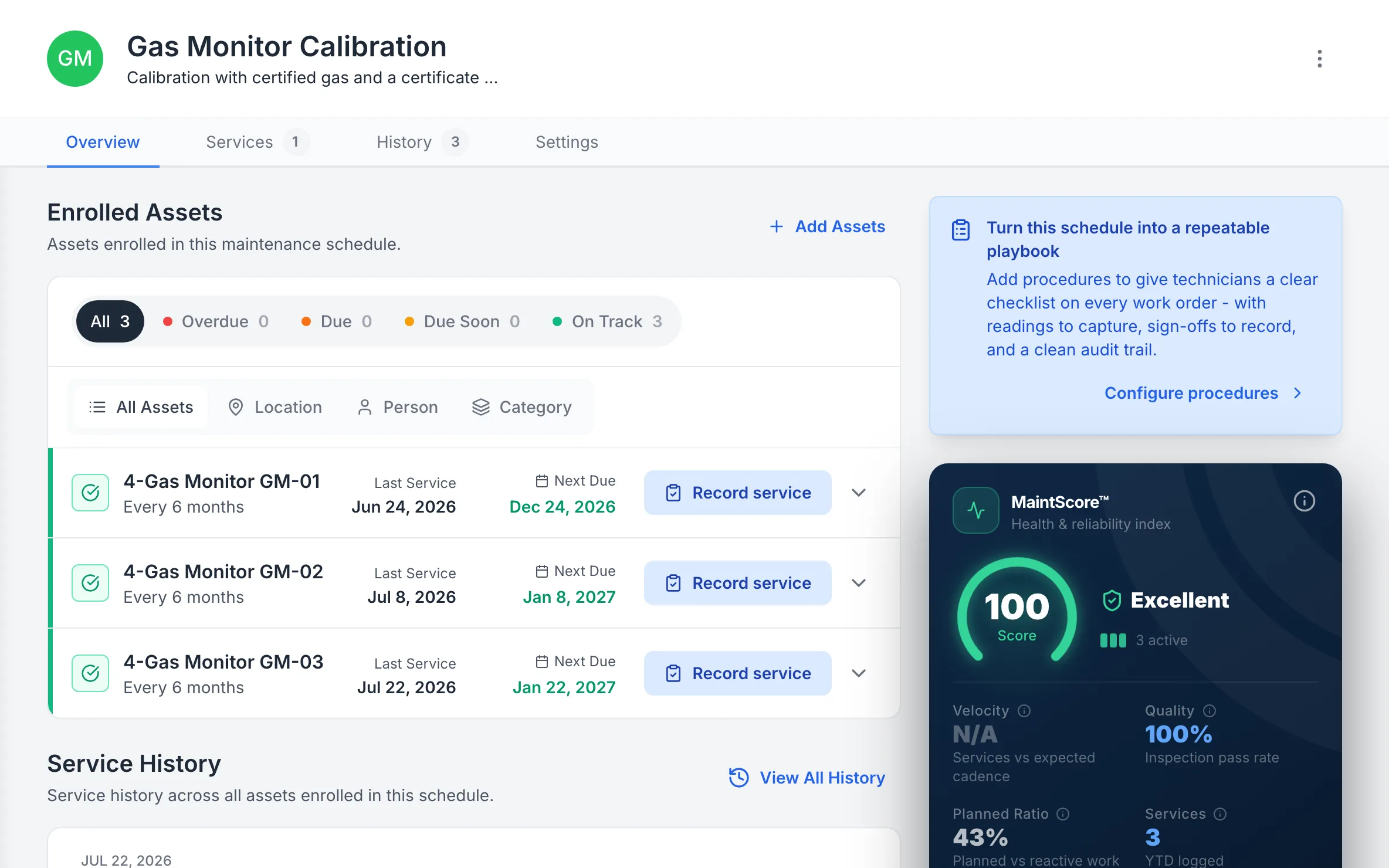
Gas monitors on a calibration schedule
Each gas monitor on a six-monthly calibration schedule, with when it was last calibrated and when the next is due.
MapTrack app · Demonstration data · Captured
About this screenshot
Demonstration workspace at a 1440 x 900 desktop viewport, on the schedule’s Overview tab, cropped right of the navigation sidebar to a 16:10 frame.
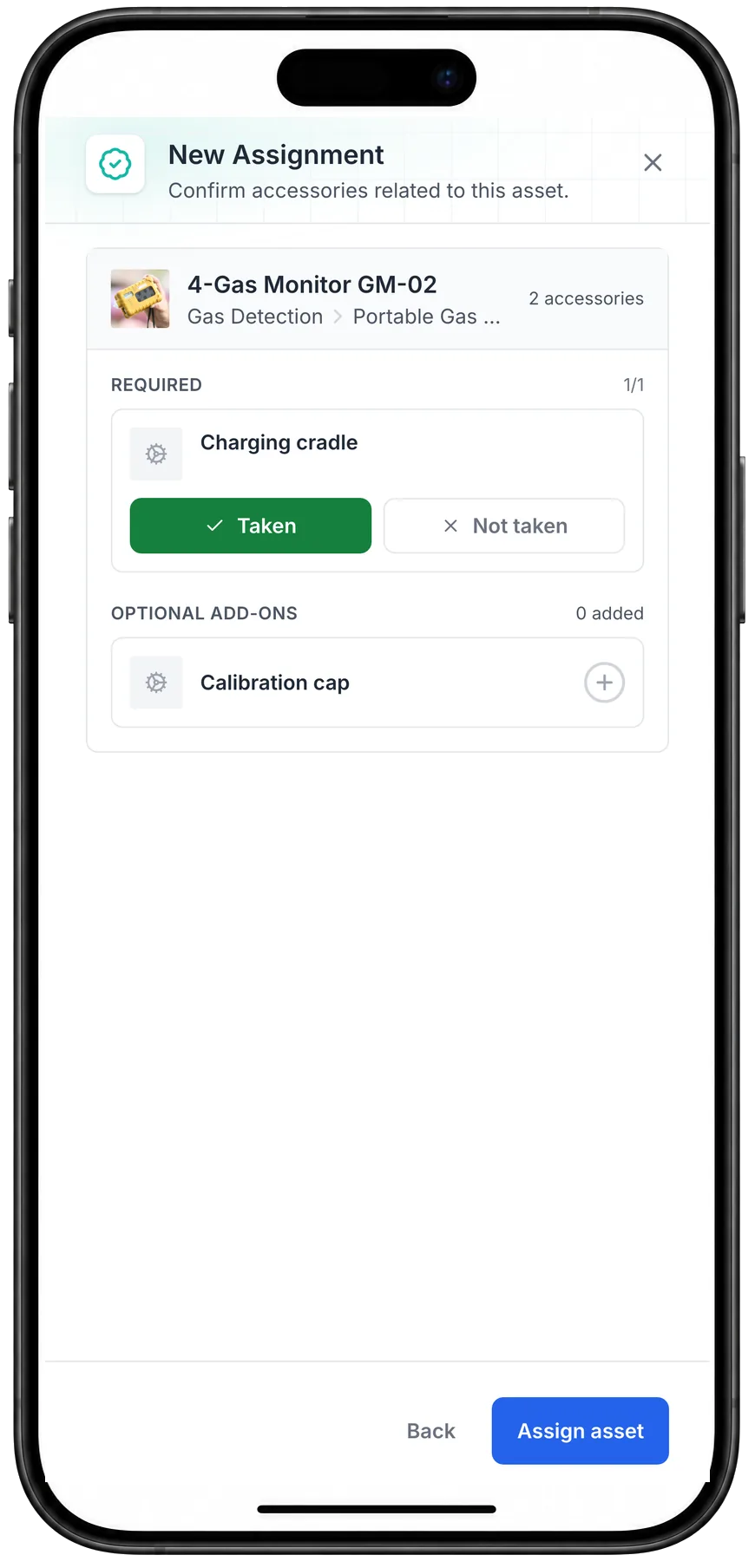
A gas monitor checked out with its charging cradle
Checking out a 4-gas monitor on a phone: its required charging cradle confirmed as taken, and an optional calibration cap left behind.
MapTrack app · Demonstration data · Captured
About this screenshot
Captured at a 430 x 932 phone viewport in a demonstration workspace, before Assign asset was pressed.
Audit what each worker and each store holds
Run an audit for one person: scan each item they hold, and at the end choose Mark Missing or Skip All for anything not scanned. Run the same audit on a store, a ute or a site box. When someone leaves, their audit and their Assignments show what's still out, and issued stock tracked for return shows as outstanding until it's returned or marked used up.
- Each audit keeps who ran it, where, and what it found
- Bulk import items, locations and people from a spreadsheet, then bulk edit them
Setup and limits
- Audits need a connection.
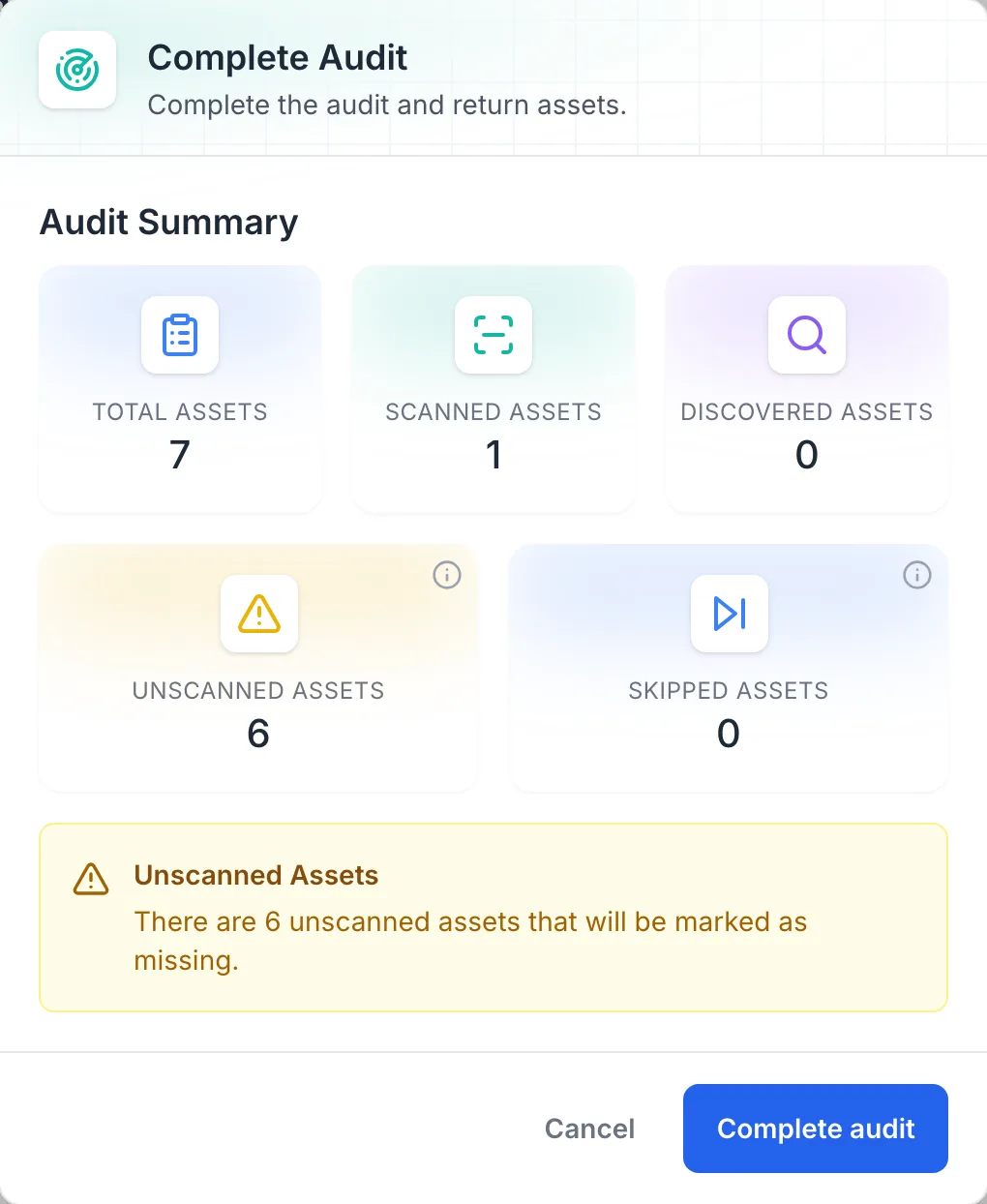
An audit of what one worker holds
Completing a person’s audit with 1 of 7 items scanned: the dialog says the 6 unscanned will be marked as missing before anything is saved.
MapTrack app · Demonstration data · Captured
About this screenshot
Demonstration workspace at a desktop viewport. The audit was left in progress for this screen and not completed.
Free PPE inspection and issue records
MapTrack's PPE Inspection Checklist, a PPE issue register, a hard hat inspection record and an OSHA respiratory protection checklist for the US. Print any of them; the PPE Inspection Checklist and the OSHA respiratory protection checklist also run on the phone in MapTrack.
Where the PPE rules come from
What PPE a business provides, how it's kept in working order and who pays for it are set by the instruments below, and they differ by country. MapTrack keeps the records; whether the PPE suits the work and fits the wearer stays with you, your competent person and the maker's instructions.
Check the current source
- Model WHS Regulations (Safe Work Australia)
- Model Work Health and Safety Act (Safe Work Australia)
- OSHA 29 CFR Part 1910, Occupational Safety and Health Standards
- Personal Protective Equipment at Work Regulations 1992
MapTrack keeps the records these standards ask you to keep. It does not certify your work or make you compliant, and the current text of each instrument is the authority.
Common questions
What is a PPE register?
Do we have to keep a PPE register in Australia?
Can we charge workers for PPE?
How do we track who has which hard hat or respirator?
Can we issue gloves, earplugs and hi-vis without tagging each one?
How often should PPE be inspected?
When should a hard hat be replaced?
How do we keep fit-test records for respirators?
Can the guys sign for their PPE on the phone?
Can we see what's running low in the PPE store?
How do we check what PPE a worker still has when they leave?
Do personal gas monitors go on the same register?
Can the PPE check be done offline?
Is a PPE register required in Great Britain?
What do the US rules say about PPE?
Do the RFID tags in our PPE work with MapTrack?
Does MapTrack link to PPE vending machines or lockers, or alert us when PPE expires?
Does MapTrack inspect or certify our PPE?


“Thanks to MapTrack we know exactly where our gear is, who has it and when it needs servicing.”
Denis Slaviero
HSEQ Manager at Hacer Group
See your PPE register in MapTrack
Book a demo to walk through a PPE register in MapTrack, from a hard hat checked out to the worker who wears it to the gloves left in the store, or start with the free PPE records.