 vs
vs
Maximo Capability Without the Multi-Month Rollout
MapTrack delivers mobile-first asset tracking, maintenance and compliance without the enterprise complexity, multi-month implementations and per-user licensing of IBM Maximo.
Teams look for Maximo alternatives when they need to be operational in days, want per-asset pricing with unlimited users, or need GPS tracking and OEM telematics without custom IoT integration. MapTrack is purpose-built for mid-market teams in construction, trades, fleet and facilities.

MapTrack is the best IBM Maximo alternative for mid-market teams who need asset tracking, maintenance and compliance without enterprise complexity. Cloud-native, mobile-first, deploys in days with per-asset pricing and unlimited users. MapTrack is one platform for every asset a field business runs: it pairs work orders, tiered service plans and parts with GPS trackers, Bluetooth tags, barcode labels and AI dash cams from one vendor, so each asset’s location, inspections and service history sit on one record.
MapTrack publishes this page and is one of the alternatives discussed. Based on IBM Maximo’s public documentation, pricing pages and named third-party reviews as of Oct 2026; confirm current features and pricing with each vendor and in a pilot. Where a capability is not confirmed in public sources we mark it as not publicly confirmed, not absent. Spotted something out of date? Email corrections@maptrack.com.
Trusted by construction, mining and field service teams














TL;DR - IBM Maximo vs MapTrack
- •IBM Maximo is an enterprise asset management (EAM) powerhouse, part of the IBM Maximo Application Suite. Built for large-scale operations with 50,000+ assets in utilities, oil/gas and manufacturing. Deep ERP integration, MRO inventory, linear asset management and regulatory compliance. Requires significant IT involvement and long implementation cycles.
- •MapTrack is cloud-native, mobile-first asset tracking with built-in maintenance (CMMS), compliance and cost tracking. GPS trackers, 150+ telematics, fleet and fuel-card data sources, offline mobile, per-asset pricing with unlimited users. Deploys in days, not months.
- •Choose MapTrack if you manage 50-5,000 assets and need to be operational quickly with GPS, telematics and unlimited users. Choose Maximo if you have 50,000+ assets and need deep ERP, MRO and regulatory compliance at enterprise scale.
What MapTrack covers in one platform
- Every asset, one record
- Tools on QR or barcode labels and Bluetooth tags, plant on GPS trackers, vehicles with GPS and AI dash cams, sites with boundaries: custody, inspections, maintenance and costs on the same record.
- Maintenance that runs on real usage
- Run hours and kilometres from trackers, dash cams or manual readings feed tiered service plans and next-service forecasts, every asset gets a 0 to 100 maintenance health score, and one work order can cover many assets, each with its own pass or fail.
- Easy for crews
- Pre-starts and inspections work without signal, on any phone, with shared-device PINs, single sign-on and AI help to build forms and add assets from a photo. Capterra Best Ease of Use 2026.
- Hardware and software from one vendor
- GPS trackers, AI dash cams with built-in GPS, Bluetooth tags and labels at published prices, managed in the same app, plus LightMetrics dash cam accounts and 150+ telematics, fleet and fuel-card data sources.
- Simple to buy and run
- Per-asset pricing with unlimited users, 24/7 support and month-to-month plans. Capterra Best Value 2026.
The full capability list (35)
- One register for tools, plant, equipment and vehicles
- Custody: who has what, and where
- Site boundaries on the map
- Live tracking and alerts in MapTrack Telematics
- Rate cards (Pro and Enterprise add-on)
- Finance dashboards (Pro and Enterprise add-on)
- Divisions (Pro and Enterprise add-on)
- Run hours and km from trackers, cameras, feeds or readings
- Work orders raised from meters, run hours and data feeds
- Tiered service plans
- Next-service forecasts from usage
- Stale-reading flags
- Maintenance health score
- Service board and due-soon emails
- One work order across many assets
- Batch work orders and bulk scan logging
- Labour, parts and external costs on every service
- Failed checks raise work orders by rule
- Parts and inventory by location and bin
- Offline pre-starts and inspections
- Mobile web app (Android, iPhone, iPad)
- Shared-device PINs
- SAML 2.0 single sign-on (SSO)
- AI form builder
- AI asset creation from a photo
- Equipment bookings (Requests)
- GPS trackers managed in the app
- AI dash cam video in the app
- AI dash cams with built-in GPS
- LightMetrics dash cam connection
- Bluetooth tags
- QR, barcode and Data Matrix scanning
- OEM feeds under Connections
- 150+ data sources
- Engine hours from 68 integrations
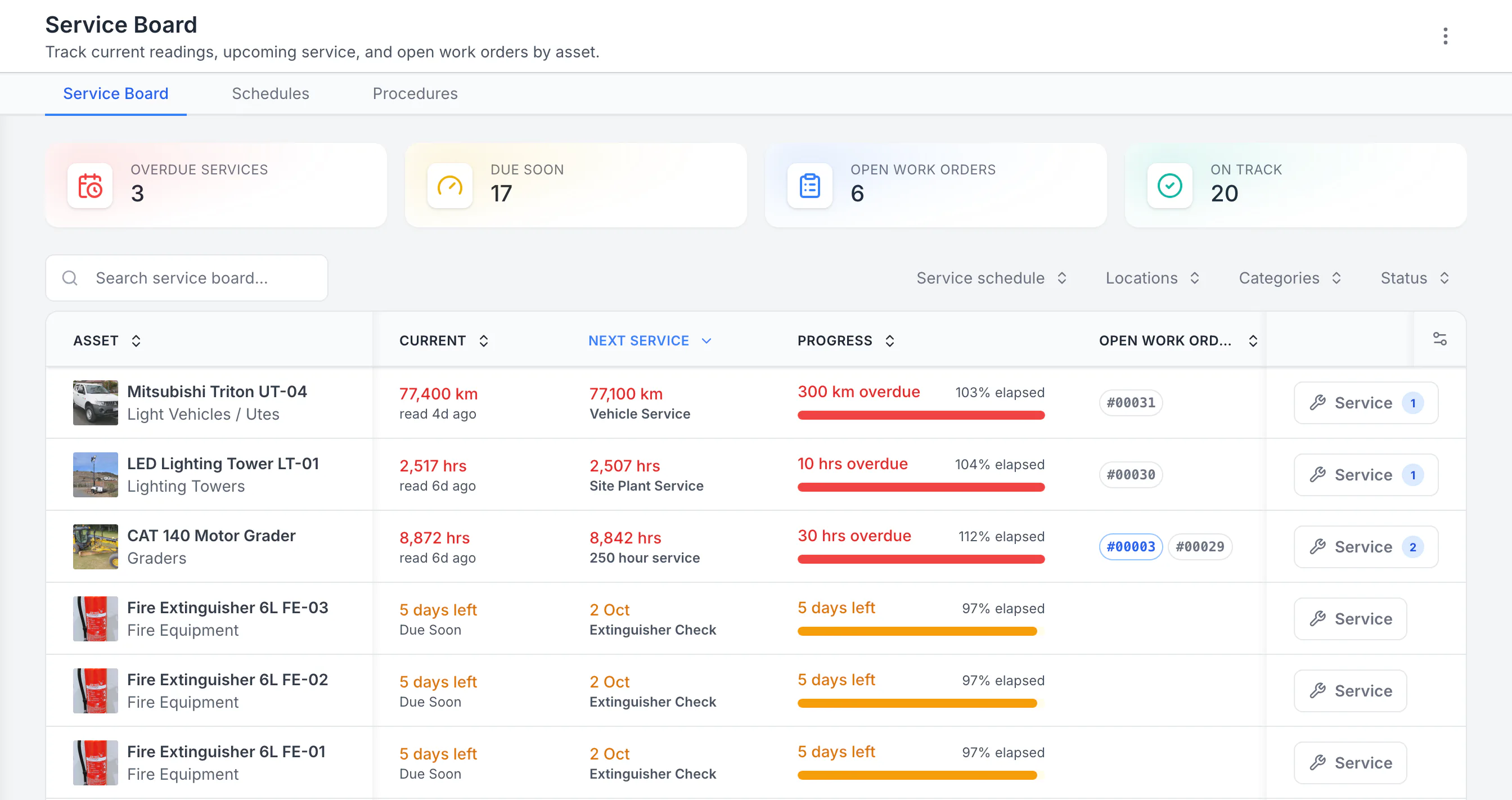
See the next service beside the current reading
Sorted by next service, the three overdue schedules come first: a ute 300 km past its service, then a lighting tower and a grader past their hour services. Each shows its open work orders. Extinguisher checks due in five days follow. Hours, kilometres and calendar checks share one board.
MapTrack app · Demonstration data · Captured
About this screenshot
Demonstration workspace with 40 schedule enrolments. Columns were chosen and resized in the board’s own display settings. Requires enrolled assets, configured schedules and an internet connection.
What is IBM Maximo?
IBM Maximo is an enterprise asset management (EAM) platform, now part of the IBM Maximo Application Suite (MAS). Originally known as Maximo Asset Management, it has been a market leader in enterprise EAM for over two decades. Maximo is used by large organisations in utilities, oil and gas, transportation, manufacturing and government to manage asset lifecycles, maintenance programmes and compliance across complex operations.
Maximo offers comprehensive capabilities: work order management, MRO inventory, preventive and predictive maintenance, condition monitoring (via Maximo Monitor), linear asset management, HSE compliance and deep ERP integration. Deployment options include on-premises, SaaS (IBM Maximo Manage) and hybrid. It is consistently recognised as a leader in the Gartner Magic Quadrant for Enterprise Asset Management Software.
The platform is powerful but complex. Larger implementations typically require systems integrator (SI) engagement. TEC reports an average of around seven months, complex or on-premises rollouts can run 6-18 months with a certified partner, and MAS SaaS can be faster. Licensing is in AppPoints, a credit pool that users and installs both draw on; IBM publishes an entry price for SaaS Essentials and an online estimator for Standard, and quotes the rest.
Why teams look for an IBM Maximo alternative
IBM Maximo is an exceptional platform for enterprise-scale operations. Teams typically look for alternatives when the platform is more than they need, or when the cost and complexity outweigh the benefits for their scale of operation:
Months to deploy vs days
IBM Maximo implementations average around 7 months (TEC), and complex or on-premises rollouts can run 6-18 months with SI consulting. MapTrack is cloud-native and operational in days with guided onboarding.
Enterprise cost for mid-market needs
Maximo licensing, implementation, infrastructure and ongoing maintenance can cost 5-10x a purpose-built cloud platform. MapTrack uses simple per-asset pricing.
Unlimited users included
Maximo licenses in AppPoints that users and installs both draw on, so cost scales with headcount and installs. MapTrack includes unlimited users with per-asset pricing, so every operator, supervisor and subcontractor gets access.
Mobile-first, not desktop-first
Maximo was built for desktop with mobile added later. MapTrack is built mobile-first with offline standard (pre-starts, inspections, forms and loaded work-order results), designed for field crews, not back-office administrators.
OEM telematics out of the box
MapTrack connects 150+ telematics, fleet and fuel-card data sources with zero custom integration. Maximo IoT capabilities via Monitor require additional configuration and licensing.
GPS tracking built in
MapTrack integrates GPS trackers (incl. ultra long-life battery) for real-time location, geofences and trip history. Maximo documents map views and IoT meter feeds, but GPS tracker hardware is not publicly documented.
Which platform fits your team?
Pick the persona that sounds most like you. The recommendation reflects where each platform is strongest.
The enterprise asset manager
Do you manage 50,000+ assets across utilities, oil/gas or large manufacturing with complex ERP integrations?
Stay on IBM Maximo. Its depth in linear asset management, GIS integration, ERP connectivity and regulatory compliance is built for enterprise-scale operations with dedicated IT teams.
The field operations lead
Do you manage 50-5,000 assets across construction, trades or facilities and need mobile-first tools?
Choose MapTrack. Cloud-native deployment, offline mobile, GPS tracking, OEM telematics and per-asset pricing with unlimited users are built for field teams who need to be operational in days, not months.
Learn more →The cost-conscious maintenance coordinator
Are you looking for maintenance and compliance without enterprise licensing costs and IT overhead?
Choose MapTrack. Telemetry-driven maintenance triggers, pre-start inspections and work orders without the implementation cost, consulting fees or dedicated infrastructure that enterprise EAM requires.
The growing mid-market team
Do you need to scale from spreadsheets to a proper tracking system without a multi-month implementation?
Choose MapTrack. Deploy in days with guided onboarding, CSV import and AI-assisted field mapping. No consulting engagement required.
Learn more →MapTrack vs IBM Maximo: detailed comparison
Side-by-side across 13 criteria. Verify current features and pricing with each vendor.
| Criteria |  MapTrack MapTrack |  IBM Maximo IBM Maximo |
|---|---|---|
| Best for | Mid-market teams (50-5,000 assets) in construction, trades, fleet, facilities | Enterprise operations (50,000+ assets) in utilities, oil/gas, large manufacturing; IBM also sells an entry-level SaaS Essentials package (up to 25 users) |
| Pricing model | YesPer asset; unlimited users included; no lock-in | AppPoints credits drawn on by users and installs; entry price published for SaaS Essentials only (Maintenance from under US$40,000/yr), Standard by online estimator, Premium and client-managed by quote(per IBM Maximo pricing, Oct 2026) |
| Implementation time | YesDays; guided onboarding included | ?Averages ~7 months (TEC); complex or on-premises rollouts can run 6-18 months with a certified partner; MAS SaaS can be faster(per Facilio: IBM Maximo pricing and implementation, Jun 2026) |
| GPS tracking | YesGPS trackers incl. ultra long-life battery; real-time on map; geofences | ?Map views through Maximo Spatial (Esri ArcGIS bought separately), technician GPS location in Maximo Mobile, IoT meter feeds; GPS tracker hardware not publicly documented(per IBM Maximo map features, Oct 2026) |
| OEM / telematics | Yes150+ telematics, fleet and fuel-card data sources; engine hours, ODO, fault codes, fuel | ?IoT meter feeds into asset and location meters; supported telematics providers not publicly listed(per IBM Maximo IoT device data integration, Oct 2026) |
| Mobile & offline | YesMobile-first; offline standard on all plans (pre-starts, inspections, forms and loaded work-order results) | YesMaximo Mobile on iOS, Android and Windows with online and offline modes and barcode scanning; mobile UX noted as needing improvement in reviews |
| Deployment | YesCloud-native SaaS; no infrastructure required | ?On-premises, SaaS (Manage) or hybrid; infrastructure required for on-prem |
| Work orders / CMMS | YesBuilt-in CMMS; telemetry-driven triggers; inspection-to-work-order escalation; tiered service plans, one work order across many assets, and parts and stock by location | YesIndustry-leading work order depth; MRO, planned maintenance, condition monitoring |
| Pre-starts / inspections | YesPre-starts, inspections, evidence on asset; AI form builder | YesInspection capabilities; HSE module for safety management |
| ERP integration | ?API-based integrations; Xero, business systems; accounting integrations and 150+ telematics, fleet and fuel-card data sources | YesDeep native ERP integration (SAP, Oracle); decades of enterprise connectors |
| Cost tracking / TCO | YesPurchase, depreciation, service, hire & operating costs; TCO reports | YesComprehensive financial tracking; deep depreciation and lifecycle costing |
| SSO / API / enterprise | YesRBAC and API on all plans; SSO/Active Directory (SAML 2.0 with Microsoft Entra ID, set up by our team) on Enterprise (Pro add-on); primary database and application hosting in Sydney | YesFull enterprise security; LDAP, SSO, RBAC; on-premises option |
| Trial | YesFree trial, no credit card | ?Guided trial for Manage and Health, plus a self-guided Visual Inspection demo; live demo on request(per IBM Maximo pricing (trial FAQ), Oct 2026) |
Enterprise features without enterprise complexity
Full access to GPS tracking, 150+ telematics, fleet and fuel-card data sources, compliance, maintenance and every feature. Per-asset pricing with unlimited users. Operational in days.
- No credit card required
- Unlimited users
How MapTrack compares to IBM Maximo
Which deploys faster?
MapTrack deploys in days. Maximo implementations average around 7 months, and complex or on-premises rollouts can run 6-18 months.
MapTrack is cloud-native SaaS. Sign up, import your asset register via CSV with AI-assisted field mapping, and your team is operational with guided onboarding. No servers, no middleware, no SI consulting. IBM Maximo deployments typically involve requirements gathering, system design, configuration, integration, testing, training and go-live phases. TEC reports an average of around seven months, complex or on-premises rollouts can run 6-18 months with a certified partner, and MAS SaaS can be faster. Even SaaS (Manage) deployments require configuration. For teams that need to be tracking assets next week, not next quarter, the deployment difference is decisive.
Which has GPS tracking?
MapTrack has built-in GPS tracking. Maximo documents map views and IoT meter feeds; GPS tracker hardware is not publicly documented.
MapTrack supports GPS trackers, including ultra long-life battery units that run for years, for real-time asset location on a map across job sites. Geofences trigger entry/exit alerts and power time-on-site reporting. BLE beacons add proximity detection inside sheds and laydown areas. IBM Maximo documents map views through Maximo Spatial (which needs Esri ArcGIS bought separately), a technician’s GPS location in Maximo Mobile, and IoT meter feeds. GPS tracker hardware is not publicly documented.
Which connects OEM telematics?
MapTrack connects 150+ telematics, fleet and fuel-card data sources out of the box. Maximo’s supported telematics providers are not publicly listed.
MapTrack integrates with 150+ telematics, fleet and fuel-card data sources (Caterpillar, John Deere, Komatsu, Geotab, Samsara, Verizon Connect and more) to ingest engine hours, odometer, fuel consumption, fault codes and DTC alerts. This data feeds directly into automated maintenance triggers. IBM Maximo can bring IoT data into asset and location meters through its IoT integration, and its supported telematics providers are not publicly listed.
Which is better for mobile teams?
MapTrack is mobile-first with offline standard (pre-starts, inspections, forms and loaded work-order results). Maximo Mobile works online and offline but is noted as an area for improvement.
MapTrack is built mobile-first with full capability on phone and tablet, including offline support standard on all plans. Field teams can scan, complete forms and record results on loaded work orders without connectivity, syncing automatically when back online. IBM Maximo has Maximo Mobile for field workers on iOS, Android and Windows, with online and offline modes and barcode scanning, but historically the platform was desktop-first. Multiple G2 reviewers note the mobile experience as an area that could be improved. For teams where mobile is the primary interface, this distinction matters.
Which has better maintenance depth?
Maximo has deeper enterprise maintenance. MapTrack has telemetry-driven triggers for mid-market teams.
IBM Maximo is industry-leading for enterprise maintenance: MRO inventory, condition monitoring, planned and unplanned maintenance, linear asset management, and deep work order hierarchy. For large-scale operations with complex maintenance programmes, Maximo is hard to match. MapTrack combines tracking and CMMS in one platform with work orders triggered by live OEM telemetry (engine hours, odometer, fault codes), pre-start inspection failures and scheduled intervals. For mid-market teams, MapTrack delivers the maintenance depth needed without the enterprise complexity.
Which is better for compliance?
Both handle compliance. MapTrack adds AI form builder and mobile-first inspections.
MapTrack keeps compliance attached to each asset: pre-starts, inspections, certificates and evidence trails. Failed checks can auto-trigger work orders. The AI form builder creates inspection forms from a PDF or description. IBM Maximo has comprehensive HSE (Health, Safety, Environment) and compliance modules with deep regulatory framework support. For highly regulated industries (nuclear, utilities, aviation), Maximo compliance depth may be required. For construction, trades and facilities compliance, MapTrack covers the requirements without enterprise overhead.
Which costs less to own?
MapTrack has predictable per-asset pricing. Maximo TCO includes licensing, implementation, infrastructure and consulting.
MapTrack uses per-asset pricing with unlimited users, no lock-in contracts and a free trial with no credit card. Total cost is predictable and scales with your asset count. IBM Maximo TCO includes licensing (per-user or AppPoint), implementation consulting (averaging around 7 months, and 6-18 months for complex or on-premises rollouts), infrastructure (on-premises) or subscription (SaaS), customisation, upgrades, training and ongoing administration. For mid-market teams, the total cost of Maximo ownership can be 5-10x the subscription cost of a purpose-built cloud platform.
Where IBM Maximo wins
IBM Maximo is an industry-leading platform with genuine strengths at enterprise scale. A balanced comparison should acknowledge where the competitor excels:
Enterprise scale
Built for operations with 50,000+ assets across complex organisations. Linear asset management, hierarchical work orders and enterprise-grade data models.
ERP integration depth
Deep native integrations with SAP, Oracle and other enterprise systems built over decades. Unmatched for organisations with complex ERP requirements.
Maintenance depth
Industry-leading planned and unplanned maintenance, MRO inventory management, condition monitoring and reliability engineering tools.
Regulatory compliance
Comprehensive HSE and compliance modules with support for regulatory frameworks in utilities, nuclear, aviation and oil and gas.
Gartner / analyst recognition
Consistently positioned as a leader in the Gartner Magic Quadrant for Enterprise Asset Management. Trusted by global enterprises for decades.
On-premises deployment
On-premises deployment option for organisations with strict data residency, air-gapped environments or specific infrastructure requirements.
What our customers say
“We used to spend 1-2 days a week tracking equipment. MapTrack gave us full visibility across every site.”
Steve McAllister
Site Manager, Saunders International
“MapTrack has completely transformed how we manage our tools, equipment and fleet.”

Scott Bradley
Managing Director, SPDR
“Doing monthly site audits in MapTrack has drastically reduced our equipment loss and downtime.”

Khalid El-Hussein
NSW Store Manager, Axis Services Group
Measured impact: what teams report after switching
Verified outcomes from MapTrack customers. Specific numbers reflect published case studies; ranges reflect typical results.
| Metric | MapTrack | IBM Maximo |
|---|---|---|
| Tool loss reductionConstruction firm case study | Up to 70% reduction (verified case study) | Enterprise-grade tracking but requires full implementation |
| Equipment recovery | $142K recovered in 48 hours (Mega Electrics) | GPS capabilities vary by deployment configuration |
| Implementation time | Operational within days; guided onboarding included | Averages ~7 months (TEC); complex or on-premises rollouts can run 6-18 months with a certified partner; MAS SaaS can be faster |
| Tool replacement costs | 40-50% reduction (SPDR) | Not a stated outcome; focus is on asset lifecycle optimisation |
| User licensing | Per asset, unlimited users included | AppPoints credits drawn on per user (authorized or concurrent) and per install (verify current model) |
Should you choose MapTrack or IBM Maximo?
Choose MapTrack if you…
- Manage 50-5,000 assets in construction, trades, fleet or facilities
- Need to be operational in days, not months
- Want per-asset pricing with unlimited users and no lock-in contracts
- Need GPS trackers for real-time asset location across job sites
- Want 150+ telematics, fleet and fuel-card data sources feeding into maintenance triggers out of the box
- Require offline mobile for remote construction, mining or field sites
- Want one platform for tracking, compliance, maintenance and cost tracking
- Want AI dash cams with live video and event clips in the same app as your assets
- Use barcode or Data Matrix labels as well as QR, scanned with the phone camera or a handheld scanner
- Want tiered service plans on run hours, with work orders raised from meter readings
- Run test and tag or calibration rounds as one work order across many assets, each with its own pass or fail
- Need equipment bookings (Requests) with approvals, conflict checks and scan-to-check-out
- Hire out equipment and need rate cards with daily, weekly and monthly rates (a Pro and Enterprise add-on)
- Want a cost ledger, budget vs actual and repair-or-replace for every asset (a Pro and Enterprise add-on)
- Run several divisions that each need their own assets and team access (a Pro and Enterprise add-on)
Consider IBM Maximo if you…
- •Manage 50,000+ assets across large-scale enterprise operations
- •Need deep ERP integration with SAP, Oracle or other enterprise systems
- •Require linear asset management for utilities or infrastructure
- •Have a dedicated IT team for platform administration and customisation
- •Need on-premises deployment for data residency or security requirements
- •Operate in highly regulated industries with specific compliance frameworks
Pricing: MapTrack vs IBM Maximo
MapTrack
Priced per asset with unlimited users, files, scans, documents, forms, alerts and automations included. No per-seat fees. No lock-in contracts. Free trial with no credit card and guided onboarding. Monthly or annual billing.
Get pricing for your asset count →IBM Maximo
- Licensing: AppPoints credit pool drawn on by users and installs
- Deployment: On-premises, SaaS (Manage) or hybrid
- Implementation: Averages ~7 months (TEC); complex or on-premises rollouts can run 6-18 months with a certified partner; MAS SaaS can be faster
- Pricing: Essentials entry price published (Maintenance from under US$40,000/yr); Standard via online estimator; Premium and client-managed by quote
Guided trial for Manage and Health. Contact IBM for pricing based on your deployment model and scale.
IBM Maximo pricing varies significantly by deployment model, user count and modules required. MapTrack pricing is transparent and scales with asset count. Compare total cost of ownership, not just licence fees.
Total cost of ownership: what to include
When comparing MapTrack and IBM Maximo, look well beyond the licence fee. Enterprise EAM platforms carry significant hidden costs:
Software licensing
- MapTrack: per-asset pricing with unlimited users; no lock-in contracts
- IBM Maximo: AppPoints credits drawn on per user (authorized or concurrent) and per install (verify current model with IBM)
- Factor in total users who need access, including field operators, supervisors and subcontractors
Implementation & consulting
- MapTrack: guided onboarding included; operational in days
- IBM Maximo: implementations average around 7 months (TEC); complex or on-premises rollouts can run 6-18 months with a certified partner, while MAS SaaS can be faster
- Consulting fees can equal or exceed multi-year licence costs
Infrastructure & IT overhead
- MapTrack: fully cloud-managed; no infrastructure to maintain
- IBM Maximo: on-premises deployments require servers, database management and dedicated IT staff
- SaaS (Manage) option available but may still require integration and configuration work
Ongoing operational costs
- Customisation and configuration changes typically require consulting or specialised internal staff
- Upgrades and version migrations can be multi-month projects
- Training costs for complex enterprise UI vs mobile-first interface
The hidden cost of enterprise EAM complexity
IBM Maximo is a powerful enterprise asset management platform, but that power comes with complexity. Implementations typically require systems integrator (SI) engagements, dedicated project managers, and months of configuration before go-live.
For teams with 50-5,000 assets in construction, trades, fleet or facilities, this level of investment often exceeds the operational benefit. The total cost of ownership for Maximo, including licensing, implementation, infrastructure and ongoing maintenance, can be 5-10x the subscription cost of a purpose-built cloud platform.
- Implementation: averages ~7 months (TEC); complex or on-premises rollouts can run 6-18 months with a certified partner; MAS SaaS can be faster
- SI consulting: often required for configuration and customisation
- Infrastructure: servers, databases and IT staff for on-premises deployments
- Upgrades: version migrations can be multi-month projects
- Training: complex desktop UI requires significant user training
MapTrack is cloud-native, mobile-first and deploys in days. No infrastructure, no consulting engagement, no multi-month implementation. Per-asset pricing with unlimited users means the cost scales with your asset count, not your IT budget.
How to switch from IBM Maximo to MapTrack
MapTrack supports CSV and spreadsheet imports with AI-assisted field mapping. Most teams are operational within a week.
Export your data
Export your asset register, service history and compliance records from IBM Maximo as CSV or spreadsheet.
Import & map fields
Upload into MapTrack. AI-assisted import auto-matches columns. Our team maps your sites, categories and custom fields.
Go live
Roll out to your crew with guided training. Apply heavy-duty QR labels where needed. Operational within a week.
What to verify in a demo
Before committing, run a short pilot with your own asset mix and workflows:
- ✓MapTrack: Confirm GPS tracker compatibility with your fleet; verify your telematics or fuel-card provider is among the 150+ data sources in the integration directory; test offline on remote sites; review cost tracking and TCO reports; RBAC/SSO if required; confirm API coverage for any system integrations.
- ✓IBM Maximo: Confirm total cost including licensing, implementation, infrastructure and ongoing administration; verify mobile experience meets field team needs; check IoT/telematics integration requirements; assess implementation timeline against your operational needs.
Other IBM Maximo alternatives to consider
Depending on your use case, these platforms may also fit:
MaintainX
Top-rated CMMS with strong work orders and mobile UX. Best for maintenance-first teams. Free Basic tier. Per-user pricing from ~$20/mo.
Asset Panda
Configurable cloud-based asset register with barcode/QR scanning. Strong for IT and office inventory. Quote-based pricing with unlimited users.
Limble
User-friendly CMMS with strong work orders and preventive maintenance. Free tier available. Per-user pricing on paid plans.
Fleetio
Fleet management for vehicles and equipment. 50+ telematics integrations. Per-vehicle pricing from ~$4/mo. Vehicle-first platform.
SafetyCulture
Inspections and audit powerhouse with 10,000+ templates and a free tier. Best for safety and compliance-first teams. Per-seat pricing from ~$24/mo.
See our full 10 best asset tracking software 2026 guide for a detailed comparison across all platforms.
Methodology and sources
This comparison is based on publicly available IBM Maximo documentation, G2 and Gartner reviews, and MapTrack customer data, reviewed Jun 2026. All claims are sourced and verifiable. Where a capability is not confirmed, it is marked accordingly.
- IBM Maximo Application Suite product page
- G2 IBM Maximo reviews
- Gartner Peer Insights for IBM Maximo
- Facilio: IBM Maximo pricing and implementation timelines
IBM Maximo publishes an entry price for SaaS Essentials, an online estimator for Standard and quotes for the rest, and pricing varies by deployment model (SaaS, on-premises, hybrid). Implementation timelines vary widely: TEC reports an average of around seven months, while complex or on-premises rollouts can run 6-18 months with a certified partner and MAS SaaS can be faster. Where a capability is not clearly documented in public sources, it is marked "Verify with vendor." MapTrack outcome figures are from published customer case studies.
Spotted something out of date or incorrect? Email corrections@maptrack.com and we will review and update this page.
Frequently asked questions: IBM Maximo vs MapTrack
More alternatives
- Alternative to Asset Panda
- Alternative to Hilti ON!Track
- Alternative to MaintainX
- Alternative to SafetyCulture
- Alternative to Fleetio
- Alternative to Limble
- Alternative to Cheqroom
- Alternative to UpKeep
- Alternative to SAP EAM
- Alternative to Sortly
- Alternative to EZOfficeInventory
- Alternative to GoCodes
- Alternative to AssetTiger
- Alternative to spreadsheets
- Alternative to Toolwatch
- Alternative to ShareMyToolbox
- Alternative to Gearbelt
- Alternative to Tenna
- Alternative to Samsara
- Alternative to ToolSense
- Alternative to Milwaukee One-Key
- Alternative to Fiix
- Alternative to GoAudits
- Alternative to Dashpivot
- Alternative to GoFMX
- Alternative to Kynection
Direct comparison and category guides
About the author

Co-Founder & GM of Operations
Lachlan leads operations at MapTrack, bringing 10+ years of enterprise technology experience across mining, construction and heavy industry. Before MapTrack, he held senior roles at Workato (integration and automation) and AppDynamics/Cisco (application performance), working directly with ASX-listed organisations to modernise their technology stacks. His deep understanding of field operations and blue-collar workflows shapes how MapTrack solves real problems for asset-intensive teams.
View LinkedIn profile →See what purpose-built asset tracking looks like
Book a tailored demo and get pricing for your asset count. No lock-in; unlimited users included. Operational in days.
4.9 on G2 · 5.0 on Capterra, GetApp & Software Advice
- No credit card required
- Unlimited users
ERP field integration planning · MaintainX alternative · Asset Panda alternative · Best asset tracking software