
Who has what: equipment custody
Assign gear to a person, a vehicle, a crew (through its leading hand or the crew's ute or container) or a site, and keep the history every time it changes hands. The question is not only where something is, it is who is responsible for it right now.

Trusted by construction, mining and field service teams














Make custody traceable when the equipment list changes
The item requested, the item issued and the item returned may differ. Keep those transitions in the request and assignment so the team can explain the handover.
1. Retain the substitution
Record the replacement and its reason before completing the request. The original demand stays visible alongside what stores actually fulfilled.
2. Reconcile assets and accessories
Check the physical return against issued quantities and record a reason for anything missing. Follow the linked assignment instead of relying on a new unconnected note.
Setup and limits
- Requests and custody changes require a connection.
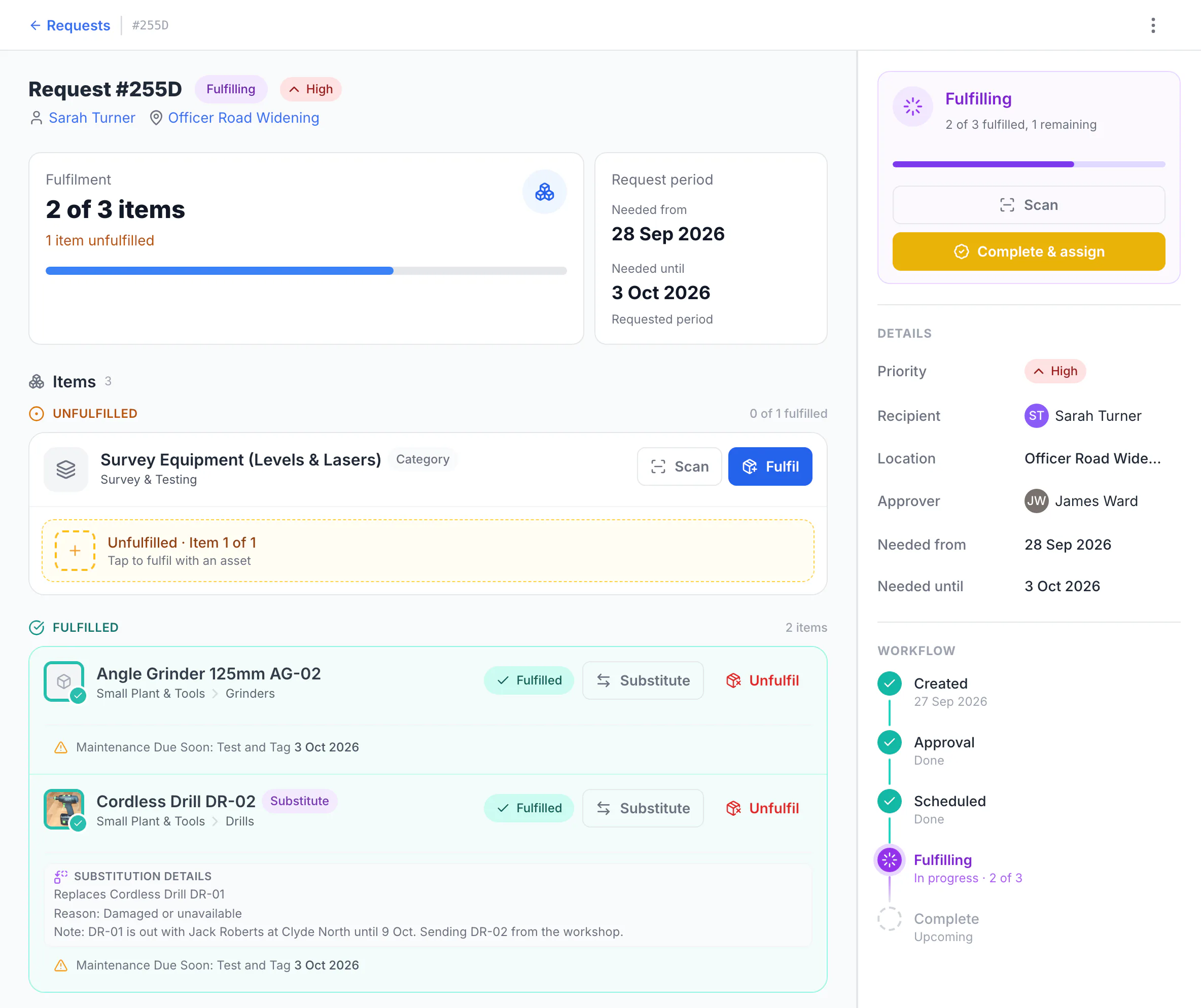
See what was picked and what is still outstanding
The request is for an angle grinder, drill DR-01 and one survey instrument, with Sarah Turner as recipient at Officer Road Widening and James Ward as approver. DR-01 was already out with another crew member, so stores sent DR-02 and recorded why. Two of three items are fulfilled and the survey instrument is still outstanding.
MapTrack app · Demonstration data · Captured
About this screenshot
Demonstration workspace with request approval switched on. The request was created, approved and part-fulfilled; the assignment has not been completed yet.
What is custody tracking?
Custody tracking records who is currently responsible for an asset, and keeps the history of everyone who held it before. In MapTrack the current holder is called the custodian, and it can be a named person, a vehicle, a crew (through its leading hand or the crew’s ute) or a site. It answers a different question from location: an item can be assigned to a leading hand while sitting in a container, and both facts matter. Custody is what makes it possible to run a report on a person before they leave, or to see how long a piece of gear has been out.
- Custodian: Who is responsible right now. A person, a vehicle, a crew or a site.
- History: Every previous holder, so you can follow the chain rather than guess.
- Different from location: Responsibility and physical position are tracked separately, because they answer different questions.
Why does gear stop coming back?
Rarely because anyone took it. Far more often it was lent to someone on another job, that person moved on, and no record of the handover survived. The pattern is always the same: the item was borrowed informally, it went somewhere legitimate, and the trail ended at the moment it changed hands. Handover is the event worth capturing, and it has to take seconds or it will not happen.
The problem
Most gear does not vanish, it drifts. Somebody grabs a laser level for a job, hands it to another crew, and moves to a different site. Nothing was stolen and nobody did anything wrong, but there is now no way to say who has it. The cost is rarely the item itself. It is the morning somebody needs it, cannot find it, and buys another one, and it is the fact that people tend not to report something missing when they know how the conversation goes.
How MapTrack addresses it
Assign every asset that moves to a custodian: a person, a vehicle, a crew (through its leading hand or the crew's ute) or a site, whichever you can actually hold to it. The crew changes custody by scanning the label on their phone and completing the reassign step, which takes seconds and therefore actually happens. Every assignment is kept, so the record shows the chain of who held the item and for how long. Filter by custodian to see what someone has before they leave, or by category to see the gear that walks. Location is tracked separately, because responsibility and position are not the same fact.
How it works
- 1
Label the gear that moves
Durable QR or barcode labels on the items that change hands. The ones that never leave the workshop matter less.
- 2
Assign to the level you can hold
A person for personal issue, a vehicle for truck kit, a site for shared gear. Forcing a name onto shared gear just records the wrong name.
- 3
Hand over by scanning
Scan and reassign on the phone. If handover is slower than skipping it, it gets skipped, so the speed is the feature.
- 4
Keep the history, not just the current holder
Every assignment stays on the record, so you can follow where something went rather than only where it is now.
- 5
Report on a custodian before they leave
Pull everything assigned to a person while they are still there. This is the report teams wish they had the week after someone finishes.
Why custody is the thing that actually gets used
Every asset system can store a name in a field. The difference is whether the crew will keep it current.
Custodian, not just a text field
The current holder is a first-class part of the asset record, so it can be reported on, filtered and handed over rather than typed into a note.
Handover takes seconds
Scan the label, reassign, done. The record stays current because keeping it current is faster than working around it.
The chain survives
Previous holders stay on the record. When something does not come back, you can see where the trail actually ends.
Assign to people or places
Crews share gear and trucks carry kit. Assigning to a vehicle or a site records something true, instead of pinning shared gear on one name.
What custody connects to
Answer who has it in one filter
Assign gear to a custodian, hand it over by scanning, and keep every previous holder on the record.
- No credit card required
- 30 days free trial
- Cancel anytime
Frequently asked questions
Explore
- Pricing
- Book a demo
- MapTrack vs Asset Panda
- Alternative to Asset Panda
- Alternative to spreadsheets
- Commercial GPS tracking
- Construction equipment GPS tracking
- Construction
- Vehicle pre-start checklist
- Hardware store
Related use cases
- Tool theft prevention
- Tool tracking for construction
- Equipment utilisation tracking
- Plant and machinery compliance
- Fleet pre-start inspections
- Equipment maintenance scheduling
- Asset audits and stocktakes
- Equipment hire and rental tracking
- Fire extinguisher inspections
- Test and tag tracking
- Shutdown and turnaround management
- Multi-site equipment management
- GPS geofence time onsite
- Calibration tracking
- Bulk inspections and testing
- Lifting gear and crane inspections
- SWMS and plant risk assessments
- Asset documents and certificates
- Offline inspections
- One system for fleet, plant and tools
- Plant hire chargeout and job costing
Know who has your gear right now
Join construction, mining and field service teams across Australia.
4.9 on G2 · 5.0 on Capterra, GetApp & Software Advice
- No credit card required
- 30 days free trial
- Cancel anytime