
PUWER inspections
One register for work equipment inspections under PUWER regulation 6: the inspection recorded against the machine, the result kept in its history, and a due list set by your risk assessment.

Co-Founder & GM of Operations
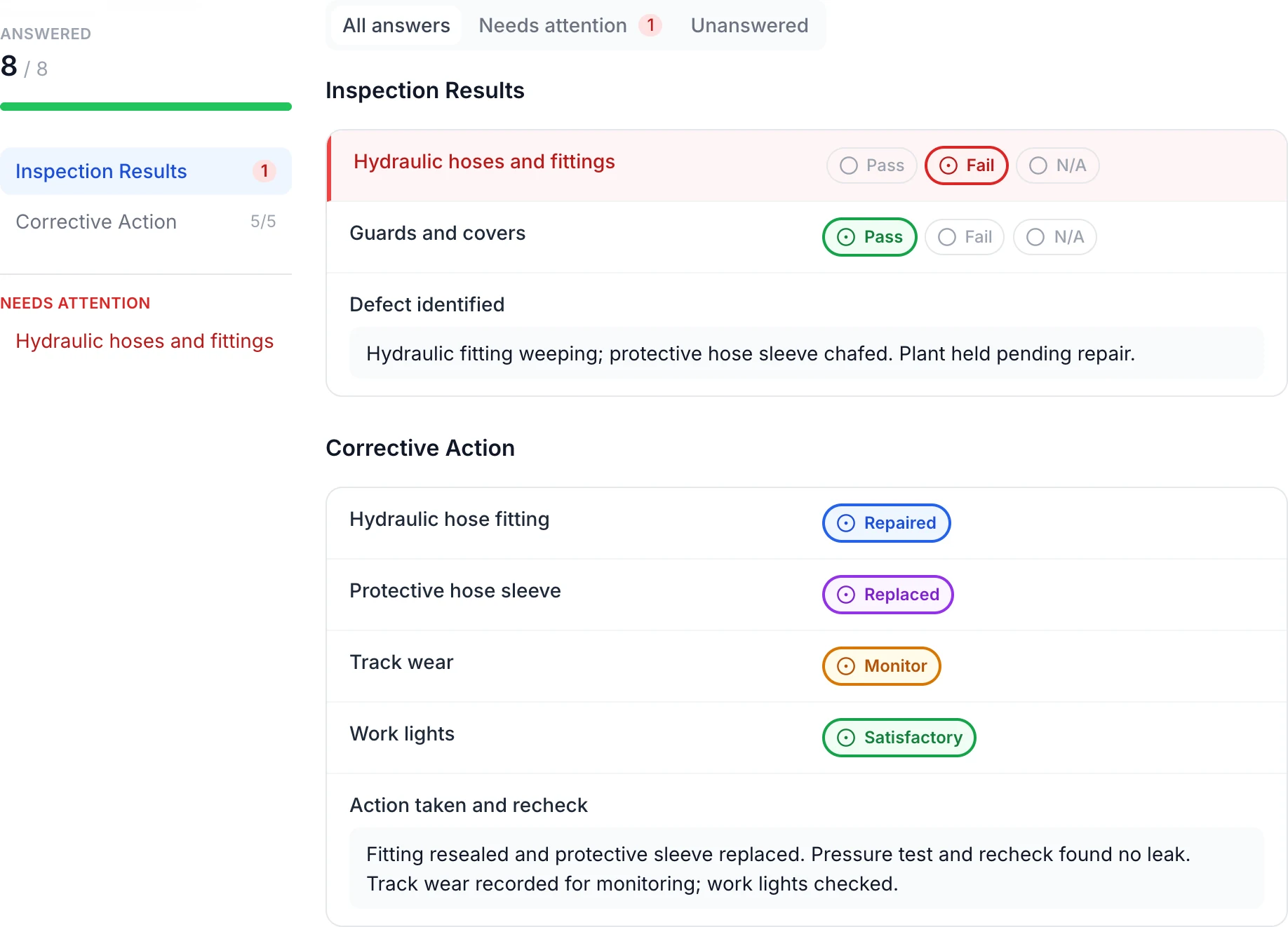
Read the defect, action taken and recheck together
The original hydraulic check remains Fail. The saved answers record the resealed fitting, replaced sleeve and a recheck with no leak, while track wear remains marked Monitor. All eight answers were checked after reopening the submission.
MapTrack app · Demonstration data · Captured
About this screenshot
Genuine answer-panel crop from a completed demonstration inspection. The repair outcomes are recorded answers; the linked corrective task has a separate status.
Trusted by construction, mining and field service teams

















PUWER has no fixed inspection interval: your risk assessment sets it
Regulation 6(2) of PUWER requires work equipment exposed to conditions causing deterioration that is liable to result in dangerous situations to be inspected "at suitable intervals", and again each time exceptional circumstances are liable to have jeopardised its safety. HSE gives major modifications, known or suspected serious damage and a substantial change in the nature of use as examples. The regulation does not say monthly, six-monthly or annual. HSE’s guidance is that the need for inspection and its frequency should be determined through risk assessment, taking account of the manufacturer’s recommendations, industry advice and your own experience, and that intervals can be increased where the inspection history shows negligible deterioration, or shortened where experience shows this is necessary to prevent danger. The inspection history is therefore part of the case for the interval: it is what lets you defend a longer one, or shows you need a shorter one.
- Practical consequence: Different machines need different intervals in the same register, and each should trace back to a reason: the manufacturer, the conditions of use or the inspection history.
- What we do not do: MapTrack holds the interval you set and the result your inspector records. It does not set intervals or certify that an inspection met the regulations.
What regulation 6 asks you to record, and what it does not
The record duty is short and worth reading exactly. Regulation 6(3) requires the result of each inspection to be recorded and kept until the next inspection is recorded. HSE’s guidance adds that records do not have to be on paper, provided they are held securely and can be produced for an enforcing authority, and that records are not normally required for the simplest pre-use checks. It also warns that asking for too much detail too often risks a superficial tick-box approach, or inspection stopping altogether: you only need to inspect what is necessary for safety. Regulation 6(4) then covers equipment on the move. Equipment leaving your business, or arriving from another, must be accompanied by physical evidence that its last inspection was carried out, such as an inspection report or, for smaller items, a tag, colour code or label.
- In practice: A useful record answers five questions: which machine, who inspected it, when, the result, and what was done about anything found.
The problem
The inspection itself is rarely the problem. The evidence is. The inspection sheet lives in a folder by the machine or in someone’s van, a defect is mentioned to a supervisor but never written against the item, and equipment comes back from hire with nothing to show it was inspected. Intervals drift because nobody can see what is due. When an HSE inspector or an insurer asks for the last inspection on one particular machine, the honest answer is often that it happened but cannot be found.
How MapTrack addresses it
MapTrack keeps each inspection on the machine itself. Every item of work equipment carries its own inspection history, the defects and photos recorded against it, its service records and its next due date, so the record belongs to the machine rather than to whoever filed the sheet. Inspectors scan the QR label and complete the inspection where the equipment is, on a phone, even without signal once the form is loaded. Each machine carries the interval your risk assessment sets, the due list shows what is coming up and what is overdue, and the assigned person gets an email reminder in the week before an inspection falls due. Any inspection can be downloaded as a PDF to go with equipment leaving your site.
How it works
- 1
Put the equipment in the register
Add each machine, tool and installation as an asset with its identifier and location. Import in bulk from a spreadsheet if you already keep an equipment list.
- 2
Give each machine its interval
Record the inspection interval your risk assessment sets for each item and the form the inspection uses. Different machines can carry different intervals in the same register.
- 3
Inspect at the machine
Scan the QR label, complete the inspection on a phone and photograph anything found. The result, and any failed item, stays on that machine’s record.
- 4
Work the due list
See what is due or overdue by site, so inspections happen before equipment goes back into use rather than after.
What the register holds for each machine
Each of these sits on the item, so the machine and its inspection history stay together.
An interval per machine
Set from your risk assessment and the manufacturer’s recommendations. The assigned person gets an email reminder in the week before an inspection falls due.
Results, defects and photos
Pass or fail, date and inspector in sequence, with photos of what was found. Every result stays in the history, not only the latest one.
Service records on the same machine
Maintenance is recorded against the item that was inspected, so its maintenance log and inspection record read as one history.
A report that can travel with it
Download an inspection as a PDF, so a copy of the report can go with equipment that leaves your site.
Why teams move PUWER inspections off paper
Intervals follow the risk, not the calendar
PUWER leaves the interval to your risk assessment, so each machine carries its own rather than one date for everything.
Scan at the machine
The inspection opens where the equipment is, which is where defects are found and photographed.
Overdue shows at check-out
If a scheduled inspection is overdue when someone checks an item out, MapTrack flags it, and records the decision if they go ahead.
One round, many machines
Inspect a whole workshop in one work order, with a pass or fail recorded for each machine.
Other recurring checks run on the same register
The regulations this recordkeeping sits under
The duty to inspect, the intervals and the question of competence are set by the regulations below and by HSE’s Approved Code of Practice for PUWER (L22), not by MapTrack. We support the recordkeeping; the inspection and the compliance judgement remain yours. PUWER 1998 applies in England, Wales and Scotland; Northern Ireland has its own 1999 regulations.
Check the current source
- Lifting Operations and Lifting Equipment Regulations 1998 (LOLER)
- Provision and Use of Work Equipment Regulations 1998 (PUWER)
- Management of Health and Safety at Work Regulations 1999
MapTrack keeps the records these standards ask you to keep. It does not certify your work or make you compliant, and the current text of each instrument is the authority.
Every machine inspected at the interval you set
Full access to every feature. No credit card required. Per-asset pricing so you scale as your fleet grows.
- No credit card required
- 30 days free trial
- Cancel anytime
Frequently asked questions
Explore
- Pricing
- Book a demo
- MapTrack vs Asset Panda
- Alternative to Asset Panda
- Alternative to spreadsheets
- Commercial GPS tracking
- Construction equipment GPS tracking
- Construction
- Vehicle pre-start checklist
- Hardware store
Related use cases
- Tool theft prevention
- Tool tracking for construction
- Equipment utilisation tracking
- Plant and machinery compliance
- Fleet pre-start inspections
- Equipment maintenance scheduling
- Asset audits and stocktakes
- Equipment hire and rental tracking
- Fire extinguisher inspections
- Test and tag tracking
- Shutdown and turnaround management
- Multi-site equipment management
- GPS geofence time onsite
- Calibration tracking
- Bulk inspections and testing
- Lifting gear and crane inspections
- SWMS and plant risk assessments
- Asset documents and certificates
- Equipment custody and handover
- Offline inspections
- One system for fleet, plant and tools
- Plant hire chargeout and job costing
Take PUWER inspections off paper
Join construction, mining and field service teams across Australia.
4.9 on G2 · 5.0 on Capterra, GetApp & Software Advice
- No credit card required
- 30 days free trial
- Cancel anytime
UK HSE compliance templates · LOLER thorough examination templates · PUWER inspection checklist · PUWER risk assessment template · Compliance · Pricing