















Aviation

Aviation GSE & MRO tool tracking software Know which tools came back airside before close of day

Track tools, GSE and equipment across hangars, ramps and MRO facilities. Calibration tracking, compliance registers and maintenance in one platform, so you know what's calibrated, who has what and what's flight-ready.

From $1 a tool and $12 a machine a month, AUD ex GST. Unlimited users.

600,000+ assets tracked since 2012 · Unlimited users, per-asset pricing · Sydney, primary application hosting

Ground support equipment on a wet apron, with the baggage tractor ringed, its hardwired GPS tracker marked and its MapTrack maintenance health score laid beside it.
Maintenance health score
MapTrack maintenance health score: 100, Excellent, on the health and reliability index.
Hardwired GPSExample: MapTrack Telematics
Maintenance health score
MapTrack maintenance health score: 100, Excellent, on the health and reliability index.
Hardwired GPSExample: MapTrack Telematics
Maintenance health score
MapTrack maintenance health score: 100, Excellent, on the health and reliability index.
Hardwired GPSExample: MapTrack Telematics

Asset tracking software for aviation helps MRO organisations and ground handlers control calibrated tools, test instruments and ground support equipment from one auditable register. MapTrack combines QR scanning and tool reconciliation with offline mobile inspections in hangars and at outstations, calibration certificate tracking, meter-based servicing, Sydney application hosting, SSO and RBAC. Aviation teams use it to pass CASR Part 145 tool-control audits, prevent foreign object debris through post-task scans, and stop ground support unavailability driving aircraft-on-ground events.

Key takeaways

  • Doc Palmer’s maintenance planning research puts typical wrench time at 35% of a technician’s day, and shows proper planning and scheduling lifting it to 55%.
  • CASR Part 145 maintenance organisations must keep calibration certificates and tool control records auditable; CASA expects evidence linked to each instrument.
  • Foreign Object Debris prevention relies on tool reconciliation after every task; bulk QR scans verify every wrench is accounted for before aircraft release.
  • Track running hours and service dates for GPUs, tugs and belt loaders.
  • Offline mobile capture lets MRO technicians complete pre-use inspections inside hangars, on remote ramps and at outstations with no reliable signal.
  • MapTrack's primary database and application hosting are in Sydney; SSO and RBAC support multi-base enterprise rollouts.

Pricing

One price per machine, with the hardware included: software and a QR tag from $12 a machine a month, GPS tracking from $27 and AI cameras from $72. Tools and equipment start at $1/asset/month. Every plan includes unlimited users. Prices are AUD ex GST, and machine prices are for annual billing.

View pricingGet a tailored quote

Jarrod Milford

Jarrod Milford

Co-Founder & Commercial Director

Published 15 February 2026Updated 26 October 2026

Ground support equipment tracking software

Ground support equipment tracking means knowing who has each tug, belt loader, GPU and set of stairs, whether it passed its pre-use check and when it's next due for service. In MapTrack each unit gets a QR label and its own record. Operators do the pre-use check on their phone, with a note and photo on any failed check, and a form rule can raise the repair job. Servicing falls due on run hours or the calendar, and each unit is signed out to a person or a base, so its record shows who had it last.

Aviation

MapTrack at a glance

Built for
Airports, ground handlers and aeromedical teams with ground support equipment, tool control and medical kit to account for.
Tracks
Contractor hand and power tools, tool cabinets and kit bags, tugs, belt loaders and ground power units, test sets and torque tools, ventilators, defibrillators and battery packs, drug kits that travel, batteries away for servicing.
Tracked with
QR labels, Bluetooth tags or hardwired GPS trackers.
Works offline
Pre starts, inspections and other forms save with no reception and sync when the phone is back in range. A work order already loaded on the phone can be worked through with no reception too.
Phones and computers
In the browser on a computer, and Android, iPhone and iPad access through the mobile browser or the installable web app.
Connects to
Telematics and accounting integrations, a public API, and an MCP server for AI tools such as Claude.
Sign-in
Sign in with Microsoft, or SAML 2.0 single sign-on set up by our team (Enterprise, or a Pro add-on).
Set-up and support
24/7 support. Our team sets up single sign-on and OEM telematics feeds, and helps connect trackers you already run.
Track record
600,000+ assets tracked since 2012.

How to choose ground support equipment tracking software

Look for:

  1. Every contractor tool in and out, reconciled by close of day
  2. Pre-use checks on the phone, with a note and photo on any failed check
  3. GSE servicing that falls due on run hours or the calendar
  4. Daily and monthly audits by scan
  5. Every annual test and calibration on time, with contractor tickets on their record

Where MapTrack fits

Next to an EAM or ERP

If fixed plant, work planning and finance sit in an EAM or ERP, MapTrack can run beside it for the tools, equipment and vehicles that move between sites and crews. Its public API passes records between the two.

Next to telematics

A telematics platform tracks where vehicles go. MapTrack puts each vehicle and machine on the same register as the tools, with its pre starts and services. A GPS tracker or AI dashcam puts its latest position on the record, with estimated km and hours feeding its services, and MapTrack Telematics adds GPS tracking with trips, history and geofences.

See what MapTrack costs for your aviation assets

Per-asset pricing tailored to your aviation asset mix and a rollout plan, within one business day.

Trusted by teams that track tools, kits and calibrated gear

Saunders InternationalMineral ResourcesSupagasHacer GroupMetro TunnelUltrabuilt
G2 rating 4.9 out of 5
Capterra rating 5.0 out of 5GetApp rating 5.0 out of 5Software Advice rating 5.0 out of 5
15 reviews on G2 · the same 17 reviews on Capterra, GetApp and Software AdviceCapterra Best Value 2026 badgeCapterra Best Ease of Use 2026 badgeAll MapTrack reviews

What we track

Every asset type across your aviation operation

MapTrack is built for the full mix of assets that move across your hangars, ramp areas, MRO workshops and outstations - from calibrated hand tools to heavy ground support equipment.

  • Ground power units (GPU) & start carts
  • Tugs, tractors & towbars
  • Belt loaders & cargo loaders
  • Passenger stairs & boarding bridges
  • Pushback & tow equipment
  • Tools & tool kits (calibrated)
  • Test equipment & avionics gear
  • Ladders & access equipment
  • Light fleet & vehicles
  • Ground service equipment (GSE)
  • De-icing & fluid equipment
  • Spare parts & inventory

What you run, and how MapTrack tracks it

Contractor hand and power tools
QR label
Tool cabinets and kit bags
QR label
Tugs, belt loaders and ground power units
QR label and hardwired GPS tracker
Ventilators, defibrillators and battery packs
QR label and Bluetooth tag
Test sets and torque tools
QR label
Airside retailers' knives and tools in locked cabinets
QR label
Laryngoscopes and drug kits that travel
QR label
Batteries that go away for servicing
QR label

Running a mix like this? See how MapTrack handles it in a demo built around aviation teams.

Book a demo

30 minutes on Microsoft Teams

The challenge

The costs of poorly managed aviation tools and GSE

Aviation assets don't sit still. Tools move between hangars and bays, calibrated instruments expire on different cycles, GSE wears out based on hours not dates, and a single unaccounted-for tool can ground an aircraft or create a FOD hazard.

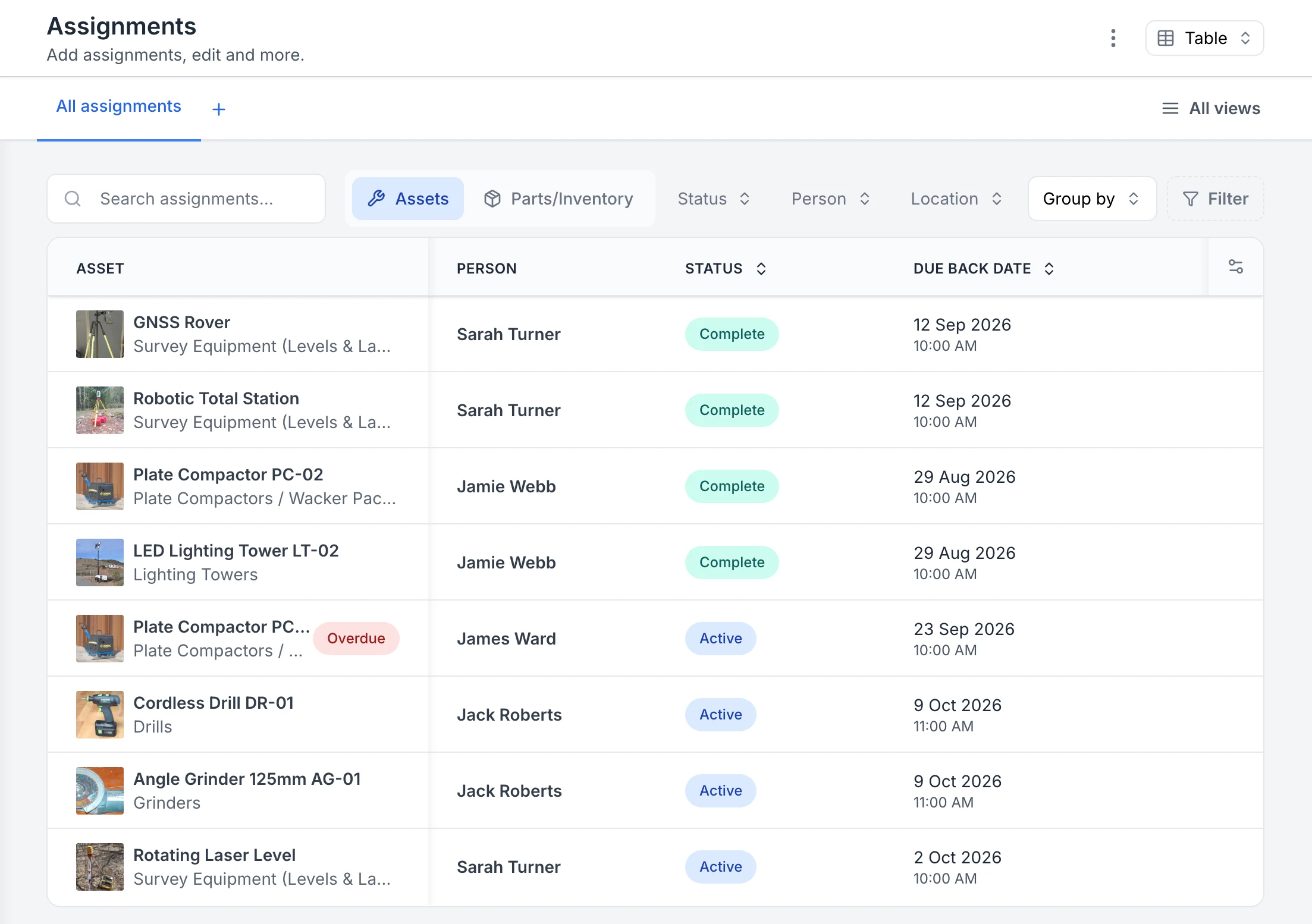
MapTrack Assignments table listing eight tool and equipment assignments, a GNSS rover, robotic total station, two plate compactors, a lighting tower, a cordless drill, an angle grinder and a rotating laser level, each with its photo, the person it went to, a Complete or Active status and a due-back date. One plate compactor is flagged Overdue.

See who has each tool and when it is due back

Every sign-out in one list. Four assignments are back and marked Complete; four are still out as Active, each with the person and the due-back date. The plate compactor with James Ward was due back on 23 September, so it is flagged Overdue.

MapTrack app · Demonstration data · Captured

About this screenshot

Captured in a demonstration workspace on the All assignments view with the Person, Status and Due Back Date columns. The app shortens long asset and category names.

Tools and GSE move between hangars with no tracking

Torque wrenches, calibrated instruments and GSE get borrowed between bays or moved to another hangar without a record. Without a clear chain of custody, tools go missing, shifts start short-kitted and replacements get ordered unnecessarily.

Calibration due dates missed across the tool fleet

Hundreds of calibrated tools and test instruments each with their own calibration cycle. Spreadsheets can't keep up. A missed calibration means work completed with a non-compliant tool - a serious regulatory and safety risk that can ground aircraft.

FOD risk when tools aren't accounted for after maintenance

Foreign Object Debris is one of the most serious safety hazards in aviation. If tools aren't reconciled after every maintenance task, a forgotten wrench or socket can cause catastrophic damage. Manual tool counts are slow and error-prone.

GSE servicing driven by hours. Not the calendar

Ground power units, tugs and belt loaders need servicing based on runtime hours and usage cycles. Not arbitrary monthly reminders. Missing service intervals leads to unplanned breakdowns on the ramp that delay flights and cascade across the schedule.

Multi-location operations need consistent visibility

Tools and GSE spread across hangars, ramp locations, outstations and MRO workshops with no single view. Each base runs its own spreadsheet or paper system. Leadership can't see the full picture without manual consolidation that's always out of date.

From MapTrack's own data

What we see across MapTrack customer accounts

These figures come from MapTrack's own product data, de-identified and aggregated. Accounts aren't grouped by industry, so each figure covers every qualifying customer account, not one industry alone. Every figure counts at least 20 accounts, and each one says how it was measured.

About 160

Size of a typical register

The typical MapTrack customer account tracks about 160 assets, and a quarter track more than 425 (62 accounts, 26 October 2026).

Method: MapTrack's own product data: 62 customer accounts, 24,507 assets, snapshot at 26 October 2026. Demo, test and trial-build accounts and anything MapTrack staff created are left out. Median 157, middle half 40 to 428. Counts only assets customers added themselves, so registers MapTrack staff imported read low.
Want to know what these costs look like on your own sites? Talk it through with us.

Book a demo

30 minutes on Microsoft Teams

Use cases

How aviation teams use MapTrack

Every contractor tool in and out, reconciled by close of day

Scan each tool out to the contractor at the screening point with a due-back time, and back in on the way out. Anything not back by close of day is flagged overdue against a name, so there's an end-of-day reconciliation without the paper register.

Tool tracking
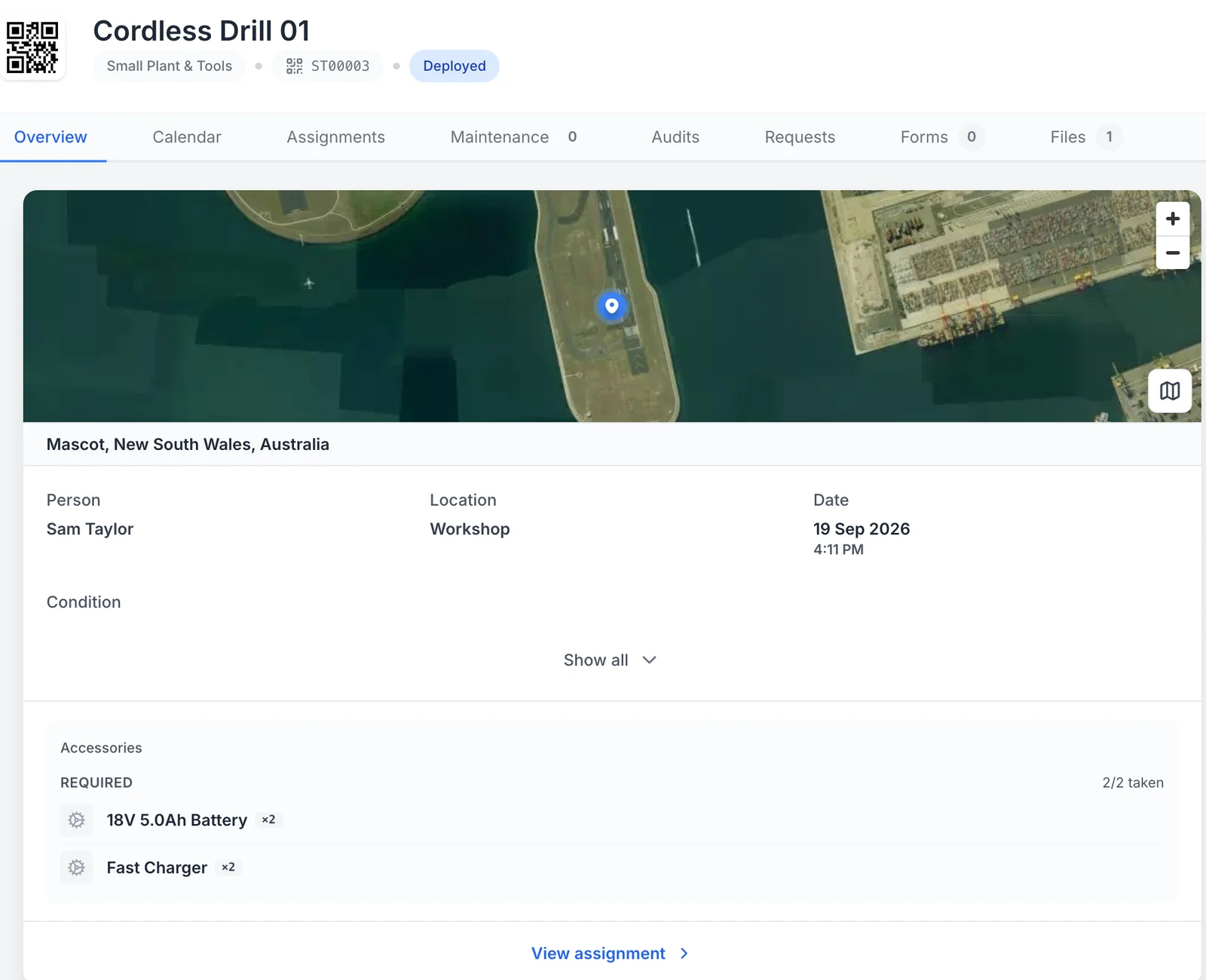
MapTrack record for Cordless Drill 01, tag ST00003, Deployed: a satellite map pinned at Mascot, New South Wales, the person Sam Taylor, the location Workshop, the date 19 Sep 2026 at 4:11 PM, and its required accessories, two 18V 5.0Ah batteries and two fast chargers, 2 of 2 taken.

Who has it, and where it was checked out

While the drill is out, its record shows who has it, where it was checked out on the map and the accessories that went with it.

MapTrack app · Demonstration data · Captured

About this screenshot

Demonstration workspace at a desktop viewport, on the asset’s Overview tab, cropped to its header, map, assignment and accessories.

Every kit back with all its parts

Kit bags, defibrillators and battery packs go out with their accessories confirmed, and come back the same way. Anything missing is recorded with a reason, so the next crew isn't caught short.

Tool tracking
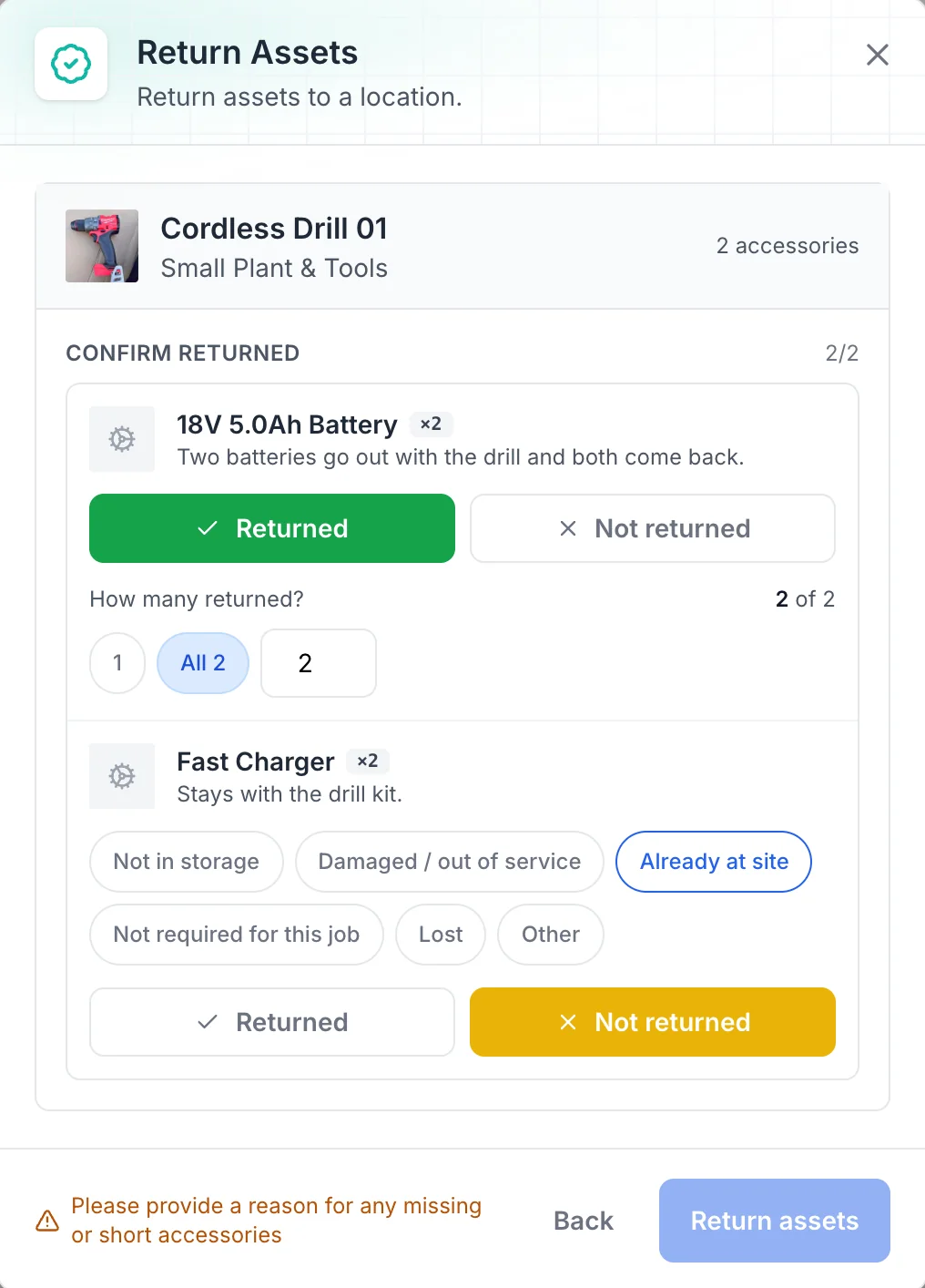
MapTrack Return Assets dialog for Cordless Drill 01 with 2 accessories: two 18V 5.0Ah batteries marked Returned, 2 of 2, and two fast chargers marked Not returned, with the reasons Not in storage, Damaged / out of service, Already at site (selected), Not required for this job, Lost and Other, and a prompt to give a reason for any missing or short accessories.

Accessories back, or a reason why not

Returning a drill kit: both batteries are confirmed back, the chargers are marked not returned with a reason, and anything short asks for one.

MapTrack app · Demonstration data · Captured

About this screenshot

Demonstration workspace at a desktop viewport, in the Return Assets dialog, cropped to the dialog.

Daily and monthly audits that actually get done

Walk the tool cabinet or the equipment room and scan what's there. Anything not scanned stays on the list as missing, and each audit records who did it and when.

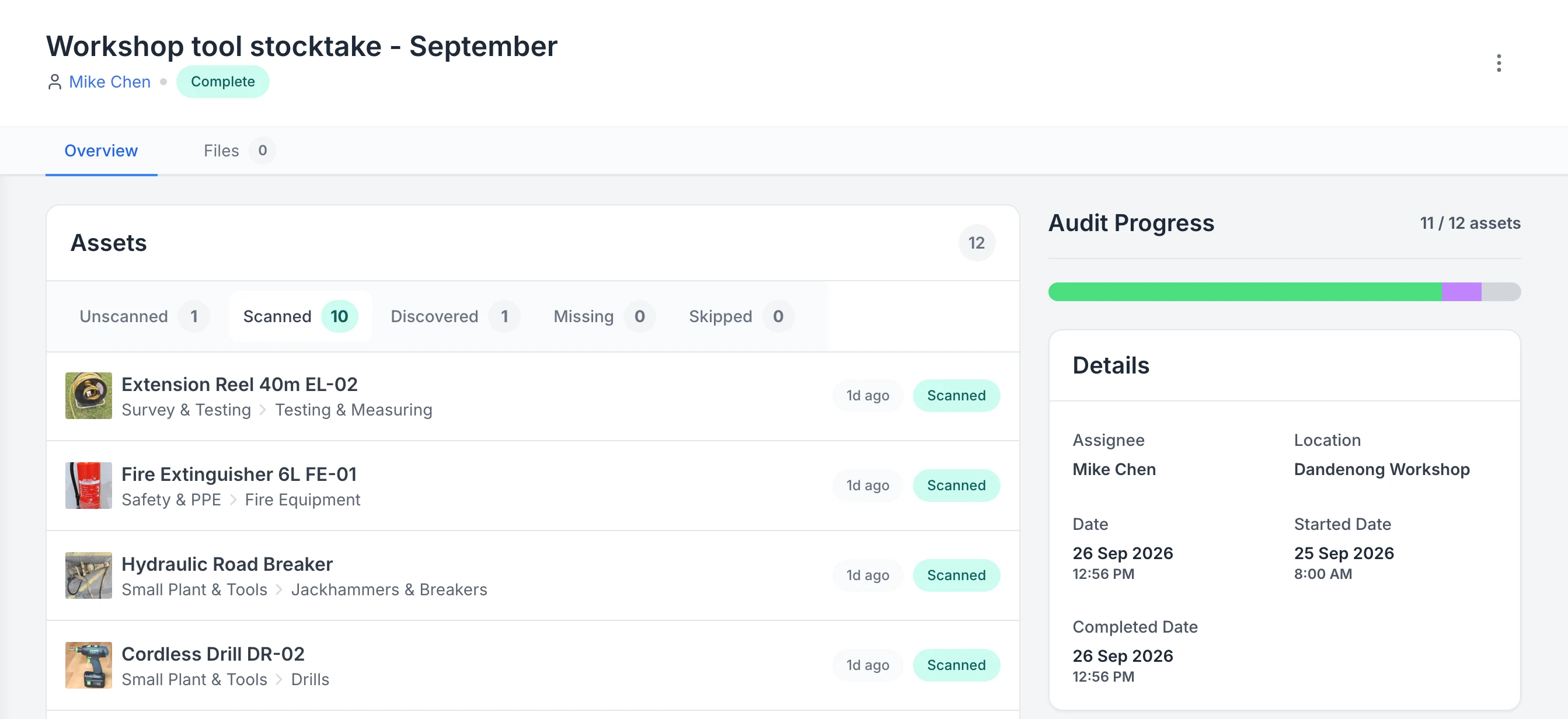
Audits
MapTrack audit Workshop tool stocktake - September, assigned to Mike Chen and marked Complete. Tabs show 1 unscanned, 10 scanned, 1 discovered, 0 missing and 0 skipped; the scanned list starts with an extension reel, a fire extinguisher, a hydraulic road breaker and a cordless drill; the progress bar reads 11 of 12 assets.

See what a stocktake scanned, discovered and missed

A completed workshop stocktake. Ten listed assets were scanned and one asset that was not on the list was discovered, so progress reads 11 of 12. One asset is still unscanned and none are marked missing.

MapTrack app · Demonstration data · Captured

About this screenshot

Captured in a demonstration workspace on the audit’s Overview tab with the Scanned tab open; its activity log continues below the crop.

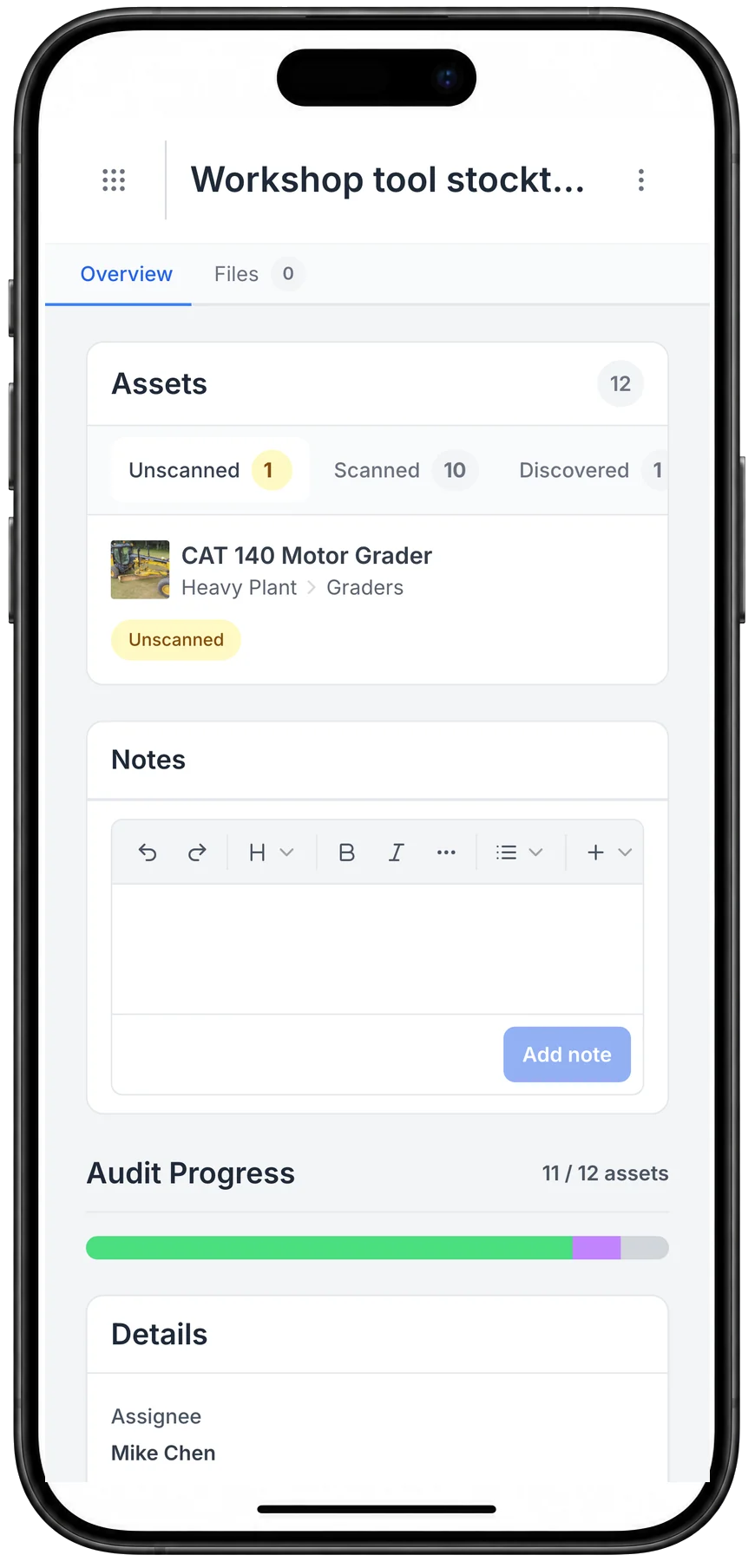
A MapTrack workshop tool stocktake on a phone: 12 assets, with 10 scanned, 1 discovered and 1 still unscanned, a CAT 140 motor grader, and audit progress at 11 of 12 assets, assigned to Mike Chen.

A stocktake on the phone

A stocktake on the phone: what has been scanned, what turned up that was not on the list, and what is still to find.

MapTrack app · Demonstration data · Captured

About this screenshot

Captured at a 430 x 932 phone viewport in a demonstration workspace and shown in a phone frame.

Every annual test and calibration on time

Annual testing, servicing and calibration run on a schedule. The assigned person gets an email a week before each one falls due, and anything overdue is flagged when someone books it out.

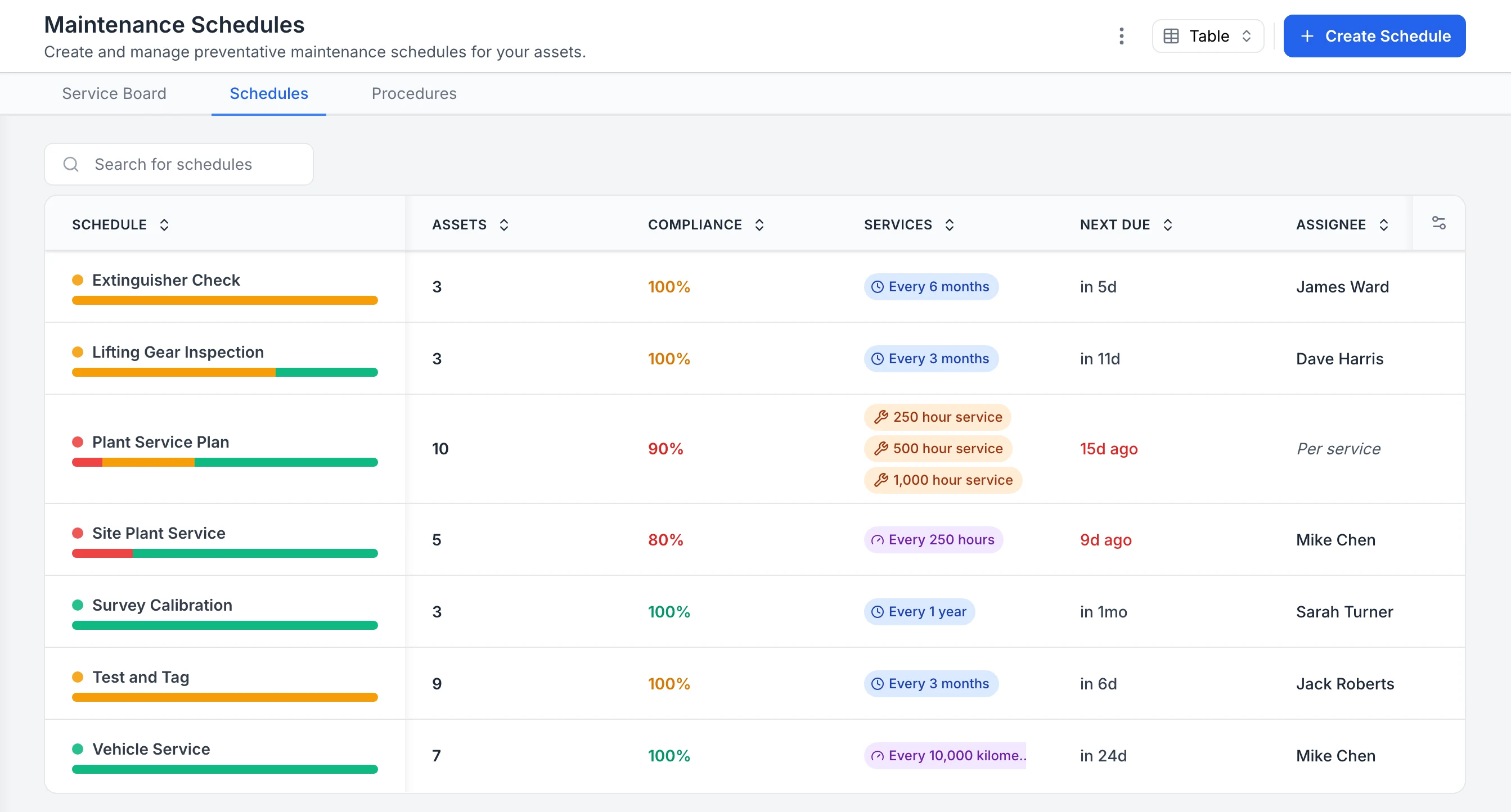
Compliance
MapTrack Maintenance Schedules table listing Extinguisher Check, Lifting Gear Inspection, Plant Service Plan, Site Plant Service, Survey Calibration, Test and Tag and Vehicle Service, each with its asset count, a compliance percentage, its interval, when it is next due and who it is assigned to. The two plant schedules are overdue and show in red.

See compliance for every inspection and service schedule

Every maintenance schedule in one table. Extinguisher checks, lifting gear inspections, test and tag and survey calibration sit beside plant and vehicle servicing, each with a compliance percentage, interval, next due date and assignee. The plant service plan and site plant service are overdue, so they show in red; schedules with assets due soon show in orange.

MapTrack app · Demonstration data · Captured

About this screenshot

Captured in a demonstration workspace on the Maintenance Schedules tab. The app shortens long interval labels, as in the vehicle service row.

Not sure which of these to start with? We'll walk you through it in a demo.

Book a demo

30 minutes on Microsoft Teams

Pre-starts and servicing on the GSE

Operators do the tug, belt loader or ground power unit pre-start on their phone, with a note and photo on any failed check. Servicing falls due on run hours or the calendar.

Pre-start inspections
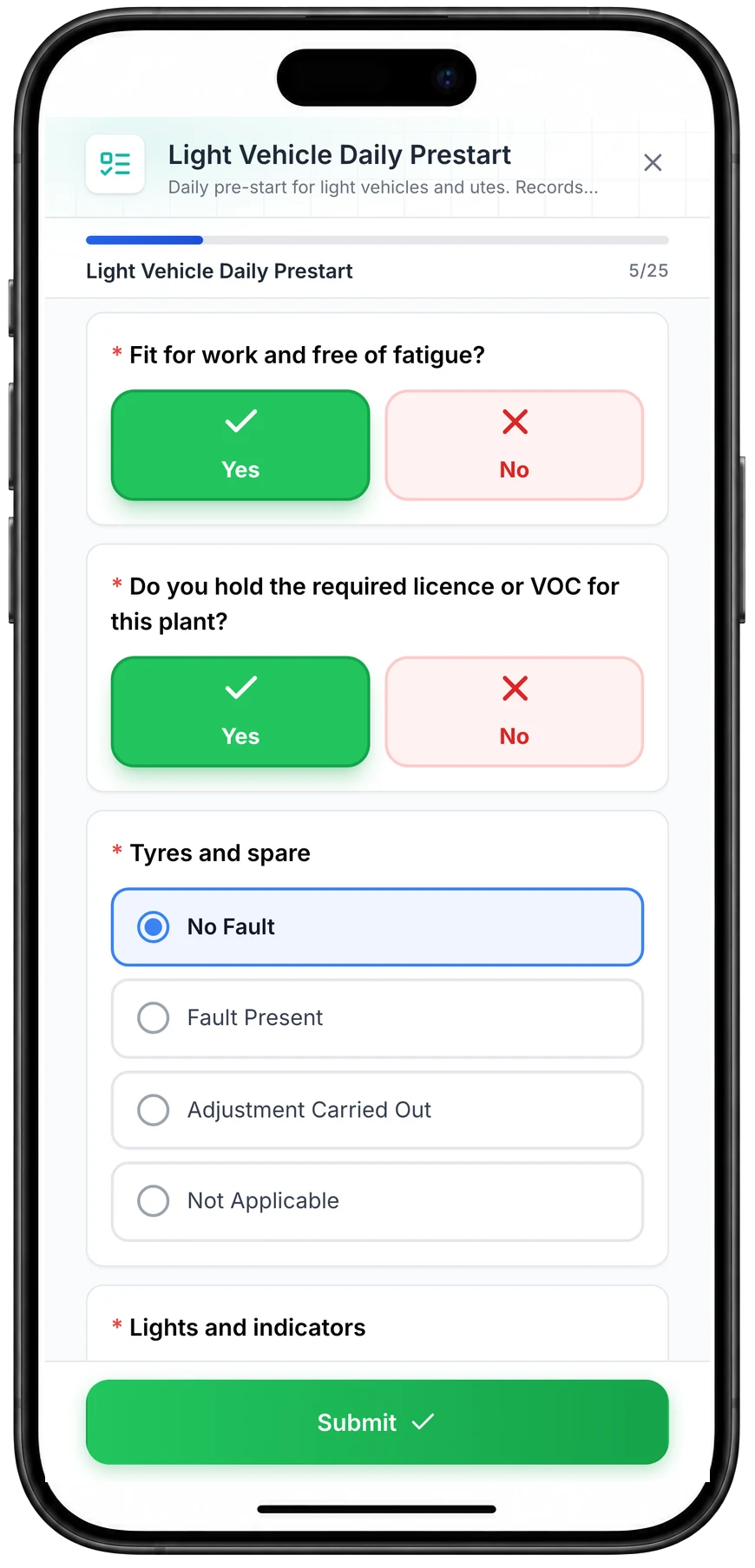
MapTrack Light Vehicle Daily Prestart on a phone, 5 of 25 answered: Yes selected for fit for work and free of fatigue and for holding the required licence, No Fault selected for tyres and spare from No Fault, Fault Present, Adjustment Carried Out and Not Applicable, the lights and indicators check next, and a Submit button.

Run a vehicle pre-start on a phone

A daily pre-start for a ute, part-way through. Driver checks such as fitness for work and licence take one tap, and each vehicle check records No Fault, Fault Present, Adjustment Carried Out or Not Applicable.

MapTrack app · Demonstration data · Captured

About this screenshot

Captured at a 430 x 932 phone viewport in a demonstration workspace and shown in a phone frame; the form was closed without submitting.

Contractor tickets on their record

Keep each person's licence, card and medical or VOC expiry dates on their own record, next to the tools they hold.

Compliance
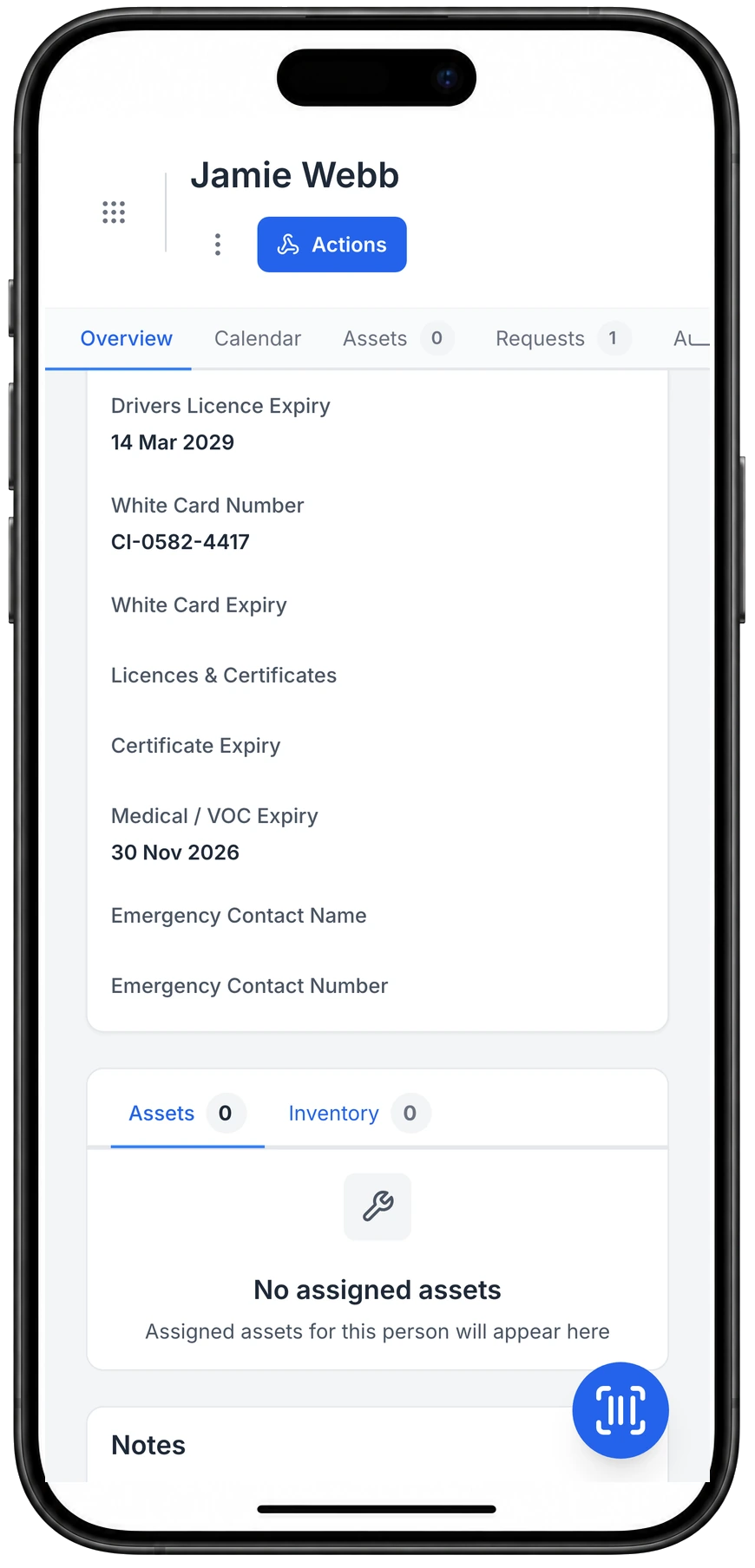
Person record for Jamie Webb on a phone showing Drivers Licence Expiry 14 Mar 2029, White Card Number CI-0582-4417 and Medical / VOC Expiry 30 Nov 2026, with White Card Expiry, Licences & Certificates and Certificate Expiry fields below.

Licence, white card and VOC dates on the person’s record

Licence, white card and medical or VOC dates live on the person's record, next to the gear they hold.

MapTrack app · Demonstration data · Captured

About this screenshot

Demonstration person with three values entered on 23 Oct 2026; the fields are custom person fields set up in this workspace.

Seen one that fits how your team works? We'll show it to you in a demo.

Book a demo

30 minutes on Microsoft Teams

Customer proof

What customers say

We haven't published an aviation customer story. These are customers doing the same work in other industries, each labelled with their own industry.

“the process of assigning assets is now incredibly streamlined. The system's reliability has been a significant upgrade from our old spreadsheets, and the 'Activity' function (automated record-keeping) has greatly enhanced accountability among our tool assignees and users.”

Verified LinkedIn User, Project Coordinator, Construction, 51-200 employeesVerified review on Capterra, August 2025

“Accessing Asset information like servicing/repair history, condition, last user, important user guides and other documentation for any asset is literally one click away on your phone.”

Lindsay, Workshop Coordinator, Construction, Small-Business (50 or fewer emp.)Verified review on G2, August 2025

Rated 4.9 on G2 (15 reviews) and 5.0 on Capterra, GetApp and Software Advice (one shared pool of 17 reviews). Capterra Best Ease of Use 2026 and Best Value 2026 badges. 600,000+ assets tracked since 2012. 24/7 support.

Want to hear how other aviation teams set MapTrack up? Ask us in a demo.

Book a demo

30 minutes on Microsoft Teams

By the numbers

The real cost of poor asset control in aviation

Missing tools, expired calibrations and unplanned GSE downtime create safety risks and operational delays. The numbers make a clear case for digital tracking.

35%

typical wrench time: the share of a maintenance technician’s day on hands-on work, with the rest lost to travel, parts, paperwork and searching

Doc Palmer, Plant Services, 4 March 2019

55%

wrench time reached with proper maintenance planning and scheduling, up from a typical 35%

Doc Palmer, Plant Services, 4 March 2019

30–40%

savings opportunity that a functioning predictive maintenance programme opens up against a reactive-heavy operation

US Department of Energy, O&M Best Practices Guide, Release 3.0 (2010), p. 5.4

One platform

Tool control, calibration and maintenance in one system

Stop juggling spreadsheets, paper calibration logs and disconnected systems. MapTrack connects tool accountability, calibration tracking and usage-based maintenance into a single platform built for hangars, ramps and MRO workshops.

MapTrack Assets table filtered to Small Plant & Tools, showing 9 tools, angle grinders, a hydraulic road breaker, cordless drills, a concrete cut-off saw, an inverter welder and plate compactors, each with its category, a Deployed or Available status, the person or site it is with, its QR tag ID and its make.

Keep small tools in the same register as plant

The same register filtered to small plant and tools. Each tool carries its own QR tag and shows whether it is out with someone or sitting at the workshop or on site.

MapTrack app · Demonstration data · Captured

About this screenshot

Captured in a demonstration workspace. The All assets view is filtered to the Small Plant & Tools category and shows the Status, Person, Location, Tag and Make columns.

Want to see how these fit together on your own sites? We'll show you in a demo.

Book a demo

30 minutes on Microsoft Teams

Compliance

Calibration tracking and compliance, audit-ready on mobile

Store calibration certificates and due dates against every tool and instrument. Overdue alerts flag non-compliant items before they're used on aircraft. Pre-use inspection forms completed on mobile in the hangar or on the ramp with photos - attach to the asset record with a timestamp.

  • Calibration due dates and certificate storage on each tool
  • Overdue alerts prevent use of non-compliant instruments
  • Pre-use inspections completed on mobile with photo evidence
  • Failed items automatically trigger work orders
  • Full compliance history exportable for CASA or customer audits
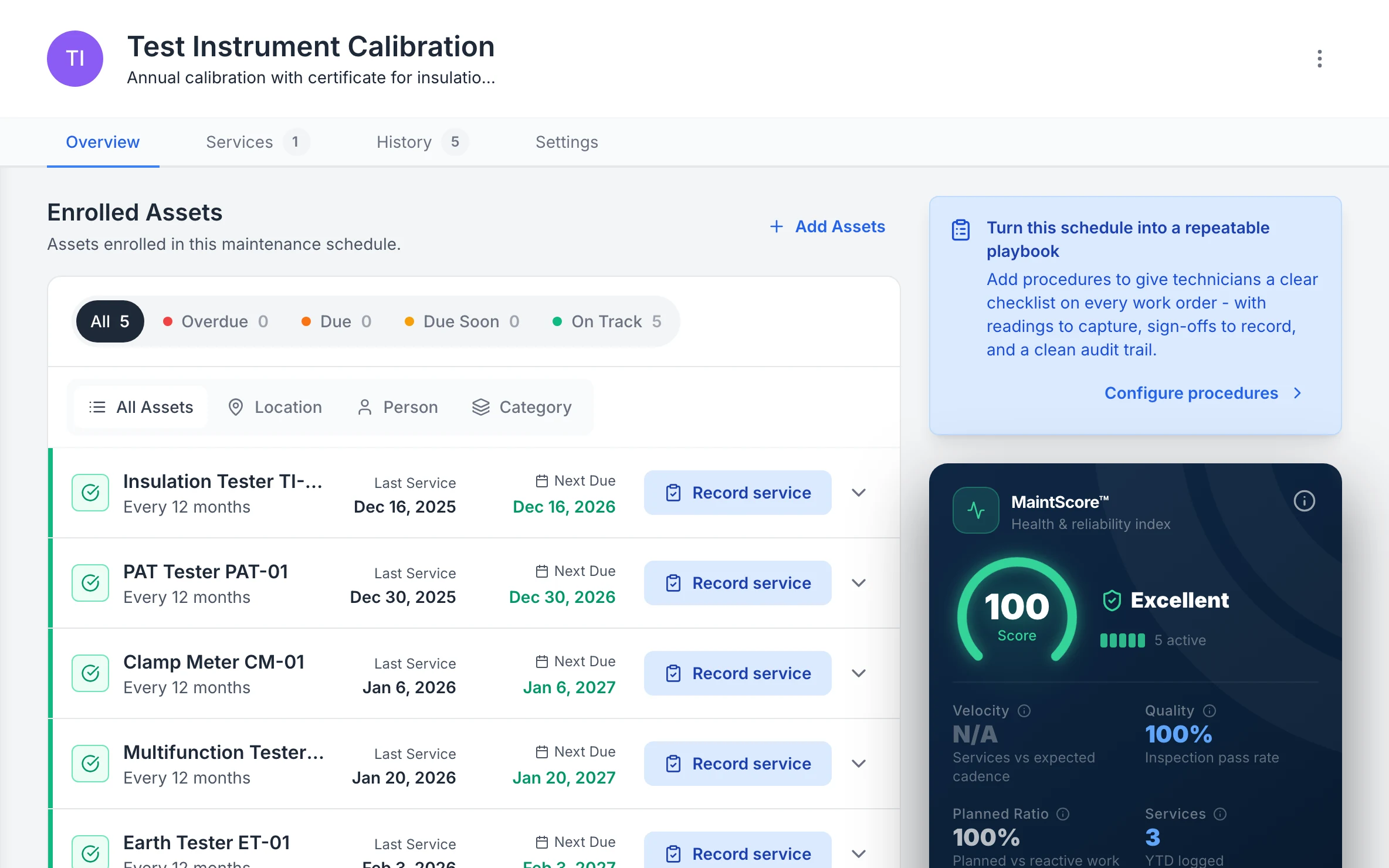
MapTrack Test Instrument Calibration schedule, annual calibration with a certificate: five enrolled testers, all on track, among them PAT tester PAT-01, clamp meter CM-01 and earth tester ET-01, each with its last calibration and next due date, beside a MaintScore of 100, Excellent.

Every tester’s next calibration

Each test instrument with its last calibration and when the next is due, on a yearly calibration schedule.

MapTrack app · Demonstration data · Captured

About this screenshot

Demonstration workspace at a 1440 x 900 desktop viewport, cropped right of the navigation sidebar to a 16:10 frame.

Accountability

Scan, assign and reconcile from the hangar

QR code every tool and instrument. Check tools out to a job, bay or aircraft and check them back in when the task is complete. Run tool reconciliation scans after every maintenance event to verify every item is accounted for - directly supporting your FOD prevention programme.

  • Check-in and check-out on mobile for every tool
  • Tool reconciliation scans after maintenance tasks
  • Missing tools flagged immediately - before aircraft release
  • Assign tools to bays, aircraft or technicians
  • Bulk scanning for hangar audits and stocktakes
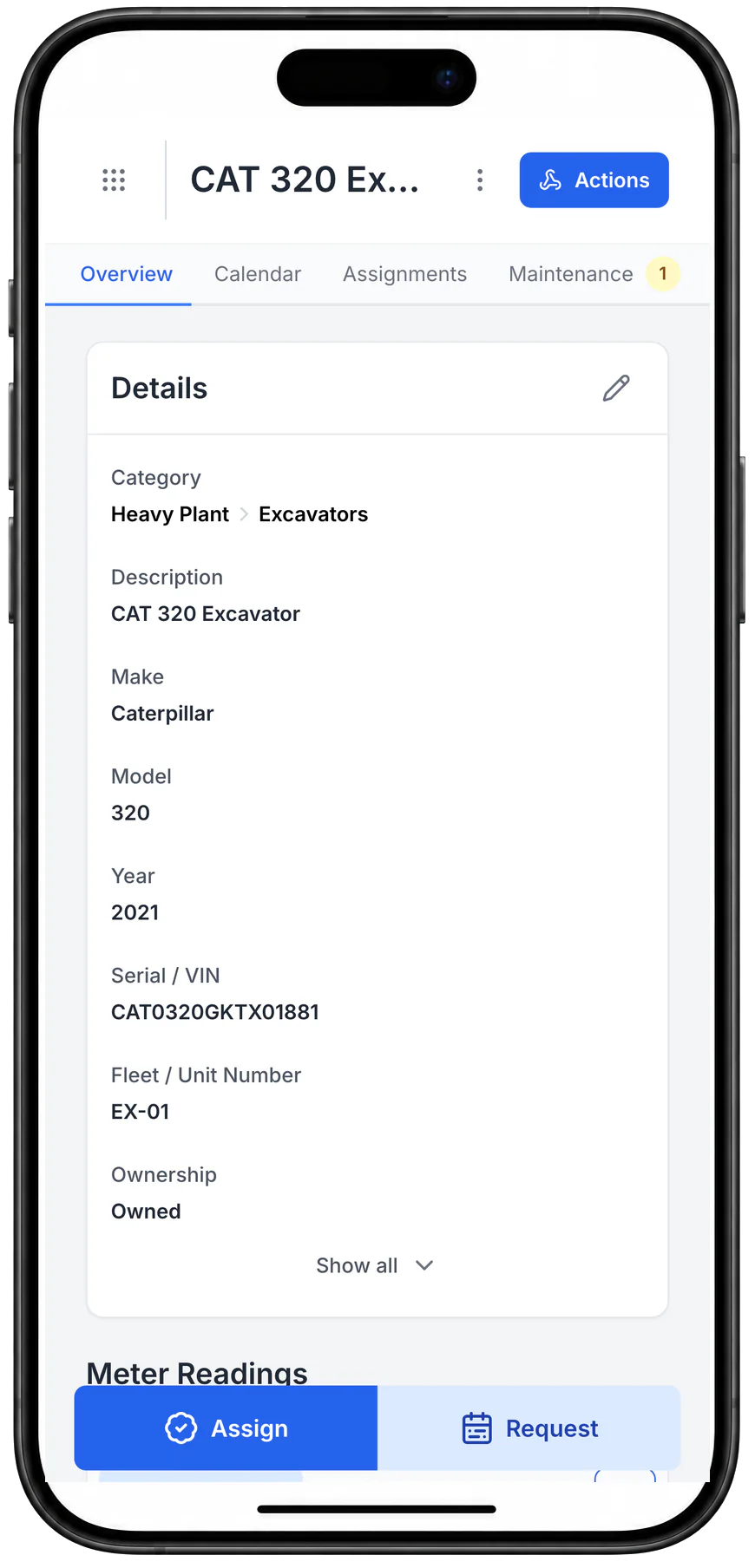
The MapTrack record for a CAT 320 excavator on a phone: category, description, make, model, year, serial, fleet number and ownership, with Assign and Request buttons.

Open the record a scan leads to

An asset record on a phone, with its details and Assign and Request one tap away. Scanning the asset’s MapTrack QR tag opens this record; this capture was opened from the asset list instead.

MapTrack app · Demonstration data · Captured

About this screenshot

Captured at a 430 x 932 phone viewport in a demonstration workspace and shown in a phone frame.

See these on a phone and a desktop in a live demo.

Book a demo

30 minutes on Microsoft Teams

Maintenance

Service GSE when the hours say so. Not the calendar

Trigger work orders from runtime hours, engine hours or cycle counts. Not arbitrary calendar reminders. Telematics data feeds in automatically where integrated. Every service record lives alongside the asset's tracking, calibration and compliance history.

  • Meter-based triggers: runtime hours, cycles, ODO
  • Telematics data feeds in from Teletrac Navman, Geotab and others
  • Work orders assigned to GSE technicians on mobile
  • Complete parts history and cost tracking per asset
  • Overdue alerts keep ramp equipment serviceable
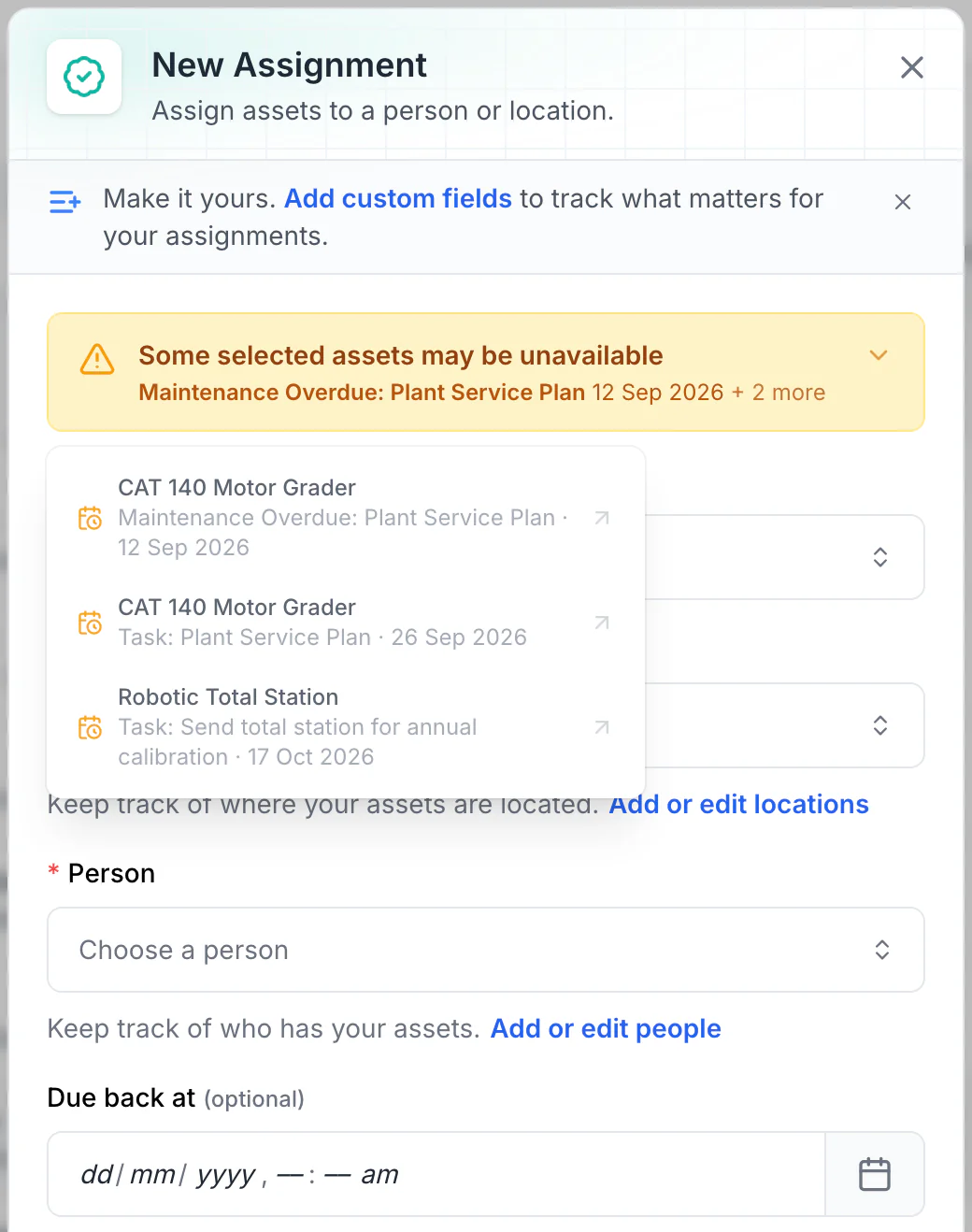
MapTrack New Assignment form with an amber notice that some selected assets may be unavailable, and its detail open: the CAT 140 Motor Grader with Plant Service Plan maintenance overdue since 12 September 2026 and a Plant Service Plan task on 26 September 2026, and the Robotic Total Station with a task to send it for annual calibration on 17 October 2026, each with a link.

Read the warnings before issuing equipment

Overdue maintenance and scheduled tasks show as amber warnings. No due-back date is set here, so every upcoming conflict is listed. With a due-back date, only tasks before it are listed: a 15 October due-back leaves out the total station’s 17 October calibration.

MapTrack app · Demonstration data · Captured

About this screenshot

Demonstration workspace. Two assets selected and Assign opened; the form was not saved.

Integrations

GSE data straight from the telematics

MapTrack integrates with telematics platforms used across aviation ground operations, so runtime hours, odometer and GPS location drive maintenance and utilisation automatically, without manual data entry from your GSE fleet.

Teletrac Navman
Geotab
  • Runtime hour tracking for timely preventive maintenance on GSE
  • Live GPS location for ground support equipment across ramp areas
  • Fault and diagnostic data where supported by your integration
  • Utilisation data for GSE fleet right-sizing and cost allocation

See all integrations

What we track

Built for hangars and ramps, mobile and offline

MapTrack is built for the full mix of assets that move across your hangars, ramp areas, MRO workshops and outstations - from calibrated hand tools to heavy ground support equipment.

Store calibration certificates and due dates against every tool and instrument. Overdue alerts flag non-compliant items before they're used on aircraft. Pre-use inspection forms completed on mobile in the hangar or on the ramp with photos - attach to the asset record with a timestamp.

iOS & Android

No specialist hardware required

Sydney

Primary application hosting

QR scan

Any standard phone camera

Unlimited users

No per-seat charges

Maintain every asset from apron to hangar

Track calibration schedules, enforce tool control and manage GSE maintenance from one platform built for aviation operations.

  • Used across Australia & New Zealand
  • Per-asset pricing
  • Unlimited users

Get started

How aviation teams roll out MapTrack

Most aviation and MRO teams are tracking tools and GSE within one to two weeks. Start with your most critical assets and expand across hangars and ramp locations.

Step 1

Import your GSE and tooling inventory

Upload your existing asset register or start fresh. Add aircraft ground support equipment, maintenance tooling, and safety-critical gear.

Step 2

Attach QR labels and assign to crews (through a crew member or zone)

Print durable QR labels, attach to equipment, and assign to ramp teams (through a team member), MRO technicians, or hangar zones.

Step 3

Track, inspect, and stay compliant

Log check-outs, schedule calibration and inspections, and generate compliance reports for auditors.

Tool control and calibration rules for hangars and ramps

Australian operators answer to CASA. In the United States, an FAA regulation and an FAA advisory circular spell out what tool control and calibration look like, and they're a useful benchmark for any hangar or ramp. In the United Kingdom, Part-145 sets the same tool control and calibration duty.

Australia

WHS Regulation s 213

Prices on our pricing page are in Australian dollars, ex GST.

  • Australia, in Queensland's text of the model WHS Regulations (each state and territory enacts its own version)

    Work Health and Safety Regulation 2011, section 213, maintenance and inspection of plant

    What it asks for

    The person with management or control of plant at a workplace makes sure its maintenance, inspection and, if needed, testing is done by a competent person, following the manufacturer's recommendations. Where there are none, a competent person's recommendations apply, and where neither is reasonably practicable, the plant is inspected annually.

    How MapTrack keeps the record

    Each tug, loader, GPU and stand is its own record with its services scheduled by date or by hours from meter readings, and the person assigned to a schedule gets an email 7 days before a service falls due.

    Source: Work Health and Safety Regulation 2011 (Queensland) (Queensland Government (Queensland Legislation), checked 26 Oct 2026)

United States

14 CFR 145.109, FAA AC 150/5210-24A

Pricing is quoted in your currency, US dollars.

  • United States, FAA-certificated repair stations

    14 CFR 145.109, repair station equipment, materials and data

    What it asks for

    A repair station has the equipment, tools and materials its work needs, on the premises and under its control while the work is being done. All test and inspection equipment and tools used to make airworthiness determinations are calibrated to a standard acceptable to the FAA.

    How MapTrack keeps the record

    Each torque wrench, test set and gauge carries its calibration date, certificate and next due date. An instrument past its due date is flagged when someone books it out, and booking it out anyway is logged.

    Source: 14 CFR 145.109, Equipment, materials, and data requirements (eCFR) (US Federal Aviation Administration, via the Electronic Code of Federal Regulations, checked 26 Oct 2026)

  • United States airports (guidance, February 2024)

    FAA Advisory Circular 150/5210-24A, airport foreign object debris (FOD) management

    What it asks for

    For aircraft maintenance, it says to account for the hand tools used in repair jobs, and that all tools should be accounted for as a matter of practice, using checklists, shadow boards and cut-out tool tray liners. It also suggests procedures to inspect GSE for the wear and tear that can lead to FOD.

    How MapTrack keeps the record

    Tools are scanned out to a person and back in, kits come back with every part confirmed, and anything not back by close of day shows against a name. GSE pre-use checks on the phone record any failed item with a note and photo.

    Source: AC 150/5210-24A, Airport Foreign Object Debris (FOD) Management (US Federal Aviation Administration, checked 26 Oct 2026)

Part 145 repair station
A maintenance organisation certificated by the FAA under 14 CFR Part 145.

United Kingdom

Part-145 145.A.40

Pricing is quoted in your currency, pounds sterling.

  • United Kingdom, approved aircraft maintenance organisations

    UK Part-145 (Annex II to Regulation (EU) No 1321/2014), 145.A.40, equipment and tools

    What it asks for

    The organisation has and uses the equipment and tools its approved scope of work needs, using a tool the manufacturer specifies unless the CAA agrees an alternative. All tools and equipment, particularly test equipment, are controlled and calibrated to an officially recognised standard at a frequency that keeps them serviceable and accurate, and records of each calibration and its traceability are kept.

    How MapTrack keeps the record

    Each torque wrench, test set and gauge carries its calibration date, certificate and next due date. An instrument past its due date is flagged when someone books it out, and booking it out anyway is logged.

    Source: Regulation (EU) No 1321/2014, Annex II (Part-145) (legislation.gov.uk (The National Archives), checked 26 Oct 2026)

Part-145 approval
The UK CAA approval for an aircraft maintenance organisation, set out in Annex II to Regulation (EU) No 1321/2014 as it applies in the UK.

MapTrack keeps the records these rules ask you to keep. It does not do the inspection or testing, certify your work or make you compliant, and the current text of each instrument is the authority.

Want to see how these records would look for your own gear? We'll show you in a demo.

Book a demo

30 minutes on Microsoft Teams

Aviation tool and GSE terms, defined

GSE (ground support equipment)
The vehicles and equipment that service an aircraft between flights: tugs and pushback tractors, belt loaders, ground power units, air start units, stairs, baggage carts and dollies, de-icers, refuellers and catering trucks.
MRO
Maintenance, repair and overhaul: the hangars and workshops that maintain aircraft and their components.
FOD
Foreign object debris: anything loose airside, such as a bolt, a tool or a luggage wheel, that can damage an aircraft. Foreign object damage is the damage it causes.
Tool control
Knowing where every tool is before an aircraft is signed off: tools signed out to a person, checked back in, and any gap found before the aircraft moves. Shadow boards and tray liners show a gap at a glance; scanning records it.
Calibration traceability
Being able to show that a tool's calibration links back, through the lab's own standards, to a national or international reference. The calibration certificate is the evidence.
Airside
The part of an airport past security screening and the boundary fence, including the aprons, taxiways and runways, where access and vehicle movements are controlled.

Stop the loss

Tool loss and calibration gaps are the two biggest controllable risks in aviation asset management

MapTrack gives your team the tool control, calibration visibility and maintenance triggers to close both without adding headcount or replacing your existing workflows.

Frequently asked questions

Common questions from aviation and MRO teams.

Aviation asset tracking software is a platform that helps airlines, MRO facilities, ground handling companies and aviation maintenance teams track, manage and maintain their tools, ground support equipment (GSE) and calibrated instruments across hangars, ramps and workshops. It replaces spreadsheets, paper calibration logs and disconnected systems with a single source of truth for where assets are, who has them, what their calibration status is and when they're due for service. MapTrack combines asset tracking (QR codes, barcodes and GPS), calibration management, pre-start inspections, maintenance scheduling and work orders, and reporting, all on mobile in the hangar or on the ramp.

Yes. MapTrack stores calibration certificates, due dates and calibration history against each tool or instrument. Overdue and upcoming calibration alerts ensure nothing slips through. You can filter your entire fleet by calibration status - current, due soon or overdue, and generate reports for regulatory audits. When a tool reaches its calibration due date, it can be flagged as out-of-service until re-calibrated, preventing use of non-compliant instruments on aircraft.

Foreign Object Debris (FOD) is a critical safety risk in aviation maintenance. MapTrack supports tool accountability by tracking every tool checked out to a technician for a job, or to a bay or aircraft. After maintenance, teams can run a tool reconciliation scan to verify every tool is accounted for before the aircraft is signed off. Missing tools are immediately flagged so the team can locate them before the aircraft returns to service. This systematic approach to tool control directly supports FOD prevention programmes.

Yes. MapTrack supports mixed asset types in a single platform. Track GSE - ground power units, tugs, belt loaders, pushback tractors, passenger stairs and more - alongside hand tools, calibrated instruments and test equipment. GSE can be tracked with QR labels, GPS devices or OEM telematics data where available. All asset types live in the same system alongside their maintenance history, inspection records and assignments.

Yes. Meter-based maintenance triggers (runtime hours, engine hours, cycle counts) drive work orders in MapTrack. Where you have telematics integrations (Teletrac Navman, Geotab and others), meter data feeds in automatically so you're servicing GSE based on real usage. Not just arbitrary calendar dates. Manual meter readings are also supported where telematics is not present. This ensures high-utilisation equipment gets serviced on time while low-utilisation units aren't over-serviced.

MapTrack helps MRO teams meet compliance obligations by keeping calibration certificates, inspection records and maintenance evidence attached to each asset. This includes calibration tracking for precision tools and test equipment, pre-use inspection records for GSE and ground equipment, maintenance and service history for regulatory audits, and tool control records for FOD prevention. All evidence is searchable and exportable for CASA, EASA or customer audits. Failed inspection items can automatically trigger work orders so defects are tracked from identification through to rectification.

MapTrack gives you a single register across all hangars, ramps, workshops and outstations. Each location can have its own asset view with RBAC (role-based access control) so teams see what's relevant to them. You can transfer tools between locations with a full audit trail, run stocktakes by hangar or location, and see which location holds which calibrated instruments at any time. This is critical for MRO operators running across multiple bases or for airlines managing GSE pools across terminals.

MapTrack's primary database and application hosting are in Sydney. Some supporting services may process data outside Australia, so aviation operators should review the current subprocessor list and hosting documentation against their requirements. SSO and RBAC are available for larger organisations with enterprise security requirements.

MapTrack uses per-asset pricing with unlimited users included. Not per-seat licensing. You can give access to every technician, engineer, ramp crew member, GSE operator and admin without your costs growing as the team does. This is a significant advantage in aviation where teams span maintenance, ground handling, engineering and management. Pricing scales with the number of assets you track, not the size of your team.

Most aviation teams are running on MapTrack within one to two weeks. The typical approach is to start with one asset class or one hangar: import or scan in assets, set up your first workflows (usually calibration tracking or tool control), and roll out to maintenance crews. MapTrack's onboarding team supports you through setup and training at no additional cost. For larger rollouts across multiple bases or MRO facilities, a phased approach works well: get adoption solid on one workflow, then expand to more asset types and locations.

MapTrack tracks ground support equipment alongside the tools and calibrated instruments in the hangar. Each tug, loader, GPU and stair unit has a QR label, a pre-use check on the phone, servicing on run hours, and a record of who had it. Hangar tools are scanned out and back with a due-back time, so anything not back by close of day is flagged against a name.

One that reconciles every tool by the end of the shift and keeps calibration on the record. In MapTrack technicians scan each tool out to their name and back in, kits come back with their parts confirmed, overdue tools are flagged against a name, and calibrated instruments carry their next due date and cert, flagged if someone books one out overdue. An audit of the tool cabinet is a walk with a phone.

Each maker's manual sets the intervals for its units, typically daily operator checks plus services by run hours, the calendar or both. In MapTrack one service plan holds the levels in order, such as 250, 500 and 1,000-hour services, and when two fall due together the bigger one covers the smaller in one work order. Run hours come from a reading on the pre-use check or are estimated from a tracker, and MapTrack estimates when the next service will fall due from each unit's recent usage.

Yes, in two ways. In MapTrack each apron, hangar or yard can have its boundary drawn on its map, showing the gear there, and a GPS tracker on a tug or loader puts its latest position on its record. Live tracking, trip history and alerts when a unit enters or leaves an area run in MapTrack Telematics, from the same vendor and account.

Fit each cart or dolly with a Bluetooth tag. A gateway GPS tracker (Oyster, Remora3, G70 or Dart3), fitted to a tug or left at a stand, picks up the tags near it, and each detection updates that item's location in MapTrack, so you can see where the dollies were last seen without a tracker on every one. We supply the tags and trackers in Australia and New Zealand.

Often, yes. Digital Matter trackers are registered in MapTrack's device manager, showing battery, signal and last report, and their estimated run hours and kilometres feed each unit's service schedule. Other tracker brands are connected with our help. If your units report through their maker's own platform, bring the details to the demo and we'll tell you what can come across.

Got a question we haven't answered here? Ask it in a demo.

Book a demo

30 minutes on Microsoft Teams

Get MapTrack pricing for Aviation teams

Tell us about your operations. Our team will share per-asset pricing tailored to your aviation asset mix and a rollout plan - within one business day.

Per-asset pricing. Unlimited users. Primary database hosted in Sydney.

Aviation teams start tracking today

Join aviation and MRO teams across Australia using MapTrack to track tools, manage calibration and keep GSE maintained, all in one platform.

Calibration tracking · Maintenance · Asset tracking · Industrial maintenance · Compare

Tools from $1 · Machines from $12View pricing