
One system for fleet, plant and tools
Vehicles, machines, small tools and test gear in a single register, with inspections, servicing, custody and documents attached to each one. The asset spreadsheet is the thing this replaces.

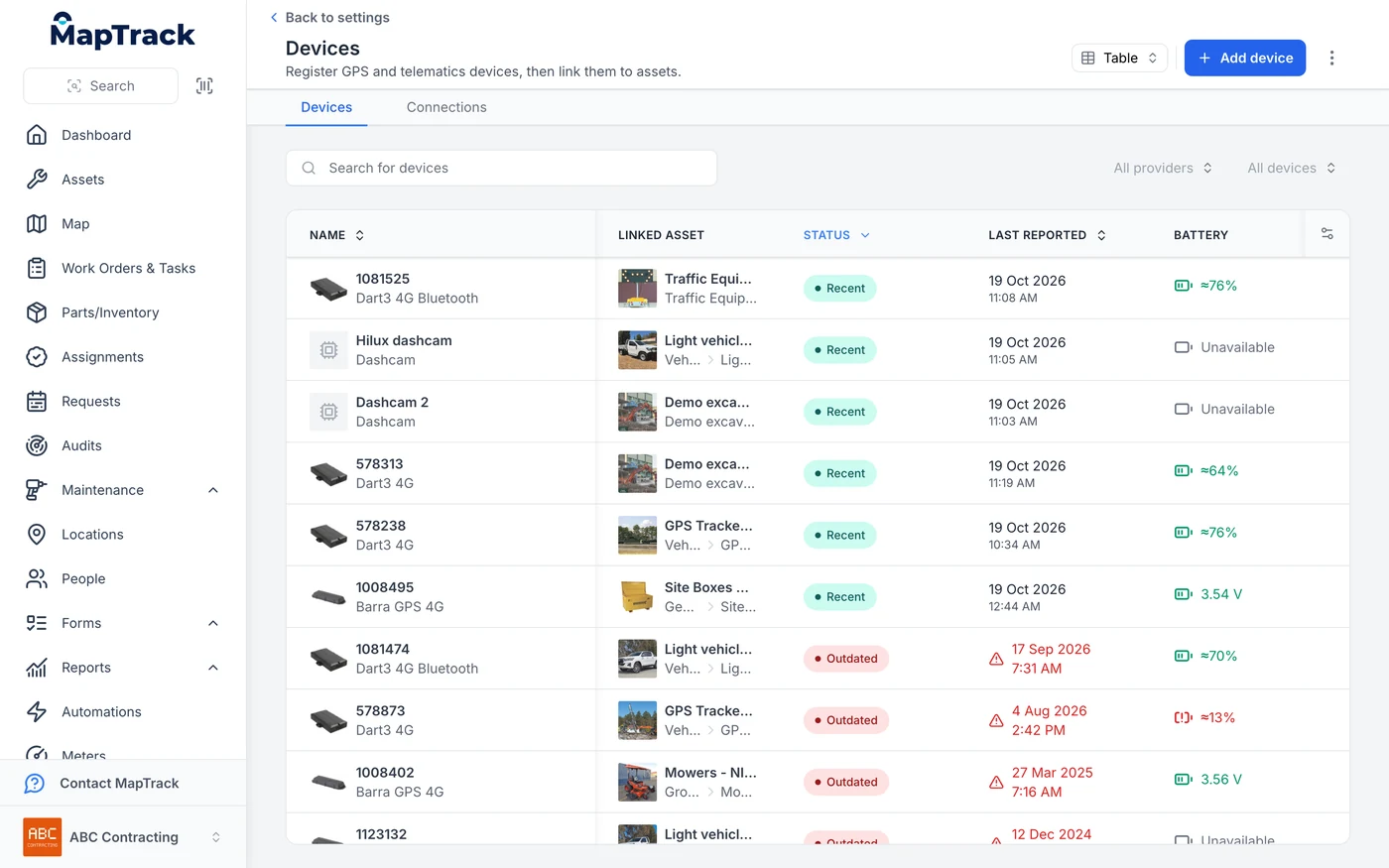
Cameras and trackers in one device list
An AI dash cam registers in the same device list as the GPS trackers and links to the asset it is fitted to. The status and last reported columns come from the devices themselves, so a tracker that has stopped reporting shows as Outdated.
MapTrack app · Demonstration data · Captured
About this screenshot
Demonstration account at a 1440 px desktop viewport, Devices list sorted by status. The camera maker’s name is masked.
Trusted by construction, mining and field service teams














Keep a common asset record and clear location sources
Tools, vehicles and plant can share the register while using different tracking methods. Match the method to the operational question and the equipment.
1. Tools and handovers
Use QR scans and assignments for custody. Supported Bluetooth-tag gateway detections update location in the app.
2. Plant and vehicle movement
Use the app for the latest position and MapTrack Telematics for live GPS, geofences, trips and history. Keep the device and reporting interval with the interpretation.
What does consolidating the asset layer actually mean?
It means one register for everything you own that has to be found, checked, serviced or proven, instead of a separate list per asset class and per department. In practice that is vehicles, plant, small tools, test and measurement gear and safety equipment in the same system, each with its own inspections, maintenance, custody and documents. Requests cover equipment bookings, while work planning and work orders carry procedures, time, parts and recorded costs. Payroll, statutory accounting and dispatch stay in the systems you use for them. The asset records are the part that is scattered, and they are the part worth bringing together.
- In scope: Register, Requests and equipment bookings, work planning, work orders, custody, inspections, maintenance, time, parts, recorded costs, documents and audits.
- Out of scope: Payroll, statutory accounting and dispatch. Confirm the integration or API workflow before rollout.
- What disappears: The asset spreadsheet, and the second copy of it somebody else keeps.
Why does the same asset end up in four places?
Because each system was bought to solve one department's problem. The jobs system needed a plant list so it could schedule. The forms app needed an asset list so inspections could be filed against something. The GPS platform came with its own. Finance keeps the depreciation schedule. None of them was wrong on its own, and together they mean one excavator exists four times, with four different names and four different ideas of whether it is on site.
The problem
Most teams did not choose to run five systems. They bought a jobs system, then a forms app, then GPS on the trucks, and each one arrived with its own asset list. The register that everyone actually trusts is a spreadsheet on somebody's desktop, and it is the one thing that is not in any of them. So the same machine is entered several times, the inspection lives apart from the service history, the certificate lives in a shared drive, and nobody can answer a simple question about one asset without opening three tabs.
How MapTrack addresses it
MapTrack is the asset layer underneath the systems you keep. One register holds vehicles, plant, small tools and test gear, with categories and custom fields carrying what makes each class different. Requests cover equipment bookings. Work planning and work orders keep procedures, time, parts and recorded costs with the job. Inspections, maintenance, custody, meter readings, photos and documents attach to the asset itself. QR or barcode labels mean the crew opens the right record by scanning rather than searching. The systems you keep stay connected through integrations and the public API, so the same asset stops being typed in twice.
How it works
- 1
Decide the shape before you import
Categories, asset numbering and the handful of custom fields you actually report on. This decision shapes every report afterwards, so it is worth the afternoon.
- 2
Import the spreadsheets you already have
Bring the registers in from wherever they live now, including the one on somebody's desktop that everybody actually trusts.
- 3
Label what moves
Durable QR or barcode labels on the gear that changes hands, so the crew opens the right record by scanning instead of guessing at a name.
- 4
Move the recurring work onto the record
Plan servicing and inspections, assign work orders and attach procedures, time, parts and recorded costs. Keep the work and its history with the asset.
- 5
Connect what you are keeping
Accounting and telematics integrations and the public API let the asset layer feed the systems around it, rather than duplicating them.
For vehicles with connected cameras
Video and meter readings can sit alongside the vehicle record. We'll check the camera setup, installation and reviewer access with you before rollout.
View video beside the vehicle history
With the connected-camera setup enabled, authorised reviewers can view live video and saved 30-second events in app.maptrack.com, alongside the asset record, pre-starts and maintenance.
Read the fleet camera guideConfirm the readings and review process
The camera setup can provide location, speed, trips, run hours and kilometres. We'll confirm which readings are available on your vehicles. Agree who can view footage and how it'll be used before cameras go live.
Work through the camera policyPlan for the rest of the register
A camera installation needs checking for each asset. Your other equipment can stay in the same register, with inspections, maintenance, photos and documents attached. Use your own asset mix to estimate camera coverage and review time.
Estimate coverage and review timeThe consolidation that works, and the one that does not
Teams are right to be sceptical of all-in-one platforms. The version worth doing is narrow and specific.
One asset layer, not one platform for everything
The register carries Requests and equipment bookings, work planning and work orders, with procedures, time, parts and recorded costs. Keep payroll, statutory accounting and dispatch in the systems you use for them.
Every asset class in the same register
A ute, an excavator and a laser level answer the same five questions. Categories and custom fields carry the differences without needing separate systems.
The crew opens records by scanning
Adoption is the thing that kills consolidation projects. Scanning a label beats searching a list, which is the difference between a system people use and one they route around.
It stops the double entry, not the other systems
The measure of success is how many places the same asset gets typed into, not how many logins you cancelled.
What the asset layer carries
Retire the asset spreadsheet
Bring vehicles, plant and tools into one register, with equipment bookings, work orders and recorded costs. Keep payroll, statutory accounting and dispatch where they work for you.
- No credit card required
- 30 days free trial
- Cancel anytime
Frequently asked questions
Explore
- Pricing
- Book a demo
- MapTrack vs Asset Panda
- Alternative to Asset Panda
- Alternative to spreadsheets
- Commercial GPS tracking
- Construction equipment GPS tracking
- Construction
- Vehicle pre-start checklist
- Hardware store
Related use cases
- Tool theft prevention
- Tool tracking for construction
- Equipment utilisation tracking
- Plant and machinery compliance
- Fleet pre-start inspections
- Equipment maintenance scheduling
- Asset audits and stocktakes
- Equipment hire and rental tracking
- Fire extinguisher inspections
- Test and tag tracking
- Shutdown and turnaround management
- Multi-site equipment management
- GPS geofence time onsite
- Calibration tracking
- Bulk inspections and testing
- Lifting gear and crane inspections
- SWMS and plant risk assessments
- Asset documents and certificates
- Equipment custody and handover
- Offline inspections
- Plant hire chargeout and job costing
See the asset layer in one place
Join construction, mining and field service teams across Australia.
4.9 on G2 · 5.0 on Capterra, GetApp & Software Advice
- No credit card required
- 30 days free trial
- Cancel anytime