
Bulk inspections, testing and calibration
One work order can cover many assets, and every asset keeps its own pass or fail. Built for the rounds where a technician works through a list in one visit: test and tag, calibration, fire equipment, height safety gear.

Trusted by construction, mining and field service teams

















Close out one round without losing a failed item
One work order can contain many assets, with a separate status and pass or fail outcome for each. Use the shared job to organise the visit and the individual records to explain exactly what happened.
1. Choose the due list
Filter the registered assets by the relevant site, category and configured next-test date. Confirm each physical item has its own identifier before adding it to the work order.
2. Record mixed outcomes deliberately
Complete each asset’s procedure and outcome. A completed round can include failed items; the work-order status describes completion of the work, not universal fitness for use.
3. Keep the exception traceable
Retain the failed item’s evidence and create the required repair, replacement or retest follow-up. Reopen that asset’s history to check that its result is individually retrievable.
Setup and limits
- Use competent people and the procedure appropriate to the equipment. Recording an outcome does not certify compliance.
- Load the work order before losing reception; reconnect and confirm the saved results afterwards.
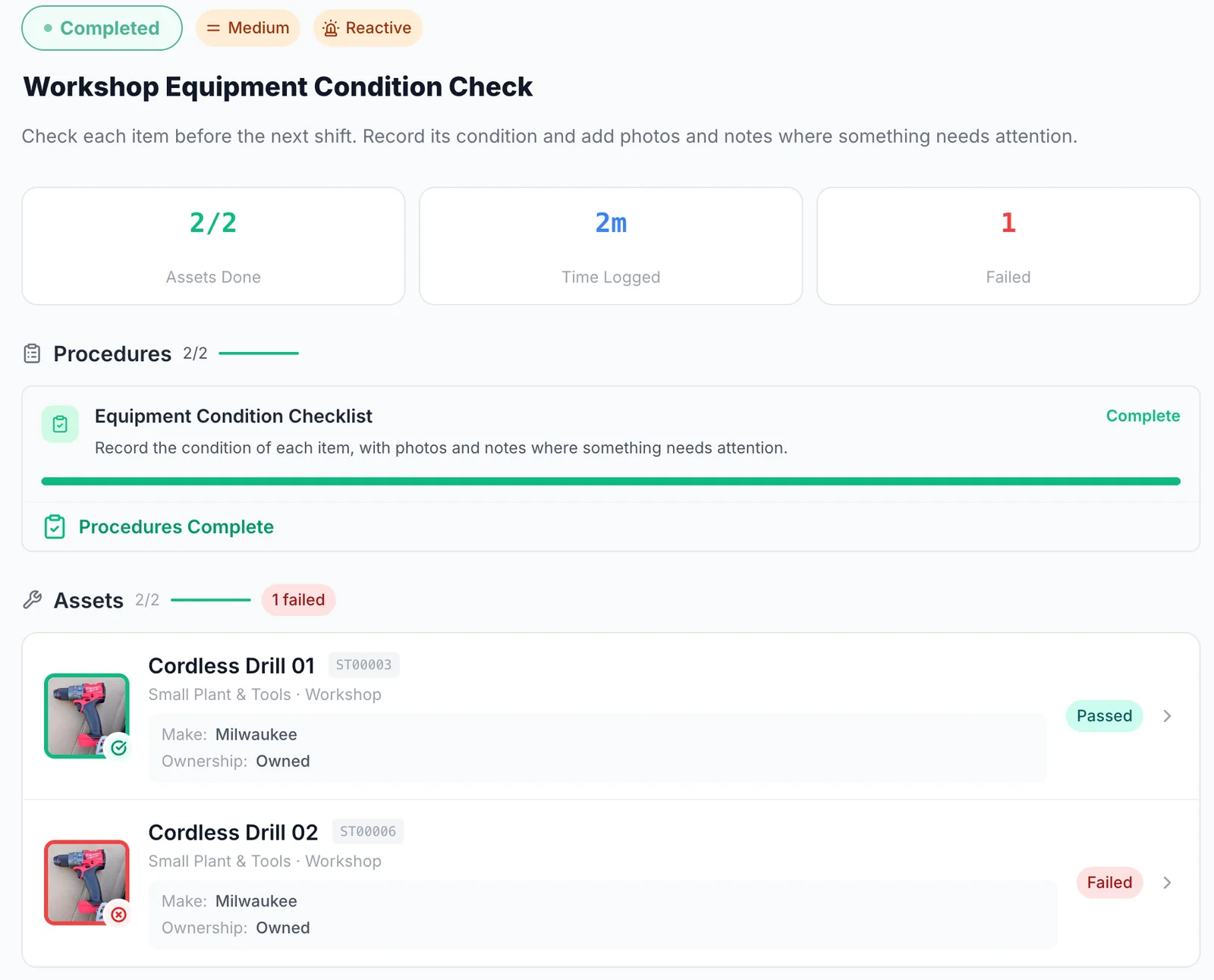
One job, a pass or fail for each item
One work order covers two cordless drills, and each gets its own result: one passed, one failed. The failed item stays plain to see on the job.
MapTrack app · Demonstration data · Captured
About this screenshot
Demonstration workspace at a desktop viewport, on the completed work order, cropped to its summary, procedure and assets.
What is a bulk inspection round?
A bulk inspection round is one scheduled job that covers many assets at once, where each asset still records its own result. MapTrack runs this as a single work order with a per-asset checklist: every asset on it carries its own status and its own pass or fail outcome. That lets a team complete test and tag, calibration, certification or fire equipment work across a large number of assets without losing the record for each individual item.
- The unit of work: One work order, many assets, one close-out.
- The unit of record: Each asset keeps its own outcome and its own history.
- Where it sits: Alongside that asset's forms, maintenance and service history, not in a separate compliance silo.
Why does the round keep falling apart in a spreadsheet?
Because a spreadsheet forces a choice between the job and the record. Track the round and you get one row that says it was done, with no evidence against any individual item. Track the assets and you get 200 rows and no way to plan a visit. Teams end up keeping both, typing the results twice, and finding out at audit time that the two do not agree. The register and the round have to be the same system.
The problem
Compliance testing is not one asset at a time. Somebody pulls a list of what is due, a technician spends a day working through it, and every item on that list needs its own result, its own date and its own certificate. Most systems model either the job or the asset, so the round gets tracked in a spreadsheet and the results get typed in twice. Items that fail go missing between the two, and the first time anyone notices is when a client asks for the evidence.
How MapTrack addresses it
MapTrack treats the round as one work order and the assets on it as individual records. Filter the register by what is due, turn that list into a single job, and let the technician work through it on a phone, scanning each QR or barcode label to open the right asset. Each item gets a pass or fail, a date, a photo where it matters and a certificate attached to the asset itself. The work order closes once. The evidence sits on every asset it covered, so the next audit is a filter, not a hunt.
How it works
- 1
Pull the list of what is due
Filter the register by next test or calibration due, site, category or custodian. That filtered list is the round.
- 2
Raise one work order across those assets
The work order carries a per-asset checklist. Every asset on it has its own line, its own status and its own outcome.
- 3
Record a result for each asset
Scan a QR tag with a supported phone to open the asset record. In the loaded work order, record each asset's pass or fail. Its procedures and per-asset outcomes can be recorded offline and sync after reconnection.
- 4
Attach the paperwork to the assets it covers
Test reports, calibration certificates and compliance plate photos go on the asset record, so the evidence stays with the item.
- 5
Review the failures before closing the round
Check each failed result and create the repair or retest work it needs. Move the work order to Completed when you're connected.
Why teams doing volume compliance work choose MapTrack
Most asset systems model one work order against one asset. That is fine for a breakdown and wrong for a testing round.
One work order, per-asset outcomes
A single work order can cover many assets, with each asset keeping its own status and its own pass or fail result. It is the mechanic that makes a bulk round auditable rather than a single tick against a batch.
The round and the register are the same system
The list you filter to plan the visit is the list you record against. No export, no re-keying, no second spreadsheet that disagrees with the first.
Record the results without reception
Load the work order before reception drops. Work through its procedures and record per-asset outcomes offline, then reconnect to sync the results, add costs and complete the work order.
Certificates live on the asset
One PDF report covering forty items can be attached to all forty, so the proof is on each asset instead of in a shared drive nobody can search under audit pressure.
The rounds teams run this way
The standards these rounds sit under
Recurring inspection and testing work is usually driven by a named instrument, and the interval, the competent person and the record you have to keep are set by that instrument rather than by us. These are the ones our customers cite most often for this work.
Check the current source
- Model WHS Regulations (Safe Work Australia)
- AS/NZS 3760:2022, In-service safety inspection and testing of electrical equipment (Standards Australia)
- AS 1851-2012, Routine service of fire protection systems and equipment (Standards Australia)
- AS 2550 series, Cranes, hoists and winches, safe use (Standards Australia listing)
MapTrack keeps the records these standards ask you to keep. It does not certify your work or make you compliant, and the current text of each instrument is the authority.
Turn a due list into one job
Filter what is due, raise a single work order across those assets, and keep a separate result on every one of them.
- No credit card required
- 30 days free trial
- Cancel anytime
Frequently asked questions
Explore
- Pricing
- Book a demo
- MapTrack vs Asset Panda
- Alternative to Asset Panda
- Alternative to spreadsheets
- Commercial GPS tracking
- Construction equipment GPS tracking
- Construction
- Vehicle pre-start checklist
- Hardware store
Related use cases
- Tool theft prevention
- Tool tracking for construction
- Equipment utilisation tracking
- Plant and machinery compliance
- Fleet pre-start inspections
- Equipment maintenance scheduling
- Asset audits and stocktakes
- Equipment hire and rental tracking
- Fire extinguisher inspections
- Test and tag tracking
- Shutdown and turnaround management
- Multi-site equipment management
- GPS geofence time onsite
- Calibration tracking
- Lifting gear and crane inspections
- SWMS and plant risk assessments
- Asset documents and certificates
- Equipment custody and handover
- Offline inspections
- One system for fleet, plant and tools
- Plant hire chargeout and job costing
Run your next testing round in one job
Join construction, mining and field service teams across Australia.
4.9 on G2 · 5.0 on Capterra, GetApp & Software Advice
- No credit card required
- 30 days free trial
- Cancel anytime