 vs
MapTrack vs Gearbelt: Standalone Platform vs Sitemate Product
MapTrack is a standalone Australian-built asset platform with native first-party GPS trackers and Bluetooth tags, reservations, AI features, multi-industry depth, a Sydney-hosted primary database and G2 + Capterra reviews under its own name. Gearbelt is the rebranded Nomad Fleet asset management product (acquired by Sydney-based Sitemate Technologies in August 2024) sitting inside Sitemate's 'Atlassian-style suite for the Built World' alongside Dashpivot and Flowsite - it uses QR-code identification and markets GPS-tracker and telematics sync that its help centre does not document (no first-party GPS hardware), and has 0 G2 reviews + 0 Capterra reviews under its own brand as of Jun 2026. MapTrack is one platform for every asset a field business runs: any brand of tool on QR, barcode or Data Matrix labels and Bluetooth tags, plus plant and vehicles on GPS trackers and AI dash cams, with check-out, bookings, test and tag rounds and maintenance on one record.

Based on Gearbelt’s public documentation and named third-party reviews as of Nov 2026. How we compare · Report a correction
Who should choose MapTrack or Gearbelt?
Choose MapTrack if you want plant, vehicles and tools in one asset platform rather than an asset product inside a forms suite: plant and machinery, trailers, tools and light vehicles that move between sites and crews in construction, civil, mining, utilities or trades. Every asset carries its location, bookings, check-outs, pre starts, inspections and service history, from MapTrack’s own GPS trackers and Bluetooth tags, QR, barcode and Data Matrix labels and AI dash cams with GPS built in. It’s priced per asset with unlimited users. At Specialised Plumbing and Drainage, unnecessary tool purchases dropped by an estimated 40-50% in the first year once crews could see what was already available and where it was (case study).
Choose Gearbelt if your team already runs on Sitemate, with Dashpivot for forms and Flowsite for integrations, and you want plant and equipment pre-starts, inspections, schedules, issues and work orders under the same Sitemate login. Gearbelt is priced per asset with users free and unlimited, has its own Gearbelt Mobile app for mechanics (launched September 2026), an Open API that can read, create and update records, and Flowsite connections that send its data to Power BI, Excel and Power Platform.
Gearbelt facts last checked: Nov 2026. Each sourced row in the comparison table shows its own source and date.
Trusted by construction, mining and field service teams






What are the key differences between MapTrack and Gearbelt?
- •MapTrack is a standalone purpose-built asset platform with G2 + Capterra reviews under its own name. Gearbelt is a tile in Sitemate's bundled suite (Dashpivot + Gearbelt + Flowsite) with 0 G2 reviews and 0 Capterra reviews under its own brand as of Jun 2026. Sitemate parent has ~75 Capterra reviews and 28 G2 reviews - but those are for Dashpivot (forms), not Gearbelt (assets).
- •Gearbelt uses QR-code identification for tools and markets GPS-tracker and telematics sync that its help centre does not document (no first-party GPS hardware); BLE, reservations and AI asset creation and an AI form builder are not publicly confirmed (AI assistants can read Gearbelt data through the Sitemate MCP), while parent Sitemate documents SOC 2 certification (ISO 27001 is not publicly confirmed). MapTrack ships its own GPS trackers, Bluetooth tags and 150+ telematics, fleet and fuel-card data sources, plus reservations and AI features. MapTrack also covers councils, facilities, transport, energy and water alongside built-world; Gearbelt is built-world only.
- •MapTrack’s MCP server connects your AI tools, such as Claude and Codex, to MapTrack. It’s included on the Enterprise plan and available as an add-on on Pro.
- •MapTrack: per-asset pricing, unlimited users, standalone purpose-built, with its primary database and application hosting in Sydney. Gearbelt: also priced per asset, per month, with users free and unlimited (per the Gearbelt pricing page, Jul 2026) - so the pricing model is a point of parity, not a differentiator. Gearbelt sits inside the Sitemate suite, Sydney HQ via parent; compare per-asset quotes and what each tier includes.
What MapTrack covers in one platform
- Every asset, one record
- Tools on QR or barcode labels and Bluetooth tags, plant on GPS trackers, vehicles with GPS and AI dash cams, sites with boundaries: custody, inspections, maintenance and costs on the same record.
- Maintenance that runs on real usage
- Run hours and kilometres from trackers, dash cams or manual readings feed tiered service plans and next-service forecasts, every asset gets a 0 to 100 maintenance health score, and one work order can cover many assets, each with its own pass or fail.
- Easy for crews
- Pre-starts and inspections work without signal, on any phone, with shared-device PINs, single sign-on and AI help to build forms and add assets from a photo. Capterra Best Ease of Use 2026.
- Hardware and software from one vendor
- GPS trackers, AI dash cams with built-in GPS, Bluetooth tags and labels at published prices, managed in the same app, plus LightMetrics dash cam accounts and 150+ telematics, fleet and fuel-card data sources.
- Simple to buy and run
- Per-asset pricing with unlimited users, 24/7 support and month-to-month plans. Capterra Best Value 2026.
The full capability list (47)
- One register for tools, plant, equipment and vehicles
- Custody: who has what, and where
- Site boundaries on the map
- Location types, zones and geofences
- Location teams and roles
- Live tracking and alerts in MapTrack Telematics
- Rate cards (Pro and Enterprise add-on)
- Finance dashboards (Pro and Enterprise add-on)
- Divisions (Pro and Enterprise add-on)
- Run hours and km from trackers, cameras, feeds or readings
- Meter readings from a photo
- Work orders raised from meters, run hours and data feeds
- Tiered service plans
- Next-service forecasts from usage
- Stale-reading flags
- Maintenance health score
- Service board and due-soon emails
- One work order across many assets
- Batch work orders and bulk scan logging
- Labour, parts and external costs on every service
- Failed checks raise work orders by rule
- Parts and inventory by location and bin
- Offline pre-starts and inspections
- Phone forms in sections, with Pass, Fail and N/A buttons
- Mobile web app (Android, iPhone, iPad)
- Shared-device PINs
- Smart overlay (AR) that scans several codes at once
- SAML 2.0 single sign-on (SSO)
- AI form builder
- AI asset creation from a photo
- Equipment bookings (Requests)
- GPS trackers managed in the app
- AI dash cam video in the app
- AI dash cams with built-in GPS
- LightMetrics dash cam connection
- AI dash cam live view: road, driver or both
- Dash cam footage requests, with blurring
- Driver scorecards and a Safety events dashboard
- Bluetooth tags
- QR, barcode and Data Matrix scanning
- RFID and NFC
- OEM feeds under Connections
- Connection library in the app
- 150+ data sources
- Engine hours from 68 integrations
- REST API with per-key access levels
- MCP server for AI tools (Enterprise, or a Pro add-on)
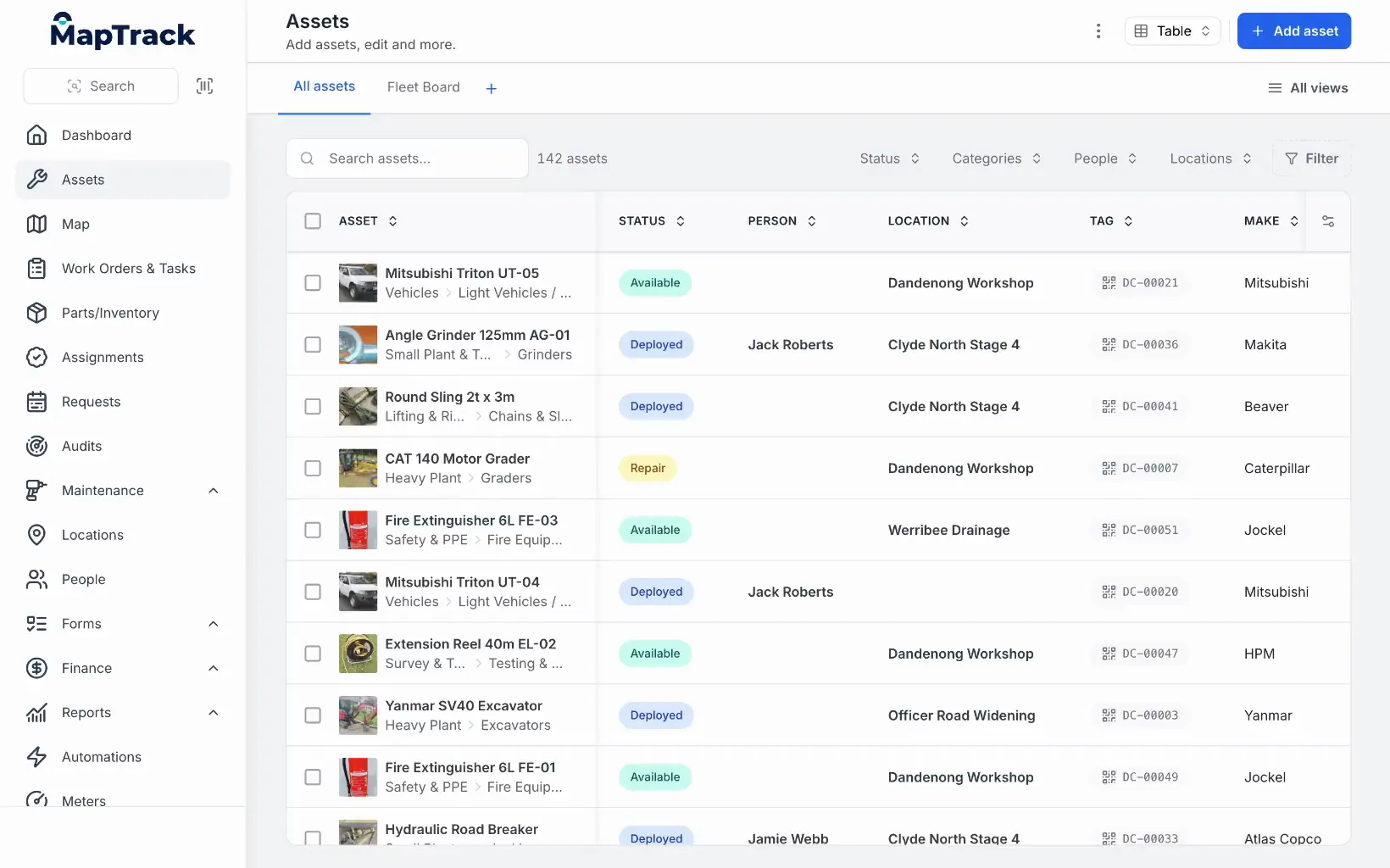
Every asset in one register
The asset register filtered to a few categories, showing each asset's status, location and tag.
MapTrack app · Demonstration data · Recorded
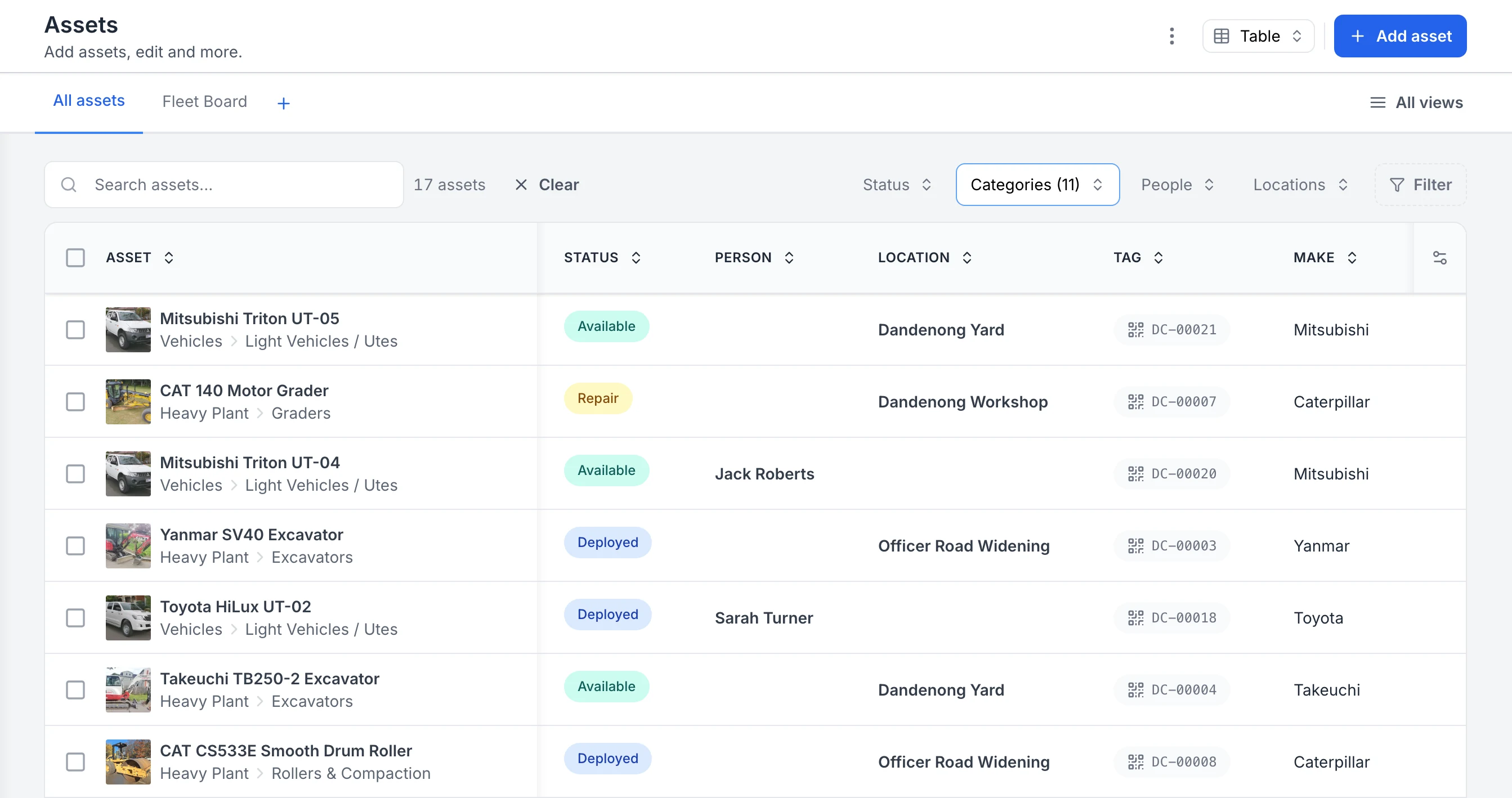
See every asset, its status and who or where it is with
The register filtered to heavy plant and vehicles. Each row shows the photo and category, whether the asset is available, deployed or in for repair, the person or site it is with, and its QR tag ID. Two utes are with named crew members; the rest are at the yard, the workshop or a project site.
MapTrack app · Demonstration data · Captured
About this screenshot
Captured in a demonstration workspace. The All assets view is filtered to the Heavy Plant and Vehicles categories and shows the Status, Person, Location, Tag and Make columns.
What's the quick summary of MapTrack vs Gearbelt?
Both platforms target AU built-world asset tracking, but MapTrack is a standalone purpose-built platform with native first-party GPS trackers and Bluetooth tags, reservations and an independently reviewed product. Gearbelt is a Sitemate product with its own plans, forms, documents, work orders, mobile app and API, sharing one Sitemate login with Dashpivot and Flowsite, that uses QR-code identification and markets GPS-tracker and telematics sync its help centre does not document, with no reservations documented and zero G2 or Capterra reviews under its own brand. Here's a clear, side-by-side comparison.
TL;DR - MapTrack vs Gearbelt: MapTrack is a standalone Australian-built asset platform for heavy industry across AU/NZ, UK, US - tools + equipment + plant + fleet + machinery on one register with its own native GPS trackers, Bluetooth tags, 150+ telematics, fleet and fuel-card data sources, built-in reservations, structured inspections with custom forms, native work orders with failed-inspection-to-WO escalation, meter-driven PM, AI asset creation, AS/NZS-aware templates you adapt, primary database and application hosting in Sydney, and G2 + Capterra reviews under the MapTrack name. Gearbelt is the rebranded Nomad Fleet asset management product, acquired by Sydney-based Sitemate Technologies in August 2024 (acquisition terms not publicly disclosed). It sits inside Sitemate's 'Atlassian-style suite for the Built World' alongside Dashpivot (forms) and Flowsite (integrations). Pricing: per asset, per month, with users free and unlimited - the same per-asset model MapTrack uses (per the Gearbelt pricing page, Jul 2026; check the vendor page for current rates). Parent has raised ~$32M total (Crunchbase), including a Blackbird-led Series A in December 2024 (reported AUD $27.5M / USD $18M). Gearbelt has 0 G2 reviews + 0 Capterra reviews under its own brand (Jun 2026); it uses QR-code identification for tools and markets GPS-tracker and telematics sync that its help centre does not document (no first-party GPS hardware), with BLE, reservations, AI asset creation and an AI form builder not publicly confirmed (AI assistants can read Gearbelt data through the Sitemate MCP). Choose MapTrack for standalone purpose-built asset management, multi-industry depth, reviewed product, reservations, its own GPS trackers + Bluetooth tags + telematics, AI features and Sydney-hosted primary systems. Choose Gearbelt if you are an AU built-world contractor already using Dashpivot for site forms and want an asset add-on inside the Sitemate suite. MapTrack covers tools, plant, trailers and vehicles on one record, from any phone, and holds Capterra’s Best Ease of Use award for 2026. MapTrack’s MCP server connects your AI tools, such as Claude and Codex, to MapTrack. It’s included on the Enterprise plan and available as an add-on on Pro.
Which platform fits your team?
Pick the persona that sounds most like you. Gearbelt is a Sitemate product, sold on its own plans and sharing one login with Dashpivot and Flowsite. The recommendation reflects whether the Sitemate suite is the natural fit or whether standalone purpose-built asset management serves better.
The existing Dashpivot customer
Are you already running Dashpivot for site forms and want an asset add-on inside the Sitemate suite?
Stay on Gearbelt. If Dashpivot already handles your forms, Gearbelt is the lowest-friction path - connected to Flowsite integrations under a single Sitemate login. The Atlassian-style suite pitch pays off if you commit to the suite.
The standalone AU built-world buyer
Do you want a purpose-built asset platform with native GPS, reservations and a reviewed product record?
Choose MapTrack. Gearbelt is a tile in Sitemate's bundle with 0 G2 reviews + 0 Capterra reviews of its own (Jun 2026). MapTrack is a standalone purpose-built asset platform with G2 and Capterra review presence under its own name.
The multi-industry operator
Do you cover councils, facilities, transport, energy or water alongside built-world assets?
Choose MapTrack. Gearbelt describes itself as fleet and asset management for the built world, used by construction, engineering, mining and energy teams, and Sitemate’s sector list adds oil and gas, utilities and government. MapTrack covers built-world plus councils, facilities, transport, energy and water.
The fleet operator needing live GPS
Do you need native, first-party GPS and BLE on your fleet and high-value gear?
Choose MapTrack. Gearbelt uses QR-code identification, has no first-party GPS hardware, and markets GPS-tracker and telematics sync that its help centre does not document. MapTrack ships its own GPS trackers, BLE beacons and 150+ telematics, fleet and fuel-card data sources - native rather than dependent on trackers you bring yourself.
How do MapTrack and Gearbelt compare on every feature?
Side-by-side criteria for MapTrack and Gearbelt, grouped by category. Updated Nov 2026. Verify current features and pricing with each vendor.
| Criteria |  MapTrack | Gearbelt |
|---|---|---|
| Reviews & Standalone vs Bundled | ||
| Best for | Standalone asset ops across multiple industries with native GPS + reservations | AU built-world contractors already on Dashpivot wanting an asset add-on(per Sitemate llms.txt (products: Dashpivot, Flowsite, Gearbelt, Sitemate Mobile and Storm), Nov 2026) |
| Independent reviews (G2 + Capterra) | YesG2 + Capterra reviewed under MapTrack name | Not available per vendor sources0 G2 reviews + 0 Capterra reviews under Gearbelt brand (Jun 2026)(per Capterra Gearbelt listing (0 reviews), Jun 2026) |
| Standalone vs bundled | YesStandalone purpose-built asset platform | ?Separate Sitemate subscription with its own forms, documents, work orders and API; one Sitemate login with Dashpivot and Flowsite(per Gearbelt help: log in to Gearbelt Mobile (Sitemate login portal, SSO listed as Enterprise), Nov 2026) |
| Industries covered | YesBuilt-world + councils + facilities + transport + energy + water | ?Built world: construction, engineering, mining and energy teams, in Gearbelt’s own description; Sitemate also lists oil and gas, utilities and government(per Gearbelt app listing by Sitemate (fleet and asset management for the built world: construction, engineering, mining and energy teams), Nov 2026) |
| Tracking & Workflows | ||
| Reservations / planning | YesBuilt-in reservations and planning view (all plans) | Not publicly confirmedNo reservation feature or planning calendar UI publicly documented (not stated either way)(per Gearbelt help centre (asset, location, schedule and work order articles; bookings not publicly documented), Nov 2026) |
| GPS / BLE / telematics | YesShips its own GPS trackers (registered in MapTrack) + Bluetooth tags + 150+ telematics, fleet and fuel-card data sources | ?QR-code identification for tools; no first-party GPS hardware. Sitemate's product page says you can 'sync your GPS trackers' and integrate with telematics, but the Gearbelt help centre documents location only as logs added by hand or picked on a form. Verify tracker sync in a pilot(per Gearbelt help: location logs (added by hand or from a form’s Location List field), Nov 2026) |
| BLE beacons | YesNative Bluetooth tags for proximity and last-seen: nearby gateway trackers update the asset location in MapTrack | Not publicly confirmedBLE beacon support not publicly confirmed(per Gearbelt help centre (QR code, location and reading log articles; Bluetooth tags not publicly documented), Nov 2026) |
| QR / barcode | YesQR, barcode and Data Matrix labels; the phone camera reads 14 code types, and handheld Bluetooth or USB scanners also work. The camera’s smart overlay (AR) scans several codes at once | YesQR-code identification (primary mechanism for tools)(per Gearbelt help: generate asset QR codes, Nov 2026) |
| Pre-starts / inspections | YesNative inspections + custom forms + AS/NZS templates | ?Pre-starts and custom inspection, schedule and repair forms in its own form builder; a Fail answer prompts an issue(per Gearbelt help: Pass/Fail/NA field (a Fail answer prompts an issue), Nov 2026) |
| Maintenance & Compliance | ||
| Work orders | YesNative work orders tied to assets; failed-inspection-to-WO escalation; one work order across many assets, each with its own pass or fail; batch work orders and bulk scan logging; labour, parts and external costs on every service | YesFault-to-WO conversion; end-to-end task assignment(per Gearbelt help: add an issue to a work order (issues linked to the asset’s work order), Nov 2026) |
| Preventive maintenance | YesMeter-driven PM from telematics data + calendar + hours + odometer triggers | YesAutomated PM based on usage, hours or calendar intervals with overdue notifications(per Gearbelt help: Schedules overview (usage or time triggers, check records, work orders), Nov 2026) |
| AI features | YesAI asset creation from photo + AI form builder live | ?AI assistants can read Gearbelt data via Sitemate MCP; AI asset creation and AI form builder not publicly documented (Nov 2026)(per Sitemate MCP FAQs and overview (read-only access to Gearbelt workspaces, assets, work orders and inspections), Nov 2026) |
| MCP server for AI tools | YesMCP server for AI tools such as Claude and Codex (Enterprise, or a Pro add-on) | YesSitemate MCP gives ChatGPT and Claude read-only access to Gearbelt workspaces, assets, work orders and inspections (Nov 2026)(per Sitemate MCP FAQs and overview (read-only access to Gearbelt workspaces, assets, work orders and inspections), Nov 2026) |
| Hosting region | YesPrimary database and application hosting in Sydney; AS/NZS-aware templates you adapt | ?Sydney HQ; Sitemate lists data residency controls on its Premium and Platinum plans, but a Gearbelt hosting region is not publicly stated(per Sitemate network and application security (AWS hosting; data residency controls on Premium and Platinum plans), Nov 2026) |
| Platform & Pricing | ||
| Pricing model | YesPer asset; unlimited users included; no lock-in; tools from A$1, machinery from A$12 a month | YesPer asset, per month; users free and unlimited (Sitemate states Gearbelt is never priced per user). Get a quote for current per-asset rates(per Gearbelt pricing page (per asset, per month; users free and unlimited), Jul 2026) |
| Free trial | YesFree trial, no credit card | Yes30-day free trial, all features(per Gearbelt help: free trial (30 days, all features, unlimited assets and invited users), Nov 2026) |
| SSO / API / enterprise | YesRBAC on all plans, API on Pro and Enterprise; SSO on Enterprise (Pro add-on); REST API keys can be read-only, read-and-write or full access | ?Gearbelt Open API that can read, create and update records (October 2026); SSO through the Sitemate login, listed as Enterprise in the Gearbelt Mobile login guide (Dashpivot SSO: Pro and above)(per Sitemate October 2026 release notes (Gearbelt Open API can now create and update records), Nov 2026) |
| Integrations | Yes150+ telematics, fleet and fuel-card data sources + Xero + MYOB + SimPRO + AroFlo. The MapTrack connection library lists 118 GPS, telematics, OEM machine and video providers in the app, and our team sets up the ones you request | ?Flowsite sends Gearbelt data to Power BI, Excel and Power Platform; Gearbelt Open API (read, create and update); Xero via Flowsite (not publicly confirmed for Gearbelt data); GPS-tracker and telematics sync marketed but not documented in its help centre(per Sitemate August 2026 release notes (Flowsite connects Gearbelt to Power BI, Excel and Power Platform), Nov 2026) |
Standalone asset operations. Native GPS. Reviewed product.
MapTrack covers tools + plant + fleet + machinery with native first-party GPS and BLE, built-in reservations, AI features, AS/NZS-aware templates and a primary database in AWS Sydney - as a standalone purpose-built platform with G2 + Capterra reviews under its own name.
- No credit card required
- Unlimited users
How MapTrack and Gearbelt compare on features
Which has independent customer reviews?
MapTrack has G2 + Capterra reviews under its own name. Gearbelt has 0 + 0 under its brand as of Jun 2026.
As of Jun 2026, Gearbelt has zero independent reviews under its own brand: 0 reviews on Capterra (listing at capterra.com/p/10027085/Gearbelt was refreshed 2026-03-13 but no verified users have published) and no dedicated G2 reviews page (only a competitors/alternatives stub). Sitemate parent reviews are for Dashpivot (~75 Capterra, 28 G2) - not Gearbelt. This is a meaningful gap for B2B buyers: there is no third-party voice-of-customer to validate the asset management claims. MapTrack has G2 + Capterra review presence under its own name, with customer quotes and verified outcomes published publicly.
Standalone vs bundled - which fits your stack?
MapTrack is a standalone purpose-built asset platform. Gearbelt is its own Sitemate subscription, with its own forms, documents and work orders; GPS hardware and reservations are not publicly documented, and each work order covers a single asset.
Gearbelt sits in Sitemate's suite (Dashpivot for forms + Gearbelt for assets + Flowsite for integrations), with one Sitemate login and its own Gearbelt subscription. It is more than a thin tile: its help centre documents its own form builder for inspection, schedule and repair forms, a documents module with expiry dates, issues, work orders, usage and time schedules, its own Gearbelt Mobile app for iOS and Android (launched September 2026) and an Open API that can read, create and update records (October 2026), and it works offline through the Sitemate Mobile app. What still differs is in the product itself: GPS hardware, telematics feeds and reservations are not publicly documented, a Fail answer prompts an issue rather than raising a work order, and each work order covers a single asset. For teams already committed to Dashpivot for site forms, the bundle is the natural fit. For teams that want a standalone purpose-built asset platform without committing to the broader suite, MapTrack is the standalone alternative - no bundle dependency, full asset platform depth in a single product.
Which has reservations and planning?
MapTrack has built-in reservations + planning standard. Gearbelt has neither documented (not stated either way).
We found no equipment-reservation feature or first-class planning calendar UI documented for Gearbelt as of Jun 2026, and Sitemate does not state one either way. PM scheduling exists with calendar intervals (usage, hours, calendar-based), but a true planning calendar to reserve assets by job, see availability across the fleet, or avoid double-booking conflicts is not surfaced publicly. MapTrack has built-in reservations and a planning view standard on all plans. For built-world contractors juggling shared equipment across multiple sites and crews, confirm Gearbelt's reservation handling in a pilot.
Which has live GPS tracking?
MapTrack ships its own GPS + BLE + 150+ telematics, fleet and fuel-card data sources. Gearbelt markets syncing third-party GPS trackers, but its help centre documents no tracker setup.
Gearbelt uses QR-code identification for tools as its primary mechanism, and Sitemate's product page says you can 'sync your GPS trackers' and integrate with telematics (sitemate.com/software/gearbelt/). The Gearbelt help centre documents location as logs added by hand or picked on a submitted form, and documents no GPS or telematics setup (Nov 2026), so confirm tracker sync in a pilot. It has no first-party GPS hardware of its own. BLE beacon support is not publicly confirmed. MapTrack ships its own native GPS trackers (including ultra long-life battery units) + BLE beacons + 150+ telematics, fleet and fuel-card data sources (Geotab, Trimble, John Deere, Caterpillar, Komatsu and more). The real contrast: MapTrack gives you native, first-party GPS and BLE out of the box, where Gearbelt depends on third-party trackers you source and integrate yourself.
Which has AI features?
MapTrack ships AI asset creation + AI form builder. For Gearbelt, AI asset creation and an AI form builder are not publicly documented, though AI assistants can read its data through the Sitemate MCP connector.
As of Nov 2026, Gearbelt documents AI access through the Sitemate MCP, which lets ChatGPT and Claude read Gearbelt workspaces, assets, work orders and inspections through a custom connector. AI photo recognition for asset creation, anomaly detection, AI summaries and an AI form builder are not publicly documented for Gearbelt (Sitemate’s AI form fill and templates are documented for Dashpivot and Sitemate Mobile, not Gearbelt forms), and an AI roadmap for Gearbelt is not publicly documented either way. MapTrack ships AI-assisted asset creation from photo (snap a photo, AI fills in make/model/serial fields) + AI form builder (describe the inspection workflow in plain English, MapTrack drafts the form). For teams onboarding hundreds of assets quickly, AI is a meaningful time-saver.
How do maintenance and work orders compare?
Both platforms have native PM and work orders. MapTrack adds meter-driven PM from 150+ telematics, fleet and fuel-card data sources.
Both platforms support work orders and preventive maintenance. Gearbelt has fault-to-WO conversion, automated PM based on usage, hours or calendar intervals, and overdue notifications. Gearbelt has its own form builder for inspection, schedule and repair forms, and a Fail answer prompts the operator to raise an issue. MapTrack has native work orders tied to assets with failed-inspection-to-WO escalation, meter-driven PM from 150+ telematics, fleet and fuel-card data sources (engine hours, odometer, fault codes auto-trigger maintenance) and native structured inspections with a custom form builder - all in one product without the Dashpivot bundle.
Which publishes clearer hosting information for AU buyers?
MapTrack is hosted with its primary database in AWS Sydney + AS/NZS-aware templates. Gearbelt is Sydney-HQ but commitment not surfaced.
Gearbelt has Sydney HQ via Sitemate Technologies (Sydney AU); AU enterprise customers via the parent (Boral, John Holland, Downer, Transgrid, Siemens Energy); but public data residency commitment is not surfaced on the Gearbelt product page or pricing page (Jun 2026), and Sitemate’s security article lists data residency controls on its Premium and Platinum plans without naming a region or Gearbelt. AS/NZS-specific templates are not publicly documented for Gearbelt, which builds its own inspection, schedule and repair forms. MapTrack is Australian-founded, with its primary database and application hosting in Sydney. Plus AS/NZS-aware templates you adapt to your standard (test-and-tag intervals per AS/NZS 3760, EWP and SWP prestart regimes, AS 3760 electrical inspection cadence); MapTrack does not certify conformance.
How do the pricing models compare?
Both platforms price per asset with unlimited users. Compare quotes for your asset count and what each tier includes.
Gearbelt is priced per asset, per month, with users free and unlimited - Sitemate states it never charges for users (sitemate.com/software/gearbelt/pricing/, as of Jul 2026); get a per-asset quote from Sitemate for current rates. MapTrack uses the same model: per-asset pricing with unlimited users included, so operators, supervisors, subcontractors and managers get access at no per-seat cost on either platform. That makes the pricing model a point of parity, not a differentiator. The comparison comes down to what is included for your asset count: MapTrack bundles unlimited files, scans, documents, forms, alerts and automations, has no lock-in contracts, ships its own GPS trackers and Bluetooth tags, and includes reservations and AI features. Model both quotes against your asset mix.
Which is better: MapTrack or Gearbelt?
MapTrack wins for teams that want a standalone purpose-built asset platform with multi-industry depth (built-world + councils + facilities + transport + energy + water), reservations, native first-party GPS trackers + Bluetooth tags + 150+ telematics, fleet and fuel-card data sources, AI features, a primary database in AWS Sydney, and an independently reviewed product on G2 and Capterra under its own name. Gearbelt is a strong choice for AU built-world contractors already using Dashpivot for site forms who want an asset add-on inside the Sitemate suite - and who can confirm Gearbelt's marketed GPS/telematics sync in a pilot and do not need independent reviews, documented reservations or AI for now.
How Gearbelt compares: independent ratings and verified pricing
All figures below are sourced from public review platforms, vendor pricing pages and customer reviews. We recheck every field on a quarterly cadence.
Pricing
Sitemate prices Gearbelt per asset, per month, with users free and unlimited - its pricing page states Gearbelt is never priced per user (as of Jul 2026). Standard and Pro tiers exist; current per-asset dollar rates are not restated here, so confirm them in a quote. Capterra lists a free trial and no free version. Built by Sitemate (Australia).
Source: Vendor pricing page · View source
Feature parity: MapTrack vs Gearbelt
| Capability | MapTrack | Gearbelt |
|---|---|---|
| QR label scanning from a phoneGearbelt uses QR-code stickers to identify and scan assets from a phone. MapTrack scans QR, barcode and Data Matrix labels with the phone camera or a handheld Bluetooth or USB scanner; the camera reads 14 code types. | ||
| Tool check-in / check-out and assignmentGearbelt provides digital check-in/check-out and tracks assets across teams, sites and schedules. | ||
| Native GPS, BLE and 150+ telematics, fleet and fuel-card data sourcesGearbelt logs location by hand or from form submissions; Sitemate markets GPS-tracker sync, but the Gearbelt help centre documents no tracker setup, and native BLE and broad telematics integration are not publicly documented. MapTrack includes native GPS, Bluetooth tags and 150+ telematics, fleet and fuel-card data sources, and supplies the GPS trackers and Bluetooth tags. | ||
| Offline-first mobile captureGearbelt documents offline use in Sitemate Mobile: saved assets, inspections, issues and records work without a connection and sync automatically. The separate native Gearbelt Mobile app only shows an offline banner, which Sitemate describes as network awareness rather than offline support. | ||
| Maintenance scheduling and work ordersGearbelt automates preventive maintenance by usage, hours or calendar and converts faults into digital work orders you can assign and track. | ||
| Digital pre-starts, inspections and compliance formsGearbelt replaces paper with digital pre-start, inspection and servicing forms, with photo capture and audit trails. | ||
| Public API includedGearbelt lists third-party integrations and connects to Sitemate Dashpivot, and the Gearbelt Open API, read-only at launch, can now read, create and update records (Sitemate October 2026 release notes), covering assets, work orders, inspections and documents, with one Sitemate token covering both the Dashpivot and Gearbelt APIs. API access is included on MapTrack’s Pro and Enterprise plans. |
Last verified 2026-07-25. Gearbelt is not affiliated with MapTrack; trade marks belong to their respective owners.
Measured impact: what teams report after switching
Verified outcomes from MapTrack customers across construction, mining and field services. Gearbelt outcomes are limited to one published vendor case study (Burton Contractors) and Sitemate parent data.
| Metric | MapTrack | Gearbelt |
|---|---|---|
| Independent reviews | G2 + Capterra reviewed product under MapTrack name | 0 G2 reviews + 0 Capterra reviews under Gearbelt brand (Jun 2026) |
| Reservations / planning | Built-in reservations and planning view (all plans) | No reservation feature or planning calendar UI publicly documented |
| Hardware tracking | Native GPS trackers + 150+ telematics, fleet and fuel-card data + Bluetooth tags + QR | QR identification for tools; marketed GPS/telematics sync not documented in its help centre; first-party GPS hardware not publicly documented |
| AI features | AI asset creation from photo + AI form builder live | AI assistants can read Gearbelt data via Sitemate MCP; AI asset creation and AI form builder not publicly documented (Nov 2026) |
| Industries covered | Built-world + councils + facilities + transport + energy + water | Built world: construction, engineering, mining and energy teams, in Gearbelt’s own description; Sitemate also lists oil and gas, utilities and government |
| Admin time reduction | SPDR: tool replacement costs cut 40-50% | Burton Contractors: "80% admin time reduction" (Sitemate-published, single case study) |
How does MapTrack pricing compare to Gearbelt?
MapTrack
Priced per asset with unlimited users, files, scans, documents, forms, alerts and automations included. No per-seat fees and no lock-in contracts. Free trial with no credit card and guided onboarding; monthly or annual billing.
Get pricing for your asset count →Gearbelt
- Model: Per asset, per month
- Users: Free and unlimited - Sitemate states Gearbelt is never priced per user
- Tiers: Standard and Pro; rates not restated here - get a per-asset quote from Sitemate
- Free trial: 30 days, all features (unlimited assets and invited users)
- Pricing model per the Gearbelt pricing page, as of Jul 2026
Check Gearbelt pricing for current rates.
Both MapTrack and Gearbelt price per asset with users free and unlimited, so crew size is not a per-seat cost on either platform. Compare quotes for your asset count and what each tier includes - hardware, telematics integrations, reservations and AI features differ more than the pricing model does.
Should you choose MapTrack or Gearbelt?
Choose MapTrack if you…
- Want a standalone purpose-built asset platform (not a tile in a broader suite)
- Need built-in reservations and planning view (not documented for Gearbelt)
- Require native, first-party GPS trackers and Bluetooth tags, supplied and registered by MapTrack, rather than syncing third-party trackers
- Need AI-assisted asset creation and AI form builder (neither is documented for Gearbelt)
- Value an independently reviewed product on G2 and Capterra under its own name
- Cover councils, facilities, transport, energy or water alongside built-world
- Need AS/NZS-aware templates and a primary database in AWS Sydney
- Run test and tag or calibration rounds as one work order across many assets, each with its own pass or fail
- Want site geofences drawn on every map, with entry and exit alerts in MapTrack Telematics
- Want tiered service plans on run hours, with work orders raised from meter readings
- Want AI dash cams with live video and event clips in the same app as your assets
- Hire out equipment and need rate cards with daily, weekly and monthly rates (a Pro and Enterprise add-on)
- Want a cost ledger, budget vs actual and repair-or-replace for every asset (a Pro and Enterprise add-on)
- Run several divisions that each need their own assets and team access (a Pro and Enterprise add-on)
Consider Gearbelt if you…
- Already use Dashpivot for site forms and want an asset add-on inside the Sitemate suite
- Value the 'Atlassian-style suite for the Built World' bundle pitch
- Run plant, equipment and vehicles in construction, engineering, mining or energy, the built-world teams Gearbelt describes itself as made for
- Can confirm Gearbelt's marketed GPS/telematics sync in a pilot (or do not need live GPS), and do not need independent reviews, documented reservations or AI for now
- Have a tight relationship with Sitemate and want to consolidate vendors
Best Gearbelt alternatives, ranked
These are the platforms teams compare against Gearbelt when they need standalone purpose-built asset management, native GPS, reservations or an independently reviewed product.
- 1
MapTrack
Best standalone alternative for AU built-world + multi-industry operators. Native first-party GPS trackers + Bluetooth tags, reservations, AI features, AS/NZS-aware templates, a primary database in AWS Sydney, per-asset pricing.
- 2
MaintainX
Best for maintenance-heavy CMMS workflows. Strong G2 reviews. Per-user pricing scales linearly with crew size.
- 3
Limble
Per-asset pricing CMMS with strong G2 reviews. Best for mid-market maintenance teams. US-led support and roadmap.
- 4
Fleetio
Fleet-focused asset management with native vehicle telematics. Best for transport-heavy operations. Per-vehicle pricing.
- 5
SafetyCulture
Inspection-led platform with 76,000+ customers. Best for inspection workflows. Asset register depth shallower than purpose-built EAMs.
What our customers say
“Bloody amazing! We used to spend 1-2 days a week tracking and managing our generators alone.”

Steve McAllister
Asset Coordinator, Saunders International
“Our investment in MapTrack paid off in a big way when a couple of pieces of test equipment, valued at over $142,000 AUD, was stolen during a break-in at an employee's home. Thanks to MapTrack, we were able to give police the exact location of the asset, even guiding them over the phone as they executed the search warrant. This led them directly to the equipment, which was recovered within 48 hours.”

Dane Rolinson
Operations Manager, Mega Electrics
“MapTrack streamlines tracking and asset servicing across mine shutdowns - simple, reliable, and effective.”

Gordon Stennings
Maintenance Storeman, Mineral Resources
Customer outcomes
Results from published MapTrack customer case studies.
Estimated 40-50%
Unnecessary tool purchases dropped by an estimated 40-50% in the first year as crews gained visibility over what was already available and where it was located.
Dramatically reduced
QR code check-in/out and clear accountability per worker dramatically reduced lost, misplaced and unaccounted-for tools across all sites.
Approximately 12+ separate spreadsheets
Consolidated approximately 12+ separate spreadsheets and paper-based systems into one centralised platform, eliminating duplicate records and version-control issues.
How do you switch from Gearbelt to MapTrack?
MapTrack supports CSV and spreadsheet imports with AI-assisted field mapping. Most teams are operational within a week.
Export your data
Export your asset register, assignments and inspection history from Gearbelt as CSV (or via the Gearbelt Open API).
Import & map fields
Upload into MapTrack. AI-assisted import auto-matches columns. Our team maps your sites, categories, custom fields and assignment workflows.
Go live
Roll out to your crew with training. Apply QR labels where needed. Add GPS trackers and Bluetooth tags for high-value equipment. Operational within a week.
What should you verify in a pilot?
Before committing, run a short pilot with your own asset mix and workflows.
- ✓MapTrack: Confirm reservations and planning view work for your job types; verify your telematics or fleet data source is in MapTrack's integration directory of 150+ telematics, fleet and fuel-card data sources; test AI asset creation with photos of your gear; check a primary database in AWS Sydney matches your governance needs; review G2 + Capterra reviews under the MapTrack name.
- ✓Gearbelt: Confirm which GPS trackers and telematics Gearbelt can sync (tracker setup is not publicly documented in its help centre), and how location behaves; verify offline mode depth for Gearbelt-specific flows (not just Sitemate parent); check RBAC granularity; ask Sitemate directly about SOC 2 / ISO 27001 status and a Sydney-hosted primary database; verify how much of the workflow depends on Dashpivot bundling vs Gearbelt-native features.
Methodology and sources
Updated Nov 2026 from the Sitemate help centre, release notes and app store listings; rows that rest on the sitemate.com Gearbelt product and pricing pages, Capterra or G2 keep their earlier check dates. This comparison uses publicly available Sitemate documentation (including the Sitemate security and SOC 2 help centre article), the Gearbelt pricing page, Dashpivot help centre, Crunchbase acquisition and funding records, Startup Daily and BusinessWire press, Capterra listing (0 reviews), G2 alternatives stub, Apple App Store + Google Play (Sitemate app), Burton Contractors case study, and MapTrack customer data. We focus on field realities: independent reviews, reservations, GPS and telematics, AI features, multi-industry depth and a Sydney-hosted primary database. Where a capability is not confirmed in public sources we mark it as not publicly confirmed, not absent.
- Sitemate Gearbelt product page
- Gearbelt help centre: location logs, added by hand or from a submitted form (Sep 2026)
- Sitemate Gearbelt pricing page (per-asset pricing; users free and unlimited)
- Sitemate security and SOC 2 help centre article
- Capterra Gearbelt listing (0 reviews, Jun 2026)
- Crunchbase: Sitemate (acquisition + funding)
- Sitemate acquires Nomad press (August 2024)
- Sitemate llms.txt (products and sectors served)
- Gearbelt help centre (all Gearbelt articles)
- Sitemate October 2026 release notes (Gearbelt Open API create and update)
- Sitemate September 2026 release notes (Gearbelt Mobile app, first Open API)
- Sitemate August 2026 release notes (Gearbelt to Power BI, Excel and Power Platform via Flowsite)
- Gearbelt help: download the Gearbelt Mobile app
- Gearbelt app on the Apple App Store
- Sitemate network and application security (data residency controls)
- Gearbelt help: free trial
Gearbelt is the rebranded Nomad Fleet asset management product, acquired by Sydney-based Sitemate Technologies Pty Ltd in August 2024; the acquisition price was not publicly disclosed. It sits inside Sitemate's 'Atlassian-style suite for the Built World' alongside Dashpivot (forms) and Flowsite (integrations). Sitemate parent has raised ~$32M total (Crunchbase), including a Blackbird-led Series A in December 2024 (reported AUD $27.5M / USD $18M). Pricing model verified Jul 2026: per asset, per month, with users free and unlimited (Sitemate states Gearbelt is never priced per user); check the Sitemate Gearbelt pricing page for current per-asset rates.
Spotted something out of date or incorrect? Email corrections@maptrack.com and we will review and update this page.
Frequently asked questions: MapTrack vs Gearbelt
What is Gearbelt?
Is Gearbelt a standalone product or part of Sitemate?
Does Gearbelt have customer reviews on G2 or Capterra?
Does Gearbelt have reservations or a planning calendar?
Does Gearbelt have GPS or BLE tracking?
What does Gearbelt cost compared to MapTrack?
Does Gearbelt support AI features?
Does Gearbelt have SOC 2 or ISO 27001?
Is MapTrack one platform for tools, plant and vehicles?
Can one MapTrack work order cover many assets?
Does MapTrack have geofencing?
Does MapTrack do rate cards, finance and divisions?
Can a site tablet or shared phone sign tools out to different people?
Who should choose MapTrack instead of Gearbelt?
Which Gearbelt alternative tracks vehicles, plant and tools in one system?
Does MapTrack offer RFID and NFC?
Can each site have its own team in MapTrack?
Can crews fill in MapTrack forms on a phone?
More comparisons
- MapTrack vs Asset Panda
- MapTrack vs SafetyCulture
- MapTrack vs Hilti ON!Track
- MapTrack vs Milwaukee ONE-KEY
- MapTrack vs MaintainX
- MapTrack vs Fleetio
- MapTrack vs ToolSense
- MapTrack vs Tenna
- MapTrack vs Samsara
- MapTrack vs Geotab
- MapTrack vs Verizon Connect
- MapTrack vs Trackunit
- MapTrack vs ToolWatch
- MapTrack vs spreadsheets
- MapTrack vs Sortly
- MapTrack vs EZOfficeInventory
- MapTrack vs Limble
- MapTrack vs GoCodes
- MapTrack vs AssetTiger
- MapTrack vs Cheqroom
- MapTrack vs ShareMyToolbox
- MapTrack vs Fiix
- MapTrack vs GoAudits
- MapTrack vs Sitemate
- MapTrack vs GoFMX
- MapTrack vs IBM Maximo
- MapTrack vs Kynection
Other ways to evaluate Gearbelt
About the author

Co-Founder & GM of Operations
Lachlan leads operations at MapTrack, bringing 10+ years of enterprise technology experience across mining, construction and heavy industry. Before MapTrack, he held senior roles at Workato (integration and automation) and AppDynamics/Cisco (application performance), working directly with ASX-listed organisations to modernise their technology stacks. His deep understanding of field operations and blue-collar workflows shapes how MapTrack solves real problems for asset-intensive teams.
View LinkedIn profile →Free templates for this workflow
Whichever platform you choose, these are free to download and use. No account needed.
Standalone asset operations. Native GPS. Reviewed product.
Book a tailored demo and get pricing for your asset count. Standalone purpose-built asset platform with native first-party GPS and BLE, built-in reservations, AI features and a primary database in AWS Sydney - with G2 + Capterra reviews under the MapTrack name.
4.9 on G2 · 5.0 on Capterra, GetApp & Software Advice· Source: G2.com, Inc.
- No credit card required
- Unlimited users
Gearbelt alternative · MapTrack vs SafetyCulture · Best asset management software