














Fleet & transport

Fleet GPS tracking & CMMS software Know who has each vehicle and what's due

Track vehicles, trailers and mobile assets across depots and routes with GPS, OEM telematics, compliance and maintenance in one platform, so you know where every vehicle is, what’s due and what’s road-ready.

From $1 a tool and $12 a machine a month, AUD ex GST. Unlimited users.

600,000+ assets tracked since 2012 · Unlimited users, per-asset pricing · Offline-ready, works in the field

Prime movers lined up in a truck workshop, with a failed MapTrack pre-start check laid beside them.
Failed check
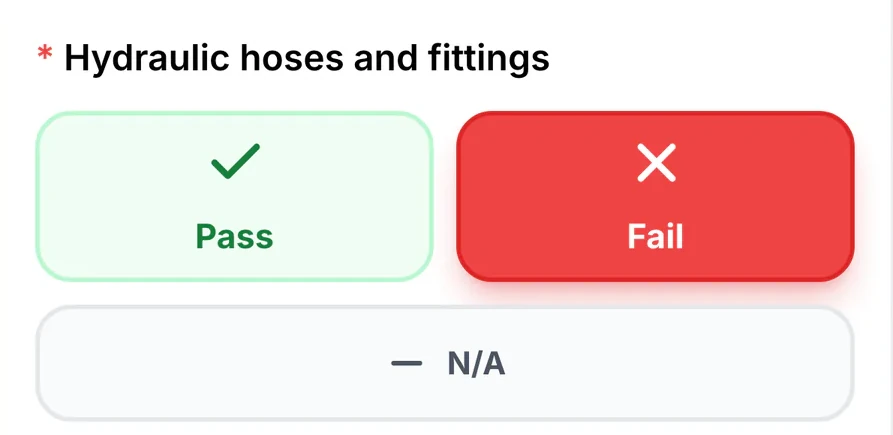
MapTrack pre-start check on a phone: Hydraulic hoses and fittings marked Fail.
QR labelExample: scan to open its record
Services on the odometerExample: estimated km from MapTrack Telematics
Failed check
MapTrack pre-start check on a phone: Hydraulic hoses and fittings marked Fail.
QR labelExample: scan to open its record
Services on the odometerExample: estimated km from MapTrack Telematics
Failed check
MapTrack pre-start check on a phone: Hydraulic hoses and fittings marked Fail.
QR labelExample: scan to open its record
Services on the odometerExample: estimated km from MapTrack Telematics

Published customer results

Near-universal

Digital pre-start inspections for vehicles and equipment went from inconsistent paper-based compliance to near-universal daily completion across all crews.

Specialised Plumbing and Drainage, Plumbing
Read the Specialised Plumbing and Drainage story

Roughly 80%

Overdue service items dropped by roughly 80% within the first six months as automated scheduling and alerts replaced manual spreadsheet tracking.

RIX Specialist Contracting, Construction
Read the RIX Specialist Contracting story

$142,000 AUD

$142,000 AUD of test equipment recovered in full within 48 hours

Mega Electrics, Electrical
Read the Mega Electrics story

Asset tracking software for fleets helps operators manage vehicles, trailers and plant with GPS location and maintenance in one register. MapTrack combines GPS tracking and OEM telematics with QR daily pre-starts, odometer and engine-hour service triggers, FBT-aware vehicle records and timestamped fatigue evidence. Fleet teams use it to cut unplanned downtime on commercial vehicles with ODO-based servicing, meet NHVR chain-of-responsibility and Advanced Fatigue Management obligations, and replace paper logbooks with photo-backed pre-start evidence.

Key takeaways

  • Verizon Connect’s 2026 survey of almost 900 fleet professionals found 80% now run GPS tracking, with users reporting 11% to 19% lower fuel, accident, labour and maintenance costs.
  • NHVR Chain of Responsibility under the Heavy Vehicle National Law extends mass, fatigue and maintenance obligations to every party in the supply chain, not just drivers.
  • AFM (Advanced Fatigue Management) accreditation and standard hours fatigue rules need timestamped work-rest records attached to the driver and the vehicle.
  • Track odometer readings and service dates so the team can see when each vehicle is due.
  • FBT-aware vehicle records (log books, business-use percentages) plus telematics location data live better against one asset than across spreadsheets.
  • Daily pre-starts via QR scan replace paper logbooks and meet WHS Regulations plus principal-contractor site requirements with timestamped, photo-backed evidence.

Pricing

One price per machine, with the hardware included: software and a QR tag from $12 a machine a month, GPS tracking from $27 and AI cameras from $72. Tools and equipment start at $1/asset/month. Every plan includes unlimited users. Prices are AUD ex GST, and machine prices are for annual billing.

View pricingGet a tailored quote

Jarrod Milford

Jarrod Milford

Co-Founder & Commercial Director

Published 15 February 2026Updated 26 October 2026

Fleet maintenance software for mixed fleets of vehicles, plant and trailers

Fleet maintenance software should keep each vehicle's daily checks, servicing and costs on one record, whether it's a car, a truck, a trailer or a piece of plant. In MapTrack drivers scan the QR label and run the daily check on their phone, with a photo of anything wrong, and a failed check reaches the workshop through a form rule. Services fall due on the odometer or hour meter, logged on a phone or estimated from your telematics, and each one closes out with labour, parts and costs. Buying in Australia? See our guide to fleet management software in Australia.

Fleet

MapTrack at a glance

Built for
Fleet managers running mixed fleets of cars, utes, trucks, trailers and plant.
Tracks
Vans and cars, utes and pickups, light and heavy trucks, trailers and dollies, forklifts and mobile plant, generators and breakdown kit, extinguishers and first aid kits on board, tools and driver kit.
Tracked with
QR labels or telematics integrations.
Works offline
Pre starts, inspections and other forms save with no reception and sync when the phone is back in range. A work order already loaded on the phone can be worked through with no reception too.
Phones and computers
In the browser on a computer, and Android, iPhone and iPad access through the mobile browser or the installable web app.
Connects to
Telematics and accounting integrations, a public API, and an MCP server for AI tools such as Claude.
Sign-in
Sign in with Microsoft, or SAML 2.0 single sign-on set up by our team (Enterprise, or a Pro add-on).
Set-up and support
24/7 support. Our team sets up single sign-on and OEM telematics feeds, and helps connect trackers you already run.
Track record
600,000+ assets tracked since 2012.

How to choose fleet maintenance software

Look for:

  1. Daily checks by scan on the driver's phone, with a photo of anything wrong
  2. A failed check that reaches the workshop through a form rule
  3. Services on the odometer or hour meter, logged on a phone or estimated from your telematics
  4. Each service closed out with labour, parts and costs
  5. Rego, VIN and the trailer on one record

Where MapTrack fits

Next to telematics

A telematics platform tracks where vehicles go. MapTrack keeps each vehicle's daily checks, services and costs on its record, with km and hours logged on a phone or estimated from your telematics, and MapTrack Telematics adds GPS tracking with trips, history and geofences.

Next to an EAM or ERP

If fixed plant, work planning and finance sit in an EAM or ERP, MapTrack can run beside it for the tools, equipment and vehicles that move between sites and crews. Its public API passes records between the two.

See what MapTrack costs for your fleet assets

Per-asset pricing tailored to your fleet asset mix and a rollout plan, within one business day.

Trusted by fleet and field teams, including Specialised Plumbing & Drainage and Supagas

Specialised Plumbing & DrainageSupagasSaunders InternationalMineral ResourcesHacer GroupMetro Tunnel
G2 rating 4.9 out of 5
Capterra rating 5.0 out of 5GetApp rating 5.0 out of 5Software Advice rating 5.0 out of 5
15 reviews on G2 · the same 17 reviews on Capterra, GetApp and Software AdviceCapterra Best Value 2026 badgeCapterra Best Ease of Use 2026 badgeAll MapTrack reviews

Keep the pre-start result and service level with the vehicle

A daily form, a corrective task and a completed service are separate records. Connect them so the workshop can understand what was found and what was done.

  1. 1. Test the defect follow-up

    Configure the form-submission automation, submit a controlled failed answer and inspect the resulting task and History.

  2. 2. Review the planned service

    Use the Service Board to compare the current reading, named next service and retained last-service record.

What we track

What fleets track in MapTrack

MapTrack is built for the full mix of assets that move across your depots, routes and client sites, from light vehicles and trailers to tools and breakdown equipment.

  • Vans & cars
  • Utes & pickups
  • Light & heavy trucks
  • Prime movers
  • Trailers & dollies
  • Forklifts & mobile plant
  • Generators & breakdown kit
  • Extinguishers & first aid kits on board
  • Tools & driver kit
  • Driver licences on the driver record

What you run, and how MapTrack tracks it

Vans and cars
QR label and telematics integration
Utes and pickups
QR label and telematics integration
Light and heavy trucks
QR label and telematics integration
Trailers and dollies
QR label
Forklifts and mobile plant
QR label and telematics integration
Generators and breakdown kit
QR label
Extinguishers and first aid kits on board
QR label
Tools and driver kit
QR label

Running a mix like this? See how MapTrack handles it in a demo built around fleet teams.

Book a demo

30 minutes on Microsoft Teams

The challenge

The costs of poorly managed fleet assets

Fleet assets don’t sit still. They move between depots and routes, wear out based on kilometres and hours, require documented compliance evidence, and their downtime means missed deliveries, tow-truck callouts and unhappy customers.

Vehicles move between depots and routes with limited visibility

Trucks and vans are out on the road across multiple depots and routes. Without a single view you rely on phone calls, driver logbooks or fragmented telematics dashboards to find out where a vehicle is and whether it’s available.

Pre-starts and compliance not consistently completed or recorded

Daily vehicle pre-starts are a legal requirement, but paper forms get lost, skipped or completed at the end of the day rather than before the trip. When an auditor asks for evidence, you’re scrambling through filing cabinets.

Maintenance driven by ODO or hours but no system to trigger it

Vehicles need servicing based on odometer readings and engine hours. Not calendar reminders. Without automated triggers you miss service intervals, leading to breakdowns on the road, tow-truck callouts and delayed deliveries.

Fleet costs hard to attribute to individual vehicles or routes

Fuel, tyres, servicing, registration and insurance costs are tracked in spreadsheets or accounting software with no link back to individual vehicles. You can’t see total cost of ownership per asset or identify which vehicles are bleeding money.

Telematics data exists but isn’t connected to compliance or maintenance

You may already have GPS tracking or telematics devices fitted, but that data sits in its own silo. ODO readings don’t trigger work orders. Location data doesn’t connect to pre-start records. You're paying for data you can’t act on.

From MapTrack's own data

What we see across MapTrack customer accounts

These figures come from MapTrack's own product data, de-identified and aggregated. Accounts aren't grouped by industry, so each figure covers every qualifying customer account, not one industry alone. Every figure counts at least 20 accounts, and each one says how it was measured.

15%

Scheduled services past their due date

Across 32 MapTrack customer accounts with service schedules, 15% of scheduled services were past their due date on 26 October 2026. More than three quarters of those (78%) were over 30 days past due.

Method: MapTrack's own product data: 32 customer accounts with service schedules, 5,855 scheduled services (884 past due), snapshot at 26 October 2026. Demo, test and trial-build accounts are left out. Includes schedules MapTrack set up during onboarding; the servicing itself is the customer's. One account holds 53% of the past-due services; without it the share is 16%. Some past-due items may be assets no longer in use that were never archived.
More than 80 days

How late a missed service runs

Across 32 MapTrack customer accounts, a service that was past due on 26 October 2026 was typically more than 80 days overdue.

Method: MapTrack's own product data: 32 customer accounts, 884 past-due services, snapshot at 26 October 2026. Demo, test and trial-build accounts are left out. Includes schedules MapTrack set up during onboarding; the servicing itself is the customer's. Typical means the median: 105 days across all past-due services and 82 days with the largest account left out, so the lower figure is used.

51%

Services driven by hours and kilometres

Across 39 MapTrack customer accounts with service schedules, half of all service triggers (51%) run off engine hours or kilometres rather than the calendar.

Method: MapTrack's own product data: 39 customer accounts with service schedules, 289 service triggers (148 meter based: 118 hours, 30 km), schedules live on 26 October 2026. Demo, test and trial-build accounts and anything MapTrack staff created are left out. Counts trigger rules on live schedules, not services carried out, so the record count is small.

99%

Meter readings typed in by hand

Across 25 MapTrack customer accounts that log hour or kilometre readings, 99% of meter readings in MapTrack were entered by hand, and nearly half of meters (47%) had gone more than 30 days without a new reading on 26 October 2026.

Method: MapTrack's own product data: 25 customer accounts, 43 meters, 24,491 readings, all readings to 26 October 2026. Demo, test and trial-build accounts and anything MapTrack staff created are left out. Counts the readings stored in the MapTrack app only; trips and run hours shown through MapTrack Telematics may not appear here. Only 43 meters, so the 47% is thin, and a quiet meter can be a parked machine.

Want to know what these costs look like on your own sites? Talk it through with us.

Book a demo

30 minutes on Microsoft Teams

Use cases

How fleet managers use MapTrack

Service on the odometer and engine hours

Each vehicle's service plan runs off its odometer or hour meter, logged on a phone or estimated from your telematics. Log a reading past the service point and the job opens with the reading that made it due.

Meter-based maintenance
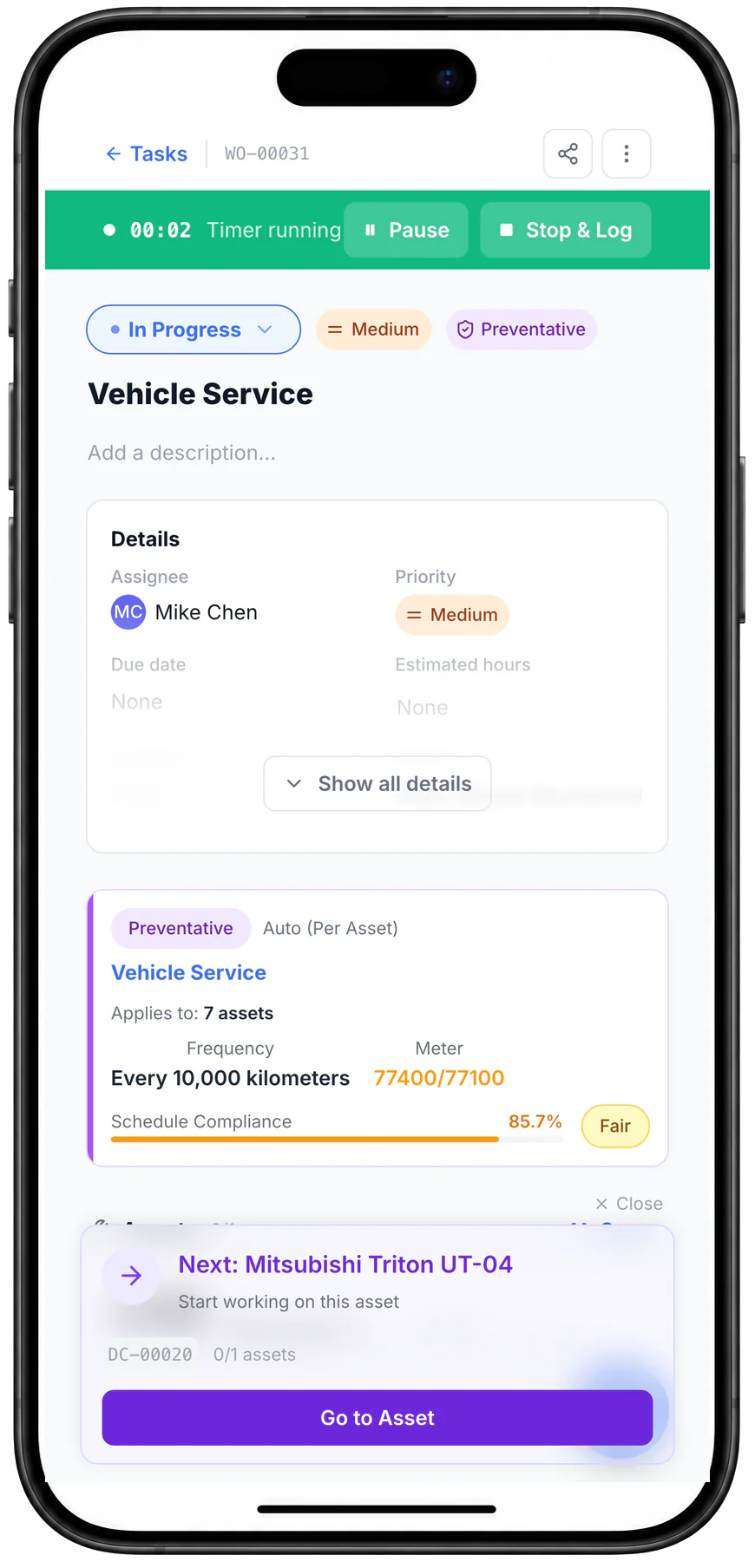
MapTrack work order WO-00031, Vehicle Service, on a phone: In Progress with a running timer, Pause and Stop & Log, assigned to Mike Chen, raised per asset every 10,000 km with the odometer at 77,400 against 77,100, and the next asset to work on.

Start a work order on a phone

Starting the work order set it In Progress and started its timer. It shows the schedule that raised it, the odometer reading that made it due and the next asset to work through.

MapTrack app · Demonstration data · Captured

About this screenshot

Captured at a 430 x 932 phone viewport in a demonstration workspace, with a connection, and shown in a phone frame.

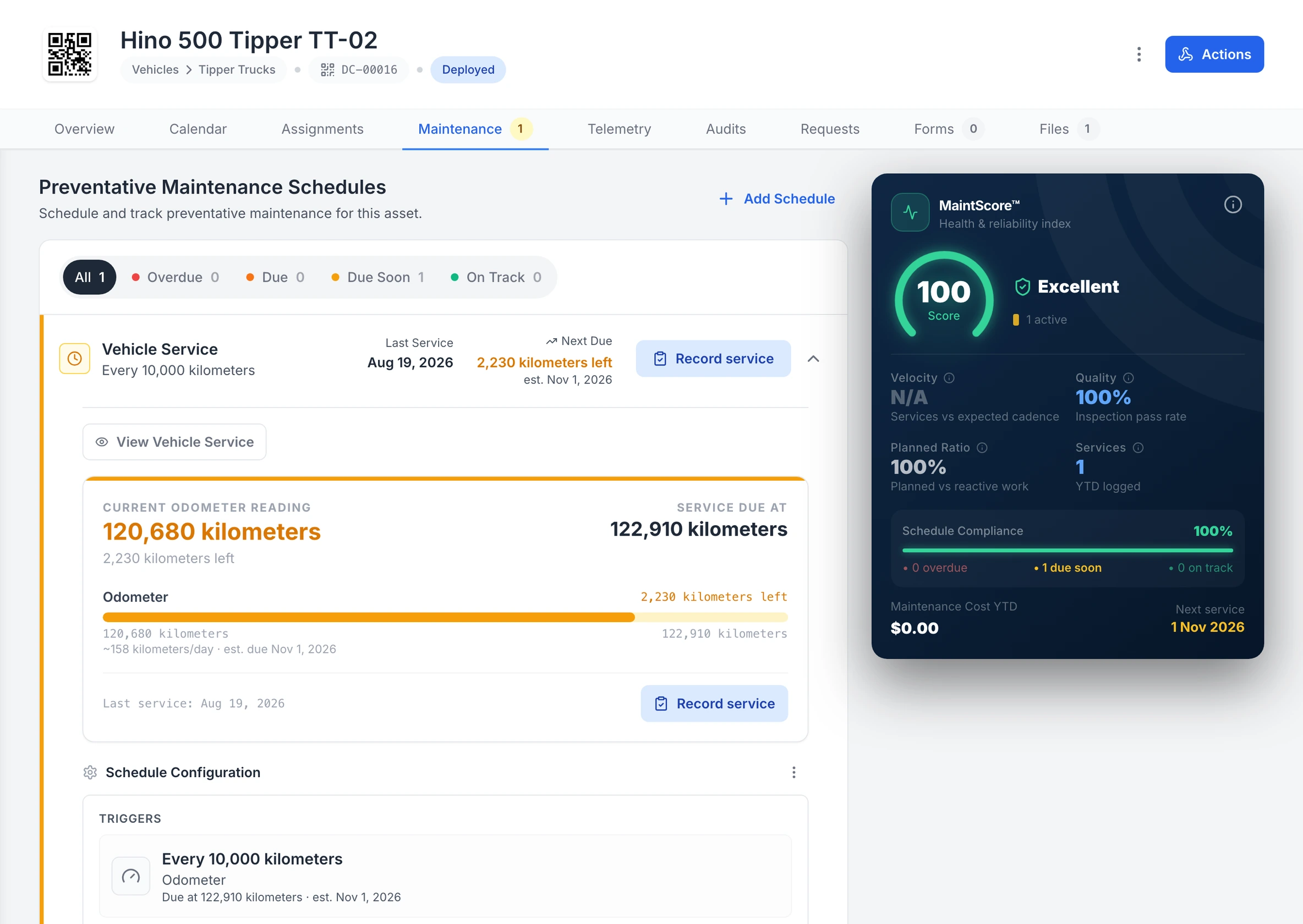
Hino 500 Tipper TT-02 Maintenance tab in MapTrack: the Vehicle Service schedule, every 10,000 kilometres, Due Soon, last service Aug 19, 2026, next due 2,230 kilometres left, estimated Nov 1, 2026; a current odometer reading of 120,680 kilometres against a service due at 122,910 kilometres, at about 158 kilometres a day; the schedule’s trigger, every 10,000 kilometres on the odometer; and a MaintScore of 100, Excellent, with the next service on 1 Nov 2026.

A truck’s kilometre service, forecast from its use

Tipper TT-02’s Vehicle Service runs off its odometer: 2,230 kilometres to the 122,910 kilometre service, with the due date estimated from about 158 kilometres a day.

MapTrack app · Demonstration data · Captured

About this screenshot

Demonstration workspace at a 1600 px desktop viewport on the truck’s Maintenance tab, cropped right of the navigation sidebar and above the schedule’s service history. The 10,000 km interval is the demonstration workspace’s own schedule, not the maker’s.

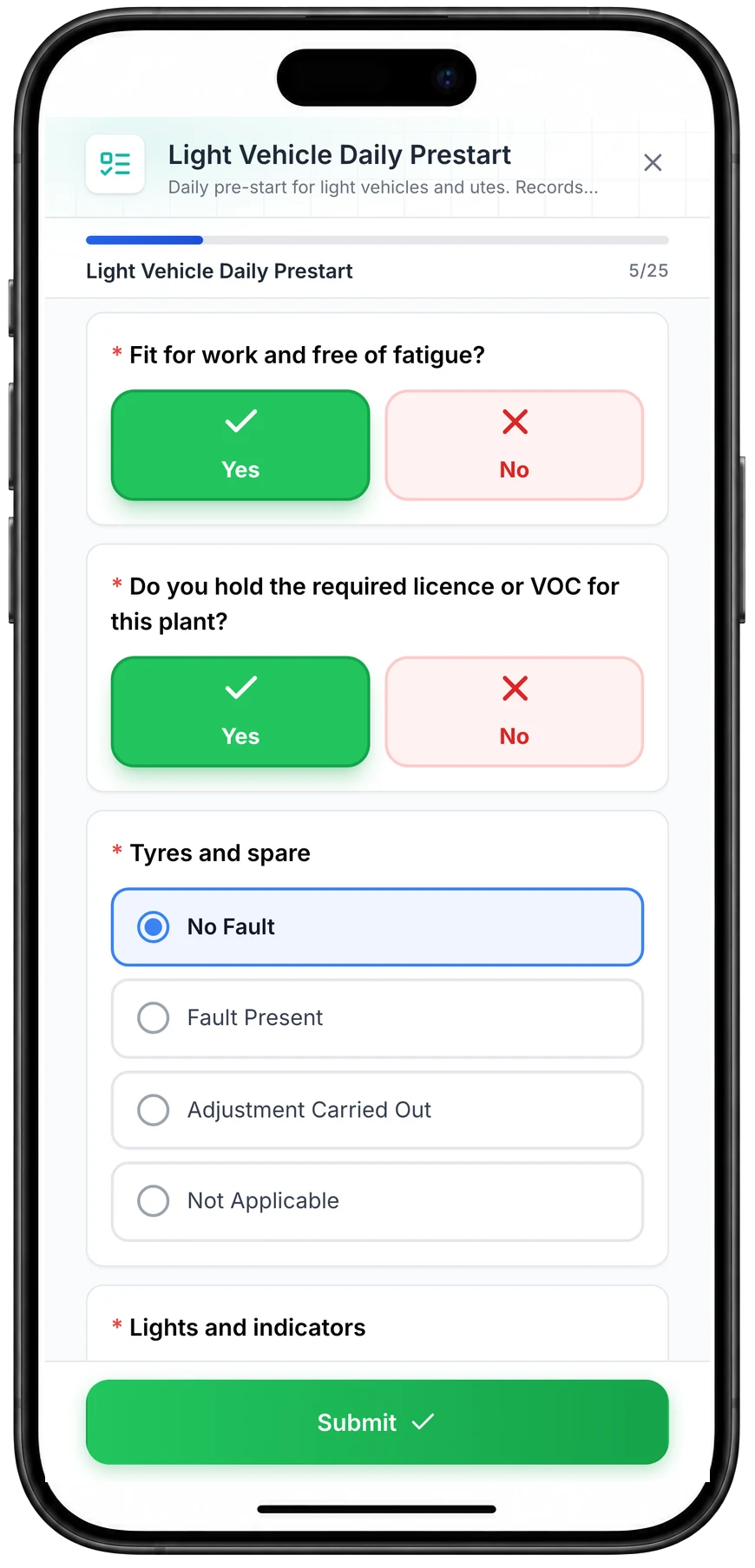
Daily checks on the phone, with photos

Drivers scan the QR label and run the daily check on their phone, with a photo of anything wrong. It saves with no signal and syncs when they're back in range.

Pre-start inspections
MapTrack Light Vehicle Daily Prestart on a phone, 5 of 25 answered: Yes selected for fit for work and free of fatigue and for holding the required licence, No Fault selected for tyres and spare from No Fault, Fault Present, Adjustment Carried Out and Not Applicable, the lights and indicators check next, and a Submit button.

Run a vehicle pre-start on a phone

A daily pre-start for a ute, part-way through. Driver checks such as fitness for work and licence take one tap, and each vehicle check records No Fault, Fault Present, Adjustment Carried Out or Not Applicable.

MapTrack app · Demonstration data · Captured

About this screenshot

Captured at a 430 x 932 phone viewport in a demonstration workspace and shown in a phone frame; the form was closed without submitting.

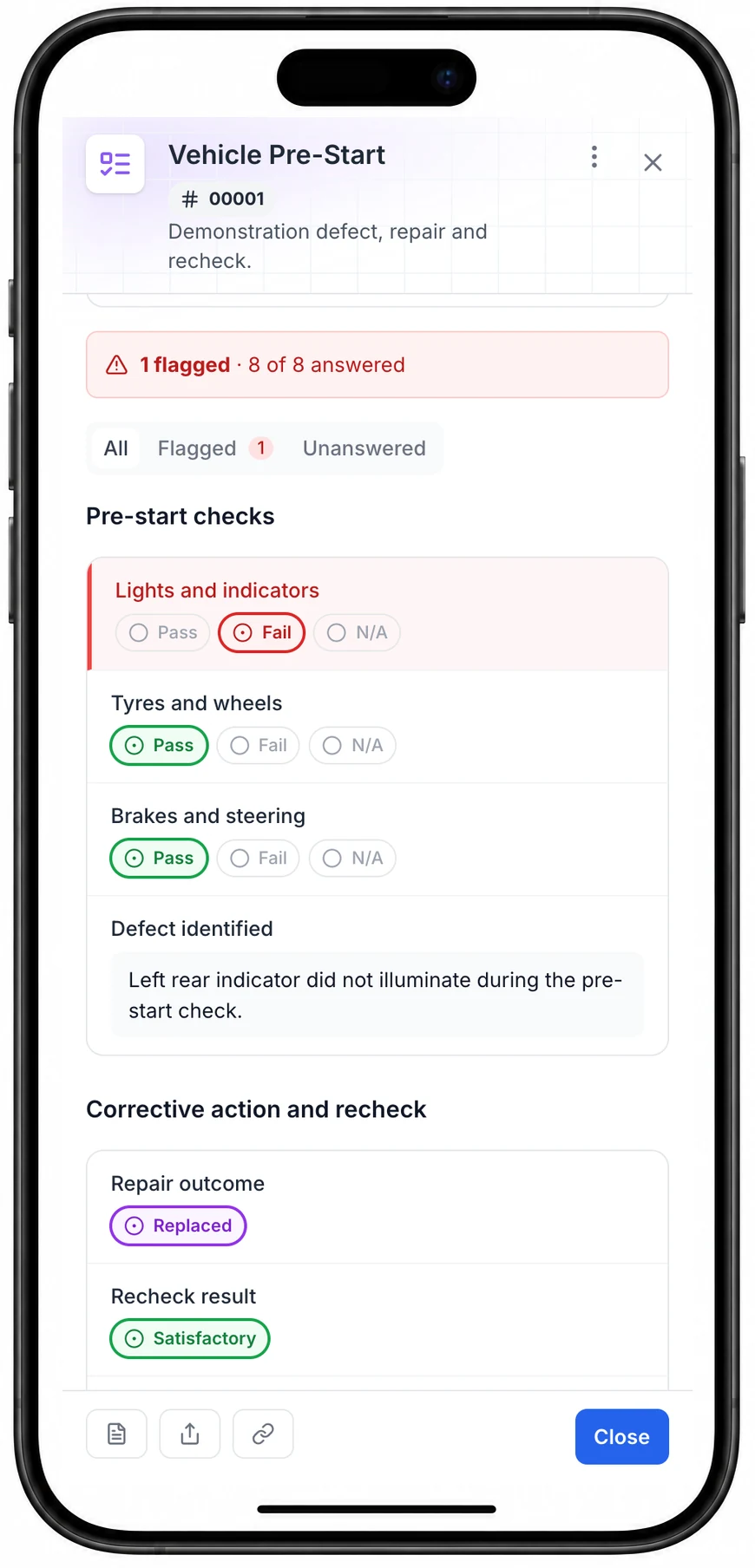
A failed check reaches the workshop

A failed check stays on the record beside the fix and the recheck. Set a form rule and a failed answer raises the repair job for the workshop.

Pre-start inspections
Saved vehicle pre-start on a phone showing eight of eight answered, one flagged check, the red failed indicator check, two green Pass answers, a purple Replaced outcome and a green Satisfactory recheck.

See the completed pre-start on a phone

All eight answers are saved. This phone view shows the original failed check and the replacement and recheck outcomes. The desktop result also shows the action taken and recheck notes.

MapTrack app · Demonstration data · Captured

About this screenshot

Saved demonstration pre-start, reopened in an online phone browser.

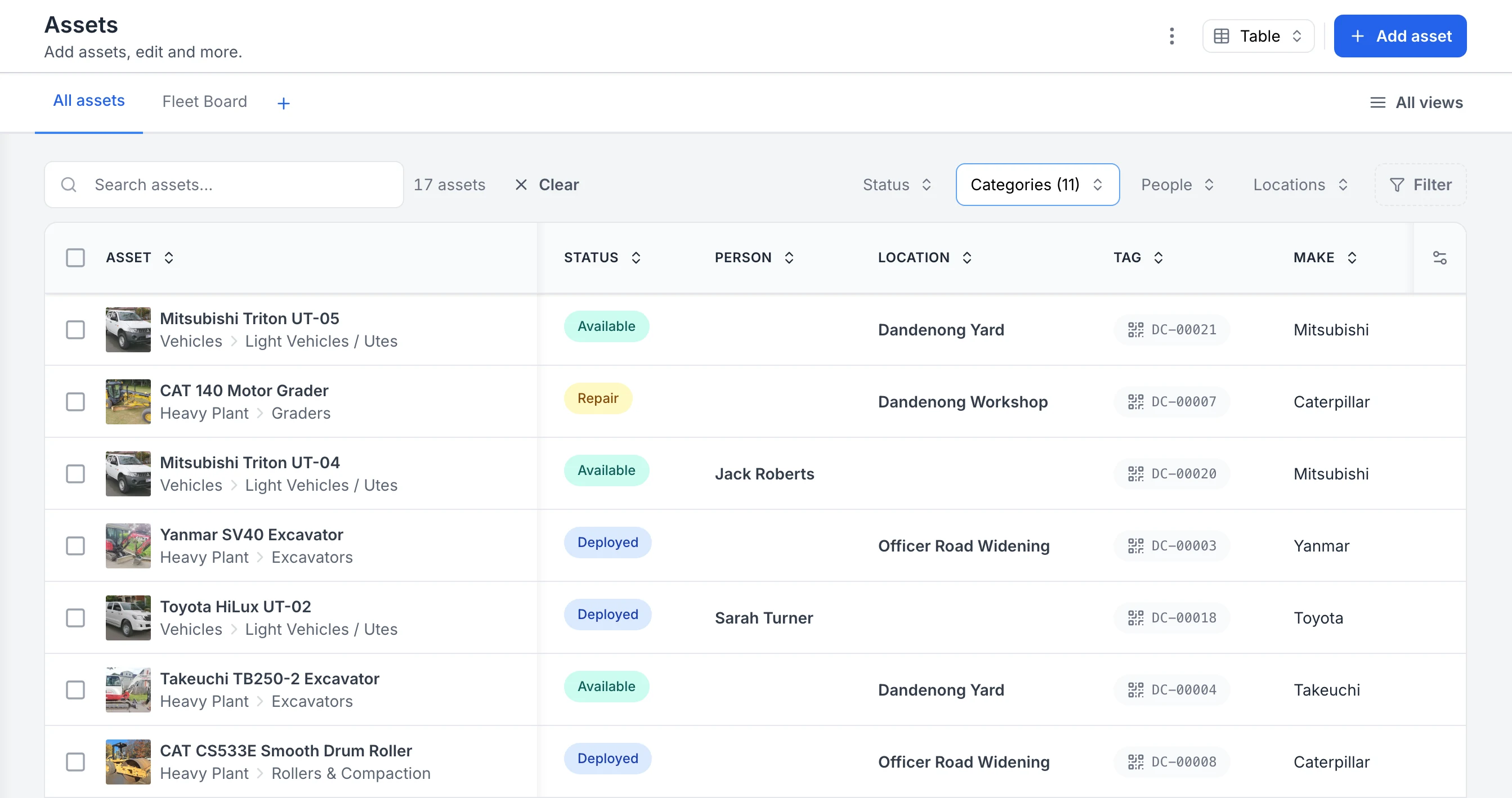
Know who has each vehicle

Scan the QR label to hand a vehicle to a driver. The register shows who has it, which yard or site it's at, and whether it's available, out or in for repair.

Asset register
MapTrack Assets table filtered to heavy plant and vehicles, showing 17 assets. Each row has a photo, the category path, a status of Available, Repair or Deployed, the person or location the asset is with, its QR tag ID and its make.

See every asset, its status and who or where it is with

The register filtered to heavy plant and vehicles. Each row shows the photo and category, whether the asset is available, deployed or in for repair, the person or site it is with, and its QR tag ID. Two utes are with named crew members; the rest are at the yard, the workshop or a project site.

MapTrack app · Demonstration data · Captured

About this screenshot

Captured in a demonstration workspace. The All assets view is filtered to the Heavy Plant and Vehicles categories and shows the Status, Person, Location, Tag and Make columns.

Not sure which of these to start with? We'll walk you through it in a demo.

Book a demo

30 minutes on Microsoft Teams

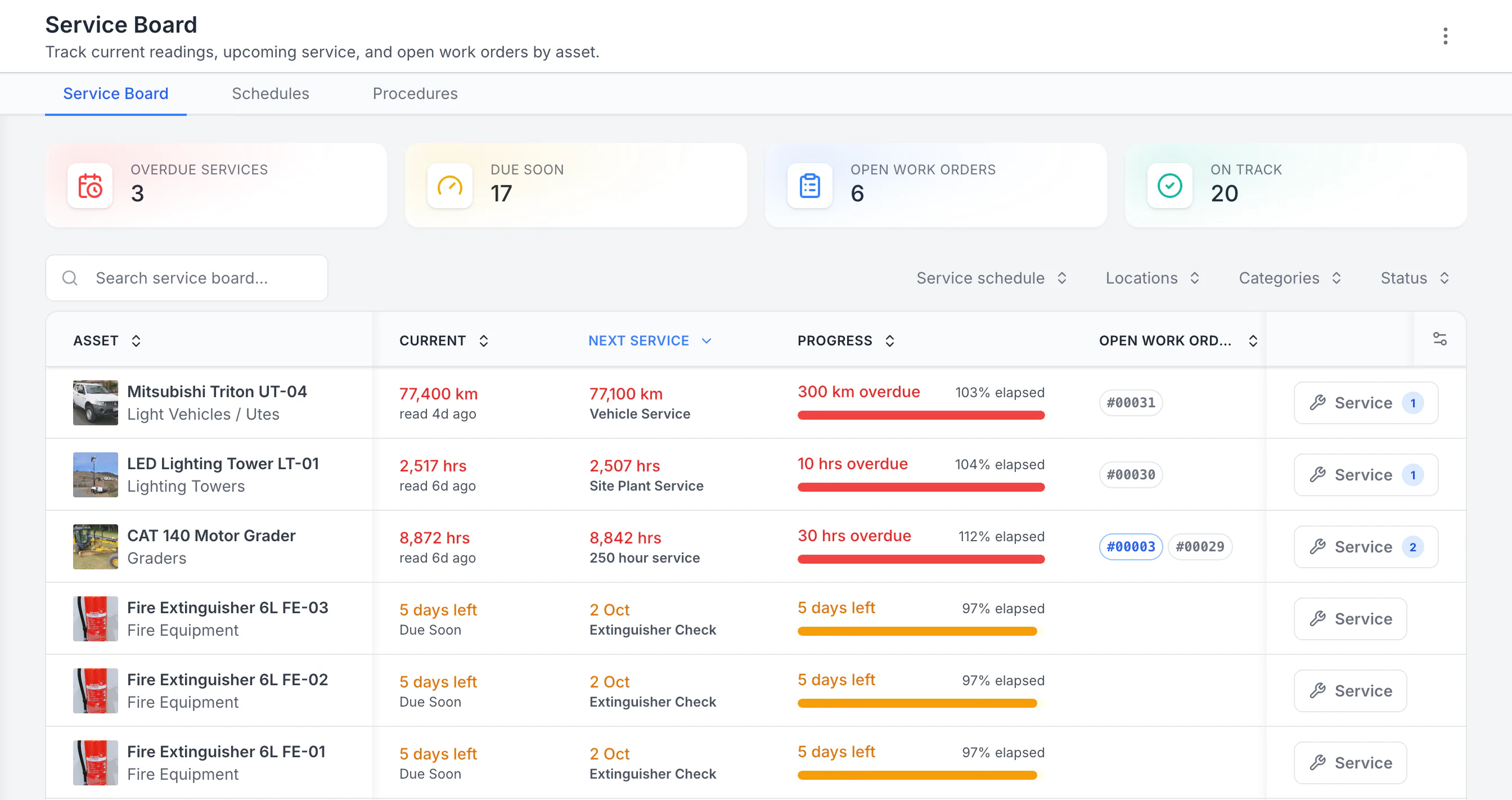
Every service and kit check on one board

Services due on the odometer or hour meter sit beside the extinguisher checks and other kit, most overdue first, with each open job on its row.

Maintenance
MapTrack Service Board sorted by next service, showing 3 overdue, 17 due soon, 6 open work orders and 20 on track: a Mitsubishi Triton 300 km overdue, a lighting tower 10 hours overdue and a CAT 140 grader 30 hours overdue, each with open work orders, then three fire extinguishers due in 5 days.

See the next service beside the current reading

Sorted by next service, the three overdue schedules come first: a ute 300 km past its service, then a lighting tower and a grader past their hour services. Each shows its open work orders. Extinguisher checks due in five days follow. Hours, kilometres and calendar checks share one board.

MapTrack app · Demonstration data · Captured

About this screenshot

Demonstration workspace with 40 schedule enrolments. Columns were chosen and resized in the board’s own display settings. Requires enrolled assets, configured schedules and an internet connection.

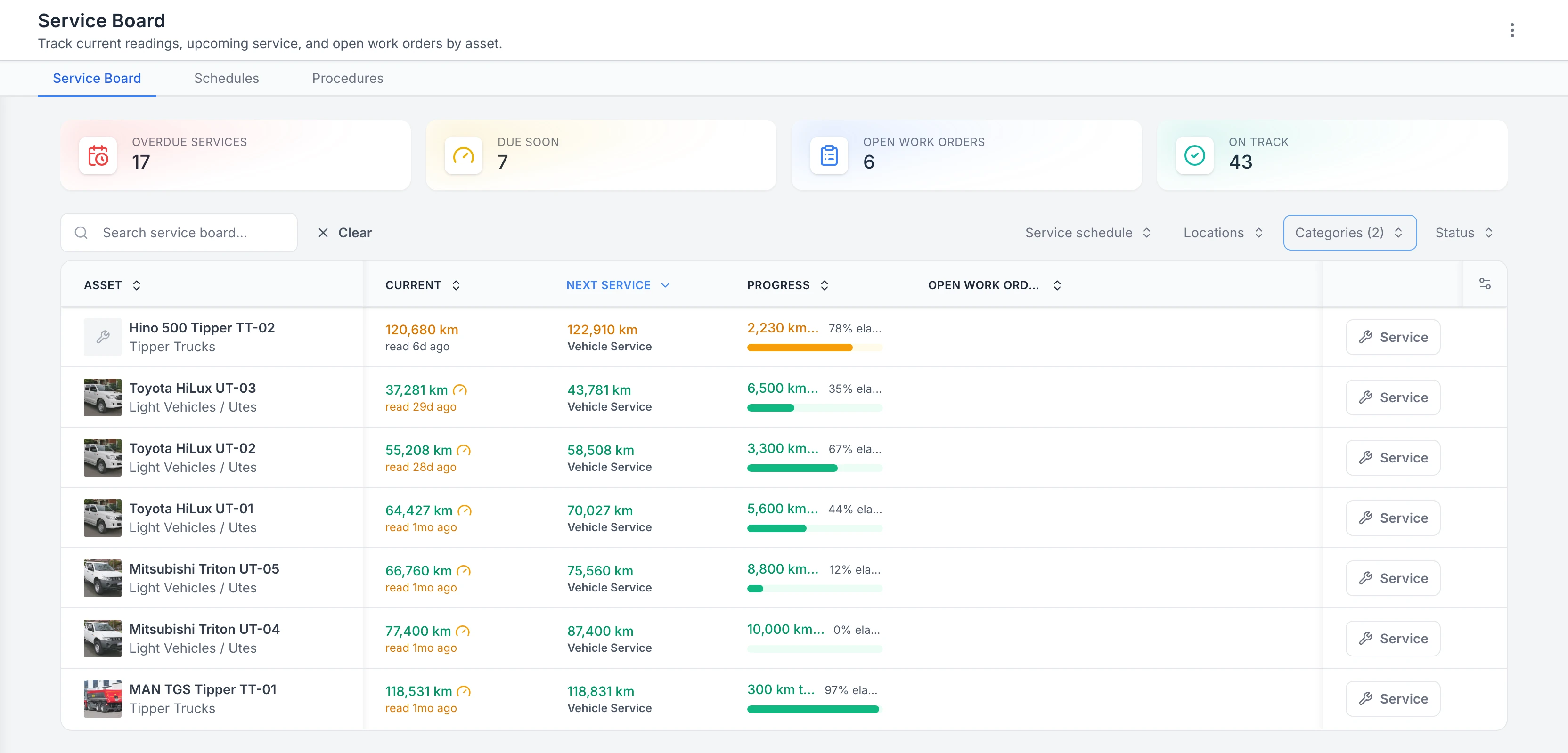
Service Board filtered to two vehicle categories: Hino 500 and MAN TGS tippers and five Toyota HiLux and Mitsubishi Triton utes, each with its current odometer, the km of its next Vehicle Service and a progress bar, the MAN 300 km from due.

Utes and trucks by their next service

Every ute and truck on one board, ordered by the next service, with the km left on each.

MapTrack app · Demonstration data · Captured

About this screenshot

Demonstration service board filtered to the Light Vehicles / Utes and Tipper Trucks categories. The four totals at the top count the whole board, not just vehicles.

Rego, VIN and the trailer on one record

Each truck's record carries its rego and rego expiry, its VIN and its service schedule, with its trailer as a sub-asset on the same record.

Asset register
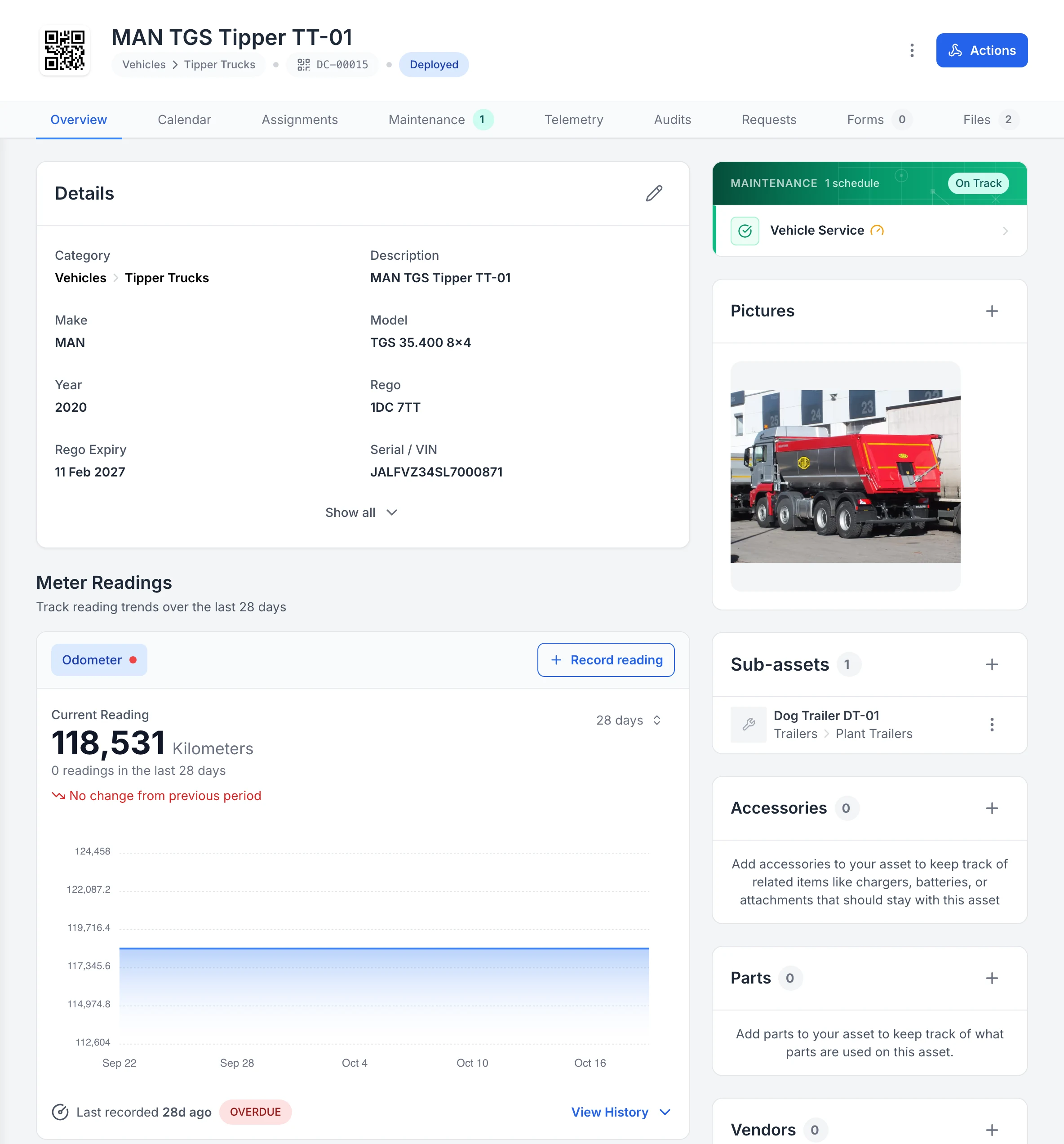
MapTrack asset record for a MAN TGS Tipper TT-01: QR code, category Vehicles then Tipper Trucks, tag DC-00015 and Deployed status; tabs including Maintenance (1) and Files (2); a Details card with make MAN, model TGS 35.400 8x4, year 2020, rego 1DC 7TT, rego expiry 11 Feb 2027 and the VIN; the Vehicle Service schedule On Track; the truck’s photo; Dog Trailer DT-01 as a sub-asset under Trailers then Plant Trailers; and the odometer at 118,531 kilometres with no reading in 28 days, marked OVERDUE.

One truck’s record, its dog trailer included

Tipper TT-01’s record: its QR tag, rego and rego expiry, photo, Vehicle Service schedule and odometer, with its dog trailer, DT-01, as a sub-asset on the same record.

MapTrack app · Demonstration data · Captured

About this screenshot

Demonstration workspace at a 1440 px desktop viewport on the truck’s Overview tab, cropped right of the navigation sidebar. Accessories, parts, vendors, notes and activity continue further down the page. The dog trailer was added in the app that day.

Seen one that fits how your team works? We'll show it to you in a demo.

Book a demo

30 minutes on Microsoft Teams

Customer proof

What customers say

We haven't published a fleet operator customer story. These are customers doing the same work in other industries, each labelled with their own industry.

Plumbing contractor, 100+ vehicles

“Through the forms feature, we've been using daily safety truck checks. So our mechanic here completes that every day, as well as the truck drivers.”

Specialised Plumbing and Drainage, from their customer video
  • From the published story: Digital pre-start inspections for vehicles and equipment went from inconsistent paper-based compliance to near-universal daily completion across all crews.
Read the Specialised Plumbing and Drainage story

“Bulk scanning makes assigning multiple assets simple ... We get alerts when staff members have expired tickets/licenses, when plant needs maintenance, we can audit all assets comprehensively giving confidence in the accuracy of all asset information/locations.”

Taylor, Contracts Administrator, Construction, 51-200 employeesVerified review on Capterra, August 2025

“I've been using Maptrack for 1.5 years to track my tools, equipment and some light vehicles, and I couldn't be happier ... Helps us get control of our tools, small plant & light vehicles. Helps us reduce asset spend & time wasted looking for our gear.”

David, Director & Owner, Construction, Mid-Market (51-1000 emp.)Verified review on G2, December 2024

Want to hear how other fleet teams set MapTrack up? Ask us in a demo.

Book a demo

30 minutes on Microsoft Teams

By the numbers

The real cost of reactive fleet management

Missed service intervals, unplanned breakdowns and manual reconciliation quietly erode fleet profitability and uptime. The numbers make a clear case for proactive digital tracking.

80%

of fleet professionals now rely on GPS fleet tracking, up 11 percentage points in a year

Verizon Connect, Fleet Technology Trends Report 2026

11–19%

average decrease in fuel, accident, labour and maintenance expenses reported by fleet technology users

Verizon Connect, Fleet Technology Trends Report 2026

33%

of heavy vehicle units inspected had at least one non-conformity; brakes 14%, lights and reflectors 10%

NHVR, National Roadworthiness Survey 2024

Want to see how these fit together on your own sites? We'll show you in a demo.

Book a demo

30 minutes on Microsoft Teams

Chain of Responsibility

Driver-to-vehicle assignment with NHVR CoR evidence on file

Every vehicle, trailer and dolly assigned to a named driver before the wheels turn. Drivers complete pre-trip walkarounds on mobile, log defects with photos, and capture fatigue and mass declarations. Pre-starts, sign-offs and timestamps attach to the vehicle record so your CoR evidence under the Heavy Vehicle National Law is audit-ready.

  • Driver assignment locked in before each trip
  • Pre-trip walkaround forms with photos and GPS
  • Fatigue (BFM/AFM) and mass declaration capture
  • NHVR Chain of Responsibility audit trail
  • Defects raised in the field trigger work orders
Fleet pre-start inspections
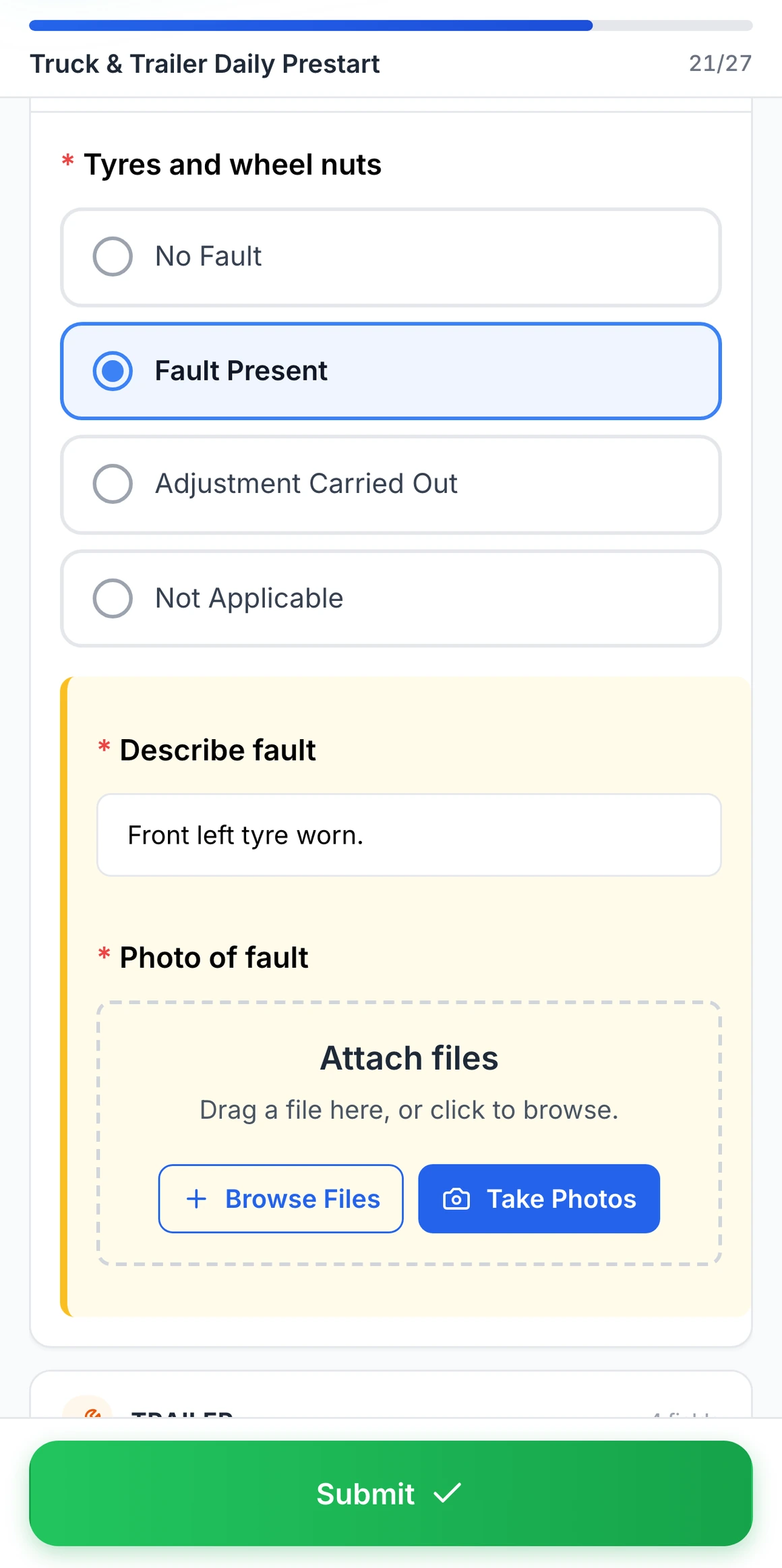
MapTrack Truck & Trailer Daily Prestart on a phone: Fault Present selected for tyres and wheel nuts, with the required Describe fault box reading "Front left tyre worn." and the required Photo of fault field with Browse Files and Take Photos, and the Submit button.

Fault Present on a truck pre start

Choosing Fault Present on tyres and wheel nuts opens a fault note and a photo, both required before the pre start can be submitted.

MapTrack app · Demonstration data · Captured

About this screenshot

Captured at a 430 x 932 phone viewport in a demonstration workspace. The pre start was filled in for this screen and not submitted.

GPS + telematics

Live vehicle location plus OEM telematics in one view

QR each vehicle and trailer, then layer in GPS hardware or pull OEM telematics feeds from CAT, Volvo, Iveco and Isuzu. See real-time vehicle and trailer position, fire geofence alerts when units leave a depot or stray off-route, and let engine-hour and fault data trigger work orders automatically.

  • Real-time GPS for vehicles, trailers and dollies
  • Geofences around depots, yards and job sites
  • OEM feeds: CAT, Volvo, Iveco, Isuzu, Geotab
  • Engine hours and DTC faults trigger work orders
  • Multi-depot visibility from a single dashboard
GPS tracking
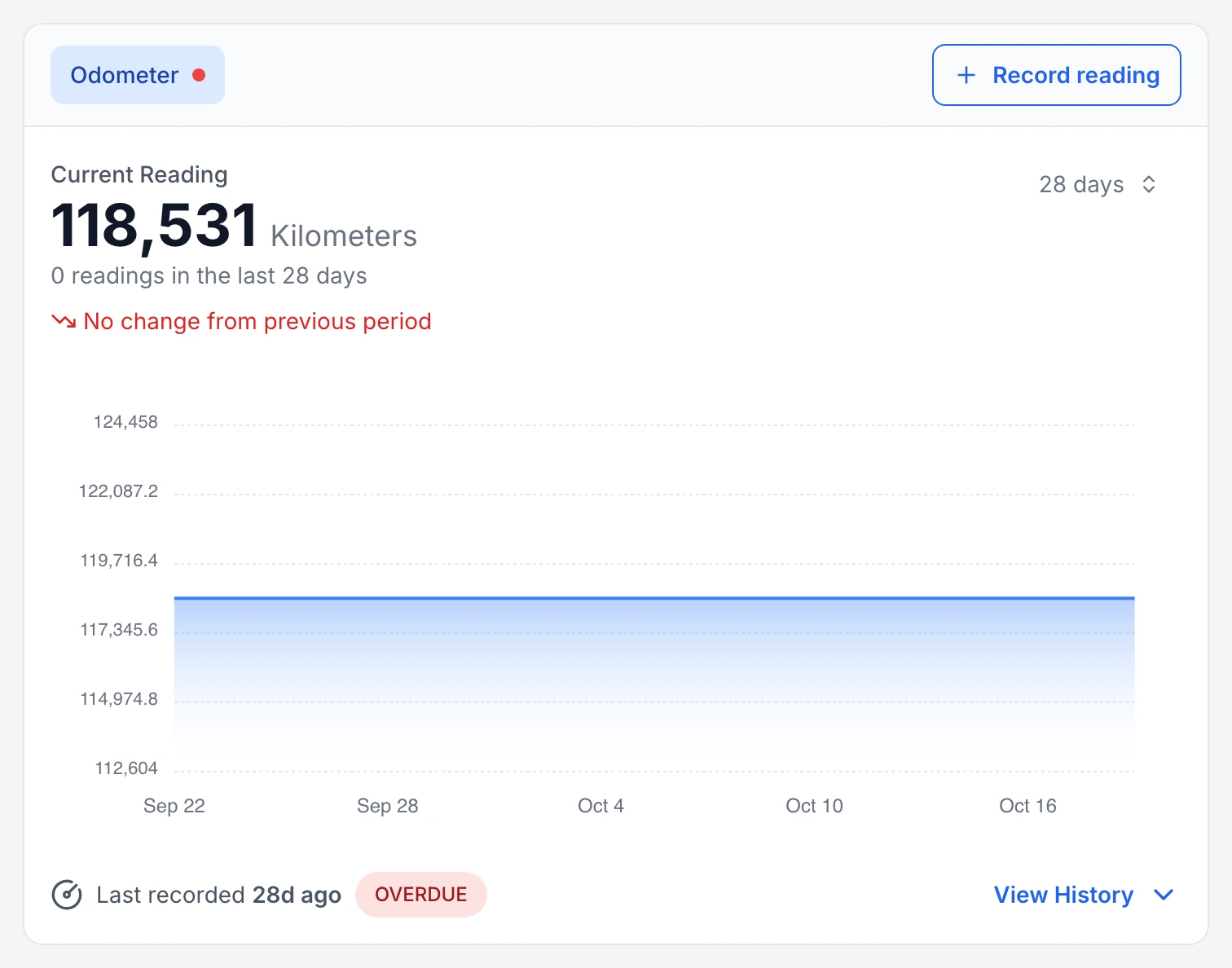
MapTrack Meter Readings card for a tipper truck: a red dot on the Odometer tab, a current reading of 118,531 kilometres, 0 readings in the last 28 days, no change from the previous period, a flat 28-day chart from 22 September to 16 October, and "Last recorded 28d ago" marked OVERDUE, with a Record reading button.

A truck odometer that has stopped updating, flagged

Tipper TT-01’s odometer: no reading in the last 28 days, so MapTrack marks the meter overdue for a reading and shows the gap on its 28-day chart.

MapTrack app · Demonstration data · Captured

About this screenshot

Demonstration workspace at a 1440 px desktop viewport on the truck’s Overview tab, cropped to its Meter Readings card.

See these on a phone and a desktop in a live demo.

Book a demo

30 minutes on Microsoft Teams

Fleet CMMS

Meter-based servicing that cuts unplanned downtime

Service intervals fire from real ODO and engine-hour readings, not a guess on the calendar. Track tyres, parts and labour cost against each vehicle, build out a workshop schedule mechanics can follow on mobile, and turn telematics fault codes into preventive jobs before they become roadside breakdowns.

  • ODO and engine-hour service triggers
  • Tyre wear, rotation and replacement tracking
  • Parts, labour and total cost per vehicle
  • Workshop calendar with mobile work orders
  • Predictive triggers from telematics fault codes
Maintenance & work orders

Integrations

Every asset type in your fleet

MapTrack is built for the full mix of assets that move across your depots, routes and client sites, from light vehicles and trailers to tools and breakdown equipment.

Teletrac Navman
Geotab
Caterpillar
John Deere
HCSS
  • Light vehicles & cars
  • Trucks & heavy vehicles
  • Trailers & tow equipment
  • Vans & commercial fleet
  • Plant & machinery (mobile)
  • Generators & auxiliary equipment
  • Driver equipment & kits
  • Fuel cards & telematics devices
  • Spare parts & inventory
  • Tools & breakdown equipment
  • Cameras & dash cams
  • Compliance & certification gear

See all integrations

Field-ready

Built for depots, drivers and the road

Fleet management happens at the depot and on the road, not behind a desk. MapTrack runs on any phone or tablet. No specialist hardware required. Drivers complete pre-starts, log defects, record ODO readings and check vehicles in and out from their phone.

Offline mode means drivers can complete pre-starts in areas with no signal. Data syncs automatically when back online. Unlimited users means every driver, mechanic and fleet coordinator has access without per-seat charges.

QR scan

Any standard phone camera

Unlimited users

No per-seat charges

Keep your fleet moving and compliant

GPS tracking, pre-starts, rego and compliance management for every vehicle and trailer. Built for operators who can\u2019t afford downtime.

  • Used across Australia & New Zealand
  • Per-asset pricing
  • Unlimited users

Get started

How fleet teams get started

Most fleet managers are tracking vehicles and scheduling maintenance within one to two weeks. Start with your highest-use assets and expand across the fleet.

Step 1

Import your vehicle and equipment register

Upload your existing fleet register or build it from scratch. Add light vehicles, heavy plant, trailers, and attached equipment.

Step 2

Assign vehicles and log odometer or hours

Link each vehicle to a driver or depot, and start recording odometer readings or engine hours to trigger accurate service schedules.

Step 3

Track maintenance, defects, and compliance

Log defect reports in the field, receive automated service reminders, and generate roadworthy and compliance records.

The vehicle inspection records fleet rules ask for

Fleet managers in Australia, the United States and the United Kingdom answer to different rules, but the records they ask for look alike: what was checked, when, by whom, and what's due next. Open a market to see its rules, the words buyers there search for, and how pricing is quoted.

Australia

HVNL

Prices on our pricing page are in Australian dollars, ex GST.

  • Australia, heavy vehicles over 4.5 tonnes gross vehicle mass

    Heavy Vehicle National Law (HVNL) and its regulations

    What it asks for

    One set of laws, administered by the National Heavy Vehicle Regulator, for heavy vehicles over 4.5 tonnes gross vehicle mass. It runs in the ACT, New South Wales, Queensland, South Australia, Tasmania and Victoria. It hasn't commenced in Western Australia or the Northern Territory, but applies to their vehicles when they cross into a state where it does. It changed on 1 August 2026, adding a new Heavy Vehicle Accreditation scheme and simpler work diary record-keeping.

    How MapTrack keeps the record

    Each truck and trailer's pre starts, defects and services sit on its record, with services due by date, km or engine hours, and a failed pre start can raise the workshop job through a rule you set.

    Source: Heavy Vehicle National Law and Regulations (National Heavy Vehicle Regulator, checked 26 Oct 2026)

United States

49 CFR 396.3, 49 CFR 396.11 (DVIR)

Pricing is quoted in your currency, US dollars.

  • United States, motor carriers

    FMCSA 49 CFR 396.3, inspection, repair and maintenance

    What it asks for

    Motor carriers systematically inspect, repair and maintain every vehicle they control. For each one controlled for 30 consecutive days, the record identifies the vehicle (company number, make, serial number and year), shows the nature and due date of each inspection and maintenance task, and records what was done and when. Records are kept for a year, and for 6 months after the vehicle leaves the carrier's control.

    How MapTrack keeps the record

    Each truck and trailer is a record with its unit number, make, serial number or VIN and year. Service schedules show what's due and when, by date, miles or engine hours, and every inspection and repair is saved on it with its date.

    Source: 49 CFR 396.3, Inspection, repair, and maintenance (eCFR) (US Federal Motor Carrier Safety Administration, via the Electronic Code of Federal Regulations, checked 26 Oct 2026)

  • United States, motor carriers

    FMCSA 49 CFR 396.11, driver vehicle inspection reports (DVIR)

    What it asks for

    At the end of each day's work, the driver reports in writing on each vehicle driven, covering brakes, steering, lights, tyres, horn, wipers, mirrors, coupling devices, wheels and emergency equipment, and signs it; no report is needed when no defect is found or reported. Safety defects are repaired before the vehicle runs again, the repair is certified on the report, and reports are kept for three months. Electronic reports are allowed.

    How MapTrack keeps the record

    The end-of-day report is a form on the driver's phone, signed, with a note and photo on any defect. A failed item can raise the workshop job through a rule you set, and the report's PDF stays on the vehicle's record.

    Source: 49 CFR 396.11, Driver vehicle inspection report(s) (eCFR) (US Federal Motor Carrier Safety Administration, via the Electronic Code of Federal Regulations, checked 26 Oct 2026)

DVIR
Driver vehicle inspection report: the written end-of-day report a US driver makes on each vehicle under 49 CFR 396.11 when a defect is found or reported.
Annual DOT inspection
The common name for the periodic inspection in 49 CFR 396.17: each commercial motor vehicle passes it at least once every 12 months, with proof on the vehicle.

United Kingdom

DVSA roadworthiness guide

Pricing is quoted in your currency, pounds sterling.

  • Great Britain, goods and passenger vehicle operators

    DVSA Guide to maintaining roadworthiness

    What it asks for

    A driver or responsible person does a walkaround check at least once in every 24 hours a vehicle is in service, and any defect is reported in writing. Safety inspections run at the interval the operator declared on its licence, remedial work is recorded, and the vehicle is declared roadworthy before it returns to service. Defect reports and safety inspection records are kept for at least 15 months, and electronic records are acceptable.

    How MapTrack keeps the record

    Walkaround checks are forms on the driver's phone, signed, with a photo of any defect. Safety inspections are scheduled on each vehicle at the interval you set, and every check, defect and repair stays on its record, with form responses exporting to CSV.

    Source: Guide to maintaining roadworthiness: commercial goods and passenger carrying vehicles (Driver and Vehicle Standards Agency (GOV.UK), checked 26 Oct 2026)

Walkaround check
The UK name for a driver's daily check of a vehicle before it goes on the road, done at least once in every 24 hours it's in service.

MapTrack keeps the records these rules ask you to keep. It does not do the inspection or testing, certify your work or make you compliant, and the current text of each instrument is the authority.

Want to see how these records would look for your own gear? We'll show you in a demo.

Book a demo

30 minutes on Microsoft Teams

Stop the downtime

Fleet downtime and missed servicing are the two biggest controllable costs in transport operations

MapTrack gives your team the visibility, compliance evidence and ODO-based maintenance triggers to cut both without adding headcount or replacing your existing telematics.

Frequently asked questions

Fleet asset management software is a platform that helps transport operators, logistics companies and businesses with vehicle fleets track, manage and maintain their vehicles, trailers and mobile assets across depots and routes. It replaces spreadsheets, paper logbooks and disconnected tools with a single source of truth for where vehicles are, who’s driving them, what their compliance status is and when they’re due for service. MapTrack combines asset tracking (QR codes, GPS and OEM telematics), pre-start and inspection forms, ODO and hour-based maintenance scheduling, and reporting, all accessible on mobile in the field or depot.

Yes. MapTrack integrates with a wide range of telematics providers and OEM platforms used in fleet and transport, including Teletrac Navman, Geotab, Caterpillar, John Deere and HCSS. Integrations bring odometer readings, engine hours, GPS location and trip data directly into MapTrack, driving maintenance triggers and utilisation visibility without manual data entry. If you already have tracking devices fitted, MapTrack works alongside them rather than replacing them.

You set maintenance triggers based on odometer readings, engine hours or runtime intervals for each vehicle or asset class. Where telematics is integrated, meter data feeds in automatically, so when a truck hits its next service interval, a work order is created and assigned without anyone needing to check the dash. Manual meter readings are also supported for vehicles without telematics. This ensures servicing happens based on real usage, not arbitrary calendar reminders.

Absolutely. MapTrack is built for mixed asset types in a single platform. Track light vehicles, heavy trucks, trailers, generators, tools, breakdown equipment, spare parts and any other mobile assets together. Each asset type gets the tracking method that suits it. GPS for vehicles, QR labels for tools and equipment, OEM data for heavy plant. Everything lives in one system alongside compliance, maintenance and assignment history.

MapTrack supports cost tracking at the individual asset level. Log fuel costs, maintenance spend, parts, registration and insurance against each vehicle. Where GPS is configured, geofence-based time onsite supports job costing by route or client site. Reports break down total cost of ownership per vehicle or asset class, so you can see which vehicles are costing you and make data-driven decisions about replacement or reallocation.

Yes. Where GPS or telematics is configured, you can set geofence boundaries around depots, client sites or defined routes. MapTrack records entry and exit times for time-on-site reporting and can trigger alerts when vehicles leave a designated area. This supports both security (knowing if a vehicle leaves a depot after hours) and operational visibility (time spent at each client site for job costing).

Drivers scan a QR code on the vehicle and complete the pre-start checklist on their phone with photos where needed. The completed form attaches to the vehicle record with a timestamp and the driver's name. Failed items can automatically trigger a work order so defects are tracked from identification through to repair. All pre-start records are searchable and exportable for audits and WHS compliance. Forms work offline and sync when connectivity returns.

Yes. MapTrack supports multi-depot and multi-site operations. Assign vehicles and assets to specific depots, then track transfers between locations with timestamps and accountability. Run reports by depot to see what’s available, what’s out on route, what’s due for service and what’s overdue for pre-start. Leadership gets a single view across all depots without manual consolidation from each site.

MapTrack uses per-asset pricing with unlimited users included. Not per-seat licensing. You can give access to every driver, fleet coordinator, workshop mechanic and admin without your costs growing as the team does. This is a significant advantage in fleet operations where you may have dozens or hundreds of drivers who all need to complete pre-starts and report defects. Pricing scales with the number of assets you track, not the size of your team.

Most fleet teams are running on MapTrack within one to two weeks. The typical approach is to start with one depot or one vehicle class: import your fleet register, set up pre-start forms and maintenance schedules, and roll out to drivers. MapTrack’s onboarding team supports you through setup and training at no additional cost. For larger multi-depot rollouts, a phased approach works well: get adoption solid at one depot, then expand to the rest of the fleet.

Pick one that puts every make on one record per machine. MapTrack connects OEM telematics such as Cat, Komatsu and John Deere under Connections, set up by our team, and Cat, Komatsu, JCB and Volvo machines can feed engine hours, location, fault codes and fuel used into MapTrack. Machines without a feed can carry a GPS tracker (ours in Australia and New Zealand, or one you already run, connected with our help), and every machine keeps its pre starts, servicing and costs in the same place.

Who has each vehicle, whether it passed today's check and what's due. In MapTrack the register shows who has each vehicle and whether it's available, out or in for repair, failed checks reach the workshop through a form rule, and the service board shows what's over first, with each open job on its row.

Got a question we haven't answered here? Ask it in a demo.

Book a demo

30 minutes on Microsoft Teams

Get MapTrack pricing for Fleet teams

Tell us about your operations. Our team will share per-asset pricing tailored to your fleet asset mix and a rollout plan - within one business day.

Per-asset pricing. Unlimited users. Primary database hosted in Sydney.

Track your entire fleet, not just vehicles

Join fleet and transport operators across Australia using MapTrack to track vehicles, run digital pre-starts and keep the fleet maintained, all in one platform.

Pre-start inspections · Maintenance · Asset tracking · Construction · Compare

Tools from $1 · Machines from $12View pricing