 vs

The GoFMX Alternative for Mobile Asset Operations
MapTrack is the GoFMX alternative for teams whose assets move: mobile, offline-first tracking of tools, plant and fleet by QR, GPS and BLE, with inspections and maintenance on each asset, Sydney hosting and per-asset pricing.
GoFMX is a strong, well-reviewed US facilities CMMS for buildings, especially K-12 schools. Teams move to MapTrack when their assets are mobile and field-based, when they need offline capture and live GPS, or when they want AU compliance and AUD pricing.

GoFMX (FMX) is a US facilities and maintenance management platform for buildings (quote-based, by billable user), strongest in K-12 education, with QR scanning but no publicly confirmed offline mode or live GPS. MapTrack is the GoFMX alternative for mobile asset operations: QR, barcode, GPS and BLE tracking, 150+ telematics, fleet and fuel-card data sources, offline-first field capture, inspections and maintenance, with per-asset pricing, unlimited users and Sydney hosting. MapTrack is one platform for every asset a field business runs: it pairs work orders, tiered service plans and parts with GPS trackers, Bluetooth tags, barcode labels and AI dash cams from one vendor, so each asset’s location, inspections and service history sit on one record.
MapTrack publishes this page and is one of the alternatives discussed. Based on GoFMX’s public documentation, pricing pages and named third-party reviews as of Oct 2026; confirm current features and pricing with each vendor and in a pilot. Where a capability is not confirmed in public sources we mark it as not publicly confirmed, not absent. Spotted something out of date? Email corrections@maptrack.com.
Trusted by construction, mining and field service teams





TL;DR - GoFMX vs MapTrack
- •GoFMX (FMX) is a mature, well-reviewed US facilities and maintenance management platform (G2 4.7, Capterra 4.7 as of June 2026) for buildings: work orders, preventive maintenance, equipment, event and space scheduling, capital planning and invoicing, with QR code scanning and a deep K-12 education moat. Priced on a personalised quote by billable user, with requesters not billable, annual renewal and a one-time implementation fee. US-centric.
- •MapTrack is a mobile, offline-first asset operations platform: one register that tracks tools, plant and fleet by QR, barcode, GPS, Bluetooth tags and 150+ telematics, fleet and fuel-card data sources, with inspections, AS/NZS-aware templates, reservations, preventive maintenance and work orders, parts and stock, and per-asset cost tracking. Per-asset pricing with unlimited users, AU-founded with its primary database and application hosting in Sydney, and AUD pricing.
- •Choose MapTrack for mobile field assets that move across sites, need offline capture and live GPS, plus AU compliance. Choose GoFMX for buildings and facilities management, especially US K-12 education, government and property.
What MapTrack covers in one platform
- Every asset, one record
- Tools on QR or barcode labels and Bluetooth tags, plant on GPS trackers, vehicles with GPS and AI dash cams, sites with boundaries: custody, inspections, maintenance and costs on the same record.
- Maintenance that runs on real usage
- Run hours and kilometres from trackers, dash cams or manual readings feed tiered service plans and next-service forecasts, every asset gets a 0 to 100 maintenance health score, and one work order can cover many assets, each with its own pass or fail.
- Easy for crews
- Pre-starts and inspections work without signal, on any phone, with shared-device PINs, single sign-on and AI help to build forms and add assets from a photo. Capterra Best Ease of Use 2026.
- Hardware and software from one vendor
- GPS trackers, AI dash cams with built-in GPS, Bluetooth tags and labels at published prices, managed in the same app, plus LightMetrics dash cam accounts and 150+ telematics, fleet and fuel-card data sources.
- Simple to buy and run
- Per-asset pricing with unlimited users, 24/7 support and month-to-month plans. Capterra Best Value 2026.
The full capability list (35)
- One register for tools, plant, equipment and vehicles
- Custody: who has what, and where
- Site boundaries on the map
- Live tracking and alerts in MapTrack Telematics
- Rate cards (Pro and Enterprise add-on)
- Finance dashboards (Pro and Enterprise add-on)
- Divisions (Pro and Enterprise add-on)
- Run hours and km from trackers, cameras, feeds or readings
- Work orders raised from meters, run hours and data feeds
- Tiered service plans
- Next-service forecasts from usage
- Stale-reading flags
- Maintenance health score
- Service board and due-soon emails
- One work order across many assets
- Batch work orders and bulk scan logging
- Labour, parts and external costs on every service
- Failed checks raise work orders by rule
- Parts and inventory by location and bin
- Offline pre-starts and inspections
- Mobile web app (Android, iPhone, iPad)
- Shared-device PINs
- SAML 2.0 single sign-on (SSO)
- AI form builder
- AI asset creation from a photo
- Equipment bookings (Requests)
- GPS trackers managed in the app
- AI dash cam video in the app
- AI dash cams with built-in GPS
- LightMetrics dash cam connection
- Bluetooth tags
- QR, barcode and Data Matrix scanning
- OEM feeds under Connections
- 150+ data sources
- Engine hours from 68 integrations
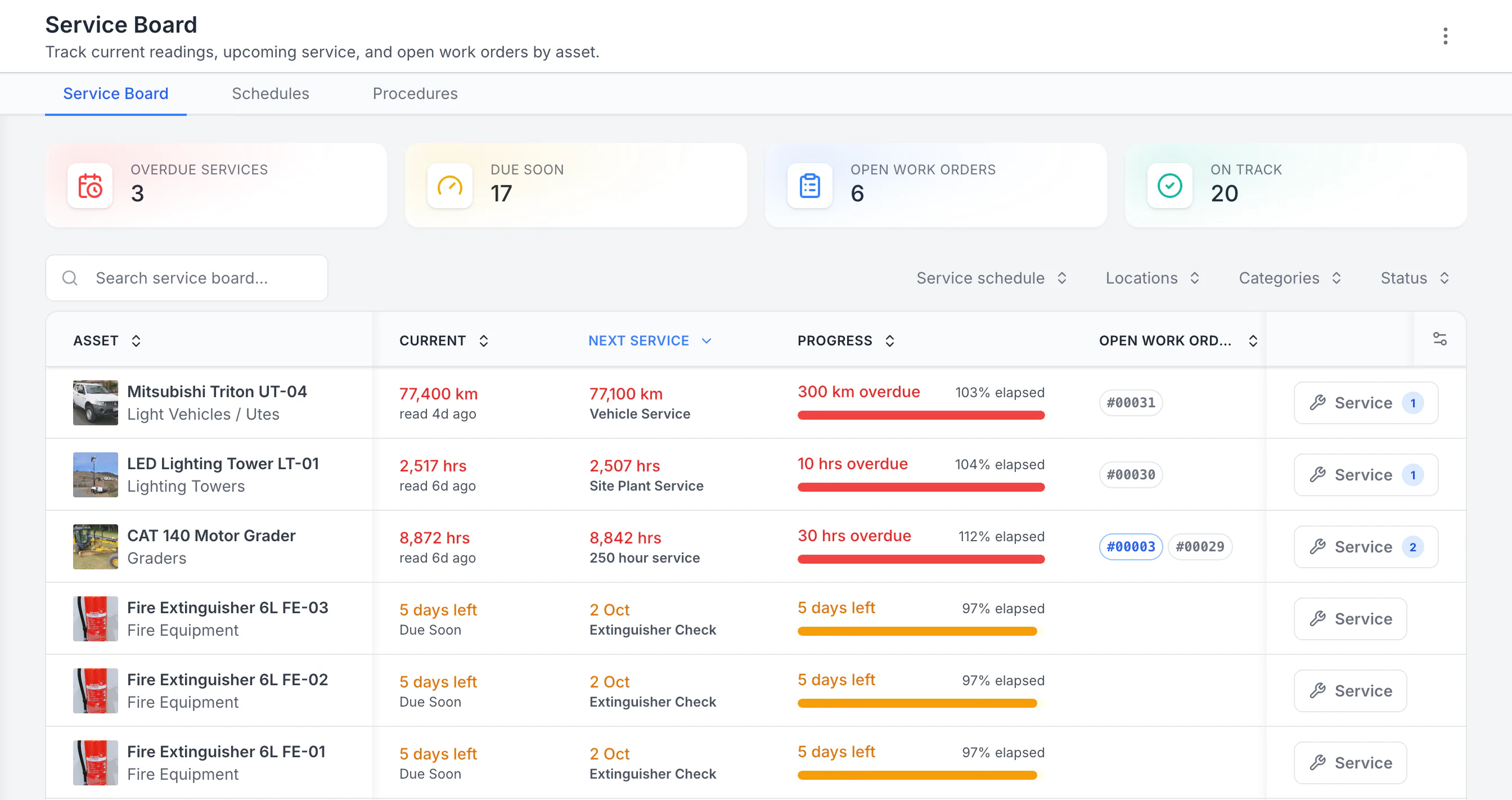
See the next service beside the current reading
Sorted by next service, the three overdue schedules come first: a ute 300 km past its service, then a lighting tower and a grader past their hour services. Each shows its open work orders. Extinguisher checks due in five days follow. Hours, kilometres and calendar checks share one board.
MapTrack app · Demonstration data · Captured
About this screenshot
Demonstration workspace with 40 schedule enrolments. Columns were chosen and resized in the board’s own display settings. Requires enrolled assets, configured schedules and an internet connection.
What is GoFMX?
GoFMX (FMX, Facilities Management eXpress) is a US facilities and maintenance management platform (CAFM/CMMS) for buildings. It covers work orders, preventive maintenance, equipment, event and space scheduling, capital planning, maintenance inventory and invoicing, organised into facilities modules. It auto-generates QR codes for equipment, inventory and locations so technicians can scan to find an asset, and it is strongest in K-12 schools, US government and property management.
GoFMX is priced on a personalised quote, based on its billable users (people who work on and close out requests) and the features you enable, with annual renewal and a one-time implementation fee; requesters, community members, vendors and partners are not billable (per the GoFMX pricing page, October 2026). It is easy to use and well reviewed (G2 4.7, Capterra 4.7 as of June 2026). It is, however, US-centric - US verticals, US English and USD pricing - and it does not publicly document an Australian product or hosting region. It is built for buildings rather than mobile field assets, although it also markets a Fleet Manager product for vehicle fleets; a true offline mode and native live GPS are not publicly confirmed, and its Samsara integration shows each asset’s last known GPS location, updated hourly.
Why teams look for a GoFMX alternative
GoFMX is a strong facilities CMMS for buildings. Teams typically look for an alternative when their assets are mobile and field-based, when they need offline capture, or when they want an Australian-hosted primary database and AUD pricing:
Your assets are mobile, not buildings
GoFMX is a facilities desk for buildings (with a Fleet Manager product for vehicles). MapTrack tracks mixed mobile assets - tools, plant, fleet - by QR, barcode, GPS and BLE with 150+ telematics, fleet and fuel-card data sources.
Your crews work offline
GoFMX has mobile apps but a true offline mode is not publicly confirmed. MapTrack is offline-first: scan, inspect and record work-order results with no signal, then sync.
You need live GPS, not just QR scans
GoFMX uses QR codes to find equipment; native live GPS is not confirmed (its Samsara integration shows last known location hourly). MapTrack adds GPS and BLE for live location and geofences across mobile gear.
You want an Australian-hosted primary database
GoFMX is US-centric and does not publicly document an AU product or Australian hosting region. MapTrack is Australian-founded with its primary database and application hosting in Sydney, AUD pricing and local support.
You need AU-aligned compliance
GoFMX offers inspections within maintenance. MapTrack ties pre-starts, inspections and evidence to each asset with AS/NZS-aware templates you adapt.
Per-billable-user adds up
GoFMX charges per billable (full) user on a personalised quote. When many people actively work on assets, MapTrack per-asset pricing with unlimited users is often more predictable.
Which platform fits your team?
Pick the persona that sounds most like you. The recommendation reflects publicly documented capabilities as at Oct 2026.
The facilities or buildings manager (K-12, gov, property)
Is your job managing buildings - maintenance and event scheduling, room booking, capital planning - across a campus or property portfolio, in the US?
GoFMX may be the better fit. It is an easy-to-use, well-reviewed facilities CMMS with event and space scheduling, capital planning and a deep K-12 education moat. MapTrack is built for mobile field assets rather than buildings management.
The asset-ops or field operations manager
Do tools, plant and fleet move across people, jobs and sites, often with no signal, and you need to track and maintain them?
Choose MapTrack. It tracks mixed mobile assets by QR, GPS and BLE with 150+ telematics, fleet and fuel-card data sources, is offline-first, and runs inspections and maintenance on each asset. GoFMX is a facilities desk (with a Fleet Manager product for vehicles) and native live GPS is not publicly confirmed, although its Samsara integration shows each asset’s last known GPS location, updated hourly.
Learn more →The Australian operator
Do you need AUD pricing, Sydney hosting, AS/NZS-aware compliance and local support rather than a US facilities platform?
Choose MapTrack. It is Australian-founded with its primary database and application hosting in Sydney, AUD pricing, AS/NZS-aware templates and local support. GoFMX is US-centric and does not publicly document an AU product, AUD pricing or an Australian hosting region.
Learn more →The remote or low-signal site team
Do your crews work on remote, underground or low-signal sites where the app must work offline?
Choose MapTrack. It is offline-first on all plans, so crews scan, inspect and record work-order results with no signal and sync later. GoFMX has mobile apps but a true offline mode is not publicly confirmed.
Learn more →Best GoFMX alternatives, ranked
These are the tools teams compare against GoFMX when they need mobile asset tracking, offline field capture or Australian support.
- 1
MapTrack
Best for mobile asset operations - QR/GPS/BLE tracking, offline-first, 150+ telematics, fleet and fuel-card sources, Sydney hosting, per-asset pricing.
- 2
MaintainX
Best for maintenance-first teams wanting strong work orders and a polished mobile app. Per-user pricing.
- 3
Limble
Best for lean maintenance teams wanting a modern, fast-to-adopt CMMS with strong PM and reporting.
- 4
Fiix
Best for plant reliability - deep preventive and predictive maintenance. Per-user pricing.
- 5
UpKeep
Best for technician-led, mobile-first maintenance with reactive and preventive work orders.
MapTrack vs GoFMX: detailed comparison
Side-by-side across 12 criteria. Updated Oct 2026. Verify current features and pricing with each vendor.
| Criteria |  MapTrack |  GoFMX |
|---|---|---|
| Best for | Mobile asset operations - tools, plant, fleet that move across sites; field-first | US facilities and buildings management (CAFM/CMMS); strong in K-12 education |
| Category | YesMobile asset tracking + CMMS + compliance (asset-first) | Facilities management + maintenance (buildings-first)(per GoFMX, Jun 2026) |
| Mobile asset tracking (QR / GPS / BLE) | YesQR, barcode, GPS, BLE; live location and geofences | ?QR scanning for equipment/inventory/locations; live GPS not confirmed (last known location hourly via Samsara)(per GoFMX, Oct 2026) |
| Offline field capture | YesOffline-first on all plans; scan, inspect and record work offline | Not publicly confirmedMobile apps with QR scan; true offline mode not confirmed(per GoFMX mobile app, Jun 2026) |
| OEM / telematics data | Yes150+ telematics, fleet and fuel-card data sources | ?Samsara (assets, locations, mileage and engine hours for meter-based PM) and Zonar (inspection defects raise work orders) integrations(per GoFMX Samsara integration, Oct 2026) |
| Work orders | YesWork orders; meter, inspection and schedule triggers; due-soon reminders; one work order across many assets, each with its own pass or fail; batch work orders and bulk scan logging; labour, parts and external costs on every service | YesWork order management; maintenance requests; invoicing(per GoFMX, Jun 2026) |
| Preventive maintenance | YesPM schedules; meter, inspection and date triggers; tiered service plans; service board, maintenance health score and due-soon emails | YesPreventive maintenance management; calendar scheduling(per GoFMX, Jun 2026) |
| Event / space scheduling | ?Reservations and planning view for assets; crews book equipment ahead through Requests, with optional approval, and a scan at pick-up turns the booking into a check-out | YesEvent and facility scheduling; room/space booking(per GoFMX, Jun 2026) |
| Inspections / pre-starts on asset | YesPre-starts, inspections and evidence; AS/NZS-aware templates | ?Inspections within maintenance; checklists(per GoFMX, Jun 2026) |
| Pricing model | YesPer asset; unlimited users; AUD | Quote-based, by billable user (requesters not billable); annual renewal and one-time implementation fee (Oct 2026)(per GoFMX pricing, Oct 2026) |
| Free option | ?Free trial, no credit card, full access | ?Free trial; no free plan publicly documented(per GoFMX pricing, Oct 2026) |
| Unlimited light users | YesUnlimited users on all plans (no per-seat fees) | ?Unlimited requesting/view-only users; billable full users(per GoFMX pricing, Jun 2026) |
| Australian presence | YesAU-founded; AUD pricing; primary database and application hosting in Sydney; AU support | US-centric; no publicly documented AU product, AUD pricing or Australian hosting region(per GoFMX, Jun 2026) |
When a facilities desk does not fit field assets
MapTrack tracks mobile tools, plant and fleet by QR, GPS and BLE, offline-first, with inspections and maintenance, Sydney hosting and per-asset pricing. Unlimited users included.
- No credit card required
- Unlimited users
How MapTrack compares to GoFMX
Which tracks mobile assets in the field?
MapTrack adds GPS, BLE and 150+ telematics, fleet and fuel-card sources. GoFMX is a facilities CMMS with QR scanning; live GPS not confirmed (last known location hourly via Samsara).
GoFMX auto-generates QR codes for equipment, inventory and locations so technicians scan to find an asset at a facility, which is great for buildings. It is a facilities desk rather than a field-tracking platform (with a Fleet Manager product for vehicles), and native live GPS and BLE across a mixed fleet are not publicly confirmed, although its Samsara integration shows each asset’s last known GPS location, updated hourly. MapTrack is built for mobile assets: QR and barcode for identification, GPS and BLE for live location and geofences, and 150+ telematics, fleet and fuel-card data sources for meter readings. If your gear moves across sites, MapTrack shows you where it is.
Which works offline in the field?
MapTrack is offline-first on all plans. A true offline mode is not publicly confirmed for GoFMX.
MapTrack is offline-first: on remote sites, underground or in yards, crews scan, inspect and record results on loaded work orders with no connectivity, then sync. GoFMX has native mobile apps with QR scanning, but its help and marketing do not publicly confirm a full works-without-internet mode. For facilities staff inside a connected building this rarely matters; for field teams on low-signal sites it is a real difference. Verify GoFMX offline behaviour in a pilot if your crews work off-grid.
Which covers mobile tools, plant and fleet?
MapTrack holds one register across mixed mobile assets. GoFMX indexes to buildings (with a Fleet Manager product for vehicles) and splits work across modules.
MapTrack holds one register across tools, plant, fleet and equipment, with QR, GPS and Bluetooth tag tracking, telematics, inspections, maintenance, reservations and cost tracking on each asset, and parts and stock in the same platform. GoFMX organises work into facilities modules - work orders, preventive maintenance, equipment, events, capital - built for buildings and campuses, plus a Fleet Manager product for vehicle fleets (out-of-service tracking, repair and inspection history, and preventive maintenance by mileage, engine hours or calendar). If your assets are mobile and varied, MapTrack’s asset-first register fits; if your assets are a building’s fixed equipment and spaces, GoFMX’s facilities modules fit. The two index to different worlds.
Which is built for Australia?
MapTrack is AU-founded with a Sydney-hosted primary database, AUD pricing and AS/NZS templates. GoFMX is US-centric.
MapTrack is built and headquartered in Australia, hosts its primary database in the AWS Sydney region, prices in AUD, and ships AS/NZS-aware templates (test-and-tag, EWP and SWP prestart, AS 3760 electrical) you adapt to your standard. MapTrack does not certify conformance. GoFMX is a US-centric platform - K-12, US government and property verticals, US English, USD pricing - with no Australian product, pricing or data-residency pages publicly documented. For Australian operators, MapTrack is the practical choice.
Which handles AU compliance and inspections?
MapTrack ties pre-starts and inspections to each asset with AS/NZS-aware templates. GoFMX offers inspections within maintenance.
MapTrack keeps compliance on the asset record - pre-starts, custom forms, certificates and evidence - with a failed check able to trigger a work order, and AS/NZS-aware templates you adapt. GoFMX provides inspections and checklists within its maintenance workflow, which suits buildings-maintenance inspection but is not an AU-localised plant-compliance system. For WHS plant inspection tied to the asset, compare AU template coverage in a pilot.
Where does GoFMX still go deeper?
GoFMX wins on facilities: event and space scheduling, capital planning and a deep K-12 education vertical.
We are clear about this: for facilities and buildings management, GoFMX goes further. Event and facility scheduling, room and space booking, capital planning, maintenance requests and a maintenance desk for a campus or property portfolio are mature, and it has a genuine moat in K-12 education plus US government and property, with strong reviews (G2 4.7, Capterra 4.7 as of June 2026). If your job is buildings and you run a school district, council or property portfolio, GoFMX is purpose-built for it. MapTrack wins when your assets are mobile and field-based.
Where GoFMX wins
GoFMX is a genuinely strong facilities CMMS. A fair comparison should be clear about where it is the better choice:
Facilities and buildings depth
A complete facilities desk: work orders, preventive maintenance, equipment, event and space scheduling, capital planning and invoicing for campuses and portfolios, plus a Fleet Manager product for vehicle fleets.
Deep K-12 education moat
Purpose-built for schools and districts, with special K-12 pricing based on enrolment - a genuine vertical strength.
Easy to use and well reviewed
G2 4.7/5 and Capterra 4.7/5 (as of June 2026), with consistent praise for ease of use, fast training and responsive support.
Unlimited requesting users
Unlimited request and view-only users on paid plans keep costs predictable for facilities with a large submitter base.
Pricing fitted to your users
A personalised quote based on billable users and the features you enable, with requesters, community members, vendors and partners not billable, plus a free trial.
What our customers say
“MapTrack streamlines tracking and asset servicing across mine shutdowns. Simple, reliable and effective.”

Gordon Stennings
Maintenance Storeman, Mineral Resources
“Thanks to MapTrack we know exactly where our gear is. Hire costs reduced 25-35%.”

Denis Slaviero
Operations Manager, Hacer Group
“We used to spend 1 to 2 days a week tracking our generators alone. MapTrack gave us full visibility across every site.”

Steve McAllister
Asset Coordinator, Saunders International
How GoFMX compares: independent ratings and verified pricing
All figures below are sourced from public review platforms, vendor pricing pages and customer reviews. We recheck every field on a quarterly cadence.
Pricing
Quote-based, with no public price list. Priced by the number of users who manage and close work (public K-12 schools are priced by student enrolment with unlimited users), plus a one-time implementation fee. A free 14-day trial needs no credit card. US vendor with pricing implied in USD; no AUD pricing is published.
Source: Sales quote · View source
Feature parity: MapTrack vs GoFMX
| Capability | MapTrack | GoFMX |
|---|---|---|
| Barcode and QR label scanning from a phoneFMX auto-generates QR codes for its Equipment, Inventory and Resources modules and lets technicians scan them from phones and tablets to open the asset record - QR-to-record lookup rather than full barcode and QR mobile-first capture. MapTrack scans QR, barcode and Data Matrix labels with the phone camera or a handheld Bluetooth or USB scanner. | ||
| Asset register and check-in / check-outFMX centralises asset data and tracks each asset lifecycle and offers resource scheduling, but a dedicated asset check-in/check-out custody workflow is not publicly documented. | ||
| Native GPS, BLE and 150+ telematics, fleet and fuel-card data sourcesFMX is facility/building-maintenance-centric; it integrates with IoT sensors for condition monitoring, and with Samsara (mileage, engine hours and last known GPS location, updated hourly) and Zonar (inspection defects raise work orders) for vehicle fleets, but native GPS hardware, BLE and broader OEM telematics for mobile plant are not publicly documented. | ||
| Offline-first mobile captureFMX offers mobile access for technicians, but offline-first capture is not documented on the pages reviewed. | ||
| Maintenance scheduling and work ordersA core FMX strength: work order management plus preventive and planned maintenance scheduling are headline features. | ||
| Digital pre-starts, inspections and compliance formsFMX supports automated inspection schedules and documentation tracking for regulatory compliance (for example fire-safety inspections). | ||
| Public API included (not gated to a higher tier)FMX has a REST API, but it is a separately purchased feature; API access is included with MapTrack. | ||
| AUD pricing and Australian-based supportFMX is a US (Ohio) vendor with quote-based pricing implied in USD; AUD pricing, Australian support and data residency are not publicly confirmed. | ||
| Per-asset pricing with unlimited usersFMX prices by the number of users who manage and close work (public K-12 schools are the exception, priced by enrolment); MapTrack prices per asset with unlimited users. |
Last verified 2026-06-28. GoFMX is not affiliated with MapTrack; trade marks belong to their respective owners.
MapTrack vs GoFMX: the differences that matter
GoFMX is a capable facilities CMMS; the competitor column states documented capability as at Oct 2026. MapTrack figures are customer-reported outcomes or platform capability.
| Metric | MapTrack | GoFMX |
|---|---|---|
| Primary category | Mobile asset tracking + maintenance + compliance | Facilities management (CAFM) + maintenance for buildings |
| Asset tracking | QR, barcode, GPS, BLE and 150+ telematics, fleet and fuel-card data sources | QR scanning for equipment; native live GPS not confirmed; last known location hourly via Samsara |
| Offline field capture | Offline-first on all plans | Mobile apps; true offline mode not publicly confirmed |
| Pricing model | Per asset, unlimited users (AUD) | Quote-based, by billable user; requesters not billable (Oct 2026) |
| Hosting region | AWS Sydney region by default | US-centric; AU residency not documented |
| Reduction in asset loss after switching | Up to 70% (customer-reported) | Not a stated outcome |
Should you choose MapTrack or GoFMX?
Choose MapTrack if you…
- You manage mobile assets - tools, plant, fleet - that move across sites
- You need QR, barcode, GPS and BLE tracking with live location and geofences
- Your crews work offline on remote or low-signal sites
- You want 150+ telematics, fleet and fuel-card data sources
- You need an Australian-hosted primary database, AUD pricing and local support
- You need AS/NZS-aware inspections and pre-starts on the asset record
- You prefer per-asset pricing with unlimited users
- You want GPS trackers managed in the same app, with battery, signal and estimated run hours feeding service plans
- You want AI dash cams with live video and event clips in the same app as your assets
- You use barcode or Data Matrix labels as well as QR, scanned with the phone camera or a handheld scanner
- You want tiered service plans on run hours, with work orders raised from meter readings
- You hire out equipment and need rate cards with daily, weekly and monthly rates (a Pro and Enterprise add-on)
- You want a cost ledger, budget vs actual and repair-or-replace for every asset (a Pro and Enterprise add-on)
- You run several divisions that each need their own assets and team access (a Pro and Enterprise add-on)
Consider GoFMX if you…
- •You manage buildings and facilities - a campus, council or property portfolio
- •You need event and space scheduling and room booking
- •You work in K-12 education or US government and want a deep vertical fit
- •You need capital planning for facilities
- •You want unlimited request-only users for a large submitter base
- •You operate in the US and do not need Australian hosting or offline-first field capture
Pricing: MapTrack vs GoFMX
MapTrack
Priced per asset with unlimited users, files, scans, forms, alerts and automations included. No per-seat fees. Free trial with no credit card and guided onboarding. AUD pricing; monthly or annual billing.
Get pricing for your asset count →GoFMX
- Pricing: personalised quote, based on billable users and the features you enable
- Billable users: people who work on and close out requests; requesters, community members, vendors and partners are not billable
- Terms: annual renewal, with a one-time implementation fee
Quote-based (as of October 2026). Check GoFMX pricing for a current quote.
GoFMX is per billable user with unlimited requesters; MapTrack is per asset with unlimited users. MapTrack's value is mobile, offline-first asset tracking plus maintenance and Australian fit; GoFMX's value is facilities and buildings depth. Model both against your full-user count and asset count.
How to switch from GoFMX to MapTrack
MapTrack supports CSV and spreadsheet imports with AI-assisted field mapping. Most teams are operational within a week.
Export your data
Export your equipment register, PM schedules and work orders from GoFMX as CSV.
Import & map fields
Upload into MapTrack with AI-assisted import; our team maps sites, categories and custom fields.
Go live
Roll out to your crew with guided training. Apply QR labels where needed. Most teams are operational within a week.
What to verify in a demo
Before committing, run a short pilot with your own asset mix and workflows:
- ✓MapTrack: Confirm QR, GPS and Bluetooth tag tracking fit your mobile asset mix and register a tracker in the app; test offline capture on your field sites; verify your OEM telematics provider is supported; confirm pre-start, inspection and maintenance schedule workflows for your compliance needs; check the Sydney primary-database and application-hosting setup for your governance requirements.
- ✓GoFMX: Confirm per-billable-user cost at your full-user count; test facilities, event and space scheduling and capital planning for your buildings; verify whether a true offline mode and native live GPS exist (beyond the hourly last-known location from its Samsara integration); check for any Australian data-residency region and support hours.
Other GoFMX alternatives to consider
Depending on your use case, these platforms may also fit:
MaintainX
The #1 CMMS on G2, strong on work orders, parts inventory and a polished mobile app. Best for maintenance-first teams. Per-user pricing.
Limble
Modern, easy-to-adopt CMMS with strong PM and reporting. Best for lean maintenance teams that want fast setup. Per-user pricing.
Fiix
Rockwell-owned plant CMMS with deep preventive and predictive maintenance and reliability. Best for plant reliability. Per-user pricing.
UpKeep
Mobile-first maintenance and asset management for technicians, with reactive and preventive work orders. Per-user pricing.
See our full best CMMS for equipment guide for a detailed comparison across all platforms.
Methodology and sources
Updated June 2026. This comparison is based on the public GoFMX product, pricing and mobile help pages and named third-party reviews (G2, Capterra), plus MapTrack product data. Where GoFMX does not document a capability (native live GPS tracking, a true offline mode, an Australian data-residency region), we say so rather than assert it is absent (its Samsara integration does show each asset’s last known GPS location, updated hourly).
- GoFMX product (facilities and maintenance management)
- GoFMX pricing (quote-based, by billable user)
- GoFMX mobile app (FMX Go; QR scanning)
- FMX reviews (G2 4.7/5)
GoFMX is a mature, well-reviewed facilities CMMS (G2 4.7, Capterra 4.7 as of June 2026) and a strong choice for buildings and facilities management, especially K-12 education. It provides QR code scanning for equipment, inventory and locations, and its Samsara integration shows each asset’s last known GPS location, updated hourly. Capabilities GoFMX does not document publicly (native live GPS tracking, a true offline mode, an Australian data-residency region) are marked "not publicly confirmed, verify in a pilot" rather than stated as absent. All product names, logos and trademarks are the property of their respective owners and are used here for identification and comparison only, which does not imply any endorsement or affiliation. Spotted something out of date or incorrect? Email corrections@maptrack.com and we will review and update.
Spotted something out of date or incorrect? Email corrections@maptrack.com and we will review and update this page.
Frequently asked questions: GoFMX vs MapTrack
More alternatives
- Alternative to Asset Panda
- Alternative to Hilti ON!Track
- Alternative to MaintainX
- Alternative to SafetyCulture
- Alternative to Fleetio
- Alternative to Limble
- Alternative to Cheqroom
- Alternative to IBM Maximo
- Alternative to UpKeep
- Alternative to SAP EAM
- Alternative to Sortly
- Alternative to EZOfficeInventory
- Alternative to GoCodes
- Alternative to AssetTiger
- Alternative to spreadsheets
- Alternative to Toolwatch
- Alternative to ShareMyToolbox
- Alternative to Gearbelt
- Alternative to Tenna
- Alternative to Samsara
- Alternative to ToolSense
- Alternative to Milwaukee One-Key
- Alternative to Fiix
- Alternative to GoAudits
- Alternative to Dashpivot
- Alternative to Kynection
About the author

Co-Founder & GM of Operations
Lachlan leads operations at MapTrack, bringing 10+ years of enterprise technology experience across mining, construction and heavy industry. Before MapTrack, he held senior roles at Workato (integration and automation) and AppDynamics/Cisco (application performance), working directly with ASX-listed organisations to modernise their technology stacks. His deep understanding of field operations and blue-collar workflows shapes how MapTrack solves real problems for asset-intensive teams.
View LinkedIn profile →Ready for mobile, offline-first asset operations?
Book a tailored demo and get pricing for your asset count. No lock-in; unlimited users included; AUD pricing and Sydney hosting.
4.9 on G2 · 5.0 on Capterra, GetApp & Software Advice
- No credit card required
- Unlimited users