 vs
vs
MapTrack vs EZOfficeInventory
MapTrack is purpose-built for heavy industry with native GPS trackers (including ultra long-life battery units), 150+ telematics, fleet and fuel-card data sources, job and project costing, pre-start inspections and offline mobile. EZO (formerly EZOfficeInventory, now EZO EAM) is an equipment and asset management platform with RFID scanning, Zendesk/Jira integrations, asset lifecycle tracking and, from its Premium plan, GPS integrations. MapTrack is one platform for every asset a field business runs: tools, plant, trailers and vehicles tracked with QR, barcode and Data Matrix labels, Bluetooth tags, GPS trackers and AI dash cams, with bookings, inspections, maintenance and parts on one record.

Based on EZOfficeInventory’s public documentation and named third-party reviews as of Oct 2026. How we compare · Report a correction
Trusted by construction, mining and field service teams














What are the key differences between MapTrack and EZOfficeInventory?
- •MapTrack is purpose-built for heavy industry: construction, civil, mining and facilities. Native GPS trackers (including ultra long-life battery units), 150+ telematics, fleet and fuel-card data sources, per-asset cost tracking, job/project costing, pre-start inspections and offline mobile come standard. EZO (formerly EZOfficeInventory, now EZO EAM) covers equipment as well as IT asset management, offices, education and healthcare, with RFID scanning, GPS integrations on higher plans, QR/barcode scanning, Zendesk/Jira/Slack integrations and asset lifecycle management from procurement to retirement.
- •MapTrack supports mixed fleets (vehicles, plant, tools) with geofence-based job costing: allocate asset time and cost to job sites using GPS. EZO tracks asset costs and depreciation, but job or project-level costing and native geofencing are not publicly stated; verify with the vendor.
- •MapTrack: per-asset pricing, unlimited users, built for plant and equipment across job sites. EZO: plans priced by item count with unlimited users (fair-usage) from a 100-item minimum, for example US$81.41 (Essentials), US$117.11 (Advanced) and US$142.10 (Premium) per month for 500 items, with Enterprise on a custom quote.
What MapTrack covers in one platform
- Every asset, one record
- Tools on QR or barcode labels and Bluetooth tags, plant on GPS trackers, vehicles with GPS and AI dash cams, sites with boundaries: custody, inspections, maintenance and costs on the same record.
- Maintenance that runs on real usage
- Run hours and kilometres from trackers, dash cams or manual readings feed tiered service plans and next-service forecasts, every asset gets a 0 to 100 maintenance health score, and one work order can cover many assets, each with its own pass or fail.
- Easy for crews
- Pre-starts and inspections work without signal, on any phone, with shared-device PINs, single sign-on and AI help to build forms and add assets from a photo. Capterra Best Ease of Use 2026.
- Hardware and software from one vendor
- GPS trackers, AI dash cams with built-in GPS, Bluetooth tags and labels at published prices, managed in the same app, plus LightMetrics dash cam accounts and 150+ telematics, fleet and fuel-card data sources.
- Simple to buy and run
- Per-asset pricing with unlimited users, 24/7 support and month-to-month plans. Capterra Best Value 2026.
The full capability list (35)
- One register for tools, plant, equipment and vehicles
- Custody: who has what, and where
- Site boundaries on the map
- Live tracking and alerts in MapTrack Telematics
- Rate cards (Pro and Enterprise add-on)
- Finance dashboards (Pro and Enterprise add-on)
- Divisions (Pro and Enterprise add-on)
- Run hours and km from trackers, cameras, feeds or readings
- Work orders raised from meters, run hours and data feeds
- Tiered service plans
- Next-service forecasts from usage
- Stale-reading flags
- Maintenance health score
- Service board and due-soon emails
- One work order across many assets
- Batch work orders and bulk scan logging
- Labour, parts and external costs on every service
- Failed checks raise work orders by rule
- Parts and inventory by location and bin
- Offline pre-starts and inspections
- Mobile web app (Android, iPhone, iPad)
- Shared-device PINs
- SAML 2.0 single sign-on (SSO)
- AI form builder
- AI asset creation from a photo
- Equipment bookings (Requests)
- GPS trackers managed in the app
- AI dash cam video in the app
- AI dash cams with built-in GPS
- LightMetrics dash cam connection
- Bluetooth tags
- QR, barcode and Data Matrix scanning
- OEM feeds under Connections
- 150+ data sources
- Engine hours from 68 integrations
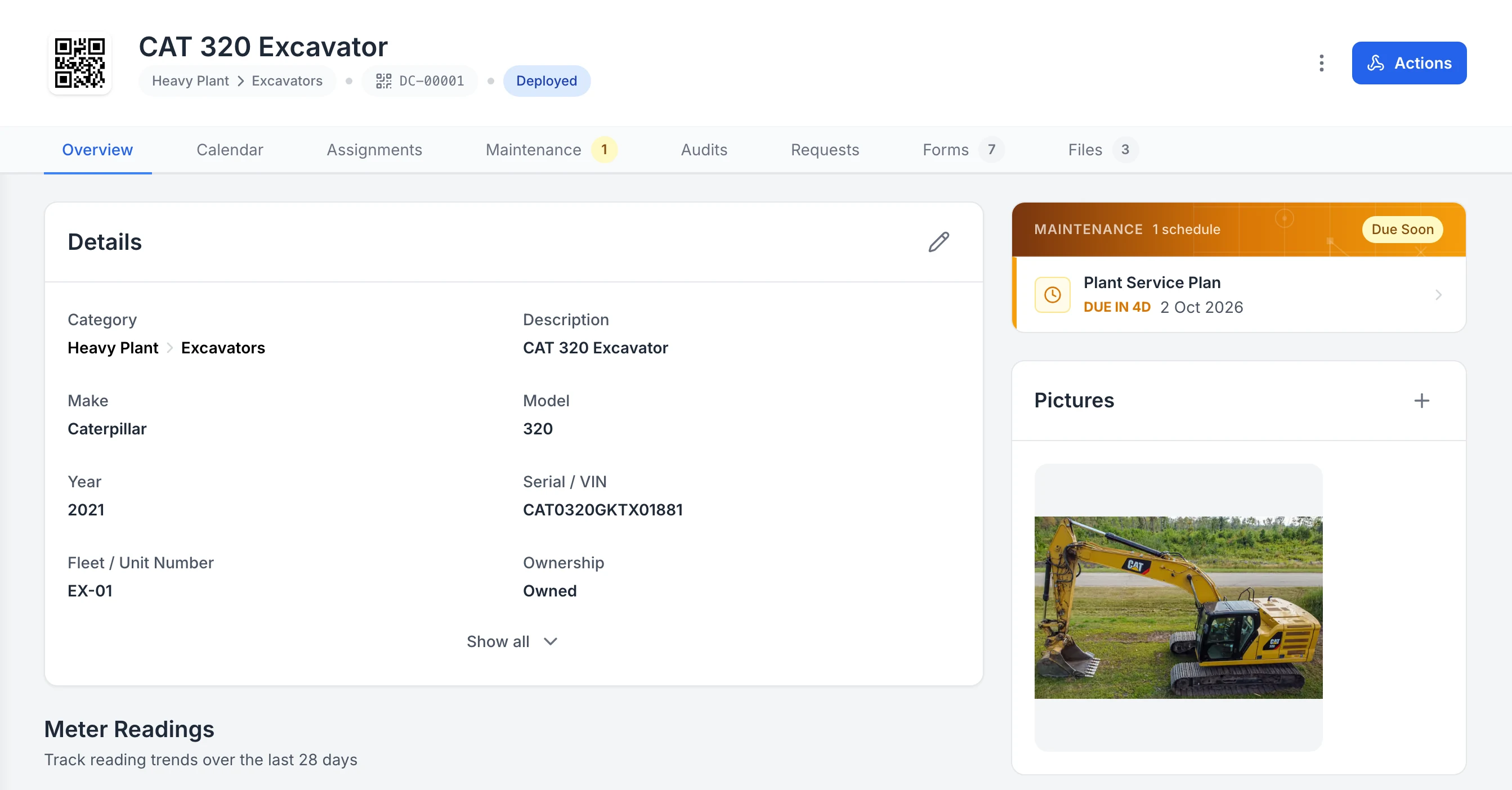
Keep the details, next service and photo on the asset
One excavator’s record. Its QR tag, status and details sit at the top, the next service is flagged Due Soon, and its assignments, maintenance, audits, requests, forms and files are each one tab away.
MapTrack app · Demonstration data · Captured
About this screenshot
Captured in a demonstration workspace on the asset’s Overview tab. Meter readings, sub-assets, parts and activity continue further down the page.
What's the quick summary of MapTrack vs EZOfficeInventory?
MapTrack and EZO (formerly EZOfficeInventory) both track assets, but they serve different needs. MapTrack is built for construction, mining and field operations with GPS, compliance and job costing. EZO, now branded EZO EAM, covers equipment as well as IT, office and education assets, with RFID, helpdesk and (on higher plans) GPS integrations. Here's a clear, side-by-side comparison.
TL;DR: MapTrack vs EZO (formerly EZOfficeInventory) serve different needs. MapTrack is purpose-built for heavy industry (construction, civil, mining, facilities) with native GPS trackers (including ultra long-life battery units), 150+ telematics, fleet and fuel-card data sources, geofencing, per-asset cost tracking, job/project costing, pre-start inspections, CMMS and offline mobile in one platform. EZO, now branded EZO EAM, covers equipment as well as IT asset management, offices, education and healthcare, with RFID scanning, GPS integrations on higher plans, QR/barcode scanning, Zendesk/Jira/Slack integrations, asset lifecycle management (procurement through retirement), maintenance work orders and reservations. Both include unlimited users: MapTrack uses asset-based pricing, while EZO prices its plans by item count (Essentials US$81.41, Advanced US$117.11, Premium US$142.10 a month for 500 items) from a 100-item minimum, with Enterprise on a custom quote. Choose MapTrack if you need GPS tracking, job costing, compliance and offline for field assets across job sites. Choose EZO if you need RFID, helpdesk integrations and IT asset lifecycle management in office or education settings. MapTrack covers tools, plant, trailers and vehicles on one record, from any phone, and holds Capterra’s Best Ease of Use award for 2026.
Which platform fits your team?
Pick the persona that sounds most like you. The recommendation reflects where each platform is strongest.
The IT asset manager
Do you manage laptops, monitors, servers and office equipment with Zendesk or Jira?
EZO (formerly EZOfficeInventory) is a strong fit. RFID scanning, helpdesk integrations (Zendesk, Jira, Slack) and asset lifecycle management from procurement to retirement are core strengths.
The heavy-industry operator
Do you manage plant, vehicles, tools and equipment across construction or mining sites?
Choose MapTrack. Native GPS tracking (including ultra long-life battery units), 150+ telematics, fleet and fuel-card data sources, pre-start inspections, job costing and offline mobile are built for field operations.
The job-costing team
Do you need to allocate asset time and cost to specific job sites or projects?
Choose MapTrack. Geofence-based time onsite feeds directly into job and project-level cost allocation. Job-level costing is not a publicly stated EZO feature; verify with the vendor.
The mixed-environment team
Do you manage both IT assets in offices and field equipment on sites?
Evaluate both platforms for your specific mix. MapTrack excels at field assets with GPS, compliance and job costing. EZO (formerly EZOfficeInventory) excels at IT lifecycle management with RFID and helpdesk integrations. You may need both or pick the platform that covers your primary use case.
How do MapTrack and EZOfficeInventory compare on every feature?
Side-by-side criteria for MapTrack and EZOfficeInventory, grouped by category.
| Criteria |  MapTrack MapTrack |  EZOfficeInventory EZOfficeInventory |
|---|---|---|
| Tracking & Location | ||
| Best for | Heavy industry: construction, civil, mining, facilities; mixed fleet + tools/plant | Equipment and IT-adjacent asset management (EZO EAM) across manufacturing, construction, healthcare, education and government; asset lifecycle tracking |
| GPS tracking | YesNative GPS trackers incl. ultra long-life battery units; real-time location on map | ?GPS via third-party integrations (Samsara, Trackunit, John Deere, Hapn) from the Premium plan; not native hardware(per EZO pricing page, Jun 2026) |
| Tracking methods | YesQR, barcode, GPS, BLE, OEM telematics; one register for fleet and non-fleet | YesQR, barcode, RFID scanning; asset lifecycle tracking |
| Telematics / data integrations | Yes150+ telematics, fleet and fuel-card data sources; consolidate into one system | ?Zendesk, Jira, Slack integrations, plus GPS integrations from Premium and telematics on Enterprise(per EZO pricing page, Jun 2026) |
| Geofencing | YesJob-site geofences with entry/exit alerts, time-on-site reporting and job costing | Not publicly confirmedNot publicly stated; verify with vendor(per EZO pricing page, Jun 2026) |
| Maintenance & Asset Lifecycle | ||
| Maintenance / work orders | YesBuilt-in CMMS; telemetry-driven triggers (hours, odo, fault codes); inspection-to-work order; one work order across many assets, each with its own pass or fail; batch work orders and bulk scan logging; labour, parts and external costs on every service | YesMaintenance management with work orders and service scheduling |
| Pre-starts / inspections | YesPre-starts, inspections, evidence attached to asset | ?Custom forms and reports; verify pre-start workflows |
| Asset lifecycle management | YesProcurement, tracking, maintenance, cost tracking, disposal | YesFull lifecycle: procurement, tracking, maintenance, retirement; core strength |
| Reservations / booking | YesBuilt-in reservations and planning view | YesAsset reservations and checkout workflows |
| Inventory management | YesConsumables, spare parts, stock levels, reorder alerts | ?Inventory tracking with stock alerts; verify depth |
| Cost & Pricing | ||
| Cost tracking | YesPurchase, depreciation, service, hire & operating costs; TCO reports; job/project costing | ?Asset cost tracking, depreciation; no job/project-level costing stated |
| Job / project costing | YesCost and time onsite by job; geofence-based where GPS configured | Not publicly confirmedNot publicly stated; verify with vendor(per EZO pricing page, Jun 2026) |
| Pricing model | YesAsset-based; unlimited users included | Priced by item count, unlimited users (fair-usage): Essentials US$81.41, Advanced US$117.11, Premium US$142.10/mo for 500 items, from 100-item minimum; Enterprise custom(per EZO pricing page, Jun 2026) |
| Trial | YesFree trial, no credit card | ?14-day free trial(per EZO pricing page, Jun 2026) |
| Platform & Enterprise | ||
| Mobile app | YesFull capability; mobile-first; offline | ?Mobile app with barcode scanning; offline mode on the Enterprise plan only(per EZO pricing page, Jun 2026) |
| RFID scanning | ?QR, barcode, GPS, BLE; no RFID | YesRFID, QR and barcode scanning supported(per EZO pricing page, Jun 2026) |
| SSO / API / enterprise | YesRBAC and API on all plans; SSO and Active Directory (SAML 2.0 with Microsoft Entra ID, set up by our team) on Enterprise (Pro add-on) | ?API, custom roles; SSO on higher tiers(per EZO pricing page, Jun 2026) |
| Helpdesk integrations | Not available per vendor sourcesNot core; focused on field operations and OEM telematics | YesZendesk, Jira, Slack integrations |
GPS, compliance and job costing for heavy industry. Not just asset tags.
Full access to GPS tracking, 150+ telematics, fleet and fuel-card data sources, pre-starts, cost tracking and every feature. Per-asset pricing with unlimited users.
- No credit card required
- Unlimited users
How MapTrack and EZOfficeInventory compare on features
Which is better for GPS asset tracking?
MapTrack offers native GPS trackers (including ultra long-life battery units) with real-time location and geofencing. EZO (formerly EZOfficeInventory) relies on third-party integrations for GPS.
MapTrack supports native GPS trackers, including ultra long-life battery units that run for years without charging, giving you real-time location on a map for plant, vehicles and high-value equipment across job sites. MapTrack also connects 150+ telematics, fleet and fuel-card data sources, consolidating location data from multiple sources into a single platform. BLE beacons can be added for proximity detection inside sheds and laydown areas. EZO (formerly EZOfficeInventory) does not provide native GPS tracking hardware. GPS location data is available via third-party integrations (Samsara, Trackunit, John Deere, Hapn) from its Premium plan, but real-time tracking with geofencing and entry/exit alerts is not a core capability. If you need to know where your excavators, generators and vehicles are right now on a map, MapTrack is built for that.
How do tracking methods compare: QR, barcode, RFID and GPS?
MapTrack uses QR, barcode, GPS, BLE and OEM telematics. EZO (formerly EZOfficeInventory) uses QR, barcode and RFID scanning.
MapTrack supports QR codes, barcodes, GPS trackers, BLE beacons and 150+ telematics, fleet and fuel-card data sources. This combination covers everything from hand tools (QR scan) to heavy plant (GPS and engine telemetry) in a single register. EZO (formerly EZOfficeInventory) supports QR codes, barcodes and RFID scanning. RFID is a strength for EZO, allowing bulk scanning of IT assets, office equipment and warehouse inventory. If you need RFID for high-volume indoor asset identification, EZO covers that. If you need GPS for outdoor, mobile assets across job sites with OEM telematics, MapTrack is the stronger choice.
Which tracks costs per asset with job and project costing?
MapTrack tracks full cost of ownership per asset and supports job/project-level costing. EZO (formerly EZOfficeInventory) tracks asset costs and depreciation but not by job.
MapTrack tracks the full cost of ownership per asset: purchase price, depreciation schedules, service and repair costs, hire and rental charges, fuel and operating expenses. Roll-up reports give you total cost of ownership (TCO) by asset, category, site or project. MapTrack also supports job and project-level costing with geofence-based time onsite where GPS is configured, so you can answer "what did this excavator cost on this project?" EZO (formerly EZOfficeInventory) tracks asset costs, depreciation and maintenance expenses across the asset lifecycle. Job or project-level cost allocation is not publicly stated; verify with the vendor. If you need to allocate asset time and cost to specific job sites, MapTrack covers that gap.
Which is purpose-built for heavy industry?
MapTrack is designed for construction, civil, mining and facilities. EZO (formerly EZOfficeInventory) is now EZO EAM, covering equipment as well as IT, office, education and healthcare assets.
MapTrack is designed for construction, civil, mining, oil and gas, facilities and field services, where assets are mobile, crews rotate, sites are remote and compliance is non-negotiable. Workflows like pre-start inspections, site transfers, plant compliance registers and job-site geofencing are first-class features. MapTrack handles mixed fleets: vehicles, plant, tools and equipment in one register. EZO (formerly EZOfficeInventory), now branded EZO EAM, covers equipment as well as IT asset management, office equipment, education institutions and healthcare facilities, with GPS integrations on its Premium plan and above. Its strengths are asset lifecycle management (procurement through retirement), RFID scanning and helpdesk integrations with Zendesk and Jira. If you manage excavators on a mine site, choose MapTrack. If you manage laptops in an office, EZO may be a better fit.
How do maintenance and work orders compare?
Both platforms offer maintenance scheduling and work orders. MapTrack adds telemetry-driven triggers and job costing; EZO (formerly EZOfficeInventory) adds helpdesk ticket integration.
MapTrack is a unified tracking and CMMS platform: work orders, meter-based triggers driven by live telemetry (engine hours, odometer, fault codes), inspection-to-work-order escalation and planned maintenance schedules. Maintenance ties directly to job costing and mixed-asset workflows. EZO (formerly EZOfficeInventory) offers maintenance management with work orders, service scheduling and vendor management. Maintenance can be linked to helpdesk tickets via Zendesk and Jira integrations, which is valuable for IT teams managing hardware service requests. Both platforms are capable for maintenance; the difference is the context and how the CMMS is priced. MapTrack is built for field maintenance on heavy equipment; EZO covers IT, office and equipment servicing, with a CMMS add-on priced separately by admin user.
Which has better mobile and offline capability?
MapTrack is mobile-first with full offline support for remote sites. EZO (formerly EZOfficeInventory) has a mobile app with barcode scanning, with offline mode on its Enterprise plan only.
MapTrack is built mobile-first with full capability on phone and tablet, including offline mode. This is critical for remote construction and mining sites without connectivity, where crews need to complete pre-starts, scan assets and log inspections even when there is no signal. Data syncs when connectivity returns. EZO (formerly EZOfficeInventory) offers a mobile app with barcode scanning for check-in, check-out and asset identification. Its offline mode for the mobile app comes with the Enterprise plan only. If your teams work on remote mine sites or rural construction jobs where connectivity is unreliable, compare offline depth side by side in a pilot.
Which is better for compliance and inspections?
MapTrack keeps compliance attached to each asset with pre-starts, inspections and evidence trails. EZO (formerly EZOfficeInventory) tracks asset lifecycle compliance for IT and office environments.
MapTrack keeps compliance attached to each asset: pre-starts, inspections, certificates, licences and evidence trails in one place for audits. This is built for industries where compliance is a legal requirement, such as construction, mining and transport. The mobile app allows field teams to complete pre-start inspections with photos and signatures offline. EZO (formerly EZOfficeInventory) supports custom fields, reports and audit trails for asset lifecycle compliance, which is suited to IT asset management, software licence tracking and office equipment audits. If your compliance requirements involve heavy equipment pre-starts, plant registers and safety inspections, MapTrack is purpose-built for that. If your compliance involves IT asset audits and software licences, evaluate EZO.
Which is better: MapTrack or EZOfficeInventory?
MapTrack wins for heavy-industry teams managing fleet, plant, tools and equipment across job sites with native GPS, job costing and compliance. EZOfficeInventory wins for IT and office teams managing asset lifecycles with RFID scanning and helpdesk integrations. These platforms serve different needs, so the right choice depends on your assets and environment.
| Category | Winner |
|---|---|
| Native GPS real-time tracking (hardware)(per EZO pricing page, Jun 2026) | MapTrack |
| 150+ telematics, fleet & fuel-card data sources(per EZO pricing page, Jun 2026) | MapTrack |
| Offline mobile for remote sites(per EZO pricing page, Jun 2026) | MapTrack |
| Geofencing with entry/exit alerts(per EZO pricing page, Jun 2026) | MapTrack |
| RFID scanning | EZOfficeInventory |
| IT/helpdesk integrations (Zendesk, Jira) | EZOfficeInventory |
| Asset reservations / checkout | Draw |
How EZOfficeInventory compares: independent ratings and verified pricing
All figures below are sourced from public review platforms, vendor pricing pages and customer reviews. We recheck every field on a quarterly cadence.
Pricing
Per-item, not per-user. Essentials USD $81.41/month, Advanced $117.11/month and Premium $142.10/month, each based on 500 items; Enterprise quoted on request. Unlimited users under fair-use across paid plans.
Source: Vendor pricing page · View source
Feature parity: MapTrack vs EZOfficeInventory
| Capability | MapTrack | EZOfficeInventory |
|---|---|---|
| Asset register with depreciation and warranty trackingEZO supports depreciation schedules, warranty expiry tracking and custom fields out of the box. | ||
| Offline-first mobile (full record editing while disconnected)EZO lists offline mode for its mobile app on the Enterprise plan only; full asset editing offline is not advertised. MapTrack’s pre-starts and inspections, and a loaded work order’s procedures and per-asset results, complete without signal and sync on reconnect; check-outs, returns, audits and Requests need a connection. | ||
| Native barcode and QR scanning on iOS and AndroidEZO supports barcode, QR and (on higher tiers) RFID scanning. | ||
| Native GPS asset trackingEZO captures last-known location via mobile check-in, and offers GPS tracking from its Premium plan. | ||
| Multi-tenant data isolation for partners and sub-contractorsEZO supports groups and role-based access; cross-tenant sub-contractor isolation is not the default model. | ||
| Built-in maintenance and work-order schedulingEZO includes work orders, service tickets and preventive-maintenance scheduling. | ||
| Per-asset pricing (vs per-user)EZO is per-item with unlimited users under fair-use; the pricing model is closer to MapTrack than per-user CMMS vendors. | ||
| Australian-hosted data residencyVerify in a pilot. EZO operates US data centres; AU residency is not publicly advertised. |
Last verified 2026-06-05. EZOfficeInventory is not affiliated with MapTrack; trade marks belong to their respective owners.
Measured impact: what teams report after switching
Verified outcomes from MapTrack customers across construction, mining and field services. Specific numbers reflect published case studies; ranges reflect typical pilot results.
| Metric | MapTrack | EZOfficeInventory |
|---|---|---|
| Tool loss reductionSee /resources/how-a-construction-firm-reduced-tool-loss-by-70 | Up to 70% reduction (verified case study; results vary) | Not a stated outcome for field assets |
| Implementation time | ~2 weeks with guided onboarding | Self-serve setup; varies by plan and tier |
| User licensing model | Per asset, unlimited users | Priced by item count, unlimited users (fair use); from 100-item minimum |
| Job/project costing | Built-in via geofence time onsite | Not publicly stated; verify with vendor |
| Offline field capability | Full offline on mobile; syncs when connectivity returns | Offline mobile app on the Enterprise plan only |
How does MapTrack pricing compare to EZOfficeInventory?
MapTrack
Priced per asset with unlimited users, files, scans, documents, forms, alerts and automations included. No per-seat fees and no lock-in contracts. Free trial with no credit card and guided onboarding; monthly or annual billing.
Get pricing for your asset count →EZOfficeInventory
Plans priced by item count with unlimited users on a fair-usage basis: Essentials US$81.41/mo, Advanced US$117.11/mo and Premium US$142.10/mo for 500 items, from a 100-item minimum, with Enterprise on a custom quote. A CMMS add-on is priced separately by admin user. Check EZO's pricing page for the latest rates, tiers and item limits.
Both platforms include unlimited users, so compare on pricing axis and total cost: MapTrack charges per asset, EZO (formerly EZOfficeInventory) charges by item count within each plan. Factor in whether you need GPS hardware, RFID readers or helpdesk integrations.
Should you choose MapTrack or EZOfficeInventory?
Choose MapTrack if you…
- Need native GPS trackers (including ultra long-life battery units) for real-time location on a map
- Want to consolidate 150+ telematics, fleet and fuel-card data sources into one platform
- Need job and project-level costing with geofence-based time onsite
- Manage mixed fleets (vehicles, plant, tools) in one register across job sites
- Need pre-start inspections, compliance registers and audit-ready evidence trails
- Operate in heavy industry: construction, civil, mining, oil and gas, facilities
- Need full offline mobile capability on remote sites without connectivity
- Prefer per-asset pricing where users are unlimited and you do not hit per-item tier limits (with AU/NZ support)
- Want AI dash cams with live video and event clips in the same app as your assets
- Use barcode or Data Matrix labels as well as QR, scanned with the phone camera or a handheld scanner
- Want tiered service plans on run hours, with work orders raised from meter readings
- Need parts and stock by location and bin, issued against work orders
- Hire out equipment and need rate cards with daily, weekly and monthly rates (a Pro and Enterprise add-on)
- Want a cost ledger, budget vs actual and repair-or-replace for every asset (a Pro and Enterprise add-on)
- Run several divisions that each need their own assets and team access (a Pro and Enterprise add-on)
Consider EZOfficeInventory if you…
- Manage IT assets, office equipment or education/healthcare assets
- Need RFID scanning for high-volume indoor asset identification
- Want Zendesk, Jira or Slack integration for helpdesk ticketing
- Need asset lifecycle management from procurement to retirement in IT/office environments
What our customers say
“MapTrack easily shows us where our equipment is, what project it’s on and who it is assigned to. Support is super helpful.”

Sharyn Edwards
Fleet Coordinator (Major Projects), Genus
“Our investment in MapTrack paid off in a big way when test equipment valued at over $142,000 AUD was stolen during a break-in. Thanks to MapTrack, we gave police the exact location and the gear was recovered within 48 hours.”

Operations Manager
Operations, Mega Electrics
“MapTrack streamlines tracking and asset servicing across mine shutdowns. Simple, reliable and effective.”

Gordon Stennings
Maintenance Storeman, Mineral Resources
How do you switch from EZOfficeInventory to MapTrack?
MapTrack supports CSV and spreadsheet imports so you can migrate your asset register, service history and compliance records from EZOfficeInventory. The MapTrack onboarding team provides guided setup, data mapping and training for your crew. Most teams are operational within a week.
Export your data
Export your asset register and history from EZOfficeInventory as CSV.
Import & map fields
Upload into MapTrack. Our team maps your fields, sites and categories.
Go live
Roll out to your crew with training. Operational within a week.
What should you verify in a pilot?
Before committing, run a short pilot or proof with your own asset mix and workflows.
- ✓MapTrack: Confirm GPS tracker compatibility (including ultra long-life battery units) with your fleet; verify your telematics or fuel-card provider is in MapTrack's integration directory of 150+ telematics, fleet and fuel-card data sources; test job costing and geofence time onsite; review cost tracking, compliance and TCO reports; verify offline on remote sites; RBAC on all plans, SSO on Enterprise if required.
- ✓EZOfficeInventory: Confirm RFID scanning meets your requirements; test Zendesk/Jira integration workflows; check whether you need EZO's Enterprise plan for its offline mobile app; confirm the current trial length; compare total cost at your asset count against EZO's item-count pricing; check asset lifecycle management depth for your industry.
Methodology and sources
This comparison uses publicly available EZO (formerly EZOfficeInventory) documentation and pricing pages verified in Jun 2026. MapTrack capabilities are from internal customer data and our published feature pages. We focus on field realities: GPS tracking, offline mobile, job costing, compliance, telematics ingestion and maintenance workflows. See /features/integrations for our integration directory, /pricing for per-asset pricing.
Where an EZO capability is not clearly stated in public sources, it is marked "Not publicly confirmed, verify with vendor." EZO pricing is by item count in US dollars, with unlimited users on a fair-usage basis, from a 100-item minimum (verified Oct 2026); verify current rates and tier limits before committing.
Spotted something out of date or incorrect? Email corrections@maptrack.com and we will review and update this page.
Frequently asked questions: MapTrack vs EZOfficeInventory
By industry
More comparisons
- MapTrack vs Asset Panda
- MapTrack vs SafetyCulture
- MapTrack vs Hilti ON!Track
- MapTrack vs Milwaukee ONE-KEY
- MapTrack vs MaintainX
- MapTrack vs Fleetio
- MapTrack vs ToolSense
- MapTrack vs Tenna
- MapTrack vs Samsara
- MapTrack vs Geotab
- MapTrack vs Verizon Connect
- MapTrack vs Trackunit
- MapTrack vs ToolWatch
- MapTrack vs spreadsheets
- MapTrack vs Sortly
- MapTrack vs Limble
- MapTrack vs GoCodes
- MapTrack vs AssetTiger
- MapTrack vs Cheqroom
- MapTrack vs ShareMyToolbox
- MapTrack vs Gearbelt
- MapTrack vs Fiix
- MapTrack vs GoAudits
- MapTrack vs Sitemate
- MapTrack vs GoFMX
- MapTrack vs IBM Maximo
- MapTrack vs Kynection
Other ways to evaluate EZOfficeInventory
About the author

Co-Founder & GM of Operations
Lachlan leads operations at MapTrack, bringing 10+ years of enterprise technology experience across mining, construction and heavy industry. Before MapTrack, he held senior roles at Workato (integration and automation) and AppDynamics/Cisco (application performance), working directly with ASX-listed organisations to modernise their technology stacks. His deep understanding of field operations and blue-collar workflows shapes how MapTrack solves real problems for asset-intensive teams.
View LinkedIn profile →Free templates for this workflow
Whichever platform you choose, these are free to download and use. No account needed.
Track field assets with native GPS trackers
Book a tailored demo and get pricing for your asset count. No lock-in; unlimited users included.
4.9 on G2 · 5.0 on Capterra, GetApp & Software Advice
- No credit card required
- Unlimited users
MapTrack vs Asset Panda · MapTrack vs Sortly · EZOfficeInventory alternative