
Equipment Maintenance for Operations Teams
Schedule preventive maintenance, manage work orders and keep service history with the asset record. Confirm any configured device feed or separately scoped telematics workflow before rollout.
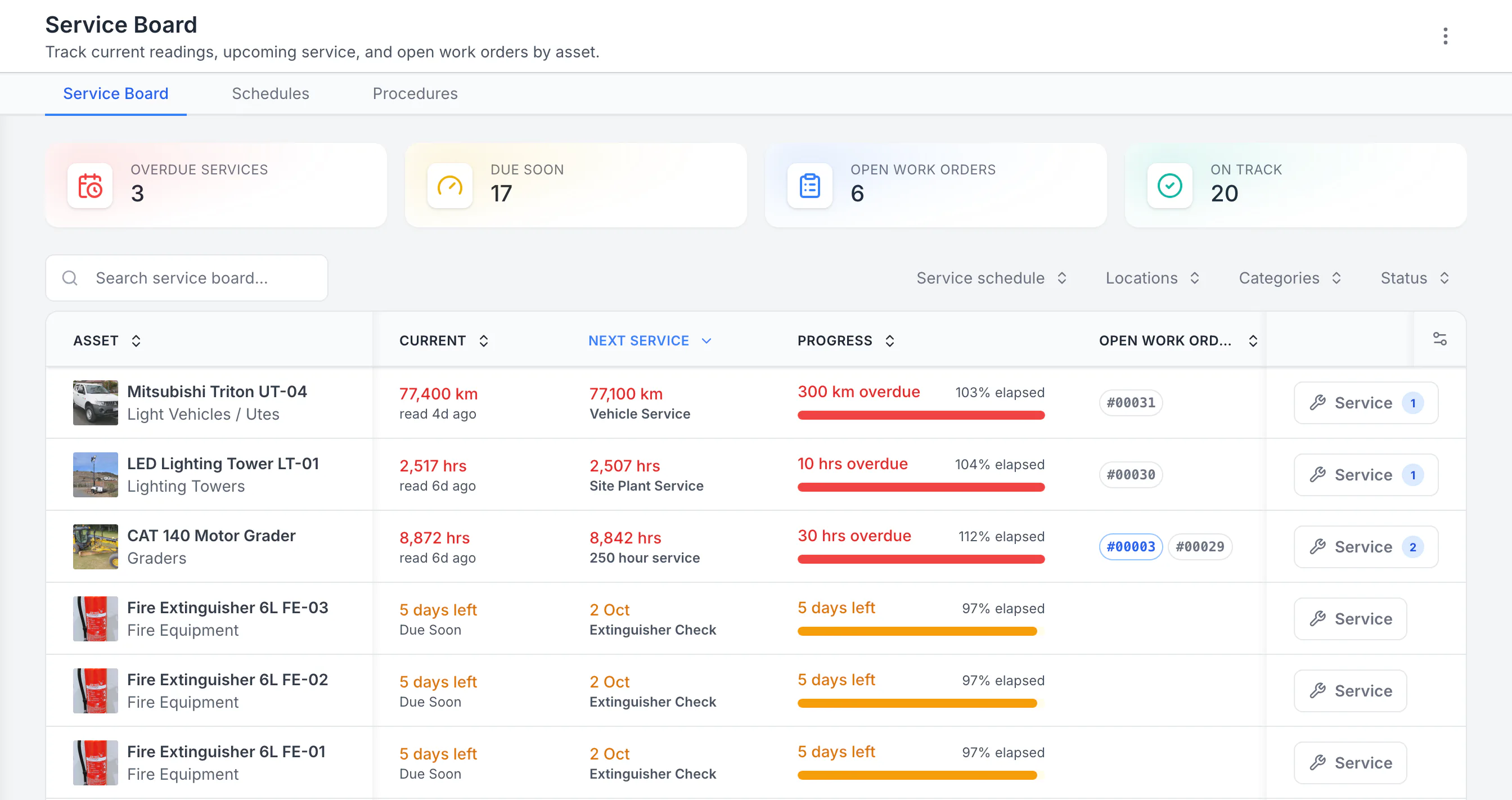
See the next service beside the current reading
Sorted by next service, the three overdue schedules come first: a ute 300 km past its service, then a lighting tower and a grader past their hour services. Each shows its open work orders. Extinguisher checks due in five days follow. Hours, kilometres and calendar checks share one board.
MapTrack app · Demonstration data · Captured
About this screenshot
Demonstration workspace with 40 schedule enrolments. Columns were chosen and resized in the board’s own display settings. Requires enrolled assets, configured schedules and an internet connection.

Co-Founder & GM of Operations
Trusted by construction, mining and field service teams
















What we track
Equipment in the maintenance rollout
Use preventive schedules and work orders for the equipment included in the maintenance rollout.
- Excavators, loaders & earthmoving
- Cranes, EWPs & access equipment
- Generators & compressors
- Fleet vehicles (utes, trucks, vans)
- Pumps, welders & site equipment
- HVAC & mechanical plant
- Forklifts & warehousing equipment
- Trailers & towable plant
- Power tools & battery platforms
- Fire safety & emergency systems
- Building services equipment
- Specialist test & measurement gear
The challenge
Why equipment breaks down before it should
Reactive habits, disconnected data and manual scheduling can make service work harder to plan and records harder to retrieve.
Reactive maintenance creates avoidable disruption
An unexpected breakdown can add repair, downtime and call-out costs. Preventive schedules help teams organise planned work, but no system can guarantee that breakdowns will be prevented.
Spreadsheet schedules miss service intervals
Maintenance scheduled in spreadsheets or wall planners can fall behind when usage changes. Time- and meter-based schedules provide different ways to organise due work, with the correct baseline and trigger still owned by your team.
Service records are scattered across paper and email
When maintenance records are split between filing cabinets, technician notes, email and invoices, retrieving the available history for an audit, warranty review or asset sale can require substantial manual work.
No connection between usage data and maintenance triggers
Engine hours, odometer readings and custom meters can be captured manually and used by preventive schedules. Confirm the device, provider, delivered location or telemetry fields and rollout scope.
Maintenance is disconnected from asset tracking
Your asset register lives in one system, maintenance in another, and inspections in a third. Nobody has a single view of where equipment is, what condition it is in, and when its next service is due. Decisions are made with incomplete information.
One platform
Scheduling, work orders and service history. Not three separate tools
MapTrack connects preventive schedules, work orders and recorded service history with the asset register. Test the intended roles, field workflow and outputs before rollout.
Preventive scheduling
Choose and test the schedule trigger and manual, per-asset automatic or batch generation mode.
Explore preventive schedulingDigital work orders
Assign work orders to supported people. Once loaded, users can work through procedures and checklists and record per-asset outcomes offline, then add costs and move the work order to Completed once connected.
Explore digital work ordersRecorded service history
Keep completed work records and recorded costs with the asset. Workspace owners can use the current Asset Servicing and Asset Performance reports, and your team remains responsible for repair-or-replace decisions.
Explore recorded service historyConnect the service plan to retained asset history
Define the service levels for the equipment, then use the Service Board and completed record to connect planned work with what was recorded on the asset.
1. Specify the complete higher-level job
When services become due together, the higher-ordered due level takes priority. Its own procedure and parts must include all required work; the lower service content is not automatically combined.
2. Test the plan on one asset
Review the sequence and starting readings before enrolling a larger group. Check the generated or manually raised job and reopen the saved result after completion.
Setup and limits
- Maintenance setup and the Service Board require a connection. An already-open lower-level job is not automatically merged into a later higher-level job.
Preventive maintenance
Schedule services and manage work orders from one place
Choose and test the schedule trigger and manual, per-asset automatic or batch generation mode. Configured notification actions send email to selected Person records with a valid email address.
- Time- or meter-based scheduling
- Manual, automatic per-asset or automatic batch generation
- Assign work orders to supported people
- Record time and costs on loaded work orders
- Keep completed work records with the asset
Inspections
Configure inspection follow-up deliberately
A failed submission doesn’t create follow-up work by default. Configure and test any task or work-order automation before rollout.
- Previously loaded forms can be submitted offline
- Selected results can feed configured follow-up
- Photos, signatures and timestamps for audit evidence
- Keep submitted results and corrective work with the asset
- Generate a draft form from supplied source material
Alerts
Configure maintenance email notifications
Configured notification actions send email to selected Person records with a valid email address.
- Define the event and conditions during setup
- Test with one controlled record before rollout
- Email notification actions for selected Person records
- Recipients need a valid email address
- Confirm any escalation sequence before relying on it
Field-ready
Built for maintenance teams, mobile and offline
Maintenance happens in workshops and on site. MapTrack runs as a web app on supported phones and tablets. Once a work order is loaded, users can work through its procedures in the field, even without reception, then add costs and move it to Completed once connected.
Loaded forms can be submitted offline and loaded work orders record per-asset results offline. Adding costs, closing work orders, creation, setup, imports, exports and server-side automations need a connection.
Web app
Supported mobile browsers
Offline work
Record results after first load
Configured notification action
Access
Confirm current plan terms
Plan service work before it becomes overdue
Preventive maintenance scheduling, digital work orders and service history for Australian maintenance teams. Confirm the device, provider, delivered location or telemetry fields and rollout scope.
- Free trial
- No credit card required
- Confirm current plan scope
Get started
How maintenance teams roll out MapTrack
Setup depends on data quality, labels, workflows and team size. Start with one asset class or site, test one field workflow, then expand.
Import your fleet register
Import supported asset fields from a spreadsheet or create records individually. Meter readings, service history, assignments, files and warranty records need to be added or handled through a separately validated workflow.
Configure schedules & triggers
Confirm the device, provider, delivered location or telemetry fields and rollout scope. Choose and test the schedule trigger and manual, per-asset automatic or batch generation mode.
Set up inspections & forms
A failed submission doesn’t create follow-up work by default. Configure and test any task or work-order automation before rollout.
Roll out to technicians
Give technicians, operators and planners the appropriate current roles. Once work orders are loaded, users can work through procedures in the field without reception, then record costs and move the work to Completed once connected.
Key features for equipment maintenance management
Documented scheduling, work-order and service-record capabilities for equipment maintenance.
Plan the maintenance work
Replace reactive records with a defined service process
Configure time- or meter-based schedules, complete loaded work orders in the field and keep recorded service history with the asset.
Frequently asked questions
Common questions about equipment maintenance management software.
Resources for maintenance teams
Guides, calculators and pages relevant to equipment maintenance management.
Maintenance & work orders
How MapTrack handles preventive maintenance scheduling, work orders and service history in one platform.
Explore maintenance & work ordersMeter-based maintenance
Engine hours, odometer and custom meter triggers - schedule services by actual equipment usage, not guesswork.
Explore meter-based maintenanceEquipment maintenance scheduling
Use case guide: how teams schedule, assign and track preventive maintenance across their equipment fleet.
Explore equipment maintenance schedulingConstruction asset management
How construction teams manage tools, plant and equipment, including maintenance - across projects and sites.
Explore construction asset managementROI calculator
Calculate how much reactive maintenance, downtime and missed services are costing your business each year.
Explore ROI calculatorCompare MapTrack
See how MapTrack compares to other maintenance and asset management platforms on features, pricing and support.
Explore compare MapTrackExplore
- Pricing
- Book a demo
- MapTrack vs Asset Panda
- Alternative to Asset Panda
- Alternative to spreadsheets
- Maintenance & work orders
- Meter-based servicing
- Construction
- Vehicle pre-start checklist
- Hardware store
Other industries we serve
- Construction
- Civil contractors
- Plumbing contractors
- Electrical contractors
- HVAC contractors
- Landscaping
- Building services
- Mining and resources
- Oil and gas
- Industrial maintenance
- Facilities services
- Fleet and transport
- Government and councils
- Manufacturing
- Energy and utilities
- Infrastructure
- Education
- IT assets
- Aviation
- Fire safety and protection
- Agriculture
- Transport and logistics
- Water utilities
Move from reactive records to planned maintenance
Schedule services, manage work orders and keep recorded service history with each asset. Confirm current pricing, plan inclusions, user entitlements, trial and subscription terms directly with MapTrack before relying on them.
Maintenance · Meter-based servicing · Service history · Construction · Compare MapTrack