
Asset audits & stocktakes
Run asset audits and stocktakes for a person or location. Scan QR tags, review gaps and close the audit with a clear decision on every expected asset.

Co-Founder & GM of Operations
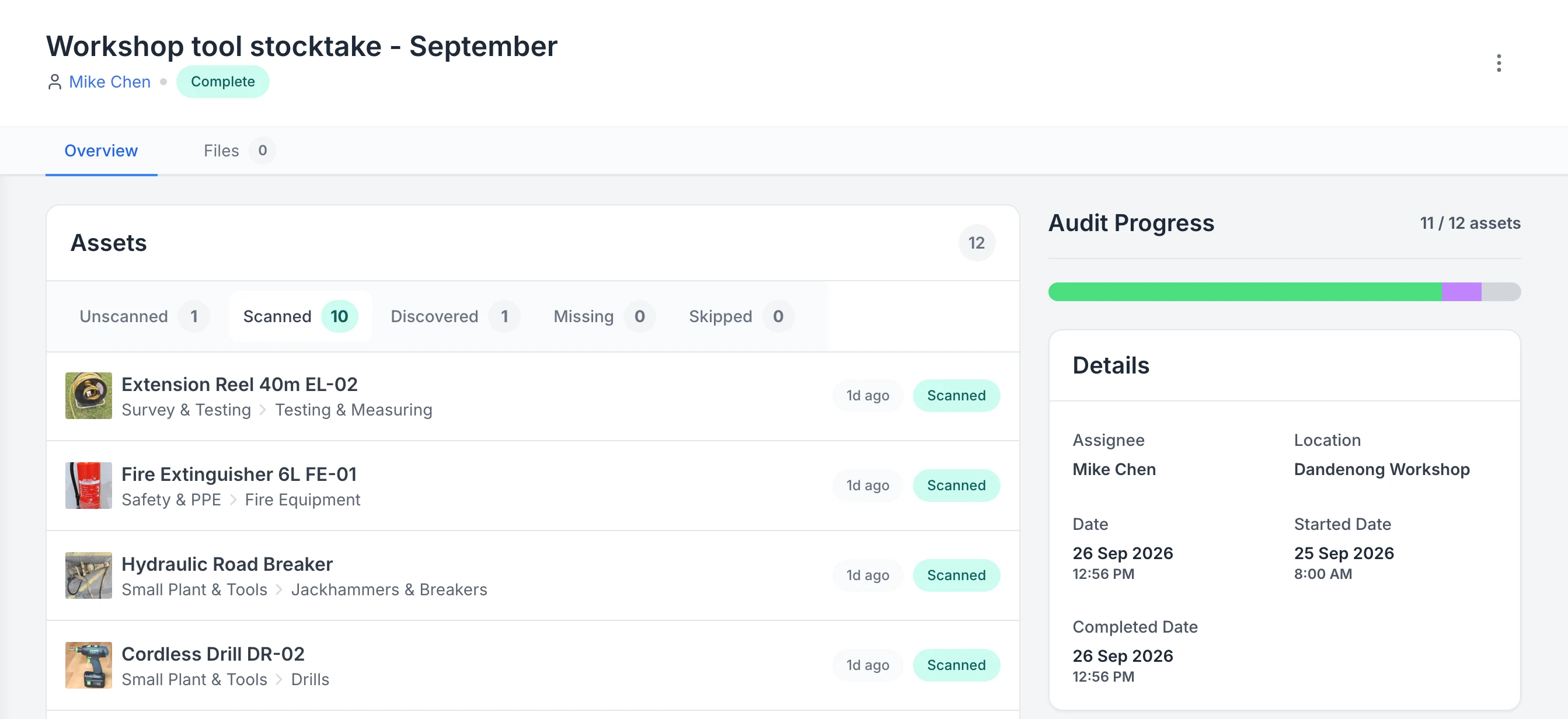
See what a stocktake scanned, discovered and missed
A completed workshop stocktake. Ten listed assets were scanned and one asset that was not on the list was discovered, so progress reads 11 of 12. One asset is still unscanned and none are marked missing.
MapTrack app · Demonstration data · Captured
About this screenshot
Captured in a demonstration workspace on the audit’s Overview tab with the Scanned tab open; its activity log continues below the crop.
Trusted by construction, mining and field service teams














The problem
Asset audits and stocktakes are slow and error-prone when you're working from spreadsheets or paper lists. You can't easily verify what's present, what's missing or who had what, and there's no clear audit trail for compliance or insurance. Manual counts don't scale across sites and asset types.
How MapTrack addresses it
MapTrack gives you a scan-first audit for the assets held by a person or assigned to a location. Start the audit, scan QR tags and review the live Scanned, Discovered, Unscanned, Skipped and Missing states. When expected assets remain unscanned, choose Skip All or Mark Missing before completion. Completed audits keep their summary and cannot be edited.
How it works
- 1
Scan expected assets
Start the audit and scan MapTrack QR tags with the camera or a compatible handheld scanner. Expected assets move to Scanned.
- 2
Review exceptions
A known workspace asset outside the audit scope appears as Discovered. Check anything still Unscanned before completing.
- 3
Resolve remaining items
Choose Skip All when the remaining items should not be marked missing, or Mark Missing to update those unscanned asset records.
- 4
Complete the audit
Review the completion summary before closing the audit. A completed audit is locked from further changes.
Give every audit a clear close-out
Full access to every feature. No credit card required. Per-asset pricing so you scale as your fleet grows.
- No credit card required
Frequently asked questions
Explore
- Pricing
- Book a demo
- MapTrack vs Asset Panda
- Alternative to Asset Panda
- Alternative to spreadsheets
- Commercial GPS tracking
- Construction equipment GPS tracking
- Construction
- Vehicle pre-start checklist
- Hardware store
Related use cases
- Tool theft prevention
- Tool tracking for construction
- Equipment utilisation tracking
- Plant and machinery compliance
- Fleet pre-start inspections
- Equipment maintenance scheduling
- Equipment hire and rental tracking
- Fire extinguisher inspections
- Test and tag tracking
- Shutdown and turnaround management
- Multi-site equipment management
- GPS geofence time onsite
- Calibration tracking
- Bulk inspections and testing
- Lifting gear and crane inspections
- SWMS and plant risk assessments
- Asset documents and certificates
- Equipment custody and handover
- Offline inspections
- One system for fleet, plant and tools
- Plant hire chargeout and job costing
- Forklift inspections
- EWP inspections
- Harness and ladder inspections
- Crane inspections
- PPE register
- Scaffold tagging
- First aid and AED inspections
Run your next audit digitally
Join construction, mining and field service teams across Australia.
4.9 on G2 · 5.0 on Capterra, GetApp & Software Advice
- No credit card required
Run an asset audit step by step · Audits & stocktakes · QR tracking · Asset tracking · Pricing