
Fleet pre-start inspections
Fleet pre-start inspections on mobile, attached to each vehicle. Evidence for audits and work orders when something fails. One system for fleet compliance.

Co-Founder & GM of Operations
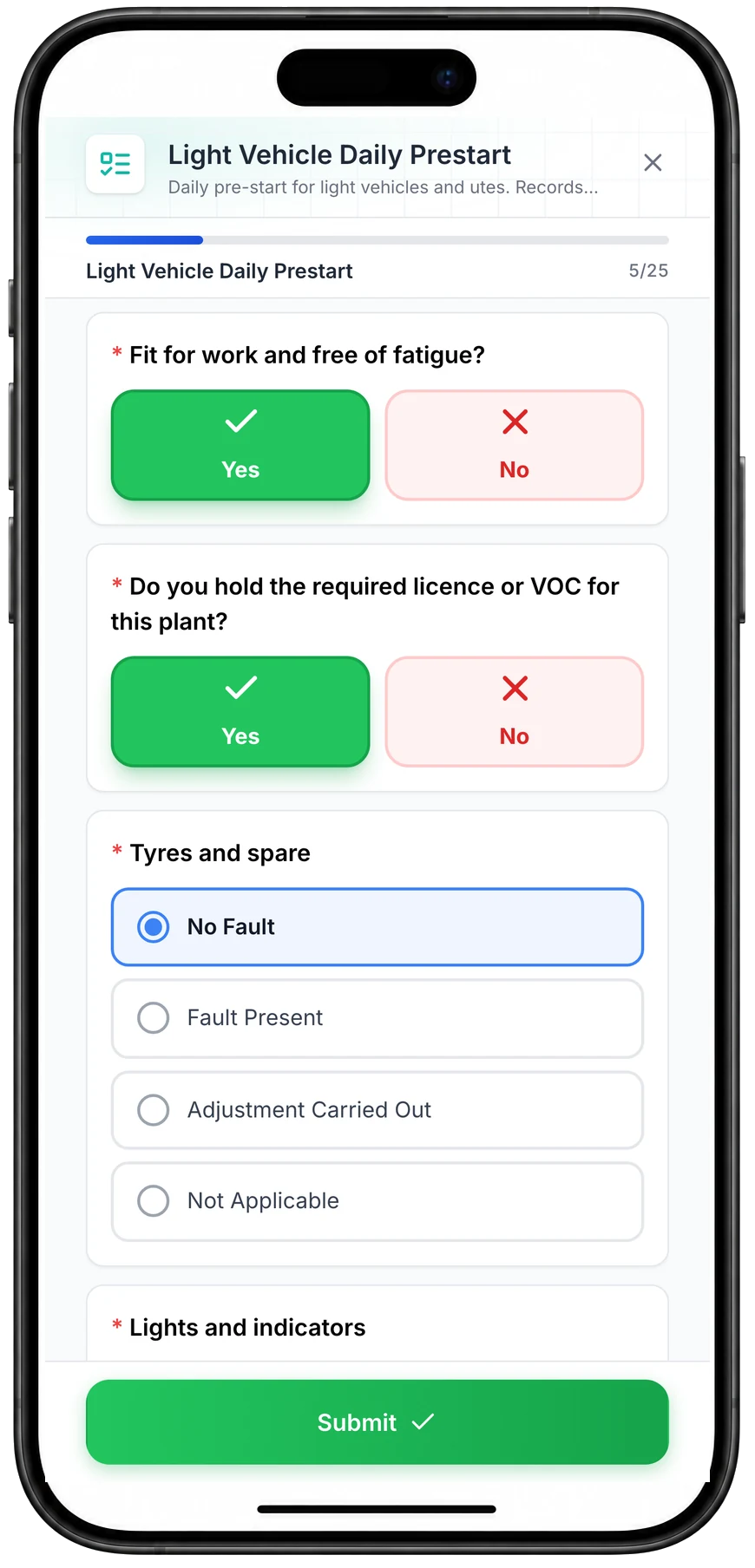
Run a vehicle pre-start on a phone
A daily pre-start for a ute, part-way through. Driver checks such as fitness for work and licence take one tap, and each vehicle check records No Fault, Fault Present, Adjustment Carried Out or Not Applicable.
MapTrack app · Demonstration data · Captured
About this screenshot
Captured at a 430 x 932 phone viewport in a demonstration workspace and shown in a phone frame; the form was closed without submitting.
Trusted by construction, mining and field service teams
















Give the workshop the result behind the fault
For a vehicle pre-start, retain the submitted answers and photos with the vehicle and use a configured follow-up rule to put the issue into the work queue.
1. Test the exception before fleet rollout
Use a controlled failed result on a demonstration vehicle. Check which task is created, who receives it and whether the description gives the workshop enough context.
2. Close the loop on the vehicle
Review the corrective job and the retained pre-start together. A submitted form and a completed repair are different records; keep both available when deciding whether the vehicle returns to work.
The problem
Fleet pre-starts are required for safety and compliance, but when they're on paper or in a separate app, evidence isn't tied to the vehicle. Audits are slow, and you can't easily block a vehicle that's failed a pre-start or is overdue for service. Drivers need a simple way to complete checks; ops need visibility and an audit trail.
How MapTrack addresses it
MapTrack gives you pre-start inspections attached to each vehicle. Drivers complete checks on mobile (including offline); results and evidence sit on the vehicle record. Failed items can trigger work orders so the vehicle isn't available until it's cleared. You get one place for fleet compliance evidence, timestamps for audits and visibility for ops. MapTrack supports mixed fleet - vehicles and equipment, so you can run the same compliance workflow across assets.
How it works
- 1
Pre-start forms on mobile
Drivers complete pre-start inspections on phone or tablet. Forms can be built to match your checklist; offline support for low-connectivity areas.
- 2
Evidence on the vehicle
Results, photos and timestamps attach to each vehicle. One record for compliance and audits.
- 3
Work orders from failures
Failed pre-start items can automatically create or link to work orders so vehicles aren't used until fixed.
- 4
Visibility and audit trail
Ops see completion status and history. Export or show evidence when auditors or regulators ask.
Digital pre-starts with photo proof
Full access to every feature. No credit card required. Per-asset pricing so you scale as your fleet grows.
- No credit card required
Frequently asked questions
Explore
- Pricing
- Book a demo
- MapTrack vs Asset Panda
- Alternative to Asset Panda
- Alternative to spreadsheets
- Commercial GPS tracking
- Construction equipment GPS tracking
- Construction
- Vehicle pre-start checklist
- Hardware store
Related use cases
- Tool theft prevention
- Tool tracking for construction
- Equipment utilisation tracking
- Plant and machinery compliance
- Equipment maintenance scheduling
- Asset audits and stocktakes
- Equipment hire and rental tracking
- Fire extinguisher inspections
- Test and tag tracking
- Shutdown and turnaround management
- Multi-site equipment management
- GPS geofence time onsite
- Calibration tracking
- Bulk inspections and testing
- Lifting gear and crane inspections
- SWMS and plant risk assessments
- Asset documents and certificates
- Equipment custody and handover
- Offline inspections
- One system for fleet, plant and tools
- Plant hire chargeout and job costing
- Forklift inspections
- EWP inspections
- Harness and ladder inspections
- Crane inspections
- PPE register
- Scaffold tagging
- First aid and AED inspections
Pre-starts done before the engine starts
Join construction, mining and field service teams across Australia.
4.9 on G2 · 5.0 on Capterra, GetApp & Software Advice
- No credit card required
Pre-start inspections · Compliance · Best pre-start inspection software · Pricing · QR asset labels