















Facilities services

Facilities asset management software

Track cleaning equipment, floor care machines, tools and fleet across multi-site operations. Accountability, inspections and maintenance in one platform, so you know who has what, what’s due and what’s ready for the next customer site.

From $1 a tool and $12 a machine a month, AUD ex GST. Unlimited users.

600,000+ assets tracked since 2012 · Unlimited users, per-asset pricing · Offline-ready, works on every site

A cleaning cart with a vacuum, mops and bins, with the vacuum ringed, a Bluetooth tag marked on it and a MapTrack Test and Tag schedule laid beside it.
Test and tag
MapTrack maintenance schedules: the Test and Tag schedule with its status bar.
Bluetooth tagExample: seen by a nearby gateway
Test and tag
MapTrack maintenance schedules: the Test and Tag schedule with its status bar.
Bluetooth tagExample: seen by a nearby gateway
Test and tag
MapTrack maintenance schedules: the Test and Tag schedule with its status bar.
Bluetooth tagExample: seen by a nearby gateway

Published customer results

Under 4 hours

Weekly hours spent on manual data entry, form transcription and compliance reporting dropped from roughly 8–10 hours to under 4 hours after moving to digital forms and automated workflows.

365 Alongside, Building Maintenance
Read the 365 Alongside story

Instantly retrievable

Digital forms with automatic timestamps and asset linking replaced paper records, making compliance documentation instantly retrievable for client or auditor requests.

365 Alongside, Building Maintenance
Read the 365 Alongside story

Roughly 80%

Overdue service items dropped by roughly 80% within the first six months as automated scheduling and alerts replaced manual spreadsheet tracking.

RIX Specialist Contracting, Construction
Read the RIX Specialist Contracting story

Asset tracking software for facilities management helps FM contractors and in-house teams track equipment, fire assets and plant across multiple sites from one register. MapTrack combines QR scanning with offline mobile capture for basements and plant rooms, AS/NZS 3760 test-and-tag records, AS 1851 fire service evidence and vendor SLA tracking by site. Facilities teams use it to stop equipment being mislaid between depots and vans, clear the expired-tag write-ups that dominate compliance audits, and keep multi-site registers clean so the same scrubber is not re-purchased twice.

Key takeaways

  • In a MapTrack case study, building maintenance contractor 365 Alongside cut admin time by about 60% after moving its asset records into one register.
  • AS/NZS 3760 test and tag intervals belong on the asset record; expired tags are the most common write-up in facilities compliance audits.
  • AS 1851 routine service of fire extinguishers (six-monthly and annual) must be evidenced per asset, not signed off on a generic site sheet.
  • Equipment moves between depots, vans and sites, so the register needs a scan at each handover to show where an item actually is.
  • Offline mobile scanning is essential for basements, plant rooms and stairwells where 4G coverage drops out and paper checklists otherwise creep back in.
  • Vendor SLA tracking and contract scoping by customer site keep multi-site registers clean and stop the same scrubber being re-purchased by two depots.

Pricing

One price per machine, with the hardware included: software and a QR tag from $12 a machine a month, GPS tracking from $27 and AI cameras from $72. Tools and equipment start at $1/asset/month. Every plan includes unlimited users. Prices are AUD ex GST, and machine prices are for annual billing.

View pricingGet a tailored quote

Jarrod Milford

Jarrod Milford

Co-Founder & Commercial Director

Published 15 February 2026Updated 26 October 2026

Asset tracking for facilities teams and FM contractors

Facilities teams look after two things at once: the equipment they run and the checks they owe each site. In MapTrack each building or customer site is a location, and every scrubber, vacuum, ladder, tester and piece of plant gets a QR label and its own record. Test and tag rounds, extinguisher checks and site inspections run on the phone as jobs and forms, saved against the site or the asset, each showing when it's next due. Supplier visits close out on the plant's own record with the result and the cost.

Facilities

MapTrack at a glance

Built for
Facilities teams and FM contractors looking after equipment and site checks across many buildings.
Tracks
Auto scrubbers and floor-care machines, vacuums, pressure washers and blowers, portable electrical equipment, pumps, ventilation, air-conditioning and fire panels, furniture and equipment, first aid kits and extinguishers, site vehicles.
Tracked with
QR labels, battery GPS trackers, hardwired GPS trackers or AI dashcams with built-in GPS.
Works offline
Pre starts, inspections and other forms save with no reception and sync when the phone is back in range. A work order already loaded on the phone can be worked through with no reception too.
Phones and computers
In the browser on a computer, and Android, iPhone and iPad access through the mobile browser or the installable web app.
Connects to
Telematics and accounting integrations, a public API, and an MCP server for AI tools such as Claude.
Sign-in
Sign in with Microsoft, or SAML 2.0 single sign-on set up by our team (Enterprise, or a Pro add-on).
Set-up and support
24/7 support. Our team sets up single sign-on and OEM telematics feeds, and helps connect trackers you already run.
Track record
600,000+ assets tracked since 2012.

How to choose asset tracking software for facilities management

Look for:

  1. Each building or customer site as a location, with a proper asset register kept current
  2. Test and tag rounds, extinguisher checks and site inspections run as jobs and forms
  3. Each check showing when it's next due
  4. Supplier visits closed out on the plant's own record, with the result and the cost
  5. Site checklists kept with the assets they cover

Where MapTrack fits

Next to job management software

Job management software runs the quotes, schedules and invoices. MapTrack keeps the gear those jobs use on one register: who's got it, where it was last checked out or returned, and when it's due for a service, test or calibration.

Next to an EAM or ERP

If fixed plant, work planning and finance sit in an EAM or ERP, MapTrack can run beside it for the tools, equipment and vehicles that move between sites and crews. Its public API passes records between the two.

See what MapTrack costs for your facilities assets

Per-asset pricing tailored to your facilities asset mix and a rollout plan, within one business day.

Trusted by facilities and maintenance teams, including 365 Alongside and Axis Services Group

365 AlongsideAxis Services GroupSaunders InternationalMineral ResourcesSupagasHacer Group
G2 rating 4.9 out of 5
Capterra rating 5.0 out of 5GetApp rating 5.0 out of 5Software Advice rating 5.0 out of 5
15 reviews on G2 · the same 17 reviews on Capterra, GetApp and Software AdviceCapterra Best Value 2026 badgeCapterra Best Ease of Use 2026 badgeAll MapTrack reviews

What we track

What facilities teams track in MapTrack

MapTrack is built for the full mix of equipment that moves across your depots, vans and customer sites, from hand tools and vacuums to ride-on scrubbers and fleet vehicles.

  • Auto scrubbers & floor-care machines
  • Vacuums, dust extractors & pressure washers
  • Portable electrical equipment on test and tag
  • Ladders, harnesses & testers
  • First aid kits & extinguishers
  • Pumps, ventilation & air-conditioning plant
  • Hotel furniture & equipment
  • Site vehicles

What you run, and how MapTrack tracks it

Auto scrubbers and floor-care machines
QR label and battery GPS tracker
Vacuums and dust extractors
QR label
Pressure washers and blowers, with batteries and chargers
QR label
Portable electrical equipment on test and tag
QR label
Pumps, ventilation, air-conditioning and fire panels
QR label
Hotel furniture and equipment
QR label
First aid kits and extinguishers
QR label
Site vehicles
Hardwired GPS tracker or AI dashcam

Running a mix like this? See how MapTrack handles it in a demo built around facilities teams.

Book a demo

30 minutes on Microsoft Teams

The challenge

The costs of poorly managed facilities equipment

Facilities equipment doesn’t sit still. It moves between depots, vans and customer sites every day. Technicians borrow gear, inspections get skipped and maintenance falls behind - until something breaks on a customer site and disrupts the contract.

Equipment moves between depots and customer sites with no tracking

Scrubbers, vacuums and tools get loaded onto vans, dropped at a customer site and never returned to the depot. Without a clear chain of custody, you write off the loss and re-purchase - over and over again.

Technicians don’t return gear, or return it damaged

Equipment goes out with one technician and comes back broken, or doesn’t come back at all. Nobody knows who had it last. You spend hours chasing down missing items and lose money replacing gear that should still be in service.

Inspections and compliance not attached to assets

Pre-start checks, test-and-tag records and safety inspections sit in paper folders or disconnected spreadsheets. Not linked to the equipment they apply to. When a client or auditor asks for evidence, you scramble to find it.

No visibility across multi-site contracts

Equipment is spread across depots, vans and dozens of customer sites with no single view. Each site manager runs their own list. Operations can’t see the full picture without ringing around or consolidating spreadsheets manually.

Maintenance missed because no system triggers service

Scrubbers and ride-on machines need regular servicing, but without usage-based triggers or scheduled reminders, maintenance gets missed. Equipment breaks down on a customer site, disrupts the contract and costs more to repair than a planned service would have.

From MapTrack's own data

What we see across MapTrack customer accounts

These figures come from MapTrack's own product data, de-identified and aggregated. Accounts aren't grouped by industry, so each figure covers every qualifying customer account, not one industry alone. Every figure counts at least 20 accounts, and each one says how it was measured.

15%

Scheduled services past their due date

Across 32 MapTrack customer accounts with service schedules, 15% of scheduled services were past their due date on 26 October 2026. More than three quarters of those (78%) were over 30 days past due.

Method: MapTrack's own product data: 32 customer accounts with service schedules, 5,855 scheduled services (884 past due), snapshot at 26 October 2026. Demo, test and trial-build accounts are left out. Includes schedules MapTrack set up during onboarding; the servicing itself is the customer's. One account holds 53% of the past-due services; without it the share is 16%. Some past-due items may be assets no longer in use that were never archived.
77%

Usual calendar service intervals

Across 37 MapTrack customer accounts with calendar-based service schedules, 6 months and 12 months are the usual intervals: together they cover 77% of calendar triggers.

Method: MapTrack's own product data: 37 customer accounts with calendar-based service schedules, 141 calendar triggers, schedules live on 26 October 2026. Demo, test and trial-build accounts and anything MapTrack staff created are left out. Counts: 6 months 55, 12 months 53, 3 months 18, monthly 7, other 8. This describes how customers set their own schedules, not what a regulation or standard requires.

6%

Photos and documents on asset records

Across 62 MapTrack customer accounts, 80% of asset records had a photo on 26 October 2026, but only 6% had a manual, certificate or invoice file attached.

Method: MapTrack's own product data: 62 customer accounts, 24,507 assets, snapshot at 26 October 2026. Demo, test and trial-build accounts and anything MapTrack staff created are left out. Counts files attached to the asset record; certificates kept on service records or forms aren't counted. The median account has under 1% with a document.

1.5 days

How far ahead equipment is booked

Across 20 MapTrack customer accounts using equipment requests over the 12 months to October 2026, a typical request was booked 1.5 days ahead, and 45% were for gear needed within 24 hours.

Method: MapTrack's own product data: 20 customer accounts using equipment requests, 1,050 requests, 12 months to 26 October 2026. Demo, test and trial-build accounts and anything MapTrack staff created are left out. Exactly 20 accounts, and one holds 41% of requests; 404 of the 1,050 were cancelled.

Want to know what these costs look like on your own sites? Talk it through with us.

Book a demo

30 minutes on Microsoft Teams

Use cases

How facilities managers use MapTrack

Test and tag rounds across every site

Run each site's test and tag round as one job: a pass or fail on every item, and a note on anything that fails. The schedule shows when each one's next due.

Compliance
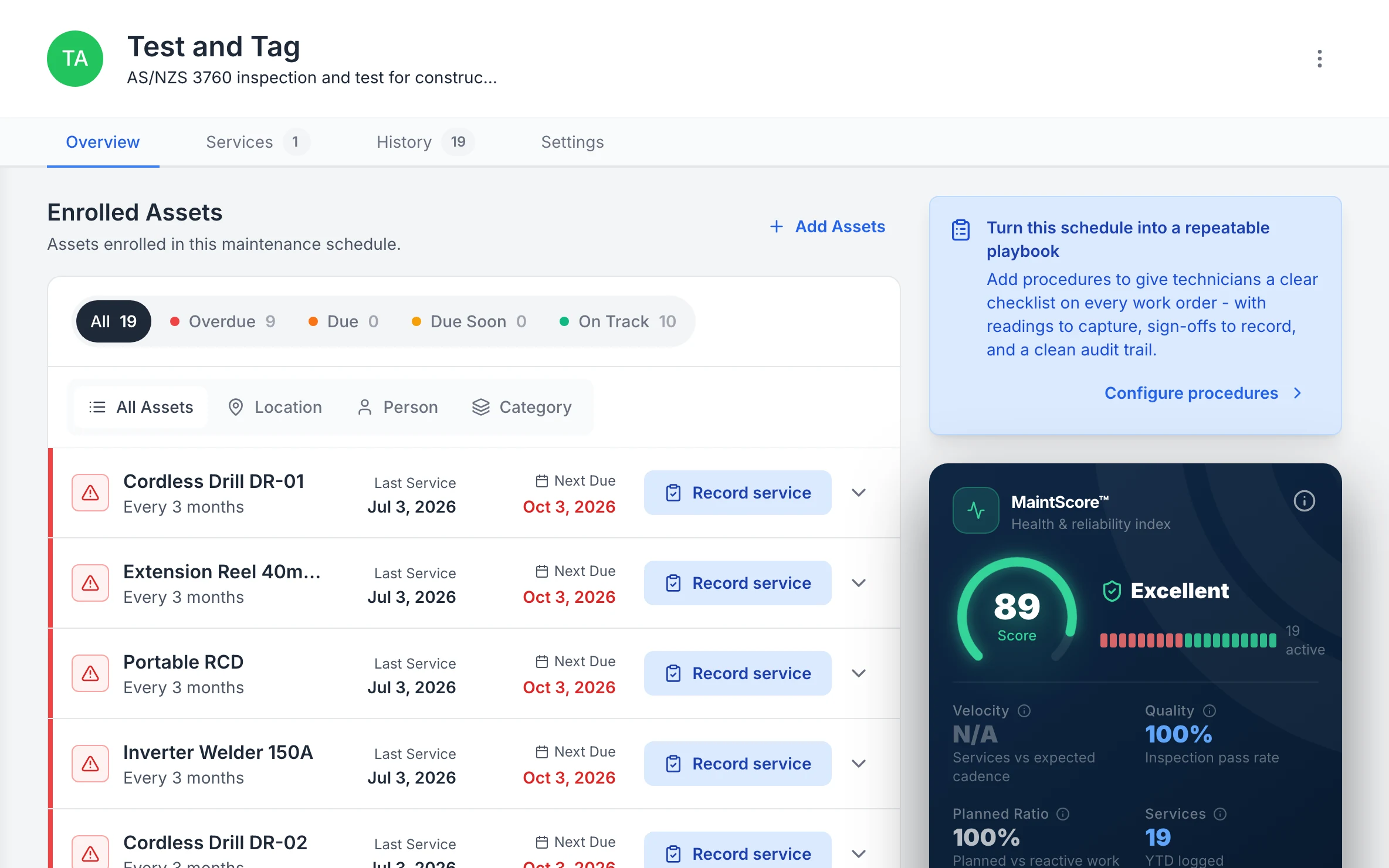
MapTrack Test and Tag schedule for AS/NZS 3760 inspection and test: 19 enrolled assets, 9 overdue and 10 on track; cordless drills, a 40m extension reel, a portable RCD and an inverter welder, each tested every 3 months with its last service and next due date, beside a MaintScore of 89, Excellent.

Test and tag, lead by lead

Every enrolled lead and tool with when it was last tested and when it’s next due, the overdue ones first.

MapTrack app · Demonstration data · Captured

About this screenshot

Demonstration workspace at a 1440 x 900 desktop viewport, cropped right of the navigation sidebar to a 16:10 frame.

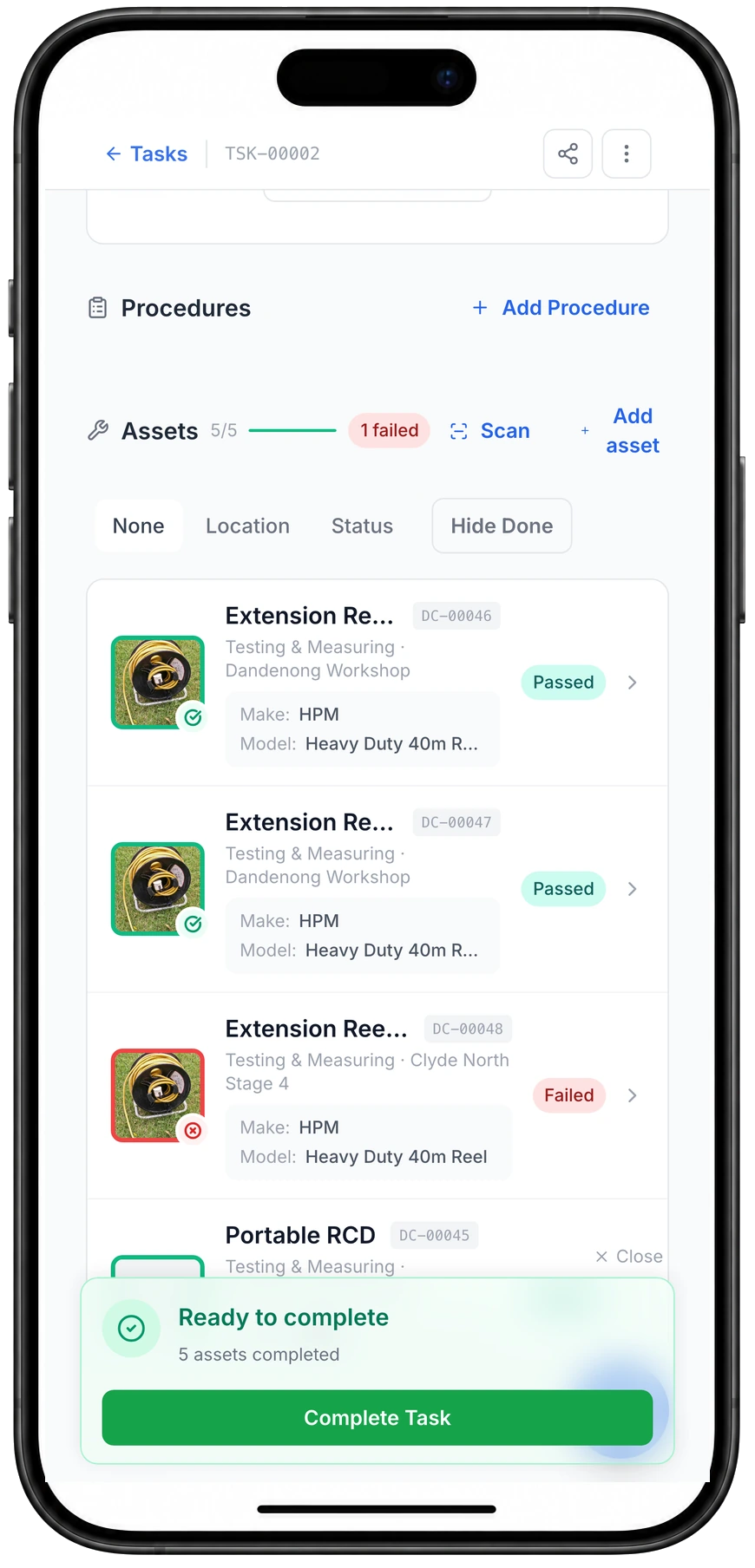
A task on a phone with Assets 5 of 5 and a red "1 failed" badge. Two Extension Reel 40m rows at Dandenong Workshop show Passed, and a third at Clyde North Stage 4 shows Failed with a red outline. A Ready to complete panel reads 5 assets completed.

A test and tag round as one job, pass or fail each

Work through every lead and RCD on one job, and the one that fails stands out straight away.

MapTrack app · Demonstration data · Captured

About this screenshot

Demonstration task with five items overdue for test and tag (three 40 m reels, a portable RCD and a welder), four completed as Passed and one as Failed on a phone on 23 Oct 2026. No test readings, tags, time or notes recorded.

A proper asset register, kept current

Bring the spreadsheet in once, then the team scans an item's QR label to open it and update it on the spot. The register shows each item's status, who or which site has it, and its tag.

Asset register
MapTrack Assets table filtered to Small Plant & Tools, showing 9 tools, angle grinders, a hydraulic road breaker, cordless drills, a concrete cut-off saw, an inverter welder and plate compactors, each with its category, a Deployed or Available status, the person or site it is with, its QR tag ID and its make.

Keep small tools in the same register as plant

The same register filtered to small plant and tools. Each tool carries its own QR tag and shows whether it is out with someone or sitting at the workshop or on site.

MapTrack app · Demonstration data · Captured

About this screenshot

Captured in a demonstration workspace. The All assets view is filtered to the Small Plant & Tools category and shows the Status, Person, Location, Tag and Make columns.

Not sure which of these to start with? We'll walk you through it in a demo.

Book a demo

30 minutes on Microsoft Teams

Supplier visits logged against the plant

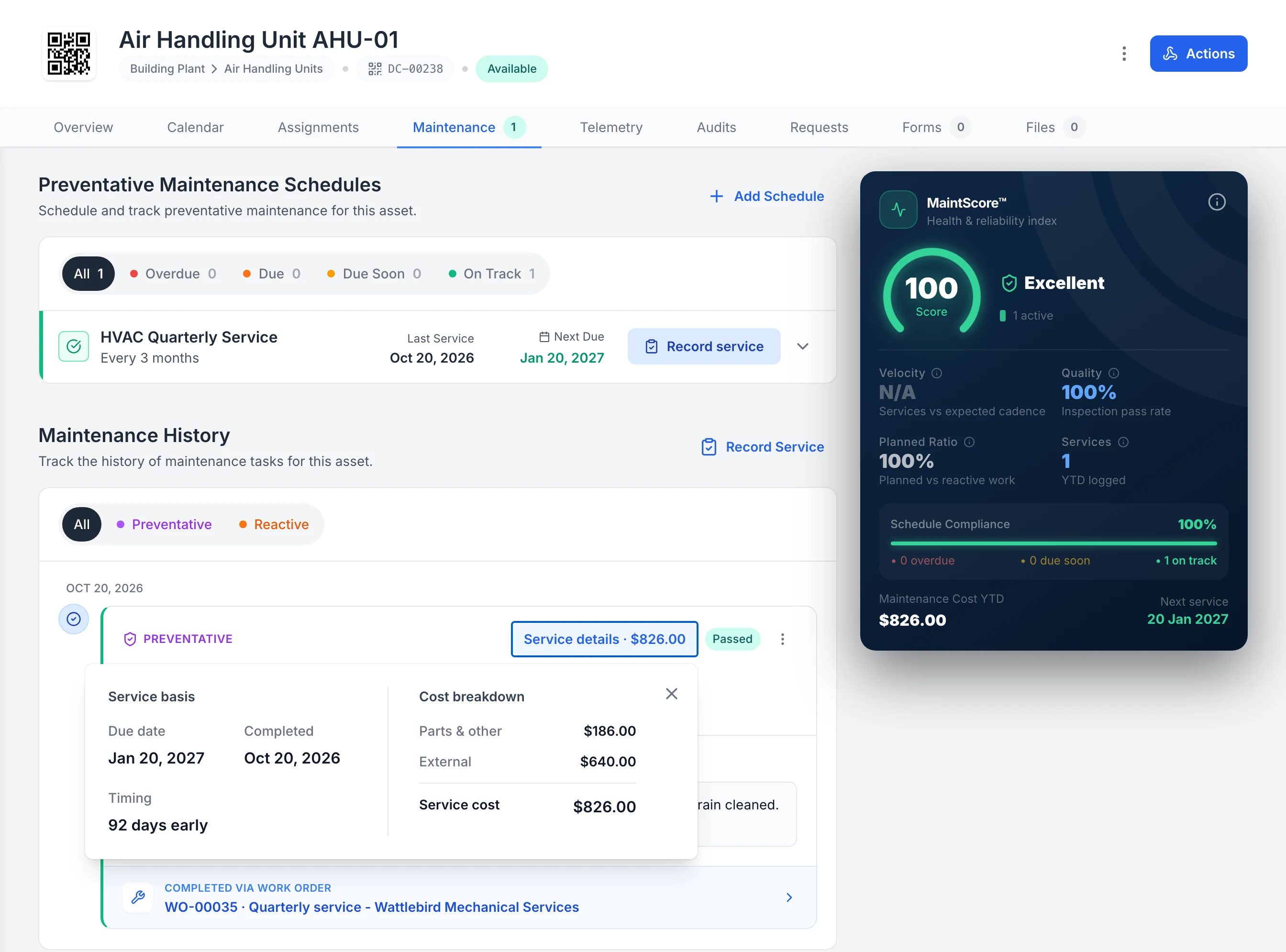
Each supplier visit closes out on the plant's own record, with the date, the result and the cost, including what the supplier charged. The history stays with the pump, fan or panel.

Service history
MapTrack Maintenance tab for Air Handling Unit AHU-01: the HVAC Quarterly Service schedule, last serviced Oct 20, 2026 and next due Jan 20, 2027, and in the maintenance history a passed preventative service with its Service details open: parts and other $186.00, external $640.00, service cost $826.00, completed through work order WO-00035, Quarterly service - Wattlebird Mechanical Services.

A supplier’s service visit on the unit’s own record

A supplier’s quarterly service, logged on the air handling unit’s own record: passed, with the supplier’s $640 charge shown separately from $186 of parts.

MapTrack app · Demonstration data · Captured

About this screenshot

Demonstration workspace at a 1600 x 1400 desktop viewport, with the Service details panel open on the service record, cropped right of the navigation sidebar.

Site checklists kept with the assets

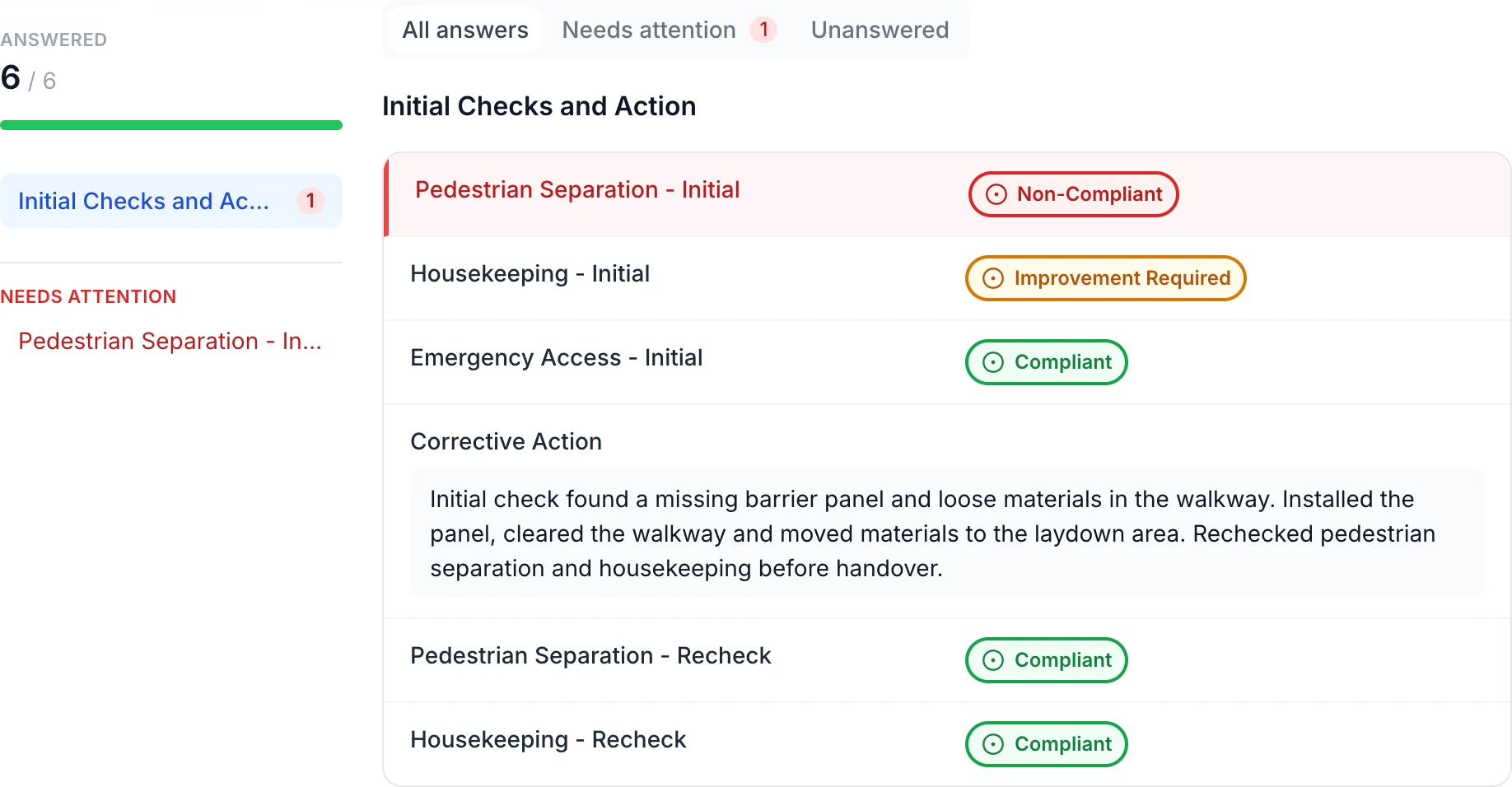
Build your site checks as forms and run them on a phone. A non-compliant answer stays red beside the corrective action and the recheck, and the finished form saves against the site or the asset.

Forms and inspections
Completed site inspection with six of six answers: red Non-Compliant pedestrian separation, amber Improvement Required housekeeping, green Compliant emergency access, a corrective action note and two green Compliant rechecks.

Keep the site finding and corrective action together

The initial red and amber findings remain beside the recorded action: install the missing barrier panel, clear the walkway and recheck both items. In this example, only the red Non-Compliant answer appears under Needs attention.

MapTrack app · Demonstration data · Captured

About this screenshot

Saved demonstration Location form linked to a site. All six answers appear here.

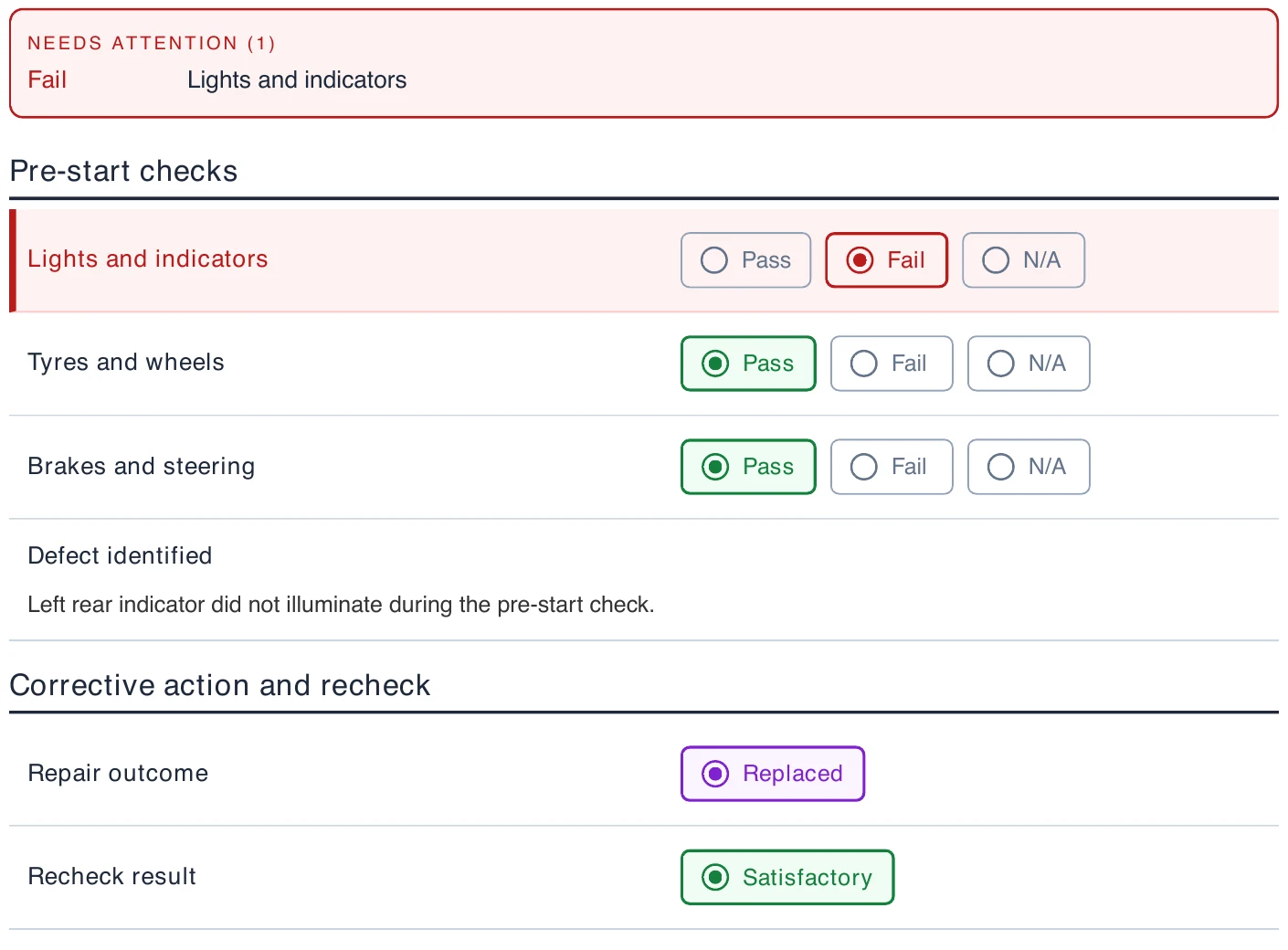
Excerpt from an exported vehicle pre-start PDF showing the Needs attention summary, a red failed lights and indicators answer, two green passing checks, the original defect note, a purple Replaced outcome and a green Satisfactory recheck.

Read the same outcomes in the completed PDF

The completed PDF keeps the original failed check and the recorded follow-up outcomes. This excerpt is from its first page; the action taken and recheck notes continue on the second page.

MapTrack PDF export · Demonstration data · Captured

About this screenshot

An excerpt from the actual two-page PDF downloaded from this saved demonstration submission.

Extinguisher and first aid checks on time

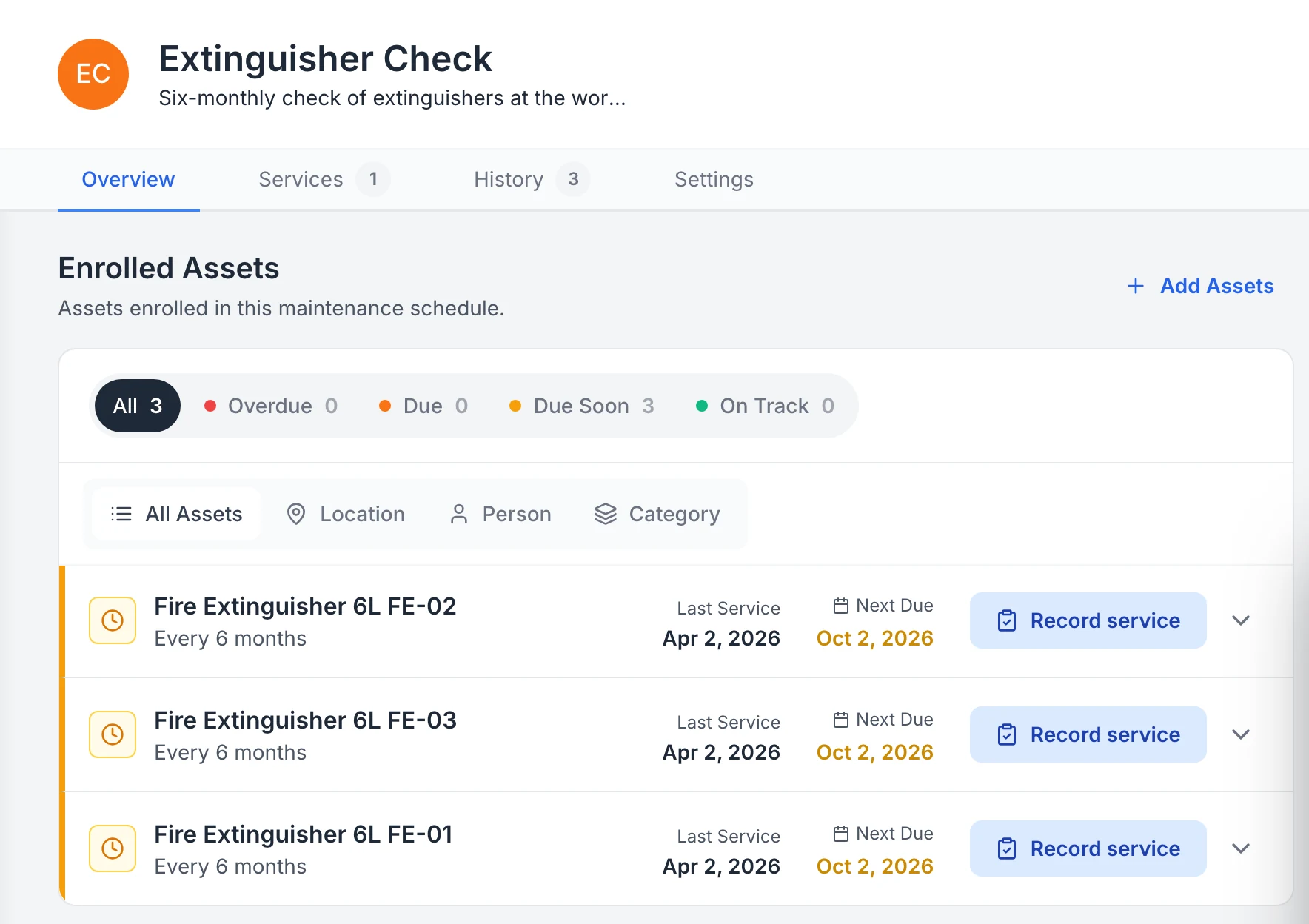
Extinguishers and first aid kits sit on a check schedule with when each was last done and when it's next due, and one job can take a round across many units, each with its own pass or fail.

Compliance
MapTrack Extinguisher Check schedule with three 6-litre fire extinguishers, each checked every 6 months, last serviced on 2 April 2026 and next due on 2 October 2026, all marked Due Soon, with a Record service button on each.

See which extinguishers are due for their check

A six-monthly extinguisher check across three extinguishers. All three were last checked on 2 April and are due again on 2 October, so the schedule flags them Due Soon.

MapTrack app · Demonstration data · Captured

About this screenshot

Captured in a demonstration workspace on the schedule’s Overview tab; its service history continues below the crop.

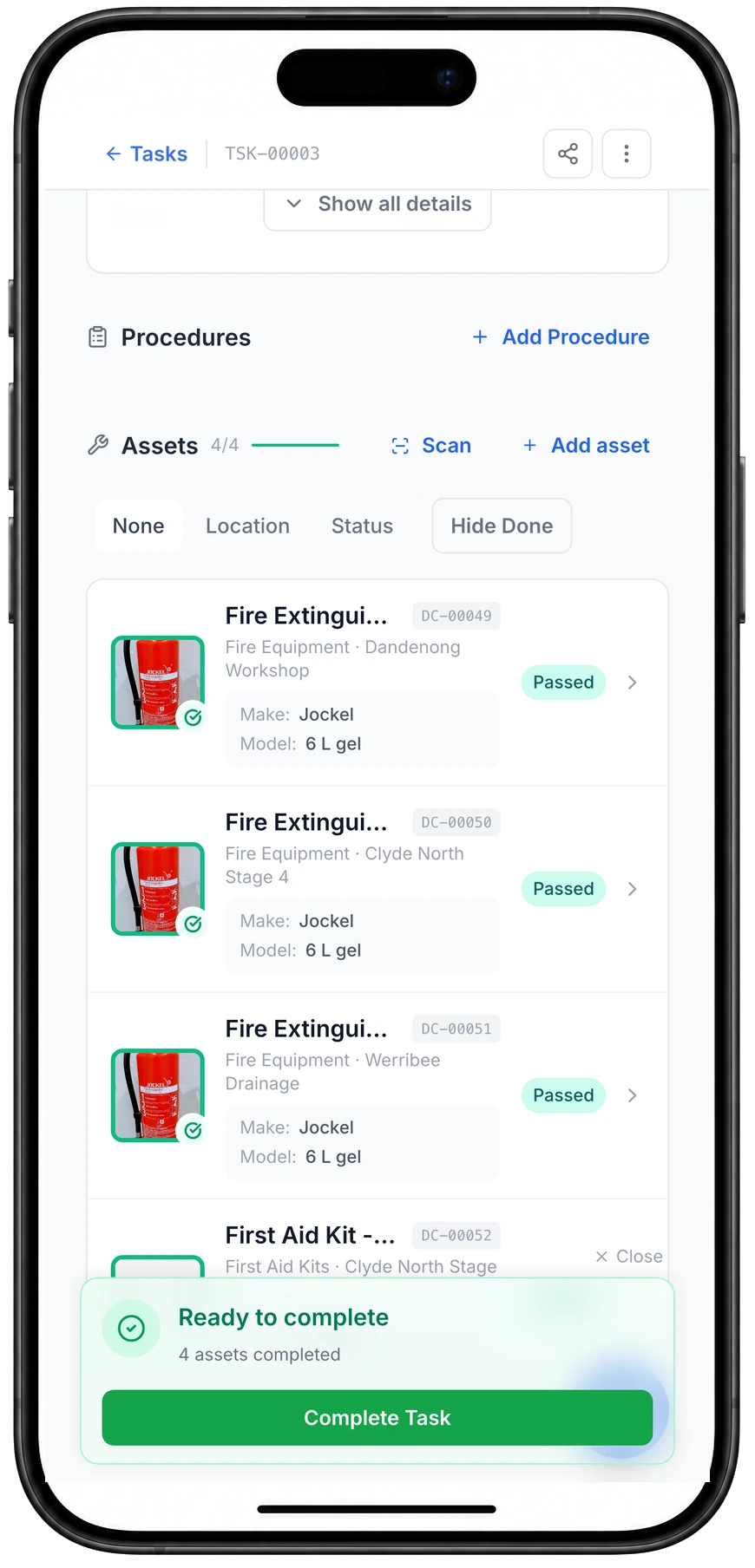
A task on a phone with Assets 4 of 4 done. Three Fire Extinguisher 6 L rows, at Dandenong Workshop, Clyde North Stage 4 and Werribee Drainage, each show a green Passed badge, and a Ready to complete panel reads 4 assets completed.

Every extinguisher on the round, in one job

One job covers every unit on the round, and each extinguisher gets its own pass or fail as you go.

MapTrack app · Demonstration data · Captured

About this screenshot

Demonstration task with four items (three extinguishers and a site first aid kit), each completed on a phone on 23 Oct 2026. No time or notes logged.

Seen one that fits how your team works? We'll show it to you in a demo.

Book a demo

30 minutes on Microsoft Teams

Customer proof

What facilities customers say

“MapTrack has completely changed how we track tools and manage compliance across our sites - the admin time we've saved alone has been a game-changer.”

365 Alongside Team, Management, 365 Alongside
  • From the published story: Weekly hours spent on manual data entry, form transcription and compliance reporting dropped from roughly 8–10 hours to under 4 hours after moving to digital forms and automated workflows.
  • From the published story: Digital forms with automatic timestamps and asset linking replaced paper records, making compliance documentation instantly retrievable for client or auditor requests.
Read the 365 Alongside story

“Accessing Asset information like servicing/repair history, condition, last user, important user guides and other documentation for any asset is literally one click away on your phone.”

Lindsay, Workshop Coordinator, Construction, Small-Business (50 or fewer emp.)Verified review on G2, August 2025

“For tooling, it's made a big difference in reducing loss and improving accountability, and it was straightforward to implement without needing much setup. ... Helps us stay in control of our tools and supports the compliance side by sending reminders and email alerts, making it easy to stay on top of inspections and servicing.”

Tony, Maintenance Planner, Mining & Metals, Mid-Market (51-1000 emp.)Verified review on G2, July 2025

Want to hear how other facilities teams set MapTrack up? Ask us in a demo.

Book a demo

30 minutes on Microsoft Teams

By the numbers

The real cost of poor asset management in facilities

Lost equipment, audit failures and time wasted on manual reconciliation quietly erode efficiency across facilities operations. The numbers make a clear case for digital tracking.

~60%

reduction in admin time at 365 Alongside, a building maintenance contractor, after moving asset records into MapTrack

MapTrack case study: 365 Alongside

19%

of a knowledge worker’s working week goes on searching for and gathering information

McKinsey Global Institute, The Social Economy (2012)

12–18%

savings from preventive over reactive maintenance, in the facility studies the US Department of Energy summarises

US Department of Energy, O&M Best Practices Guide, Release 3.0 (2010)

Want to see how these fit together on your own sites? We'll show you in a demo.

Book a demo

30 minutes on Microsoft Teams

What we track

Every asset type across your facilities operation

MapTrack is built for the full mix of equipment that moves across your depots, vans and customer sites, from hand tools and vacuums to ride-on scrubbers and fleet vehicles.

  • Works offline and syncs when back on signal
  • Failed items automatically trigger work orders
  • Full compliance history attached to each asset
  • Test-and-tag and chemical safety records in one place
  • Build forms with AI or upload your existing checklists
Pre-start inspections
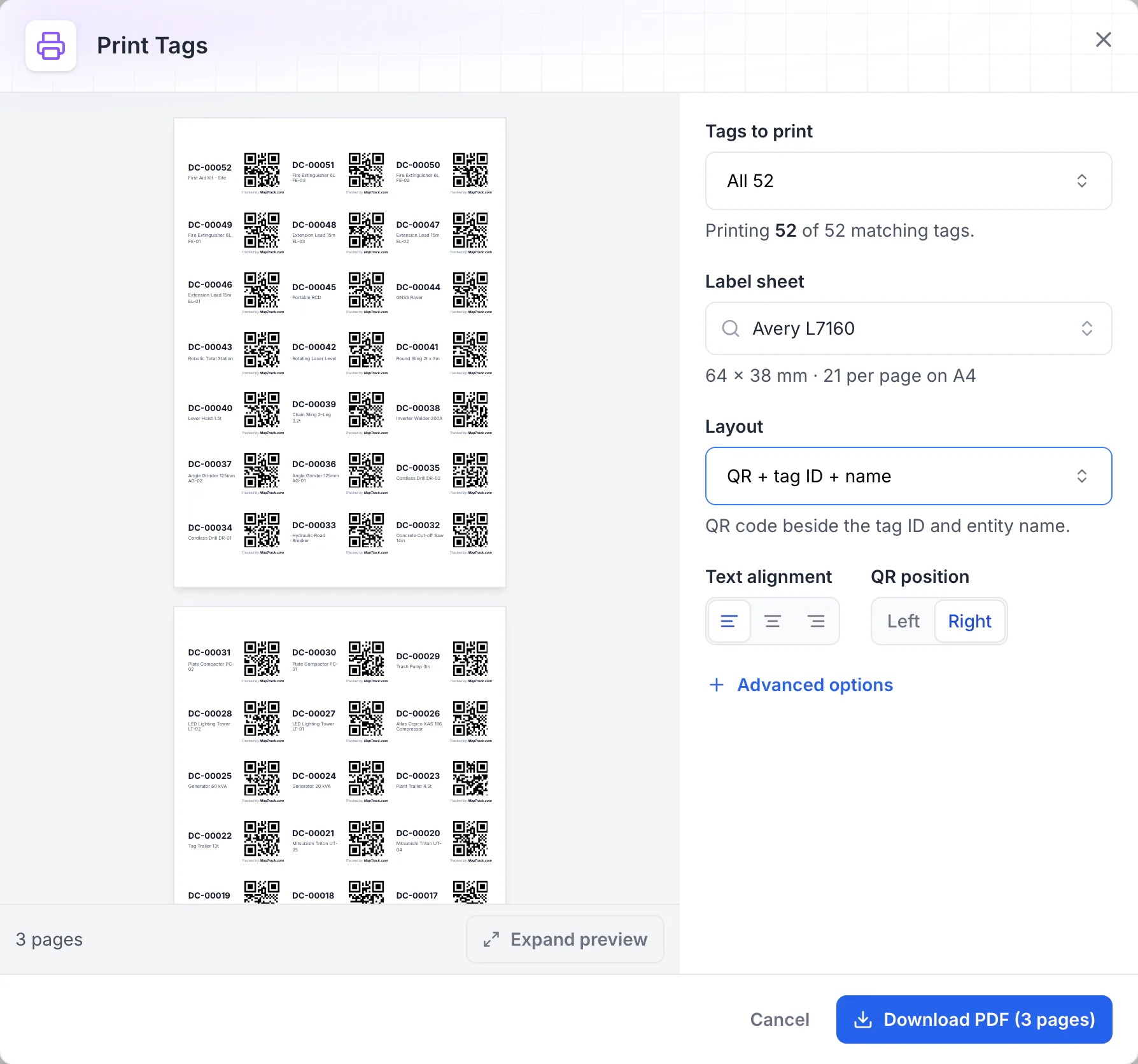
MapTrack Print Tags dialog: all 52 QR tags laid out on Avery L7160 A4 label sheets of 64 x 38 mm, 21 per page, each label showing the QR code, tag ID and asset name, with a Download PDF button for 3 pages.

Print QR labels for every asset

Print Tags lays QR labels out on standard label stock. Here all 52 tags fill three A4 sheets of 64 x 38 mm labels, each with the QR code beside the tag ID and asset name, ready to download as a PDF and print.

MapTrack app · Demonstration data · Captured

About this screenshot

Captured in a demonstration workspace with the Avery L7160 sheet and the QR + tag ID + name layout chosen. Each QR code holds the tag ID printed beside it.

Accountability

Scan, assign and track from the depot or customer site

QR code every vacuum, scrubber and tool kit. Attach GPS to vans and ride-on machines. Assign assets to technicians, vans or customer sites. Know who has what, where it is and when it's due back with a clear chain of custody across every contract.

  • Check-in and check-out on mobile at the depot or van
  • Bulk scanning for depot audits and site stocktakes
  • Assign to technicians or sites with scoped access
  • GPS location for vans and ride-on machines where fitted
  • Geofence alerts when equipment leaves a site boundary
Asset tracking
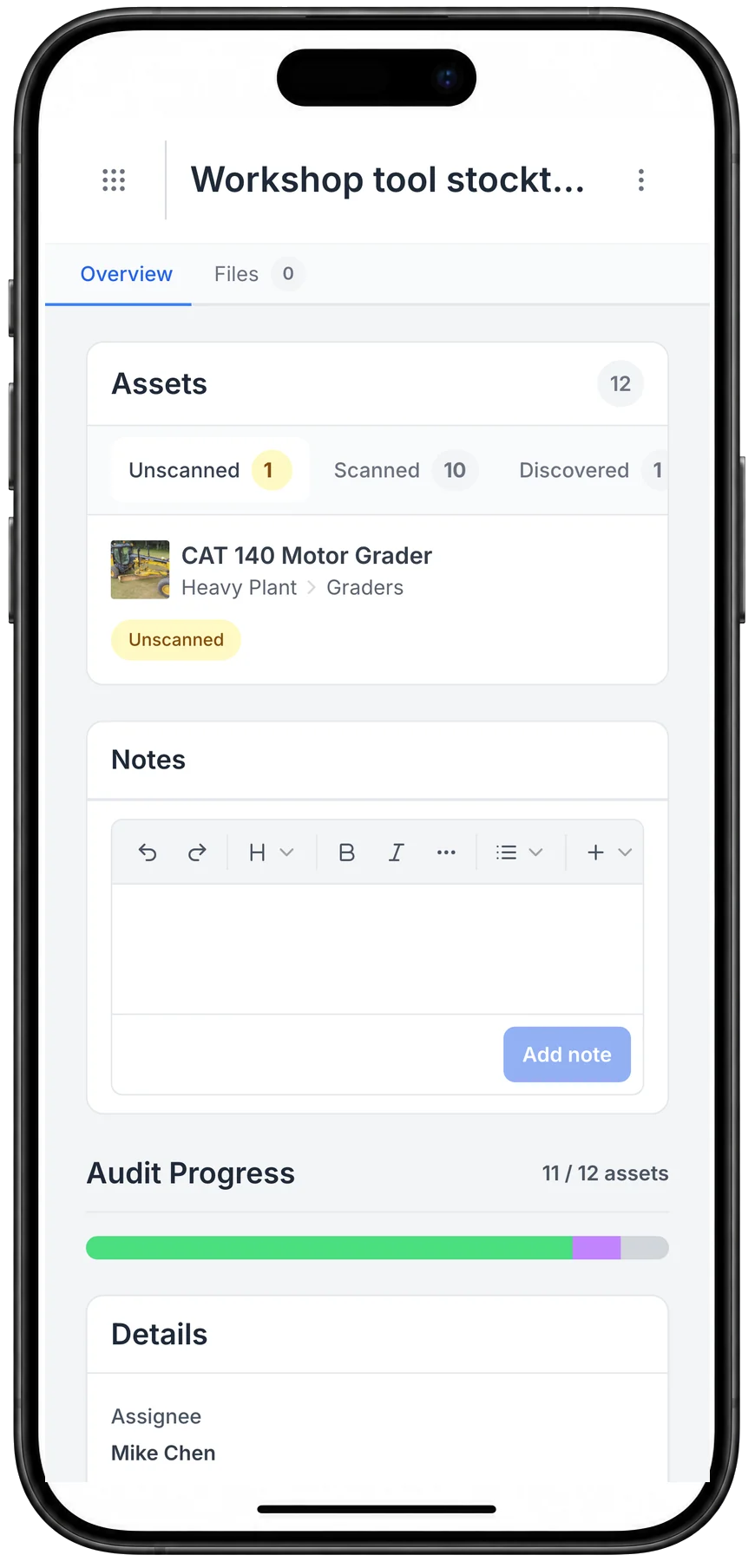
A MapTrack workshop tool stocktake on a phone: 12 assets, with 10 scanned, 1 discovered and 1 still unscanned, a CAT 140 motor grader, and audit progress at 11 of 12 assets, assigned to Mike Chen.

A stocktake on the phone

A stocktake on the phone: what has been scanned, what turned up that was not on the list, and what is still to find.

MapTrack app · Demonstration data · Captured

About this screenshot

Captured at a 430 x 932 phone viewport in a demonstration workspace and shown in a phone frame.

See these on a phone and a desktop in a live demo.

Book a demo

30 minutes on Microsoft Teams

Maintenance

Keep every scrubber, vacuum and ride-on serviced and ready

Schedule preventive maintenance based on time intervals, usage hours or inspection results. Not guesswork. Work orders go to technicians on mobile. Every service record lives alongside the asset's tracking and compliance history so nothing falls through the cracks.

  • Time-based and usage-based maintenance triggers
  • Failed inspections automatically create work orders
  • Work orders assigned to technicians on mobile
  • Complete parts history and cost tracking per asset
  • Overdue alerts to keep maintenance current
Maintenance & work orders
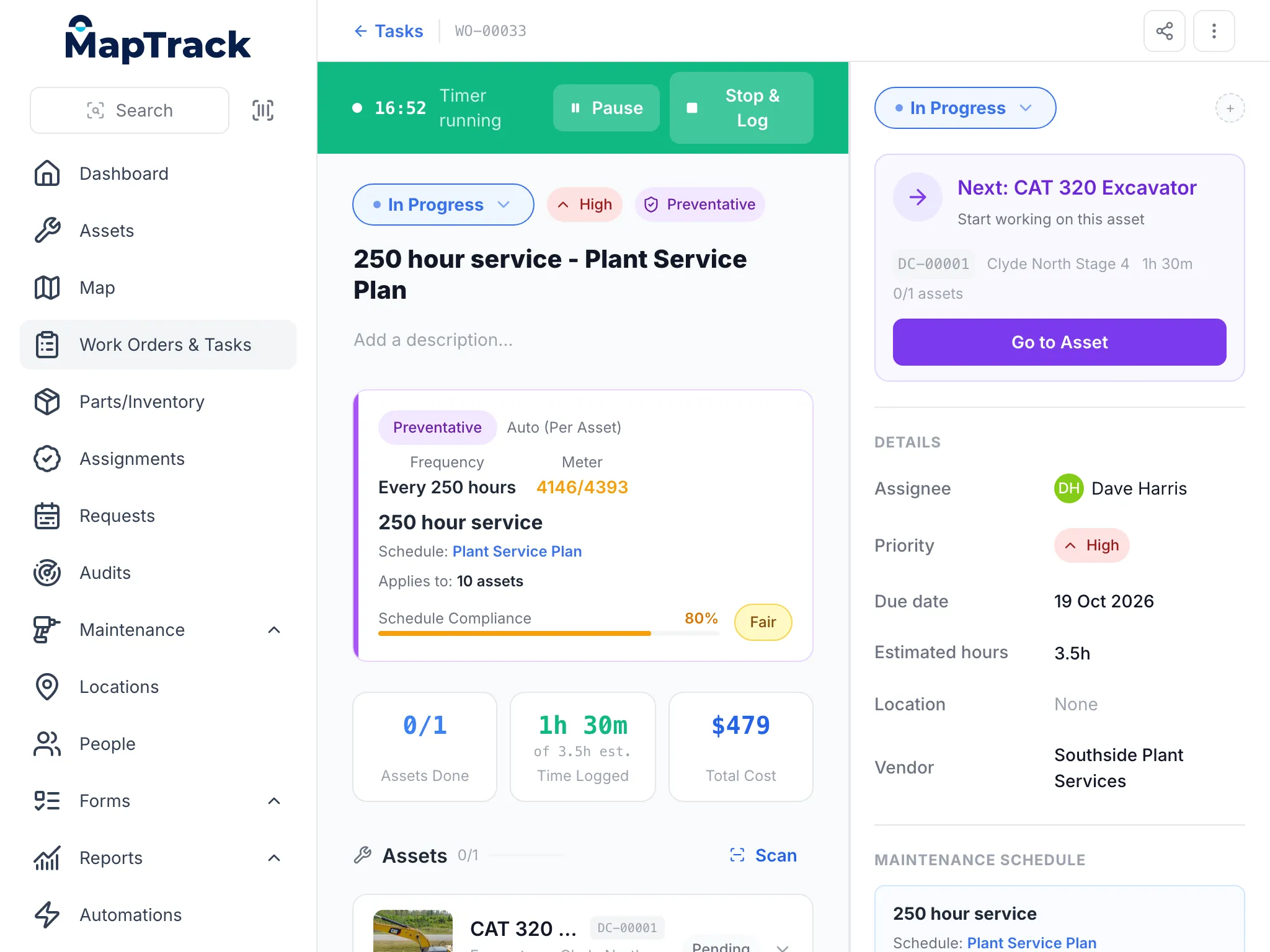
MapTrack on a tablet: a 250 hour service work order for a CAT 320 excavator, in progress with its timer running at 16:52, high priority and preventative, every 250 hours on a meter reading 4146 of 4393, with 1 hour 30 minutes logged, a total cost of $479, Dave Harris assigned and Southside Plant Services as the vendor.

A service job on a tablet

The same work order a mechanic runs on a phone or a desk, here on a tablet: the timer, the schedule that raised it, the time logged and the costs.

MapTrack app · Demonstration data · Captured

About this screenshot

Captured at a 1024 x 768 tablet viewport (the app at a 1024 px wide window) in a demonstration workspace; nothing pressed.

Integrations

Fleet telematics data straight into MapTrack

MapTrack integrates with fleet telematics platforms, so odometer readings, GPS location and usage data for your vans and vehicles drive maintenance triggers and utilisation reporting automatically, without manual data entry.

Teletrac Navman
Geotab
  • Odometer and usage tracking for timely preventive maintenance on fleet
  • Live GPS location and geofence alerts for vans across your contracts
  • Time-on-site data for customer billing and contract management
  • Utilisation reporting to right-size your fleet across depots

See all integrations

Field-ready

Built for depots, customer sites and mobile teams

Facilities work happens at customer sites, not the office. MapTrack runs on any phone or tablet. No specialist hardware required. Scan equipment, complete inspections, update maintenance records and log issues directly from the depot or customer site.

Offline mode means technicians can keep working in basements, plant rooms or areas with no signal. Data syncs automatically when back online. Unlimited users means every technician, supervisor and office staff member has access.

QR scan

Any standard phone camera

Unlimited users

No per-seat charges

One view of every asset across all your buildings

Track equipment and tools across multi-site facilities. Inspections, compliance registers and maintenance scheduling in one platform.

  • Used across Australia & New Zealand
  • Per-asset pricing
  • Unlimited users

Get started

How facilities teams get started

Most facilities teams are tracking assets across buildings within one to two weeks. Start with your highest-priority locations and expand as adoption builds.

Step 1

Build your asset register across all buildings

Import your existing CMMS data or start fresh. Add HVAC units, fire equipment, cleaning machinery, AV systems, and furniture.

Step 2

Label assets and assign to maintenance zones

Print QR labels and assign assets to floors, buildings, or maintenance contractors for clear accountability.

Step 3

Run maintenance schedules and compliance reports

Set preventive maintenance reminders, log work orders from the field, and produce inspection records for audits.

Fire equipment rules facilities teams keep records for

Australian facilities work to AS 1851 for fire protection equipment and AS/NZS 3760 for portable electrical gear, covered earlier on this page. In New South Wales, AS 1851-2012 became the required standard for class 1b and class 2 to 9 buildings on 13 February 2026. In the United Kingdom, the Fire Safety Order, HSE's PAT guidance and the gas safety rules for let homes set the records.

Australia

AS 1851 in NSW, AS/NZS 3760

Prices on our pricing page are in Australian dollars, ex GST.

  • New South Wales, class 1b and class 2 to 9 buildings, from 13 February 2026

    NSW: essential fire safety measures inspected and tested to AS 1851-2012

    What it asks for

    Under the Environmental Planning and Assessment (Development Certification and Fire Safety) Regulation 2021, building owners must have essential fire safety measures inspected and tested in accordance with AS 1851-2012, or to the standard a performance solution nominates, and keep the records in the manner AS 1851-2012 prescribes for at least 7 years.

    How MapTrack keeps the record

    Each extinguisher, hose reel, fire door and panel on a site is its own record with a QR label. Every routine service is saved with its date, the person who did it and the result, and the history stays on the item.

    Source: Responsibilities of building owners under AS 1851-2012 (NSW Government, Building Commission NSW, checked 26 Oct 2026)

  • Australia and New Zealand

    AS/NZS 3760:2022, in-service safety inspection and testing of electrical equipment

    What it asks for

    Sets how often electrical equipment is inspected and tested, by the kind of environment it's used in, and what each test record holds.

    How MapTrack keeps the record

    Test and tag rounds run site by site as one job, with a pass or fail on each item, and each item's tag date and next due date stay on its record.

    Source: AS/NZS 3760:2022, In-service safety inspection and testing of electrical equipment (Standards Australia, checked 29 Aug 2026)

United States

OSHA 1910.157(e)

Pricing is quoted in your currency, US dollars.

  • United States, general industry

    OSHA 29 CFR 1910.157(e), portable fire extinguishers

    What it asks for

    Portable extinguishers are visually inspected monthly and get an annual maintenance check. The employer records the annual maintenance date and keeps that record for one year after the last entry or the life of the shell, whichever is less.

    How MapTrack keeps the record

    The monthly check runs as one job across every extinguisher on a site, with a pass or fail on each, and the annual service date and next due date sit on each extinguisher's record.

    Source: 29 CFR 1910.157, Portable fire extinguishers (US Occupational Safety and Health Administration, checked 26 Oct 2026)

United Kingdom

Fire Safety Order article 17, HSE PAT guidance, Gas Safety regulation 36

Pricing is quoted in your currency, pounds sterling.

  • England and Wales, the responsible person for premises

    Regulatory Reform (Fire Safety) Order 2005, article 17, maintenance

    What it asks for

    Where it's needed to keep people safe, the responsible person makes sure the premises and the fire safety facilities, equipment and devices provided for them are under a suitable system of maintenance and kept in an efficient state, in efficient working order and in good repair.

    How MapTrack keeps the record

    Each extinguisher, alarm panel, emergency light and fire door is its own record with a QR label. Routine checks run as one job across a site, with a pass or fail on each item, and the history stays on the item.

    Source: Regulatory Reform (Fire Safety) Order 2005, article 17 (legislation.gov.uk (The National Archives), checked 26 Oct 2026)

  • Great Britain, portable electrical equipment

    HSE guidance on portable appliance testing (PAT)

    What it asks for

    HSE says the Electricity at Work Regulations 1989 require electrical equipment that could cause injury to be kept safe, but don't set a test interval: how often depends on the equipment and where it's used, so a power tool on a construction site is checked more often than a lamp in a hotel room. Labels and records aren't a legal requirement, though HSE calls them a useful way to manage the scheme and show it exists.

    How MapTrack keeps the record

    PAT rounds run site by site as one job, with a pass or fail on each item, and each item's test date and next due date stay on its record.

    Source: PAT (portable appliance testing): HSE's answers to popular questions (Health and Safety Executive, checked 26 Oct 2026)

  • Great Britain, gas appliances and flues in let homes

    Gas Safety (Installation and Use) Regulations 1998, regulation 36, duties of landlords

    What it asks for

    Each appliance and flue is safety checked within 12 months of installation and then at intervals of no more than 12 months, by a member of a class of persons HSE approves. The record of each check gives the date, the address, each appliance or flue and where it is, any safety defect, the remedial action taken, and the engineer's name, signature and registration number, and is kept until two further checks have been made.

    How MapTrack keeps the record

    Each boiler, cooker and flue is a record at its property. The annual check is a form with the engineer's signature, the defects and remedial action, saved as a PDF on that appliance, and the next check shows as due soon or overdue.

    Source: Gas Safety (Installation and Use) Regulations 1998, regulation 36 (legislation.gov.uk (The National Archives), checked 26 Oct 2026)

PAT testing
Portable appliance testing: the UK name for inspecting and testing portable electrical equipment, the job Australians call test and tag. HSE says how often depends on the equipment and where it's used.
Landlord gas safety record
The record of the annual safety check on each gas appliance and flue in a let home, kept until two more checks have been made.

MapTrack keeps the records these rules ask you to keep. It does not do the inspection or testing, certify your work or make you compliant, and the current text of each instrument is the authority.

Want to see how these records would look for your own gear? We'll show you in a demo.

Book a demo

30 minutes on Microsoft Teams

Facilities management terms, defined

CAFM
Computer-aided facility management: software for the building side of FM, such as space, moves, room bookings and the floor plans behind them.
CMMS
Computerised maintenance management system: software that schedules and records maintenance work orders against assets.
IWMS
Integrated workplace management system: a suite that combines facility management, maintenance, property and lease management in one platform.
PPM (planned preventive maintenance)
Servicing done on a schedule, by date or usage, before something fails, as opposed to reactive repairs.
Asset register
The list of every asset you look after, with where it is, its condition, who's responsible for it and its service and test history.
Essential safety measures
The fire and life safety features a building relies on, such as extinguishers, exit lights, fire doors and sprinklers, which state building rules require owners to maintain and report on.

Stop the loss

Equipment loss and missed maintenance are the two biggest controllable costs in facilities services

MapTrack gives your team the visibility, accountability and maintenance triggers to cut both without adding headcount or chasing spreadsheets across depots.

Frequently asked questions

Facilities services asset management software is a platform that helps facilities management companies, cleaning contractors and multi-site field service teams track, manage and maintain their equipment, tools and vehicles across depots, customer sites and contracts. It replaces spreadsheets, paper checklists and disconnected systems with a single source of truth for where assets are, who has them, whether they’re compliant and when they’re due for service. MapTrack combines asset tracking (QR codes, barcodes and GPS), pre-start and inspection forms, maintenance scheduling and work orders, and reporting, all on mobile in the field.

Yes. MapTrack lets you organise assets by customer site, depot, contract or region. You can assign equipment to specific sites, filter reports by location or contract, and run audits scoped to a single site or across your entire operation. When equipment moves between customer sites, transfers are tracked with timestamps so you always know where something is and who moved it.

Yes. MapTrack supports mixed asset types in a single platform. Use QR or barcode labels for vacuums, hand tools, buffers, chemicals and smaller equipment. Use GPS tracking for vans, ride-on scrubbers and utility vehicles where devices are fitted. All asset types - regardless of how they’re tracked. Live in the same system alongside their inspection records, maintenance history and assignments.

Technicians scan a QR code or barcode on the equipment using their phone to check it in or out. MapTrack records who took the item, when it was checked out and which site or van it was assigned to. When the equipment comes back, a scan checks it back in. This creates a clear chain of custody so you always know who had what, and can follow up when gear doesn’t come back.

Yes. MapTrack is built for field use with offline support. Technicians can scan assets, complete inspection forms, update work orders and record notes in areas with no connectivity. Data syncs automatically when the device comes back online. This is important for facilities teams working in basements, car parks, hospitals and other locations where cellular coverage is limited.

MapTrack handles pre-start inspections, daily equipment checks, test-and-tag records, chemical safety compliance and any custom inspection form you need. Forms are completed on mobile and attach to the asset record with timestamps and photos. Failed items can automatically trigger work orders so defects are tracked from identification through to rectification. All evidence is searchable and exportable for audits and client reporting.

You can set preventive maintenance schedules based on time intervals (e.g. every 3 months), usage triggers (e.g. every 500 hours for a ride-on scrubber) or inspection results (a failed pre-start triggers a work order). MapTrack sends overdue alerts so nothing slips. Work orders are assigned to technicians on mobile and include parts, costs and completion history. Every service record lives alongside the asset’s tracking and compliance data.

Yes. MapTrack supports inventory and consumable tracking alongside your equipment. You can track stock levels of chemicals, cleaning supplies and spare parts by depot or site, set minimum quantity alerts, and see consumption history. This helps you manage restocking, reduce waste and understand per-site or per-contract supply costs.

MapTrack uses per-asset pricing with unlimited users included. Not per-seat licensing. You can give access to every technician, supervisor, depot manager and admin without your costs growing as the team does. This is a significant advantage in facilities services where you may have dozens or hundreds of field staff across multiple sites who all need to scan, inspect or update equipment. Pricing scales with the number of assets you track, not the size of your team.

Most facilities teams are running on MapTrack within one to two weeks. The typical approach is to start with one depot or one contract: import or scan in assets, set up your first workflows (usually check-in/check-out or inspections), and roll out to field crews. MapTrack’s onboarding team supports you through setup and training at no additional cost. For larger rollouts across multiple depots and contracts, a phased approach works well: get adoption solid on one workflow, then expand to more asset types and sites.

Start with one register: every asset at every site, each with a QR label, its location and who has it. Put the compliance work on schedules against those records: test and tag, extinguisher and first aid checks, harness and ladder inspections, and planned maintenance. Each check runs on the phone, a fail stays on the record beside the fix, and the assigned person gets an email a week before something falls due. Completed inspections download as a PDF for building managers and auditors.

Set each site up as a location, with zones for plant rooms, floors or stores, and sign equipment out to a person or a site when it moves. Each site's audit is a walk with a phone: scan what's there and you see what's still to find and what turned up from elsewhere. Pricing is per asset with unlimited users, so every technician and cleaner can scan.

CAFM runs the building: space, moves and bookings. A CMMS runs maintenance work orders. Asset tracking keeps the register of what you own, where it is and who has it. MapTrack covers the asset register and the maintenance side for the equipment facilities teams move and service, such as scrubbers, vacuums, test and tag items and extinguishers, with work orders, services and inspections on each item's record.

When keeping it running costs more than a replacement would save, which is hard to see without each item's full service and repair cost. MapTrack's Finance add-on, on the Pro and Enterprise plans, keeps a cost ledger for every asset and site, with budget against actual, depreciation and repair-or-replace guidance, and exports to CSV.

Yes. Each mower, blower and ride-on is on the register with a QR label, and the hours reading taken on its pre start goes onto its meter. Services fall due on those hours, and on an automatic schedule a recorded reading raises the service work order.

A spreadsheet holds a list, but it can't tell you who has the scrubber today, remind anyone a test is due, or keep the photo from the last inspection. In MapTrack each item's record carries its location, custodian, tag date and service history, and the person assigned to a service gets an email before it falls due. The spreadsheet you have now is the starting point: import it, then label the items.

Got a question we haven't answered here? Ask it in a demo.

Book a demo

30 minutes on Microsoft Teams

Get MapTrack pricing for Facilities teams

Tell us about your operations. Our team will share per-asset pricing tailored to your facilities asset mix and a rollout plan - within one business day.

Per-asset pricing. Unlimited users. Primary database hosted in Sydney.

Manage facility assets from one dashboard

Join facilities services teams across Australia using MapTrack to track assets, run digital inspections and keep equipment maintained, all in one platform.

Pre-start inspections · Maintenance · Asset tracking · Building services · NSW facilities · VIC facilities · QLD facilities · Compare

Tools from $1 · Machines from $12View pricing