
EWP inspection software from scissor lifts to boom lifts
Know which scissor lifts and boom lifts got their pre start, which are due for a routine, annual or major inspection, and where the reports are. Every EWP's hours, faults, services and logbook sit on one record in MapTrack.

The asset register as it opens
Plant, vehicles, tools and safety gear on one register, each with its status, who has it, where it is and its QR tag.
MapTrack app · Demonstration data · Captured
About this screenshot
Demonstration workspace at a 1440 x 900 desktop viewport, the register’s default view, cropped right of the navigation sidebar to a 16:10 frame.
One register for every scissor lift, boom lift and cherry picker
This is the register for whoever answers for the EWPs. Each machine carries its pre starts, faults and repairs, its four inspections, its hour readings and services, while each operator's licence and VOC sit on their own record.
The short answer
MapTrack keeps each scissor lift, boom lift and cherry picker on its own record, opened by scanning its QR label. Operators do the pre start on a phone, and a rule you set up can raise a corrective task from a fault. Routine, annual and major inspection dates fall due on schedules, with each report on the machine.

Co-Founder & GM of Operations
Key takeaways
- One record per scissor lift, boom lift, cherry picker or spider lift: make, model, serial, fleet number, QR tag and status, with forms, maintenance and files a tab away.
- Operators scan the EWP's QR label and do the pre start on a phone. Fault Present opens a required fault description and photo.
- Calendar schedules put the 3-monthly routine, annual periodic and major inspections due soon and overdue, and the person assigned gets an email 7 days out.
- Hour services from the maker's manual sit on one service plan per machine; on an automatic schedule, an hour reading someone records raises the work order for you.
- Set a faulty EWP to Damaged or Repair: the next person who scans it sees that status, and a Damaged EWP is blocked at check-out, with an owner's override logged.
What MapTrack keeps for each EWP
- Every kind of EWPScissor lifts, booms, cherry pickers and spider lifts
- The four inspectionsRoutine, periodic and major, on dates
- Pre starts on a phoneFault Present, a description and a photo
- Hour servicesOne plan per machine, from the maker's manual
- Status and check-outsDamaged, Repair and who has each EWP
- Logbook and operatorsReports, certificates, licences and VOCs
- Truck and trailer mountedAn odometer and an hour meter on one record
- Scan or track itQR labels and the Yabby3
Trusted by construction, mining and field service teams

















Every scissor lift, boom lift, cherry picker and spider lift on one register
Add each EWP with its make, model, serial and fleet number, or bulk import the fleet from a spreadsheet or a fleet list and bulk edit it. Each kind keeps its own pre starts, inspection schedules and hour services beside the rest of the fleet.
Scissor lifts
Slab electric and rough-terrain diesel
- Pre starts, faults and repairs on its own record
- Routine and annual inspections on calendar schedules
Boom lifts
Articulating, telescopic and knuckle booms
- A design registration number and certificate on its record
- Hour services from the maker's manual
Cherry pickers
The boom lifts many crews call cherry pickers
- 250 and 500 hour services on one plan
- Its operators' licences on their own records
Spider lifts
Compact tracked booms with outriggers
- The EWP Daily Prestart, outriggers and stabilisers included
- Checked out to a site or a person, with a due-back date
Routine, periodic and major
The four EWP inspections, each on its own schedule
In Australia, the WHS Regulations ask for plant to be inspected by a competent person as the manufacturer recommends, else as a competent person recommends, else at least annually. Safe Work Australia's model Code of Practice for elevating work platforms, approved in NSW from 10 July 2026, sets out four: a pre-operational inspection at the start of each use, routine inspections at least every three months while the EWP is in service, a periodic inspection at least annually unless the manufacturer or a competent person recommends otherwise, and a major inspection after 10 years of service and every 5 years after that, or sooner after damage, a modification or a missing history. Check your state's regulator for the code that applies where you work.
- Put the 3-monthly routine inspection, the annual periodic inspection and the major inspection on calendar schedules; MapTrack puts each one due soon and then overdue, and the person assigned gets an email 7 days before it's due
- One work order can cover a yard of scissor lifts for their annual inspection, each with its own pass or fail
- Each competent person's report goes in the machine's Files tab, and the Service Board shows what's overdue and due soon
Setup and limits
- The date puts an inspection due; a person raises its work order from the schedule.
- The pre start is the operator's check: the routine, periodic and major inspections are a competent person's, each on its own schedule.
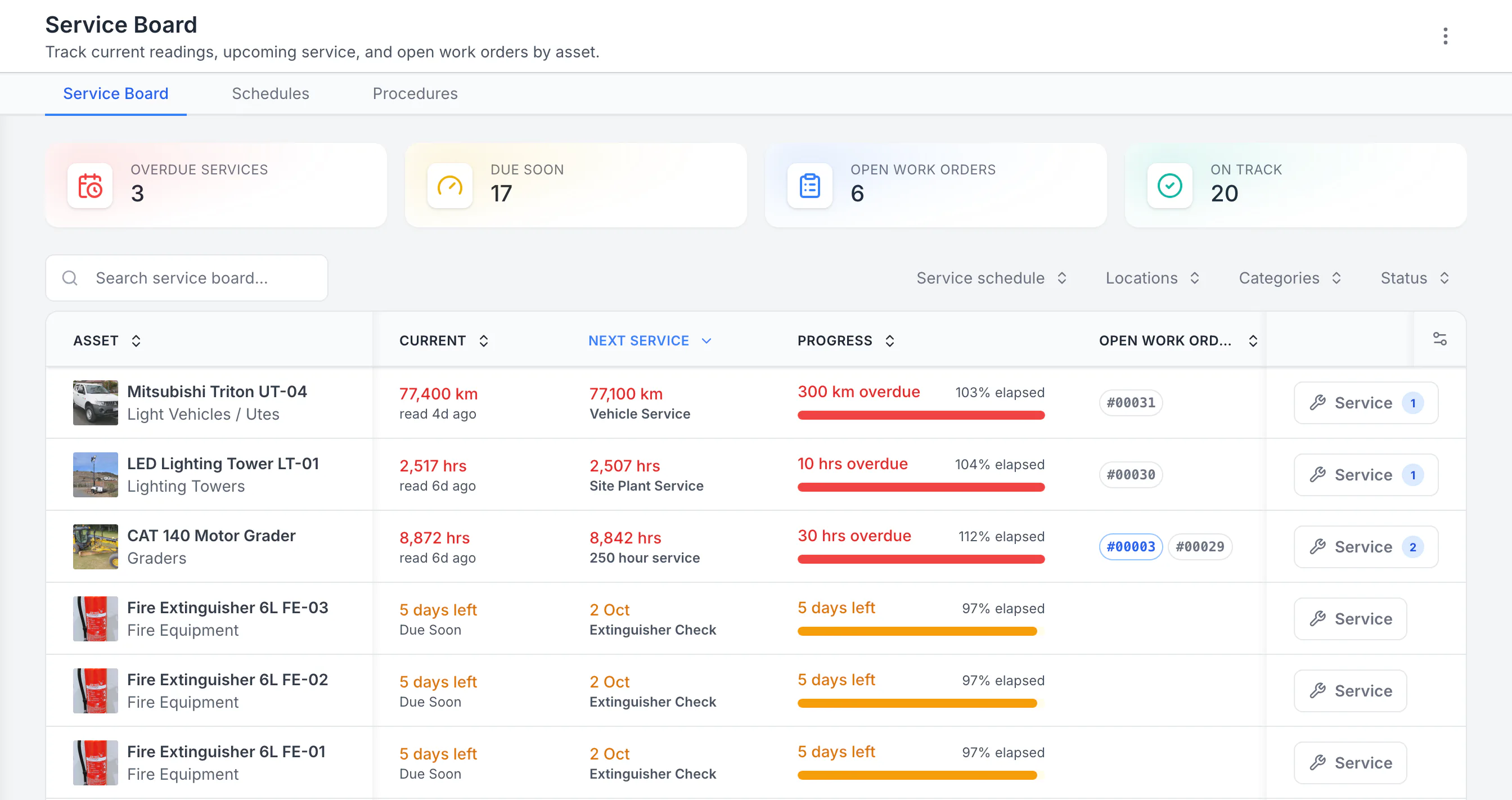
See the next service beside the current reading
Sorted by next service, the three overdue schedules come first: a ute 300 km past its service, then a lighting tower and a grader past their hour services. Each shows its open work orders. Extinguisher checks due in five days follow. Hours, kilometres and calendar checks share one board.
MapTrack app · Demonstration data · Captured
About this screenshot
Demonstration workspace with 40 schedule enrolments. Columns were chosen and resized in the board’s own display settings. Requires enrolled assets, configured schedules and an internet connection.
Before each use
Pre starts at the machine, faults on its record
Operators scan the EWP's QR label and do the pre start on a phone, or a shared tablet with their own PIN. MapTrack's construction, civil and electrical setups include an EWP Daily Prestart: the runtime hours reading, fit for work, the required licence or VOC, the operator manual and logbook, harness and anchor points, emergency stop and emergency descent, platform and ground controls, hydraulic hoses and leaks, tyres, outriggers and stabilisers, slew and boom operation, gates and guard rails, alarms, fluids, guards, the fire extinguisher, defects and a signature.
- Fault Present opens a required fault description and photo
- A rule you set up can raise a linked corrective task, recorded apart from the original fault
- The completed pre start downloads as a PDF, and each one records where it was done
- The next person who scans the EWP sees the failed pre start in its Forms tab
Setup and limits
- Pre starts submit offline and sync once the phone has reception; the scan that opens one needs coverage, or the form already on the phone.
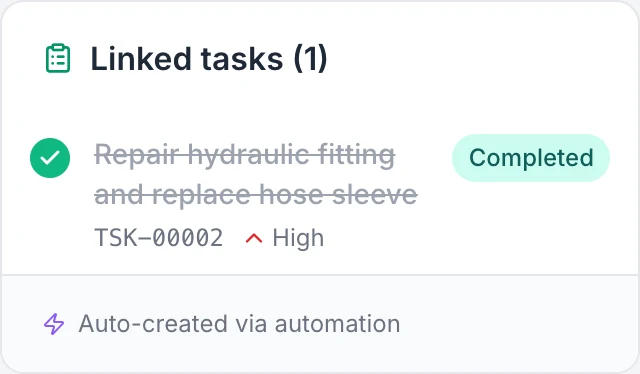
Check that the corrective task is completed
The failed hydraulic answer created this corrective task through a configured automation. The repair note and recheck were recorded, then the task was completed. The original Fail answer stays in the saved inspection.
MapTrack app · Demonstration data · Captured
About this screenshot
Complete linked-task card cropped from the reopened demonstration submission. The full inspection and its action notes are shown separately above; answer colours do not create or complete tasks by themselves.
Hours
Hour services on one plan per machine
Record the hours reading on the EWP's pre start and its meter updates, or record it by hand on the record; manual readings need no tracker. One plan holds a machine's hour services, for example 250 and 500 hours, and when two coincide the bigger covers the smaller in one work order. Plans run on hours, months or whichever comes first, set from the maker's manual. MapTrack forecasts the next due date from recent readings and flags readings that have gone stale, and the Service Board lists what's overdue and due soon.
- On an automatic schedule, an hour reading someone records raises the work order for you, one per machine or one batch for everything due together
- A person raises per-asset or batch work orders from the schedule in a couple of clicks
- Scan a batch of EWPs after a service round and log the service for all of them at once; each keeps its own hour reading and history entry
- A 0 to 100 maintenance health score per machine and schedule, with 12 months of memory
- Register your GPS trackers in MapTrack and see battery, signal and last report; run hours estimated from the tracker keep the hour meter current, so services fall due on use
Setup and limits
- Hours from a tracker are estimates: record the hour meter at each service.
- A service round logged by scan needs a connection.
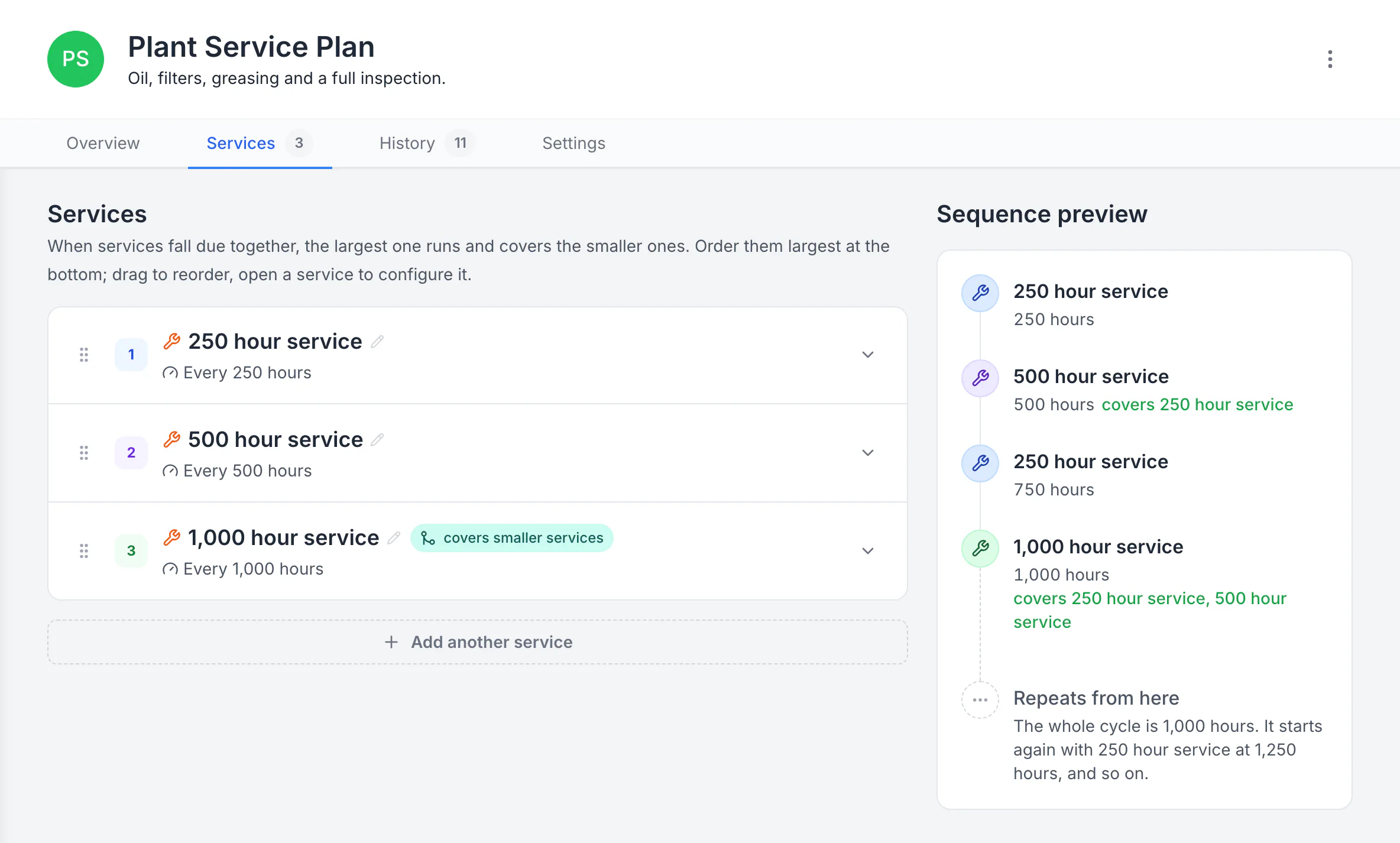
Build a plan with separate service levels
The plan runs a 250-hour service, a 500-hour service that covers it, and a 1,000-hour service that covers both. The sequence preview shows the whole 1,000-hour cycle and where it starts again.
MapTrack app · Demonstration data · Captured
About this screenshot
Demonstration plan. Each level carries its own triggers, procedure, parts and work-order defaults. Follow your equipment manufacturer’s service intervals.
Service intervals vary by make, model and how hard the machine works. Genie's Scissor Lifts Maintenance Manual (part no. 1305686GT, August 2024), for example, lists one-time commissioning tasks at 50 and 150 hours, quarterly and annual inspections and programmed work by machine hours, and has a scissor lift that's been out of service for more than 3 months get the quarterly inspection first. Use the maker's manual for your model; MapTrack holds the plan you set from it.
The logbook
The EWP logbook, on the machine's own record
In Australia, Safe Work Australia's model Code of Practice says detailed records of an EWP's inspection, testing and maintenance are kept for as long as it's used or until you hand over control, and passed to the next owner, and that logbooks or an electronic logging system can be used. In MapTrack each machine's pre starts, the faults found and the repairs that follow, its hour readings, inspection schedules and service history, and its reports and certificates sit on its own record.
- The operator's manual, a boom-type EWP's design registration certificate, a compliance plate photo, the routine and periodic inspection reports, and the major inspection report with its NDT results, on the machine's record
- In Great Britain, the thorough examination report on the machine it covers
- Each operator's high risk work licence class (in Australia, WP for a boom of 11 metres or more), expiry and a copy of the licence on their person record, with a VOC form signed off there
- Forms Reporting counts a week's submissions by asset, location or person
Setup and limits
- MapTrack doesn't check an operator against a machine.
- The weekly count is of submissions, not proof that every check was done.
- In Australia, the Code asks for a boom-type EWP's design registration number to be readily accessible near the machine at all times; a copy on its record in MapTrack doesn't replace that.

Choose the week and the type of form
Choose a week and use All, Asset, Location or Person to focus the view. The summary counts submissions and participating users; it does not establish that every required inspection was completed.
MapTrack app · Demonstration data · Captured
About this screenshot
Demonstration weekly summary. The individual user rows are outside this crop.
Out of service, on the record
Status, check-outs and bookings for every EWP
Set an EWP's status to Repair or Damaged on its record; the next person who scans it sees that status and the failed pre start in its Forms tab. A Damaged or written-off EWP is blocked at check-out, and an owner's override is logged.
- Check an EWP out to a person, a site or both, with a due-back date; its harnesses, charger or outrigger pads are confirmed out and back, with a reason for anything missing
- An overdue inspection or service is flagged when someone checks the EWP out or books it, and going ahead is logged
- Book an EWP for a job or a site with Requests, approve it, and turn it into a check-out by scan
- A reminder email goes out when a check-out is overdue
Setup and limits
- A status is a record: park the EWP in a safe area, lock it out and tag it as well.
- Checking an EWP out or back in, and booking one, needs a connection.
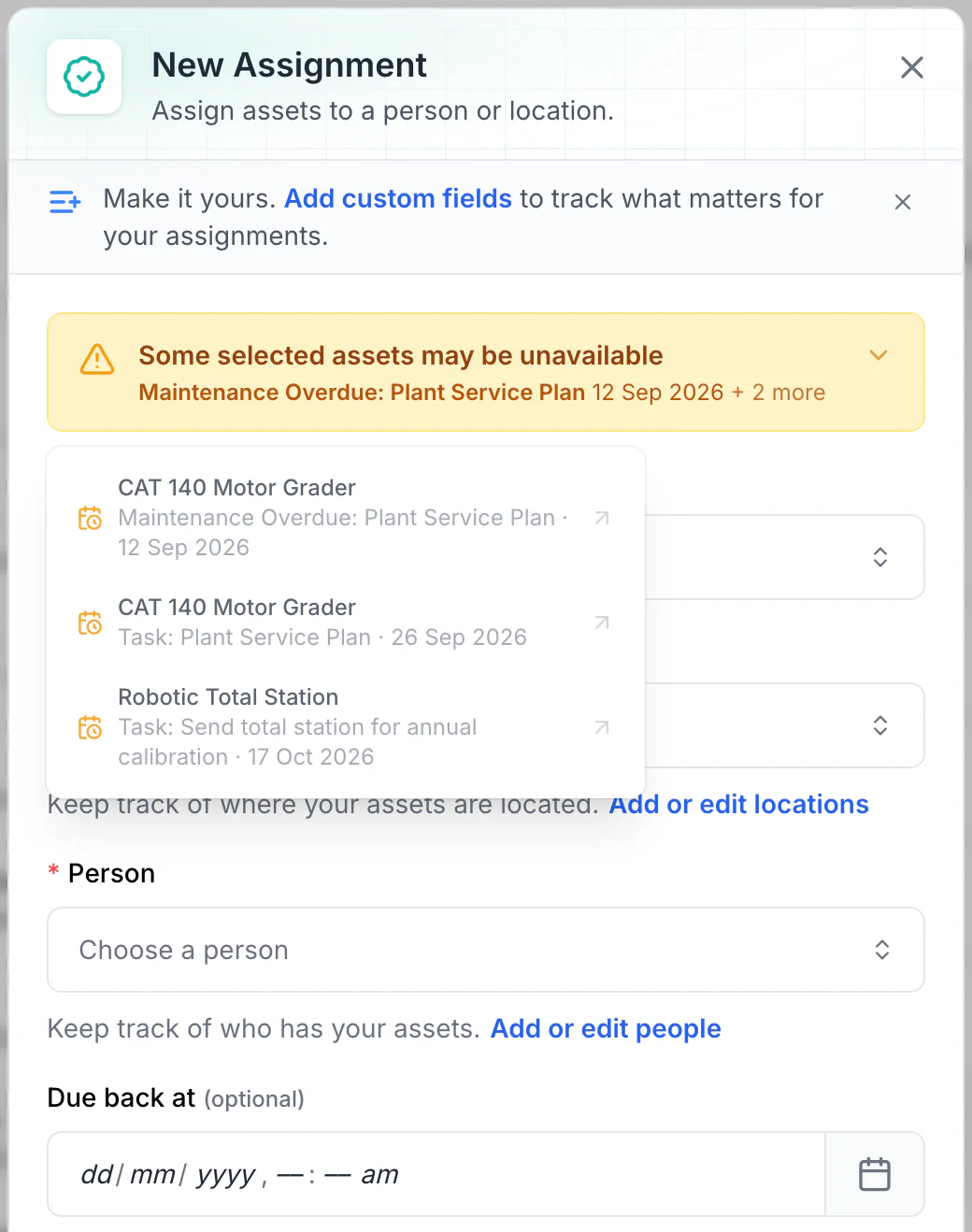
Read the warnings before issuing equipment
Overdue maintenance and scheduled tasks show as amber warnings. No due-back date is set here, so every upcoming conflict is listed. With a due-back date, only tasks before it are listed: a 15 October due-back leaves out the total station’s 17 October calibration.
MapTrack app · Demonstration data · Captured
About this screenshot
Demonstration workspace. Two assets selected and Assign opened; the form was not saved.
QR labels on every EWP, GPS on the ones that move between sites
Every EWP can carry a QR label, and the pre start starts from a scan: the phone camera or a handheld Bluetooth or USB scanner opens the machine's record. Scissor lifts and booms that sit unpowered on site or travel on a truck can carry a battery GPS tracker such as the Yabby3, and other tracker brands you already run are connected with our help.
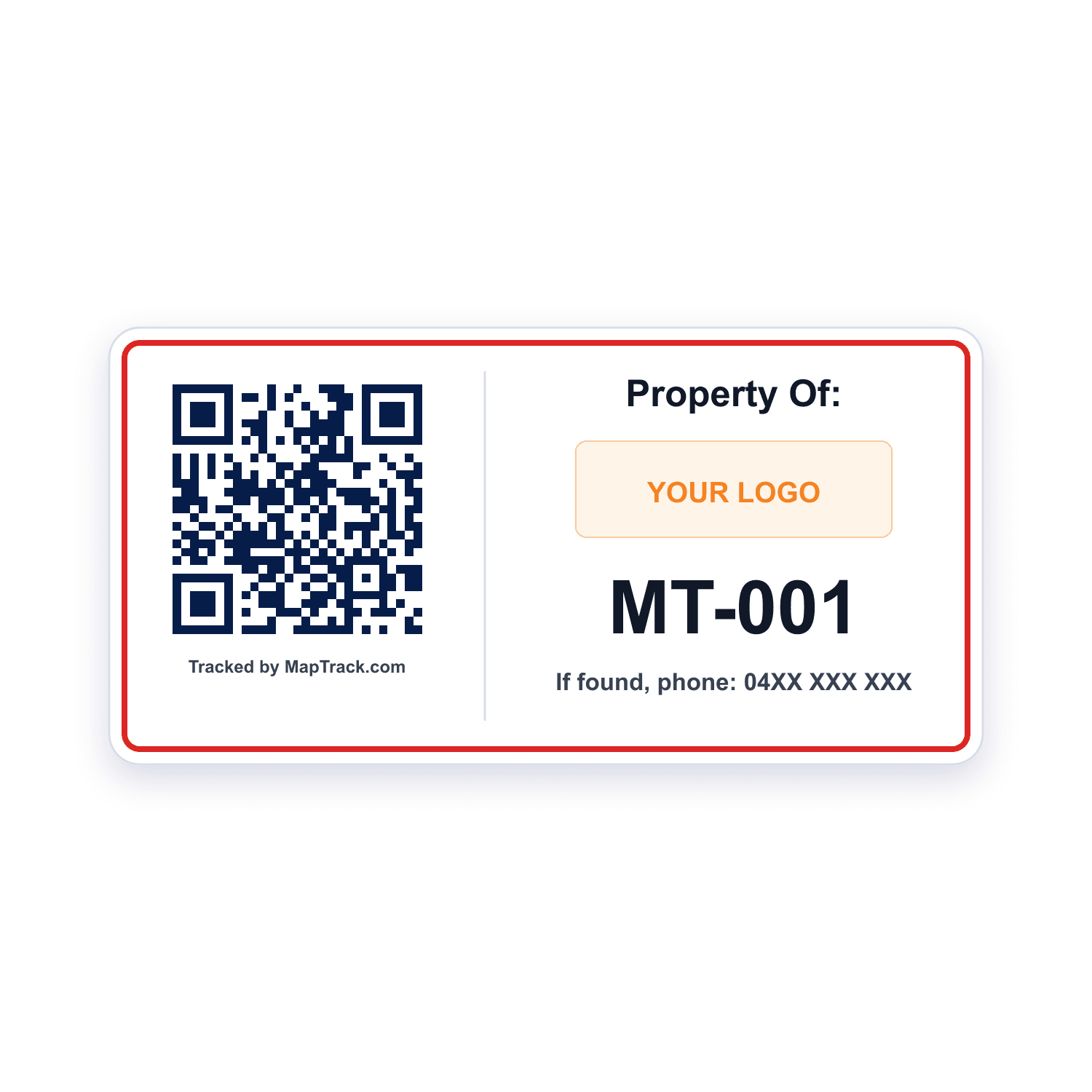
Every scissor lift, boom lift, cherry picker and spider lift
QR labels
- Scan QR, barcode and Data Matrix labels with the phone camera or a handheld Bluetooth or USB scanner to open the EWP's record
- Print QR labels in MapTrack, or get durable labels from the label store
Good to know: A plain scan of the label records no location
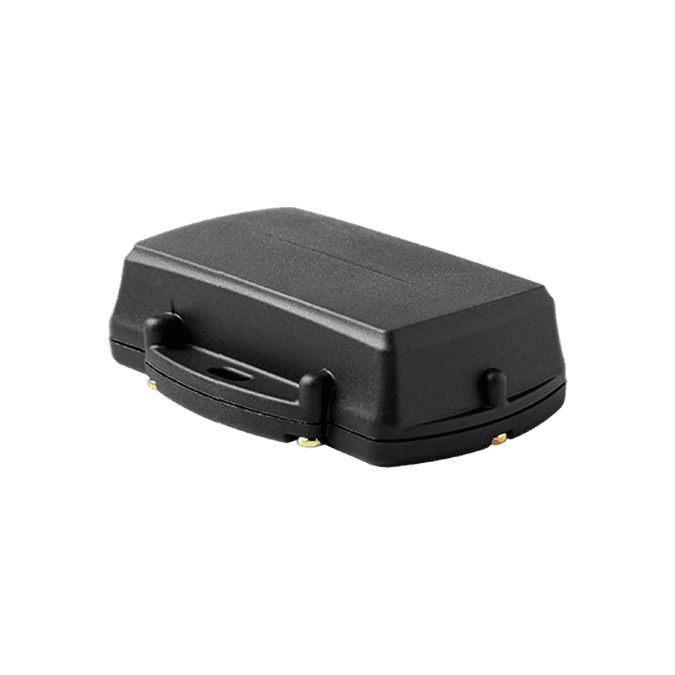
Scissor lifts and booms that sit unpowered on site or travel on a truck
Battery GPS tracker (Yabby3)
- No wiring
- The machine's latest position on its record when the tracker has a fix
- Battery, signal and last report in MapTrack
Good to know: Live GPS, trip history and boundary alerts come with MapTrack Telematics, an optional add-on
EWPs that already carry another brand of tracker
The trackers you already run
- Other tracker brands connected to MapTrack with our help
- No new hardware on those machines
Good to know: Set up with our help rather than by you
Our trackers ship within Australia and New Zealand; elsewhere we connect your existing trackers with you.
One register for EWPs and the gear around them
EWPs sit in the same register as the harnesses used in them, the trucks that carry them, the lifting gear, plant and tools, so pre starts, inspections and services run on one system. Each machine carries its QR label, its make, model, serial and fleet number, its status and its site, and you can add your own fields, such as a boom-type EWP's design registration number, the date of manufacture or commissioning, the rated capacity and the working height.
QR label on the machine
Scan it to open the EWP's record, its pre starts and its next inspection
Its own numbers on the record
Fleet number and serial, and a boom-type EWP's design registration number
Site on the record
The site or yard it's at, or where it was last checked out or returned
Example record
- a diesel articulating boom lift with its fleet number, serial and working height
- its design registration number in a custom field, and the certificate in its Files tab
- its 250 and 500 hour services on one plan, and its annual inspection on a calendar schedule
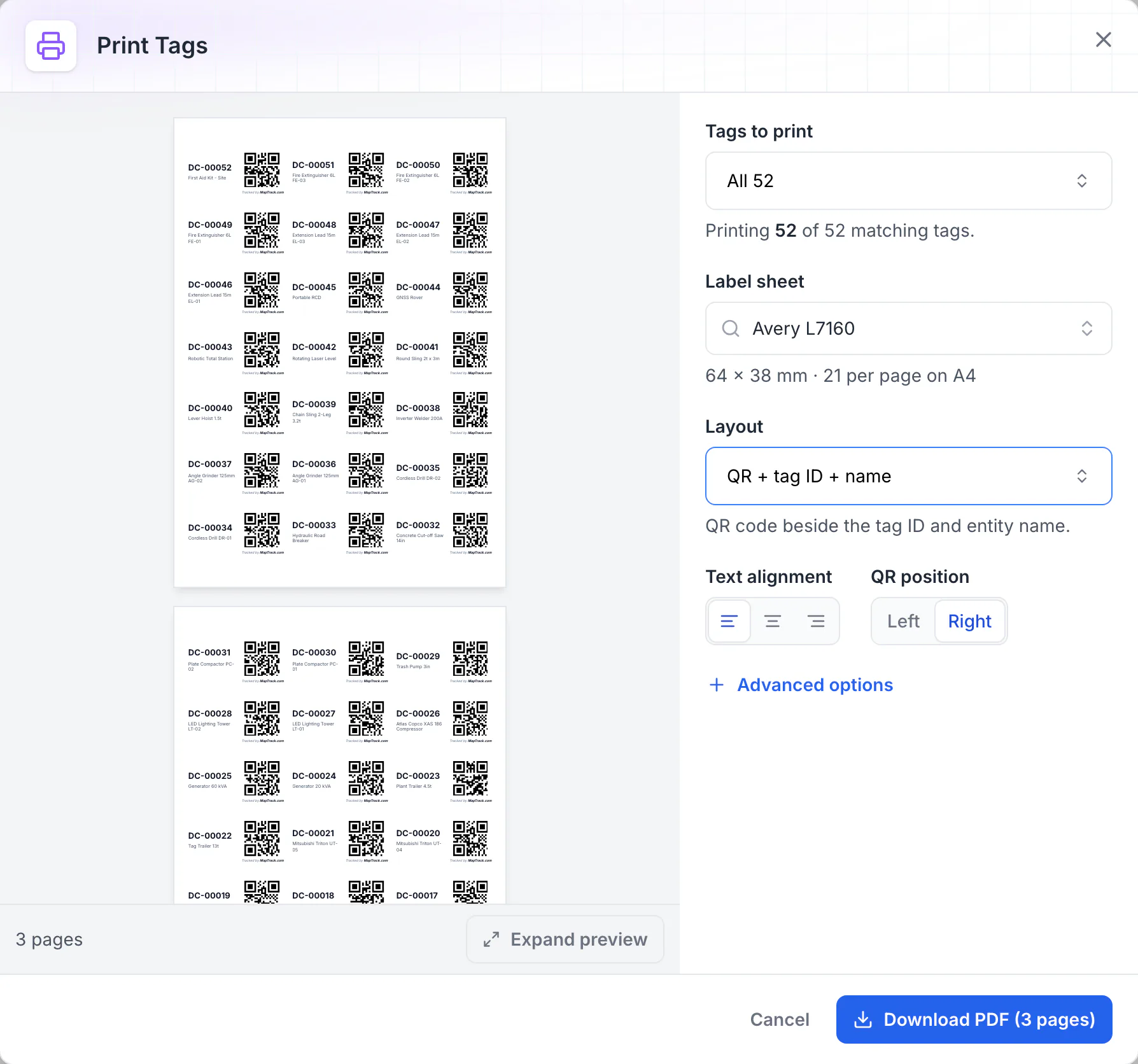
Print QR labels for every asset
Print Tags lays QR labels out on standard label stock. Here all 52 tags fill three A4 sheets of 64 x 38 mm labels, each with the QR code beside the tag ID and asset name, ready to download as a PDF and print.
MapTrack app · Demonstration data · Captured
About this screenshot
Captured in a demonstration workspace with the Avery L7160 sheet and the QR + tag ID + name layout chosen. Each QR code holds the tag ID printed beside it.
Truck-mounted and trailer-mounted EWPs
A truck-mounted or trailer-mounted EWP keeps one record with an odometer and an hour meter, so the boom's hour services and the vehicle's kilometres sit side by side, and the truck's or trailer's rego date goes on a calendar schedule beside the boom's inspections. In NSW, the Code of Practice counts truck or vehicle-mounted lifts and trailer lifts as boom-type EWPs for licensing, and a telehandler fitted with a personnel box with controls in the box counts as one too; other states may differ.
- The boom's pre starts, inspections and hour services, and the vehicle's rego date, on one record
- An odometer and an hour meter on the same record
- Each operator's licence and a signed-off VOC form on their person record
- For the truck under a truck-mounted EWP, see truck and prime mover tracking
- For the trailer under a trailer-mounted lift, see GPS trackers for trailers
- For a telehandler fitted with a work platform, see telehandler inspections
Yards, sites and audits
Audit a yard by scanning each EWP's QR label; at the end you choose Mark Missing or Skip All. Draw a boundary around each yard or site on its map in MapTrack and see which gear is there.
- The app shows an EWP's latest position when its tracker has a fix; without one, the pin shows where it was last checked out or returned
- For live GPS, trip history and boundary alerts, MapTrack Telematics is the optional add-on
Setup and limits
- A yard audit needs a connection.
Service agents, parts and costs for each EWP
Keep the EWP service agent as a vendor and make it the schedule's preferred vendor. Labour, parts and external costs go on the work order and stay in each EWP's service history.
- Hoses, tyres, batteries and filters as parts with stock per bin, planned against used on the work order
- Rate cards, an add-on on Pro and Enterprise plans: daily, weekly and monthly hire rates (dry, wet or standby), with the hire cost recorded when an EWP comes back
- Finance and costings, an add-on on Pro and Enterprise plans: a cost ledger for every EWP, with budget against actual, depreciation and repair-or-replace guidance
Setup and limits
- Planned parts on a work order aren't deducted from stock by it.
- Booking a service or comparing repair costs? See EWP servicing and repairs
Free EWP pre starts, inspections and hour services
Pre starts for boom lifts, scissor lifts, cherry pickers, spider lifts and mast climbing work platforms, quarterly and annual services for booms and scissor lifts, the cherry picker 250 and 500 hour services, the scissor lift major inspection and the optional 5-year enhanced periodic inspection. Print any of them; all but the spider lift and mast climber pre starts also run on the phone in MapTrack.
- EWP / boom lift pre-start checklist
- Scissor lift pre-start checklist
- Cherry picker pre-start checklist
- Spider lift pre-start checklist
- Mast climbing work platform pre-start checklist
- EWP / boom lift quarterly service procedure
- Scissor lift quarterly service procedure
- EWP / boom lift annual service procedure
- Scissor lift annual service procedure
- Cherry picker 250-hour service checklist
- Cherry picker 500-hour service checklist
- Scissor lift 10-year major inspection checklist
- EWP 5-year enhanced periodic inspection checklist
The rules and standards behind these records
The inspection types and intervals, design registration and operator licences are set by the instruments below, not by MapTrack, and they differ by country and, in Australia, by state. MapTrack keeps the records; the inspections and the compliance judgement stay with you and your competent person.
Check the current source
- Code of Practice: Elevating work platforms (SafeWork NSW, July 2026, based on Safe Work Australia's model Code)
- Model WHS Regulations (Safe Work Australia)
- Plant and equipment requiring design registration (WorkSafe Victoria)
- OSHA 29 CFR Part 1926, Safety and Health Regulations for Construction
- Lifting Operations and Lifting Equipment Regulations 1998 (LOLER)
- Provision and Use of Work Equipment Regulations 1998 (PUWER)
- AS/NZS 1418.10:2025, Cranes, hoists and winches, elevating work platforms (Standards Australia)
- AS 2550 series, Cranes, hoists and winches, safe use (Standards Australia listing)
MapTrack keeps the records these standards ask you to keep. It does not certify your work or make you compliant, and the current text of each instrument is the authority.
Common questions
See your EWPs in MapTrack
Book a demo to walk through scissor lifts and boom lifts in MapTrack, from the morning pre start to the annual inspection report, or start with the free EWP templates.