
Free equipment calibration record
Free equipment calibration record template (PDF-ready). Document instrument details, calibration method, results and tolerance. Download free.
Updated 28 Sept 2026
Equipment Calibration Record
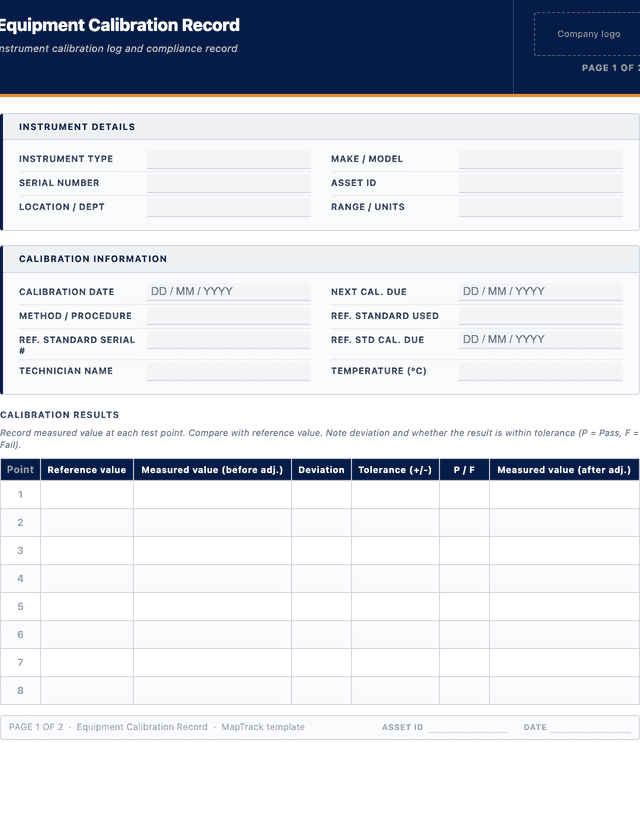
Record measured value at each test point. Compare with reference value. Note deviation and whether the result is within tolerance (P = Pass, F = Fail).
| # | Point | Reference value | Measured value (before adj.) | Deviation | Tolerance (+/-) | P / F | Measured value (after adj.) |
|---|---|---|---|---|---|---|---|
| e.g. | - | 96,000 | 96,000 | - | - | - | 96,000 |
| 1 | |||||||
| 2 | |||||||
| 3 | |||||||
| 4 | |||||||
| 5 |
The PDF includes all 8 numbered rows, ready to print or fill on screen.
Calibration Technician Sign-off
Signature
Print name
Date
Reviewer / Approver Acknowledgement
Signature
Print name
Date
How to use: download the PDF, print or complete digitally on any device.
- PDF format, ready to print or fill on screen
- Use as-is or customise to suit your operation
- Go digital in MapTrack for photos, reminders and audit trails
Two ways to use it
Use in MapTrack →Use it digitally instead
Unlimited usersThese same 7 columns, already built.




- Scan the asset’s QR tag with any phone
- Submitted forms can trigger alerts
- Photos on fails, audit-ready records
- Export responses, PDF reports with your logo
Free trial. No credit card needed.
Trusted by teams across Australia and New Zealand
We respect your privacy. Unsubscribe anytime.
These templates are free general guides provided as-is. They do not constitute legal, safety or compliance advice. You are responsible for ensuring any form meets your specific workplace obligations, industry standards and applicable regulations.
Don't just download it - use it live. Start a free workspace with this equipment calibration record already built, so your crew can run it from a phone.

Co-Founder & Commercial Director
Key takeaways
- The MapTrack equipment calibration record has 7 columns and room for 8 entries. Columns: Point, Reference value, Measured value (before adj.), Deviation, Tolerance (+/-), P / F, Measured value (after adj.).
Enter your email below to download this equipment calibration record as a ready-to-use PDF.
Used by construction, mining and field service teams











What is an equipment calibration record?
An equipment calibration record is a structured form used to document the calibration of instruments, gauges and measuring equipment. It records the instrument details, calibration method, reference standards used, measured results, acceptable tolerance, pass/fail outcome, and the next calibration due date. Calibration records are essential for quality management, regulatory compliance and audit readiness across manufacturing, construction, mining, laboratories, workshops and any operation where measurement accuracy affects safety, quality or regulatory compliance.
Maintaining accurate calibration records ensures instruments are reading within acceptable limits and helps organisations meet ISO 9001, NATA and industry-specific standards. The record creates a traceable history for each instrument, linking calibration results to certified reference standards. Over time, this history reveals drift trends that inform whether calibration intervals should be shortened or extended. For NATA-accredited laboratories, calibration records must demonstrate traceability to national measurement standards as required by AS ISO/IEC 17025. Without documented calibration records, organisations cannot prove their measurements are accurate, which undermines quality control, safety decisions and regulatory compliance.
Learn more about compliance and inspections in MapTrack.
Benefits of using this equipment calibration record
- Measurement accuracy: confirm instruments are reading within acceptable tolerance before use, reducing the risk of incorrect measurements affecting safety or quality decisions.
- Regulatory compliance: documented calibration records meet ISO 9001, NATA and industry-specific audit requirements, providing evidence for external and internal auditors.
- Traceability: link each calibration event to the reference standard used, creating a documented chain of traceability back to national measurement standards.
- Drift detection: track calibration results over time to identify instruments that are gradually drifting out of tolerance, enabling proactive intervention before failures occur.
- Scheduling: record the next calibration due date for each instrument so that calibrations are not missed and overdue items are flagged automatically.
- Audit readiness: maintain a verifiable and complete history of calibration for each instrument in your register, ready for auditor review at any time.
Benefits of digitising forms in MapTrack
When you digitise calibration equipment log / registers in MapTrack, you get:
- Field users can easily scan a QR code to complete a form on mobile. Unlimited users.
- Email the right people when a form is submitted, with an automation you set up.
- File every completed form against the asset, location or person it covers.
- Download any completed form as a PDF, with failed answers listed at the top.
- Fill in forms offline; they upload when the device is back online.
- Build conditional logic (show or hide questions based on answers).
- Take pictures or attach photos. Not possible with a paper-based form.
- Electronic signatures.
- Edit forms later without reprinting.
- Set who can view, fill in or edit forms with user roles.
- Upload a paper form (PDF, Word, Excel or a photo) and MapTrack's AI builds a digital version for you to check.
- Assign audits and send reminder emails to the people doing them.
- Keep every audit, inspection and sign-off against the asset or site it covers.
- Track corrective actions as work orders from finding to close-out, with each change in the activity log.
Book a demo to see how MapTrack handles calibration equipment log / registers.
Try MapTrack free for 30 days
Full access to every feature. No credit card required. Per-asset pricing so you scale as your fleet grows.
- No credit card required
- 30 days free trial
- Cancel anytime
1-2 days/week saved
“Bloody amazing! We used to spend 1-2 days a week tracking and managing our generators alone.”

Steve McAllister
Asset Coordinator, Saunders International
What to include in an equipment calibration record
This equipment calibration record covers 7 key areas:
- Instrument details: type, make/model, serial number, asset ID, location.
- Calibration information: date performed, calibration method or procedure, reference standard used, reference instrument serial number, environmental conditions.
- Calibration results: test points, measured values, reference values, deviation, tolerance, pass/fail for each point.
- Overall result: pass (within tolerance) or fail (out of tolerance, action required).
- Next calibration due: date of next scheduled calibration.
- Corrective action: adjustments made, action taken for out-of-tolerance results.
- Sign-off: calibration technician and reviewer.
How to use this equipment calibration record
- Record instrument details including type, make/model, serial number and location.: Cross-reference the instrument against your asset register to confirm the correct serial number and asset ID. Note the department or location where the instrument is normally used.
- Note the calibration method, reference standard used and its certificate number.: Record the specific procedure or standard followed (for example, ISO/IEC 17025 or an internal calibration procedure). Confirm the reference standard has a valid calibration certificate and note its traceability chain.
- Record environmental conditions (temperature, humidity) if required by the procedure.: Measure and document the ambient temperature and relative humidity at the calibration location. If conditions fall outside the range specified by the calibration procedure, note this and assess the impact on results.
- Perform calibration at each test point. Record measured value, reference value, deviation and whether the result is within tolerance.: Apply the reference value at each designated test point and allow the reading to stabilise before recording. Calculate the deviation as a percentage or absolute value and compare against the stated tolerance limits.
- Determine the overall result: pass or fail. Note any adjustments made.: If all test points are within tolerance, mark the instrument as passed. If any point is out of tolerance, adjust the instrument if possible, record as-left readings, and note the specific adjustments performed.
- Record the next calibration due date based on your calibration schedule.: Calculate the next due date from your calibration interval policy. Consider shortening the interval if the instrument showed significant drift or if it operates in harsh conditions that accelerate wear.
- Sign off and date the form. Attach calibration certificates if applicable.: The calibration technician and a reviewer should both sign the completed record. File the record with the instrument history in your calibration management system and attach any external calibration certificates.
In MapTrack, you can automate compliance tracking and audit trails. Each submission is stored as a timestamped PDF against the asset record.
Get the free templateEnter your email above to download the full equipment calibration record as a PDF.Back to download formHow often should you complete this log / register?
Calibration frequency depends on the instrument type, manufacturer recommendations, regulatory requirements and how critical the measurement is. Common intervals are 6 or 12 months. High-use instruments, those in harsh environments, or instruments used for safety-critical measurements may need quarterly calibration. Review calibration history and drift trends to optimise the interval for each instrument. If an instrument fails calibration or shows significant drift, shorten the interval until stability is confirmed over at least two consecutive calibration cycles.
For NATA-accredited laboratories operating under AS ISO/IEC 17025, calibration intervals must be justified by documented evidence and may be subject to review during surveillance audits. ISO 9001 clause 7.1.5 covers monitoring and measuring resources, including the traceability of measurement results. In MapTrack, you can set calibration schedules per instrument, receive automated alerts before the due date, and track drift trends across your entire instrument register to make interval decisions based on data rather than guesswork.
Frequently asked questions
Applicable regulatory standards
This template is a starting point. Check the current requirements that apply to your equipment, work and location. The template alone does not establish compliance.
- AS ISO/IEC 17025 (General requirements for competence of testing and calibration laboratories)
- ISO 9001 Clause 7.1.5 - Monitoring and measuring resources
- WHS Regulations 2011, Chapter 5 - Plant and Structures
- Safe Work Australia Code of Practice: Managing Risks of Plant in the Workplace
Equipment calibration record preview
The numbers behind this equipment calibration record
Every figure below is sourced and dated, so you can quote it in a toolbox talk, a budget case or a board paper without having to chase the original report.
Embed this free template on your website
Run an industry blog, trade association site, or training resource? Drop a preview of this free equipment calibration record straight into your page. The snippet is self-contained, needs no scripts, and links readers back to the full free template.
<div style="max-width:480px;font-family:system-ui,-apple-system,'Segoe UI',Roboto,sans-serif;border:1px solid #E5E7EB;border-radius:12px;padding:20px;background:#ffffff;">
  <p style="font-size:12px;font-weight:700;letter-spacing:0.05em;text-transform:uppercase;color:#071D49;margin:0;">Free template</p>
  <p style="font-size:18px;font-weight:700;color:#071D49;margin:6px 0 0;">Equipment calibration record</p>
  <ul style="margin:12px 0 0;padding-left:18px;color:#374151;font-size:14px;line-height:1.6;">
    <li style="margin:4px 0;">Instrument details: type, make/model, serial number, asset ID, location.</li>
    <li style="margin:4px 0;">Calibration information: date performed, calibration method or procedure, reference standard used, reference instrument serial number, environmental conditions.</li>
    <li style="margin:4px 0;">Calibration results: test points, measured values, reference values, deviation, tolerance, pass/fail for each point.</li>
    <li style="margin:4px 0;">Overall result: pass (within tolerance) or fail (out of tolerance, action required).</li>
    <li style="margin:4px 0;">Next calibration due: date of next scheduled calibration.</li>
    <li style="margin:4px 0;">Corrective action: adjustments made, action taken for out-of-tolerance results.</li>
  </ul>
  <p style="font-size:13px;color:#6B7280;margin:14px 0 0;padding-top:12px;border-top:1px solid #E5E7EB;">Free <a href="https://www.maptrack.com/templates/equipment-calibration-record" style="color:#071D49;font-weight:600;text-decoration:none;">Equipment calibration record</a> by MapTrack</p>
</div>Free to reuse, including commercially. This template is published under a Creative Commons Attribution 4.0 licence. Copy it, adapt it, put it on your own site or in your own docs. All we ask is that you credit MapTrack with a link back to this page. The snippet above already includes that credit, so if you use it as-is you’re covered.
Cite this template
Writing about this topic? You’re welcome to quote this checklist. Here’s the wording to use so your readers can find the original.
The MapTrack equipment calibration record has 7 columns and room for 8 entries.
- Short attribution
- MapTrack Equipment calibration record, https://www.maptrack.com/templates/equipment-calibration-record
- Reference list
- MapTrack. (2026). Equipment calibration record [Checklist template]. Retrieved from https://www.maptrack.com/templates/equipment-calibration-record
Free to reuse with credit under a Creative Commons Attribution 4.0 licence. If you’d rather link straight to it, the page is https://www.maptrack.com/templates/equipment-calibration-record.
Need to automate compliance tracking and audit trails?
Register every calibration equipment in MapTrack, attach digital forms, and get a complete history of every inspection, service and compliance record.
Compliance and inspections · All templates · Pricing · Book a demo