
Tool Tracking Software
Tools go missing between sites. Sign-out sheets get lost. Replacement costs add up. MapTrack lets you label every tool with a QR code, scan to assign, track across sites and run audits from any phone.
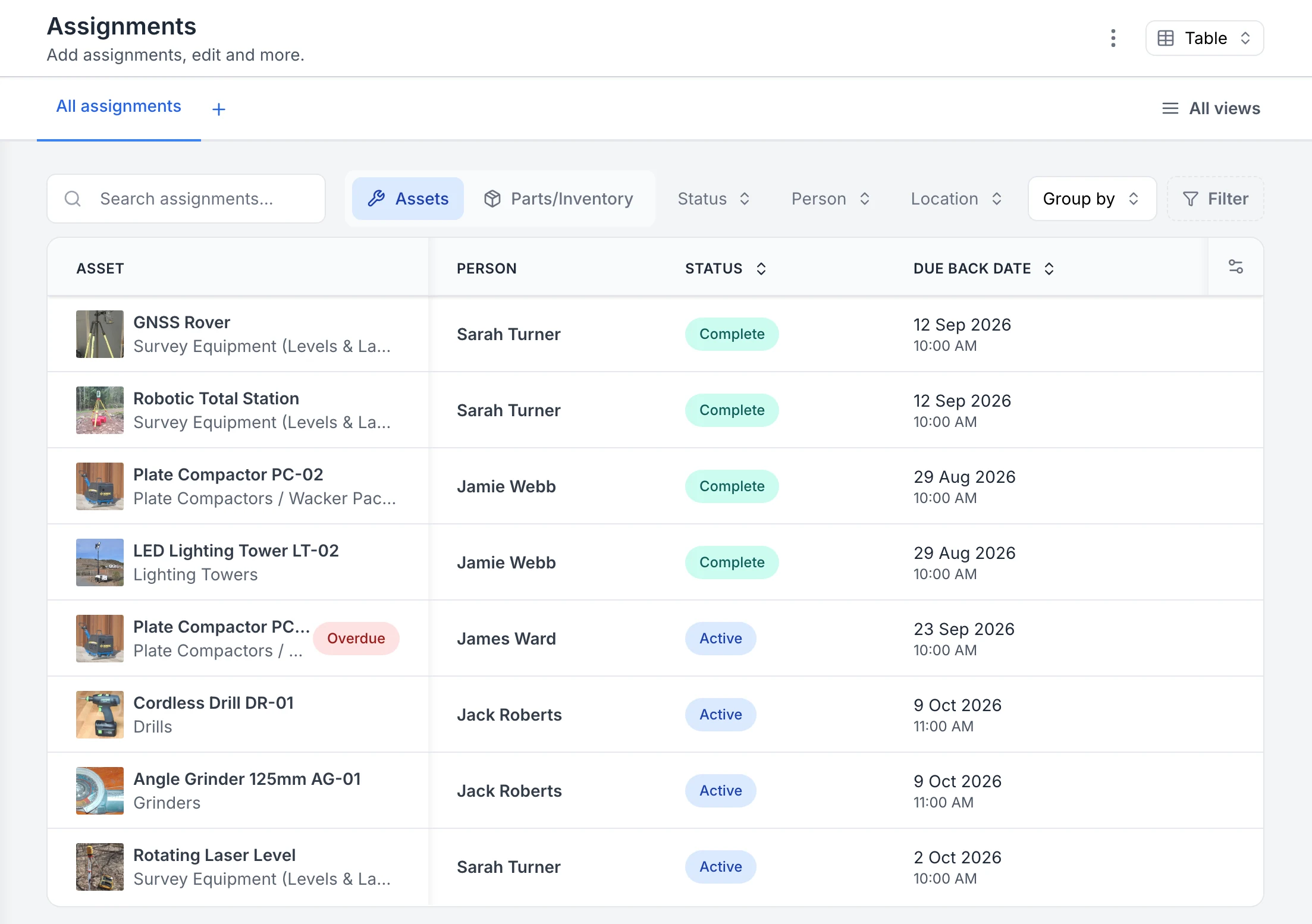
See who has each tool and when it is due back
Every sign-out in one list. Four assignments are back and marked Complete; four are still out as Active, each with the person and the due-back date. The plate compactor with James Ward was due back on 23 September, so it is flagged Overdue.
MapTrack app · Demonstration data · Captured
Captured in a demonstration workspace on the All assignments view with the Person, Status and Due Back Date columns. The app shortens long asset and category names.

Co-Founder & GM of Operations
Combine a deliberate handover with Bluetooth detections
A QR scan records a deliberate action. A supported gateway can detect a Bluetooth tag and update the tool’s location in the MapTrack app. Use both with clear expectations about what each record establishes.
1. Record who took the tool
Use the assignment workflow to record the recipient or destination and the accessories handed over. A nearby tag detection does not prove custody.
2. Check the last gateway detection
Use a supported gateway such as Oyster, Remora3, G70 or Dart3 for Bluetooth-tag detections. Check the detection time and gateway context before deciding where to look.
3. Reconcile the physical return
Scan and inspect the tool, confirm the accessories returned and record any shortage. Keep the return connected to the original assignment.
Setup and limits
- Bluetooth detections depend on a compatible gateway within range. They do not provide continuous, precise indoor coordinates or establish that a tool has been returned.
What is tool tracking software?
Tool tracking software is a digital platform that helps organisations label, locate and manage hand tools, power tools, instruments and portable equipment across multiple sites and crews. It replaces paper sign-out sheets and spreadsheets with QR code scanning, GPS location, assignment logs and full audit trails. Unlike standalone asset tracking systems, dedicated tool tracking also covers theft prevention, calibration management and compliance inspections for regulated instruments. See our contractor tool tracking solution for how this applies to trade and construction teams.
The problem
Tool loss is costing you more than you think
Missing tools
Tools disappear between sites. No one knows who had them last or where they went.
No accountability
Paper sign-out sheets get lost. When a tool goes missing, there is no trail to follow.
Replacement costs
Buying the same tools repeatedly because you cannot find or verify what you already own.
Compliance gaps
Calibrated instruments and safety tools need regular checks. Paper records cannot send reminders.
How it works
Four steps to full tool visibility
Label your tools
Print QR labels from MapTrack and attach them to each tool. Durable labels survive outdoor and workshop conditions.
Scan to assign
Team members scan a tool to check it out. The register records who has it, where and when.
Track and inspect
See where each tool was last checked out or returned across sites. Run inspections, calibrations and compliance checks from any phone.
Audit and report
Run bulk verification audits by scanning tools on site. Reports show utilisation, missing items and maintenance history.
Trusted by construction, mining and field service teams










Platform capabilities
Everything you need to track every tool
QR code scanning
Print labels, scan to assign, check in/out and view history from any phone.
GPS location
Latest position for tools with a GPS tracker. Live tracking, geofences and movement alerts run in MapTrack Telematics.
Central register
One register for every tool across every site. Full history and audit trail.
Compliance checks
Calibration tracking, test-and-tag and inspection reminders with evidence.
Maintenance
Schedule servicing and repairs. Track costs and service history per tool.
Inspections
Digital checklists for tool condition checks with photos and sign-off.
Reporting
Utilisation, loss rates, compliance status and cost reports on one dashboard.
By the numbers
What teams report after switching
Tool tracking pays for itself fast. Here is what MapTrack customers measure after the first 90 days.
40–50%
estimated reduction in tool replacement costs after enforcing check-in/check-out and personal accountability
Specialised Plumbing case study (customer-reported)
Less loss
equipment loss and downtime at Axis Services Group after monthly site audits moved into MapTrack, in their words "drastically reduced"
Axis Services Group review
1–2 days
per week that Saunders International used to spend tracking and managing generators alone, before MapTrack
Saunders International review
Days to instant
safety audit documentation at RIX Specialist Contracting, which previously took two to three days to compile
RIX case study
Customer Story
How a plumbing contractor eliminated tool loss across 100+ vehicles
Scott Bradley, Managing Director at SPDR, on tracking, compliance and fleet visibility
Watch how Specialised Plumbing Drainage and Roofing use MapTrack for tool and equipment tracking, compliance and maintenance.
Show transcript
We’re a good sized company with 100+ plumbers. Loss of tools and equipment over years has probably cost the company tens of thousands of dollars.
We have quite a few different assets, like from cars to trucks, excavators. Just had too many platforms that we were trying to use. That’s when we came across MapTrack.
And now with MapTrack we know where everything is. We know when people swap tools between one another. Everything gets moved digitally. It’s easy to track down, it’s easy to find. We just have one person run around, take photos, enter the data, and we’re up and running within a couple of days.
Through the forms feature, we’ve been using daily safety truck checks. So our mechanic here completes that every day, as well as the truck drivers. A lot of our job sites are commercial sites, so when we have an excavator out on site, we have to show proof of the last time it got serviced. They’re not having to call the office and being like, "Oh hey, when’s the last risk assessment done? When’s this? When’s that?" It’s just all there.
MapTrack’s alerts has drastically changed our ability to service our equipment from both tools, vehicles, and we also get alerts when guys put a wear and tear or damage to equipment comes up straight away. Gets sent directly to me.
Super easy for the guys on site to use. It’s a quick scan of a QR code and click of a button and you’re done. Since the introduction of MapTrack, on-site accountability of their tools has been drastically improved just because they know they’re being watched. We’re no longer misplacing or losing tools, and the wear and tear on our tools has reduced.
MapTrack’s support has been amazing. We’ve been able to deal directly with their team at a drop of a hat. There’s any issues, or we need a new field, or we need to learn something new, a phone call away, it’s answered.
I would say for anyone who’s planning to look at an asset management system, I would highly recommend MapTrack. It’s quick, simple, innovative.
Know where every tool is, who has it and when it's due back
Check-in/check-out tracking, GPS location and automated return reminders. Stop losing tools. Start your free trial.
- No credit card required
- 30 days free trial
- Cancel anytime
Built for your industry
Tool tracking across every sector
Construction
Track tools across job sites, crews and subcontractors.
Electrical
Track test instruments, calibrated tools and safety gear.
Plumbing
Manage tool kits, specialist equipment and vehicle loads.
Mining
Track tooling across mine sites, shutdowns and workshops.
Facilities
Manage maintenance tools across multi-site properties.
Tool tracking FAQ
What is tool tracking software?
Tool tracking software is a digital platform that helps organisations label, locate and manage hand tools, power tools, instruments and portable equipment. It replaces paper sign-out sheets and spreadsheets with QR code scanning, GPS location, assignment logs and audit trails. MapTrack combines tool tracking with maintenance, compliance and reporting in one platform.
How does tool tracking work with QR codes?
You print a QR label for each tool and stick it to the asset. Team members scan the label with their phone to open its record, check the tool in or out, view its history, report a fault or complete an inspection. Check-in and check-out write to the register as they happen, so they need a connection; inspections and fault reports can be completed offline and push when the phone reconnects.
Can tool tracking software prevent tool theft?
Yes. Tool tracking software creates accountability by recording who has each tool, when it was signed out and where it was last checked out or returned. Tools with a GPS tracker also show their latest position, with live tracking and geofences in MapTrack Telematics. Overdue returns raise an email alert. This visibility deters theft and makes it easy to identify missing items during audits.
How much does tool tracking software cost?
Tool and equipment tracking starts at $1/asset/month on Standard, with volume discounts at higher asset counts. Fleet, Plant & Heavy Machinery use a separate rate card starting at $8/asset/month. All plans include unlimited users, so every team member can scan and track without adding per-seat charges.
Can I track tools across multiple construction sites?
Yes. MapTrack supports multi-site tracking with site-level registers, transfer logs and cross-site reporting. You can see which tools are on which site, who has them and when they were last inspected. Role-based access controls let you restrict visibility by site or region.
What is the difference between tool tracking and asset tracking?
Tool tracking is a subset of asset tracking focused specifically on hand tools, power tools and portable equipment. Asset tracking covers a broader range including vehicles, plant, machinery and fixed assets. MapTrack handles both in one register, so you do not need separate systems.
Does tool tracking work offline?
Partly. Inspections, pre-starts and fault reports can be completed offline on iOS and Android and sync when the device reconnects. On a work order loaded before reception drops, crews can work through procedures and record per-asset pass or fail results offline. Adding costs and moving the work order to Completed need a connection. Check-in and check-out, audits and Requests also need a connection.
How do I switch from a sign-out sheet to tool tracking software?
Most teams migrate in under a day. Import your existing tool list from a spreadsheet, print QR labels and start scanning. MapTrack provides import templates and onboarding support to make the switch simple.
Can we track tools with barcode or Data Matrix labels?
Yes. Scan QR, barcode and Data Matrix labels with the phone camera or a handheld Bluetooth or USB scanner, as long as each code is linked to the tool’s record. QR labels can be generated in bulk in the app, and barcode or Data Matrix labels are ordered from your tool list.
Stop losing tools
Label, scan and track every tool across every site in one platform.
4.9 on G2 · 5.0 on Capterra, GetApp & Software Advice
- No credit card required
- 30 days free trial
- Cancel anytime