
Import your assets, assign MapTrack QR tags, add the fields that matter and connect the related operating workflows. A latest GPS fix requires a configured device feed.
4.9 on G2 · 5.0 on Capterra, GetApp & Software Advice15 current G2 reviewsNo credit card required
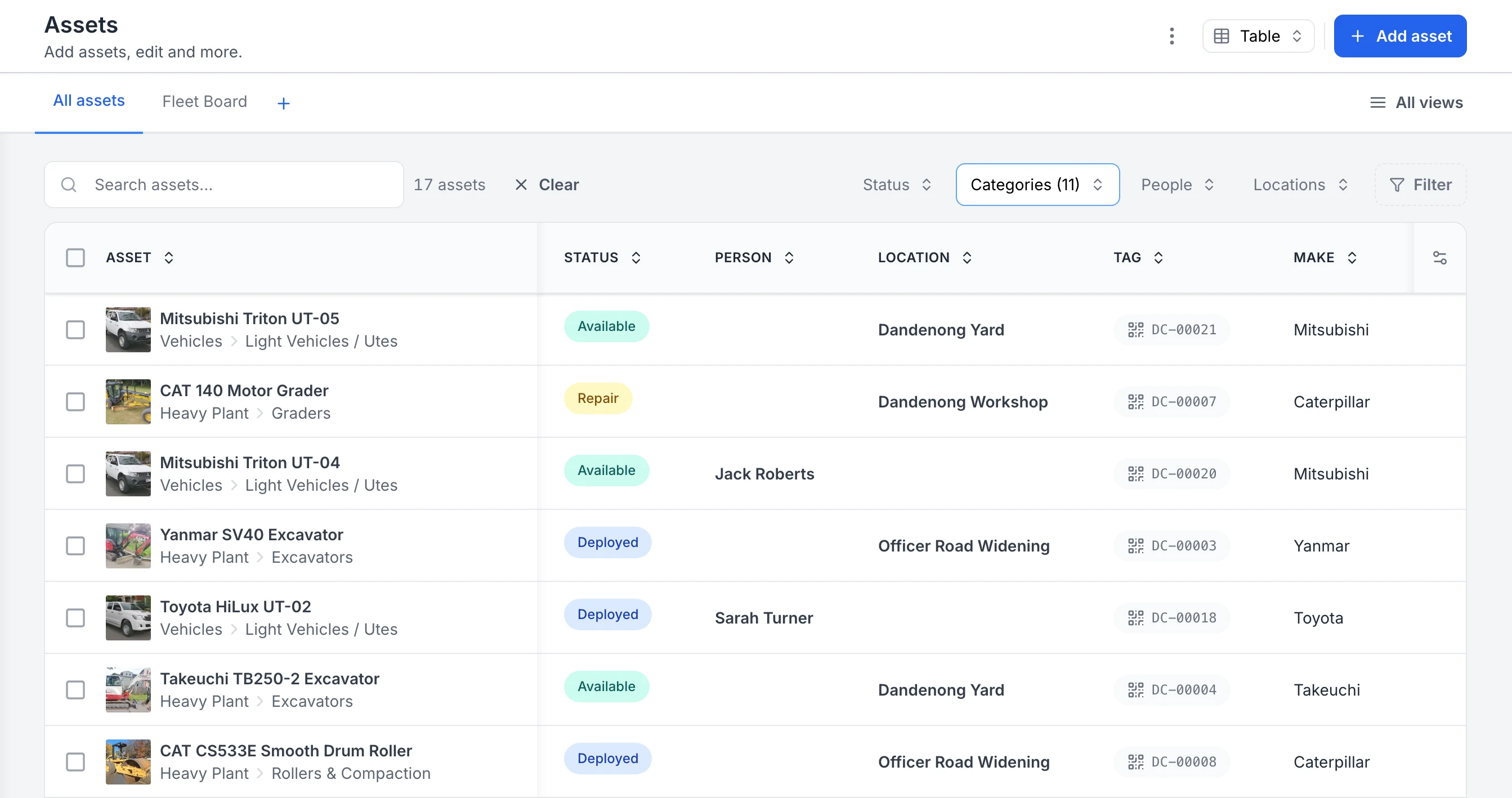
See every asset, its status and who or where it is with
The register filtered to heavy plant and vehicles. Each row shows the photo and category, whether the asset is available, deployed or in for repair, the person or site it is with, and its QR tag ID. Two utes are with named crew members; the rest are at the yard, the workshop or a project site.
MapTrack app · Demonstration data · Captured
About this screenshot
Captured in a demonstration workspace. The All assets view is filtered to the Heavy Plant and Vehicles categories and shows the Status, Person, Location, Tag and Make columns.

Co-Founder & GM of Operations
Make the register easier to build and easier to use
Bulk actions, naming conventions and shared views solve different setup jobs. Use a small representative group first, then expand once the identifiers and fields behave as expected.
1. Create or update a selected group
Use bulk add for a group of assets and bulk edit for changes shared by selected records. Check the selection before applying changes and retain the individual identifiers.
2. Set the naming convention
Enable the account convention and use category overrides where a group needs its own pattern. Check a sample name, including missing source fields, before applying it broadly. Generated names and printed tag values are separate fields.
3. Save a view for the actual job
Save the filters for a site, category or recurring review. Choose private, account-wide or selected users and roles when sharing. Reopen the saved view as the intended user.
4. Choose the columns the team needs
Keep useful identifiers and custom fields visible. Personal column choices take precedence over an account default; the account owner can publish the default for the team.
Setup and limits
- Sharing a view does not grant access to records the recipient cannot otherwise read.
- Saving shared views and account defaults requires a connection. Naming setup and publishing defaults require the appropriate account permissions.
Keep your everyday filters above the asset list
Choose the quick filters your team reaches for, including your own fields, and put them in order. They sit above the asset list on a desktop and in the filter sheet on a phone.
1. Open the quick-filter settings
Open Filter and choose Configure quick filters, or choose Choose quick filters from the asset list’s ⋮ menu.
2. Pick and order the fields
Tick the fields you filter by most, including your own single-option custom fields, then drag them into order and save.
3. Narrow the list
Pick values in each quick filter. The count beside the search box shows how many assets match.
4. Use the same filters on a phone
Your quick filters follow you to a phone, in the same order, in the filter sheet. Reset to default returns to Status, Category, Person and Location.
Setup and limits
- Quick filters narrow the list you are looking at. Use Save as view to keep a filtered list you come back to.
- Advanced filters stay available for conditions the quick filters do not cover.
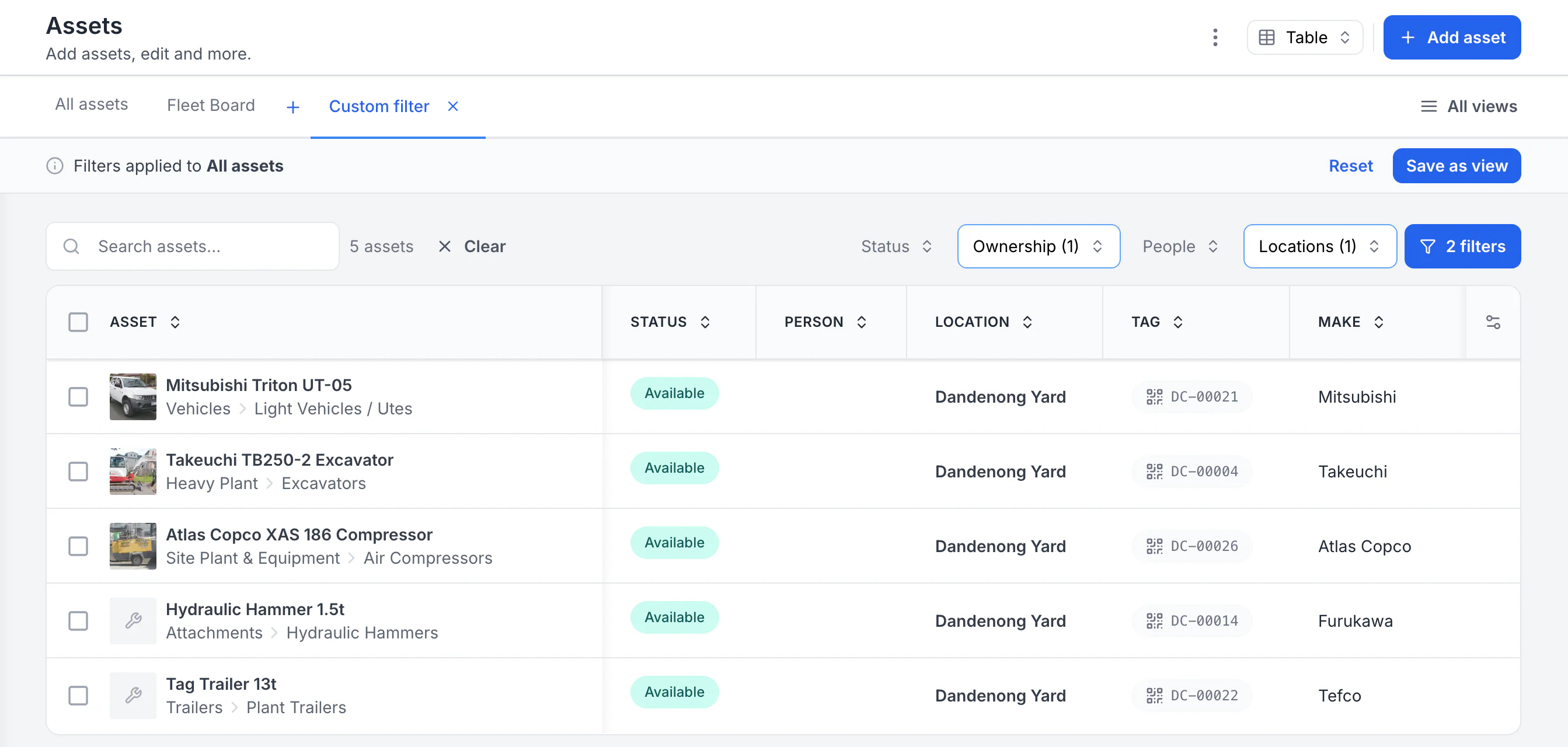
Keep the filters you use above the asset list
Quick filters sit above the asset list in the order you chose. Here a custom Ownership field has replaced the default Category filter, and Owned plus Dandenong Yard narrow the list to five assets.
MapTrack app · Demonstration data · Captured
About this screenshot
Demonstration workspace, desktop browser. Quick filters chosen as Status, Ownership, Person and Location, then two values applied.
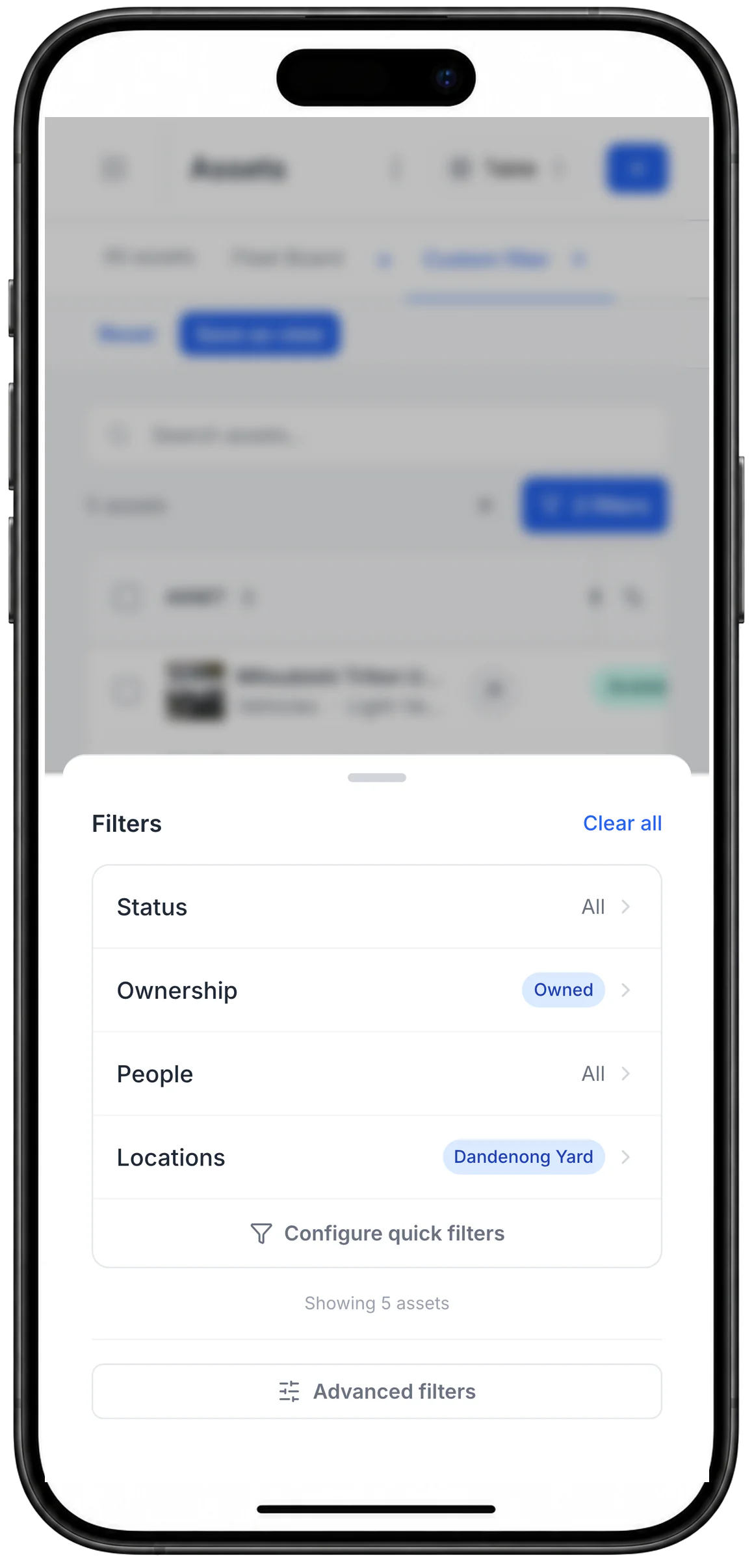
The same quick filters on a phone
The quick filters chosen on the desktop followed the same user to a phone, in the same order. Configure quick filters sits in the sheet, and Advanced filters stays available below it.
MapTrack app · Demonstration data · Captured
About this screenshot
Captured at a 430 x 932 phone viewport in a second browser session for the same user, and shown in a phone frame.
Trusted by construction, civil, mining and facilities teams








What is an asset register?
An asset register is the single, central record of every physical asset a business owns or controls: tools, plant, machinery, vehicles, IT and equipment. For each asset it holds the ID, category, location, custodian, status and configured fields. Related forms, assignments, service and work records remain accessible through their supported workflow views.
One register, everything on it
Build the register around verified workflows
Start with identifiers and fields, then add QR identification and the related operating workflows your team has tested.
Import a prepared register
Import CSV or XLSX after preparing the core columns and any required active custom fields. Test a small sample first.
Custom fields per asset type
Capture serial numbers, make and model, cost, warranty, site and cost centre. Each asset type holds the fields that matter.
QR and configured location
Generate QR tags for identification. Validate existing barcodes separately, and confirm device-feed delivery before relying on GPS data.
Related operating history
Keep assignments, submitted forms, work orders and service records accessible from the asset and their workflow pages.
Inspection evidence
Use configured forms, files and fields for required evidence. Confirm and test any reminder or follow-up automation.
Connected audits
Run an online audit against the required scope and use its skipped, unexpected and missing-item controls.
How it works
Three steps to a register you can trust
Import or create your assets
Import assets from CSV or XLSX, add them manually, or use AI photo prefill when enabled. Create required active custom fields first and test a sample import.
Explore import or create your assets →Label and link each asset
Generate and assign a MapTrack QR tag while connected. A scan identifies the asset and opens its linked record. Validate existing-barcode or configured GPS workflows separately.
Explore label and link each asset →Run the operating workflows
Use deliberate assignments, forms, work orders, service records and connected audits, then review the related history from the asset and relevant workflow pages.
Explore run the operating workflows →Single source of truth
Bring a sample of the register across first
Bring a small CSV or XLSX from your current register. Map its columns, review any row errors and check the imported records before bringing over the rest. Check how your existing asset numbers map to the fields you've configured.
A live asset register helps by keeping assets and their related forms, assignments and work orders accessible from the asset and the relevant workflow. Use roles, connected mutations and periodic audits to keep the register reliable.
Not sure how to structure yours? Start with the free asset register builder, then import it into MapTrack when you are ready to go live.
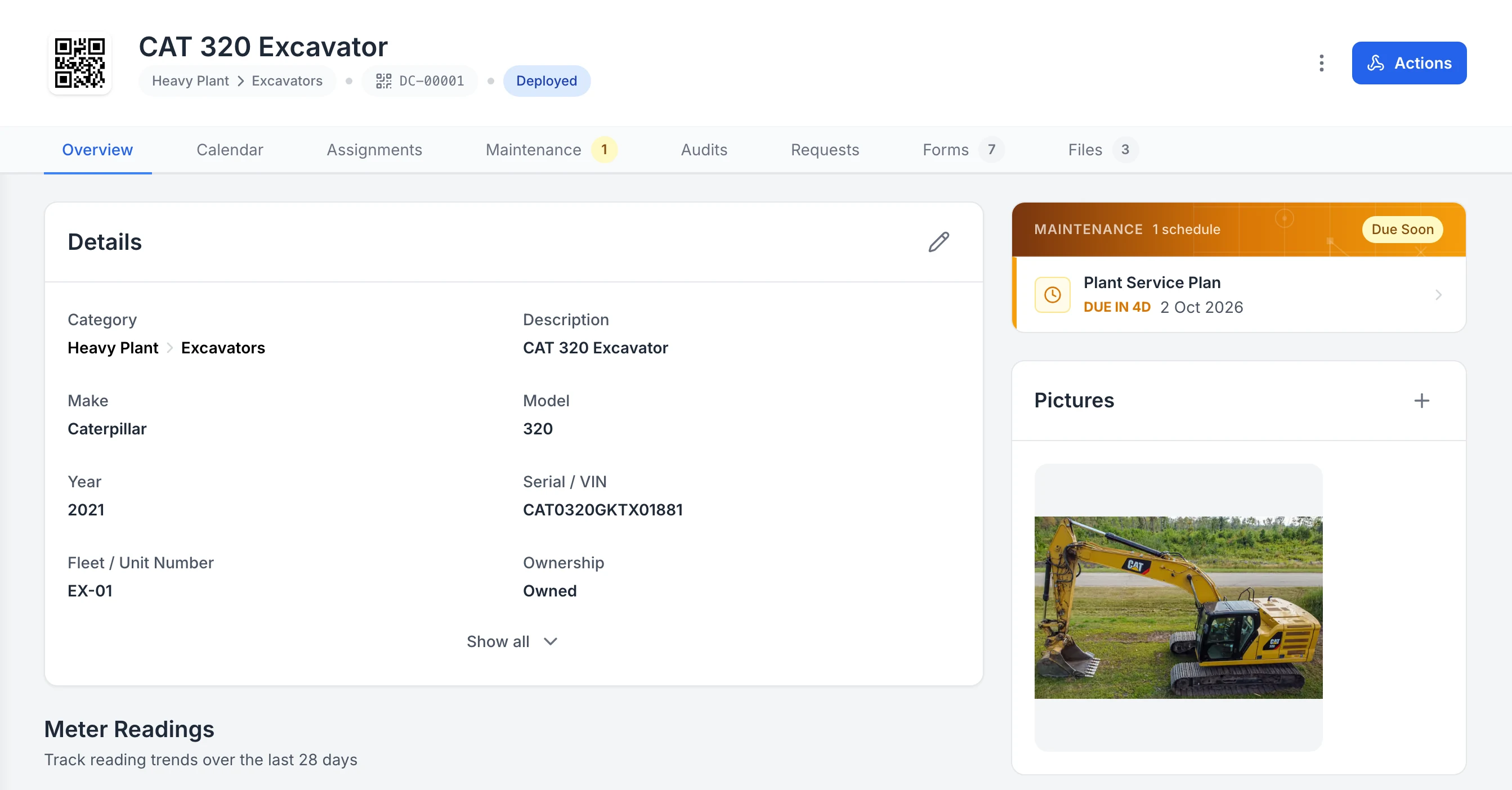
Keep the details, next service and photo on the asset
One excavator’s record. Its QR tag, status and details sit at the top, the next service is flagged Due Soon, and its assignments, maintenance, audits, requests, forms and files are each one tab away.
MapTrack app · Demonstration data · Captured
About this screenshot
Captured in a demonstration workspace on the asset’s Overview tab. Meter readings, sub-assets, parts and activity continue further down the page.
Evidence on the asset
Inspections and certificates live on the record
Pre-starts, inspections, certificates and test-and-tag records attach to the asset, as configured forms, fields or files. Test any scheduled reminder or follow-up automation, and confirm with your compliance adviser which evidence your process requires.
Why teams switch
Spreadsheet vs MapTrack asset register
- Account-based asset records
- -
- Configured category fields
- -
- QR identification
- -
- Related form and service records
- -
- Configured depreciation fields
- -
- Connected audit workflow
- -
- Loaded-form offline submission
- -
Free asset register tools and templates
Build your register structure first, then bring it into MapTrack. No sign-up required.
Asset register FAQs
How to import, structure, identify and review assets with clear connectivity and evidence boundaries.
Build an asset register your team can test
Import a controlled sample, assign QR tags and test the field workflows your team will use. The 30-day trial needs no credit card.
- No credit card required
- 30 days free
- Confirm plan scope