
Free vehicle mileage log
Free vehicle mileage log template (PDF-ready). Record odometer readings, trip distance, business vs private use and fuel for FBT compliance. Download free.
Updated 28 Sept 2026
Vehicle Mileage Log
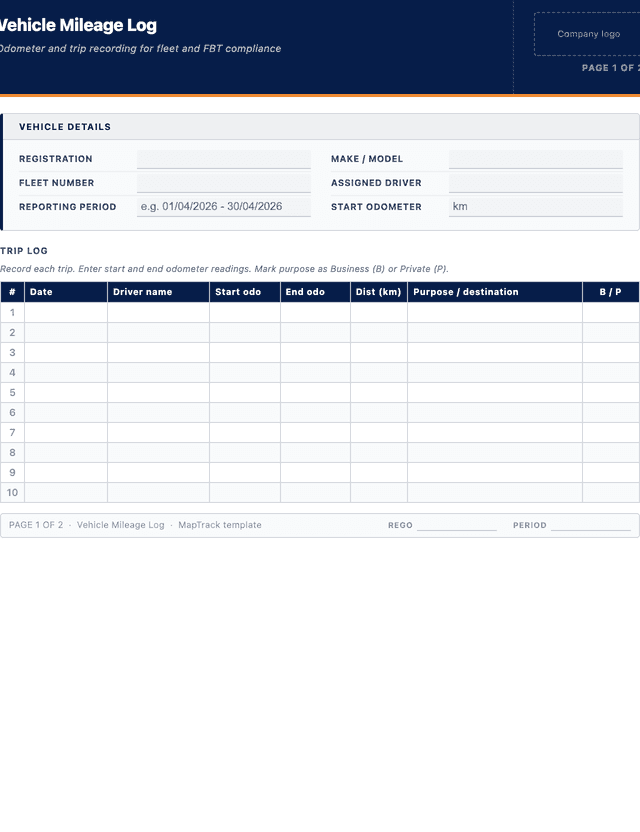
Record each trip. Enter start and end odometer readings. Mark purpose as Business (B) or Private (P).
| # | Date | Driver name | Start odo | End odo | Dist (km) | Purpose / destination | B / P |
|---|---|---|---|---|---|---|---|
| e.g. | 12/03/2024 | S. Carter | 3,120 | 3,120 | 3,120 | - | - |
| 1 | |||||||
| 2 | |||||||
| 3 | |||||||
| 4 | |||||||
| 5 |
The PDF includes all 20 numbered rows, ready to print or fill on screen.
Driver sign-off
Signature
Print name
Date
Fleet manager sign-off
Signature
Print name
Date
How to use: download the PDF, print or complete digitally on any device.
- PDF format, ready to print or fill on screen
- Use as-is or customise to suit your operation
- Go digital in MapTrack for photos, reminders and audit trails
Two ways to use it
Use in MapTrack →Use it digitally instead
Unlimited usersThese same 7 columns, already built.




- Scan the asset’s QR tag with any phone
- Submitted forms can trigger alerts
- Photos on fails, audit-ready records
- Export responses, PDF reports with your logo
Free trial. No credit card needed.
Trusted by teams across Australia and New Zealand
We respect your privacy. Unsubscribe anytime.
These templates are free general guides provided as-is. They do not constitute legal, safety or compliance advice. You are responsible for ensuring any form meets your specific workplace obligations, industry standards and applicable regulations.
Don't just download it - use it live. Start a free workspace with this vehicle mileage log already built, so your crew can run it from a phone.

Co-Founder & Commercial Director
Key takeaways
- The MapTrack vehicle mileage log has 7 columns and room for 20 entries. Columns: Date, Driver name, Start odo, End odo, Dist (km), Purpose / destination, B / P.
- Records odometer at the start and end of every journey with its purpose, so business and private use can be separated when it matters.
- An entry without a purpose makes business use difficult to substantiate. The reading proves distance; the purpose explains the business share.
- Reconcile the log against fuel records monthly. Kilometres without fuel, or fuel without kilometres, both point to missing entries.
- For heavy vehicles, Chain of Responsibility duties under the Heavy Vehicle National Law make these records evidence for the business, not just the driver.
Enter your email below to download this vehicle mileage log as a ready-to-use PDF.
Used by construction, mining and field service teams











What is a vehicle mileage log?
A vehicle mileage log is a structured record used to track the distance travelled by a fleet vehicle over a reporting period. It captures odometer readings at the start and end of each trip, the distance in kilometres, the purpose or destination, and whether the journey was for business or private use. Mileage logs are required for FBT compliance in Australia and are used by fleet managers to monitor vehicle utilisation, fuel efficiency, driver accountability and maintenance scheduling based on actual kilometres driven. The log typically includes vehicle identification, driver details, a trip-by-trip register and a period summary with business-use percentage calculations.
Under ATO requirements, businesses using the operating cost method for Fringe Benefits Tax must maintain a logbook for a continuous 12-week period to establish the business-use percentage of each vehicle. The logbook can then be applied for up to five years if driving patterns remain consistent. Under section 19 of the WHS Act, as enacted in each state and territory except Victoria, a PCBU must ensure, so far as is reasonably practicable, the provision and maintenance of safe plant and structures, and section 8 makes a vehicle used for work a workplace, so accurate kilometres matter for odometer-based service scheduling. In the states and territories where it applies (all except Western Australia and the Northern Territory), the Heavy Vehicle National Law covers vehicles with a GVM or ATM over 4.5 tonnes; its driver fatigue rules are in Chapter 6, and drivers of fatigue-regulated heavy vehicles record work and rest hours in a work diary when those rules require one, so a mileage log sits alongside the work diary rather than replacing it. Beyond FBT, mileage logs help fleet managers identify underutilised vehicles that could be redeployed or removed from the fleet, forecast replacement schedules based on annual kilometres, calculate accurate per-kilometre running costs for budgeting and cost recovery, and detect unusual usage patterns that may indicate unauthorised private use or inefficient routing.
Learn more about GPS and fleet tracking in MapTrack.
Benefits of using this vehicle mileage log
- FBT compliance: substantiate business use percentages for Fringe Benefits Tax returns as required by the ATO.
- Cost tracking: monitor per-kilometre running costs, fuel consumption and vehicle utilisation across your fleet.
- Driver accountability: clear records of who drove which vehicle, when and for what purpose.
- Maintenance scheduling: odometer-based service intervals are easier to manage with accurate distance records.
- Insurance and claims: documented trip records support insurance claims and incident investigations.
- Budget forecasting: historical mileage data helps predict future fuel, maintenance and replacement costs.
Benefits of digitising forms in MapTrack
When you digitise vehicle log / registers in MapTrack, you get:
- Field users can easily scan a QR code to complete a form on mobile. Unlimited users.
- Email the right people when a form is submitted, with an automation you set up.
- File every completed form against the asset, location or person it covers.
- Download any completed form as a PDF, with failed answers listed at the top.
- Fill in forms offline; they upload when the device is back online.
- Build conditional logic (show or hide questions based on answers).
- Take pictures or attach photos. Not possible with a paper-based form.
- Electronic signatures.
- Edit forms later without reprinting.
- Set who can view, fill in or edit forms with user roles.
- Upload a paper form (PDF, Word, Excel or a photo) and MapTrack's AI builds a digital version for you to check.
- Schedule services by odometer, engine hours or date for every vehicle.
- Keep fuel receipts and service records with each vehicle's inspections.
- Record repair costs on each work order against the vehicle.
Book a demo to see how MapTrack handles vehicle log / registers.
Try MapTrack free for 30 days
Full access to every feature. No credit card required. Per-asset pricing so you scale as your fleet grows.
- No credit card required
- 30 days free trial
- Cancel anytime
Intuitive for field crews
“MapTrack's a great platform - intuitive for the guys out in the field and also has fantastic support.”

Matthew Anderson
Maintenance Planning Supervisor, Supagas
What to include in a vehicle mileage log
This vehicle mileage log covers 5 key areas:
- Vehicle details: registration, make/model, fleet number, assigned driver, reporting period.
- Trip log: date, driver name, start odometer, end odometer, distance in km, purpose/destination.
- Trip classification: business or private use for each journey.
- Period summary: total distance, business kilometres, private kilometres, fuel purchased.
- Sign-off: driver and fleet manager signatures.
How to use this vehicle mileage log
- Record vehicle details and the reporting period start date.: Enter the vehicle registration, make, model, fleet number and the assigned driver. Note the reporting period start date and the opening odometer reading from the dashboard.
- Note the start odometer reading before each trip.: Read the odometer before moving the vehicle and record the exact figure. For FBT logbook compliance, each trip must have a start and end reading to calculate the precise distance travelled.
- At the end of each trip, record the end odometer and calculate the distance.: Subtract the start reading from the end reading to determine the trip distance in kilometres. Record the figure in the distance column. Complete this at the time of arrival, not from memory later.
- Record the destination or purpose and mark whether business or private.: Write the destination address or a clear trip purpose such as "client site visit" or "office to warehouse". Classify each trip as business or private. The ATO requires this classification for FBT logbook substantiation.
- At the end of the period, complete the summary totals.: Sum all trip distances to calculate total kilometres for the period. Separate business and private kilometres and calculate the business-use percentage. This percentage is used for FBT calculations under the operating cost method.
- Sign off and submit to the fleet manager for review.: The driver signs the completed log to confirm all entries are accurate. Submit the log to the fleet manager or supervisor who reviews, countersigns and files the record. Retain for a minimum of five years per ATO requirements.
In MapTrack, you can track your fleet with GPS and digital pre-starts. Each submission is stored as a timestamped PDF against the asset record.
Get the free templateEnter your email above to download the full vehicle mileage log as a PDF.Back to download formHow often should you complete this log / register?
Mileage should be recorded for every trip at the time of travel, not retrospectively from memory. For FBT purposes, the ATO accepts a representative 12-week logbook period that applies for up to five years, provided vehicle use patterns do not change materially. Under the FBT rules, you keep a new 12-week logbook when none of the previous four FBT years was a logbook year for that car, when you choose to, for example because business use has increased, or when the ATO asks for one in writing. If the pattern of use changes significantly, a new logbook is the simplest way to keep the business-use percentage a reasonable estimate. Many fleet operators choose to maintain continuous logs for more accurate cost analysis, driver accountability and odometer-based maintenance scheduling.
At the end of each reporting period, usually monthly or quarterly, the fleet manager should review completed logs, verify odometer readings against service records, calculate business-use percentages and file the records. The ATO requires FBT logbook records to be retained for a minimum of five years from the date of the relevant FBT return. If a vehicle carries a GPS tracker, a separately scoped MapTrack Telematics deployment records its trip history and odometer readings, which you can check against this log.
Frequently asked questions
Applicable regulatory standards
This template is a starting point. Check the current requirements that apply to your equipment, work and location. The template alone does not establish compliance.
- WHS Act 2011 (Section 19 - Primary duty of care)
- Heavy Vehicle National Law, Chapter 6 - Driver fatigue and fitness to drive
- WHS Regulations 2011, Chapter 5 - Plant and Structures
Vehicle mileage log preview
The numbers behind this vehicle mileage log
Every figure below is sourced and dated, so you can quote it in a toolbox talk, a budget case or a board paper without having to chase the original report.
Embed this free template on your website
Run an industry blog, trade association site, or training resource? Drop a preview of this free vehicle mileage log straight into your page. The snippet is self-contained, needs no scripts, and links readers back to the full free template.
<div style="max-width:480px;font-family:system-ui,-apple-system,'Segoe UI',Roboto,sans-serif;border:1px solid #E5E7EB;border-radius:12px;padding:20px;background:#ffffff;">
  <p style="font-size:12px;font-weight:700;letter-spacing:0.05em;text-transform:uppercase;color:#071D49;margin:0;">Free template</p>
  <p style="font-size:18px;font-weight:700;color:#071D49;margin:6px 0 0;">Vehicle mileage log</p>
  <ul style="margin:12px 0 0;padding-left:18px;color:#374151;font-size:14px;line-height:1.6;">
    <li style="margin:4px 0;">Vehicle details: registration, make/model, fleet number, assigned driver, reporting period.</li>
    <li style="margin:4px 0;">Trip log: date, driver name, start odometer, end odometer, distance in km, purpose/destination.</li>
    <li style="margin:4px 0;">Trip classification: business or private use for each journey.</li>
    <li style="margin:4px 0;">Period summary: total distance, business kilometres, private kilometres, fuel purchased.</li>
    <li style="margin:4px 0;">Sign-off: driver and fleet manager signatures.</li>
  </ul>
  <p style="font-size:13px;color:#6B7280;margin:14px 0 0;padding-top:12px;border-top:1px solid #E5E7EB;">Free <a href="https://www.maptrack.com/templates/vehicle-mileage-log" style="color:#071D49;font-weight:600;text-decoration:none;">Vehicle mileage log</a> by MapTrack</p>
</div>Free to reuse, including commercially. This template is published under a Creative Commons Attribution 4.0 licence. Copy it, adapt it, put it on your own site or in your own docs. All we ask is that you credit MapTrack with a link back to this page. The snippet above already includes that credit, so if you use it as-is you’re covered.
Cite this template
Writing about this topic? You’re welcome to quote this checklist. Here’s the wording to use so your readers can find the original.
The MapTrack vehicle mileage log has 7 columns and room for 20 entries.
- Short attribution
- MapTrack Vehicle mileage log, https://www.maptrack.com/templates/vehicle-mileage-log
- Reference list
- MapTrack. (2026). Vehicle mileage log [Checklist template]. Retrieved from https://www.maptrack.com/templates/vehicle-mileage-log
Free to reuse with credit under a Creative Commons Attribution 4.0 licence. If you’d rather link straight to it, the page is https://www.maptrack.com/templates/vehicle-mileage-log.
Need to track your fleet with GPS and digital pre-starts?
Register every vehicle in MapTrack, attach digital forms, and get a complete history of every inspection, service and compliance record.
GPS and fleet tracking · All templates · Pricing · Book a demo