 vs

The Teletrac Navman alternative for mixed plant and fleet
Teletrac Navman is an established fleet telematics vendor with a real Australian and New Zealand presence, offering AI video, GPS asset tracking, equipment utilisation, fleet maintenance and heavy-vehicle compliance reporting. Teams look past it when the operation is jobsite-shaped rather than road-first.
MapTrack overlaps on asset tracking and AI dash cams but is built around the mixed-fleet jobsite: the excavator, the generator, the trailer and the tool crate alongside the vehicles, with published hardware and software pricing.

Choose Teletrac Navman when the centre of gravity is a road fleet needing telematics and heavy-vehicle compliance reporting, or when its separate equipment platform (TN360 ACM) already covers your plant. Choose MapTrack, which sells the RoadSight, DualSight and Panorama AI dash cams with GPS built in, when the operation is mixed plant, machinery, trailers and tools, and inspections, maintenance triggers and job costing have to run on the same asset record. MapTrack is one platform for every asset a field business runs: alongside vehicles with GPS and AI dash cams, it tracks the tools, plant and trailers outside the cab with QR, barcode and Data Matrix labels, Bluetooth tags and GPS trackers, and runs their pre-starts, bookings and maintenance on the same record.
Based on Teletrac Navman’s public documentation, MapTrack product pages and public pricing and store pages as of Oct 2026. Capabilities vary by region and package; verify in a pilot.
Trusted by construction, mining and field service teams















Teletrac Navman vs MapTrack: the short answer
- •Teletrac Navman covers fleet telematics, AI video review, GPS asset tracking, equipment utilisation, fleet and equipment maintenance and compliance tools (Electronic Work Diary, Fuel Tax Credits and Mass Manager on its Australian site; ELD, DVIR and IFTA on its US site), with dedicated Australian and New Zealand sites.
- •It is fleet-first, with an equipment side (TN360 ACM) that publishes digital inspections, work orders, jobsite cost reporting and ownership cost analytics. Hire rate cards and QR custody workflows are not publicly documented.
- •Teletrac Navman’s Australian compliance pages describe Chain of Responsibility and NHVAS obligations in connection with Mass Manager, so confirm exactly which HVNL obligations its reporting covers.
- •MapTrack publishes hardware prices in a public store and software pricing on a public page; Teletrac Navman routes through a configurator to a quote.
What MapTrack covers in one platform
- Every asset, one record
- Tools on QR or barcode labels and Bluetooth tags, plant on GPS trackers, vehicles with GPS and AI dash cams, sites with boundaries: custody, inspections, maintenance and costs on the same record.
- Maintenance that runs on real usage
- Run hours and kilometres from trackers, dash cams or manual readings feed tiered service plans and next-service forecasts, every asset gets a 0 to 100 maintenance health score, and one work order can cover many assets, each with its own pass or fail.
- Easy for crews
- Pre-starts and inspections work without signal, on any phone, with shared-device PINs, single sign-on and AI help to build forms and add assets from a photo. Capterra Best Ease of Use 2026.
- Hardware and software from one vendor
- GPS trackers, AI dash cams with built-in GPS, Bluetooth tags and labels at published prices, managed in the same app, plus LightMetrics dash cam accounts and 150+ telematics, fleet and fuel-card data sources.
- Simple to buy and run
- Per-asset pricing with unlimited users, 24/7 support and month-to-month plans. Capterra Best Value 2026.
The full capability list (35)
- One register for tools, plant, equipment and vehicles
- Custody: who has what, and where
- Site boundaries on the map
- Live tracking and alerts in MapTrack Telematics
- Rate cards (Pro and Enterprise add-on)
- Finance dashboards (Pro and Enterprise add-on)
- Divisions (Pro and Enterprise add-on)
- Run hours and km from trackers, cameras, feeds or readings
- Work orders raised from meters, run hours and data feeds
- Tiered service plans
- Next-service forecasts from usage
- Stale-reading flags
- Maintenance health score
- Service board and due-soon emails
- One work order across many assets
- Batch work orders and bulk scan logging
- Labour, parts and external costs on every service
- Failed checks raise work orders by rule
- Parts and inventory by location and bin
- Offline pre-starts and inspections
- Mobile web app (Android, iPhone, iPad)
- Shared-device PINs
- SAML 2.0 single sign-on (SSO)
- AI form builder
- AI asset creation from a photo
- Equipment bookings (Requests)
- GPS trackers managed in the app
- AI dash cam video in the app
- AI dash cams with built-in GPS
- LightMetrics dash cam connection
- Bluetooth tags
- QR, barcode and Data Matrix scanning
- OEM feeds under Connections
- 150+ data sources
- Engine hours from 68 integrations
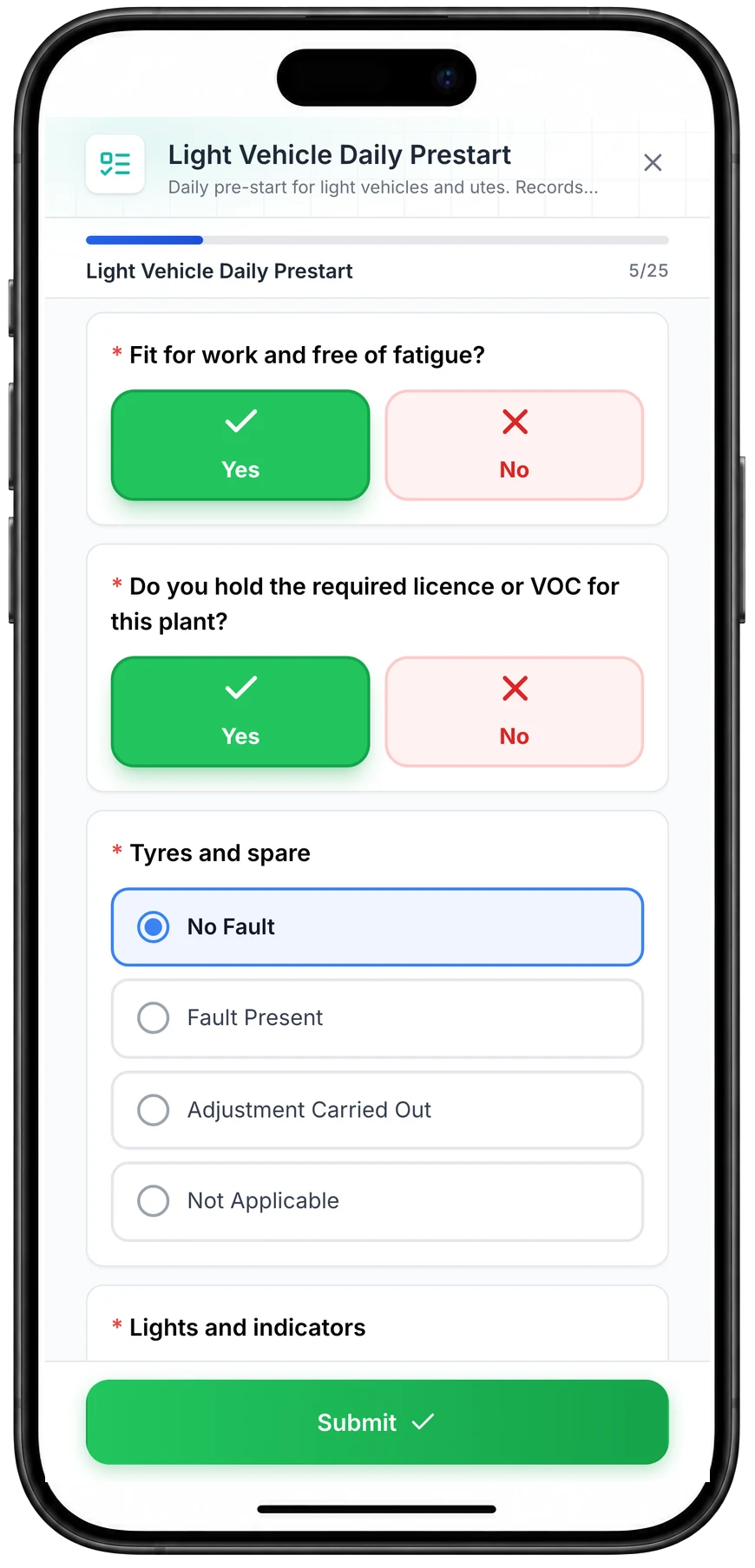
Run a vehicle pre-start on a phone
A daily pre-start for a ute, part-way through. Driver checks such as fitness for work and licence take one tap, and each vehicle check records No Fault, Fault Present, Adjustment Carried Out or Not Applicable.
MapTrack app · Demonstration data · Captured
About this screenshot
Captured at a 430 x 932 phone viewport in a demonstration workspace and shown in a phone frame; the form was closed without submitting.
What is Teletrac Navman?
Teletrac Navman is a long-established fleet telematics vendor with genuine local presence, running dedicated Australian and New Zealand sites alongside the US, UK and Mexico. Its product set spans fleet telematics, AI video ("review every minute of driving time and use AI simplify risk management" in its own words), GPS asset tracking, equipment utilisation, fleet and equipment maintenance, and compliance tools (Electronic Work Diary, Fuel Tax Credits and Mass Manager on its Australian site; ELD, DVIR and IFTA on its US site).
For a road-first fleet with heavy-vehicle compliance obligations, that is a coherent package from a vendor that will answer the phone in the same time zone. The question is what happens to the assets that are not on the road.
Why teams look for a Teletrac Navman alternative
Check how the proposed camera programme fits alongside the tracking, inspection and maintenance workflows for your complete asset register.
The jobsite is not the road when you hire out by rate card
Equipment utilisation, jobsite cost reporting and ownership cost analytics are published products, but hire rate cards and chargeout are not publicly documented.
DVIR is not a plant pre-start with a work order on that machine
DVIR covers heavy-vehicle inspection, and Teletrac Navman also publishes digital pre-use inspections for equipment with failure alerts. Whether a failed check raises a work order on that machine, with the photos and signatures you need, is worth verifying.
Tools and custody
QR scan and BLE custody of tools and small plant is not publicly positioned, and it is often where the losses actually are.
You cannot price it yourself
A "Build Your Solution" configurator routes to a quote with no public price, so comparing total cost against a published alternative takes a sales cycle.
MapTrack vs Teletrac Navman
Competitor claims come from that vendor’s own public pages. Where a capability is not documented publicly it is marked unknown, never absent.
| Criteria |  MapTrack |  Teletrac Navman |
|---|---|---|
| Built for | YesMixed fleets: plant, machinery, trailers, tools and vehicles on one asset record | Road fleets and equipment-heavy operations wanting telematics, AI video, equipment management and heavy-vehicle compliance reporting in one place(per Teletrac Navman, Oct 2026) |
| In-cab video and AI events | YesAI dashcam events on the same asset record as GPS, pre-starts, maintenance and cost; a fleet safety events dashboard; and estimated run hours feeding services | YesAI video review across driving time, alongside fleet telematics hardware(per Teletrac Navman, Sep 2026) |
| Assets with no cab (trailers, generators, tools) | YesGPS trackers, BLE beacons and QR labels cover trailers, generators, containers and tools | YesGPS Asset Tracking covers trailers, small powered tools and non-powered assets with battery-powered GPS trackers, plus geofencing, movement and dwell reporting and a recovery mode; confirm the trackers for your asset types(per Teletrac Navman GPS asset tracking, Oct 2026) |
| Pre-starts and inspections | YesQR pre-starts and inspections attached to the asset, with failures raising work orders | ?Digital pre-use inspections for equipment with instant failure notifications, alongside automated work order creation and assignment; photos, signatures, GPS stamps and offline use should be verified(per Teletrac Navman equipment management, Oct 2026) |
| Maintenance from runtime or odometer | YesTriggered by runtime, odometer, calendar or a failed pre-start | YesFleet Maintenance is a published product, and equipment tracking covers location, costs and maintenance schedules(per Teletrac Navman, Sep 2026) |
| Job costing and rate cards | YesRate cards, chargeout and cost history per asset and per site | ?Jobsite cost reporting automates cost allocation and invoice reconciliation, and ownership cost analytics support replacement decisions; hire rate cards and chargeout are not publicly documented(per Teletrac Navman equipment management, Oct 2026) |
| Custody of tools and small plant | YesQR scan and BLE custody: who has it, where it went, when it came back | Not publicly confirmedDriver identity sits inside the fleet and Electronic Work Diary workflows, and equipment operator management covers licences, training and other requirements. QR and BLE custody of tools is not publicly documented(per Teletrac Navman operator safety, Oct 2026) |
| Pricing transparency | YesPublic hardware store with prices, plus a public software pricing page | ?No public price. A "Build Your Solution" configurator routes to a quote(per Teletrac Navman, Sep 2026) |
| Commercial model | YesPer-asset pricing, unlimited users, no multi-year hardware lock required | Quote-led subscription assembled through a solution configurator(per Teletrac Navman, Sep 2026) |
| Region | YesAustralian-built and supported, deployed internationally | YesDedicated Australian and New Zealand sites alongside US, UK and Mexico(per Teletrac Navman, Sep 2026) |
See a mixed fleet in one record
Bring an asset list with a truck, an excavator, a trailer and a generator on it. We will show you what each one looks like in MapTrack.
- No credit card required
- Unlimited users
Where MapTrack is different
What covers the assets that have no cab?
Driver-facing footage covers activity in the cab. It doesn't replace location, inspection and maintenance records for trailers, generators, containers, tools and other equipment. Plan coverage from your own asset list.
List the vehicles and plant you want to equip, then confirm mounting, power and viewing requirements with the supplier. MapTrack also uses GPS trackers, BLE beacons and QR labels for asset records beyond the camera programme.
Where does the pre-start live?
An event flagged by a camera is worth more sitting next to the inspection record and service history for the same machine than it is alone in a separate console.
MapTrack runs QR pre-starts against the asset, so a failed check raises a work order on the machine it belongs to. When a pattern of harsh braking concentrates on one vehicle rather than one driver, the brake service history is on the same page, which is the difference between a coaching conversation and a maintenance finding.
Can you see what the asset actually costs?
Rate cards, chargeout and cost history per asset and per site, so utilisation and cost sit beside location rather than in a finance spreadsheet.
Telematics tells you where a machine is. It does not usually tell you what it cost you this month, what it earned on a site, or whether it is worth keeping. MapTrack carries that on the asset record, which is what turns a tracking rollout into a decision about fleet size.
Are you locked into one hardware ecosystem?
MapTrack publishes hardware prices in a public store and stays flexible across AI dashcams, industrial GPS trackers, BLE beacons and QR.
Compare the equipment and contract terms for the rollout you actually need. Include cameras, GPS trackers, BLE beacons and QR labels where appropriate, and check installation, subscriptions and footage review costs separately.
Where Teletrac Navman wins
Written to be useful rather than flattering to us. If these are the things you are buying, buy them.
Genuine ANZ presence
Dedicated Australian and New Zealand sites and local support, which matters for heavy-vehicle operators here in a way it does not for a US-only vendor.
Heavy-vehicle compliance breadth
On its Australian site, Electronic Work Diary, Fuel Tax Credits, Mass Manager and Chain of Responsibility support are published alongside telematics (ELD, DVIR and IFTA on its US site), so a road-first fleet can consolidate several obligations with one vendor.
Maintenance is a real product
Fleet Maintenance is published rather than implied, and equipment tracking explicitly covers location, costs and maintenance schedules.
When to choose each
Choose MapTrack if you…
- Your fleet is mixed: plant, machinery, trailers and tools alongside vehicles.
- Pre-starts, maintenance and cost need to sit on the same record as location.
- You need asset records for equipment beyond the driver-video programme.
- You want published hardware pricing rather than a quote through a configurator.
- Compliance evidence has to cover the whole register, not just the trucks.
- You want site geofences drawn on every map, with entry and exit alerts in MapTrack Telematics.
- You want GPS trackers managed in the same app, with battery, signal and estimated run hours feeding service plans.
- You need equipment bookings (Requests) with approvals, conflict checks and scan-to-check-out.
- You want tiered service plans on run hours, with work orders raised from meter readings.
- You hire out equipment and need rate cards with daily, weekly and monthly rates (a Pro and Enterprise add-on).
- You want a cost ledger, budget vs actual and repair-or-replace for every asset (a Pro and Enterprise add-on).
- You run several divisions that each need their own assets and team access (a Pro and Enterprise add-on).
Consider Teletrac Navman if you…
- •Your fleet is road-first and heavy-vehicle compliance reporting is a primary requirement.
- •You want an established ANZ telematics vendor with local support.
- •Electronic work diary, fuel tax credit and mass compliance reporting matter more to you than mixed-plant inspections and job costing.
Pricing and total cost
MapTrack
Per-asset software pricing with unlimited users, published on the pricing page. Hardware is listed with its price in the public store, including the AI Fleet Dash Cam with GPS and the full GPS tracker range.
You can price a mixed rollout before speaking to anyone, which matters when your rollout includes vehicles, plant, trailers and tools.
Teletrac Navman
Teletrac Navman routes buyers through a "Build Your Solution" configurator to a quote, with no public price. Itemise hardware, AI video licensing, compliance modules, contract term, minimums, installation and data retention before signing, and confirm which obligations the compliance reporting actually covers.
Always compare hardware ownership, contract term, minimums, installation, SIM and data, any managed review service, and footage retention before deciding.
Moving from Teletrac Navman, or running both
Keep a working camera programme in place while you test additional asset workflows. Check the migration, data access and contract requirements before changing equipment.
Export the asset register first, not the footage
Pull your asset list, categories, serial numbers and current assignments. This is the part that takes time and the part that carries forward regardless of which camera vendor you end up with.
Count the cabs
Count vehicles and plant with operator cabs, then confirm each proposed installation. Use the count as a planning estimate and identify the tracking, inspection and maintenance workflows needed for other assets.
Run both on one site
Pick a site with a truck, an excavator, a trailer and a generator. Keep the incumbent running. Compare what each system knows about all four at the end of a month.
Move the workflows, then the hardware
Pre-starts, maintenance schedules and custody move first because they are the daily habit. Hardware follows at contract renewal, which avoids paying twice.
What to verify in a pilot
Both of these are questions to ask, not claims to trust. Run them against your own asset list.
- ✓MapTrack: Load a real asset list covering a truck, an excavator, a trailer and a generator. Run a pre-start on each, trigger a maintenance task from runtime, and check the cost history. The test is whether all four assets have a complete record at the end, not whether the camera works.
- ✓Teletrac Navman: Ask which tracker models and battery lives apply to your trailers, containers, generators and tools, and whether the pre-use inspections carry the photos, signatures and work order follow-up you need on plant rather than only vehicles. Ask exactly which Chain of Responsibility obligations the compliance reporting addresses; its Australian compliance pages describe CoR alongside Mass Manager.
Other alternatives worth considering
If the camera is the whole programme, these are the comparisons that matter more than ours.
Samsara
Large connected-operations platform with strong fleet, trailer and camera hardware. Strongest where the fleet is vehicle-heavy.
Geotab
Deep telematics ecosystem with a wide marketplace. Camera options exist alongside a large third-party integration set.
Verizon Connect
Established fleet telematics with dash cam options, strongest in vehicle fleets.
Trackunit
Construction-equipment telematics with strong OEM coverage and Bluetooth tags for tools. Less focused on tool custody and job costing.
Methodology and sources
Updated Oct 2026 from the Teletrac Navman public website, plus MapTrack product documentation and public pricing and store pages.
Where a Teletrac Navman capability is not documented on the pages reviewed it is marked unknown rather than absent. Product availability and packaging differ between its regional sites; verify against the Australian or New Zealand site for local terms.
Spotted something out of date or incorrect? Email corrections@maptrack.com and we will review and update this page.
Frequently asked questions: Teletrac Navman vs MapTrack
More alternatives
- Alternative to Asset Panda
- Alternative to Hilti ON!Track
- Alternative to MaintainX
- Alternative to SafetyCulture
- Alternative to Fleetio
- Alternative to Limble
- Alternative to Cheqroom
- Alternative to IBM Maximo
- Alternative to UpKeep
- Alternative to SAP EAM
- Alternative to Sortly
- Alternative to EZOfficeInventory
- Alternative to GoCodes
- Alternative to AssetTiger
- Alternative to spreadsheets
- Alternative to Toolwatch
- Alternative to ShareMyToolbox
- Alternative to Gearbelt
- Alternative to Tenna
- Alternative to Samsara
- Alternative to ToolSense
- Alternative to Milwaukee One-Key
- Alternative to Fiix
- Alternative to GoAudits
- Alternative to Dashpivot
- Alternative to GoFMX
- Alternative to Kynection
About the author

Co-Founder & GM of Operations
Lachlan leads operations at MapTrack, bringing 10+ years of enterprise technology experience across mining, construction and heavy industry. Before MapTrack, he held senior roles at Workato (integration and automation) and AppDynamics/Cisco (application performance), working directly with ASX-listed organisations to modernise their technology stacks. His deep understanding of field operations and blue-collar workflows shapes how MapTrack solves real problems for asset-intensive teams.
View LinkedIn profile →Count the cabs in your fleet
Use your own asset register to estimate cab coverage, then check the installation and workflow requirements for the proposed rollout.
4.9 on G2 · 5.0 on Capterra, GetApp & Software Advice
- No credit card required
- Unlimited users
AI dash cams for fleets: a buyer guide · AI dashcams · GPS trackers