
8 best CMMS for equipment 2026
Comparing the best CMMS platforms for equipment maintenance? We evaluated 8 leading platforms across work orders, meter-based triggers, compliance, mobile/offline support and pricing so you can shortlist and verify with vendors. We don't rank a single "#1". The best fit depends on your equipment mix, whether assets are mobile or fixed, and your budget.

The best CMMS for equipment depends on whether your assets are fixed plant, mobile equipment or a mix, and whether meter-based maintenance from OEM telematics matters. For Australian teams running heavy plant with Caterpillar, Komatsu or John Deere integrations, MapTrack triggers maintenance from real engine hours with per-asset pricing and unlimited users; Limble leads on parts inventory; MaintainX is strongest for per-user work-order workflows.
Key takeaways
- CMMS suits maintenance-first teams (work orders, scheduled PM, compliance); EAM adds lifecycle financials for 10,000+ asset estates; APM adds predictive analytics for critical-plant operations.
- For mobile equipment that moves between sites, choose a CMMS that ties maintenance to tracking and meter data. Maintenance-first CMMS like MaintainX work well when machines stay in one location, and MaintainX also markets heavy equipment and fleet maintenance with telematics integrations.
- Meter-based triggers (every 500 engine hours, every 10,000 km) replace calendar-based servicing. MapTrack, MaintainX, Fleetio and Tenna support this; MapTrack reads meters from 150+ telematics, fleet and fuel-card data sources automatically.
- Pricing models split four ways: per-asset (MapTrack, unlimited users), per-user (MaintainX from ~$20/mo), per-vehicle (Fleetio from ~$4/mo) and custom-quote (Tenna, ToolSense, Hilti ON!Track).
- Offline mode matters for remote sites and underground work. MapTrack, MaintainX, Fleetio and SafetyCulture sync offline; Asset Panda added offline with its Pro platform, available to all customers (verify offline depth in a pilot).
TL;DR
Top 3 picks at a glance
 MapTrack
Unified CMMS with tracking, reservations and compliance for equipment that moves across sites.
Jump to review ↓ MaintainX
Top-rated CMMS (#1 on G2) with AI-powered work orders - best for maintenance-first teams with fixed or semi-fixed assets..
Jump to review ↓ Fleetio
Strong fleet CMMS with per-vehicle pricing and 40+ telematics integrations - vehicle-first focus limits non-vehicle depth..
Jump to review ↓Trusted by construction, mining and field service teams













Quick verdict: best CMMS for equipment by category
Our top picks by use case. Click any card to jump to the full review.

MapTrack
Best CMMS for mobile equipment

MaintainX
Best dedicated CMMS

Fleetio
Best CMMS for fleet maintenance

Tenna
Best CMMS for construction equipment

ToolSense
Best CMMS for facilities equipment

SafetyCulture
Best for inspection-driven maintenance

Asset Panda
Best for configurable equipment CMMS

Hilti ON!Track
Best for Hilti equipment servicing
Which CMMS or maintenance platform fits your team?
Maintenance teams have different priorities depending on asset types and workflows. Use these profiles to narrow your shortlist.
The Maintenance-Only Team
Work orders and preventive maintenance are all we need. Which standalone CMMS is best?
MaintainX is the top-rated standalone CMMS on G2 with a free Basic tier. Fiix and UpKeep are also strong CMMS options. If you do not need asset tracking, reservations or compliance, a dedicated CMMS is the right fit. If your equipment moves between sites or is serviced on run hours, MapTrack runs the same work orders and preventive maintenance with tracking, custody and inspections on the same record.
The Track-and-Maintain Team
We need to track where assets are AND manage maintenance in one system. Do I need two platforms?
MapTrack combines asset tracking (QR, GPS, multi-site) with CMMS (work orders, meter triggers from 150+ telematics, fleet and fuel-card data sources) in one platform. This avoids running separate tracking and maintenance systems.
Learn more →The Heavy Equipment Operator
We have excavators, loaders and cranes that need meter-based servicing from OEM data feeds. Which platform connects to our telematics?
MapTrack connects to 150+ telematics, fleet and fuel-card data sources (CAT, Komatsu, John Deere) for automatic meter-based work orders. Tenna integrates via AEMP. MaintainX connects to Samsara, Titan GPS, Motive, Verizon Connect and FuelCloud. Verify your specific OEM integrations with each vendor.
Learn more →The Compliance-First Facility Manager
Inspections and compliance documentation are as important as maintenance. Which platform handles both?
SafetyCulture leads on inspections with 10,000+ templates. MapTrack ties inspections to assets and triggers work orders on failed checks. Both work offline. Choose based on whether you also need asset tracking and reservations.
Learn more →In this guide
How we evaluated these platforms
We assessed each platform across six criteria: work order management and preventive maintenance, meter-based and predictive triggers, asset tracking and register capabilities, compliance and inspection workflows, mobile and offline support, and pricing model. Where we could not confirm a capability, we note "verify with vendor".
- G2 CMMS software reviews
- Capterra CMMS reviews
- MaintainX G2 profile
- Fiix by Rockwell Automation
- UpKeep website
This guide is published by MapTrack (rated 4.9/5 on G2 and 5.0/5 on Capterra, GetApp and Software Advice). MapTrack is a CMMS for equipment that moves: it combines asset tracking with CMMS work orders, preventive maintenance and parts inventory in one platform rather than as a standalone CMMS. We include ourselves alongside dedicated CMMS options. Shortlist two or three options and run a demo before deciding.
Spotted something out of date or incorrect? Email corrections@maptrack.com and we will review and update this page.
Equipment CMMS comparison table
Side-by-side overview of 8 platforms plus spreadsheets. Verify current features and pricing with each vendor.
| Software | Best for | Tracking | Reservations | Maintenance | Compliance | Offline | Pricing |
|---|---|---|---|---|---|---|---|
| MapTrack | Mobile equipment CMMS | QR, barcode, GPS, BLE, OEM | Yes | Yes | Yes | Yes | Per asset; unlimited users |
| MaintainX | Dedicated CMMS | QR, barcode | Not available per vendor sources | Yes | Yes | Yes | Per user; from ~$20/mo |
| Fleetio | Fleet maintenance | QR, barcode, NFC, OEM | ? | Yes | Yes | Yes | Per vehicle; from ~$4/mo |
 Tenna Tenna | Construction equipment | GPS, BLE, QR, OEM | Yes | Yes | Yes | Yes | Custom quote |
 ToolSense ToolSense | Facilities CMMS | QR, IoT/GPS | Yes | Yes | Yes | Yes | Modular by Hub; custom quote |
 SafetyCulture SafetyCulture | Inspection-driven maintenance | QR, barcode, GPS | Not available per vendor sources | Yes | Yes | Yes | Per seat; from ~$24/mo |
 Asset Panda Asset Panda | Configurable CMMS | Barcode, QR | Yes | Yes | Yes | Yes | Quote-based; verify |
 Hilti ON!Track Hilti ON!Track | Hilti equipment servicing | Barcode, BLE, GPS (T400) | ? | Yes | Yes | ? | Quote only |
 Spreadsheets Spreadsheets | Manual tracking | Manual list | Not available per vendor sources | Not available per vendor sources | Not available per vendor sources | Not available per vendor sources | Free / included |
Yes ConfirmedNot available per vendor sources Not available? Verify with vendorNot publicly confirmed Not publicly confirmed
Equipment CMMS reviews
Detailed review of each platform including features, pricing and best fit.

MapTrack
Best CMMS for mobile equipmentUnified CMMS with tracking, reservations and compliance for equipment that moves across sites. Meter, inspection and schedule triggers, and due-soon reminders, in one platform.
Pricing: Per asset; unlimited users · Trial: 30-day free trial
What you get in one platform
- Every asset, one record
- Tools on QR or barcode labels and Bluetooth tags, plant on GPS trackers, vehicles with GPS and AI dash cams, sites with boundaries: custody, inspections, maintenance and costs on the same record.
- Maintenance that runs on real usage
- Run hours and kilometres from trackers, dash cams or manual readings feed tiered service plans and next-service forecasts, every asset gets a 0 to 100 maintenance health score, and one work order can cover many assets, each with its own pass or fail.
- Easy for crews
- Pre-starts and inspections work without signal, on any phone, with shared-device PINs, single sign-on and AI help to build forms and add assets from a photo. Capterra Best Ease of Use 2026.
- Hardware and software from one vendor
- GPS trackers, AI dash cams with built-in GPS, Bluetooth tags and labels at published prices, managed in the same app, plus LightMetrics dash cam accounts and 150+ telematics, fleet and fuel-card data sources.
- Simple to buy and run
- Per-asset pricing with unlimited users, 24/7 support and month-to-month plans. Capterra Best Value 2026.
The full capability list (35)
- One register for tools, plant, equipment and vehicles
- Custody: who has what, and where
- Site boundaries on the map
- Live tracking and alerts in MapTrack Telematics
- Rate cards (Pro and Enterprise add-on)
- Finance dashboards (Pro and Enterprise add-on)
- Divisions (Pro and Enterprise add-on)
- Run hours and km from trackers, cameras, feeds or readings
- Work orders raised from meters, run hours and data feeds
- Tiered service plans
- Next-service forecasts from usage
- Stale-reading flags
- Maintenance health score
- Service board and due-soon emails
- One work order across many assets
- Batch work orders and bulk scan logging
- Labour, parts and external costs on every service
- Failed checks raise work orders by rule
- Parts and inventory by location and bin
- Offline pre-starts and inspections
- Mobile web app (Android, iPhone, iPad)
- Shared-device PINs
- SAML 2.0 single sign-on (SSO)
- AI form builder
- AI asset creation from a photo
- Equipment bookings (Requests)
- GPS trackers managed in the app
- AI dash cam video in the app
- AI dash cams with built-in GPS
- LightMetrics dash cam connection
- Bluetooth tags
- QR, barcode and Data Matrix scanning
- OEM feeds under Connections
- 150+ data sources
- Engine hours from 68 integrations
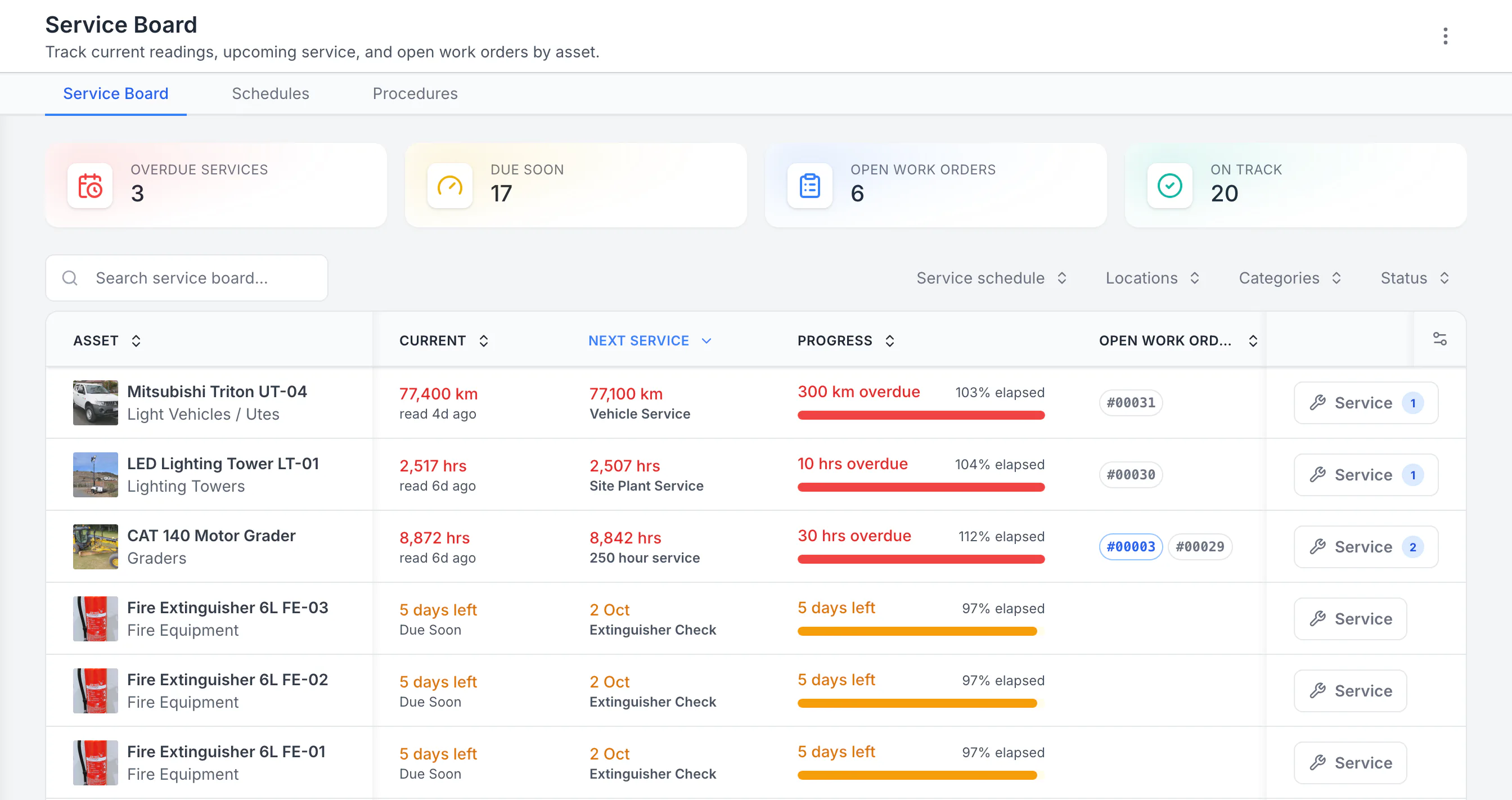
See the next service beside the current reading
Sorted by next service, the three overdue schedules come first: a ute 300 km past its service, then a lighting tower and a grader past their hour services. Each shows its open work orders. Extinguisher checks due in five days follow. Hours, kilometres and calendar checks share one board.
MapTrack app · Demonstration data · Captured
About this screenshot
Demonstration workspace with 40 schedule enrolments. Columns were chosen and resized in the board’s own display settings. Requires enrolled assets, configured schedules and an internet connection.
MapTrack is a unified platform combining CMMS capabilities - work orders raised from meter readings, inspections and schedules, with due-soon reminders - with asset tracking, reservations and compliance for tools, equipment, plant and fleet. Per-asset pricing with unlimited users suits field-heavy teams that need every technician and operator in the system without per-seat cost.
Configured telematics, fleet and fuel-card data sources can feed meter data for usage-triggered work orders and utilisation reporting. Pre-starts, inspections and AI-assisted forms attach evidence to each asset. A built-in planning view and reservations prevent double-booking across projects. AI-assisted asset creation, form creation and smart data import accelerate setup. Rated 4.9/5 on G2 and 5.0/5 on Capterra, GetApp and Software Advice.
Key features
- ✓Work orders; meter, inspection and schedule triggers; due-soon reminders
- ✓150+ telematics, fleet and fuel-card data sources
- ✓Pre-starts; inspections (AI forms)
- ✓Equipment register; lifecycle history
- ✓Reservations; planning view
- ✓Mobile and offline
- ✓Bulk scanning for audits
- ✓Geofences; utilisation reporting
- ✓AI setup
- ✓SSO, RBAC, API, regional AWS
- ✓Parts stock by location, min/max levels; cost tracking; depreciation
- ✓Heavy-duty QR labels
- ✓GPS trackers managed in the app: battery, signal and estimated run hours
- ✓AI dash cams with live video and event clips in the app
- ✓QR, barcode and Data Matrix scanning by phone camera or handheld scanner
- ✓Tiered service plans on run hours and km
- ✓One work order across many assets, each with its own pass or fail
- ✓Capterra Best Ease of Use 2026
- ✓Failed checks raise work orders automatically, through a rule you set
- ✓Rate cards: daily, weekly and monthly hire rates (dry, wet or standby) by category or asset; Pro and Enterprise add-on
- ✓Finance: cost ledger, budget vs actual, depreciation and repair-or-replace; Pro and Enterprise add-on
- ✓Divisions: each division’s own assets and team access; Pro and Enterprise add-on

MaintainX
Best dedicated CMMSTop-rated CMMS (#1 on G2) with AI-powered work orders - best for maintenance-first teams with fixed or semi-fixed assets.
Pricing: Per user; from ~$20/mo · Trial: Free Basic tier
MaintainX is an AI-powered CMMS for work orders, preventive and predictive maintenance, parts inventory and checklists. Rated #1 CMMS on G2 (Winter 2026) with strong mobile and offline support, it is popular with frontline maintenance teams in manufacturing, facilities and fleet.
A free Basic tier with unlimited requester accounts drives adoption. Best fit for maintenance-heavy operations where work orders and procedures are the priority. Per-user pricing from approximately $20 per month; no asset reservations or per-asset pricing model. Less suited for teams needing a planning view for equipment across multiple sites.
Key features
- ✓Work orders; preventive/meter/predictive triggers
- ✓Checklists, procedures, corrective actions
- ✓Parts inventory; purchase orders
- ✓Mobile-first; full offline
- ✓Free Basic tier; unlimited requesters
- ✓Samsara, Titan GPS integrations

Fleetio
Best CMMS for fleet maintenanceStrong fleet CMMS with per-vehicle pricing and 40+ telematics integrations - vehicle-first focus limits non-vehicle depth.
Pricing: Per vehicle; from ~$4/mo · Trial: 14-day
Fleetio is fleet management software for vehicle and equipment maintenance: preventive maintenance with meter and time triggers, mobile inspections, work orders, cost and fuel tracking. Over 1 million vehicles tracked across 100+ countries with deep telematics integrations.
40+ telematics integrations (Geotab, Samsara, Motive, Verizon Connect, Ford Pro, John Deere) make it strong for fleet-first operations. Failed inspection items create Issues that can be resolved through work orders. Per-vehicle pricing with unlimited users on all tiers. Less depth for non-vehicle asset tracking, reservations and job/project costing.
Key features
- ✓PM; meter/time triggers
- ✓Mobile inspections (failed item → Issue → work order)
- ✓Fuel tracking; cost management
- ✓40+ telematics integrations
- ✓Per-vehicle; unlimited users
- ✓Vehicle and equipment inventory

Tenna
Best CMMS for construction equipmentConstruction CMMS with telematics and OEM depth - custom-quote pricing.
Pricing: Custom quote · Trial: Contact vendor
Tenna targets construction and civil with mixed-fleet tracking (heavy equipment, fleet, tools, attachments) via GPS, BLE and QR. Maintenance work orders with meter and inspection triggers sit alongside real-time tracking, scheduling and safety compliance in a unified construction stack. 750+ construction businesses; recently acquired by John Deere.
Own hardware ecosystem (TennaMINI, TennaINTEL, TennaFLEET GPS, TennaBLE beacons, TennaQR) plus OEM integrations (Volvo, Komatsu, John Deere, Caterpillar via AEMP). Construction-specific workflows including DVIR, OSHA compliance and Procore/Viewpoint integration. Custom-quote pricing and US/Canada/Mexico focus.
Key features
- ✓Work orders; meter/inspection triggers
- ✓GPS, BLE and QR tracking with own hardware
- ✓Equipment scheduling and reservation
- ✓Custom inspections, DVIR, OSHA compliance
- ✓OEM integrations (Volvo, Komatsu, John Deere, CAT)
- ✓Procore and Viewpoint integration

ToolSense
Best CMMS for facilities equipmentEnterprise CMMS with IoT hardware and rules engine - niched into facilities.
Pricing: Modular by Hub; custom quote · Trial: 30-day
ToolSense is a cloud-based asset operations and CMMS platform with QR and IoT tracking (GPS, runtime, battery, fuel), work orders, inspections, equipment scheduling and lifecycle management. 250+ customers across 30+ countries; its largest customer, ISS, manages 500,000+ machines.
An in-house IoT hardware range plus direct construction OEM cloud integrations (Caterpillar, Komatsu, Volvo and more). Enterprise stack integrations (SAP, Oracle, Dynamics). 100+ languages and inherited AWS/GCP cloud certifications for global deployments. Custom-quote pricing by Hub; an offline mode that ToolSense enables per account.
Key features
- ✓Work orders; rules engine; meters
- ✓QR and IoT tracking (GPS, runtime, battery, fuel)
- ✓Equipment scheduling and assignment
- ✓Safety inspections with auto-created documents
- ✓Own IoT hardware for real-time data
- ✓SAP, Oracle and Dynamics integrations

SafetyCulture
Best for inspection-driven maintenanceInspection powerhouse where compliance drives maintenance. Assets module adds work orders.
Pricing: Per seat; from ~$24/mo · Trial: Free tier (10 users)
SafetyCulture (formerly iAuditor) is a mobile-first operations platform for inspections, audits, checklists and training. Used by 80,000 organisations with over 1 billion checks completed. The Assets module (launched 2023) adds asset management, pre-starts and work orders, making it a viable inspection-driven CMMS.
Strong for teams where inspections, safety and training are the primary workflow and maintenance follows from failed checks. 10,000+ inspection templates and an AI template builder. Free tier (up to 10 users) lowers the barrier to entry. Per-seat pricing from $24/mo and no asset reservations or planning view may limit fit for teams managing mobile equipment across sites.
Key features
- ✓Work orders via Assets module
- ✓Inspections, audits and checklists with 10,000+ templates
- ✓Training (SC Training LMS) built in
- ✓AI template builder for custom forms
- ✓Free tier (up to 10 users, 5 templates)
- ✓Full offline support; iOS and Android

Asset Panda
Best for configurable equipment CMMSHighly configurable maintenance workflows; offline now available on Asset Panda Pro, with quote-based pricing.
Pricing: Quote-based; verify · Trial: Free 7-day trial
Asset Panda offers configurable asset and inventory tracking with barcode/QR scanning, customisable maintenance workflows and reservations. Work orders, preventive maintenance and custom forms are supported. Serving 10,000+ organisations since 2012 across 60+ countries.
Strong customisation options for multi-team operations and IT/education/healthcare maintenance workflows. Asset Panda Pro (launched September 2025) added full mobile offline for all customers; verify offline depth in a pilot. GPS is at scan only (not live tracking), which may limit fit for field-heavy maintenance teams. Pricing is quote-based (not publicly listed; verify in a pilot) with minimum user counts.
Key features
- ✓Work orders; preventive maintenance
- ✓Configurable workflows and custom fields
- ✓Barcode/QR scanning with audit trails
- ✓Reservations with Gantt view and approvals
- ✓Custom forms and document storage
- ✓Integrations: Zendesk, JIRA, Slack and more

Hilti ON!Track
Best for Hilti equipment servicingMaintenance and inspection alerts for any brand of equipment - Hilti-supplied tracking hardware can limit mixed-brand teams.
Pricing: Quote only · Trial: Free consultation
Hilti ON!Track is a cloud-based asset and inventory management platform for construction. Tracks tools, equipment, supplies and consumables (any brand) via barcode, Bluetooth tags and Hilti gateways. Maintenance scheduling and service history are tied to the asset record with safety certifications and training records.
For small tools, BLE tags and gateways give warehouse, vehicle and jobsite "last-seen" proximity rather than real-time GPS. For machinery and vehicles, Hilti adds the AI T400 Geo GPS tag plus Vehicle and Heavy-Equipment Gateways for live location. Quote-only pricing and hardware costs (tags, gateways) add complexity. Free productivity analysis and on-site implementation support included. Best suited for teams with a Hilti-heavy equipment fleet.
Key features
- ✓Maintenance scheduling; service history
- ✓BLE tags (tools); AI T400 Geo GPS tag (machinery/vehicles)
- ✓Safety certifications and training records
- ✓Van, warehouse and jobsite gateways
- ✓Job costing via Trimble Viewpoint
- ✓On-site implementation and tagging support
Spreadsheets
Status quo for many teamsNo software cost but no work orders, no meter triggers, no mobile workflows and no compliance tied to assets.
Pricing: Free / included · Trial: N/A
Spreadsheets (Excel, Google Sheets) are where most teams start for equipment maintenance tracking. They work for a small number of assets with few users but break down as you scale - versions drift, there is no audit trail, no mobile field workflows, no meter-based triggers and no compliance or maintenance history tied to individual assets.
Key features
- ✓No software cost
- ✓Familiar interface
- ✓Flexible for simple lists
Also worth considering
These platforms did not make our top 8 but may suit specific equipment maintenance use cases:
- •Limble CMMS: Strong dedicated CMMS with mobile app, work orders, preventive maintenance and parts inventory. Per-user pricing. Worth evaluating if maintenance is the primary need and your equipment is largely fixed.
- •EZO (formerly EZOfficeInventory): Asset lifecycle management with a CMMS add-on for work orders and service scheduling. Plans priced by item count with unlimited users (Essentials US$81.41/mo for 500 items, 100-item minimum). Strong for IT, education and healthcare equipment checkout workflows.
- •eMaint (Fluke Reliability): Enterprise-grade CMMS and EAM software, backed by Fluke, for maintenance teams scaling across sites: work orders, preventive maintenance on time, meter readings or conditions, parts inventory, calibrations, an offline-capable mobile app and links to Fluke condition monitoring sensors. Professional (3-user minimum) and Enterprise (5-user minimum) are billed as a prepaid annual commitment, with no published prices. Where MapTrack goes further: GPS trackers and Bluetooth tags in the same app, run hours from trackers feeding tiered service plans, and per-asset pricing with unlimited users on month-to-month plans.
- •MEX Maintenance Software: Computerised maintenance management system (CMMS) with an asset register, work orders, preventive maintenance scheduled by time or usage, inventory and multi-site management, plus mobile apps that capture pre-starts, inspections and readings offline and sync later. Integrates with SAP, Xero and MYOB, and with telematics sources such as Teletrac Navman and Cat VisionLink. Pricing is by customised quote, with a free trial. Where MapTrack goes further: GPS trackers and Bluetooth tags in the same app, run hours from trackers feeding tiered service plans, one work order across many assets with a pass or fail for each, and per-asset pricing with unlimited users.
- •Pinnacle CMMS: Australian-owned, cloud-hosted CMMS and asset management platform serving customers since 1984, with work orders, preventive maintenance by time or usage, pre-start and inspection checklists, barcode and QR check-in and check-out, and a mobile app that keeps working without internet and syncs later. Connects to Business Central, MYOB, Xero, QuickBooks and SAP; package prices are not published. Where MapTrack goes further: GPS trackers and Bluetooth tags in the same app, maintenance on run hours with tiered service plans, and per-asset pricing with unlimited users.
What maintenance teams report after switching to MapTrack
Outcomes from businesses combining asset tracking with CMMS in MapTrack.
70%
Reduction in asset loss and shrinkage
Customer-reported outcomes
1-2 days/week
Time saved on weekly equipment tracking
Saunders International
$142,000+
Stolen equipment recovered
Mega Electrics, under 48 hours
Days to weeks
Time to full platform rollout
AI-assisted setup
Compare maintenance platforms side by side
Test work orders, meter triggers and inspections with your own equipment data. 30-day trial, no credit card required.
- No credit card required
- Unlimited users
- Cancel anytime
What our customers say
“We used to spend 1-2 days a week tracking equipment. MapTrack gave us full visibility across every site.”

Steve McAllister
Site Manager, Saunders International
“Meter-based work orders from OEM data mean we never miss a service interval. Downtime dropped significantly.”

Maintenance Manager
Maintenance, Hacer Group
“The per-asset pricing meant we could roll out to 50 field staff without worrying about licence fees. Everyone has access.”

Operations Manager
Operations, Supagas
What is a CMMS for equipment?
A CMMS (Computerised Maintenance Management System) for equipment is software that centralises work orders, preventive maintenance schedules, meter-based triggers and service history for physical assets. It replaces spreadsheets, whiteboards and ad-hoc maintenance requests with a digital system that keeps servicing tied to each piece of equipment.
A CMMS is different from asset tracking software, which focuses on knowing what you own, who has it and where it is. Some platforms - like MapTrack - combine both: maintenance and work orders unified with tracking, reservations and compliance in one system. Others are maintenance-first CMMS and EAM platforms (MaintainX, Limble) or fleet-first (Fleetio). The right fit depends on whether your equipment is mobile or fixed and whether you need tracking in the same platform.
MapTrack's equipment maintenance software holds tiered service plans, such as 250, 500 and 1,000 hour services, that fall due on hours, kilometres or dates, and your crew works through each work order on a phone.
Running mostly vehicles? Our guide to fleet maintenance software in Australia covers what to look for.
What does equipment CMMS software do?
- •Work orders: Create, assign and track maintenance tasks from request to completion with full audit trails and technician notes.
- •Preventive maintenance: Schedule recurring tasks by calendar (e.g. every 90 days) or by meter readings (e.g. every 500 engine hours) to catch issues before they cause downtime.
- •Meter-based triggers: Automatically generate work orders when hours, odometer or cycle counts hit a threshold - servicing based on actual usage, not guesswork.
- •Inspection-triggered maintenance: Failed pre-start checks or inspections automatically create work orders so defects are actioned immediately.
- •Service history and lifecycle: Complete maintenance record for each asset. What was done, when, by whom - supporting warranty claims, audits and resale decisions.
- •Parts and inventory: Track spare parts, set reorder points and link parts to work orders for accurate cost tracking.
- •Mobile and offline: Field technicians complete work orders, log readings and attach photos from mobile devices - even without connectivity.
- •Reporting and analytics: Track mean time between failures, maintenance costs per asset, backlog and technician workload to inform decisions.
How to choose the right CMMS for your equipment
1. Mobile or fixed equipment? If your equipment moves across sites and crews, you need a CMMS that also tracks who has it, where it is and ties maintenance to real usage. If equipment is fixed in a factory or facility, a dedicated CMMS may be sufficient. This is the most important filter.
2. Define your maintenance triggers. Calendar-based schedules (every 90 days) suit some assets, but equipment with variable utilisation benefits from meter-based triggers (hours, odometer, cycles). Check whether each vendor supports the trigger types you need and how meter data flows in - manual entry, telematics or OEM feeds.
3. Decide what goes in one system. Do you need maintenance only, or maintenance plus tracking, reservations and compliance? Unified platforms reduce handoffs and keep all evidence tied to each asset. If you only need work orders, a CMMS-only tool may be a better fit.
4. Check mobile and offline support. If technicians update from sites, underground or remote areas, offline mode is essential. Not all platforms offer it. Verify before committing.
5. Run a demo with your real workflows. Shortlist two or three options, prepare a list of your equipment types and typical maintenance workflows (work orders, pre-starts, meter reads) and see how each platform handles them. A 15–30 minute demo is usually enough to gauge fit.
CMMS vs EAM vs APM: which fits maintenance teams in 2026
Buyers searching "best CMMS" often face three overlapping categories. CMMS (Computerised Maintenance Management System) covers work-order tracking, asset records, scheduled maintenance and basic compliance. Examples: MaintainX, Limble, UpKeep. EAM (Enterprise Asset Management) adds financials, lifecycle costing, depreciation and capital planning on top of CMMS. Examples: IBM Maximo, SAP EAM, Infor EAM. APM (Asset Performance Management) layers predictive analytics, IoT sensor integration and condition-based maintenance over EAM. All three sit inside the ISO 55000 asset management framework, and all three intersect with AS/NZS ISO 45001 safety obligations and the WHS Act 2011 s.19 PCBU duty-of-care for maintained plant.
Pick a CMMS if your maintenance team is reactive-heavy and needs structured work orders fast, your asset count is in the hundreds to low thousands, you do not need finance system integration yet, and a typical AU budget of $5k to $25k per year fits. This is the right tier for most construction, civil, facilities and mid-market industrial teams. Implementation is usually one to four weeks.
Pick an EAM if you need cost capitalisation, depreciation and full lifecycle tracking, your asset count is 10,000 or more, your tax and accounting team needs direct visibility on carrying value, and a typical budget of $50k+ per year with a three to six month implementation is realistic. Mining and processing operators with large fixed-plant estates often start here. EAM tools assume an ERP is already in place.
Pick an APM if you are running critical or expensive plant (mining, oil and gas, power generation), you have IoT sensors generating real-time condition data (vibration, temperature, oil quality) and the cost of unplanned downtime justifies predictive analytics. Typical budgets sit at $100k+ per year and require significant data engineering effort. APM is the smallest of the three markets by deployment count.
Methodology transparency. MapTrack sits in the CMMS-plus-asset-tracking space, not EAM or APM. We provide an asset depreciation report from your purchase dates and prices, but not capital planning or condition-based predictive analytics. If your team needs those capabilities, evaluate IBM Maximo, SAP EAM or Infor EAM (EAM) or GE APM, Aveva APM or Bentley AssetWise (APM). If your team needs work orders, meter-based triggers, mobile inspections, reservations and asset tracking in one place, a unified CMMS-plus-tracking platform is the right tier to evaluate.
How much does equipment CMMS software cost?
Equipment CMMS pricing falls into four common models. The right choice depends on your asset count, user count and which features you need.
Per-asset pricing
Price scales with asset count; unlimited users included. Suits field-heavy teams with many technicians and operators. Example: MapTrack.
Per-user pricing
Price scales with user/seat count. Works for small teams or when user count is predictable. Examples: MaintainX (from ~$20/user/mo), SafetyCulture (from ~$24/seat/mo).
Per-vehicle pricing
Priced per vehicle with unlimited users. Suits fleet-first maintenance operations. Example: Fleetio (from ~$4/vehicle/mo).
Custom quote / tiered
Enterprise, construction or hardware-bundled pricing. Contact for a quote. Examples: Tenna, ToolSense, Hilti ON!Track, Asset Panda (all quote-based).
Most platforms offer a free trial (14–30 days) or a free tier. Factor in hardware costs (GPS devices, BLE tags, IoT sensors) if applicable. Get a MapTrack pricing estimate for your equipment count.
Why equipment maintenance management matters
Unplanned equipment downtime is expensive. It delays projects, idles crews and can trigger safety incidents. A CMMS shifts maintenance from reactive ("fix it when it breaks") to preventive and usage-based, catching issues before they cause failures. Meter-based triggers ensure servicing happens at the right time, not too early (wasting spend) or too late (risking breakdowns).
For construction, mining, civil and facilities teams, a good CMMS improves uptime, extends asset life, supports compliance (pre-start records, service certificates) and gives operations a single source of truth for every asset's maintenance history. One MapTrack customer improved shutdown efficiency by unifying maintenance, tracking and compliance in one platform.
Conclusion: choose the right CMMS for your equipment
The best CMMS for equipment depends on whether your assets are mobile or fixed, what maintenance triggers you need (meter, inspection, schedule), and your budget. This guide compared 8 platforms across work orders, compliance, mobile/offline support and pricing so you can shortlist with confidence. MapTrack is built for mobile equipment with work orders and maintenance triggers, tracking, reservations and compliance in one platform; if that fits your needs, a demo can show how it works for your team.
Frequently asked questions
Related software guides
- Best asset tracking software 2026
- Best asset tag suppliers Australia
- Best tool tracking software 2026
- Best equipment management software 2026
- Best plant management software
- Best pre-start inspection software
- Best fleet management software Australia
- Best asset management software 2026
- Best IT asset management software 2026
- Best maintenance planning software 2026
- Best asset inspection software 2026
- Best construction equipment tracking software
- Best commercial GPS tracking software
- Best fuel management software 2026
- Best safety management software 2026
- Best health and safety software 2026
Compare MapTrack head-to-head
About the author

Co-Founder & GM of Operations
Lachlan leads operations at MapTrack, bringing 10+ years of enterprise technology experience across mining, construction and heavy industry. Before MapTrack, he held senior roles at Workato (integration and automation) and AppDynamics/Cisco (application performance), working directly with ASX-listed organisations to modernise their technology stacks. His deep understanding of field operations and blue-collar workflows shapes how MapTrack solves real problems for asset-intensive teams.
View LinkedIn profile →Try maintenance management built for equipment
Work orders, meter-based triggers, tracking and compliance in one platform. Per-asset pricing with unlimited users. 30-day free trial.
4.9 on G2 · 5.0 on Capterra, GetApp & Software Advice
- No credit card required
- Unlimited users
- Cancel anytime