
Fleet maintenance
Fleet Maintenance Software for Vehicles & Plant
Service utes and trucks on kilometres and plant on hours, with pre starts, work orders and costs on each asset’s record, from any phone.
Get pricing





600,000+ assets tracked since 2012

Read how these teams run MapTrack





Co-Founder & GM of Operations
Trusted by construction, mining and field service teams










One maintenance system for utes, trucks, plant and tools
Most fleets aren’t just vehicles. MapTrack keeps utes, trucks, trailers, excavators, generators and the tools in the back of the ute in one register, and every one of them gets the same maintenance: a service plan, pre starts on a phone, work orders, costs and a service history on its own record. The workshop plans from one list instead of a vehicle system, a plant spreadsheet and a test and tag folder.
- Vehicles, plant, tools
- in one register
- Km, hours or dates
- on one service plan
- 600,000+
- assets tracked since 2012

Every kind of asset in one register
Utes, plant, tools, lifting gear and safety equipment sit in one register. Each row shows the asset’s status, who or where it is with, and its QR tag.
MapTrack app · Demonstration data · Captured
About this screenshot
Captured at a 1440 x 900 desktop viewport at 2x in a demonstration workspace, right of the sidebar, in the default view and sort.
Customer outcomes
Results from published MapTrack customer case studies.
Roughly 80%
Overdue service items dropped by roughly 80% within the first six months as automated scheduling and alerts replaced manual spreadsheet tracking.
Near-universal
Digital pre-start inspections for vehicles and equipment went from inconsistent paper-based compliance to near-universal daily completion across all crews.
Estimated 70–80%
Automated scheduling and alerts for safety inspections, certifications and regulatory requirements reduced overdue compliance items by an estimated 70–80% within the first year.
Service vehicles on kilometres and plant on hours
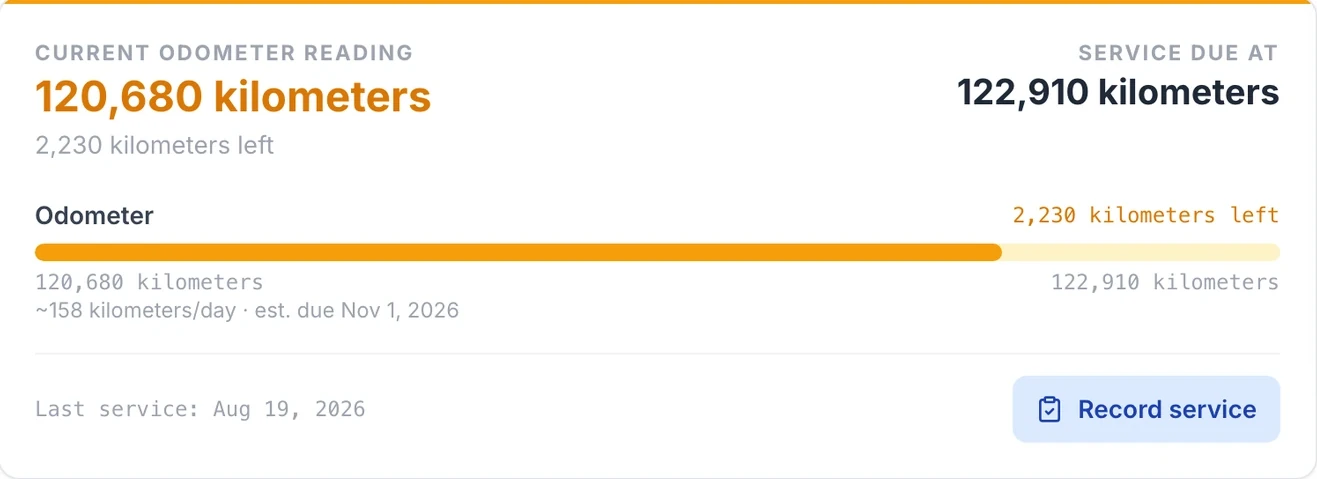
Each asset’s service plan runs on the meter that matters for it. Set a service every set number of kilometres, hours or cycles, or at a set reading, or by calendar time: every set number of days, weeks, months or years. Put both on one service and it falls due at whichever comes first, or only when both are reached.
A truck’s kilometre service, forecast from its use
MapTrack works out each asset’s usage rate from its recent readings and estimates when the next meter service will fall due, so the workshop can book the truck in before it runs over.
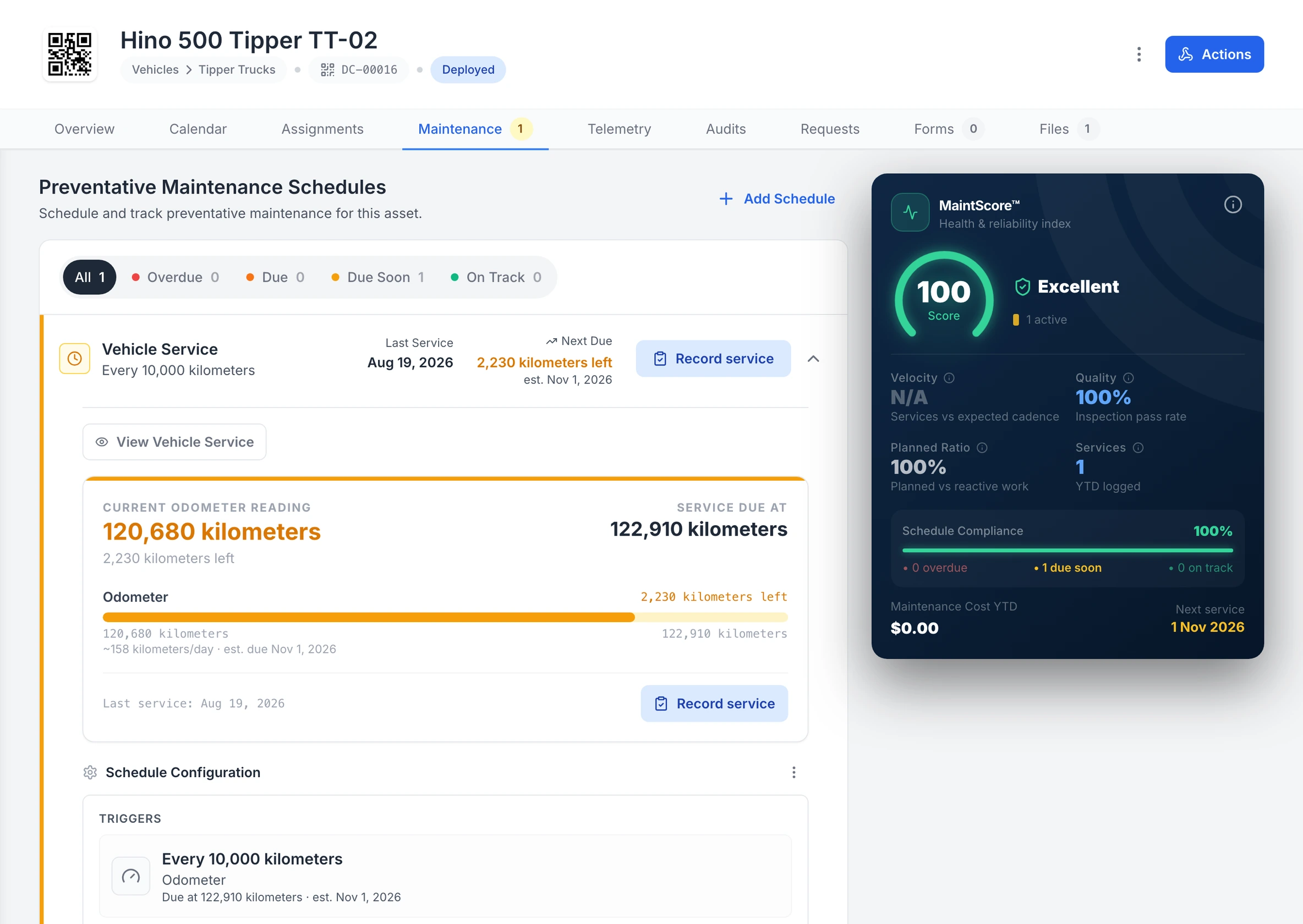
A truck’s kilometre service, forecast from its use
Tipper TT-02’s Vehicle Service runs off its odometer: 2,230 kilometres to the 122,910 kilometre service, with the due date estimated from about 158 kilometres a day.
MapTrack app · Demonstration data · Captured
About this screenshot
Demonstration workspace at a 1600 px desktop viewport on the truck’s Maintenance tab, cropped right of the navigation sidebar and above the schedule’s service history. The 10,000 km interval is the demonstration workspace’s own schedule, not the maker’s.
Plant on the same Service Board
The Service Board shows each asset’s current reading beside the reading its next service falls due at, with its open work orders. Filter by schedule, location, category or status. Keep 250, 500 and 1,000 hour services in one tiered plan: when levels fall due together, the largest due service takes priority.
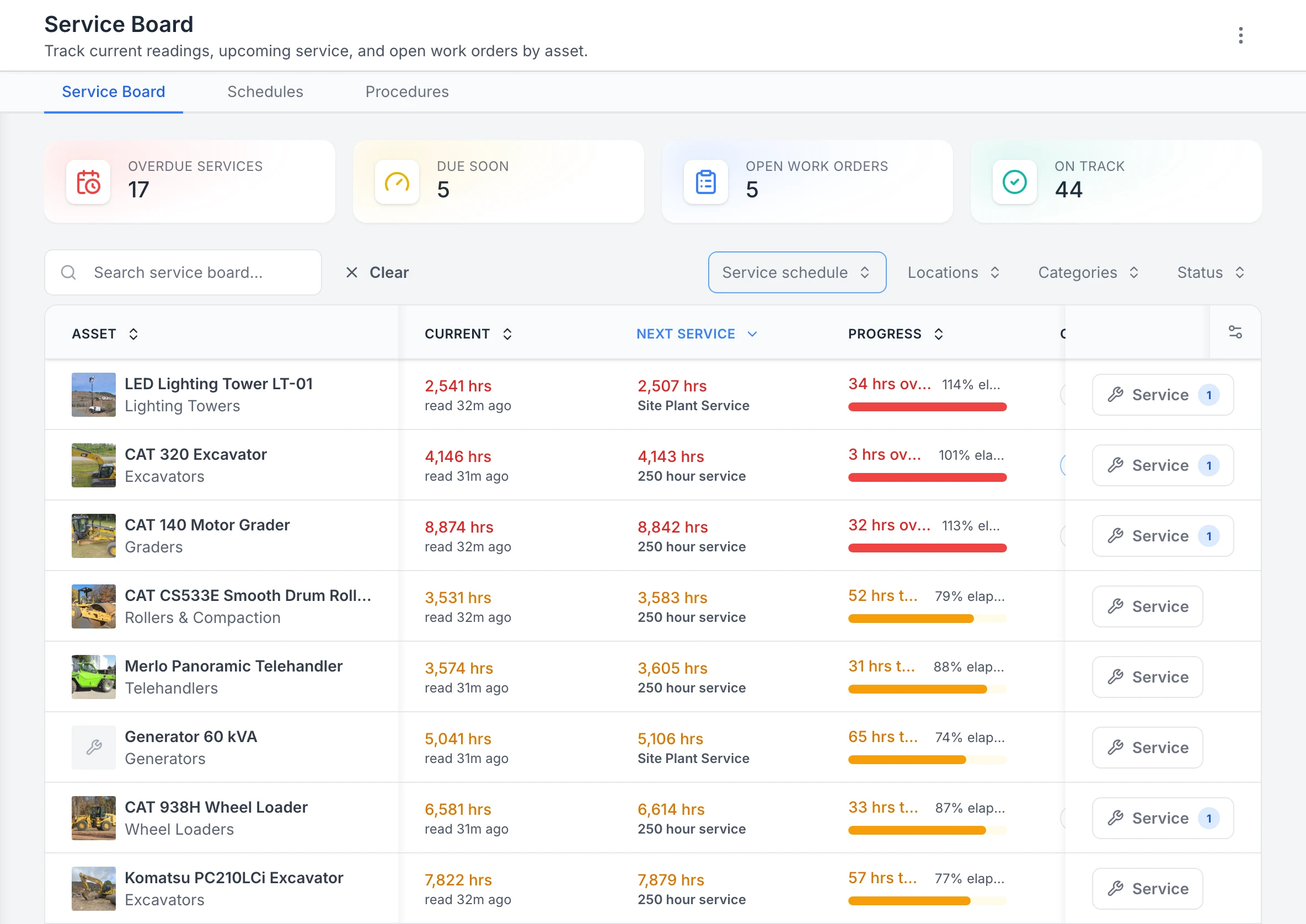
Plant and site gear by next service
Filtered to the plant and site-plant service plans and sorted by next service, the machines past their hour services come first: a lighting tower, the CAT 320 and a grader. Each row shows the current hour reading, the reading its next service falls due at and how far through the interval it is. The counts at the top cover the whole workspace, not only the filtered rows.
MapTrack app · Demonstration data · Captured
About this screenshot
Demonstration workspace at a 1440 px desktop viewport. The readings were entered by hand in the app that day. Filtered to two service plans with the board’s service schedule filter. Requires enrolled assets, configured schedules and an internet connection.
An email before it falls due
The person assigned to a schedule gets an email when a service is forecast to fall due within 7 days, and date-based services show Due Soon from 14 days out.
Raise the work your way
Each schedule raises one work order per asset, one combined work order for everything due at the same time, or flags the asset as due so you raise the job yourself. The automatic modes act on recorded meter readings; for a date-based service, raise the job from the schedule in a couple of clicks.
Catch readings that have stopped
MapTrack flags meters whose readings are out of date, or whose estimated due date has passed without a new reading, so a ute nobody has logged for a month still shows up.
A health score for every asset
Each asset and schedule gets a 0 to 100 maintenance health score with 12 months of memory, so a run of late or skipped services still counts after it’s cleared.
How each part of a mixed fleet is serviced
Different assets need different triggers and readings. Here’s how MapTrack handles each kind on the same account. A reading your crew records raises the work order on a schedule set to Auto; tracker readings feed the meter as estimates.
| Asset | Services usually run on | Where the reading comes from | Daily check |
|---|---|---|---|
| Utes, vans and pool cars | Kilometres, months or both | An odometer reading on the pre start; estimated kilometres from a hardwired GPS tracker or an AI dash cam | Light vehicle pre start on a phone |
| Trucks and prime movers | Kilometres, engine hours or both | A reading on the pre start; estimated kilometres and run hours from a GPS tracker or an AI dash cam | Truck and trailer pre start, with a photo of any fault |
| Trailers and dollies | Kilometre and calendar services on one service plan | A reading your crew records; a battery GPS tracker for location on trailers with no power | The truck and trailer pre start, with the trailer as a sub-asset of its truck |
| Excavators, loaders and graders | Engine hours, such as 250, 500 and 1,000 hour services in one tiered plan | The hour meter on the pre start; estimated run hours from a hardwired GPS tracker; Cat, Komatsu or John Deere data set up by our team | Plant pre start, scanned from the QR label on the machine |
| Generators, compressors and lighting towers | Run hours | A reading typed on the asset; estimated run hours from a battery or hardwired GPS tracker | Generator pre start on a phone |
| Power tools and test gear | Calendar dates, for test and tag and calibration | No meter needed: the schedule’s own dates | One work order across many assets, with a pass or fail for each |
Pre starts that reach the workshop
Drivers and operators scan the asset’s QR label and run the daily pre start on their phone, and the odometer or hours reading taken on the pre start goes onto the asset’s meter. On this truck pre start, choosing Fault Present opens a fault note and a photo, both required before it can be submitted.
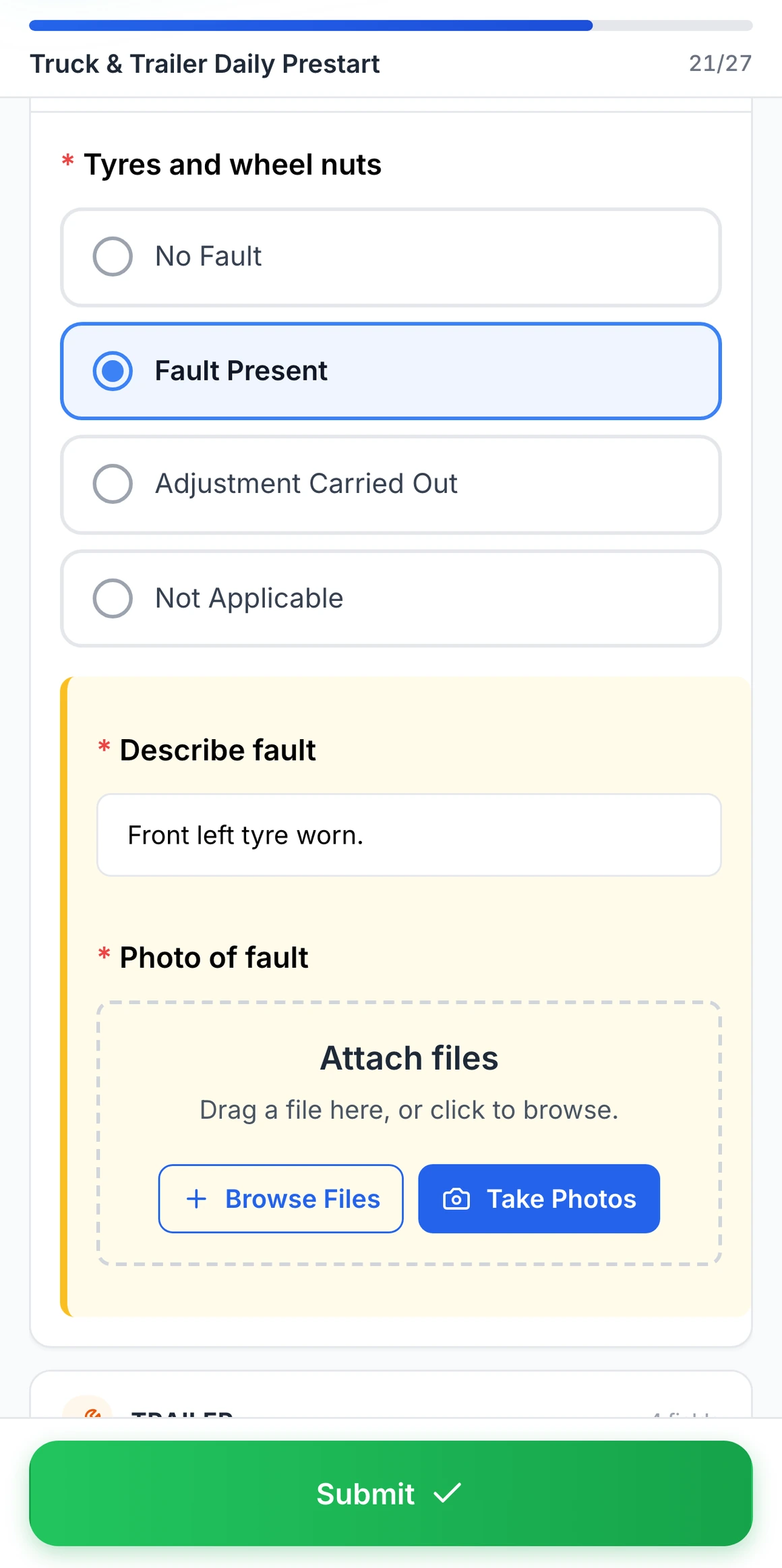
Fault Present on a truck pre start
Choosing Fault Present on tyres and wheel nuts opens a fault note and a photo, both required before the pre start can be submitted.
MapTrack app · Demonstration data · Captured
About this screenshot
Captured at a 430 x 932 phone viewport in a demonstration workspace. The pre start was filled in for this screen and not submitted.
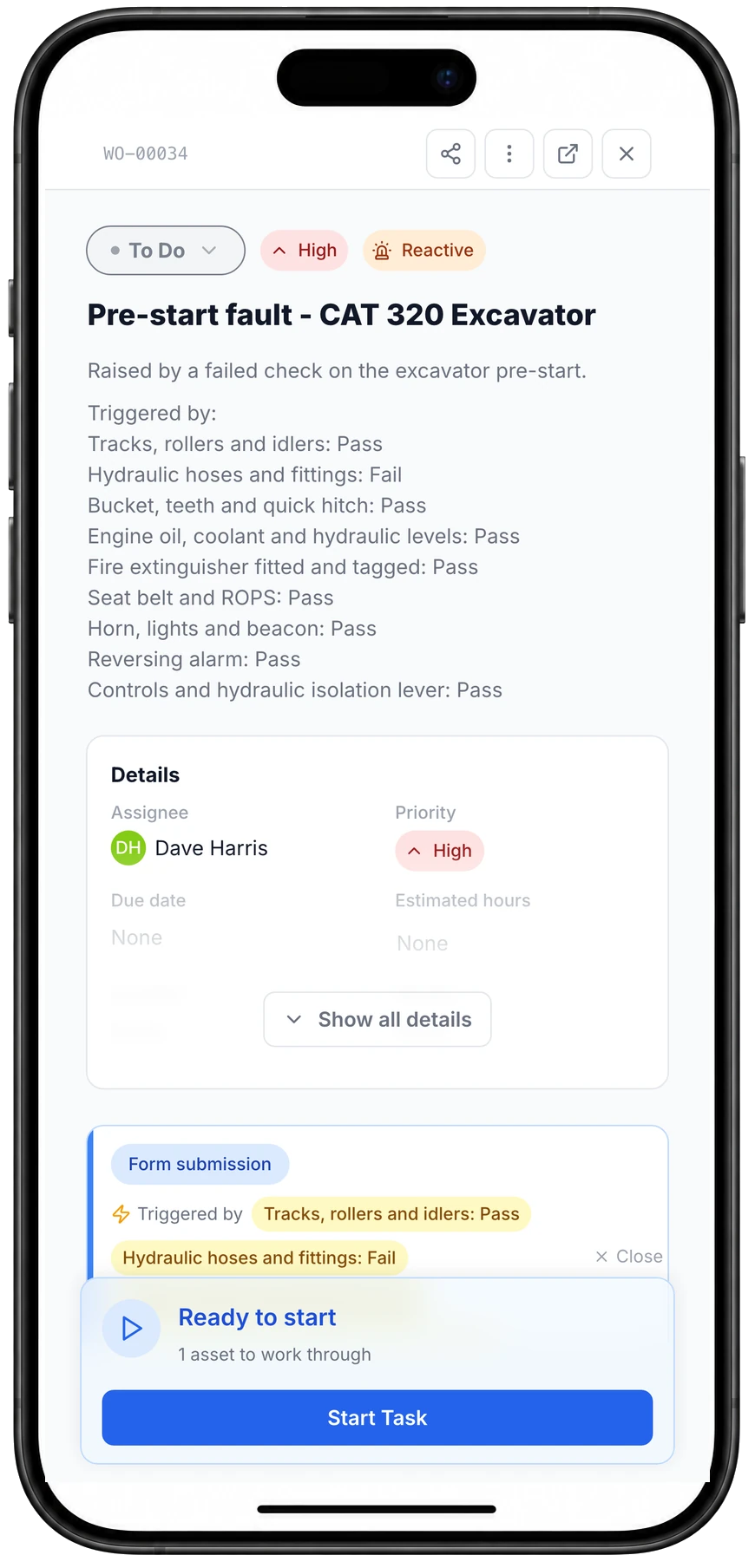
A failed pre-start check raises the job
One failed check on the excavator pre-start, the hydraulic hoses, raised this work order through the rule set on that form: named for the machine, High priority, assigned, with the answers that triggered it.
MapTrack app · Demonstration data · Captured
About this screenshot
Captured at a 430 x 932 phone viewport in a demonstration workspace and shown in a phone frame. The rule was set up on the pre-start form and tested that day with one submission.
A failed answer can raise a linked work order through a rule you set on the form: named for the machine, with its priority, who it’s assigned to and the answers that triggered it. If the same check fails again while that job is still open, the new report can be added to the job instead of raising a second one. Test the rule with a controlled submission before relying on it in the field.
Run the job and keep the cost on the asset
MapTrack work orders move across a board in the office and open on your crew’s phones in the yard or on site, with the procedure, the timer and each asset’s result in one place. Each service lists the parts it needs, and the work order shows planned against used parts.
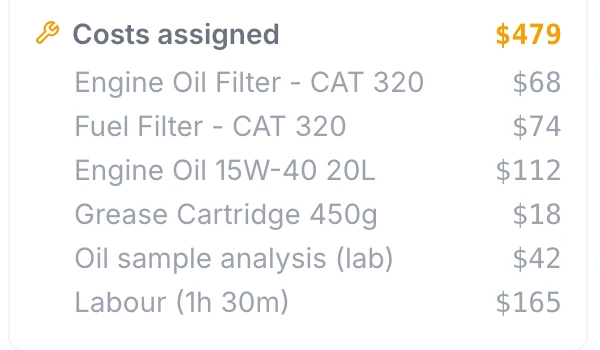
Parts, outside work and labour on the job
Part costs, an outside lab fee and logged labour add up on the work order: $479 for this 250 hour service at the time of capture. The part lines were entered as costs; this capture doesn’t show stock being drawn from the parts store.
MapTrack app · Demonstration data · Captured
About this screenshot
Demonstration workspace at a 1024 px desktop viewport, cropped to the work order’s cost summary. Costs were added with Add Cost, and labour with Log Time at $110 an hour.
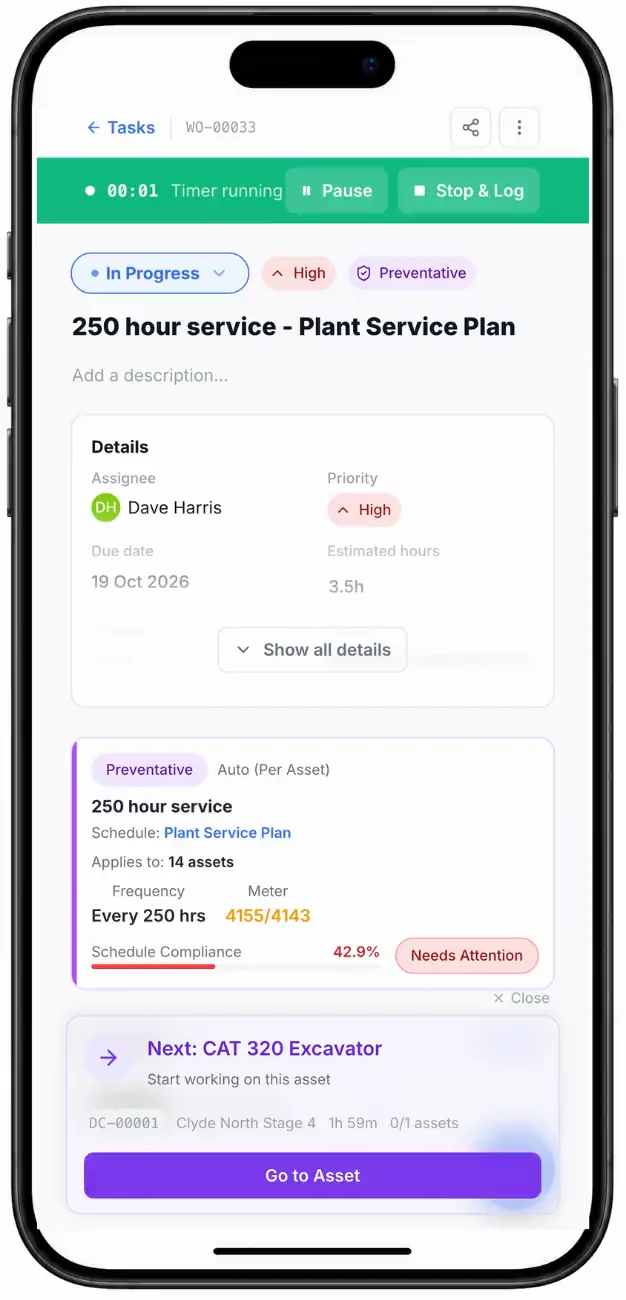
Service work order, on site
A 250 hour service work order on a phone, its timer running, then the plan card with the meter reading that raised it.
MapTrack app · Demonstration data · Recorded
Labour, parts and outside work
Record a service cost, or break it down into labour, parts and external costs. Time and costs logged on a work order roll up into each asset’s service record.
One job across many assets
One work order can cover many assets, each with its own pass or fail, for test and tag, calibration and inspection rounds on the gear that travels with the fleet.
Jobs with no reception
Load the work order while you’ve got signal and your crew can work through its procedures and record each asset’s pass or fail offline; those sync when the phone reconnects. Adding costs and moving the job to Completed need a connection.
Overdue service warned at check-out
Overdue maintenance shows as a warning when someone assigns or books the asset, and going ahead is logged.
Need spend across the whole fleet? Finance, an add-on on the Pro and Enterprise plans, adds a cost ledger, budget vs actual, depreciation and repair-or-replace for every asset, location and person.
Kilometres and hours without the paperwork
A service plan is only as good as its readings. In MapTrack they can come from your crew, your trackers or the machine itself, and the meter shows when they stop arriving.
Typed on a phone
Your crew records a reading on the asset, while logging a service, or as a question in a pre start, and the reading goes onto the asset’s meter. A QR label opens the asset with Record service ready.
GPS trackers
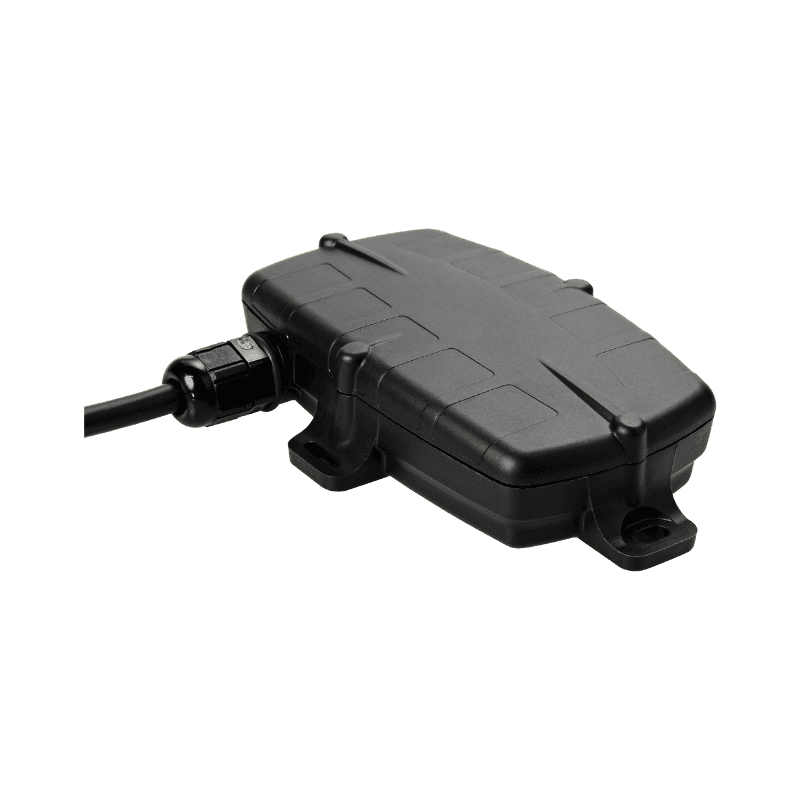
GPS trackers are registered in MapTrack with their battery, signal and last report, and feed estimated run hours and kilometres into each asset’s meters.
AI dash cams
Completed trips from an AI dash cam add estimated kilometres and run hours to the vehicle’s own meter. A ute, van or truck with an AI dash cam doesn’t need a separate GPS tracker: the camera’s location and trips land on the vehicle’s record.
OEM telematics
Connect OEM telematics such as Cat, Komatsu and John Deere under Connections: you send us the API or data feed details, and our team sets it up and checks it’s working.
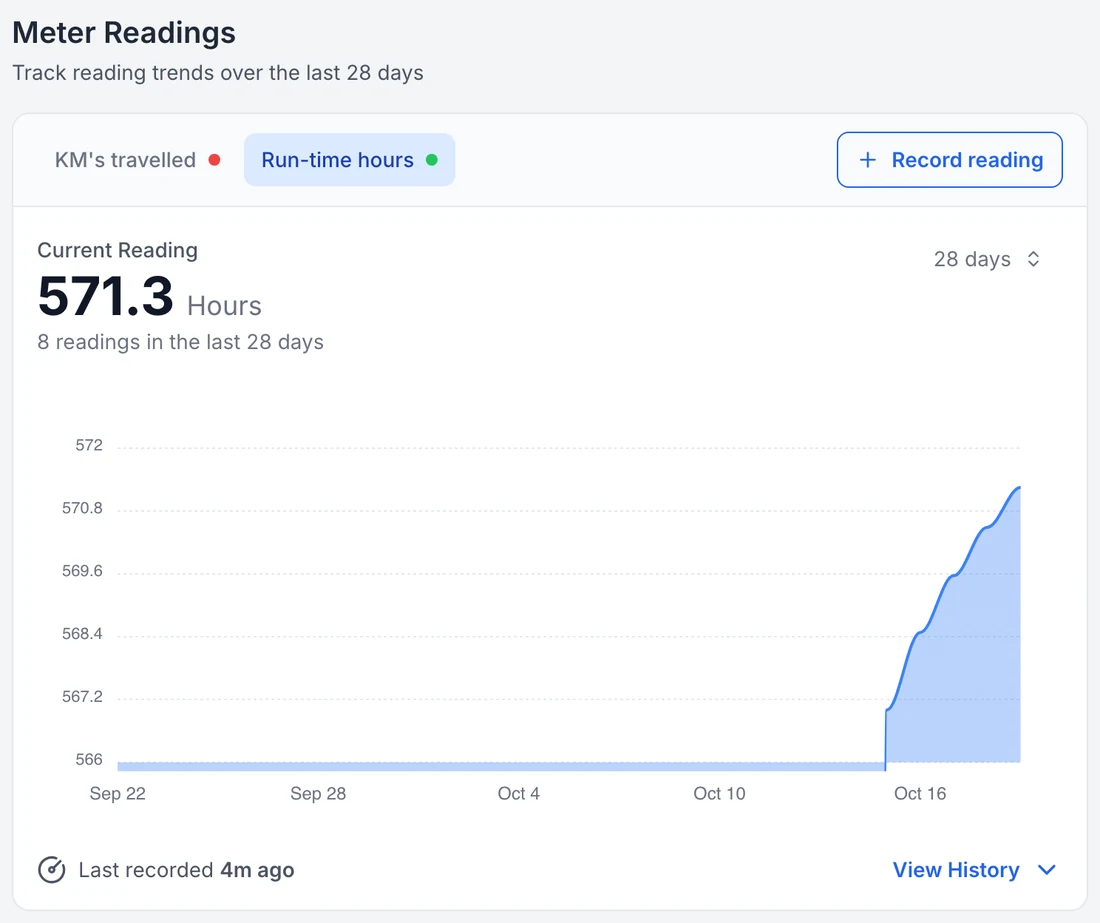
Run hours on the vehicle record
Completed trips from the camera add estimated run hours to the vehicle’s own meter, beside its servicing and costs. The flat start is the period before the camera was connected: the count begins at connection and is an estimate built from finished trips.
MapTrack app · Demonstration data · Captured
About this screenshot
Demonstration account at a 1440 px desktop viewport, Meter Readings card on the asset record with Run-time hours selected over 28 days.
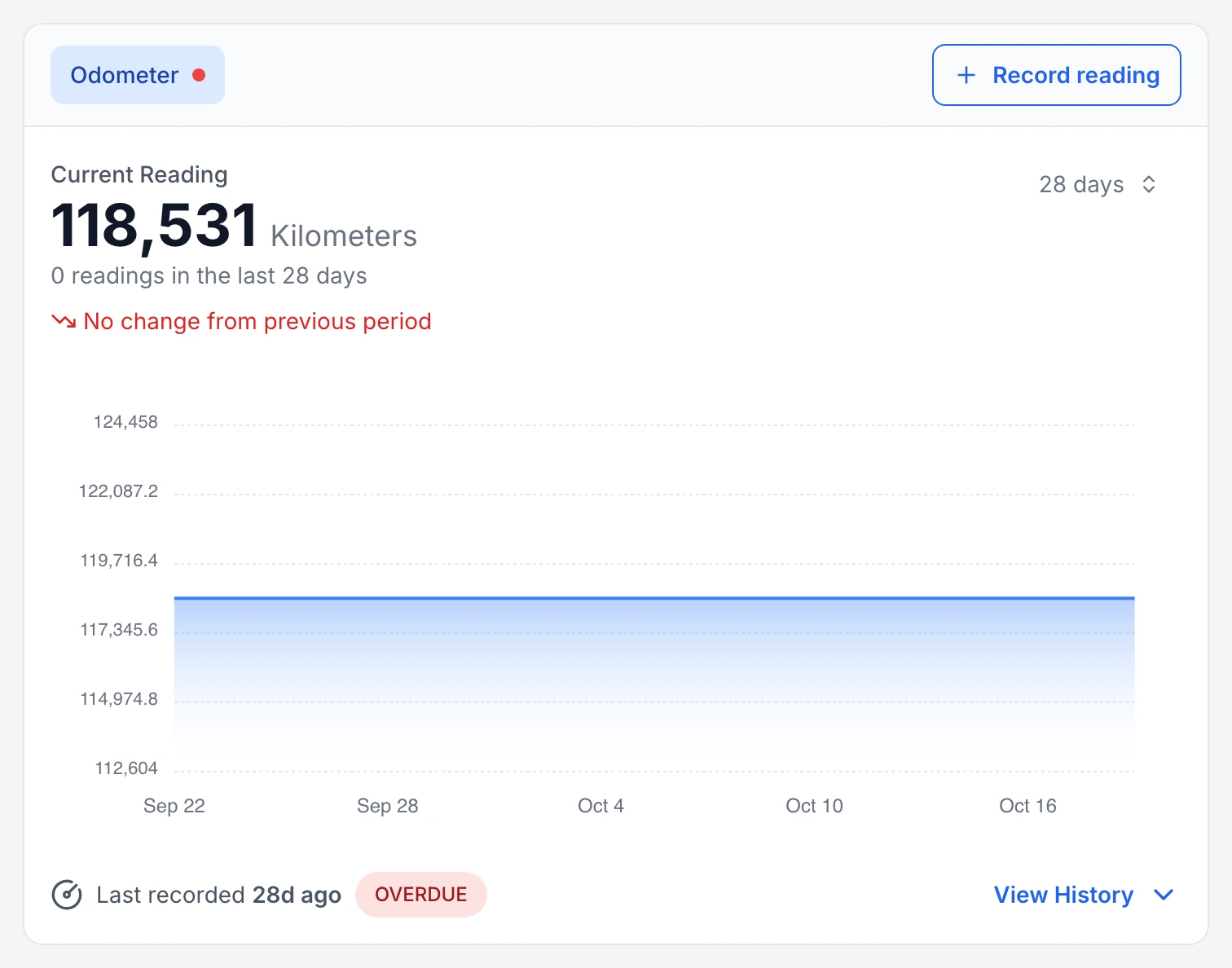
A truck odometer that has stopped updating, flagged
Tipper TT-01’s odometer: no reading in the last 28 days, so MapTrack marks the meter overdue for a reading and shows the gap on its 28-day chart.
MapTrack app · Demonstration data · Captured
About this screenshot
Demonstration workspace at a 1440 px desktop viewport on the truck’s Overview tab, cropped to its Meter Readings card.
What fleet and maintenance teams say about MapTrack
600,000+ assets tracked since 2012


“MapTrack has completely transformed how we manage our tools, equipment and fleet.”
Scott Bradley
Managing Director at Specialised Plumbing and Drainage

“MapTrack's a great platform - intuitive for the guys out in the field and also has fantastic support.”
Matthew Anderson
Maintenance Planning Supervisor at Supagas

“Thanks to MapTrack we know exactly where our gear is, who has it and when it needs servicing.”
Denis Slaviero
HSEQ Manager at Hacer Group
What is fleet maintenance software?
Fleet maintenance software plans and records the servicing of a company’s vehicles and mobile equipment: service schedules on kilometres, engine hours or dates, daily pre start checks, work orders for repairs, parts and labour costs, and each asset’s service history.
MapTrack is fleet maintenance software for mixed fleets. Construction, civil, mining, energy and trade businesses use it to service light vehicles, trucks, trailers, plant and machinery, and the tools and equipment that travel with them, from one register on any phone. If your maintenance is mostly fixed plant and equipment, start with equipment maintenance and CMMS software; if it’s mostly trucks, see truck tracking for prime movers and rigids.
Why a mixed fleet needs one system
When the vehicles live in one system and the plant in a spreadsheet, the workshop plans from two lists, the pre starts sit in two places and the costs never meet. With every asset on one register, the Service Board shows what’s due across the lot, a failed check on a ute or an excavator reaches the same workshop queue, and each asset’s service history holds its readings, costs and the person who did the work.
Fleet maintenance software FAQs
Service the whole fleet from one system
Bring your vehicle and plant service schedules to a demo and we’ll show you how they map onto MapTrack service plans, or try it on your own assets with a free trial.
- No credit card required