
7 best construction fleet management software tools for 2026
Compare construction fleet management software for trucks, heavy equipment and tools: GPS and dash cams, equipment scheduling, servicing on hours and distance, and pre-start inspections. We compared 7 platforms on tracking, maintenance, inspections, offline use and pricing.

Co-Founder & GM of Operations
The best construction fleet management software depends on how much of your fleet is trucks rather than heavy equipment and tools. MapTrack fits contractors who want trucks, equipment and tools on one register, with GPS, dash cams, QR labels and servicing on run hours and distance; Tenna fits construction GPS hardware and software from one vendor; Samsara and Motive fit connected trucks and AI cameras; Geotab fits reseller-led telematics; Verizon Connect fits US fleets that bill equipment use; Fleetio fits truck-heavy fleets.
Key takeaways
- Shortlist MapTrack for trucks, equipment and tools on one register, Tenna for construction GPS hardware, Samsara or Motive for connected trucks, and Fleetio for truck-heavy fleets.
- A construction fleet is trucks, heavy equipment and tools: software built for trucking alone misses machines serviced on run hours.
- Put GPS on trucks and high-value equipment, QR labels on tools, and Bluetooth tags where you want a location.
- Service heavy equipment on run hours and trucks on distance, on one service board, with failed pre-starts raising the repair job.
- Idle equipment on a finished job is money: check the software shows which site every asset is on before you rent one.
TL;DR
Top 3 picks at a glance
 MapTrack
A construction fleet in one register: AI dash cams with built-in GPS put trips and location on each truck’s record, GPS trackers feed estimated run hours on heavy equipment, and QR labels and Bluetooth tags cover tools.
Jump to review ↓ Tenna
Built for US construction: Tenna tracks heavy equipment, on-road vehicles, tools and attachments on its own GPS trackers, Bluetooth beacons and QR tags, with scheduling, maintenance and inspections in the same platform.
Jump to review ↓ Samsara
A connected-operations platform for vehicles, trailers and equipment on Samsara’s own gateways, asset tags and AI cameras.
Jump to review ↓Trusted by construction, mining and field service teams





Quick verdict: best construction fleet management software by category
Our top picks by use case. Click any card to jump to the full review.

MapTrack
Best for running trucks, heavy equipment and tools as one construction fleet

Tenna
Best for US contractors who want GPS hardware and software from one vendor

Samsara
Best for large fleets standardising on connected trucks, trailers and cameras

Motive
Best for truck fleets that want AI dash cams with managed review

Geotab
Best for fleets that buy telematics through a reseller

Verizon Connect
Best for US fleets that bill equipment use from engine hours

Fleetio
Best for truck-heavy fleets that already run telematics
Which construction fleet management software fits your operation?
Construction fleets differ in how much is trucks, heavy equipment and tools. Use these profiles to narrow your shortlist.
The Equipment Manager at a general contractor
We run pickups, dump trucks, excavators and a trailer full of tools across a dozen job sites. Can one system handle all of it?
Shortlist software that holds trucks, heavy equipment and tools in one register. MapTrack takes GPS trackers, dash cams, QR labels and Bluetooth tags on the same register, with servicing on run hours and distance on one service board. Tenna covers the same mix on its own hardware, sold by custom quote.
Learn more →The Fleet Manager with more trucks than iron
Most of our assets are trucks on the road, and we want driver safety video. What fits?
Motive and Samsara are built around connected vehicles and AI cameras, and Motive adds a managed human review and coaching layer. If you also want each truck’s pre-starts, servicing and tools in one place, MapTrack’s AI dash cams put location, trips and saved event clips on the truck’s record beside its pre-starts and servicing.
Learn more →The Operations Manager tired of renting machines
We keep renting equipment we already own because nobody knows which machine is idle on which job site. What helps?
Look for one register that shows which job site and person each asset is assigned to, with estimated run hours from GPS trackers. Hacer Group reduced unnecessary equipment hire by an estimated 25-35% once it could see its owned assets across every project in MapTrack. Fleetio’s Premium Jobs module reports days and engine hours on each job, and Tenna schedules equipment on a two-week lookahead.
Learn more →The Heavy Civil Contractor on HCSS
We estimate in HeavyBid and track time in HeavyJob. Should our fleet software come from HCSS too?
If your equipment costs have to flow into HeavyJob and HeavyBid, HCSS Equipment360 links to both and is built for 50 to 2,000+ heavy assets. If you want trucks, equipment and tools on one register beside the systems you already run, MapTrack sits alongside job management, accounting and ERP systems rather than replacing them.
Learn more →Who this guide isn't for
This guide compares software for running a contractor’s trucks, heavy equipment and tools as one fleet. It isn’t the right comparison if:
- You're choosing software to estimate, bid or schedule jobs. Fleet platforms, MapTrack included, sit beside those systems rather than replacing them. See how MapTrack works beside ERP and job systems
- Your main job is servicing equipment rather than running the whole fleet. Compare construction equipment maintenance software
- You only want GPS on your machines. See construction equipment GPS tracking
- You track tools only, with no trucks or equipment. Compare tool tracking software
In this guide
How we evaluated these platforms
We assessed each platform on six criteria that matter for running a construction fleet: tracking methods (GPS, dash cams, QR, Bluetooth, OEM telematics), equipment scheduling, maintenance on run hours and distance, inspections, mobile and offline use, and pricing model. Where we could not confirm a capability from public sources or vendor documentation, we say so rather than guess. How we checked this guide: every competitor row reuses facts we had already read on the vendor's own pages and dated, and each row shows its source and the month we checked it. MapTrack's rows are checked against our product documentation, which is how we know, for example, that live GPS, trips and geofence alerts run in MapTrack Telematics and that run hours from a tracker are estimated.
- Tenna hardware products page(checked Nov 2026)
- Tenna resource management(checked Nov 2026)
- Tenna OEM telematics integrations(checked Oct 2026)
- John Deere: Deere completes acquisition of Tenna(checked Oct 2026)
- Samsara equipment tracking(checked Oct 2026)
- Samsara Connected Maintenance(checked Oct 2026)
- Motive products and devices(checked Oct 2026)
- Motive Maintenance(checked Oct 2026)
- Geotab construction fleet(checked Nov 2026)
- Geotab asset tracking(checked Oct 2026)
- Geotab FAQ (no direct sales)(checked Nov 2026)
- Verizon Connect construction and heavy equipment(checked Nov 2026)
- Verizon Connect DVIR(checked Oct 2026)
- Fleetio pricing(checked Nov 2026)
- Fleetio Vehicle Assignments Scheduler(checked Nov 2026)
- Fleetio Jobs(checked Nov 2026)
- MapTrack GPS tracking
- MapTrack customer case studies
This guide is published by MapTrack (rated 4.9/5 on G2 and 5.0/5 on Capterra, GetApp and Software Advice). We include ourselves alongside other options and do not claim to be the single best fit for every use case. Shortlist two or three options and run a pilot on part of your own fleet before deciding. Every table row carries its source and the month we checked it. Plans change often, so confirm on the vendor's own page before you buy, and tell us at corrections@maptrack.com if something is out of date.
Spotted something out of date or incorrect? Email corrections@maptrack.com and we will review and update this page.
Construction fleet management software comparison table
Side-by-side overview of 7 platforms. Verify current features and pricing with each vendor.
| Software | Best for | Tracking | Scheduling | Maintenance | Inspections | Offline | Pricing |
|---|---|---|---|---|---|---|---|
| MapTrack | Trucks, equipment and tools as one fleet | GPS, dash cams, QR, BLE, OEM(per MapTrack GPS tracking, Nov 2026) | Yes | Yes | Yes | Yes | Per asset, not per user; plans on the pricing page |
| Tenna | Construction GPS hardware and software | Own GPS, BLE and QR; OEM/AEMP(per Tenna hardware products page, Nov 2026) | Yes | Yes | Yes | ? | Custom quote with hardware (purchase or financing) |
| Samsara | Connected trucks, trailers and cameras | GPS, Bluetooth, gateways, trailer devices(per Samsara equipment tracking, Oct 2026) | ? | Yes | ? | ? | "Check our prices"; quote-led with hardware |
 Motive | AI dash cams for trucks | GPS, Bluetooth, OEM (AEMP 2.0)(per Motive products and devices, Oct 2026) | ? | Yes | Yes | ? | No public pricing; sales-led |
 Geotab | Reseller-led telematics | GPS, battery trackers, Bluetooth beacons(per Geotab construction fleet page, Nov 2026) | ? | Yes | Yes | ? | Through resellers; no direct sales |
 Verizon Connect | US fleet GPS and equipment billing | GPS, asset trackers, AEMP(per Verizon Connect construction and heavy equipment, Nov 2026) | ? | Yes | Yes | ? | Plans and demos; no fixed per-asset figures published |
 Fleetio | Truck-heavy fleets | Telematics partners; QR and NFC with Tools add-on(per Fleetio pricing page, Nov 2026) | ? | Yes | Yes | ? | Per vehicle a month (USD): Essential $4 annual or $5 monthly, Professional $7, Premium $10 (annual only); unlimited users |
Yes ConfirmedNot available per vendor sources Not available? Verify with vendorNot publicly confirmed Not publicly confirmed
Construction fleet management software reviews
A detailed review of each platform: features, pricing and where it fits a construction fleet.

MapTrack
Best for running trucks, heavy equipment and tools as one construction fleetA construction fleet in one register: AI dash cams with built-in GPS put trips and location on each truck’s record, GPS trackers feed estimated run hours on heavy equipment, and QR labels and Bluetooth tags cover tools. Pre-starts, service plans and repair costs sit on the same record. Priced per asset, not per user, and Capterra Best Ease of Use 2026.
Pricing: Per asset, not per user; plans on the pricing page · Trial: Free trial, no credit card
Not a fit if: You want estimating, bidding and job management in the same system as your fleet: MapTrack sits alongside your job management, accounting and ERP systems rather than replacing them.
What you get in one platform
- Every asset, one record
- Tools on QR or barcode labels and Bluetooth tags, plant on GPS trackers, vehicles with GPS and AI dash cams, sites with boundaries: custody, inspections, maintenance and costs on the same record.
- Maintenance that runs on real usage
- Run hours and kilometres from trackers, dash cams or manual readings feed tiered service plans and next-service forecasts, every asset gets a 0 to 100 maintenance health score, and one work order can cover many assets, each with its own pass or fail.
- Easy for crews
- Pre-starts and inspections work without signal, on any phone, with shared-device PINs, single sign-on and AI help to build forms and add assets from a photo. Capterra Best Ease of Use 2026.
- Hardware and software from one vendor
- GPS trackers, AI dash cams with built-in GPS, Bluetooth tags and labels at published prices, managed in the same app, plus LightMetrics dash cam accounts and 150+ telematics, fleet and fuel-card data sources.
- Simple to buy and run
- Per-asset pricing with unlimited users, 24/7 support and month-to-month plans. Capterra Best Value 2026.
The full capability list (35)
- One register for tools, plant, equipment and vehicles
- Custody: who has what, and where
- Site boundaries on the map
- Live tracking and alerts in MapTrack Telematics
- Rate cards (Pro and Enterprise add-on)
- Finance dashboards (Pro and Enterprise add-on)
- Divisions (Pro and Enterprise add-on)
- Run hours and km from trackers, cameras, feeds or readings
- Work orders raised from meters, run hours and data feeds
- Tiered service plans
- Next-service forecasts from usage
- Stale-reading flags
- Maintenance health score
- Service board and due-soon emails
- One work order across many assets
- Batch work orders and bulk scan logging
- Labour, parts and external costs on every service
- Failed checks raise work orders by rule
- Parts and inventory by location and bin
- Offline pre-starts and inspections
- Mobile web app (Android, iPhone, iPad)
- Shared-device PINs
- SAML 2.0 single sign-on (SSO)
- AI form builder
- AI asset creation from a photo
- Equipment bookings (Requests)
- GPS trackers managed in the app
- AI dash cam video in the app
- AI dash cams with built-in GPS
- LightMetrics dash cam connection
- Bluetooth tags
- QR, barcode and Data Matrix scanning
- OEM feeds under Connections
- 150+ data sources
- Engine hours from 68 integrations
Every asset in one register
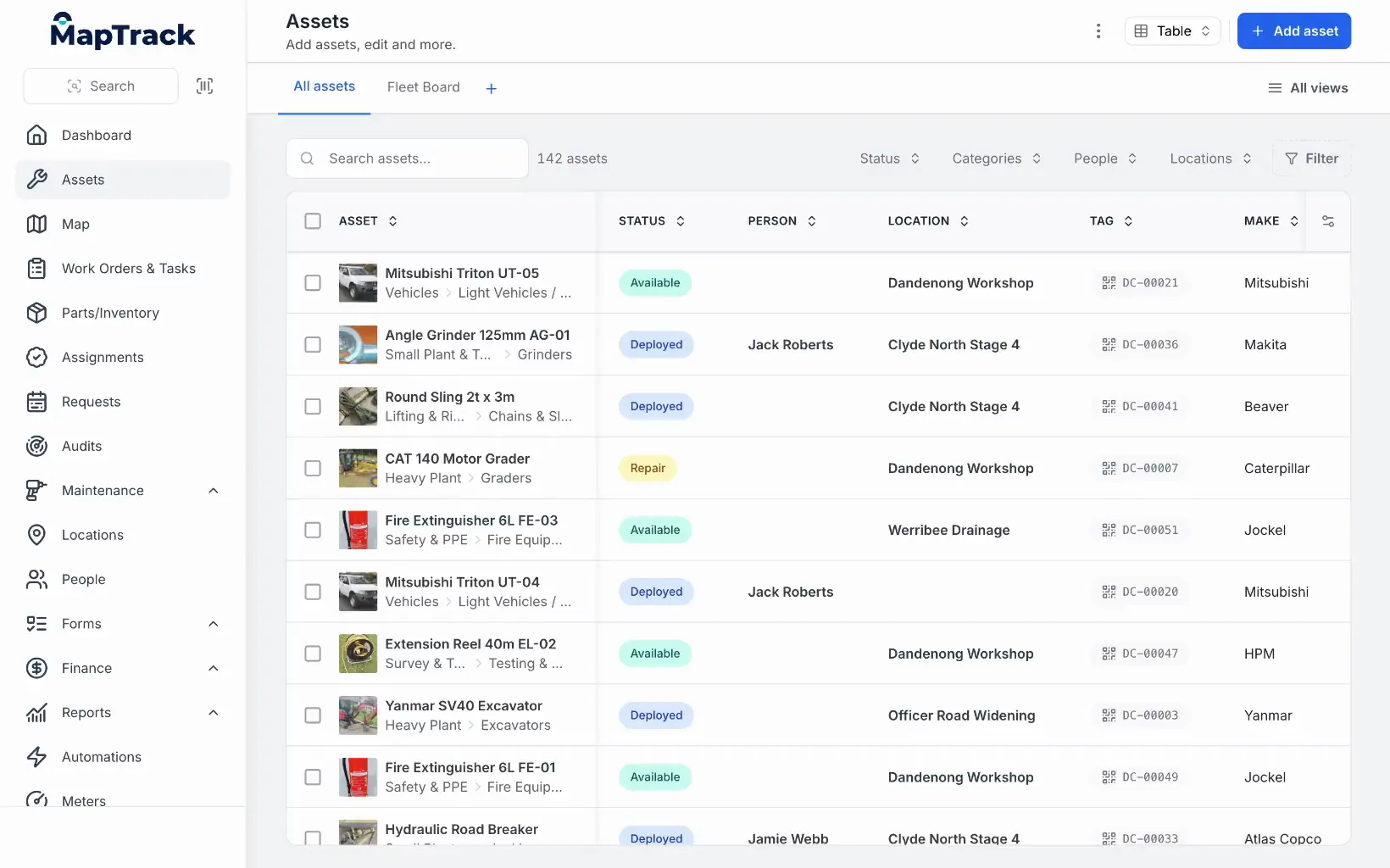
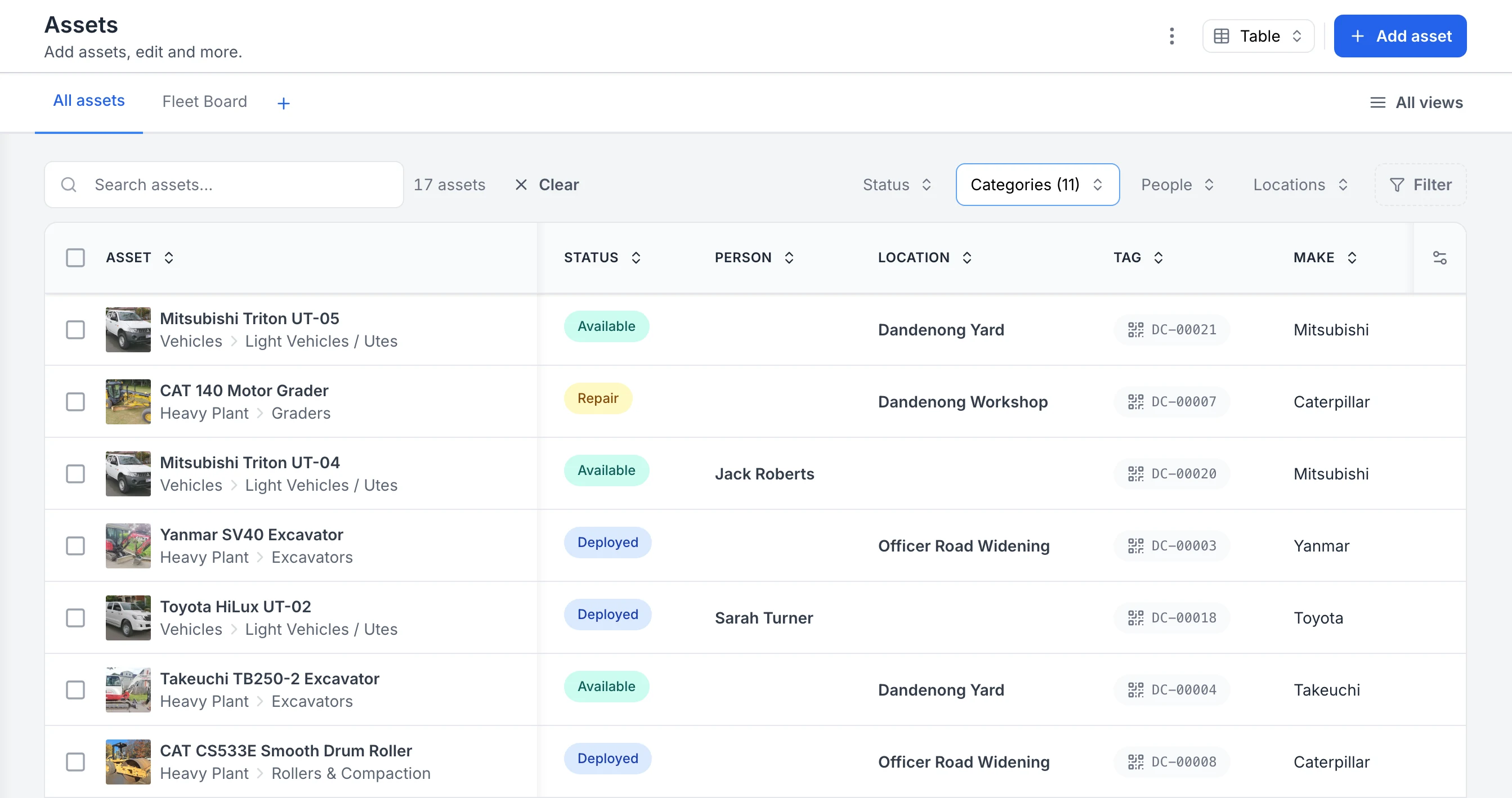
The asset register filtered to a few categories, showing each asset's status, location and tag.
MapTrack app · Demonstration data · Recorded
See every asset, its status and who or where it is with
The register filtered to heavy plant and vehicles. Each row shows the photo and category, whether the asset is available, deployed or in for repair, the person or site it is with, and its QR tag ID. Two utes are with named crew members; the rest are at the yard, the workshop or a project site.
MapTrack app · Demonstration data · Captured
About this screenshot
Captured in a demonstration workspace. The All assets view is filtered to the Heavy Plant and Vehicles categories and shows the Status, Person, Location, Tag and Make columns.
MapTrack treats a contractor’s fleet as everything that moves between jobs: pickup trucks, service trucks and dump trucks, heavy equipment, trailers and tools. Each asset has one record holding its location, who has it, its pre-starts, its service plan and its costs, and crews book equipment ahead through Requests so it isn’t double-booked across jobs. MapTrack is one platform for every asset a field business runs: tools, plant, trailers and vehicles, tracked, inspected, booked and maintained on one record, from any phone.
GPS trackers registered in MapTrack report battery and signal and feed estimated run hours into each machine’s service plan, and live GPS, trips and geofence alerts run in MapTrack Telematics. OEM feeds such as Cat, Komatsu, John Deere and Volvo are connected with our team’s help, and 68 integrations can supply run hours in all. A failed pre-start raises a corrective work order, and labour, parts and external costs land on each service record.
Key features
- ✓Trucks, heavy equipment, trailers and tools in one register
- ✓AI dash cams with built-in GPS: location and trips on the truck’s record
- ✓Saved dash cam event clips for hard braking, tailgating, phone use and fatigue
- ✓GPS trackers managed in the app: battery, signal and estimated run hours
- ✓Live GPS, trips and geofence alerts in MapTrack Telematics
- ✓QR, barcode and Data Matrix labels for check-out and return
- ✓Bluetooth tags where you want a location
- ✓Requests to book equipment ahead across job sites
- ✓Pre-starts that work offline once loaded; failed checks raise work orders
- ✓Service plans on run hours, distance and dates
- ✓Labour, parts and external costs on every service record
- ✓150+ telematics, fleet and fuel-card data sources
- ✓Rate cards: daily, weekly and monthly hire rates (dry, wet or standby); Pro and Enterprise add-on
- ✓Divisions: each division’s own assets and team access; Pro and Enterprise add-on

Tenna
Best for US contractors who want GPS hardware and software from one vendorBuilt for US construction: Tenna tracks heavy equipment, on-road vehicles, tools and attachments on its own GPS trackers, Bluetooth beacons and QR tags, with scheduling, maintenance and inspections in the same platform. Sold by custom quote with hardware, with no free trial on its site.
Pricing: Custom quote with hardware (purchase or financing) · Trial: No free trial on its site; demo and quote
Not a fit if: You want published prices or a trial you can start yourself: Tenna sells by custom quote, with data and hardware priced on asset count, and publishes no self-serve trial.
Tenna is construction equipment management software owned by John Deere since February 2026 and run as an independent business under the Tenna name. Its Schedule module covers requesting, scheduling and assigning equipment on a two-week lookahead, with SMS dispatch notifications, and geofencing works with Tenna hardware.
Telematics come from Tenna hardware and OEM and AEMP (ISO 15143-3) feeds; John Deere JDLink is one of 14 OEM and rental feeds it lists. Maintenance runs on usage or time intervals and fault codes, and custom inspections with pass/fail and conditional logic send failed items to maintenance, alongside DVIR and AI dash cams. Asset Financials adds job costing and asset P&L by machine, job and period. Tenna lists the United States, Canada and Mexico as its markets, and its products page lists unlimited users.
Key features
- ✓Heavy equipment, on-road vehicles, tools and attachments
- ✓Own GPS trackers (TennaMINI, TennaINTEL, TennaFLEET), Bluetooth beacons and QR tags
- ✓OEM and AEMP feeds, including John Deere JDLink
- ✓Schedule module: request, schedule and assign on a two-week lookahead
- ✓SMS dispatch notifications
- ✓Geofencing with Tenna hardware
- ✓Maintenance on usage or time intervals; work orders
- ✓Custom inspections, DVIR and AI dash cams
- ✓Asset Financials: job costing and asset P&L by machine, job and period

Samsara
Best for large fleets standardising on connected trucks, trailers and camerasA connected-operations platform for vehicles, trailers and equipment on Samsara’s own gateways, asset tags and AI cameras. Its Unpowered Asset Gateway covers construction equipment, and Connected Maintenance schedules service on odometer and engine hours. Quote-led, with hardware depending on the product mix.
Pricing: "Check our prices"; quote-led with hardware · Trial: Sales-led
Not a fit if: You want published prices or no hardware commitment: Samsara’s public pages use "Check our prices", and final software, hardware and contract terms are quote-led.
Samsara suits large connected operations: fleet IoT, trailer tracking, cameras and Samsara hardware standardisation. GPS gateways, Bluetooth asset tags and trailer devices cover vehicles and equipment, geofence alerts run across trailer and asset workflows, and AI cameras sit within Cameras and Video.
Connected Maintenance adds work orders, preventive schedules on odometer and engine hours, fault-code alerts and DVIR defects, for vehicles and heavy equipment, with per-asset maintenance cost reports. Driver and equipment workflows are available, but asset-linked pre-start depth should be verified in a pilot, and hire rate cards and jobsite costing are not publicly documented. Hardware is listed for the US, Canada, Mexico, the UK and the EU.
Key features
- ✓GPS gateways, Bluetooth asset tags and trailer devices
- ✓Unpowered Asset Gateway for construction equipment
- ✓Geofence alerts across trailer and asset workflows
- ✓AI cameras within Cameras and Video
- ✓Connected Maintenance: work orders and preventive schedules on odometer and engine hours
- ✓Fault-code alerts and DVIR defects feed maintenance
- ✓Per-asset maintenance cost reports

Motive
Best for truck fleets that want AI dash cams with managed reviewA fleet platform built around AI driver video with a managed human review and coaching layer, plus Vehicle Gateway, Asset Gateway Mini and Beacon trackers and OEM equipment feeds. Its Maintenance product schedules service on mileage, time and engine hours. No public pricing.
Pricing: No public pricing; sales-led · Trial: Sales-led
Not a fit if: You track lots of tools or want them checked out to people: Motive’s Beacon tags show the last-seen location of tools and small equipment, while check-out custody and QR asset labels are not publicly documented.
Motive covers vehicles with AI Dashcam and AI Omnicam for 360-degree views, and unpowered assets such as dumpsters, containers and generators with Asset Gateway Mini (battery mode) and Beacon Bluetooth tags. Equipment Monitoring adds OEM telematics through AEMP 2.0 from John Deere, Caterpillar, Komatsu and Volvo, and geofences send entry and exit notifications for vehicles and assets.
The Maintenance product creates work orders from inspection defects and fault codes, for vehicles and heavy equipment, and customisable inspection forms in the Driver App cover vehicles and off-road assets; verify pre-start depth for heavy equipment in a pilot. Drivers are assigned by Face Match or QR code scan; QR asset labels, asset check-out custody and hire rate cards are not publicly documented. Its locales cover the US, Canada, Mexico and the UK.
Key features
- ✓AI Dashcam and AI Omnicam with managed human review
- ✓Vehicle Gateway, Asset Gateway Mini and Beacon trackers
- ✓Equipment Monitoring with AEMP 2.0 OEM feeds
- ✓Geofences with entry and exit notifications
- ✓Maintenance on mileage, time and engine hours
- ✓Work orders from inspection defects and fault codes
- ✓Total cost of ownership by asset and replacement recommendations

Geotab
Best for fleets that buy telematics through a resellerFleet telematics for construction fleets, with its own GO Anywhere trackers for non-powered assets and trailers, and Bluetooth beacons for small tools. Maintenance schedules by time, distance or engine hours raise work requests that convert into work orders. Sold through resellers.
Pricing: Through resellers; no direct sales · Trial: Contact a reseller
Not a fit if: You want to buy direct from the software maker: Geotab has no direct sales, so pricing comes from a reseller.
Geotab covers fleet telematics, vehicle analytics, driver behaviour and marketplace integrations, with a large global footprint and partner network (130+ countries and 700+ partners on its software packages page). GO Anywhere comes as a battery-only model for non-powered assets, with up to 10 years of battery life, and a hybrid model for trailers and powered equipment.
Schedules by time, distance or engine hours, rules and predictive insights raise work requests that convert into work orders with labour and parts costs. Vehicle and trailer inspections run in Geotab Drive, and a beta release extends them to every physical asset, with defects passed to work orders (verify with your reseller). Geotab doesn’t sell direct: pricing comes from a reseller, so confirm tracker models for your region.
Key features
- ✓GO Anywhere battery-only and hybrid trackers
- ✓Bluetooth beacons for small tools
- ✓Maintenance by time, distance or engine hours
- ✓Work requests that convert into work orders with labour and parts costs
- ✓Vehicle and trailer inspections in Geotab Drive; asset inspections in beta
- ✓Marketplace integrations and a large partner network

Verizon Connect
Best for US fleets that bill equipment use from engine hoursUS fleet GPS that covers heavy equipment: powered and battery-powered asset trackers, built-in AEMP telematics standards, service reminders by time, distance or engine use, and digital DVIRs whose defects convert into maintenance work orders.
Pricing: Plans and demos; no fixed per-asset figures published · Trial: Demo on request
Not a fit if: You want published per-asset prices: Verizon Connect’s public pages route buyers to plans, pricing and demos rather than publishing fixed per-asset figures.
Verizon Connect covers US fleet GPS, heavy equipment, vehicle tracking and construction fleet monitoring. Job costing from engine hours per site, and client invoices for equipment usage and leasing, come from runtime data.
Service reminders run by time, distance or engine use, with real-time diagnostic trouble code monitoring; verify full work-order depth. Digital DVIRs use AI-built vehicle-specific forms with photos, signatures and an audit trail; verify heavy equipment pre-starts and offline use. Public pages route buyers to plans, pricing and demos rather than publishing fixed per-asset figures.
Key features
- ✓Powered and battery-powered asset trackers
- ✓Built-in AEMP telematics standards
- ✓Service reminders by time, distance or engine use
- ✓Diagnostic trouble code monitoring
- ✓Digital DVIRs; defects convert into work orders
- ✓Job costing from engine hours per site
- ✓Client invoices for equipment usage and leasing from runtime data

Fleetio
Best for truck-heavy fleets that already run telematicsFleet maintenance software for vehicles and equipment, priced per vehicle with unlimited users. Telematics arrive through 40+ partner integrations, the Vehicle Assignments Scheduler books future assignments by vehicle or operator (not on Essential), and Places geofences send email entry and exit alerts. Tools need a paid add-on.
Pricing: Per vehicle a month (USD): Essential $4 annual or $5 monthly, Professional $7, Premium $10 (annual only); unlimited users · Trial: 14-day free trial, no credit card
Not a fit if: You run plenty of heavy equipment and tools: Fleetio records machines such as excavators and bulldozers as vehicles, and tool management is a paid add-on.
Fleetio manages vehicles and equipment: inspections, maintenance, parts, fuel and total cost of ownership by asset or group. Failed inspection items become Issues resolved through work orders on Professional and Premium, and the Premium Jobs module assigns assets to projects or sites, by hand or by telematics geofence, and reports days and engine hours on each job.
Telematics come through 40+ partner integrations, including Geotab, Samsara, Motive, Verizon Connect, Ford Pro, John Deere and Caterpillar; Fleetio-made GPS trackers are not publicly documented, and native integrations import vehicle location nightly. Reserving an asset for a job or site is not publicly documented, and cost per job is not publicly detailed. Fleetio Go runs on iOS and Android, and its offline mode covers inspection submissions such as DVIRs.
Key features
- ✓Vehicles and equipment on one platform
- ✓40+ telematics integrations, including John Deere and Caterpillar
- ✓Vehicle Assignments Scheduler (not on Essential)
- ✓Places geofences with email entry and exit alerts
- ✓Jobs module on Premium: days and engine hours per job
- ✓Failed inspection items become Issues, resolved through work orders
- ✓Barcodes, QR codes and NFC tags for tools with the paid Tools add-on
Also worth considering
These platforms did not make our top 7 but may suit some construction fleets:
- •HCSS Equipment360: Equipment management module of the HCSS suite for heavy civil and infrastructure contractors, built for mid-to-large contractors managing 50 to 2,000+ heavy assets. It covers fleet tracking, maintenance, inspections and equipment costing, with its own telematics hardware, OEM Link and a dash camera, and deep links to HeavyJob and HeavyBid. Priced by custom quote.(per HCSS Equipment360, Oct 2026)
- •Trackunit: Construction equipment connectivity for OEMs, rental fleets and digital jobsites, with Spot S300 self-powered trackers for non-powered equipment such as trailers, containers and welders (seven years at four reports a day) and Kin Bluetooth tags for tools and attachments (battery up to five years). Trackunit Go gives technicians diagnostics, histories and work orders.(per Trackunit, Oct 2026)
- •Teletrac Navman: Fleet and equipment tracking whose GPS Asset Tracking covers trailers, small powered tools and non-powered assets with battery-powered GPS trackers, plus geofencing, movement and dwell reporting and a recovery mode. Digital pre-use inspections for equipment send instant failure notifications, alongside automated work order creation and assignment; confirm the trackers for your asset types, and verify photos, signatures and offline use.(per Teletrac Navman equipment management software, Oct 2026)
- •Fleet Complete: GPS fleet tracking platform with construction applications, part of Powerfleet since 1 October 2024. Real-time vehicle tracking, driver behaviour monitoring and basic equipment location. Stronger on fleet than on tool or equipment tracking.(per Powerfleet: Fleet Complete acquisition closed, Oct 2026)
What contractors report after moving their fleet to MapTrack
Published outcomes from construction businesses, each from its case study or customer story.
Estimated 25-35%
Less unnecessary equipment hire
Hacer Group, owned assets visible across projects
Days to hours
Transfers between job sites
Hacer Group
1-2 days/week
Time saved on weekly equipment tracking
Saunders International
$142,000+
Stolen equipment recovered
Mega Electrics, under 48 hours
Customer outcomes
Results from published MapTrack customer case studies.
Estimated 25–35%
Better visibility of owned assets across all projects reduced unnecessary equipment hire by an estimated 25–35%
Within hours
Asset transfers between project sites that previously took several days to coordinate and document are now completed and recorded within hours
Roughly 80%
Overdue service items dropped by roughly 80% within the first six months as automated scheduling and alerts replaced manual spreadsheet tracking.
Near-universal
Digital pre-start inspections for vehicles and equipment went from inconsistent paper-based compliance to near-universal daily completion across all crews.
Not sure which platform fits? Try MapTrack free
Put a few trucks, machines and tools on one register with a free trial. No credit card required.
- No credit card required
- Unlimited users
What our customers say
“MapTrack easily shows us where our equipment is, what project it's on & who it is assigned to. Support is super helpful.”

Sharyn Edwards
Fleet Coordinator (Major Projects), Genus
“Bloody amazing! We used to spend 1-2 days a week tracking and managing our generators alone.”

Steve McAllister
Asset Coordinator, Saunders International
“MapTrack's a great platform - intuitive for the guys out in the field and also has fantastic support.”

Matthew Anderson
Maintenance Planning Supervisor, Supagas
Connected in MapTrack today
What connects to MapTrack now, and who sets it up.
GPS trackers in the device manager
Register your GPS trackers in MapTrack and see each one’s battery, signal and last report. Run hours and kilometres estimated from the tracker feed your service schedules. Other tracker brands are connected with our help.
OEM machine telematics
Cat, Komatsu, JCB and Volvo machines’ own telematics can feed engine hours, location, fault codes and fuel used into MapTrack. You send us the API or data feed details, and our team sets it up under Connections and checks it’s working.
Single sign-on and Sign in with Microsoft
SAML 2.0 single sign-on, set up by our team, works with Microsoft Entra ID (Azure AD), Okta, Google Workspace and other SAML 2.0 identity providers, and new users join automatically the first time they sign in. It’s included on Enterprise and available as a Pro add-on. People can also use Sign in with Microsoft.
LightMetrics dash cam accounts
Connect a LightMetrics dash cam account and MapTrack imports the cameras, shows their latest position and safety events, and estimates kilometres and drive hours from completed trips.
Trucks, heavy equipment and tools: one construction fleet
Construction fleet management software has to cover more than trucks. A contractor's fleet is pickup trucks and service trucks, heavy equipment, and hundreds of tools moving between job sites. MapTrack keeps all three on one register, with GPS trackers, AI dash cams, Bluetooth tags and QR labels feeding one record per asset.
Trucks
AI dash cams with built-in GPS put location and trips on the truck's record, with saved event clips for hard braking, tailgating, phone use and fatigue. Pre-starts and servicing sit beside them.
Heavy equipment
GPS trackers feed estimated run hours into each machine's meters, and its service plan falls due on those hours. The app shows the latest position; live GPS, trips and geofence alerts run in MapTrack Telematics.
Tools
QR labels for check-out and return to a person, a job site or both, and Bluetooth tags where you want a location. Crews book gear ahead with Requests, so it isn't double-booked across jobs.
For the GPS side on its own, see construction equipment GPS tracking. For the how-to side, read our construction fleet management guide.
Questions to put to every construction fleet vendor
- Can I see idle equipment? Redeploying gear that sits on a finished job, before renting more, is where much of the money is. Hacer Group, a construction contractor on MapTrack, reduced unnecessary equipment hire by an estimated 25-35% because the team could see its owned assets across every project (Hacer Group case study).
- Are equipment hours and truck miles in one place? Heavy equipment is serviced on run hours and trucks on distance. In MapTrack both sit on one service board, and a failed pre-start on either raises a corrective work order. See construction equipment maintenance software for the servicing side.
- What happens when something is stolen? A tracker won’t stop a theft, but a last known position and a geofence alert when a machine leaves site give you a head start. US machine theft is estimated at US$300 million to US$1 billion a year, with 21% of stolen equipment recovered (NER and NICB, 2016; see our construction equipment theft statistics).
- Can I cost each machine and job? In MapTrack, rate cards and a finance ledger for every asset, location and person are an add-on on the Pro and Enterprise plans.
- Can everyone use it? MapTrack is priced per asset, not per user, so site crews, mechanics and subcontractors don’t add seat costs.
Want to see your trucks, equipment and tools in one register?
Book a demo30 minutes on Microsoft Teams
See a construction fleet in MapTrack
Genuine captures from a demonstration workspace, dated in each caption: pickups, equipment and tools on one register, a dash cam's trips, a service board for trucks on distance, and a failed truck pre-start with its photo. More on GPS tracking and fleet maintenance software.

The asset register as it opens
Plant, vehicles, tools and safety gear on one register, each with its status, who has it, where it is and its QR tag.
MapTrack app · Demonstration data · Captured
About this screenshot
Demonstration workspace at a 1440 x 900 desktop viewport, the register’s default view, cropped right of the navigation sidebar to a 16:10 frame.
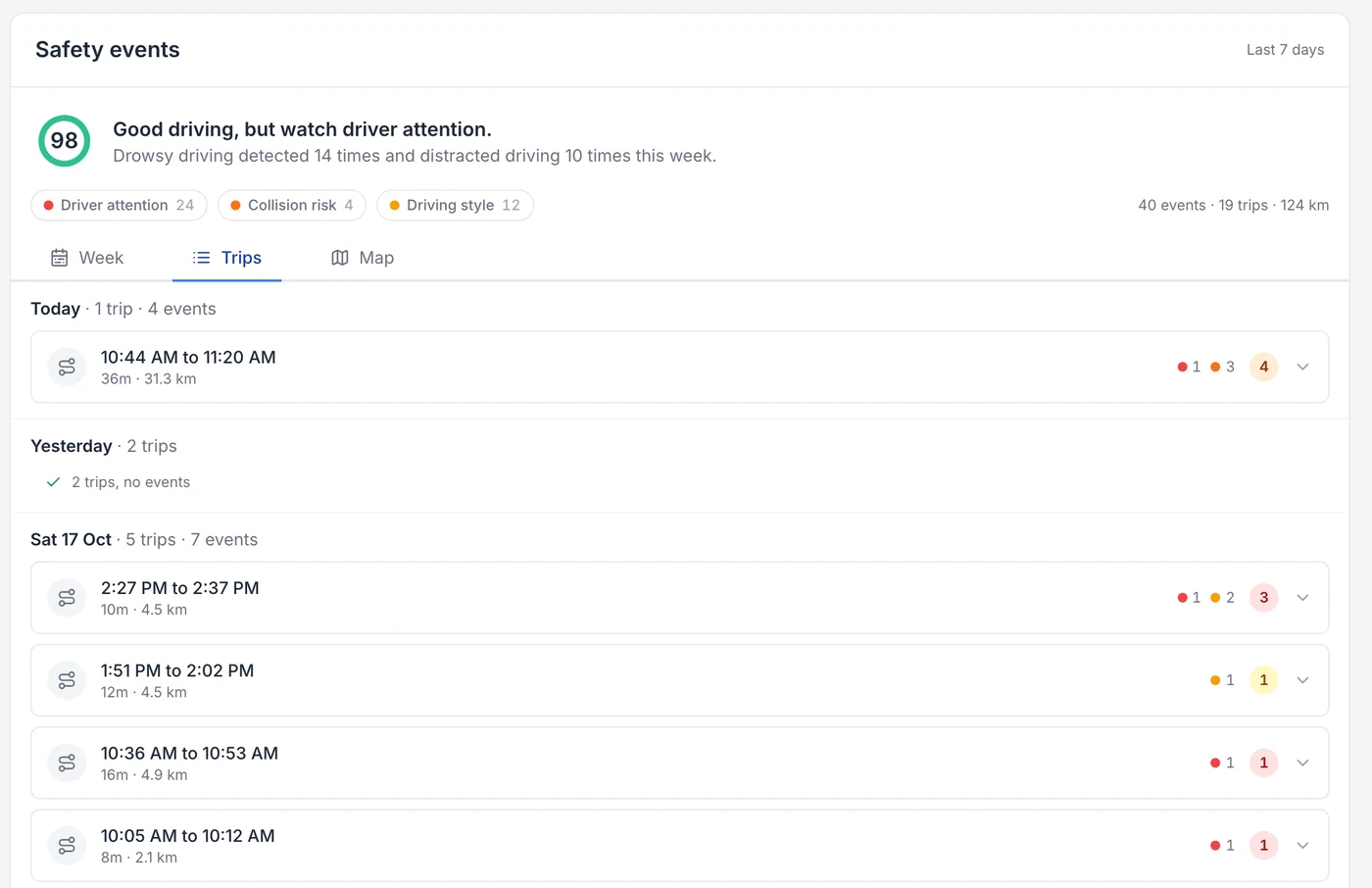
Every trip, with the events on it
The same week read as trips, with each trip’s events attached to it, so an event can be read against the drive it happened on. A day with no events says so.
MapTrack app · Demonstration data · Captured
About this screenshot
Demonstration account at a 1440 px desktop viewport, Trips view on the device page. Trips cover the last seven days.
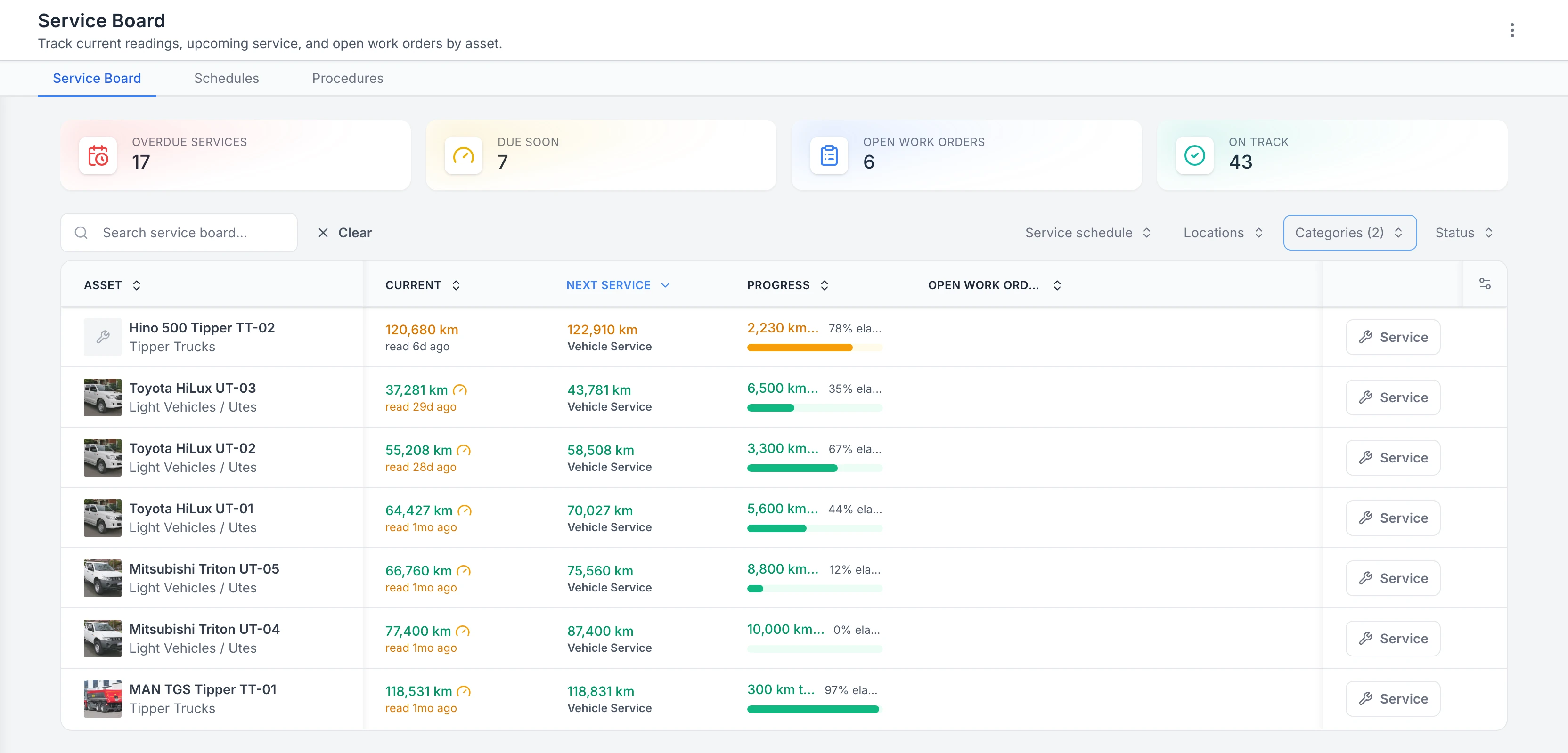
Utes and trucks by their next service
Every ute and truck on one board, ordered by the next service, with the km left on each.
MapTrack app · Demonstration data · Captured
About this screenshot
Demonstration service board filtered to the Light Vehicles / Utes and Tipper Trucks categories. The four totals at the top count the whole board, not just vehicles.
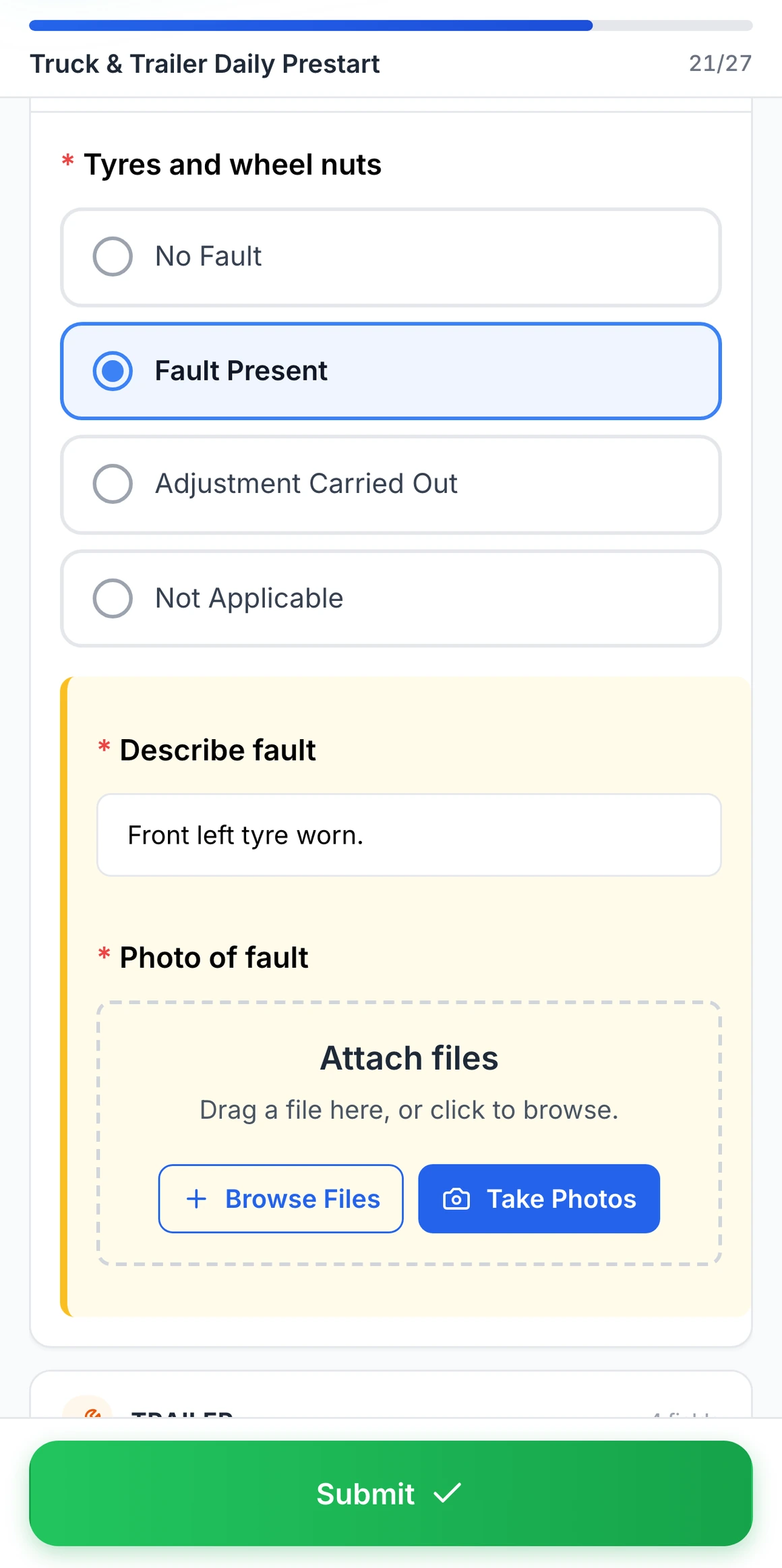
Fault Present on a truck pre start
Choosing Fault Present on tyres and wheel nuts opens a fault note and a photo, both required before the pre start can be submitted.
MapTrack app · Demonstration data · Captured
About this screenshot
Captured at a 430 x 932 phone viewport in a demonstration workspace. The pre start was filled in for this screen and not submitted.
How much does construction fleet management software cost?
Construction fleet management software is sold per vehicle, by quote with telematics hardware, by custom quote with construction hardware, or per asset. The model matters because a construction fleet has far more equipment and tools than trucks, and every operator needs the app.
- Per vehicle. Fleetio lists Essential at $4 (annual) or $5 (monthly), Professional at $7 and Premium at $10 (annual only) per vehicle a month, with unlimited users; telematics come through partner integrations.
- Quote-led telematics. Samsara’s public pages use “Check our prices”, Motive publishes no prices, Verizon Connect routes buyers to plans and demos, and Geotab sells through resellers. Samsara and Motive sell hardware and software together on a sales-led subscription.
- Custom quote with construction hardware. Tenna prices by custom quote on its products, asset types and quantities, with hardware bought outright or financed. HCSS Equipment360 is also priced by custom quote.
- Per asset. MapTrack is priced per asset, not per user, so every operator and site manager can use it. Current plans are on the MapTrack pricing page. Trackers, tags and labels are quoted on a setup call, and live GPS in MapTrack Telematics is scoped separately.
Count every truck, machine, trailer and tool before you compare, and ask each vendor what it charges for the ones without an engine. Vendor prices above are as listed on each vendor’s own page in the month shown in our sources.
Conclusion: choose fleet software that covers your whole fleet
The best construction fleet management software depends on how much of your fleet is trucks rather than heavy equipment and tools, where your run hours come from, and whether you already run a construction ERP. This guide compared 7 platforms on tracking, scheduling, maintenance, inspections, offline use and pricing so you can shortlist with confidence.
MapTrack is built for contractors who want trucks and heavy equipment on GPS, tools on QR labels and servicing on hours and distance in one register. If your asset list lives in a spreadsheet today, you can import it into MapTrack rather than retyping it, and a demo can show the rest on your own fleet.
Frequently asked questions
What is construction fleet management software?
What is the best construction fleet management software?
What should construction companies look for in fleet management software?
How is construction fleet management different from trucking fleet management?
Do I need GPS on every piece of construction equipment?
How do I see idle equipment across job sites?
Can construction fleet software handle truck dash cams?
Does construction fleet management software work without signal?
How much does construction fleet management software cost?
Why does MapTrack publish this comparison guide?
Explore
- Pricing
- Book a demo
- Construction
- Construction fleet management guide
- Construction equipment GPS tracking
- GPS tracking
- Fleet maintenance software
- Asset tracking
- Scheduling
- Best construction equipment maintenance software
- Best construction equipment tracking software
- Best commercial GPS tracking software
- MapTrack vs Tenna
- MapTrack vs Samsara
- Construction equipment theft statistics
- DVIR template
- Daily vehicle inspection form
- Free templates
Related software guides
- Best asset tracking software 2026
- Best asset tag suppliers Australia
- Best tool tracking software 2026
- Best CMMS for equipment 2026
- Best equipment management software 2026
- Best plant management software
- Best pre-start inspection software
- Best fleet management software Australia
- Best asset management software 2026
- Best maintenance planning software 2026
- Best asset inspection software 2026
- Best construction equipment tracking software
- Best construction equipment maintenance software
- Best commercial GPS tracking software
- Best fuel management software 2026
- Best safety management software 2026
Compare MapTrack head-to-head
About the author

Co-Founder & GM of Operations
Lachlan leads operations at MapTrack, bringing 10+ years of enterprise technology experience across mining, construction and heavy industry. Before MapTrack, he held senior roles at Workato (integration and automation) and AppDynamics/Cisco (application performance), working directly with ASX-listed organisations to modernise their technology stacks. His deep understanding of field operations and blue-collar workflows shapes how MapTrack solves real problems for asset-intensive teams.
View LinkedIn profile →Run your trucks, equipment and tools as one fleet
GPS, dash cams, pre-starts, servicing and repair costs for every asset that moves between your job sites. Free trial, no credit card.
4.9 on G2 · 5.0 on Capterra, GetApp & Software Advice
- No credit card required
- Unlimited users