
Equipment Management Software
Spreadsheets lose track of assets. Maintenance gets missed. Compliance falls behind. MapTrack gives you one platform to register, track, maintain and report on every piece of equipment across every site.
See every asset, its status and who or where it is with
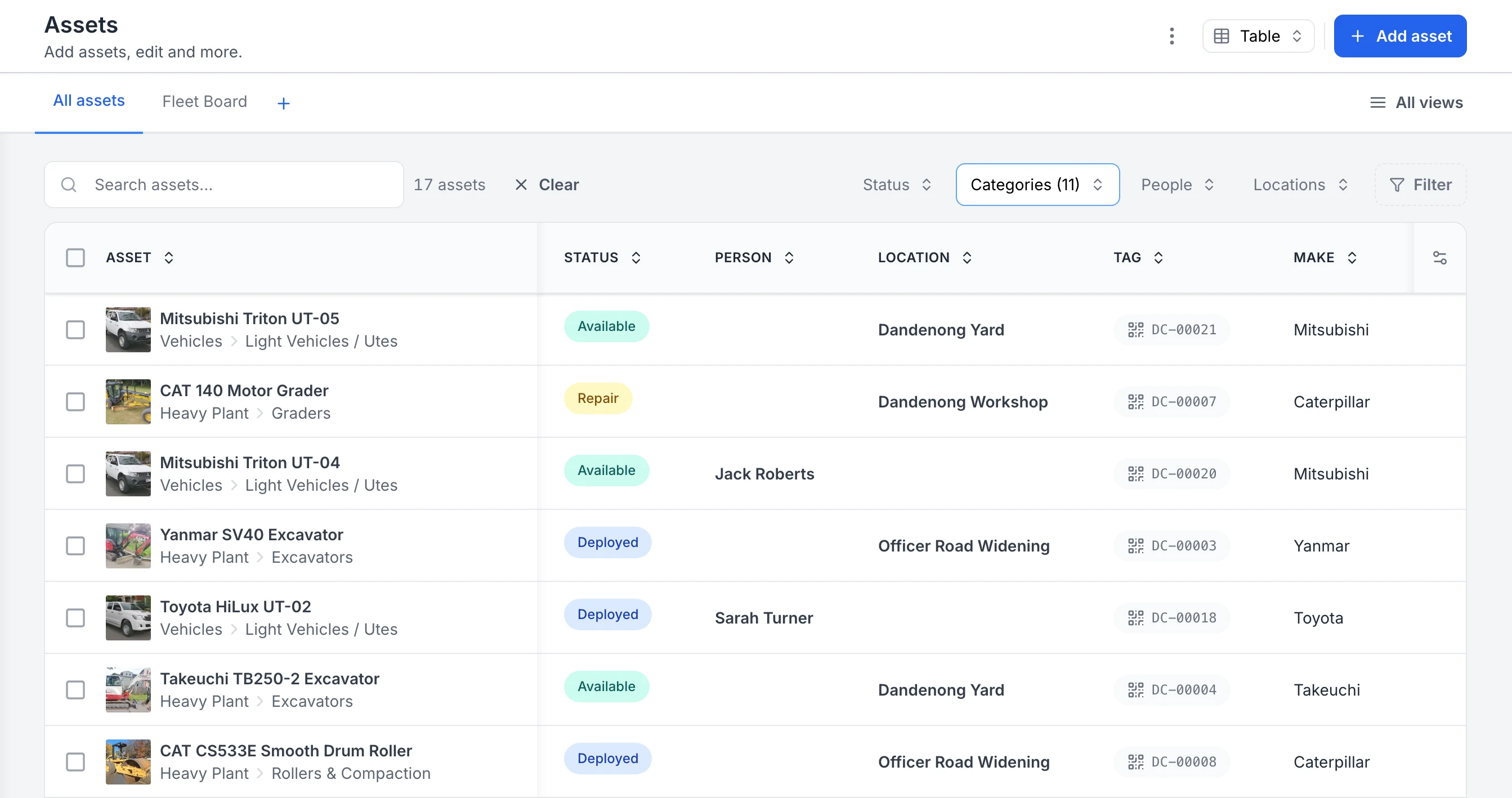
The register filtered to heavy plant and vehicles. Each row shows the photo and category, whether the asset is available, deployed or in for repair, the person or site it is with, and its QR tag ID. Two utes are with named crew members; the rest are at the yard, the workshop or a project site.
MapTrack app · Demonstration data · Captured
Captured in a demonstration workspace. The All assets view is filtered to the Heavy Plant and Vehicles categories and shows the Status, Person, Location, Tag and Make columns.

Co-Founder & GM of Operations
Connect the requirement, the service and the handover
Equipment management spans the plan for tomorrow and the records left by today’s work. Requests, service plans and custody records keep those decisions connected.
1. Plan what the job needs
Request named equipment or a category quantity for the required period. Record substitutions and shortages during fulfilment, then inspect the linked assignment.
2. Check service readiness
Review the Service Board, the named next service and open work orders before allocating equipment. Keep advisory warnings visible in the handover decision.
3. Review use over a defined period
Use Asset Performance to inspect assignment and booking use, then check its source records. Use the relevant meter or Telematics report for runtime and movement questions.
What is equipment management software?
Equipment management software is a digital platform that helps organisations register, locate, maintain and report on physical assets such as plant, machinery, vehicles, tools and portable equipment. It replaces spreadsheets and paper records with a centralised system accessible from any device. Unlike standalone asset tracking tools, equipment management also covers maintenance scheduling, compliance inspections and lifecycle cost analysis in one platform. See our CMMS glossary entry for how this relates to computerised maintenance management.
The problem
Equipment chaos is costing you
Spreadsheet chaos
Asset registers in spreadsheets go stale within weeks. No one trusts the data, and updates are lost between versions.
Missed maintenance
Without automated triggers, servicing falls through the cracks. Breakdowns, downtime and emergency repairs follow.
Compliance gaps
Paper-based inspections and scattered records make audits painful. Proving compliance takes days instead of minutes.
Lost equipment
Without real-time tracking, tools and equipment go missing between sites. Replacement costs add up fast.
How it works
Four steps to a usable equipment record
Bring in the register
Import a CSV or XLSX, map the columns and review errors. Check a small sample before adding the rest.
Record the handover
Use a connected check-out to record who or which site holds the asset. A QR scan opens its record.
Plan and issue service work
A meter reading can raise a work order when its service threshold and automatic generation are configured. For a date-based service, raise the job from the schedule or test the rule you've set.
Review the saved work
Open the related assignments, submitted forms and service history from the asset record.
Trusted by construction, mining and field service teams










Platform capabilities
Everything you need in one platform
Asset tracking
Central register with full history. Know what you own, where it is and who has it.
Maintenance and work orders
Automated scheduling from meters, time or inspections. Mobile completion from any phone.
Compliance and inspections
Digital pre-starts, safety checklists and audit-ready records with timestamps and photos.
GPS and fleet tracking
Real-time locations, geofences, time-on-site reporting and movement alerts.
QR code and label tracking
Print and scan QR labels to check assets in and out, view history and report faults from the field.
Forms and checklists
Custom digital forms for inspections, handovers and audits. AI-powered form builder.
Reporting and dashboards
Utilisation, costs, compliance and maintenance KPIs on one dashboard.
Manage every piece of equipment from one platform
Maintenance schedules, service history, location tracking and compliance records in one place. Try MapTrack free for 30 days.
- No credit card required
- 30 days free trial
- Cancel anytime
Built for your industry
Equipment management across every sector
Equipment management FAQ
What is equipment management software?
Equipment management software is a digital platform that helps organisations track, maintain and manage physical assets such as plant, machinery, vehicles, tools and portable equipment. It centralises asset registers, automates maintenance scheduling, records inspections and provides real-time visibility across multiple sites. MapTrack combines equipment tracking with maintenance, compliance and GPS in one platform.
How does equipment management software work?
In MapTrack, each asset has a record. QR tags help your crew open it, connected assignments record handovers, and configured schedules help plan servicing. The record links the related forms and saved work so you can review what happened.
What is the difference between equipment management and asset tracking?
Asset tracking focuses on knowing where an asset is and who has it. Equipment management goes further by adding maintenance scheduling, work orders, compliance inspections, cost tracking and lifecycle management. MapTrack provides both in one platform, so you do not need separate tools.
How much does equipment management software cost?
MapTrack has separate published rate cards for tools/equipment and fleet, plant & heavy machinery. Standard starts at $1/asset/month for tools and equipment and $8/asset/month for fleet, plant & heavy machinery, with volume discounts at higher asset counts. All plans include unlimited users, so your whole team can access the system without per-seat charges.
Can equipment management software track GPS locations?
Yes. MapTrack integrates with GPS and telematics devices, and shows each tracked asset's latest position on a map. Live tracking, geofences for time-on-site reporting and alerts when equipment leaves an approved zone run in MapTrack Telematics, which we sell and support alongside the app. GPS tracking is available alongside QR and barcode tracking.
What industries use equipment management software?
Equipment management software is used across construction, mining, oil and gas, facilities management, utilities, transport, manufacturing and government. Teams in Australia, the United States, the UK, New Zealand and worldwide use it to centralise tracking, maintenance and compliance for physical assets.
How do I switch from spreadsheets to equipment management software?
Start with a small CSV or XLSX from your current register. Map the fields, review errors and check the imported records. Then test the handover and service steps your crew needs before expanding to more assets or sites.
What features should equipment management software have?
Look for asset registers, maintenance scheduling (time and meter-based), mobile work orders, compliance inspections, GPS or QR tracking, reporting dashboards, multi-site support and integrations with your existing tools. MapTrack includes all of these in every plan.
Take control of your equipment
Start tracking, maintaining and managing every asset in one platform.
 4.9 on G2 · 5.0 on Capterra
- No credit card required
- 30 days free trial
- Cancel anytime