
7 best construction equipment maintenance software tools for 2026
Compare construction equipment maintenance software for servicing heavy equipment on run hours, turning pre-start faults into work orders, reading telematics hours and costing every repair. We compared 7 platforms on how service falls due, what raises the work order, inspections, offline use and pricing.

Co-Founder & GM of Operations
The best construction equipment maintenance software depends on where your machine hours come from and what you need beside servicing. MapTrack fits contractors who want heavy equipment, trucks and tools in one register, with tiered service plans on run hours and failed pre-starts raising the repair job; Tenna fits construction GPS hardware with maintenance attached; HCSS Equipment360 fits heavy civil teams on HCSS; Fleetio fits truck-heavy fleets; MaintainX and Limble fit workshop-led teams that want a per-user CMMS.
Key takeaways
- Shortlist MapTrack for heavy equipment, trucks and tools on one register, Tenna for construction GPS hardware, HCSS Equipment360 for HCSS users and Fleetio for truck-heavy fleets.
- Service construction equipment on the hours it actually runs: check that 250, 500 and 1,000 hour services can sit on one plan.
- Know where hours come from: typed into the pre-start, estimated by a GPS tracker, or read from the machine’s own telematics.
- A failed pre-start should raise the repair job on the machine’s record, not wait in a paper book for the mechanic.
- Cost every service in labour, parts and outside work, so repair-or-replace calls rest on the machine’s real history.
- Check offline use before a remote job: in MapTrack, loaded pre-starts and work-order results save without signal and sync later.
TL;DR
Top 3 picks at a glance
 MapTrack
Maintenance for contractors whose heavy equipment, trucks and tools belong in one register: tiered service plans hold 250, 500 and 1,000 hour services on one schedule, a failed pre-start raises the repair job, and labour, parts and outside costs land on each machine’s service record.
Jump to review ↓ Tenna
Built for US construction: maintenance runs on usage or time intervals and fault codes, alongside Tenna’s own GPS trackers and OEM telematics feeds, and failed inspection items go to maintenance.
Jump to review ↓The equipment management module of the HCSS suite, built for mid-to-large contractors managing 50 to 2,000+ heavy assets.
Jump to review ↓Trusted by construction, mining and field service teams














Quick verdict: best construction equipment maintenance software by category
Our top picks by use case. Click any card to jump to the full review.

MapTrack
Best for servicing heavy equipment on run hours, with trucks and tools in the same register

Tenna
Best for construction GPS hardware with maintenance attached
HCSS Equipment360
Best for heavy civil contractors already on HCSS HeavyJob and HeavyBid

Fleetio
Best for truck-heavy fleets that already run telematics

Samsara
Best for fleets already on Samsara gateways and cameras

MaintainX
Best for workshop work orders and procedures on any asset
Limble
Best for maintenance teams that schedule on meter thresholds
Which construction equipment maintenance software fits your operation?
Different construction maintenance teams start from different problems. Use these profiles to narrow your shortlist.
The Equipment Manager at a heavy civil contractor
We run excavators, dozers and haul trucks across several jobs, and our 250 hour services keep slipping because the hours live in a spreadsheet. What should we shortlist?
Shortlist software that services each machine on run hours and shows where those hours come from. MapTrack holds 250, 500 and 1,000 hour services on one plan, with hours from the pre-start, a GPS tracker (estimated) or OEM feeds connected with our team’s help. HCSS Equipment360 fits if you already run HeavyJob and HeavyBid, and Tenna if you want its own GPS hardware.
Learn more →The Shop Foreman
Our mechanics still write repairs on paper, and nobody knows what a machine has cost us. Which platform tracks the repair itself?
Look for work orders that record labour, parts and outside costs and roll them into the machine’s history. MapTrack records labour, parts and external costs on each service record. MaintainX and Limble are per-user CMMS platforms built around the workshop; their parts and cost tracking start on Premium and Premium+.
Learn more →The Safety Manager
Operators do their pre-starts, but faults sit in the book while the machine keeps working. How do we close that gap?
Choose software where a failed check raises the job without anyone retyping it. In MapTrack, submitting a defect report or failing an inspection raises a corrective work order, and pre-starts already loaded on the phone work without signal. Tenna sends failed inspection items to maintenance, and Fleetio turns them into Issues resolved through work orders.
Learn more →The Fleet Manager with more trucks than iron
Most of our fleet is on-road trucks, with a few loaders and a lot of tools. Do we need construction software at all?
Fleetio is priced per vehicle and built around vehicle maintenance, with tools as a paid add-on. MapTrack keeps trucks, loaders and tools on one register and one service board, so the loaders and tools get the same attention as the trucks.
Learn more →Who this guide isn't for
This guide compares software for servicing construction equipment, trucks and tools across job sites. It isn’t the right comparison if:
- You're choosing software to estimate, bid or schedule jobs. Maintenance platforms, MapTrack included, sit beside those systems rather than replacing them. See how MapTrack works beside ERP and job systems
- You maintain fixed plant in a factory or facility, not mobile equipment. Compare maintenance planning software
- Your fleet is on-road vehicles only, with no heavy equipment or tools. See fleet maintenance software
- You only want to know where your machines are. See construction equipment GPS tracking
In this guide
How we evaluated these platforms
We assessed each platform on six criteria that matter for servicing construction equipment: how service falls due (engine hours, distance, dates), where hours come from (typed in, a GPS tracker or OEM telematics), work orders and repair costs, inspections and defects, mobile and offline use, and pricing model. Where we could not confirm a capability from public sources or vendor documentation, we say so rather than guess. How we checked this guide: every competitor row reuses facts we had already read on the vendor's own pages and dated, and each row shows its source and the month we checked it. MapTrack's rows are checked against our product documentation, which is how we know, for example, that run hours from a GPS tracker are estimated and that a date on its own does not raise a work order.
- Tenna equipment maintenance software(checked Nov 2026)
- Tenna custom equipment inspections(checked Nov 2026)
- Tenna OEM telematics integrations(checked Oct 2026)
- John Deere: Deere completes acquisition of Tenna(checked Oct 2026)
- HCSS Equipment360(checked Oct 2026)
- Fleetio pricing(checked Nov 2026)
- Fleetio GPS and telematics integrations(checked Oct 2026)
- Samsara Connected Maintenance(checked Oct 2026)
- MaintainX pricing(checked Nov 2026)
- MaintainX integrations(checked Oct 2026)
- Limble pricing(checked Nov 2026)
- Limble CMMS cost guide (9 Mar 2026)(checked Nov 2026)
- Motive Maintenance(checked Oct 2026)
- MapTrack meter-based maintenance
- MapTrack customer case studies
This guide is published by MapTrack (rated 4.9/5 on G2 and 5.0/5 on Capterra, GetApp and Software Advice). We include ourselves alongside other options and do not claim to be the single best fit for every use case. Shortlist two or three options and run a pilot on your own machines before deciding. Every table row carries its source and the month we checked it. Plans change often, so confirm on the vendor's own page before you buy, and tell us at corrections@maptrack.com if something is out of date.
Spotted something out of date or incorrect? Email corrections@maptrack.com and we will review and update this page.
Construction equipment maintenance software comparison table
Side-by-side overview of 7 platforms. Verify current features and pricing with each vendor.
| Software | Best for | Tracking | Service plans | Work orders | Inspections | Offline | Pricing |
|---|---|---|---|---|---|---|---|
| MapTrack | Equipment on run hours, plus trucks and tools | Pre-start, GPS tracker, OEM telematics(per MapTrack meter-based maintenance, Nov 2026) | Yes | Yes | Yes | Yes | Per asset, not per user; plans on the pricing page |
| Tenna | Construction GPS plus maintenance | Own GPS, BLE and QR; OEM/AEMP(per Tenna equipment maintenance software page, Nov 2026) | Yes | Yes | Yes | ? | Custom quote with hardware (purchase or financing) |
| HCSS Equipment360 | Heavy civil teams on HCSS | GPS, telematics, barcode(per HCSS Equipment360 and pricing pages, Oct 2026) | Yes | Yes | Yes | ? | Custom quote |
 Fleetio | Truck-heavy fleets | Telematics partners; QR and NFC with Tools add-on(per Fleetio pricing page, Nov 2026) | Yes | Yes | Yes | ? | Per vehicle a month (USD): Essential $4 annual or $5 monthly, Professional $7, Premium $10 (annual only); unlimited users |
 Samsara | Fleets on Samsara hardware | Own gateways, asset tags, trailer devices(per Samsara Connected Maintenance, Oct 2026) | Yes | Yes | ? | ? | "Check our prices"; quote-led with hardware |
 MaintainX | Workshop work orders | QR, barcode; telematics integrations(per MaintainX pricing page, Nov 2026) | Yes | Yes | Yes | ? | Per user: free Basic; Essential US$20, Premium US$65 a month billed annually; requesters free |
| Limble | Meter-threshold CMMS | QR; Samsara and Motive integrations(per Limble pricing page, Nov 2026) | Yes | Yes | Yes | ? | Per user: Standard $28, Premium+ $69 a month (cost guide, Mar 2026); Enterprise custom |
Yes ConfirmedNot available per vendor sources Not available? Verify with vendorNot publicly confirmed Not publicly confirmed
Construction equipment maintenance software reviews
A detailed review of each platform: features, pricing and where it fits a construction maintenance team.

MapTrack
Best for servicing heavy equipment on run hours, with trucks and tools in the same registerMaintenance for contractors whose heavy equipment, trucks and tools belong in one register: tiered service plans hold 250, 500 and 1,000 hour services on one schedule, a failed pre-start raises the repair job, and labour, parts and outside costs land on each machine’s service record. Priced per asset, not per user, and Capterra Best Ease of Use 2026.
Pricing: Per asset, not per user; plans on the pricing page · Trial: Free trial, no credit card
Not a fit if: You want estimating, bidding and job management in the same system as your servicing: MapTrack sits alongside your job management, accounting and ERP systems rather than replacing them.
What you get in one platform
- Every asset, one record
- Tools on QR or barcode labels and Bluetooth tags, plant on GPS trackers, vehicles with GPS and AI dash cams, sites with boundaries: custody, inspections, maintenance and costs on the same record.
- Maintenance that runs on real usage
- Run hours and kilometres from trackers, dash cams or manual readings feed tiered service plans and next-service forecasts, every asset gets a 0 to 100 maintenance health score, and one work order can cover many assets, each with its own pass or fail.
- Easy for crews
- Pre-starts and inspections work without signal, on any phone, with shared-device PINs, single sign-on and AI help to build forms and add assets from a photo. Capterra Best Ease of Use 2026.
- Hardware and software from one vendor
- GPS trackers, AI dash cams with built-in GPS, Bluetooth tags and labels at published prices, managed in the same app, plus LightMetrics dash cam accounts and 150+ telematics, fleet and fuel-card data sources.
- Simple to buy and run
- Per-asset pricing with unlimited users, 24/7 support and month-to-month plans. Capterra Best Value 2026.
The full capability list (35)
- One register for tools, plant, equipment and vehicles
- Custody: who has what, and where
- Site boundaries on the map
- Live tracking and alerts in MapTrack Telematics
- Rate cards (Pro and Enterprise add-on)
- Finance dashboards (Pro and Enterprise add-on)
- Divisions (Pro and Enterprise add-on)
- Run hours and km from trackers, cameras, feeds or readings
- Work orders raised from meters, run hours and data feeds
- Tiered service plans
- Next-service forecasts from usage
- Stale-reading flags
- Maintenance health score
- Service board and due-soon emails
- One work order across many assets
- Batch work orders and bulk scan logging
- Labour, parts and external costs on every service
- Failed checks raise work orders by rule
- Parts and inventory by location and bin
- Offline pre-starts and inspections
- Mobile web app (Android, iPhone, iPad)
- Shared-device PINs
- SAML 2.0 single sign-on (SSO)
- AI form builder
- AI asset creation from a photo
- Equipment bookings (Requests)
- GPS trackers managed in the app
- AI dash cam video in the app
- AI dash cams with built-in GPS
- LightMetrics dash cam connection
- Bluetooth tags
- QR, barcode and Data Matrix scanning
- OEM feeds under Connections
- 150+ data sources
- Engine hours from 68 integrations
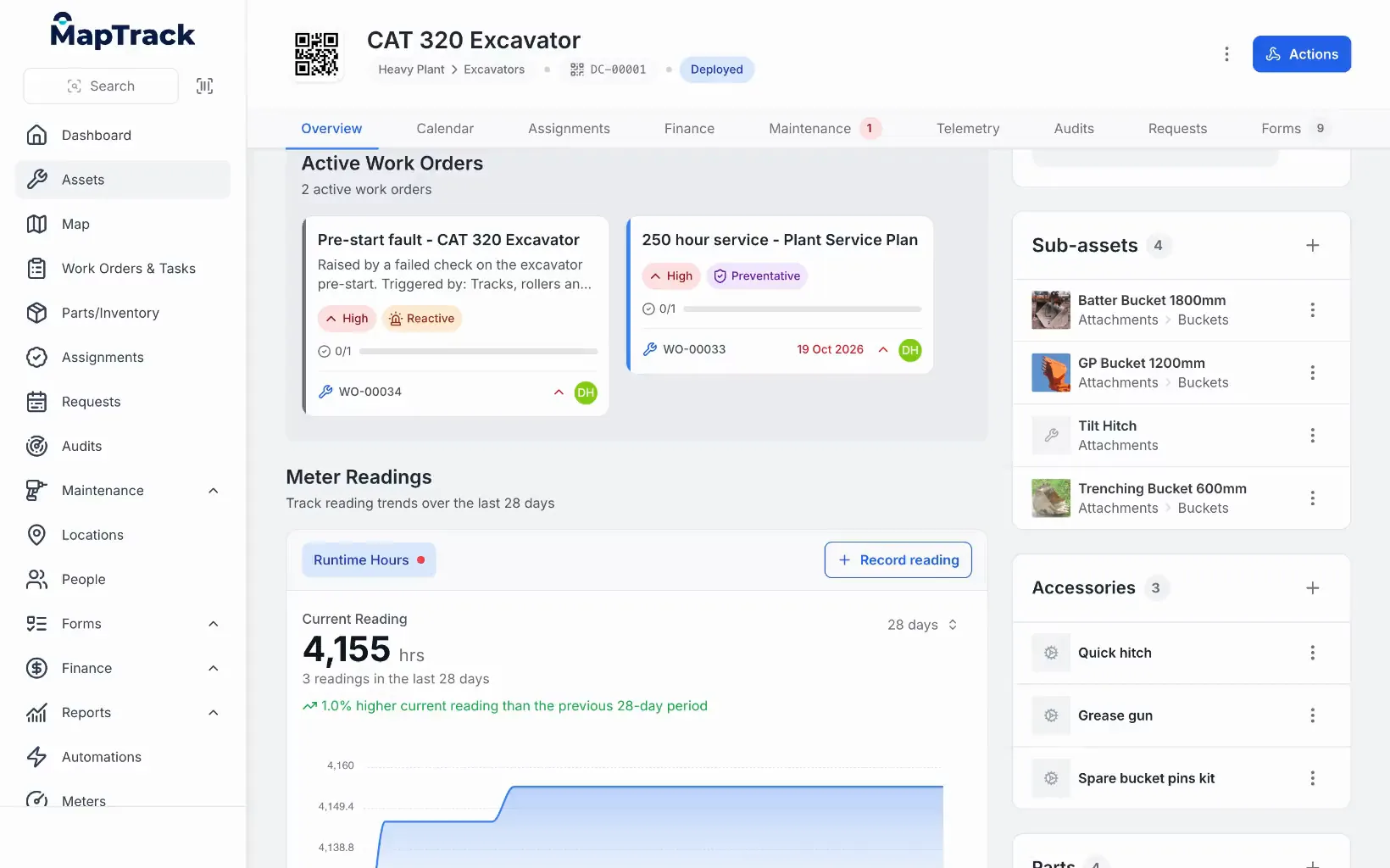
Hours in, the 250 hour job raised
An excavator's runtime hours and the 250 hour service work order they raised.
MapTrack app · Demonstration data · Recorded
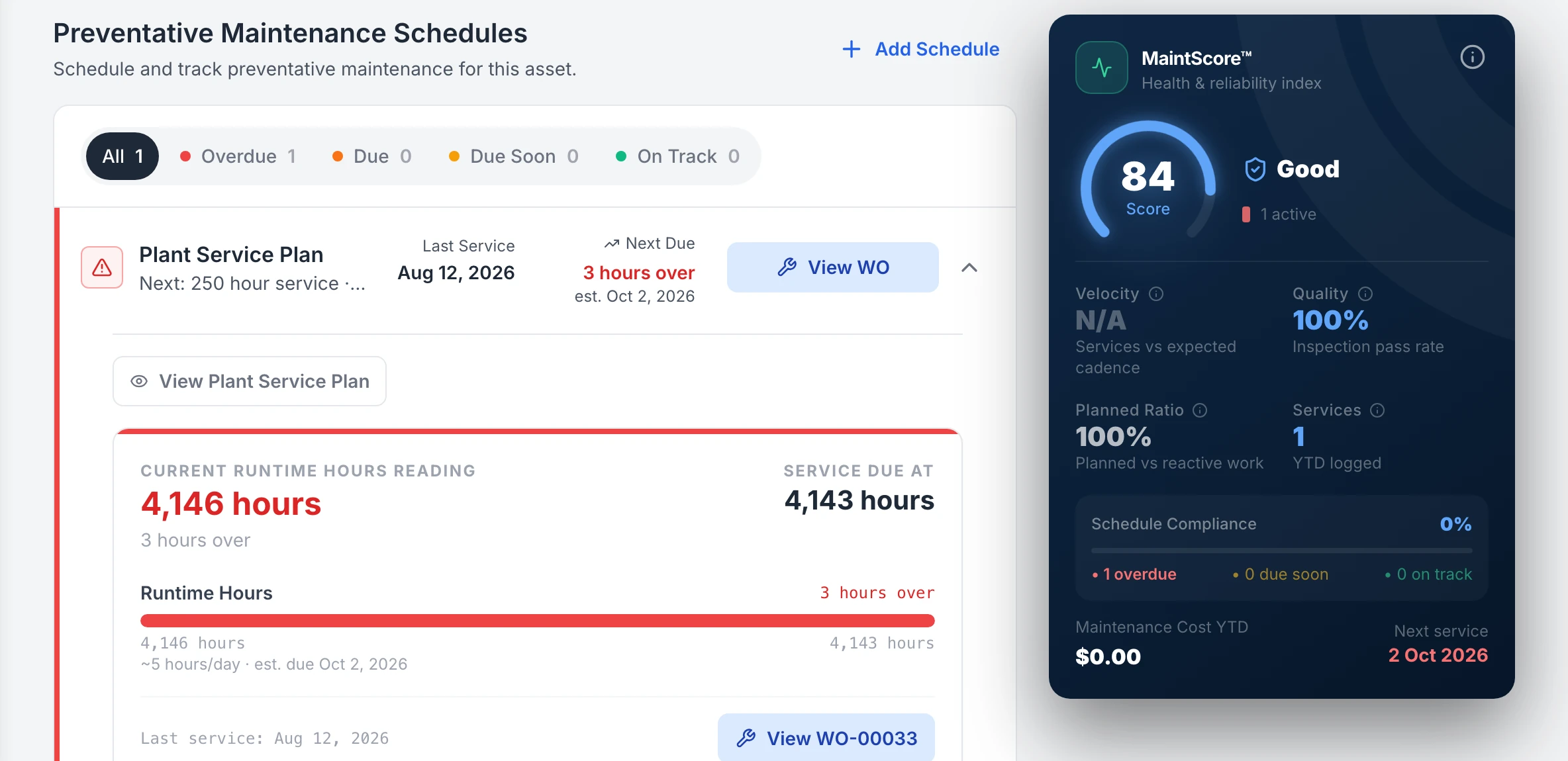
Hours against the next service
An excavator’s runtime hours, typed in on the asset, set against its next 250 hour service: 4,146 hours, 3 hours past the 4,143 hour service, with a button to open work order WO-00033. The reading shown was entered by hand, not reported by a device.
MapTrack app · Demonstration data · Captured
About this screenshot
Demonstration workspace at a 1440 px desktop viewport, scrolled to the asset’s service plan. The reading was entered in the app that day.
MapTrack keeps construction equipment maintenance on the same record as everything else about the machine: where it is, who has it, its pre-starts and its paperwork. Service plans fall due on engine hours, distance or dates, a defect report or failed inspection raises a corrective work order automatically, and each service records labour, parts and external costs. MapTrack is one platform for every asset a field business runs: tools, plant, trailers and vehicles, tracked, inspected, booked and maintained on one record, from any phone.
Hours come from the pre-start, from GPS trackers registered in MapTrack (estimated run hours) or from OEM feeds such as Cat, Komatsu, John Deere and Volvo, which our team connects with you; 68 integrations can supply engine hours in all. MapTrack works out each machine’s usage rate, estimates when its next service falls due, and flags meters whose readings are out of date so services don’t slip between readings. A 0 to 100 maintenance health score for each asset and schedule keeps 12 months of memory.
Key features
- ✓Tiered service plans: 250, 500 and 1,000 hour services on one schedule
- ✓The bigger service covers coinciding smaller ones in one work order
- ✓Recorded meter readings raise the work order on automatic schedules
- ✓A defect report or failed inspection raises a corrective work order
- ✓Email to the assigned person when a service falls due within 7 days
- ✓Usage-rate forecast of the next meter service
- ✓Stale-reading flags so services don’t slip between readings
- ✓Run hours from the pre-start, GPS trackers (estimated) or OEM feeds
- ✓Labour, parts and external costs on every service record
- ✓One work order across many assets, each with its own pass or fail
- ✓Batch work orders and bulk scan service logging
- ✓Parts and stock by location and bin
- ✓Pre-starts and inspections built with the AI form builder
- ✓Loaded forms and work-order results work offline
- ✓Service board with a 0 to 100 health score per asset and schedule
- ✓Heavy equipment, trucks, trailers and tools in one register
- ✓Finance: cost ledger, budget vs actual and repair-or-replace; Pro and Enterprise add-on

Tenna
Best for construction GPS hardware with maintenance attachedBuilt for US construction: maintenance runs on usage or time intervals and fault codes, alongside Tenna’s own GPS trackers and OEM telematics feeds, and failed inspection items go to maintenance. Sold by custom quote with hardware, with no free trial on its site.
Pricing: Custom quote with hardware (purchase or financing) · Trial: No free trial on its site; demo and quote
Not a fit if: You want published prices or a trial you can start yourself: Tenna sells by custom quote, with data and hardware priced on asset count, and publishes no self-serve trial.
Tenna is construction equipment management software owned by John Deere since February 2026 and run as an independent business under the Tenna name. Its maintenance module schedules service on usage or time intervals and fault codes, raises work orders, and tracks parts, kits and supplies across locations with restocking alerts. Custom inspections with pass/fail and conditional logic send failed items to maintenance, alongside DVIR and AI dash cams.
Tracking runs on Tenna’s own GPS trackers (TennaMINI, TennaINTEL, TennaFLEET) and Bluetooth and QR tags, plus OEM and AEMP (ISO 15143-3) feeds imported by API; John Deere JDLink is one of 14 OEM and rental feeds it lists. Tenna says its iOS and Android app handles work orders, inspections, QR scanning and Bluetooth detection offline and syncs automatically; check the depth in a pilot. It lists the United States, Canada and Mexico as its markets.
Key features
- ✓Maintenance on usage or time intervals and fault codes
- ✓Work orders; failed inspection items go to maintenance
- ✓Parts, kits and supplies with restocking alerts
- ✓Custom inspections with pass/fail and conditional logic; DVIR
- ✓Own GPS trackers, Bluetooth beacons and QR tags
- ✓OEM and AEMP telematics feeds, including John Deere JDLink
- ✓Asset Financials: job costing and asset P&L by machine, job and period
HCSS Equipment360
Best for heavy civil contractors already on HCSS HeavyJob and HeavyBidThe equipment management module of the HCSS suite, built for mid-to-large contractors managing 50 to 2,000+ heavy assets. Preventive maintenance schedules and work orders run from telematics or hand-entered meter readings, and equipment data links to HeavyJob and HeavyBid. Custom quote.
Pricing: Custom quote · Trial: Contact vendor
Not a fit if: You run a smaller fleet or mostly tools: HCSS says Equipment360 is built for mid-to-large contractors managing 50 to 2,000+ heavy assets, and it’s priced by custom quote.
HCSS Equipment360 is the equipment management module of the HCSS suite for heavy civil and infrastructure contractors. It covers fleet tracking, maintenance, inspections and equipment costing, with tight integration into HCSS HeavyJob (time tracking), HeavyBid (estimating) and HCSS Safety, so equipment data flows into project costing and job-level reporting.
HCSS says Equipment360 produces PM schedules and work orders from telematics or manual meter readings, with its own telematics hardware, OEM Link and a dash camera, and deep links to HeavyJob and HeavyBid. It is less suited to teams outside heavy civil or those not in the HCSS ecosystem. Verify reservations, offline mobile use, current pricing and standalone availability in a trial.
Key features
- ✓PM schedules and work orders from telematics or manual meter readings
- ✓DVIR and safety inspections
- ✓Equipment costing tied to projects
- ✓Integration with HeavyJob, HeavyBid and HCSS Safety
- ✓Own telematics hardware, OEM Link and a dash camera

Fleetio
Best for truck-heavy fleets that already run telematicsFleet maintenance software for vehicles and equipment, priced per vehicle with unlimited users. Preventive maintenance runs on time and meters, failed inspection items become Issues resolved through work orders, and telematics arrive through 40+ partner integrations. Tools need a paid add-on.
Pricing: Per vehicle a month (USD): Essential $4 annual or $5 monthly, Professional $7, Premium $10 (annual only); unlimited users · Trial: 14-day free trial, no credit card
Not a fit if: You run plenty of heavy equipment and tools: Fleetio records machines such as excavators and bulldozers as vehicles, and tool management is a paid add-on.
Fleetio manages vehicles and equipment: inspections, maintenance, parts, fuel and total cost of ownership by asset or group. Work orders are on the Professional and Premium plans. Parts inventory by location with aisle, row and bin, reorder points and audits is limited on Professional and not on Essential, with purchase orders and low-stock notifications on Premium.
Telematics come through 40+ partner integrations, including Geotab, Samsara, Motive, Verizon Connect, Ford Pro, John Deere and Caterpillar; Fleetio-made GPS trackers are not publicly documented. The Premium Jobs module assigns assets to projects or sites and reports days and engine hours on each job. Fleetio Go runs on iOS and Android, and its offline mode covers inspection submissions such as DVIRs.
Key features
- ✓Preventive maintenance by time and meter
- ✓Failed inspection items become Issues, resolved through work orders
- ✓Work orders on Professional and Premium
- ✓Parts by location with aisle, row and bin
- ✓40+ telematics integrations, including John Deere and Caterpillar
- ✓Jobs module on Premium: days and engine hours per job
- ✓Barcodes, QR codes and NFC tags for tools with the paid Tools add-on

Samsara
Best for fleets already on Samsara gateways and camerasA connected-operations platform whose Connected Maintenance CMMS schedules preventive work on odometer and engine hours, raises work orders and picks up fault-code alerts and DVIR defects, for vehicles and heavy equipment. Sales-led, with hardware depending on the product mix.
Pricing: "Check our prices"; quote-led with hardware · Trial: Sales-led
Not a fit if: You want published prices or no hardware commitment: Samsara’s public pages use "Check our prices", and final software, hardware and contract terms are quote-led.
Samsara connects vehicles, trailers and equipment through its own gateways, asset tags and AI cameras. Connected Maintenance adds work orders and preventive schedules on odometer and engine hours, with fault-code alerts and DVIR defects feeding maintenance, and per-asset maintenance cost reports.
Its Unpowered Asset Gateway covers containers, construction equipment, dumpsters and water tanks, and hardware is listed for the US, Canada, Mexico, the UK and the EU. Asset-linked pre-start depth should be verified in a pilot, and hire rate cards and jobsite costing are not publicly documented. Public pages use "Check our prices"; final software, hardware and contract terms are quote-led.
Key features
- ✓Connected Maintenance: work orders and preventive schedules on odometer and engine hours
- ✓Fault-code alerts and DVIR defects feed maintenance
- ✓Per-asset maintenance cost reports
- ✓Gateways, asset tags and trailer tracking hardware
- ✓Unpowered Asset Gateway for construction equipment
- ✓AI cameras within Cameras and Video

MaintainX
Best for workshop work orders and procedures on any assetA CMMS for work orders, preventive and predictive maintenance, procedures and parts, priced per user with free requesters. Meter readings can come from Samsara, Titan GPS, Motive and Verizon Connect, with Titan GPS, FuelCloud and meter sync on Enterprise.
Pricing: Per user: free Basic; Essential US$20, Premium US$65 a month billed annually; requesters free · Trial: Free Basic plan
Not a fit if: You want machine hours fed from telematics on an entry plan: MaintainX lists meter-based maintenance from Premium (US$65 per user a month, billed annually), and Samsara meter syncing and its Titan GPS integration need Enterprise.
MaintainX is a CMMS for work orders, preventive and predictive maintenance, checklists and procedures across fixed and mobile assets, with QR and barcode scanning in a mobile-first app. Parts inventory, and time and cost tracking, start on Premium.
Telematics come through integrations with Samsara, Titan GPS, Motive and Verizon Connect, plus FuelCloud fuel data; Titan GPS, FuelCloud and meter sync need Enterprise. Offline covers cached work orders on paid plans. Resource planning (Enterprise) schedules work and people; verify asset reservation with MaintainX.
Key features
- ✓Work orders; preventive and predictive maintenance
- ✓Meter-based triggers
- ✓Checklists and procedures on work orders
- ✓Parts inventory on Premium and Enterprise
- ✓Time and cost tracking on Premium and Enterprise
- ✓QR codes and barcodes generated for assets
- ✓Telematics via Samsara, Titan GPS, Motive and Verizon Connect
Limble
Best for maintenance teams that schedule on meter thresholdsA per-user CMMS with drag-and-drop work order management, preventive maintenance on every plan, and meter and threshold triggers from Premium+. Samsara and Motive feed telematics; Limble says it has no direct Geotab, Verizon Connect, CAT VisionLink or John Deere JDLink integration.
Pricing: Per user: Standard $28, Premium+ $69 a month (cost guide, Mar 2026); Enterprise custom · Trial: Demo; no free plan or trial listed
Not a fit if: You want each machine’s live location beside its maintenance: Limble sets asset locations by map pin or device, and live GPS tracking is not publicly documented.
Limble serves manufacturing, food and beverage, energy and utilities, facilities and healthcare first, with industry pages for construction, heavy equipment and fleet maintenance. Asset and work request QR codes come on every plan, while inspection procedures with signature capture and conditional logic, spare parts, and time and cost tracking start on Premium+.
Asset locations are set by map pin or the user’s device, with maps on Enterprise; live GPS tracking is not publicly documented. The iOS and Android app has offline mode on Premium+ and Enterprise for tasks already open or in progress. Limble’s March 2026 cost guide lists Standard at $28 and Premium+ at $69 per user per month, with Enterprise custom; the pricing page lists a demo, with no free plan or trial.
Key features
- ✓Drag-and-drop work order management
- ✓Preventive maintenance on every plan
- ✓Meter and threshold-based triggers from Premium+
- ✓Inspection procedures with signature capture from Premium+
- ✓Spare parts from Premium+
- ✓Samsara and Motive telematics integrations
- ✓Asset QR codes on every plan
Also worth considering
These platforms did not make our top 7 but may suit some construction maintenance teams:
- •Motive: Fleet platform whose Maintenance product schedules service on mileage, time and engine hours and creates work orders from inspection defects and fault codes, for vehicles and heavy equipment, alongside AI dash cams and customisable inspection forms in its Driver App. Total cost of ownership by asset and replacement recommendations are included; hire rate cards are not publicly documented.(per Motive Maintenance, Oct 2026)
- •Trackunit: Construction equipment connectivity for OEMs, rental fleets and contractors, with automatic service triggers from engine hours and operating conditions, fault-code diagnostics, service schedules, and technician access to diagnostics, histories and work orders in Trackunit Go.(per Trackunit equipment maintenance, Oct 2026)
- •Fiix: CMMS owned by Rockwell Automation for plant and manufacturing maintenance teams: unlimited and nested PMs, multi-asset work orders, failure codes and pass/fail inspections. Priced per user at US$45 Basic and US$75 Professional a month, with Enterprise custom and a free tier of 25 active PMs.(per Fiix pricing, Nov 2026)
- •UpKeep: CMMS for maintenance on fixed plant and facilities: work orders, preventive maintenance and technician scheduling. Priced per user, with Essential at US$24 and Premium at US$55 a month and Professional and Enterprise by quote; view-only and requester users are free. Meter readings and preventive maintenance start on Premium.(per UpKeep pricing page, Oct 2026)
What contractors report after moving maintenance to MapTrack
Published outcomes from construction and resources businesses, each from its case study.
Roughly 80%
Fewer overdue service items
RIX Specialist Contracting, first six months
Estimated 70-80%
Fewer overdue compliance items
Mineral Resources, first year
12+
Spreadsheets and paper systems replaced
RIX Specialist Contracting
Near-universal
Daily pre-start completion
Specialised Plumbing and Drainage, all crews
Customer outcomes
Results from published MapTrack customer case studies.
Roughly 80%
Overdue service items dropped by roughly 80% within the first six months as automated scheduling and alerts replaced manual spreadsheet tracking.
Estimated 70–80%
Automated scheduling and alerts for safety inspections, certifications and regulatory requirements reduced overdue compliance items by an estimated 70–80% within the first year.
Near-universal
Digital pre-start inspections for vehicles and equipment went from inconsistent paper-based compliance to near-universal daily completion across all crews.
Approximately 12+ separate spreadsheets
Consolidated approximately 12+ separate spreadsheets and paper-based systems into one centralised platform, eliminating duplicate records and version-control issues.
Not sure which platform fits? Try MapTrack free
Set up a service plan on one of your own machines with a free trial. No credit card required.
- No credit card required
- Unlimited users
What our customers say
“MapTrack's a great platform - intuitive for the guys out in the field and also has fantastic support.”

Matthew Anderson
Maintenance Planning Supervisor, Supagas
“Bloody amazing! We used to spend 1-2 days a week tracking and managing our generators alone.”

Steve McAllister
Asset Coordinator, Saunders International
“MapTrack easily shows us where our equipment is, what project it's on & who it is assigned to. Support is super helpful.”

Sharyn Edwards
Fleet Coordinator (Major Projects), Genus
Connected in MapTrack today
What connects to MapTrack now, and who sets it up.
GPS trackers in the device manager
Register your GPS trackers in MapTrack and see each one’s battery, signal and last report. Run hours and kilometres estimated from the tracker feed your service schedules. Other tracker brands are connected with our help.
OEM machine telematics
Cat, Komatsu, JCB and Volvo machines’ own telematics can feed engine hours, location, fault codes and fuel used into MapTrack. You send us the API or data feed details, and our team sets it up under Connections and checks it’s working.
Single sign-on and Sign in with Microsoft
SAML 2.0 single sign-on, set up by our team, works with Microsoft Entra ID (Azure AD), Okta, Google Workspace and other SAML 2.0 identity providers, and new users join automatically the first time they sign in. It’s included on Enterprise and available as a Pro add-on. People can also use Sign in with Microsoft.
LightMetrics dash cam accounts
Connect a LightMetrics dash cam account and MapTrack imports the cameras, shows their latest position and safety events, and estimates kilometres and drive hours from completed trips.
What construction equipment maintenance software should do
Construction equipment maintenance software should service each machine on the hours it actually runs, raise the repair job when a pre-start finds a fault, and keep the service history and its costs on the machine's own record. If servicing is the whole job, start with dedicated equipment maintenance software. If you also need to know where the machine is and who has it, shortlist a platform that does both. Six checks to run in every demo:
- Service on hours, not only dates. In MapTrack, tiered service plans hold 250, 500 and 1,000 hour services on one schedule, and the bigger service covers the smaller ones that fall due with it in one work order.
- Know where the hours come from. Typed in, a GPS tracker or the machine’s own telematics. In MapTrack an operator can record the hour meter on the pre-start, a registered GPS tracker feeds estimated run hours, and OEM feeds from Cat, Komatsu, John Deere and others are connected under Connections with our team’s help.
- Know what raises the work order. In MapTrack the work order comes from a meter reading, or through a rule you set, and the assigned person gets an email when a service falls due within 7 days. Submitting a defect report, or failing an inspection, raises a corrective work order.
- See the next service coming. MapTrack works out each asset’s usage rate from its recent readings and estimates when the next meter service will fall due. It flags meters whose readings are out of date, or whose estimated due date has passed without a new reading, so services don’t slip between readings.
- Cost every service. MapTrack records labour, parts and external costs on each service record, so the machine’s history shows what it has cost to keep running before you decide to repair or replace it.
- Keep tools and trucks in the same place. A contractor’s maintenance list isn’t only excavators. In MapTrack one work order can cover many assets, each with its own pass or fail, so a round of tool inspections sits on the same service board as the heavy equipment.
Hours, distance or dates: which machines run on which
Most contractors service a mixed fleet on three different clocks. Pick software that holds all three on one service board, rather than hours in one system and truck servicing in another.
| Equipment | Service falls due on | Where the reading comes from |
|---|---|---|
| Excavators, loaders, dozers, skid steers | Engine hours: 250, 500 and 1,000 hour services | Pre-start, GPS tracker (estimated) or OEM telematics |
| Dump trucks and service trucks | Distance, with dates as a backstop | Odometer on the pre-start, or estimated from a GPS tracker or dash cam trips |
| Generators, light towers, compressors | Run hours and dates | Pre-start or a GPS tracker (estimated) |
| Lifting gear, tools and test equipment | Dates: inspections and calibration | The inspection itself, logged against each item |
Start from a free heavy equipment maintenance checklist or the articulated dump truck 500 hour service if your servicing still runs on paper. For trucks, the driver vehicle inspection report (DVIR) template covers the daily check.
From a failed pre-start to a repaired machine
The costly gap in construction maintenance is between an operator finding a fault and a mechanic hearing about it. In MapTrack the pre-start, the work order and the service history are one chain on the machine’s record.
- The operator does the pre-start on a phone. A form already loaded on the device can be completed without signal and syncs when reception returns. An hour meter answer on the form updates the machine’s meter.
- A failed check raises the job. Submitting a defect report, or failing an inspection, raises a corrective work order automatically, with the operator’s answers attached.
- The mechanic records the repair. Labour, parts and external costs go on the work order, with the parts planned set against the parts used.
- The history stays with the machine. Time and costs logged on the work order roll up into the asset’s service record, so an auditor, a client or a buyer at resale sees the whole story.
RIX Specialist Contracting, a construction contractor on MapTrack, says overdue service items dropped by roughly 80% within the first six months as automated scheduling and alerts replaced manual spreadsheet tracking (RIX case study).
Want to see a failed pre-start turn into a work order on your own machines?
Book a demo30 minutes on Microsoft Teams
See construction equipment maintenance in MapTrack
Genuine captures from a demonstration workspace, dated in each caption: an equipment service plan with its 250, 500 and 1,000 hour services, a work order raised by a failed excavator pre-start, a skid steer’s hours forecast, and the parts and labour on a service. More on service plans on run hours and heavy equipment GPS tracking.
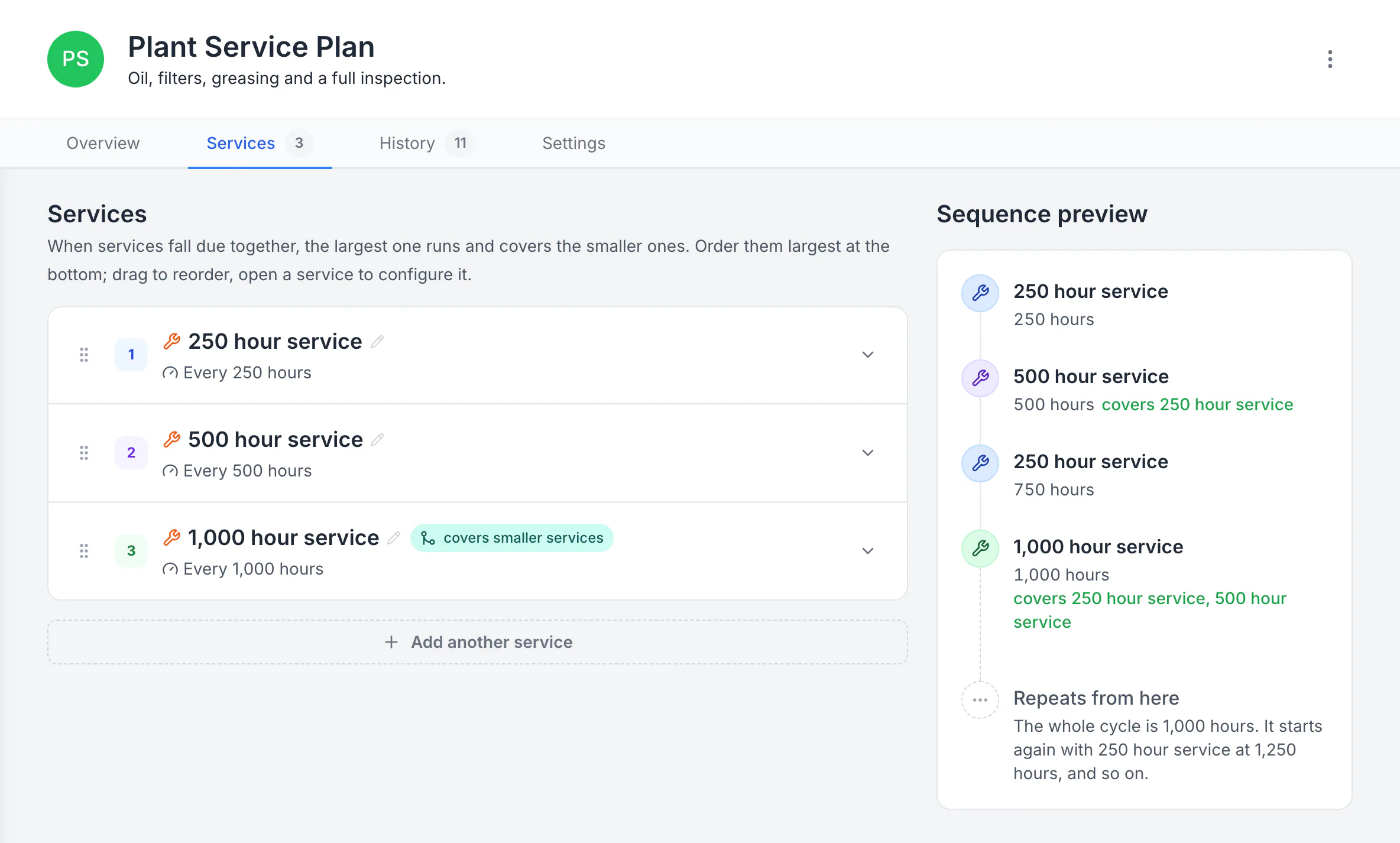
Build a plan with separate service levels
The plan runs a 250-hour service, a 500-hour service that covers it, and a 1,000-hour service that covers both. The sequence preview shows the whole 1,000-hour cycle and where it starts again.
MapTrack app · Demonstration data · Captured
About this screenshot
Demonstration plan. Each level carries its own triggers, procedure, parts and work-order defaults. Follow your equipment manufacturer’s service intervals.
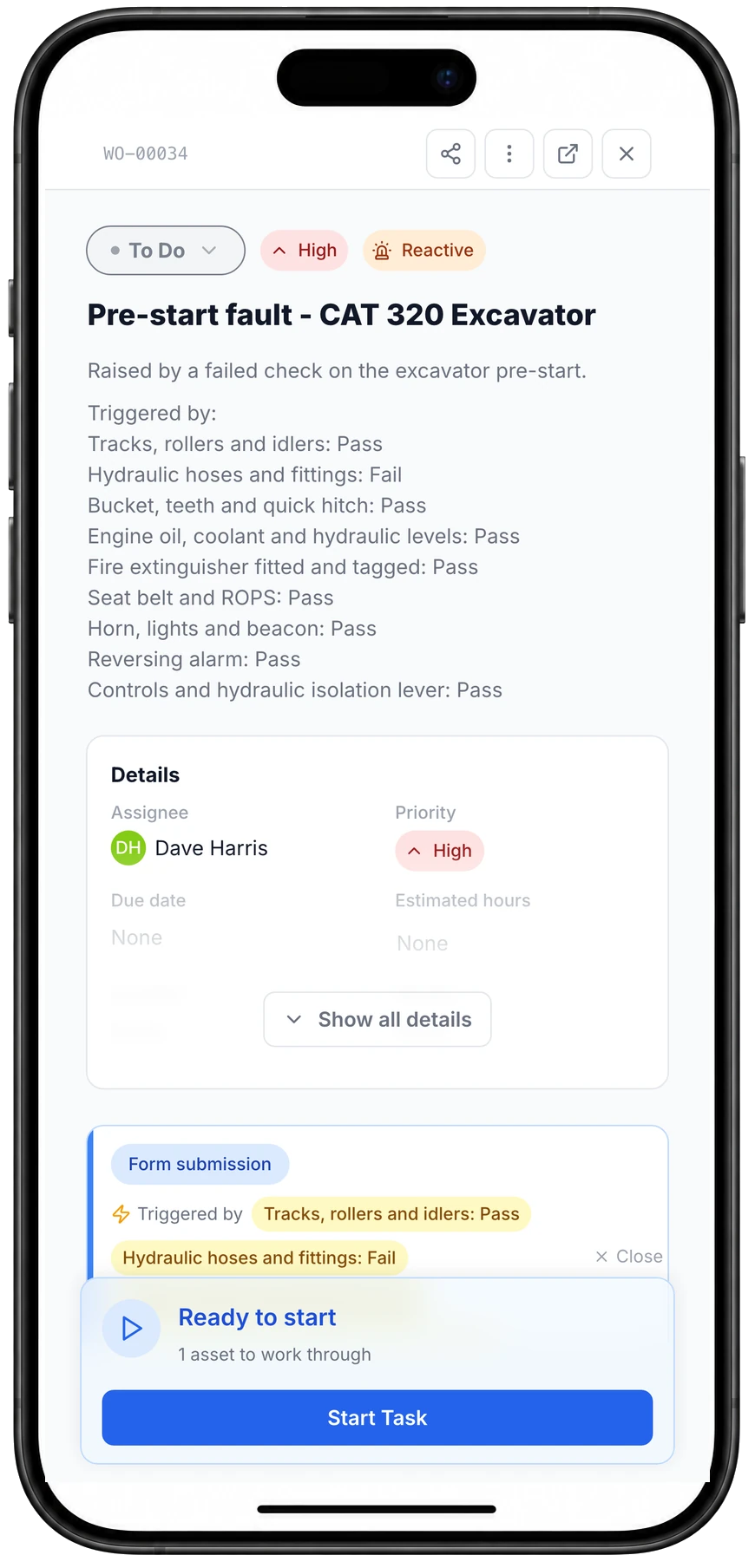
A failed pre-start check raises the job
One failed check on the excavator pre-start, the hydraulic hoses, raised this work order through the rule set on that form: named for the machine, High priority, assigned, with the answers that triggered it.
MapTrack app · Demonstration data · Captured
About this screenshot
Captured at a 430 x 932 phone viewport in a demonstration workspace and shown in a phone frame. The rule was set up on the pre-start form and tested that day with one submission.
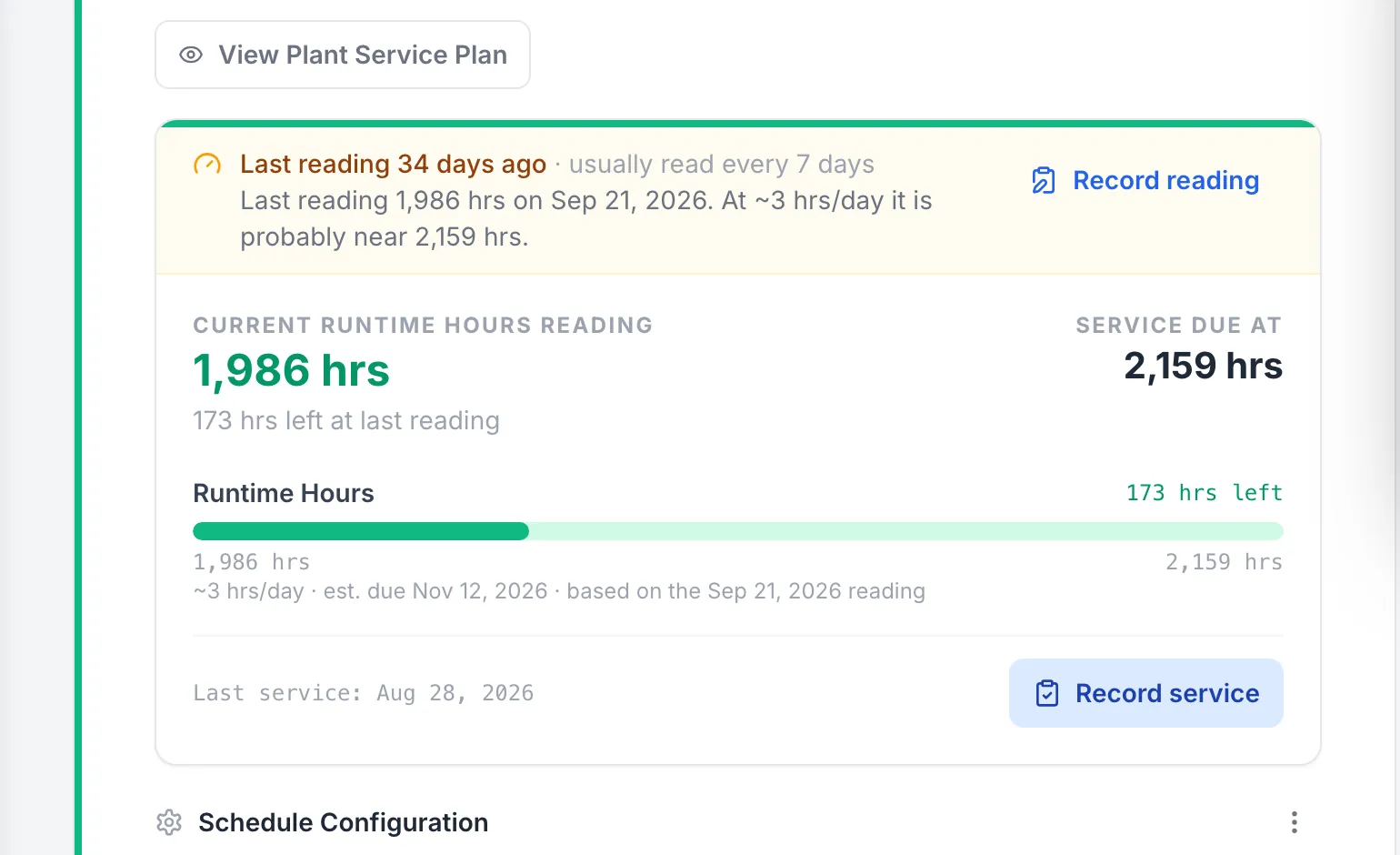
A skid steer’s hours, flagged when a reading goes stale
The track loader’s last hour reading is 34 days old, so the plan flags it and estimates where the hours are now, against the service due at 2,159 hours.
MapTrack app · Demonstration data · Captured
About this screenshot
Demonstration workspace at a 1440 px desktop viewport on Bobcat T595 SS-01’s Maintenance tab, cropped to its Plant Service Plan. The 250 hour interval is the demonstration workspace’s own plan, not a maker’s.
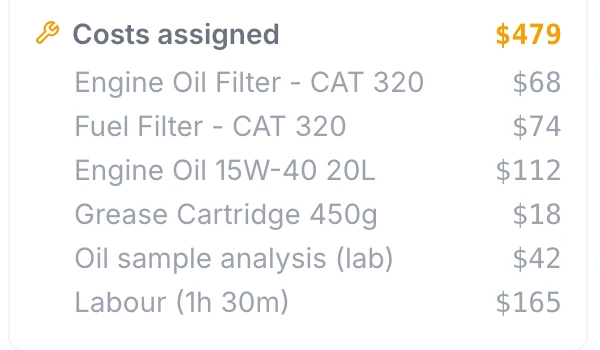
Parts, outside work and labour on the job
Part costs, an outside lab fee and logged labour add up on the work order: $479 for this 250 hour service at the time of capture. The part lines were entered as costs; this capture doesn’t show stock being drawn from the parts store.
MapTrack app · Demonstration data · Captured
About this screenshot
Demonstration workspace at a 1024 px desktop viewport, cropped to the work order’s cost summary. Costs were added with Add Cost, and labour with Log Time at $110 an hour.
How much does construction equipment maintenance software cost?
Construction equipment maintenance software is sold in three ways: per user, per vehicle or asset, or by custom quote with hardware. The model matters more than the headline number, because a contractor wants every operator doing pre-starts and every mechanic logging repairs.
- Per user. MaintainX has a free Basic plan, then Essential at US$20 and Premium at US$65 per user a month, billed annually. Limble’s March 2026 cost guide lists Standard at $28 and Premium+ at $69 per user a month. Per-user pricing suits a small workshop team and grows with every person who needs a login.
- Per vehicle. Fleetio lists Essential at $4 (annual) or $5 (monthly), Professional at $7 and Premium at $10 per vehicle a month, with unlimited users.
- Custom quote. Tenna, HCSS Equipment360 and Samsara price on request. Tenna bundles its hardware into the quote, and Samsara’s hardware depends on the product mix.
- Per asset. MapTrack is priced per asset, not per user, so every operator, mechanic and site manager can use it. Current plans are on the MapTrack pricing page. Trackers, tags and labels are quoted on a setup call.
Whichever model you pick, budget for the way hours reach the system: an operator typing hours on the pre-start needs no hardware, while GPS trackers and OEM telematics connections save the typing and can need extra hardware or a higher plan. Vendor prices above are as listed on each vendor’s own page in the month shown in our sources.
Conclusion: choose maintenance software that fits your equipment
The best construction equipment maintenance software depends on where your machine hours come from, how many of your assets are trucks rather than heavy equipment, and whether you already run a construction ERP. This guide compared 7 platforms on how service falls due, what raises the work order, inspections, offline use and pricing so you can shortlist with confidence.
MapTrack is built for contractors who want service plans on run hours, pre-starts that raise the repair job and every machine, truck and tool in one register. If your asset list lives in a spreadsheet today, you can import it into MapTrack rather than retyping it, and a demo can show the rest on your own equipment.
Frequently asked questions
What is construction equipment maintenance software?
What is the best construction equipment maintenance software?
What is the best heavy equipment maintenance software?
Should heavy equipment be serviced on hours or on dates?
Where do engine hours come from in maintenance software?
Can a failed pre-start inspection create a work order?
Does construction maintenance software work without signal?
Can one system maintain heavy equipment, trucks and small tools?
How much does construction equipment maintenance software cost?
Why does MapTrack publish this comparison guide?
Explore
- Pricing
- Book a demo
- Construction
- Equipment maintenance software
- Service plans on run hours
- Maintenance
- Fleet maintenance software
- Pre-starts and inspections
- Best construction fleet management software
- Best construction equipment tracking software
- Best CMMS for equipment
- Construction equipment GPS tracking
- MapTrack vs Tenna
- Heavy equipment maintenance checklist
- Equipment maintenance log
- Articulated dump truck 250 hour service
- Caterpillar integration
- Free templates
Related software guides
- Best asset tracking software 2026
- Best asset tag suppliers Australia
- Best tool tracking software 2026
- Best CMMS for equipment 2026
- Best equipment management software 2026
- Best plant management software
- Best pre-start inspection software
- Best fleet management software Australia
- Best asset management software 2026
- Best maintenance planning software 2026
- Best asset inspection software 2026
- Best construction equipment tracking software
- Best construction fleet management software
- Best commercial GPS tracking software
- Best fuel management software 2026
- Best safety management software 2026
Compare MapTrack head-to-head
About the author

Co-Founder & GM of Operations
Lachlan leads operations at MapTrack, bringing 10+ years of enterprise technology experience across mining, construction and heavy industry. Before MapTrack, he held senior roles at Workato (integration and automation) and AppDynamics/Cisco (application performance), working directly with ASX-listed organisations to modernise their technology stacks. His deep understanding of field operations and blue-collar workflows shapes how MapTrack solves real problems for asset-intensive teams.
View LinkedIn profile →Service every machine on the hours it runs
Service plans, pre-starts, work orders and repair costs for heavy equipment, trucks and tools in one register. Free trial, no credit card.
4.9 on G2 · 5.0 on Capterra, GetApp & Software Advice
- No credit card required
- Unlimited users