
Free plant on-hire register
Free plant on hire register (PDF). Track hired plant by supplier, on/off-hire dates, rate, hours and cost to date. Download and start today.
Updated 4 June 2026
How to use: download the PDF, print or complete digitally on any device.
- PDF format, ready to print or fill on screen
- Use as-is or customise to suit your operation
- Go digital in MapTrack for photos, reminders and audit trails
Download free PDF template
Use in MapTrack →



Trusted by teams across Australia and New Zealand
We respect your privacy. Unsubscribe anytime.
Or set it up in MapTrack
- Fill it in on a phone, attach photos to any check
- Automatic reports and audit trails
- Upload the PDF and MapTrack drafts the form for you
Free 30-day trial. No credit card. Personal email accepted.
Don't just download it - use it live. Start a free workspace, upload this plant on-hire register and MapTrack drafts it as a form your crew can run from a phone.

Co-Founder & Commercial Director
Key takeaways
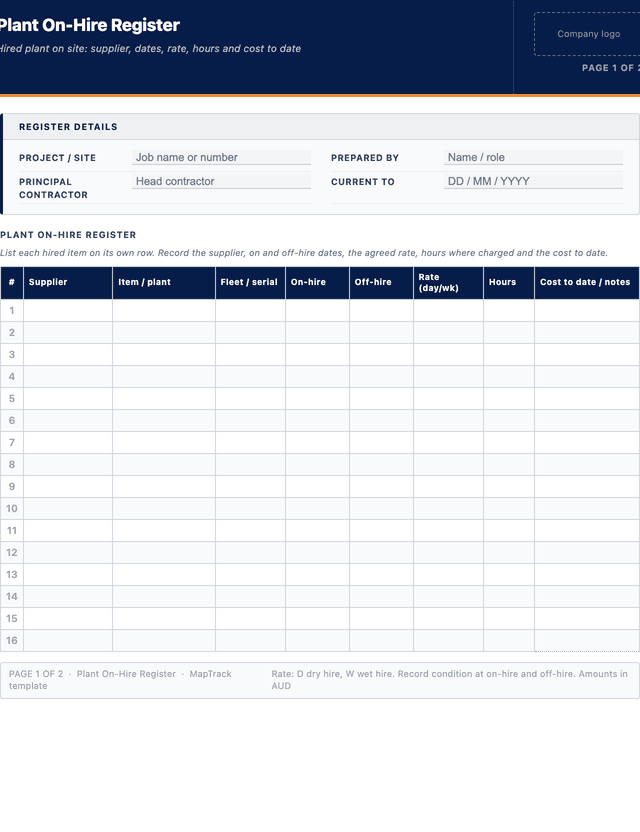
- The MapTrack plant on-hire register has 8 columns and room for 28 entries. Columns: Supplier, Item / plant, Fleet / serial, On-hire, Off-hire, Rate (day/wk), Hours, Cost to date / notes.
- A plant on-hire register lists every hired item on site with its supplier, on-hire date, rate, hours and running cost to date.
- The off-hire date is the most expensive field: idle plant left on hire keeps billing daily until you formally call it off.
- Record condition at on-hire and off-hire so you can contest damage and excess-wear charges from the hire company.
- It is a cost-control register, not a single handover form: one row per hired item, updated through the whole hire period.
Enter your email below to download this plant on-hire register as a ready-to-use PDF.
Used by construction, mining and field service teams











What is a plant on-hire register?
A plant on-hire register is a running record of every item of plant and equipment a project has on hire from external suppliers at any point in time. For each hired item it captures the supplier, the item and any fleet or serial number, the on-hire and off-hire dates, the agreed daily or weekly rate, the docket or order reference, hours where the rate is hours-based, the condition at on-hire, and the cost to date. It is the working list a site manager or hire coordinator uses to know exactly what is on hire, from whom, for how long and at what running cost.
Unlike a one-off equipment hire handover form, which records a single on-hire or off-hire event for one machine, the on-hire register tracks the whole hired fleet across the life of the job so nothing keeps billing after it is finished with. Civil, construction and plant-hire businesses rely on it to call plant off the moment it goes idle, reconcile supplier invoices against actual on-hire days, and defend against damage claims using the recorded condition. In MapTrack, hired plant can sit in the same asset register as owned plant, flagged as on-hire with its off-hire date, so a reminder fires before an idle machine quietly racks up another week. Keeping the register accurate also supports duties under the WHS Regulations 2011 to know and control the plant operating on a workplace, whether it is owned or hired.
Learn more about asset tracking in MapTrack.
Benefits of using this plant on-hire register
- Stop idle-hire bleed: a visible off-hire date against each item prompts you to call plant off the day it goes idle, not weeks later.
- Invoice reconciliation: actual on-hire days and rates on one register let you check supplier invoices line by line and dispute overbilling.
- Damage protection: condition recorded at on-hire and off-hire gives you the evidence to contest excess-wear and damage charges from the hire company.
- Live cost visibility: a cost-to-date column shows accumulated hire spend per item and per supplier before the invoices arrive.
- Total plant on site: the register shows every hired machine alongside owned plant so site supervisors know what is actually operating.
- Cleaner cost coding: linking each hire to an order or docket reference makes allocating hire cost to the right job or cost code straightforward.
- Audit and claim ready: a maintained on-hire register supports progress claims, project cost reports and end-of-job reconciliation with suppliers.
Benefits of digitising forms in MapTrack
When you move your registers from paper to MapTrack, you get:
- Field users can easily scan a QR code to complete a form on mobile. Unlimited users.
- Email the right people when a form is submitted, with an automation you set up.
- File every completed form against the asset, location or person it covers.
- Download any completed form as a PDF, with failed answers listed at the top.
- Fill in forms offline; they upload when the device is back online.
- Build conditional logic (show or hide questions based on answers).
- Take pictures or attach photos. Not possible with a paper-based form.
- Electronic signatures.
- Edit forms later without reprinting.
- Set who can view, fill in or edit forms with user roles.
- Upload a paper form (PDF, Word, Excel or a photo) and MapTrack's AI builds a digital version for you to check.
- Collect SWMS sign-ons as signed forms against each site.
- Track tool and plant movements between job sites as they are scanned, checked out and returned.
- Download completed site forms as PDFs when a principal contractor asks for them.
Book a demo to see how MapTrack handles registers.
Try MapTrack free for 30 days
Full access to every feature. No credit card required. Per-asset pricing so you scale as your fleet grows.
- No credit card required
- 30 days free trial
- Cancel anytime
1-2 days/week saved
“Bloody amazing! We used to spend 1-2 days a week tracking and managing our generators alone.”

Steve McAllister
Asset Coordinator, Saunders International
What to include in a plant on-hire register
This plant on-hire register covers 11 key areas:
- Register details: project or site, prepared by, principal contractor, and the date the register is current to.
- Supplier: the hire company supplying each item, and a contact or account reference.
- Item description: the plant or equipment hired, including make and model where it matters.
- Fleet or serial number: the supplier fleet number or serial that identifies the exact machine on hire.
- Docket or order reference: the hire docket, purchase order or contract number the hire sits against.
- On-hire date: the date the item arrived on site and hire charging started.
- Off-hire date: the date the item was called off hire, or blank while it is still on hire.
- Rate: the agreed daily or weekly rate, and whether it is dry or wet hire.
- Hours: meter or operating hours where the hire is charged or capped on hours.
- Condition: a note on condition at on-hire and at off-hire to support any damage dispute.
- Cost to date: the accumulated hire cost for the item at the register date.
How to use this plant on-hire register
- Record each item the moment it arrives on hire, before it starts work.: When a hired machine is delivered, open a new row and capture the supplier, item, fleet or serial number, docket or order reference, on-hire date and agreed rate. Note the condition on arrival so any pre-existing damage is on record from day one.
- Photograph and note the condition at on-hire against the docket.: Walk the machine with the delivery docket, record existing damage, hours on the meter and any missing items, and keep photographs. This condition baseline is what protects you from being charged for damage that was already there when it arrived.
- Keep the rate, hours and cost-to-date current through the hire period.: Update the register as the hire runs: confirm the rate is what was quoted, record meter hours where the rate depends on them, and keep the cost-to-date column moving so accumulated spend per item is visible before the supplier invoice lands.
- Review the register at least weekly and call off any idle plant.: Each week, check every open row against what is actually being used on site. The moment an item is finished with or sitting idle, call it off hire with the supplier, record the off-hire date and the off-hire reference, and confirm collection so billing stops.
- Record condition at off-hire and resolve any damage before collection.: Before the machine leaves, record its condition at off-hire, compare it with the on-hire baseline and photographs, and raise any disputes with the supplier immediately. Agreeing condition at collection avoids surprise damage charges weeks later on the final invoice.
- Reconcile supplier invoices against the register and close the row.: When the hire invoice arrives, check the charged days, rate and any damage charges against the on-hire and off-hire dates and condition notes on the register. Resolve discrepancies with the supplier, then mark the row reconciled so the project cost is final and defensible.
In MapTrack, you can track construction equipment across every site. Each submission is stored as a timestamped PDF against the asset record.
Get the free templateEnter your email above to download the full plant on-hire register as a PDF.Back to download formHow often should you complete this register?
Update the on-hire register whenever an item goes on or off hire, and review the whole register at least weekly to catch idle plant before it bills another period. On fast-moving civil and construction jobs a daily glance at open rows pays for itself, because a single excavator left on hire over a quiet week can cost thousands. Reconcile the register against supplier invoices every billing cycle. In MapTrack, hired plant flagged with an off-hire date triggers a reminder as the date approaches, so the register prompts you to act rather than waiting for the invoice to reveal the overspend.
Frequently asked questions
Applicable regulatory standards
This template is a starting point. Check the current requirements that apply to your equipment, work and location. The template alone does not establish compliance.
- WHS Regulations 2011, Chapter 5 - Plant and Structures (duties to know and control plant operating on a workplace, owned or hired)
- AS 2550.1-2011 - Cranes, hoists and winches: Safe use (safe-use and handover obligations relevant to hired lifting plant)
- ISO 55001 - Asset Management Systems (systematic control of the assets, including hired plant, an organisation is responsible for)
Plant on-hire register preview
The numbers behind this plant on-hire register
Every figure below is sourced and dated, so you can quote it in a toolbox talk, a budget case or a board paper without having to chase the original report.
Embed this free template on your website
Run an industry blog, trade association site, or training resource? Drop a preview of this free plant on-hire register straight into your page. The snippet is self-contained, needs no scripts, and links readers back to the full free template.
<div style="max-width:480px;font-family:system-ui,-apple-system,'Segoe UI',Roboto,sans-serif;border:1px solid #E5E7EB;border-radius:12px;padding:20px;background:#ffffff;">
  <p style="font-size:12px;font-weight:700;letter-spacing:0.05em;text-transform:uppercase;color:#071D49;margin:0;">Free template</p>
  <p style="font-size:18px;font-weight:700;color:#071D49;margin:6px 0 0;">Plant on-hire register</p>
  <ul style="margin:12px 0 0;padding-left:18px;color:#374151;font-size:14px;line-height:1.6;">
    <li style="margin:4px 0;">Register details: project or site, prepared by, principal contractor, and the date the register is current to.</li>
    <li style="margin:4px 0;">Supplier: the hire company supplying each item, and a contact or account reference.</li>
    <li style="margin:4px 0;">Item description: the plant or equipment hired, including make and model where it matters.</li>
    <li style="margin:4px 0;">Fleet or serial number: the supplier fleet number or serial that identifies the exact machine on hire.</li>
    <li style="margin:4px 0;">Docket or order reference: the hire docket, purchase order or contract number the hire sits against.</li>
    <li style="margin:4px 0;">On-hire date: the date the item arrived on site and hire charging started.</li>
  </ul>
  <p style="font-size:13px;color:#6B7280;margin:14px 0 0;padding-top:12px;border-top:1px solid #E5E7EB;">Free <a href="https://www.maptrack.com/templates/plant-on-hire-register-template" style="color:#071D49;font-weight:600;text-decoration:none;">Plant on-hire register</a> by MapTrack</p>
</div>Free to reuse, including commercially. This template is published under a Creative Commons Attribution 4.0 licence. Copy it, adapt it, put it on your own site or in your own docs. All we ask is that you credit MapTrack with a link back to this page. The snippet above already includes that credit, so if you use it as-is you’re covered.
Cite this template
Writing about this topic? You’re welcome to quote this checklist. Here’s the wording to use so your readers can find the original.
The MapTrack plant on-hire register has 8 columns and room for 28 entries.
- Short attribution
- MapTrack Plant on-hire register, https://www.maptrack.com/templates/plant-on-hire-register-template
- Reference list
- MapTrack. (2026). Plant on-hire register [Checklist template]. Retrieved from https://www.maptrack.com/templates/plant-on-hire-register-template
Free to reuse with credit under a Creative Commons Attribution 4.0 licence. If you’d rather link straight to it, the page is https://www.maptrack.com/templates/plant-on-hire-register-template.
Need to track construction equipment across every site?
Register every asset in MapTrack, attach digital forms, and get a complete history of every inspection, service and compliance record.