
Free daily site report template
Free construction daily report (PDF). Summarise work done, labour and plant hours, materials, delays and the next-day plan for the PM. Download free.
Updated 4 June 2026
Daily Site Report
Record each trade and item of plant on site with hours worked. Hours feed cost tracking and progress claims.
| # | Trade / plant item | No. / qty | Hours worked | Standby-idle / notes |
|---|---|---|---|---|
| e.g. | - | 1 | 3,120 | Annual service booked |
| 1 | ||||
| 2 | ||||
| 3 | ||||
| 4 | ||||
| 5 |
The PDF includes all 12 numbered rows, ready to print or fill on screen.
Site manager
Signature
Print name
Date
Reviewed by
Signature
Print name
Date
How to use: download the PDF, print or complete digitally on any device.
- PDF format, ready to print or fill on screen
- Use as-is or customise to suit your operation
- Go digital in MapTrack for photos, reminders and audit trails
Two ways to use it
Use in MapTrack →Use it digitally instead
Unlimited usersUpload this PDF and MapTrack drafts the form for you.




- Scan the asset’s QR tag with any phone
- Submitted forms can trigger alerts
- Photos on fails, audit-ready records
- Export responses, PDF reports with your logo
Free trial. No credit card needed.
Trusted by teams across Australia and New Zealand
We respect your privacy. Unsubscribe anytime.
These templates are free general guides provided as-is. They do not constitute legal, safety or compliance advice. You are responsible for ensuring any form meets your specific workplace obligations, industry standards and applicable regulations.
Don't just download it - use it live. Start a free workspace, upload this daily site report template and MapTrack drafts it as a form your crew can run from a phone.

Co-Founder & Commercial Director
Key takeaways
- The MapTrack daily site report template has 4 columns and room for 12 entries. Columns: Trade / plant item, No. / qty, Hours worked, Standby-idle / notes.
- A daily site report summarises a day of work for the project manager or client: work completed, labour and plant hours, materials used, delays and the next-day plan.
- It is the progress report sent upward, distinct from the site diary, which is the legal contemporaneous log kept for the record.
- Labour and plant hours on the report feed cost tracking, productivity review and progress claims, so record them by trade and by item.
- Keep reports consistent and on time: a daily report that arrives every afternoon builds trust and makes a project easy to track.
Enter your email below to download this daily site report template as a ready-to-use PDF.
Used by construction, mining and field service teams











What is a daily site report template?
A daily site report template is a structured summary of one day of construction work, prepared by the site manager or supervisor and sent up to the project manager, head contractor or client. It records the work completed that day by area or activity, the labour on site and hours worked by trade, the plant and equipment hours, the materials delivered or used, any delays and issues, photos of progress, and the plan for the following day. Where a site diary is a full factual log kept for the record, the daily report is a focused progress communication aimed at the people who need to know how the job is tracking.
Daily site reports are used by head contractors, project managers, superintendents and clients to monitor progress, hours and costs across building and civil projects without being on site. The labour and plant hours captured each day feed cost tracking, productivity analysis and progress claims, while the next-day plan keeps the wider team aligned. In Australia these reports support progress claims made under state-based Security of Payment legislation and the records expected under contracts such as AS 4000-1997. In MapTrack, plant hours and asset utilisation can be pulled from the equipment on site, so the report reflects real machine hours rather than estimates written up at the end of the day.
Learn more about asset tracking in MapTrack.
Benefits of using this daily site report template
- Clear progress visibility: a daily summary keeps the PM, head contractor and client informed without needing to be on site.
- Cost and productivity data: labour and plant hours recorded daily feed cost tracking, productivity review and progress claims.
- Early issue escalation: flagging delays and issues each day lets the project team act before they become programme problems.
- Forward planning: a next-day plan on every report keeps trades, deliveries and plant aligned with the programme.
- Progress claim support: a consistent daily record of work and resources backs up the monthly progress claim and reduces disputes.
- Stakeholder trust: a report that arrives reliably every afternoon builds confidence that the site is being run well.
- Photo evidence: progress photos attached daily give a dated visual record of work completed and conditions on site.
Benefits of digitising forms in MapTrack
When you move your reports from paper to MapTrack, you get:
- Field users can easily scan a QR code to complete a form on mobile. Unlimited users.
- Email the right people when a form is submitted, with an automation you set up.
- File every completed form against the asset, location or person it covers.
- Download any completed form as a PDF, with failed answers listed at the top.
- Fill in forms offline; they upload when the device is back online.
- Build conditional logic (show or hide questions based on answers).
- Take pictures or attach photos. Not possible with a paper-based form.
- Electronic signatures.
- Edit forms later without reprinting.
- Set who can view, fill in or edit forms with user roles.
- Upload a paper form (PDF, Word, Excel or a photo) and MapTrack's AI builds a digital version for you to check.
- Collect SWMS sign-ons as signed forms against each site.
- Track tool and plant movements between job sites as they are scanned, checked out and returned.
- Download completed site forms as PDFs when a principal contractor asks for them.
Book a demo to see how MapTrack handles reports.
Try MapTrack free for 30 days
Full access to every feature. No credit card required. Per-asset pricing so you scale as your fleet grows.
- No credit card required
- 30 days free trial
- Cancel anytime
1-2 days/week saved
“Bloody amazing! We used to spend 1-2 days a week tracking and managing our generators alone.”

Steve McAllister
Asset Coordinator, Saunders International
What to include in a daily site report template
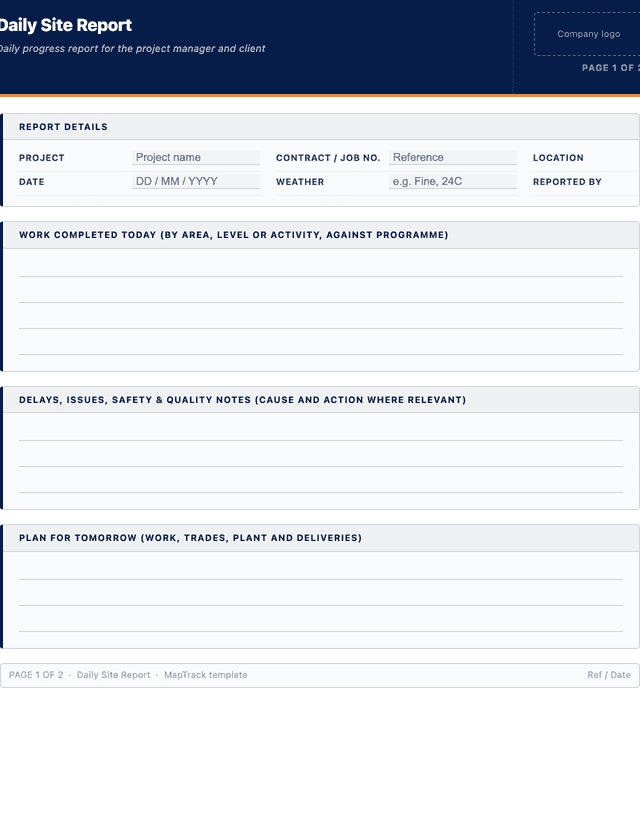
This daily site report template covers 10 key areas:
- Header: project name, contract or job number, location, date, weather and the person reporting.
- Work completed today: a summary of work done by area, level or activity against the programme.
- Labour on site: each trade or company present with worker numbers and hours worked.
- Plant and equipment hours: each item of plant on site with hours worked, standby or idle time.
- Materials delivered or used: key materials received or consumed, with quantities and supplier or docket reference.
- Delays and issues: any delay, stoppage, weather impact or issue affecting progress, with the cause noted.
- Safety and quality notes: toolbox talks held, inspections, hold points, defects or quality matters arising.
- Photos: references to progress photos taken on the day for the record.
- Next-day plan: the work, trades, plant and deliveries planned for the following day.
- Sign-off: name, signature and date of the site manager or supervisor preparing the report.
How to use this daily site report template
- Fill in the header and conditions at the start of the report.: Record the project, job number, date, weather and who is reporting. Setting the date and conditions first frames the day and lets anyone reading the report quickly link any weather-related impact to the progress recorded below it.
- Summarise the work completed against the programme.: Describe what was achieved that day by area, level or activity, and relate it to the programme so the reader can see whether the job is on track. Keep it factual and specific rather than a general statement that work continued on site.
- Record labour and plant hours by trade and by item.: Capture each trade and crew on site with worker numbers and hours, and each item of plant with working, standby and idle hours. These figures feed cost tracking, productivity review and the progress claim, so record them accurately rather than rounding from memory.
- Note materials, delays, issues and safety or quality matters.: List materials delivered or used with quantities, record any delay or issue with its cause, and note toolbox talks, inspections, hold points or defects. This gives the project team the context behind the day's progress and flags anything that needs action.
- Attach progress photos and set out the next-day plan.: Reference the progress photos taken on the day and write a clear next-day plan covering the work, trades, plant and deliveries expected. The plan keeps the wider team aligned and lets the PM arrange resources and approvals ahead of time.
- Sign, date and send the report the same day.: Have the site manager sign and date the report and send it to the project manager or client the same afternoon while the detail is current. In MapTrack, plant hours can be pulled from the equipment on site so the report reflects real machine hours rather than estimates.
In MapTrack, you can track construction equipment across every site. Each submission is stored as a timestamped PDF against the asset record.
Get the free templateEnter your email above to download the full daily site report template as a PDF.Back to download formHow often should you complete this report?
Complete and send a daily site report at the end of each working day, ideally the same afternoon while detail is fresh, so the project manager and client always have a current view of progress. Consistency matters more than length: a short report delivered reliably every day is more useful than a detailed one that arrives sporadically. On larger projects the daily report feeds weekly and monthly progress summaries and the monthly progress claim. In MapTrack, plant hours and utilisation can be drawn from the equipment on site, so reporting stays accurate without manual hour estimates.
Frequently asked questions
Applicable regulatory standards
This template is a starting point. Check the current requirements that apply to your equipment, work and location. The template alone does not establish compliance.
- AS 4000-1997 - General Conditions of Contract (progress records and resources supporting claims)
- Security of Payment legislation (state-based) (records supporting progress payment claims)
- WHS Act 2011, Section 19 - Primary duty of care (recording safety matters and inspections on site)
Check the current source
Daily site report template preview
The numbers behind this daily site report template
Every figure below is sourced and dated, so you can quote it in a toolbox talk, a budget case or a board paper without having to chase the original report.
Embed this free template on your website
Run an industry blog, trade association site, or training resource? Drop a preview of this free daily site report template straight into your page. The snippet is self-contained, needs no scripts, and links readers back to the full free template.
<div style="max-width:480px;font-family:system-ui,-apple-system,'Segoe UI',Roboto,sans-serif;border:1px solid #E5E7EB;border-radius:12px;padding:20px;background:#ffffff;">
  <p style="font-size:12px;font-weight:700;letter-spacing:0.05em;text-transform:uppercase;color:#071D49;margin:0;">Free template</p>
  <p style="font-size:18px;font-weight:700;color:#071D49;margin:6px 0 0;">Daily site report template</p>
  <ul style="margin:12px 0 0;padding-left:18px;color:#374151;font-size:14px;line-height:1.6;">
    <li style="margin:4px 0;">Header: project name, contract or job number, location, date, weather and the person reporting.</li>
    <li style="margin:4px 0;">Work completed today: a summary of work done by area, level or activity against the programme.</li>
    <li style="margin:4px 0;">Labour on site: each trade or company present with worker numbers and hours worked.</li>
    <li style="margin:4px 0;">Plant and equipment hours: each item of plant on site with hours worked, standby or idle time.</li>
    <li style="margin:4px 0;">Materials delivered or used: key materials received or consumed, with quantities and supplier or docket reference.</li>
    <li style="margin:4px 0;">Delays and issues: any delay, stoppage, weather impact or issue affecting progress, with the cause noted.</li>
  </ul>
  <p style="font-size:13px;color:#6B7280;margin:14px 0 0;padding-top:12px;border-top:1px solid #E5E7EB;">Free <a href="https://www.maptrack.com/templates/daily-site-report-template" style="color:#071D49;font-weight:600;text-decoration:none;">Daily site report template</a> by MapTrack</p>
</div>Free to reuse, including commercially. This template is published under a Creative Commons Attribution 4.0 licence. Copy it, adapt it, put it on your own site or in your own docs. All we ask is that you credit MapTrack with a link back to this page. The snippet above already includes that credit, so if you use it as-is you’re covered.
Cite this template
Writing about this topic? You’re welcome to quote this checklist. Here’s the wording to use so your readers can find the original.
The MapTrack daily site report template has 4 columns and room for 12 entries.
- Short attribution
- MapTrack Daily site report template, https://www.maptrack.com/templates/daily-site-report-template
- Reference list
- MapTrack. (2026). Daily site report template [Checklist template]. Retrieved from https://www.maptrack.com/templates/daily-site-report-template
Free to reuse with credit under a Creative Commons Attribution 4.0 licence. If you’d rather link straight to it, the page is https://www.maptrack.com/templates/daily-site-report-template.
Need to track construction equipment across every site?
Register every asset in MapTrack, attach digital forms, and get a complete history of every inspection, service and compliance record.