
Free delivery docket template
Free delivery docket template (PDF). Record materials received: supplier, order ref, quantities, condition, discrepancies and sign-off. Download free.
Updated 4 June 2026
How to use: download the PDF, print or complete digitally on any device.
- PDF format, ready to print or fill on screen
- Use as-is or customise to suit your operation
- Go digital in MapTrack for photos, reminders and audit trails
Download free PDF template
Use in MapTrack →



Trusted by teams across Australia and New Zealand
We respect your privacy. Unsubscribe anytime.
Or set it up in MapTrack
- Fill it in on a phone, attach photos to any check
- Automatic reports and audit trails
- Upload the PDF and MapTrack drafts the form for you
Free 30-day trial. No credit card. Personal email accepted.
Don't just download it - use it live. Start a free workspace, upload this delivery docket template and MapTrack drafts it as a form your crew can run from a phone.

Co-Founder & Commercial Director
Key takeaways
- The MapTrack delivery docket template has 5 columns and room for 14 entries. Columns: Item / description, Unit, Qty ordered, Qty received, Condition / notes.
- A delivery docket records what materials actually arrived on site against the order, so you only pay for what you received.
- Recording condition and shortages at the gate is what lets you reject damaged goods and claim against the supplier later.
- Always tie the docket to a purchase order or order reference so deliveries reconcile cleanly against the invoice.
- The receiver sign-off, with name and time, is the proof of delivery the supplier and your accounts team both rely on.
Enter your email below to download this delivery docket template as a ready-to-use PDF.
Used by construction, mining and field service teams











What is a delivery docket template?
A delivery docket is the record of materials and goods received on site, checked against what was ordered, at the moment they arrive. For each delivery it captures the supplier and carrier, the date and time received, the purchase order or order reference, the items and quantities delivered, the quantity actually accepted, the condition on arrival, any shortages or damage, and the sign-off of the person who received the goods. It is the document that turns a truck pulling up at the gate into an auditable record of exactly what came onto the job and in what state.
Delivery dockets matter because they sit at the join between ordering, paying and using materials. Without one, sites accept and pay for goods that were short-delivered or damaged, and have no record to dispute the supplier invoice or claim against the carrier. Construction, civil and logistics operations use the docket to reconcile deliveries against purchase orders, flag discrepancies while the driver is still on site, and prove what was received and when. In MapTrack, received items and their delivery documents can be attached to the project or asset record, so the proof of delivery, condition photos and any discrepancy note stay with the material rather than getting lost in a ute. Keeping accurate received-goods records also supports the inventory and cost-tracking obligations behind progress claims and end-of-job reconciliation.
Learn more about asset tracking in MapTrack.
Benefits of using this delivery docket template
- Pay only for what arrived: checking delivered quantity against the order at the gate stops you paying for short or missing items.
- Discrepancy evidence: recording shortages and damage on arrival gives you the basis to reject goods and claim against the supplier or carrier.
- Invoice reconciliation: tying each docket to a purchase order lets accounts match the delivery to the invoice and query anything that does not agree.
- Condition record: noting condition on arrival protects you from accepting damaged materials that fail or get rejected later in the works.
- Clear accountability: a named, timed receiver sign-off creates proof of delivery that both the supplier and your accounts team can rely on.
- Site logistics control: a docket per delivery builds a record of what landed when, useful for sequencing trades and chasing late or partial deliveries.
- Cost coding: an order reference and cost code on the docket make allocating material cost to the right job straightforward at claim time.
Benefits of digitising forms in MapTrack
When you move your forms from paper to MapTrack, you get:
- Field users can easily scan a QR code to complete a form on mobile. Unlimited users.
- Email the right people when a form is submitted, with an automation you set up.
- File every completed form against the asset, location or person it covers.
- Download any completed form as a PDF, with failed answers listed at the top.
- Fill in forms offline; they upload when the device is back online.
- Build conditional logic (show or hide questions based on answers).
- Take pictures or attach photos. Not possible with a paper-based form.
- Electronic signatures.
- Edit forms later without reprinting.
- Set who can view, fill in or edit forms with user roles.
- Upload a paper form (PDF, Word, Excel or a photo) and MapTrack's AI builds a digital version for you to check.
- Collect SWMS sign-ons as signed forms against each site.
- Track tool and plant movements between job sites as they are scanned, checked out and returned.
- Download completed site forms as PDFs when a principal contractor asks for them.
Book a demo to see how MapTrack handles forms.
Try MapTrack free for 30 days
Full access to every feature. No credit card required. Per-asset pricing so you scale as your fleet grows.
- No credit card required
- 30 days free trial
- Cancel anytime
1-2 days/week saved
“Bloody amazing! We used to spend 1-2 days a week tracking and managing our generators alone.”

Steve McAllister
Asset Coordinator, Saunders International
What to include in a delivery docket template
This delivery docket template covers 10 key areas:
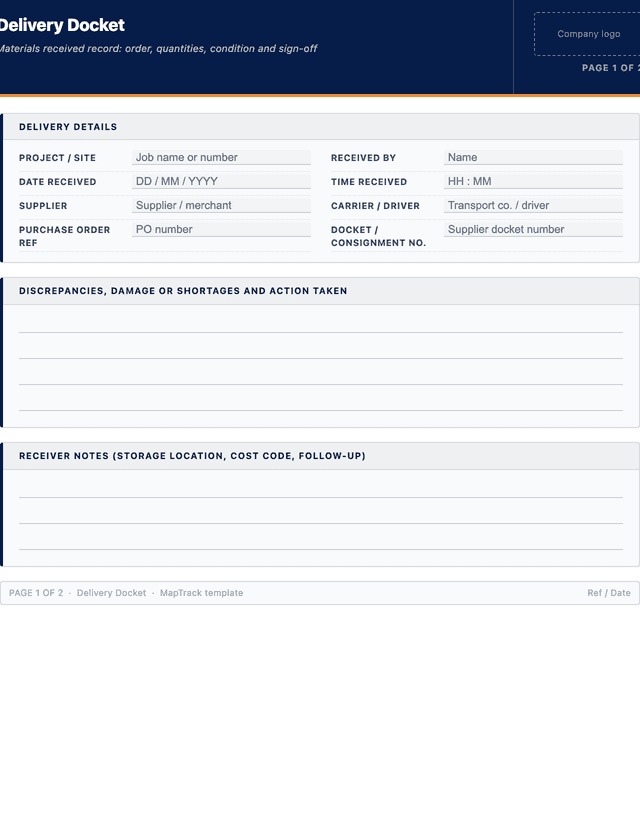
- Delivery details: project or site, receiving location, date and time received, and the person receiving the goods.
- Supplier: the supplier or merchant name and account or contact reference.
- Carrier and vehicle: the transport company, driver and vehicle or registration where relevant.
- Purchase order or order reference: the order number the delivery is being received against.
- Docket or consignment number: the supplier delivery docket or consignment note number.
- Items delivered: a line per item with description, unit and quantity ordered.
- Quantity received: the quantity actually delivered and accepted for each line.
- Condition on arrival: a condition note per line or for the delivery as a whole.
- Discrepancies: shortages, over-deliveries, damage or wrong items, with the action taken.
- Receiver sign-off: name, signature and time of the person accepting the delivery, plus driver acknowledgement where taken.
How to use this delivery docket template
- Match the delivery to the order before you start unloading.: When the truck arrives, find the purchase order or order reference the delivery is against and confirm the supplier docket matches it. Checking you are receiving the right order against the right job first avoids accepting materials that belong to another site or were never ordered.
- Count and check each line against the order while the driver waits.: Work through the docket line by line, counting the quantity actually delivered against the quantity ordered, and record the accepted quantity for each item. Do the count before the driver leaves so any shortage or over-delivery can be acknowledged on the spot rather than disputed later.
- Inspect condition and record any damage or wrong items.: Inspect the materials as they come off the truck, note the condition on arrival and record any damage, wrong items or broken packaging against the relevant line. Photograph damaged goods so the condition is evidenced before they are moved or stored on site.
- Log discrepancies and decide accept, reject or partial.: For each shortage, over-delivery or damaged item, record the discrepancy and the action taken: accept, reject and return, or accept short pending a credit. Note what was agreed with the driver so the supplier follow-up matches what happened at the gate.
- Get the receiver and driver sign-off with name and time.: Have the person receiving the goods sign and print their name with the time received, and take the driver acknowledgement where the carrier requires it. A named, timed sign-off is the proof of delivery your accounts team and the supplier both rely on if the delivery is later queried.
- File the docket against the order and pass discrepancies on.: Store the completed docket with its purchase order so accounts can reconcile it against the invoice, and pass any discrepancy straight to whoever raises supplier claims. A docket that sits in a vehicle is worthless at claim time, so capture or photograph it the same day.
In MapTrack, you can track construction equipment across every site. Each submission is stored as a timestamped PDF against the asset record.
Get the free templateEnter your email above to download the full delivery docket template as a PDF.Back to download formHow often should you complete this form?
Complete a delivery docket for every delivery received on site, no exceptions, because the goods you do not check are the ones you end up paying for in full regardless of what arrived. On a busy job that can mean dozens of dockets a day across multiple suppliers, so make receiving a defined task rather than something squeezed in around other work. Reconcile dockets against purchase orders and supplier invoices each accounting cycle. In MapTrack, a received delivery and its docket can be captured on a phone at the gate and attached to the project record, so the proof of delivery is logged the moment the goods land.
Frequently asked questions
Applicable regulatory standards
This template is a starting point. Check the current requirements that apply to your equipment, work and location. The template alone does not establish compliance.
- Sale of Goods Act (relevant state Act) - acceptance, rejection and the right to reject non-conforming goods on delivery
- ISO 9001 - Quality management systems (control of externally provided goods and verification of purchased product on receipt)
- WHS Regulations 2011 - duties relating to the safe handling and storage of materials and substances received on a workplace
Delivery docket template preview
The numbers behind this delivery docket template
Every figure below is sourced and dated, so you can quote it in a toolbox talk, a budget case or a board paper without having to chase the original report.
Embed this free template on your website
Run an industry blog, trade association site, or training resource? Drop a preview of this free delivery docket template straight into your page. The snippet is self-contained, needs no scripts, and links readers back to the full free template.
<div style="max-width:480px;font-family:system-ui,-apple-system,'Segoe UI',Roboto,sans-serif;border:1px solid #E5E7EB;border-radius:12px;padding:20px;background:#ffffff;">
  <p style="font-size:12px;font-weight:700;letter-spacing:0.05em;text-transform:uppercase;color:#071D49;margin:0;">Free template</p>
  <p style="font-size:18px;font-weight:700;color:#071D49;margin:6px 0 0;">Delivery docket template</p>
  <ul style="margin:12px 0 0;padding-left:18px;color:#374151;font-size:14px;line-height:1.6;">
    <li style="margin:4px 0;">Delivery details: project or site, receiving location, date and time received, and the person receiving the goods.</li>
    <li style="margin:4px 0;">Supplier: the supplier or merchant name and account or contact reference.</li>
    <li style="margin:4px 0;">Carrier and vehicle: the transport company, driver and vehicle or registration where relevant.</li>
    <li style="margin:4px 0;">Purchase order or order reference: the order number the delivery is being received against.</li>
    <li style="margin:4px 0;">Docket or consignment number: the supplier delivery docket or consignment note number.</li>
    <li style="margin:4px 0;">Items delivered: a line per item with description, unit and quantity ordered.</li>
  </ul>
  <p style="font-size:13px;color:#6B7280;margin:14px 0 0;padding-top:12px;border-top:1px solid #E5E7EB;">Free <a href="https://www.maptrack.com/templates/delivery-docket-template" style="color:#071D49;font-weight:600;text-decoration:none;">Delivery docket template</a> by MapTrack</p>
</div>Free to reuse, including commercially. This template is published under a Creative Commons Attribution 4.0 licence. Copy it, adapt it, put it on your own site or in your own docs. All we ask is that you credit MapTrack with a link back to this page. The snippet above already includes that credit, so if you use it as-is you’re covered.
Cite this template
Writing about this topic? You’re welcome to quote this checklist. Here’s the wording to use so your readers can find the original.
The MapTrack delivery docket template has 5 columns and room for 14 entries.
- Short attribution
- MapTrack Delivery docket template, https://www.maptrack.com/templates/delivery-docket-template
- Reference list
- MapTrack. (2026). Delivery docket template [Checklist template]. Retrieved from https://www.maptrack.com/templates/delivery-docket-template
Free to reuse with credit under a Creative Commons Attribution 4.0 licence. If you’d rather link straight to it, the page is https://www.maptrack.com/templates/delivery-docket-template.
Need to track construction equipment across every site?
Register every asset in MapTrack, attach digital forms, and get a complete history of every inspection, service and compliance record.