
Free risk assessment template
Free risk assessment template and form (PDF). 5x5 risk matrix, hazard identification, controls and sign-off. Download, print to A4 or go digital.
Updated 2 Oct 2026
Risk Assessment
Workplace hazard identification and risk control record
Manual handling and ergonomics
Slips, trips and falls
Plant, machinery and equipment
Electrical
Hazardous substances and fire
Physical environment
People, biological and psychosocial
Assessor sign-off
Print name
Signature
Date
Reviewer / manager sign-off
Print name
Signature
Date
How to use: download the PDF, print or complete digitally on any device.
- PDF format, ready to print or fill on screen
- Use as-is or customise to suit your operation
- Go digital in MapTrack for photos, reminders and audit trails
Download formats
- Risk assessment template PDF
PDF: Print-ready risk assessment form with 22 common hazards, a 5x5 likelihood and consequence rating, existing and additional controls, owners and sign-off.
- Printable risk assessment form
HTML: Browser-friendly blank form you can print, save as PDF or use to review the required fields.
Two ways to use it
Use in MapTrack →Use it digitally instead
Unlimited usersThese same 22 checks, already built.




- Scan the asset’s QR tag with any phone
- Submitted forms can trigger alerts
- Photos on fails, audit-ready records
- Export responses, PDF reports with your logo
Free trial. No credit card needed.
Trusted by teams across Australia and New Zealand
We respect your privacy. Unsubscribe anytime.
These templates are free general guides provided as-is. They do not constitute legal, safety or compliance advice. You are responsible for ensuring any form meets your specific workplace obligations, industry standards and applicable regulations.
Don't just download it - use it live. Start a free workspace with this risk assessment template already built, so your crew can run it from a phone.

Co-Founder & Commercial Director
Key takeaways
- The MapTrack risk assessment template contains 22 checks across 7 sections. Sections covered: Manual handling and ergonomics, Slips, trips and falls, Plant, machinery and equipment, Electrical, Hazardous substances and fire, Physical environment, People, biological and psychosocial.
Enter your email below to download this risk assessment template as a ready-to-use PDF.
Used by construction, mining and field service teams











What is a risk assessment template?
A risk assessment is a structured process for identifying hazards associated with a workplace task or activity, evaluating the level of risk, and determining what control measures are needed to eliminate or minimise harm. Under the model WHS Regulations, a duty holder must identify reasonably foreseeable hazards (regulation 34) and eliminate the risks or, if that isn't reasonably practicable, minimise them using the hierarchy of controls (regulations 35 and 36). Safe Work Australia's code says to do a formal risk assessment when you're unsure how a hazard could cause harm, when several hazards could interact, or when a change could affect your controls, and that you can skip it when you already know the risk and how to control it. A documented risk assessment provides the evidence that this process has been followed and forms a key part of any safety management system.
This template uses a standard 5x5 likelihood-by-consequence risk matrix to produce a quantified risk rating for each hazard. The matrix approach provides an objective, repeatable scoring method that helps teams prioritise the most significant risks and allocate resources accordingly. The form includes space for both existing controls and additional controls, along with responsible persons and review dates, making it suitable for site-based teams, project managers and WHS officers across any industry.
Risk assessments are not a one-off exercise. Under WHS Regulations 2011, Part 3.1 (regulation 38), the PCBU must review and, as necessary, revise risk controls whenever they are found to be inadequate, before a change at the workplace that is likely to create a new or different risk, when a new hazard or risk is identified, when the results of consultation indicate a review is needed, or when a health and safety representative requests a review. Failing to manage risks, or to review controls when regulation 38 requires it, can expose a PCBU to improvement notices, prohibition notices and, in the most serious cases, prosecution under the WHS Act. Beyond compliance, a thorough risk assessment protects workers from foreseeable harm, reduces lost-time injuries and supports informed decision-making about resource allocation for safety controls.
Learn more about compliance and inspections in MapTrack.
Benefits of using this risk assessment template
- Legal compliance: documented risk assessments demonstrate compliance with WHS Act obligations and can be presented to regulators during audits or investigations.
- Hazard identification: a structured process ensures hazards are systematically identified rather than overlooked or assumed.
- Control effectiveness: assessing risk before and after controls are applied confirms that measures are actually reducing the level of risk.
- Audit trail: completed risk assessments create a documented record of what was considered, who was involved and what decisions were made.
- Team awareness: involving workers in the risk assessment process increases awareness of hazards and promotes a shared understanding of how work should be done safely.
- Insurance and tender requirements: many insurers and principal contractors require documented risk assessments as a condition of cover or contract.
Benefits of digitising forms in MapTrack
When you move your checklists from paper to MapTrack, you get:
- Field users can easily scan a QR code to complete a form on mobile. Unlimited users.
- Email the right people when a form is submitted, with an automation you set up.
- File every completed form against the asset, location or person it covers.
- Download any completed form as a PDF, with failed answers listed at the top.
- Fill in forms offline; they upload when the device is back online.
- Build conditional logic (show or hide questions based on answers).
- Take pictures or attach photos. Not possible with a paper-based form.
- Electronic signatures.
- Edit forms later without reprinting.
- Set who can view, fill in or edit forms with user roles.
- Upload a paper form (PDF, Word, Excel or a photo) and MapTrack's AI builds a digital version for you to check.
- Email safety managers when a hazard report is submitted, with an automation you set up.
- Keep every hazard and incident report against the site it came from, with photos.
- Turn a hazard report into a corrective-action work order with its own review step.
Book a demo to see how MapTrack handles checklists.
Try MapTrack free for 30 days
Full access to every feature. No credit card required. Per-asset pricing so you scale as your fleet grows.
- No credit card required
- 30 days free trial
- Cancel anytime
1-2 days/week saved
“Bloody amazing! We used to spend 1-2 days a week tracking and managing our generators alone.”

Steve McAllister
Asset Coordinator, Saunders International
What to include in a risk assessment template
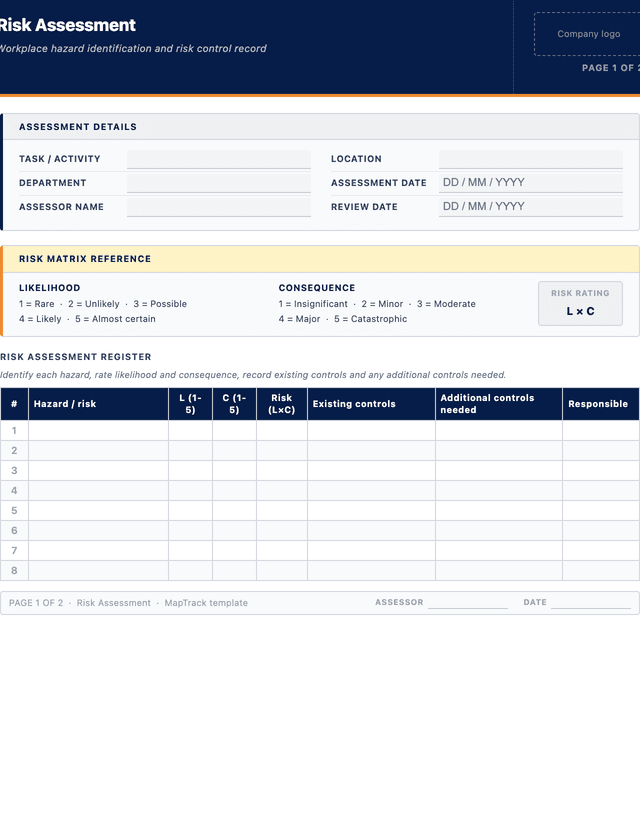
This risk assessment template covers 8 key areas:
- Task or activity: a clear description of the work being assessed, including location and department.
- Hazards: each hazard or risk identified for the task, described in plain language.
- Risk matrix: a likelihood (1-5) by consequence (1-5) scoring system to calculate a risk rating for each hazard.
- Existing controls: the control measures already in place to manage each hazard.
- Additional controls: any further actions needed to reduce the risk to an acceptable level.
- Responsible person: who is accountable for implementing each additional control measure.
- Review date: when the risk assessment will be reviewed or reassessed.
- Sign-off: signatures from the assessor and reviewing manager to confirm the assessment is complete and approved.
How to use this risk assessment template
- Identify the task or activity to be assessed: Record the task name, location, department and date. Describe the activity clearly so anyone reading the assessment understands what is being evaluated. Involve the workers who perform the task in this step, as consultation is required under Australian WHS regulations and workers often identify hazards that supervisors may overlook from a distance.
- List all hazards associated with the task: For each step of the task, identify what could cause harm. Consider the work environment, equipment, materials, weather, traffic, other trades working nearby and the physical demands on workers. Write each hazard in plain language, for example "worker struck by reversing forklift in loading bay" rather than just "forklift". The clearer the hazard description, the more effective the subsequent risk rating and control selection will be.
- Rate each hazard using the risk matrix: Assign a likelihood score (1 to 5, from rare to almost certain) and a consequence score (1 to 5, from insignificant to catastrophic) for each hazard. Multiply or cross-reference these scores on the risk matrix to produce a risk rating. Rate the inherent risk first (without considering controls) so you understand the full exposure, then re-rate the residual risk after existing and additional controls are factored in.
- Document existing controls and determine additional controls: Record the controls already in place, such as guarding, procedures, training or PPE. Evaluate whether these controls adequately reduce the risk. If the residual risk is still medium, high or critical, define additional controls following the hierarchy: elimination first, then substitution, engineering, administrative and PPE last. Assign a responsible person and due date for each additional control measure.
- Sign off and communicate the assessment: The assessor and reviewing manager both sign and date the form. Share the completed assessment with all workers involved in the task and ensure they understand the hazards and controls. Set a review date, typically every 6 to 12 months, or sooner if conditions change, an incident occurs or new information becomes available. File the assessment in your safety management records.
In MapTrack, you can digitise safety inspections and compliance forms. Each submission is stored as a timestamped PDF against the asset record.
Get the free templateEnter your email above to download the full risk assessment template as a PDF.Back to download formHow often should you complete this checklist?
Risk assessments should be completed before any new task, activity or project that involves potential hazards. For routine tasks, a comprehensive risk assessment is typically reviewed every 6 to 12 months to confirm that existing controls remain effective and that no new hazards have emerged. High-risk activities such as working at heights, confined space entry, hot work and excavation may require a task-specific assessment before each instance of the work.
Under WHS Regulations 2011, Part 3.1 (regulation 38), the PCBU must also review risk controls when they are found to be inadequate (a notifiable incident caused by the risk is one sign), before a change at the workplace that is likely to create a new or different risk, when a new hazard or risk is identified, when the results of consultation with workers indicate a review is needed, or when a health and safety representative requests one. Reviewing after any incident or near miss on the task is good practice too. A change at the workplace includes a change to the work environment, a system of work, a process or a procedure. In practice, most organisations align risk assessment reviews with their scheduled workplace inspections or safety committee meetings to ensure they remain current.
Frequently asked questions
Applicable regulatory standards
This template is a starting point. Check the current requirements that apply to your equipment, work and location. The template alone does not establish compliance.
- Work Health and Safety Act 2011 (Cth) - Sections 17-19 (duty to manage risks)
- WHS Regulations 2011 - Part 3.1 (managing risks to health and safety)
- Safe Work Australia - Code of Practice: How to Manage Work Health and Safety Risks
- AS ISO 31000:2018 - Risk management - Guidelines
Risk assessment template preview
The numbers behind this risk assessment template
Every figure below is sourced and dated, so you can quote it in a toolbox talk, a budget case or a board paper without having to chase the original report.
Embed this free template on your website
Run an industry blog, trade association site, or training resource? Drop a preview of this free risk assessment template straight into your page. The snippet is self-contained, needs no scripts, and links readers back to the full free template.
<div style="max-width:480px;font-family:system-ui,-apple-system,'Segoe UI',Roboto,sans-serif;border:1px solid #E5E7EB;border-radius:12px;padding:20px;background:#ffffff;">
  <p style="font-size:12px;font-weight:700;letter-spacing:0.05em;text-transform:uppercase;color:#071D49;margin:0;">Free template</p>
  <p style="font-size:18px;font-weight:700;color:#071D49;margin:6px 0 0;">Risk assessment template</p>
  <ul style="margin:12px 0 0;padding-left:18px;color:#374151;font-size:14px;line-height:1.6;">
    <li style="margin:4px 0;">Task or activity: a clear description of the work being assessed, including location and department.</li>
    <li style="margin:4px 0;">Hazards: each hazard or risk identified for the task, described in plain language.</li>
    <li style="margin:4px 0;">Risk matrix: a likelihood (1-5) by consequence (1-5) scoring system to calculate a risk rating for each hazard.</li>
    <li style="margin:4px 0;">Existing controls: the control measures already in place to manage each hazard.</li>
    <li style="margin:4px 0;">Additional controls: any further actions needed to reduce the risk to an acceptable level.</li>
    <li style="margin:4px 0;">Responsible person: who is accountable for implementing each additional control measure.</li>
  </ul>
  <p style="font-size:13px;color:#6B7280;margin:14px 0 0;padding-top:12px;border-top:1px solid #E5E7EB;">Free <a href="https://www.maptrack.com/templates/risk-assessment-template" style="color:#071D49;font-weight:600;text-decoration:none;">Risk assessment template</a> by MapTrack</p>
</div>Free to reuse, including commercially. This template is published under a Creative Commons Attribution 4.0 licence. Copy it, adapt it, put it on your own site or in your own docs. All we ask is that you credit MapTrack with a link back to this page. The snippet above already includes that credit, so if you use it as-is you’re covered.
Cite this template
Writing about this topic? You’re welcome to quote this checklist. Here’s the wording to use so your readers can find the original.
The MapTrack risk assessment template contains 22 checks across 7 sections.
- Short attribution
- MapTrack Risk assessment template, https://www.maptrack.com/templates/risk-assessment-template
- Reference list
- MapTrack. (2026). Risk assessment template [Checklist template]. Retrieved from https://www.maptrack.com/templates/risk-assessment-template
Free to reuse with credit under a Creative Commons Attribution 4.0 licence. If you’d rather link straight to it, the page is https://www.maptrack.com/templates/risk-assessment-template.
Need to digitise safety inspections and compliance forms?
Register every asset in MapTrack, attach digital forms, and get a complete history of every inspection, service and compliance record.
Compliance and inspections · All templates · Pricing · Book a demo