
Free incident report template
Free incident report template (printable PDF form). Incident details, injuries, witness statements, immediate and corrective actions, and sign-off. Download and print free.
Updated 2 Oct 2026
Incident Report Form
Tick all parties that have been notified as a result of this incident.
| # | Name | Role / Position | Employer | Injury / Damage Description |
|---|---|---|---|---|
| e.g. | - | - | - | Excavator - 8 tonne |
| 1 | ||||
| 2 | ||||
| 3 | ||||
| 4 | ||||
| 5 |
The PDF includes all 3 numbered rows, ready to print or fill on screen.
Reported By
Signature
Print name
Date
Supervisor / Manager
Signature
Print name
Date
WHS Officer / Coordinator
Signature
Print name
Date
How to use: download the PDF, print or complete digitally on any device.
- PDF format, ready to print or fill on screen
- Use as-is or customise to suit your operation
- Go digital in MapTrack for photos, reminders and audit trails
Two ways to use it
Use in MapTrack →Use it digitally instead
Unlimited usersThese same 4 columns, already built.




- Scan the asset’s QR tag with any phone
- Submitted forms can trigger alerts
- Photos on fails, audit-ready records
- Export responses, PDF reports with your logo
Free trial. No credit card needed.
Trusted by teams across Australia and New Zealand
We respect your privacy. Unsubscribe anytime.
These templates are free general guides provided as-is. They do not constitute legal, safety or compliance advice. You are responsible for ensuring any form meets your specific workplace obligations, industry standards and applicable regulations.
Don't just download it - use it live. Start a free workspace with this incident report template already built, so your crew can run it from a phone.

Co-Founder & Commercial Director
Key takeaways
- The MapTrack incident report template has 4 columns and room for 3 entries. Columns: Name, Role / Position, Employer, Injury / Damage Description.
Enter your email below to download this incident report template as a ready-to-use PDF.
Used by construction, mining and field service teams











What is an incident report template?
An incident report template, also called an incident report form or incident report format, is the same document: a formal written record of an event that has caused, or had the potential to cause, injury, illness, property damage or environmental harm in the workplace. The report documents who was involved, what happened, when and where it occurred, what injuries or damage resulted, what immediate actions were taken, and who witnessed the event. In Australia, workplace incident reporting is a legal requirement under the Work Health and Safety (WHS) Act and Regulations. Incident reports serve as the foundation for investigation, corrective action, regulatory notification (where required), insurance claims and organisational learning.
Accurate and timely incident reporting is essential for effective safety management. The report provides the factual basis that subsequent investigation relies on, and its quality directly affects the quality of root cause analysis and corrective actions. Organisations that consistently report and learn from incidents, including near misses, build a proactive safety culture where hazards are addressed before they cause serious harm.
Under the WHS Act 2011, Sections 35 to 39 define three categories of notifiable incident: the death of a person, a serious injury or illness, and a dangerous incident. Section 38 requires the PCBU to notify the regulator immediately by the fastest means possible, and Section 39 requires the incident site to be preserved until an inspector directs otherwise. Failure to notify a notifiable incident carries penalties of up to $50,000 for an individual and $250,000 for a body corporate. Even for non-notifiable incidents, maintaining a complete written record protects the organisation during workers compensation claims, coronial enquiries and regulatory investigations, and provides the data needed to identify systemic risks across the business.
Learn more about compliance and inspections in MapTrack.
Benefits of using this incident report template
- Compliance with WHS regulations: meet your legal obligations under the WHS Act and Regulations to report, record and notify incidents. Notifiable incidents must be reported to the regulator immediately.
- Root cause analysis: a well-documented report provides the factual basis needed for incident investigation and root cause analysis.
- Corrective actions: structured reporting ensures corrective actions are identified, assigned to responsible persons and tracked to completion.
- Pattern identification: consistent reporting allows organisations to identify trends, repeat incidents and high-risk areas across sites and teams.
- Insurance and legal protection: accurate, timely incident records support workers compensation claims, public liability claims and demonstrate due diligence.
- Worker engagement: encouraging all workers to report incidents (including near misses) builds a proactive safety culture where hazards are addressed before they cause harm.
Benefits of digitising forms in MapTrack
When you move your reports from paper to MapTrack, you get:
- Field users can easily scan a QR code to complete a form on mobile. Unlimited users.
- Email the right people when a form is submitted, with an automation you set up.
- File every completed form against the asset, location or person it covers.
- Download any completed form as a PDF, with failed answers listed at the top.
- Fill in forms offline; they upload when the device is back online.
- Build conditional logic (show or hide questions based on answers).
- Take pictures or attach photos. Not possible with a paper-based form.
- Electronic signatures.
- Edit forms later without reprinting.
- Set who can view, fill in or edit forms with user roles.
- Upload a paper form (PDF, Word, Excel or a photo) and MapTrack's AI builds a digital version for you to check.
- Email safety managers when a hazard report is submitted, with an automation you set up.
- Keep every hazard and incident report against the site it came from, with photos.
- Turn a hazard report into a corrective-action work order with its own review step.
Book a demo to see how MapTrack handles reports.
Try MapTrack free for 30 days
Full access to every feature. No credit card required. Per-asset pricing so you scale as your fleet grows.
- No credit card required
- 30 days free trial
- Cancel anytime
1-2 days/week saved
“Bloody amazing! We used to spend 1-2 days a week tracking and managing our generators alone.”

Steve McAllister
Asset Coordinator, Saunders International
What to include in an incident report template
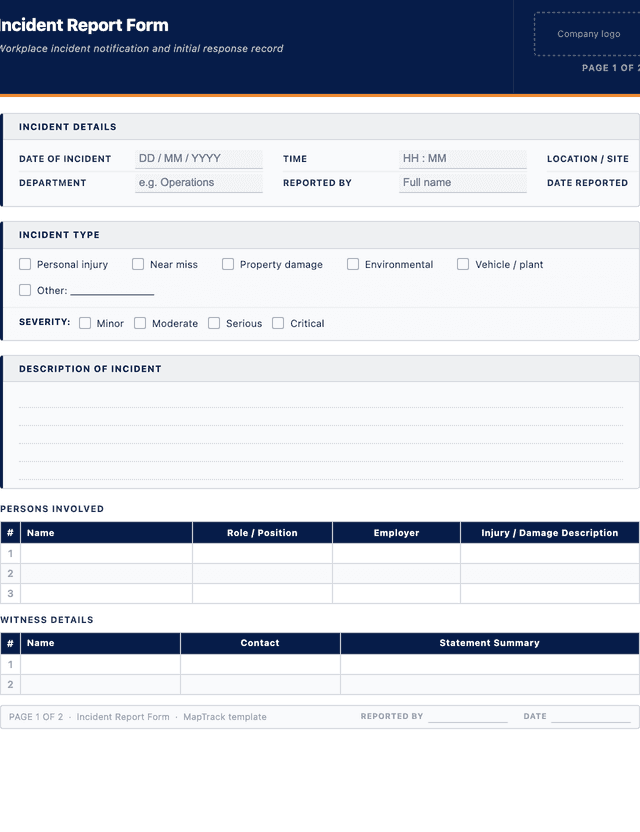
This incident report template covers 8 key areas:
- Incident details: date of incident, time, location/site, department, reported by, date reported.
- Persons involved: name, role/position, employer, and a description of any injury or damage sustained.
- Injury/damage details: incident type (personal injury, near miss, property damage, environmental, vehicle/plant) and severity (minor, moderate, serious, critical).
- Witnesses: name, contact details and a summary of their statement.
- Immediate actions taken: first aid, area secured, notifications made, equipment isolated.
- Root cause / contributing factors: initial assessment of why the incident occurred.
- Corrective actions: action required, responsible person, due date and completion status.
- Sign-off: reported by, supervisor/manager, and WHS officer/coordinator sign-off with date.
How to use this incident report template
- Record the incident details immediately, including date, time, location and the names of all persons involved.: Capture these facts as soon as the scene is safe. Note the exact time, the specific location (site, building, floor, area) and the names, roles and employers of everyone directly involved or present. Accurate details are critical for investigation and insurance purposes.
- Describe what happened in a clear, factual narrative.: Write a chronological account of the events leading up to, during and immediately after the incident. Use plain language and avoid opinions or blame. Focus on observable facts: what was seen, heard and done. Include the sequence of tasks being performed at the time.
- Document any injuries or damage sustained and the immediate actions taken.: Record the nature and location of any injuries on the body, the severity level and any first aid or medical treatment administered. If property or equipment was damaged, describe the extent. Note whether the area was secured, equipment isolated or emergency services called.
- Collect witness names and statements.: Obtain the names and contact details of anyone who witnessed the incident. Ask each witness to provide a brief written or verbal statement in their own words. Record statements separately and have each witness sign their statement where practical.
- Identify initial contributing factors and document corrective actions.: Note any obvious contributing factors such as equipment failure, procedural gaps, environmental conditions or human factors. Identify corrective actions needed to prevent recurrence, assign a responsible person and set a due date for each action.
- Sign the report and submit to your supervisor and safety officer for review.: Sign and date the completed form. The supervisor and WHS officer or coordinator should review, co-sign and determine whether further investigation, regulator notification or insurance reporting is required. File the form as part of your incident management records.
In MapTrack, you can digitise safety inspections and compliance forms. Each submission is stored as a timestamped PDF against the asset record.
Get the free templateEnter your email above to download the full incident report template as a PDF.Back to download formHow often should you complete this report?
An incident report must be completed every time a workplace incident occurs, including injuries, near misses, property damage, environmental events and dangerous occurrences. Under the WHS Act, notifiable incidents (death, serious injury or illness, dangerous incident) must be reported to the regulator immediately by the fastest possible means, by phone or in writing, and if the regulator then requires written notice it must be given within 48 hours of that request. For all other incidents, the report should be completed as soon as practicable, ideally before the end of the shift while details are fresh. Most organisations require incident reporting within 24 hours as a minimum standard.
Under WHS Act 2011, Section 38, notifiable incidents must be reported to the regulator immediately, and the incident site must be preserved until an inspector directs otherwise. Keeping a standardised report form pre-filled with site details reduces response time during critical first hours.
Frequently asked questions
Applicable regulatory standards
This template is a starting point. Check the current requirements that apply to your equipment, work and location. The template alone does not establish compliance.
- WHS Act 2011 - Sections 35-39 (notifiable incidents and notification requirements)
- WHS Regulations 2011, regulation 699 - Incident notification: prescribed serious illnesses (section 36 of the Act)
- Safe Work Australia - Code of Practice: How to Manage Work Health and Safety Risks
- Safe Work Australia - Incident Notification Fact Sheet
- OSHA 29 CFR 1904.39 - Reporting fatalities, hospitalizations, amputations and losses of an eye (United States)
Incident report template preview
The numbers behind this incident report template
Every figure below is sourced and dated, so you can quote it in a toolbox talk, a budget case or a board paper without having to chase the original report.
Embed this free template on your website
Run an industry blog, trade association site, or training resource? Drop a preview of this free incident report template straight into your page. The snippet is self-contained, needs no scripts, and links readers back to the full free template.
<div style="max-width:480px;font-family:system-ui,-apple-system,'Segoe UI',Roboto,sans-serif;border:1px solid #E5E7EB;border-radius:12px;padding:20px;background:#ffffff;">
  <p style="font-size:12px;font-weight:700;letter-spacing:0.05em;text-transform:uppercase;color:#071D49;margin:0;">Free template</p>
  <p style="font-size:18px;font-weight:700;color:#071D49;margin:6px 0 0;">Incident report template</p>
  <ul style="margin:12px 0 0;padding-left:18px;color:#374151;font-size:14px;line-height:1.6;">
    <li style="margin:4px 0;">Incident details: date of incident, time, location/site, department, reported by, date reported.</li>
    <li style="margin:4px 0;">Persons involved: name, role/position, employer, and a description of any injury or damage sustained.</li>
    <li style="margin:4px 0;">Injury/damage details: incident type (personal injury, near miss, property damage, environmental, vehicle/plant) and severity (minor, moderate, serious, critical).</li>
    <li style="margin:4px 0;">Witnesses: name, contact details and a summary of their statement.</li>
    <li style="margin:4px 0;">Immediate actions taken: first aid, area secured, notifications made, equipment isolated.</li>
    <li style="margin:4px 0;">Root cause / contributing factors: initial assessment of why the incident occurred.</li>
  </ul>
  <p style="font-size:13px;color:#6B7280;margin:14px 0 0;padding-top:12px;border-top:1px solid #E5E7EB;">Free <a href="https://www.maptrack.com/templates/incident-report-form" style="color:#071D49;font-weight:600;text-decoration:none;">Incident report template</a> by MapTrack</p>
</div>Free to reuse, including commercially. This template is published under a Creative Commons Attribution 4.0 licence. Copy it, adapt it, put it on your own site or in your own docs. All we ask is that you credit MapTrack with a link back to this page. The snippet above already includes that credit, so if you use it as-is you’re covered.
Cite this template
Writing about this topic? You’re welcome to quote this checklist. Here’s the wording to use so your readers can find the original.
The MapTrack incident report template has 4 columns and room for 3 entries.
- Short attribution
- MapTrack Incident report template, https://www.maptrack.com/templates/incident-report-form
- Reference list
- MapTrack. (2026). Incident report template [Checklist template]. Retrieved from https://www.maptrack.com/templates/incident-report-form
Free to reuse with credit under a Creative Commons Attribution 4.0 licence. If you’d rather link straight to it, the page is https://www.maptrack.com/templates/incident-report-form.
Need to digitise safety inspections and compliance forms?
Register every asset in MapTrack, attach digital forms, and get a complete history of every inspection, service and compliance record.
Compliance and inspections · All templates · Pricing · Book a demo