
Free template · PDF
Free hazard identification form
Free hazard identification form (PDF-ready). Record workplace hazards, risk ratings, existing controls and recommended actions. Download free.
Loading PDF page...


Read the form fields
23 checks · Sign-off
23 checks
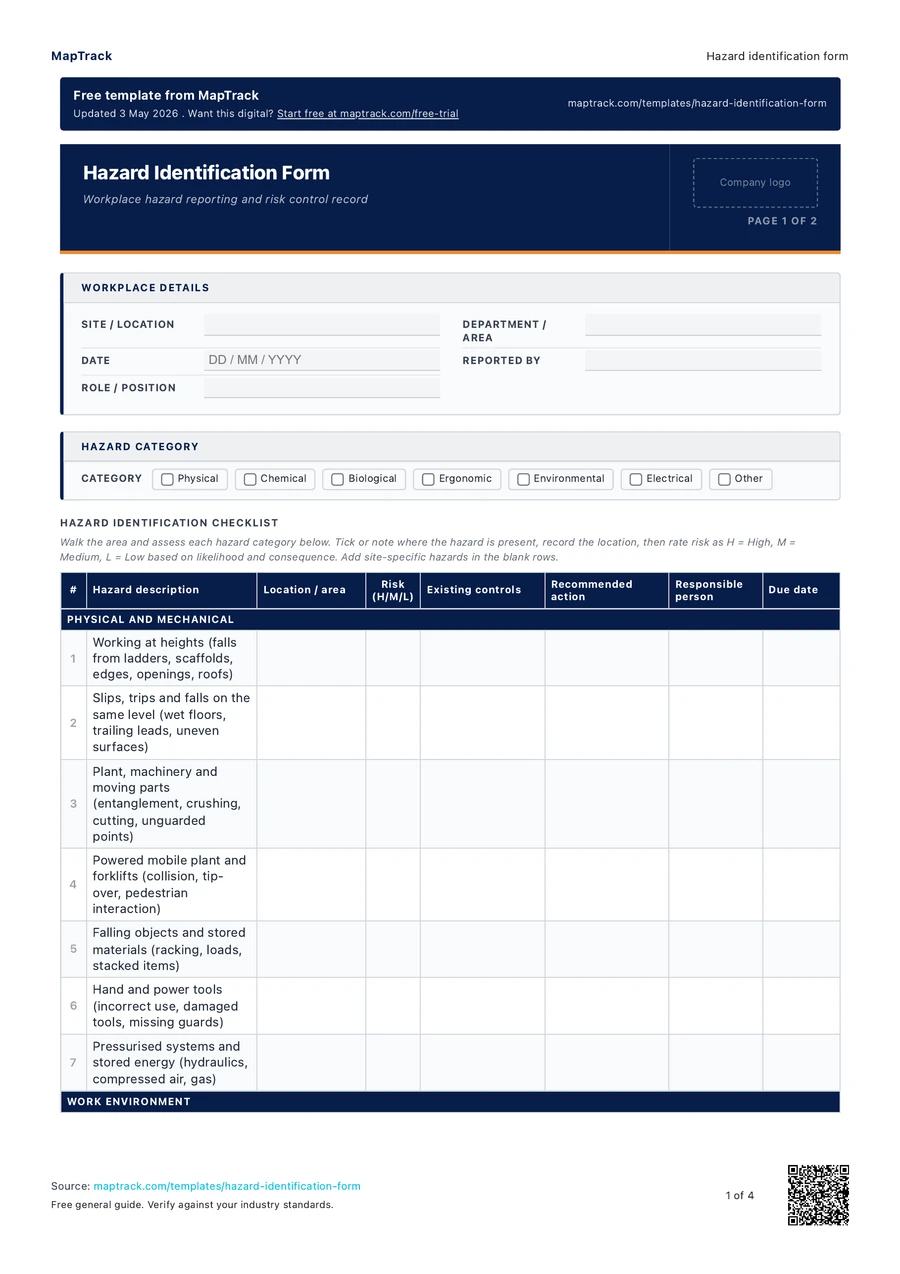
The fields in the printable form, in a view that fits your screen.
- Site / location
- Department / area
- Date
- Reported by
- Role / position
Checklist
Declaration
I confirm that the hazards listed in this form have been identified through workplace observation and/or consultation with workers. The information recorded is accurate to the best of my knowledge. All identified hazards have been reported to the relevant supervisor or WHS officer for review and action.
Reported by
Name · Signature · Date
Reviewed by / WHS officer
Name · Signature · Date
The MapTrack hazard identification form contains 23 checks.

Make this form your own
Add your fields and logo. Give your team a form they can use on site.
Free 30-day trial. No credit card. Work email needed.
Customise & use this form now for free



“MapTrack beat them all in every aspect.”
 Vincent Stone · HSEQ Advisor, Concept Tanks
After signup: customise the template, then save and publish it for your team.
General guidance only. Check the form against your equipment manual, site procedures and local requirements before using it.
Key takeaways
- The MapTrack hazard identification form contains 23 checks.
- Workplace area: site name, department or specific location where the hazard was observed.
- Task or activity: the work being performed when the hazard was identified.
- Hazard description: a clear, factual description of what could cause harm.
What is a hazard identification form?
Hazard identification is the process of finding, listing and characterising things in the workplace that have the potential to cause harm. Under Australian WHS legislation, a person conducting a business or undertaking (PCBU) must identify reasonably foreseeable hazards that could give rise to risks to health and safety. Hazard identification is the first step in the risk management process, followed by risk assessment and risk control. A hazard identification form provides a structured way to document each hazard, its location, category, risk level and the controls in place or required.
Effective hazard identification relies on input from workers at all levels, not just safety officers. A structured form makes it easy for anyone on site to report a hazard with enough detail for a supervisor to assess and act on it. Over time, the aggregate data from hazard identification forms reveals patterns and systemic issues that targeted interventions can address, driving continuous improvement in workplace safety.
Safe Work Australia's Code of Practice for Managing WHS Risks specifically lists workplace inspection and hazard reporting as primary methods for meeting hazard identification obligations. Organisations that embed structured hazard identification into daily operations, rather than treating it as a periodic exercise, consistently achieve lower incident rates and stronger regulator confidence during compliance audits.
Learn more about compliance and inspections in MapTrack.
Choose the format that fits your team
Download the PDF
Use the original printable form for a paper workflow. Check it against your equipment and site procedure before the job.
Keep completed copies in your own record system and arrange any follow-up through your normal process.
Download free PDFCustomise a form in MapTrack
Start a free trial, adjust the digital form to your workflow, then save and publish it for your team to use.
Your account uses the digital template. Sample answers on this page and completed PDF records aren't imported automatically.
Customise & use this form now for freeFree 30-day trial. No credit card. Work email needed.
Benefits of using this hazard identification form
- Legal compliance: meet your duty under Australian WHS Act and regulations to identify reasonably foreseeable hazards.
- Proactive safety: find hazards before they cause injuries, illness or damage.
- Risk reduction: documented hazards feed directly into risk assessments, ensuring controls are applied where they matter most.
- Worker engagement: giving all workers a simple way to report hazards increases safety participation and builds a stronger safety culture.
- Audit readiness: a completed hazard register demonstrates due diligence to regulators, auditors and insurers.
- Continuous improvement: reviewing hazard reports over time reveals trends and recurring issues, allowing your organisation to target systemic fixes.
What to include in a hazard identification form
- Workplace area: site name, department or specific location where the hazard was observed.
- Task or activity: the work being performed when the hazard was identified.
- Hazard description: a clear, factual description of what could cause harm.
- Hazard category: physical, chemical, biological, ergonomic, psychosocial or environmental.
- Risk rating: high, medium or low, based on likelihood and potential consequence.
- Existing controls: what measures are already in place to manage the hazard.
- Recommended actions: additional controls or corrective actions needed.
- Responsible person: who is accountable for implementing the recommended actions.
- Due date: when the corrective action must be completed.
- Status: whether the action is open, in progress or closed.
How to use this hazard identification form
Walk the workplace and observe conditions, activities and equipment.
Physically inspect the work area at a time when normal operations are underway. Look for anything that could cause harm, including physical hazards, chemical exposures, ergonomic issues and environmental factors. Talk to workers about the tasks they perform and any concerns they have.
Record each hazard on the form with a clear, factual description.
Describe exactly what could cause harm and who could be affected. Be specific, for example "unguarded drop of 2.5 m at the loading dock edge" rather than "fall risk". Include the location, the task or activity associated with the hazard and the hazard category.
Rate each hazard using the likelihood x consequence risk matrix.
Assess how likely the hazard is to cause harm and the potential severity of the outcome. Record the risk level (high, medium, low) to prioritise which hazards need immediate action and which can be scheduled for later review.
Document existing controls and recommend additional actions.
Record what controls are already in place to manage each hazard. If those controls are inadequate, document the additional actions needed, assign a responsible person and set a due date. Follow the hierarchy of controls: elimination, substitution, engineering, administrative then PPE.
Submit the completed form to your supervisor or safety officer for review.
The supervisor reviews the hazard, confirms the risk rating and ensures corrective actions are adequate and assigned. High-risk hazards should be escalated to the safety manager or site manager for immediate attention.
Follow up on corrective actions and update the hazard status.
Track each hazard through to close-out. Verify that corrective actions have been implemented and are effective. Update the status from open to in progress to closed. Transfer the hazard to the site hazard register for ongoing tracking.
How often should you complete this checklist?
Hazard identification should be conducted whenever a new hazard is observed, when work activities or conditions change, when new equipment or processes are introduced, after an incident or near miss, and as part of regular scheduled workplace inspections. Under the WHS Act, the PCBU has an ongoing duty to identify hazards. In practice, most organisations conduct formal hazard identification as part of monthly site inspections and encourage workers to submit hazard identification forms at any time through an open reporting system. The hazard register should be reviewed at least monthly to ensure all identified hazards are being tracked and managed.
Make this form your own
From your template to your team.
Start with this template, adjust it for your equipment and site, then save and publish the digital form for your team.
- 01
Start your free trial
Use your work email to create your MapTrack account.
- 02
Customise, save and publish
Adjust the template fields and branding for your site.
- 03
Complete it on the job
Record checks, add photos and export a branded PDF.
Keep working offline
Load the form before you lose reception. Complete it offline and sync when you're back online.
Scan the asset. Open its form.
Use an asset's QR code to find and complete the forms that belong to it.
Show what you found
Capture photos and attach files so the next person has the details they need.
Take a branded PDF with you
Download completed forms as PDF reports with your company logo.
The trial uses a digital template. Completed paper records aren't imported automatically.
Frequently asked questions
Practical answers about the form, record keeping and using MapTrack.
A hazard identification form is used to systematically record workplace hazards before they cause harm. It documents the hazard description, location, risk rating, existing controls and recommended corrective actions. Under Australian WHS legislation, persons conducting a business or undertaking (PCBUs) must identify reasonably foreseeable hazards. A written form provides evidence that hazards have been identified and addressed.
Link to this answerAny worker can and should complete a hazard identification form when they observe a hazard. This includes employees, contractors, subcontractors and visitors. WHS regulations require employers to consult with workers on health and safety matters, and encouraging hazard reporting from all levels is a core part of that duty. Forms should be reviewed by a supervisor or WHS officer to confirm controls are adequate.
Link to this answerHazard identification is the first step in the risk management process. It focuses on finding and recording what could cause harm. A risk assessment then evaluates each identified hazard by rating its likelihood and consequence, and determining whether existing controls are sufficient. In practice, the hazard identification form captures the hazard, and the risk assessment template analyses and prioritises the response.
Link to this answerYes. Download and use this hazard identification form for free. It downloads as a ready-to-print PDF. No MapTrack account is required. If you want digital hazard reporting from any mobile device with photo capture, GPS location, automatic risk rating and a live hazard register, MapTrack can do that. Book a demo to see how.
Link to this answerHazard identification should be an ongoing process, not a one-off activity. Under the WHS Act 2011, the PCBU must identify reasonably foreseeable hazards whenever work activities change, new equipment or substances are introduced, after an incident or near miss, and during regular scheduled workplace inspections. Most organisations conduct formal hazard identification walks at least monthly, supplemented by an open reporting system where workers can submit hazard identification forms at any time.
Link to this answerApplicable regulatory standards
This form is a starting point. Check the current requirements that apply to your equipment, work and location. The form alone does not establish compliance.
- WHS Act 2011
- Safe Work Australia - Code of Practice: How to Manage Work Health and Safety Risks
- ISO 31000 - Risk management
- Model Codes of Practice (Safe Work Australia)
- Model Work Health and Safety Act (Safe Work Australia)
- ISO 31000:2018, Risk management guidelines (ISO catalogue)
MapTrack publishes this template. The linked authorities publish their own guidance; they haven't endorsed this form.
The numbers behind this hazard identification form
Every figure below is sourced and dated, so you can quote it in a toolbox talk, a budget case or a board paper without having to chase the original report.
Cite this template
Writing about this topic? You’re welcome to quote this checklist. Here’s the wording to use so your readers can find the original.
The MapTrack hazard identification form contains 23 checks.
- Short attribution
- MapTrack Hazard identification form, https://www.maptrack.com/templates/hazard-identification-form
- Reference list
- MapTrack. (2026). Hazard identification form [Checklist template]. Retrieved from https://www.maptrack.com/templates/hazard-identification-form
Free to reuse with credit under a Creative Commons Attribution 4.0 licence. If you’d rather link straight to it, the page is https://www.maptrack.com/templates/hazard-identification-form.
Embed this free template on your website
Run an industry blog, trade association site, or training resource? Drop a preview of this free hazard identification form straight into your page. The snippet is self-contained, needs no scripts, and links readers back to the full free template.
<div style="max-width:480px;font-family:system-ui,-apple-system,'Segoe UI',Roboto,sans-serif;border:1px solid #E5E7EB;border-radius:12px;padding:20px;background:#ffffff;">
  <p style="font-size:12px;font-weight:700;letter-spacing:0.05em;text-transform:uppercase;color:#071D49;margin:0;">Free template</p>
  <p style="font-size:18px;font-weight:700;color:#071D49;margin:6px 0 0;">Hazard identification form</p>
  <ul style="margin:12px 0 0;padding-left:18px;color:#374151;font-size:14px;line-height:1.6;">
    <li style="margin:4px 0;">Workplace area: site name, department or specific location where the hazard was observed.</li>
    <li style="margin:4px 0;">Task or activity: the work being performed when the hazard was identified.</li>
    <li style="margin:4px 0;">Hazard description: a clear, factual description of what could cause harm.</li>
    <li style="margin:4px 0;">Hazard category: physical, chemical, biological, ergonomic, psychosocial or environmental.</li>
    <li style="margin:4px 0;">Risk rating: high, medium or low, based on likelihood and potential consequence.</li>
    <li style="margin:4px 0;">Existing controls: what measures are already in place to manage the hazard.</li>
  </ul>
  <p style="font-size:13px;color:#6B7280;margin:14px 0 0;padding-top:12px;border-top:1px solid #E5E7EB;">Free <a href="https://www.maptrack.com/templates/hazard-identification-form" style="color:#071D49;font-weight:600;text-decoration:none;">Hazard identification form</a> by MapTrack</p>
</div>Free to reuse, including commercially. This template is published under a Creative Commons Attribution 4.0 licence. Copy it, adapt it, put it on your own site or in your own docs. All we ask is that you credit MapTrack with a link back to this page. The snippet above already includes that credit, so if you use it as-is you’re covered.
About the author

Co-Founder & Commercial Director
Jarrod has spent over a decade in technology consulting and asset management, including roles at Accenture (mining and heavy industry) and CGI as an Asset Management Consultant. He co-founded MapTrack and built and scaled its original platform, then rebuilt it with Lachlan and Alex from thousands of customer conversations and 300+ user research sessions with field teams. His consulting background gives him deep insight into the operational and compliance challenges facing asset-intensive Australian businesses.
View LinkedIn profile →Ready for your next job?
Keep the PDF handy, or customise the digital form for your team.