
Construction asset tracking software
Keep QR-labelled tools, plant, trailers, generators and vehicles in one asset register. Field users can identify assets, complete forms and record deliberate transfers, while GPS or telematics is scoped separately where confirmed.
See every asset, its status and who or where it is with
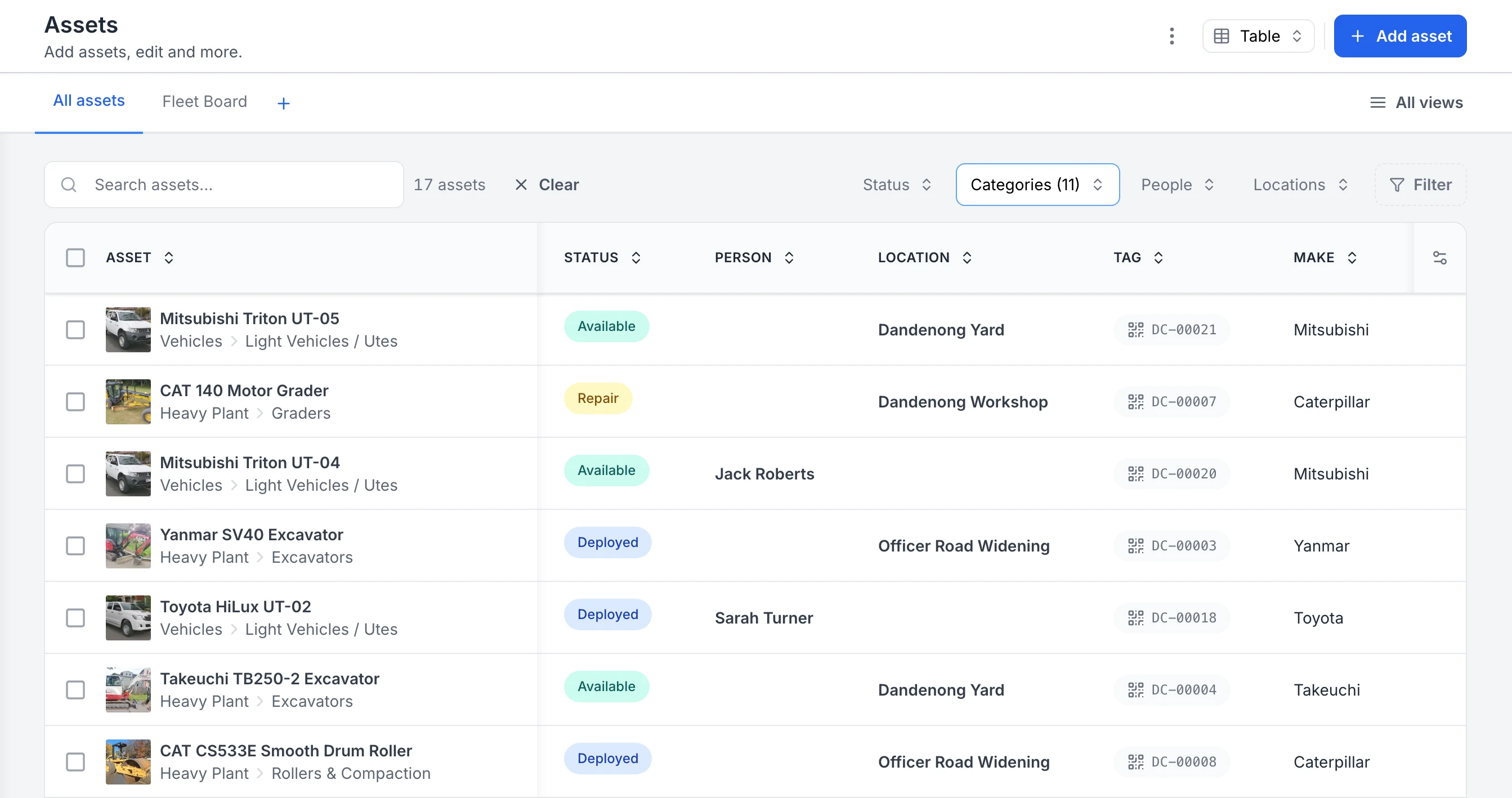
The register filtered to heavy plant and vehicles. Each row shows the photo and category, whether the asset is available, deployed or in for repair, the person or site it is with, and its QR tag ID. Two utes are with named crew members; the rest are at the yard, the workshop or a project site.
MapTrack app · Demonstration data · Captured
About this screenshot
Captured in a demonstration workspace. The All assets view is filtered to the Heavy Plant and Vehicles categories and shows the Status, Person, Location, Tag and Make columns.

Co-Founder & GM of Operations
Trusted by construction, mining and field service teams















What we track
Everything on a construction site, one register
Use configurable asset records for the tools, equipment, plant and vehicles included in the construction rollout.
- Excavators & earthmoving plant
- Skid steers & loaders
- Generators & compressors
- Trailers & floats
- Power tools & hand tools
- Survey & test equipment
- EWPs & access equipment
- Utes & site vehicles
The problem
Construction loses assets in the gaps between sites
Gear moves in utes and floats faster than any spreadsheet can follow. The costs show up as replacement purchases, idle hire and audit scrambles.
Tools vanish between sites
Gear moves site to site with no record of who took what. Losses surface months later at stocktake, and replacements get bought twice.
Idle plant and duplicate hire
One location may hire a compressor while an identical unit is recorded elsewhere. A maintained register and the Asset Performance report can provide evidence for a separate allocation decision.
Paper pre-starts and audit scramble
Pre-start books live in cab consoles, defect reports go missing between site and workshop, and producing records for an audit takes days.
One platform
QR, pre-starts and maintenance, with GPS scoped separately
Keep QR identification, digital forms and maintenance records against one asset register. Scope any GPS or telematics delivery separately.
QR register with GPS scope confirmed
Label tools with QR codes and keep supported asset records, documents, service history and current assignments together. Confirm the device, provider, delivered location or telemetry fields and rollout scope.
Explore QR register with GPS scope confirmedSite accountability built in
Use supported people and locations to record deliberate assignment, return, transfer and audit actions. A scan identifies the asset. Assignment, return, transfer and audit actions are deliberate connected steps.
Explore site accountability built inPre-starts and maintenance on the record
Keep submitted forms, work orders and recorded maintenance costs with the asset. Your team defines its compliance and cost-allocation process.
Explore pre-starts and maintenance on the recordConnect stores, site and workshop records
A construction rollout can start with one equipment request and follow it through fulfilment, service checks and return.
1. Plan and fulfil the site requirement
Request named equipment or category quantities, record any substitution and inspect the resulting checkout.
2. Review service readiness and return
Check the named service and open work, then reconcile the returned equipment and accessory quantities.
QR tracking
Label and identify the tool store
Attach supported QR labels to tools and link each code to its asset record. A scan identifies the asset. Assignment, return, transfer and audit actions are deliberate connected steps.
- Choose label material to suit the asset and environment
- Import supported asset fields from a spreadsheet
- Test the intended subcontractor workflow against current roles
GPS tracking
Scope GPS or telematics for larger assets
Confirm the device, provider, delivered location or telemetry fields and rollout scope.
- Confirm provider, hardware and installation ownership
- Confirm location, runtime and alert fields required
- Pilot the delivered data before wider rollout
Built for site conditions
Field-first asset operations
Construction work happens in the field. MapTrack runs as a web app on supported phones and tablets. Loaded forms can be submitted offline and loaded work orders record per-asset results offline. Adding costs, closing work orders, creation, setup, imports, exports and server-side automations need a connection.
Use the documented workspace roles and test the required site, division or contractor access before rollout. Confirm current pricing, plan inclusions, user entitlements, trial and subscription terms directly with MapTrack before relying on them.
Current roles
validate each access workflow
Offline work
after the record is loaded
Commercial
confirm pricing and support
Plan terms
confirm before relying on them
Review assets across configured locations
Book a demo with your real asset list and confirm the current trial, plan and onboarding terms for your rollout.
- 30-day trial
- No credit card required
- Confirm current plan scope
Get started
How construction teams roll out MapTrack
Setup depends on data quality, labels, workflows and team size. Start with one asset class or site, test one field workflow, then expand.
Import the register
Import supported asset, location and people fields from a spreadsheet. Validate the mapping and resulting records before adding more data.
Label the tool store
Choose and test QR labels for representative tools, link each code to the intended asset record, then validate the connected assignment and return steps.
Fit GPS to plant
Confirm the device, provider, delivered location or telemetry fields and rollout scope.
Make scanning the habit
Use scanning to identify an asset, then complete the intended connected action. A scan identifies the asset. Assignment, return, transfer and audit actions are deliberate connected steps.
Everything construction teams use, in one platform
The capabilities behind the register - each one connected to the same asset records.
Stop paying twice
Lost tools, idle plant and duplicate hire are controllable costs
Keep asset records and deliberate custody actions in one system, then test whether the workflow improves accountability for your sites.
Frequently asked questions
Answers reflect documented product boundaries. Confirm current commercial and telematics terms before relying on them.
Resources for construction asset tracking
Statistics, calculators and templates construction teams use alongside MapTrack.
Construction equipment theft statistics
Sourced Australian and US numbers on plant and tool theft, recovery rates and what visibility changes.
Explore construction equipment theft statisticsTool loss calculator
Estimate what disappearing tools already cost your operation each year.
Explore tool loss calculatorConstruction templates
Free pre-start checklists, plant inspection forms and site registers, PDF-ready.
Explore construction templatesConstruction industry overview
How builders and civil contractors run MapTrack across projects.
Explore construction industry overviewExplore
- Pricing
- Book a demo
- MapTrack vs Asset Panda
- Alternative to Asset Panda
- Alternative to spreadsheets
- QR tracking
- GPS tracking
- Construction
- Vehicle pre-start checklist
- Hardware store
Other industries we serve
- Construction
- Civil contractors
- Plumbing contractors
- Electrical contractors
- HVAC contractors
- Landscaping
- Building services
- Mining and resources
- Oil and gas
- Industrial maintenance
- Facilities services
- Fleet and transport
- Government and councils
- Manufacturing
- Energy and utilities
- Infrastructure
- Education
- IT assets
- Aviation
- Fire safety and protection
- Agriculture
- Transport and logistics
- Water utilities
One register across every jobsite
Track tools and plant, run digital forms and keep maintenance records against the asset. Confirm current pricing, plan inclusions, user entitlements, trial and subscription terms directly with MapTrack before relying on them.
QR tracking · GPS tracking · Pre-start inspections · Construction