
Free tool crib inventory checklist
Free tool crib inventory checklist (PDF-ready). Verify tool counts, condition, calibration status and sign-out records. Digitise with MapTrack.
Updated 28 Sept 2026
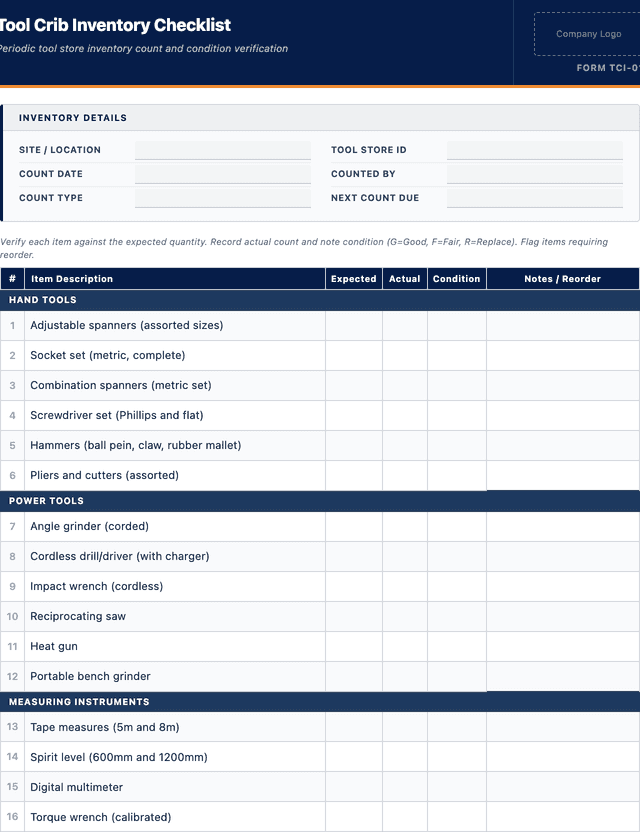
Tool Crib Inventory Checklist
Periodic tool store inventory count and condition verification
Hand Tools
Power Tools
Measuring Instruments
Safety Equipment
Consumables
How to use: download the PDF, print or complete digitally on any device.
- PDF format, ready to print or fill on screen
- Use as-is or customise to suit your operation
- Go digital in MapTrack for photos, reminders and audit trails
Download free PDF template
Use in MapTrack →



Trusted by teams across Australia and New Zealand
We respect your privacy. Unsubscribe anytime.
Or set it up in MapTrack
- Fill it in on a phone, attach photos to any check
- Automatic reports and audit trails
- The same checks as the PDF, ready to configure
Free 30-day trial. No credit card. Personal email accepted.
Don't just download it - use it live. Start a free workspace with this tool crib inventory checklist already built, so your crew can run it from a phone.

Co-Founder & Commercial Director
Key takeaways
- The MapTrack tool crib inventory checklist contains 25 checks across 5 sections. Sections covered: Hand Tools, Power Tools, Measuring Instruments, Safety Equipment, Consumables.
Enter your email below to download this tool crib inventory checklist as a ready-to-use PDF.
Used by construction, mining and field service teams











What is a tool crib inventory checklist?
A tool crib inventory checklist is a structured document used to verify the contents, condition and organisation of a tool crib, tool store or equipment room. The checklist guides the inventory through a systematic count of all tools and equipment, verification against the tool register, condition assessment, calibration status check for precision instruments, sign-out record reconciliation and identification of missing, damaged or overdue items.
Tool cribs are central to operations in manufacturing, construction, mining and maintenance organisations, and their effective management directly impacts productivity and cost control. Tools that are missing, damaged or out of calibration cause work delays, rework and safety incidents. ISO 9001 clause 7.1.5 covers monitoring and measuring resources, including the traceability of measurement results. The WHS Act 2011, Section 19 requires the PCBU to ensure tools provided to workers are safe and maintained. Without regular inventory checks, tool cribs accumulate ghost items (tools listed but not physically present), undocumented losses, expired calibrations and deteriorating equipment, all of which undermine operations and safety.
Learn more about asset tracking in MapTrack.
Benefits of using this tool crib inventory checklist
- Loss prevention: regular counts identify missing tools early, enabling investigation before losses compound.
- Condition assurance: physical inspection of each tool catches damage, wear and defects that make tools unsafe to use.
- Calibration compliance: checking calibration status ensures precision instruments are within their valid calibration period.
- Sign-out reconciliation: matching physical inventory to sign-out records identifies tools that are overdue for return.
- Budget accuracy: knowing the actual tool inventory supports procurement planning and avoids unnecessary duplicate purchases.
- Operational readiness: a well-inventoried tool crib means workers can find the tools they need without delay.
Benefits of digitising forms in MapTrack
When you move your checklists from paper to MapTrack, you get:
- Field users can easily scan a QR code to complete a form on mobile. Unlimited users.
- Email the right people when a form is submitted, with an automation you set up.
- File every completed form against the asset, location or person it covers.
- Download any completed form as a PDF, with failed answers listed at the top.
- Fill in forms offline; they upload when the device is back online.
- Build conditional logic (show or hide questions based on answers).
- Take pictures or attach photos. Not possible with a paper-based form.
- Electronic signatures.
- Edit forms later without reprinting.
- Set who can view, fill in or edit forms with user roles.
- Upload a paper form (PDF, Word, Excel or a photo) and MapTrack's AI builds a digital version for you to check.
- Keep one asset register with each asset's location, condition and custody history.
- Schedule calibration and record certification and warranty expiry dates against each asset.
- See each asset's value over time in the Asset Depreciation report.
Book a demo to see how MapTrack handles checklists.
Try MapTrack free for 30 days
Full access to every feature. No credit card required. Per-asset pricing so you scale as your fleet grows.
- No credit card required
- 30 days free trial
- Cancel anytime
1-2 days/week saved
“Bloody amazing! We used to spend 1-2 days a week tracking and managing our generators alone.”

Steve McAllister
Asset Coordinator, Saunders International
What to include in a tool crib inventory checklist
This tool crib inventory checklist covers 11 key areas:
- Tool crib details: location name, inventory date, person conducting the inventory, total expected tool count.
- Tool register: tool ID or tag number, description, category (hand tool, power tool, precision instrument, safety equipment).
- Physical count: tool present (yes/no), location within the crib (rack, drawer, shelf reference).
- Condition assessment: good, fair, poor, or defective. Specific notes on damage, wear or missing components.
- Calibration status: calibration due date, current (yes/no), calibration certificate number.
- Sign-out reconciliation: tools currently signed out (person, date out, expected return), overdue returns flagged.
- Missing tools: tool ID, description, last known location, last sign-out record, action taken.
- New or unregistered tools: tools found in the crib that are not on the register, to be added.
- Consumables check: consumable stocks (drill bits, blades, grinding discs, PPE) at minimum levels.
- Crib organisation: storage areas clean and labelled, shadow boards complete, access controls functioning.
- Sign-off: inventory officer signature, tool crib supervisor acknowledgement, next inventory date.
How to use this tool crib inventory checklist
- Print the tool register and prepare for the inventory: Generate the current tool register from the asset management system showing all tools assigned to the crib. Include tool ID, description, category and calibration due date. Close the tool crib to sign-outs during the inventory or record any sign-outs that occur during the count.
- Count each tool and verify against the register: Systematically work through the tool crib, checking each storage location (racks, drawers, shadow boards, cabinets). Mark each tool as present on the register. Note any tools found that are not on the register (unregistered items). Note any register entries where the tool is not physically present.
- Assess condition and check calibration status: Inspect each tool for damage, wear, missing components and general condition. Rate as good, fair, poor or defective. For precision instruments and measuring tools, check the calibration due date against the current date. Flag any tools past their calibration due date for immediate removal from service and recalibration.
- Reconcile sign-out records and identify missing tools: For tools not physically present, check the sign-out register to confirm they are legitimately on loan. Flag any tools that are overdue for return. For tools that are neither present nor signed out, record them as missing and initiate an investigation. Review the sign-out log for patterns of overdue returns.
- Complete the inventory report and schedule corrective actions: Summarise the inventory results: total counted, matching register, missing, damaged, overdue returns, expired calibrations. Assign corrective actions for missing tools, damaged tools and expired calibrations. Add unregistered tools to the register. Restock consumables that are below minimum levels. Sign the checklist and schedule the next inventory.
In MapTrack, you can manage your full asset register digitally. Each submission is stored as a timestamped PDF against the asset record.
Get the free templateEnter your email above to download the full tool crib inventory checklist as a PDF.Back to download formHow often should you complete this checklist?
Tool crib inventories should be conducted monthly for high-value or high-turnover cribs, and quarterly for lower-activity cribs. Annual comprehensive inventories with condition assessment and calibration verification should cover every tool in the register. Spot checks of high-value items should be conducted weekly. After any security incident (break-in, suspected theft), an immediate full inventory should be conducted. In MapTrack, schedule automated inventory reminders and track sign-out durations to flag overdue returns in real time.
Frequently asked questions
Applicable regulatory standards
This template is a starting point. Check the current requirements that apply to your equipment, work and location. The template alone does not establish compliance.
- ISO 9001, Clause 7.1.5 - Monitoring and measuring resources
- WHS Act 2011, Section 19 - Primary duty of care (safe tools)
Tool crib inventory checklist preview
The numbers behind this tool crib inventory checklist
Every figure below is sourced and dated, so you can quote it in a toolbox talk, a budget case or a board paper without having to chase the original report.
Embed this free template on your website
Run an industry blog, trade association site, or training resource? Drop a preview of this free tool crib inventory checklist straight into your page. The snippet is self-contained, needs no scripts, and links readers back to the full free template.
<div style="max-width:480px;font-family:system-ui,-apple-system,'Segoe UI',Roboto,sans-serif;border:1px solid #E5E7EB;border-radius:12px;padding:20px;background:#ffffff;">
  <p style="font-size:12px;font-weight:700;letter-spacing:0.05em;text-transform:uppercase;color:#071D49;margin:0;">Free template</p>
  <p style="font-size:18px;font-weight:700;color:#071D49;margin:6px 0 0;">Tool crib inventory checklist</p>
  <ul style="margin:12px 0 0;padding-left:18px;color:#374151;font-size:14px;line-height:1.6;">
    <li style="margin:4px 0;">Tool crib details: location name, inventory date, person conducting the inventory, total expected tool count.</li>
    <li style="margin:4px 0;">Tool register: tool ID or tag number, description, category (hand tool, power tool, precision instrument, safety equipment).</li>
    <li style="margin:4px 0;">Physical count: tool present (yes/no), location within the crib (rack, drawer, shelf reference).</li>
    <li style="margin:4px 0;">Condition assessment: good, fair, poor, or defective. Specific notes on damage, wear or missing components.</li>
    <li style="margin:4px 0;">Calibration status: calibration due date, current (yes/no), calibration certificate number.</li>
    <li style="margin:4px 0;">Sign-out reconciliation: tools currently signed out (person, date out, expected return), overdue returns flagged.</li>
  </ul>
  <p style="font-size:13px;color:#6B7280;margin:14px 0 0;padding-top:12px;border-top:1px solid #E5E7EB;">Free <a href="https://www.maptrack.com/templates/tool-crib-inventory-checklist" style="color:#071D49;font-weight:600;text-decoration:none;">Tool crib inventory checklist</a> by MapTrack</p>
</div>Free to reuse, including commercially. This template is published under a Creative Commons Attribution 4.0 licence. Copy it, adapt it, put it on your own site or in your own docs. All we ask is that you credit MapTrack with a link back to this page. The snippet above already includes that credit, so if you use it as-is you’re covered.
Cite this template
Writing about this topic? You’re welcome to quote this checklist. Here’s the wording to use so your readers can find the original.
The MapTrack tool crib inventory checklist contains 25 checks across 5 sections.
- Short attribution
- MapTrack Tool crib inventory checklist, https://www.maptrack.com/templates/tool-crib-inventory-checklist
- Reference list
- MapTrack. (2026). Tool crib inventory checklist [Checklist template]. Retrieved from https://www.maptrack.com/templates/tool-crib-inventory-checklist
Free to reuse with credit under a Creative Commons Attribution 4.0 licence. If you’d rather link straight to it, the page is https://www.maptrack.com/templates/tool-crib-inventory-checklist.
Need to manage your full asset register digitally?
Register every asset in MapTrack, attach digital forms, and get a complete history of every inspection, service and compliance record.