
Free tool inventory and stocktake form
Free tool inventory and stocktake form (PDF and editable Excel). Record tools found, missing and damaged with condition notes and discrepancy actions. Download free.
Updated 12 Aug 2026
How to use: download the PDF, print or complete digitally on any device.
- PDF format, ready to print or fill on screen
- Use as-is or customise to suit your operation
- Go digital in MapTrack for photos, reminders and audit trails
Download formats
- Tool inventory stocktake form PDF
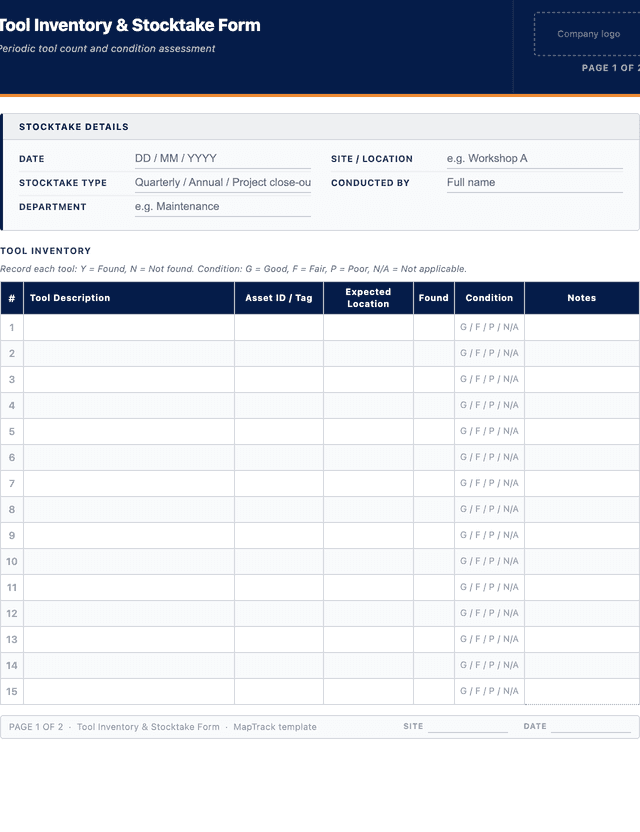
PDF: Print-ready stocktake sheet: one row per tool with asset ID, expected location, found, condition and discrepancy notes.
- Tool inventory stocktake form XLSX
XLSX: Editable Excel workbook with the same columns, ready to filter for missing and damaged tools after the count.
Download free PDF template
Use in MapTrack →



Trusted by teams across Australia and New Zealand
We respect your privacy. Unsubscribe anytime.
Or set it up in MapTrack
- Fill it in on a phone, attach photos to any check
- Automatic reports and audit trails
- The same checks as the PDF, ready to configure
Free 30-day trial. No credit card. Personal email accepted.
Don't just download it - use it live. Start a free workspace with this tool inventory and stocktake form already built, so your crew can run it from a phone.

Co-Founder & Commercial Director
Key takeaways
- The MapTrack tool inventory and stocktake form has 6 columns and room for 25 entries. Columns: Tool Description, Asset ID / Tag, Expected Location, Found, Condition, Notes.
Enter your email below to download this tool inventory and stocktake form as a ready-to-use PDF.
Used by construction, mining and field service teams











What is a tool inventory and stocktake form?
A tool inventory stocktake form is a structured document used for the periodic physical count and inspection of all tools held by an organisation. The purpose is to verify that the tools recorded in your asset register actually exist, are in the correct location, and are in serviceable condition. The stocktake form records each tool found, its asset ID or tag, condition (good, fair or poor), whether it matches the expected location, and flags any tools that are missing or damaged. Stocktakes support quarterly and annual audits, site audits and project close-outs.
Regular stocktakes are a fundamental control in tool management, particularly for construction, mining, maintenance and facilities teams where tools are shared across multiple sites and crews. Under the WHS Act 2011 (Section 19 - Primary duty of care), a PCBU must ensure that plant provided for use is without risks to health and safety so far as is reasonably practicable. The WHS Regulations 2011, Chapter 5, further require that plant, including hand and power tools, is maintained, inspected and tested to prevent risks. ISO 55001 (Asset management systems) provides the international framework for asset management disciplines including physical verification of asset registers. A stocktake also feeds into budget planning, replacement scheduling and insurance valuations by providing an accurate count of your tool inventory at a point in time. Tool theft is a significant cost in Australian construction, with industry estimates placing losses in the hundreds of millions annually, and regular stocktakes are the most effective way to catch losses early and deter opportunistic theft.
Learn more about asset tracking in MapTrack.
Benefits of using this tool inventory and stocktake form
- Accurate inventory: confirm what you actually have versus what your records say, reducing ghost assets and surprise shortages.
- Reduced loss and theft: regular counts deter theft and catch missing tools before the trail goes cold.
- Condition visibility: identify damaged or worn tools early so they can be repaired or replaced before they cause safety issues.
- Project accountability: stocktaking at project close-out ensures tools are returned and accounted for before teams demobilise.
- Budget planning: accurate tool data supports replacement budgets and procurement decisions.
- Audit readiness: completed stocktake records provide evidence for internal audits and insurance claims.
Benefits of digitising forms in MapTrack
When you move your log / registers from paper to MapTrack, you get:
- Field users can easily scan a QR code to complete a form on mobile. Unlimited users.
- Email the right people when a form is submitted, with an automation you set up.
- File every completed form against the asset, location or person it covers.
- Download any completed form as a PDF, with failed answers listed at the top.
- Fill in forms offline; they upload when the device is back online.
- Build conditional logic (show or hide questions based on answers).
- Take pictures or attach photos. Not possible with a paper-based form.
- Electronic signatures.
- Edit forms later without reprinting.
- Set who can view, fill in or edit forms with user roles.
- Upload a paper form (PDF, Word, Excel or a photo) and MapTrack's AI builds a digital version for you to check.
- Keep one asset register with each asset's location, condition and custody history.
- Schedule calibration and record certification and warranty expiry dates against each asset.
- See each asset's value over time in the Asset Depreciation report.
Book a demo to see how MapTrack handles log / registers.
Try MapTrack free for 30 days
Full access to every feature. No credit card required. Per-asset pricing so you scale as your fleet grows.
- No credit card required
- 30 days free trial
- Cancel anytime
1-2 days/week saved
“Bloody amazing! We used to spend 1-2 days a week tracking and managing our generators alone.”

Steve McAllister
Asset Coordinator, Saunders International
What to include in a tool inventory and stocktake form
This tool inventory and stocktake form covers 6 key areas:
- Stocktake details: date, site/location, stocktake type (quarterly, annual, project close-out), conducted by, department.
- Tool inventory table: tool description, asset ID/tag, expected location, found (Y/N), condition (good, fair, poor, N/A), notes.
- Discrepancy summary: total tools expected, found, missing and damaged.
- Missing tools register: description, asset ID, last known location and action required.
- Damaged tools register: description, asset ID, damage description and action (repair, write-off, scrap).
- Declaration and signatures: stocktake officer and supervisor/manager sign-off.
How to use this tool inventory and stocktake form
- Complete the stocktake details - date, site, stocktake type, your name and department.: Record the date, your name and role, the site or location, the stocktake type (quarterly, annual, project close-out) and the department. This header information ensures every stocktake is traceable and can be filed alongside previous counts for comparison.
- Print or export your current tool register so you have a reference list of expected tools and locations.: Export the tool register from your asset management system or print a copy. Having the expected list ensures you can verify each tool against the register and quickly identify items that are not where they should be.
- Walk the site systematically. For each tool, record whether it was found, its condition and any notes.: Work through the site area by area, checking each storage location, tool crib, vehicle and work station. For every tool on the register, mark whether it was found (Y/N), rate its condition (good, fair, poor) and add notes for anything unusual or requiring attention.
- Complete the discrepancy summary - total expected versus found, missing and damaged counts.: Add up the totals for tools expected, found, missing and damaged. Calculate the discrepancy percentage. This summary provides management with a clear snapshot of tool accountability and highlights whether losses are trending up or down compared to the previous stocktake.
- Document missing tools in the missing tools register with last known location and action required.: For each missing tool, record the description, asset ID, last known location and the action required (investigate, report to police, claim on insurance, replace). Assign a responsible person and set a due date for follow-up.
- Document damaged tools with a description of the damage and the action to be taken (repair, write-off or scrap).: For each damaged tool, describe the damage, assess whether repair is economical and record the action (send for repair, write off, scrap). Remove unsafe tools from service immediately and tag them to prevent use until repaired or replaced.
- Sign the declaration and have your supervisor or manager countersign.: The stocktake officer signs and dates the form to confirm the count was completed thoroughly. A supervisor or manager countersigns to acknowledge the results and approve the discrepancy actions. File the completed form and retain it as part of your quality and compliance records.
In MapTrack, you can manage your full asset register digitally. Each submission is stored as a timestamped PDF against the asset record.
Get the free templateEnter your email above to download the full tool inventory and stocktake form as a PDF.Back to download formHow often should you complete this log / register?
High-value or high-risk environments (construction sites, mining, oil and gas) should stocktake monthly or at every project close-out. General workshops and facilities should stocktake quarterly. Office-based or low-risk environments can stocktake annually. A stocktake should also be conducted whenever tools are transferred between sites, at the start and end of major projects, and when discrepancies are suspected.
Consistent, scheduled stocktakes are more effective than reactive counts because they establish accountability and make it harder for losses to go unnoticed. Under the WHS Act 2011, the PCBU has a duty to ensure plant is maintained in a safe condition, and regular stocktakes are the practical mechanism for meeting this obligation across a distributed tool inventory. Compare each stocktake result to the previous count to identify trends in loss rates, damage frequency and tool condition. If your discrepancy rate exceeds two percent, increase the frequency or investigate root causes such as inadequate sign-out processes or unsecured storage. In MapTrack, stocktake results are retained digitally against each asset, so trend analysis and audit reporting require no manual data entry.
Frequently asked questions
Applicable regulatory standards
This template is a starting point. Check the current requirements that apply to your equipment, work and location. The template alone does not establish compliance.
- WHS Act 2011 (Section 19 - Primary duty of care)
- ISO 55001 (Asset management systems)
- WHS Regulations 2011, Chapter 5 - Plant and Structures
- Safe Work Australia Code of Practice: Managing Risks of Plant in the Workplace
Tool inventory and stocktake form preview
The numbers behind this tool inventory and stocktake form
Every figure below is sourced and dated, so you can quote it in a toolbox talk, a budget case or a board paper without having to chase the original report.
Embed this free template on your website
Run an industry blog, trade association site, or training resource? Drop a preview of this free tool inventory and stocktake form straight into your page. The snippet is self-contained, needs no scripts, and links readers back to the full free template.
<div style="max-width:480px;font-family:system-ui,-apple-system,'Segoe UI',Roboto,sans-serif;border:1px solid #E5E7EB;border-radius:12px;padding:20px;background:#ffffff;">
  <p style="font-size:12px;font-weight:700;letter-spacing:0.05em;text-transform:uppercase;color:#071D49;margin:0;">Free template</p>
  <p style="font-size:18px;font-weight:700;color:#071D49;margin:6px 0 0;">Tool inventory and stocktake form</p>
  <ul style="margin:12px 0 0;padding-left:18px;color:#374151;font-size:14px;line-height:1.6;">
    <li style="margin:4px 0;">Stocktake details: date, site/location, stocktake type (quarterly, annual, project close-out), conducted by, department.</li>
    <li style="margin:4px 0;">Tool inventory table: tool description, asset ID/tag, expected location, found (Y/N), condition (good, fair, poor, N/A), notes.</li>
    <li style="margin:4px 0;">Discrepancy summary: total tools expected, found, missing and damaged.</li>
    <li style="margin:4px 0;">Missing tools register: description, asset ID, last known location and action required.</li>
    <li style="margin:4px 0;">Damaged tools register: description, asset ID, damage description and action (repair, write-off, scrap).</li>
    <li style="margin:4px 0;">Declaration and signatures: stocktake officer and supervisor/manager sign-off.</li>
  </ul>
  <p style="font-size:13px;color:#6B7280;margin:14px 0 0;padding-top:12px;border-top:1px solid #E5E7EB;">Free <a href="https://www.maptrack.com/templates/tool-inventory-stocktake-form" style="color:#071D49;font-weight:600;text-decoration:none;">Tool inventory and stocktake form</a> by MapTrack</p>
</div>Free to reuse, including commercially. This template is published under a Creative Commons Attribution 4.0 licence. Copy it, adapt it, put it on your own site or in your own docs. All we ask is that you credit MapTrack with a link back to this page. The snippet above already includes that credit, so if you use it as-is you’re covered.
Cite this template
Writing about this topic? You’re welcome to quote this checklist. Here’s the wording to use so your readers can find the original.
The MapTrack tool inventory and stocktake form has 6 columns and room for 25 entries.
- Short attribution
- MapTrack Tool inventory and stocktake form, https://www.maptrack.com/templates/tool-inventory-stocktake-form
- Reference list
- MapTrack. (2026). Tool inventory and stocktake form [Checklist template]. Retrieved from https://www.maptrack.com/templates/tool-inventory-stocktake-form
Free to reuse with credit under a Creative Commons Attribution 4.0 licence. If you’d rather link straight to it, the page is https://www.maptrack.com/templates/tool-inventory-stocktake-form.
Need to manage your full asset register digitally?
Register every asset in MapTrack, attach digital forms, and get a complete history of every inspection, service and compliance record.