
Free spare parts inventory template
Free spare parts inventory template (PDF). Track MRO stock by part number, min/max, reorder point, bin location and linked asset. Download free.
Updated 27 Sept 2026
How to use: download the PDF, print or complete digitally on any device.
- PDF format, ready to print or fill on screen
- Use as-is or customise to suit your operation
- Go digital in MapTrack for photos, reminders and audit trails
Download free PDF template
Use in MapTrack →



Trusted by teams across Australia and New Zealand
We respect your privacy. Unsubscribe anytime.
Or set it up in MapTrack
- Fill it in on a phone, attach photos to any check
- Automatic reports and audit trails
- Upload the PDF and MapTrack drafts the form for you
Free 30-day trial. No credit card. Personal email accepted.
Don't just download it - use it live. Start a free workspace, upload this spare parts inventory template and MapTrack drafts it as a form your crew can run from a phone.

Co-Founder & Commercial Director
Key takeaways
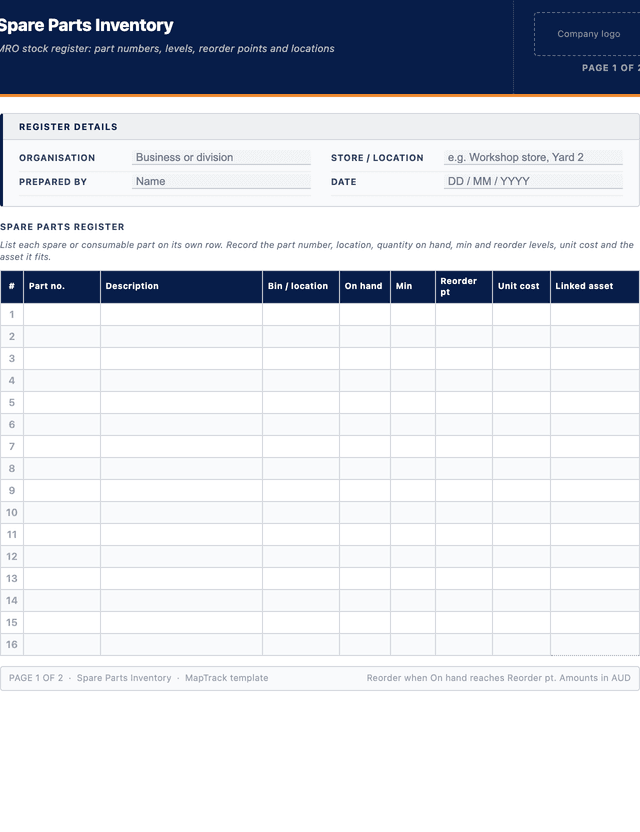
- The MapTrack spare parts inventory template has 8 columns and room for 28 entries. Columns: Part no., Description, Bin / location, On hand, Min, Reorder pt, Unit cost, Linked asset.
- A spare parts inventory lists each MRO part with its part number, quantity on hand, min/max levels, reorder point and bin location.
- Setting a min and reorder point against each line turns the register into a stockout alarm before a critical spare runs out.
- Linking parts to the asset or equipment they fit shows which machines lose cover if a critical spare drops to zero.
- Reconcile the register against a physical or cycle count regularly; recording unit cost also exposes the value of dead stock on the shelf.
Enter your email below to download this spare parts inventory template as a ready-to-use PDF.
Used by construction, mining and field service teams










What is a spare parts inventory template?
A spare parts inventory template is a standing stock register for the maintenance, repair and operations (MRO) parts an organisation holds to keep its plant and equipment running. Maintenance teams also call it a spare parts list, a spares register or an MRO stock list, and a critical spares list is the short list of parts you cannot afford to run out of. For each line it records a part number, a description, the quantity on hand, the minimum and maximum stock levels, the reorder point and reorder quantity, the bin or shelf location, the unit cost and the asset or equipment the part fits. It answers a single operational question at any moment: what spares do we hold, how many, where are they and which are about to run out.
Maintenance teams, storepersons and reliability engineers in mining, manufacturing, facilities and heavy plant rely on this register so a critical breakdown is not made worse by a missing seal, filter or bearing. Without it, stores either run out of fast-moving parts and extend downtime, or tie up cash in dead stock nobody can find. In MapTrack, spare parts sit in an inventory module where on-hand counts adjust as parts are issued to work orders, low-stock items flag against their reorder point, and each part can be linked to the assets it services. Where the model WHS Regulations apply, regulation 213 requires plant to be maintained, inspected and, if necessary, tested by a competent person, in line with the manufacturer's recommendations where there are any, and a spares register is a practical record that the parts that work needs are on hand.
Learn more about maintenance and work orders in MapTrack.
Benefits of using this spare parts inventory template
- Fewer stockouts: a minimum level and reorder point on every line trigger replenishment before a critical spare hits zero.
- Less downtime: knowing the bin location and on-hand count means a fitter finds the right part in minutes, not hours.
- Linked to assets: tying each part to the equipment it fits shows which machines lose cover when a spare runs low.
- Working capital control: unit cost and quantity reveal cash tied up in slow-moving and dead stock on the shelf.
- Right stock levels: min and max levels stop both stockouts and over-ordering of parts that rarely turn over.
- Cleaner counts: a structured register reconciles cleanly against a cycle count or annual stocktake of the store.
- Better purchasing: reorder point and reorder quantity give buyers a clear, repeatable trigger instead of guesswork.
Benefits of digitising forms in MapTrack
When you move your inventorys from paper to MapTrack, you get:
- Field users can easily scan a QR code to complete a form on mobile. Unlimited users.
- Email the right people when a form is submitted, with an automation you set up.
- File every completed form against the asset, location or person it covers.
- Download any completed form as a PDF, with failed answers listed at the top.
- Fill in forms offline; they upload when the device is back online.
- Build conditional logic (show or hide questions based on answers).
- Take pictures or attach photos. Not possible with a paper-based form.
- Electronic signatures.
- Edit forms later without reprinting.
- Set who can view, fill in or edit forms with user roles.
- Upload a paper form (PDF, Word, Excel or a photo) and MapTrack's AI builds a digital version for you to check.
- Raise a work order from a submitted form with an automation you set up.
- Track service intervals by hours, kilometres or calendar date in one place.
- Attach supplier invoices and parts receipts to each maintenance record.
Book a demo to see how MapTrack handles inventorys.
Try MapTrack free for 30 days
Full access to every feature. No credit card required. Per-asset pricing so you scale as your fleet grows.
- No credit card required
- 30 days free trial
- Cancel anytime
1-2 days/week saved
“Bloody amazing! We used to spend 1-2 days a week tracking and managing our generators alone.”

Steve McAllister
Asset Coordinator, Saunders International
What to include in a spare parts inventory template
This spare parts inventory template covers 11 key areas:
- Register details: organisation, store or location, prepared by, and the date of the count.
- Part number: the manufacturer or internal stock code that uniquely identifies the part.
- Description: a clear name for the part, including specification or size where it matters.
- Bin / location: the shelf, bin or store where the part is physically held.
- Quantity on hand: the current counted stock for the part.
- Minimum level: the stock level that should never be breached without reordering.
- Reorder point: the on-hand quantity that triggers a new purchase order.
- Reorder quantity: how many units to buy when the reorder point is reached.
- Maximum level: the upper limit that prevents over-stocking and wasted cash.
- Unit cost: the cost per unit, used to value the stock and flag dead stock.
- Linked asset: the equipment or asset the part fits, plus any notes on lead time or supplier.
How to use this spare parts inventory template
- Define the scope of the store and the parts the register will cover.: Decide whether the register covers one workshop store, a central warehouse or all sites, then list the spare and consumable parts held. Focus first on critical spares whose absence stops a machine, so the most important lines are captured accurately before the rest.
- Record the identifiers and location for each part.: Capture the part number, a clear description and the bin or shelf where the part lives. Accurate part numbers and locations are what let a fitter find the right spare fast during a breakdown, so take them from the part or the supplier catalogue rather than guessing.
- Count the quantity on hand and set min, max and reorder values.: Physically count each part and record the on-hand quantity, then set a minimum level, a reorder point and a reorder quantity based on usage and supplier lead time. Add a maximum level so the store does not tie up cash in parts that rarely move.
- Link each part to the assets or equipment it fits.: Note the machine, asset class or equipment the part services so you can see which plant loses cover when a spare runs low. This link also makes it obvious which spares are genuinely critical and which are nice to have on the shelf.
- Record unit cost and identify slow-moving or dead stock.: Enter the unit cost for each line so the register doubles as a value of the store. Flag parts that have not moved in a long period as candidates for write-down or removal, freeing shelf space and cash for spares that are actually used.
- Reconcile, store the register and keep it current as parts move.: Compare counted quantities against any system or previous count, investigate differences and correct the register. Update on-hand quantities as parts are issued and received, and re-check min and reorder levels periodically as equipment and usage patterns change.
In MapTrack, you can schedule and track maintenance digitally, by date or meter reading. Each submission is stored as a timestamped PDF against the asset record.
Get the free templateEnter your email above to download the full spare parts inventory template as a PDF.Back to download formHow often should you complete this inventory?
Build the spare parts inventory once, then keep it live. Reconcile it against a physical or cycle count regularly, for example counting fast-moving and critical lines monthly and the full store at least annually. Update on-hand quantities every time parts are issued to a job or received from a supplier, and review min, max and reorder levels at least once a year as equipment and usage change. In MapTrack, on-hand counts adjust automatically as parts are issued to work orders and low-stock lines flag against their reorder point, so the register stays accurate between counts.
Frequently asked questions
Applicable regulatory standards
This template is a starting point. Check the current requirements that apply to your equipment, work and location. The template alone does not establish compliance.
- ISO 55001:2024 - Asset management - Asset management system - Requirements
- Model WHS Regulations, regulation 213 - Maintenance and inspection of plant
- ISO 55000 - Asset Management (principles for managing physical assets across their life)
- AASB 116 Property, Plant and Equipment, paragraph 8 (spare parts)
Spare parts inventory template preview
The numbers behind this spare parts inventory template
Every figure below is sourced and dated, so you can quote it in a toolbox talk, a budget case or a board paper without having to chase the original report.
Embed this free template on your website
Run an industry blog, trade association site, or training resource? Drop a preview of this free spare parts inventory template straight into your page. The snippet is self-contained, needs no scripts, and links readers back to the full free template.
<div style="max-width:480px;font-family:system-ui,-apple-system,'Segoe UI',Roboto,sans-serif;border:1px solid #E5E7EB;border-radius:12px;padding:20px;background:#ffffff;">
  <p style="font-size:12px;font-weight:700;letter-spacing:0.05em;text-transform:uppercase;color:#071D49;margin:0;">Free template</p>
  <p style="font-size:18px;font-weight:700;color:#071D49;margin:6px 0 0;">Spare parts inventory template</p>
  <ul style="margin:12px 0 0;padding-left:18px;color:#374151;font-size:14px;line-height:1.6;">
    <li style="margin:4px 0;">Register details: organisation, store or location, prepared by, and the date of the count.</li>
    <li style="margin:4px 0;">Part number: the manufacturer or internal stock code that uniquely identifies the part.</li>
    <li style="margin:4px 0;">Description: a clear name for the part, including specification or size where it matters.</li>
    <li style="margin:4px 0;">Bin / location: the shelf, bin or store where the part is physically held.</li>
    <li style="margin:4px 0;">Quantity on hand: the current counted stock for the part.</li>
    <li style="margin:4px 0;">Minimum level: the stock level that should never be breached without reordering.</li>
  </ul>
  <p style="font-size:13px;color:#6B7280;margin:14px 0 0;padding-top:12px;border-top:1px solid #E5E7EB;">Free <a href="https://www.maptrack.com/templates/spare-parts-inventory-template" style="color:#071D49;font-weight:600;text-decoration:none;">Spare parts inventory template</a> by MapTrack</p>
</div>Free to reuse, including commercially. This template is published under a Creative Commons Attribution 4.0 licence. Copy it, adapt it, put it on your own site or in your own docs. All we ask is that you credit MapTrack with a link back to this page. The snippet above already includes that credit, so if you use it as-is you’re covered.
Cite this template
Writing about this topic? You’re welcome to quote this checklist. Here’s the wording to use so your readers can find the original.
The MapTrack spare parts inventory template has 8 columns and room for 28 entries.
- Short attribution
- MapTrack Spare parts inventory template, https://www.maptrack.com/templates/spare-parts-inventory-template
- Reference list
- MapTrack. (2026). Spare parts inventory template [Checklist template]. Retrieved from https://www.maptrack.com/templates/spare-parts-inventory-template
Free to reuse with credit under a Creative Commons Attribution 4.0 licence. If you’d rather link straight to it, the page is https://www.maptrack.com/templates/spare-parts-inventory-template.
Need to schedule and track maintenance digitally, by date or meter reading?
Register every asset in MapTrack, attach digital forms, and get a complete history of every inspection, service and compliance record.
Maintenance and work orders · All templates · Pricing · Book a demo